
























Are you struggling to gain weight and build muscle mass despite eating more and maintaining an active lifestyle?
Are you tired of endless internet searches, diet changes, and gym routines without tangible results? You’re not alone – many people face challenges when trying to gain weight healthily, often leading to frustration and disappointment.
In a world obsessed with losing weight, resources for healthy weight gain can be scarce and confusing. You may find yourself overwhelmed with vast and often contradicting information on diet plans, workout regimes, and supplements.
It’s also daunting to manually track your calorie intake, nutrients, and progress daily, making the weight gain journey seem even more challenging.
But what if we told you there was an easier way? Technology has paved the way for personalized, intuitive solutions right at your fingertips. With apps specifically designed for weight gain, you can achieve your weight goals more efficiently.
They offer personalized diet plans, progress tracking, exercise guidance, and more. In this article, we will delve into the best “apps to gain weight”, providing an in-depth review of their features and how they can assist you in your weight gain journey. Prepare to transform your lifestyle and move closer to your desired health goals.
The Need for Weight Gain Apps
In today’s health-conscious society, weight gain often takes a backseat to its more popular counterpart, weight loss.
However, the need for weight gain apps has become increasingly apparent for underweight individuals. These apps serve as valuable tools to assist those on their journey toward a healthier body mass.
One of the primary benefits of weight gain apps is their ability to provide users with personalized nutritional plans. These plans are designed to meet specific caloric and macronutrient requirements, ensuring a steady and healthy increase in weight.
These apps can calculate each individual’s optimal distribution of proteins, carbohydrates, and fats tailored to their unique needs through advanced algorithms.
Moreover, weight gain apps also offer valuable progress-tracking features. Users can input their weight, body measurements and even track their daily calorie intake to monitor their progress effectively.
Visual representations such as graphs and charts provide a comprehensive overview of the user’s weight gain journey, making it easier to identify patterns and adjust their diet and exercise routines.
Additionally, these apps often include a supportive community feature where users can connect with others who share similar goals. This sense of belonging and encouragement can be immensely beneficial, especially for those who may feel isolated or discouraged on their weight gain journey.
In conclusion, the demand for weight gain apps has risen due to the increasing recognition of the importance of healthy weight gain. These apps empower individuals to take control of their journey toward achieving a healthy body mass by offering personalized nutritional plans, progress tracking, and a supportive community.
What to Look for in a Weight Gain App
In the age of technology, weight gain apps have emerged as invaluable tools for individuals seeking to achieve their desired body mass.
However, with many available options, knowing what to look for in a weight gain app is essential to ensure an effective and tailored experience.

First and foremost, a comprehensive nutritional database is crucial. Look for an app that offers an extensive range of foods, including uncommon items, to track your calorie intake accurately. The ability to input custom recipes and meals can further enhance the app’s usability, allowing for precise monitoring.
Personalization is another key factor. Opt for an app that considers your unique attributes, such as age, gender, height, and activity level. This way, the app can generate a customized meal plan that meets your specific caloric and macronutrient needs for healthy weight gain.
Progress tracking features are vital for staying motivated and monitoring your advancements. Look for an app that allows you to log your weight, body measurements, and progress photos. Visual representations like charts and graphs provide a clear overview of your weight gain journey, allowing you to make informed adjustments as needed.
Furthermore, a community support feature can make a significant difference. Connecting with like-minded individuals can provide a sense of camaraderie, inspiration, and guidance throughout your weight gain journey. Look for an app that fosters a supportive environment where you can share experiences, ask questions, and receive encouragement.
Lastly, a user-friendly interface and seamless device integration are essential for a hassle-free experience. A well-designed app with intuitive navigation makes tracking your meals, setting reminders, and accessing the app’s various features easier.
In conclusion, when selecting a weight gain app, prioritize features such as a comprehensive nutritional database, personalized meal plans, progress tracking tools, community support, and a user-friendly interface. By finding an app that encompasses these aspects, you can maximize your chances of achieving your weight gain goals effectively and efficiently.
Review of Top Apps To Gain Weight
1. 8fit Workouts & Meal Planner
Having the right tools and guidance is essential when achieving weight gain goals. One of the top choices for individuals seeking to gain weight healthily and effectively is the 8fit Workouts & Meal Planner app. This app offers Android and iPhone users a comprehensive solution to support their weight gain journey.
The 8fit app stands out as one of the best apps to gain weight due to its unique combination of workouts and meal planning features. With a vast library of workout routines and exercises, you can customize your fitness program according to your preferences and goals.
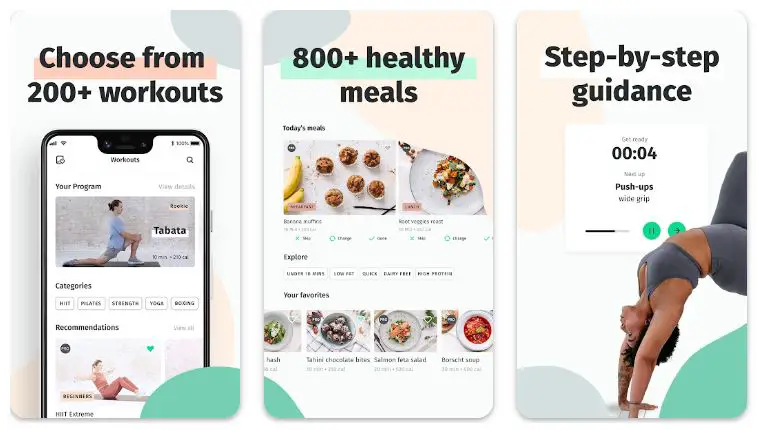
Whether you aim to build muscle mass or increase overall strength, the app provides tailored workouts targeting specific muscle groups, ensuring you make effective progress.
One of the key aspects of the app is its meal planner feature. The app offers a variety of nutritious and calorie-dense meal options that cater to individuals looking to gain weight.
With the ability to customize meal plans based on your dietary preferences and requirements, including specific macronutrient ratios, the app ensures you receive the necessary fuel to support your weight gain journey.
The 8fit Workouts & Meal Planner app goes beyond just exercise and nutrition. It also provides valuable progress-tracking tools to monitor your advancements. You can log your weight, body measurements, and progress photos, enabling you to visualize your progress over time. This feature helps you stay motivated and make any necessary adjustments to your routine and meal plan.
Furthermore, the app’s user-friendly interface makes it easy to navigate through different features and access workout videos, recipes, and meal plans. The app’s seamless integration with Android and iPhone platforms ensures a consistent experience across devices, allowing you to stay on track wherever you go.
In conclusion, the 8fit Workouts & Meal Planner app is a top choice for individuals looking to gain weight healthily and sustainably.
Its diverse workout options, customizable meal plans, progress tracking features, and user-friendly interface provides a comprehensive solution to support your weight gain goals. This app is a valuable tool for Android and iPhone to help you achieve your desired weight.
How it supports weight gain:-
The 8fit Workouts & Meal Planner app offers several features that support weight gain healthily and effectively.
Customized Meal Plans: The app provides nutritious and calorie-dense meal options tailored to support weight gain. Users can customize their meal plans based on their dietary preferences and requirements. This ensures that individuals have access to meals rich in nutrients and calories, promoting weight gain in a controlled and balanced manner.
Meal Tracking and Monitoring: The app allows users to track their daily food intake, making monitoring calorie consumption easier and ensuring they meet their weight gain goals. This feature enables individuals to stay accountable and adjust their diet as needed.
Workout Programs for Muscle Gain: The app offers a variety of workout programs that focus on muscle building and strength training. These exercises help individuals gain lean muscle mass, contributing to overall weight gain. Users can target specific muscle groups and enhance their physique by following the workout routines provided.
Progress Tracking: The app includes progress tracking tools such as weight and body measurement logging. This feature enables users to monitor their progress over time, keeping them motivated and allowing them to assess their weight gain journey objectively. Users can track their weight gain milestones and adjust their workout or meal plans based on their progress.
Supportive Community: The app fosters a supportive community where users can connect with others who share similar goals. This sense of community provides encouragement, motivation, and valuable tips and advice for successful weight gain. Users can engage in discussions, share experiences, and receive support throughout their journey.
By combining customized meal plans, targeted workout programs, progress-tracking tools, and a supportive community, the 8fit Workouts & Meal Planner app provides comprehensive support for weight gain. It empowers individuals with the necessary resources and guidance to achieve their weight gain goals healthily and sustainably.
Download The App From Google Play Store
Download The App From Apple App Store
2. MyFitnessPal
Regarding achieving weight gain goals, MyFitnessPal stands out as one of the best apps available for Android and iPhone users. With its comprehensive features and user-friendly interface, MyFitnessPal provides valuable tools to support your weight gain journey.
As a calorie counter app, MyFitnessPal allows you to track your daily food intake with ease. The app boasts an extensive food database, including various options for different cuisines and dietary preferences.
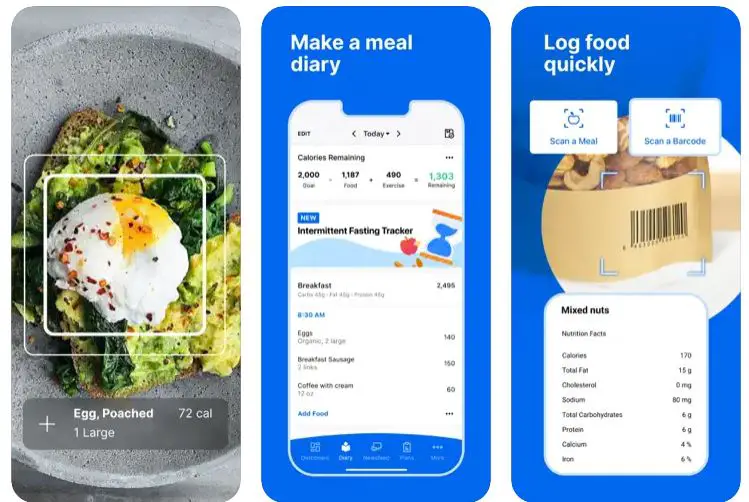
You can easily log your meals and snacks, making monitoring your caloric intake convenient and ensuring you meet your weight gain goals.
One of the standout features of MyFitnessPal is its ability to provide nutritional insights. The app breaks down your food consumption, giving you a detailed analysis of your macronutrient and micronutrient intake.
This information is invaluable for individuals looking to gain weight as it helps them identify areas where they may need to adjust their diet to ensure they get the necessary nutrients to support their weight gain journey.
MyFitnessPal also offers a progress tracking feature that allows you to monitor your weight gain journey over time. You can log your weight regularly, view your progress visually, and set goals to motivate yourself.
By tracking your progress, you can make informed decisions about your diet and exercise routine, ensuring you are on the right track to achieving your weight gain goals.
Moreover, the app provides a community aspect that connects you with like-minded individuals. You can join groups, participate in forums, and share your experiences with others striving to gain weight. This supportive community can offer valuable advice, motivation, and inspiration throughout your journey.
In conclusion, MyFitnessPal is a top choice for individuals looking to gain weight healthily and control. With calorie tracking, nutritional insights, progress tracking, and community features, MyFitnessPal provides a comprehensive and user-friendly experience.
Whether you’re an Android or iPhone user, this app is an excellent tool to support your weight gain goals and help you achieve the desired results.
How it supports weight gain:-
MyFitnessPal supports weight gain by providing several features that assist individuals in their journey to gain weight in a healthy and controlled manner.
Calorie Tracking: MyFitnessPal allows users to track their daily caloric intake by logging meals, snacks, and beverages. This feature helps individuals ensure they consume a calorie surplus necessary for weight gain. By monitoring calorie intake, users can make informed decisions about their food choices and adjust their diet as needed.
Customized Goals: The app enables users to set personalized weight gain goals. By specifying the desired rate of weight gain, MyFitnessPal generates a customized calorie target that supports the individual’s weight gain journey. This feature ensures that users have a clear direction and can track their progress toward their weight gain goals.
Nutritional Insights: MyFitnessPal provides nutritional insights by displaying macronutrient and micronutrient information for logged food items.
This feature helps users understand the composition of their diet and ensures they are consuming a well-balanced selection of nutrients. By tracking nutritional intake, individuals can make adjustments to optimize their diet for healthy weight gain.
Progress Tracking: The app offers tools like weight logging and progress charts. Users can log their weight regularly and visualize their progress over time. This feature allows individuals to monitor their weight gain journey, stay motivated, and adjust their diet and exercise routines.
Community Support: MyFitnessPal fosters a community where users can connect with others with similar weight gain goals. This supportive community provides a platform for sharing experiences, seeking advice, and gaining motivation from others on the same journey. Community engagement can offer encouragement and valuable insights throughout the weight gain process.
By combining calorie tracking, customized goals, nutritional insights, progress tracking, and community support, MyFitnessPal offers comprehensive support for weight gain.
The app empowers individuals to make informed decisions about their diet, track their progress, and stay motivated to achieve their weight gain goals healthily and sustainably.
Download The App From Google Play Store
Download The App From Apple App Store
3. Lifesum
Lifesum is a top choice when finding effective apps to gain weight. With its user-friendly interface and comprehensive features, Lifesum provides invaluable support for individuals looking to achieve their weight gain goals.
Lifesum offers a holistic approach to weight gain by combining health and nutrition. The app allows users to set specific goals, including weight gain targets and provides personalized recommendations to help them succeed.
By tailoring the experience to individual needs, Lifesum ensures users receive targeted guidance for their weight gain journey.
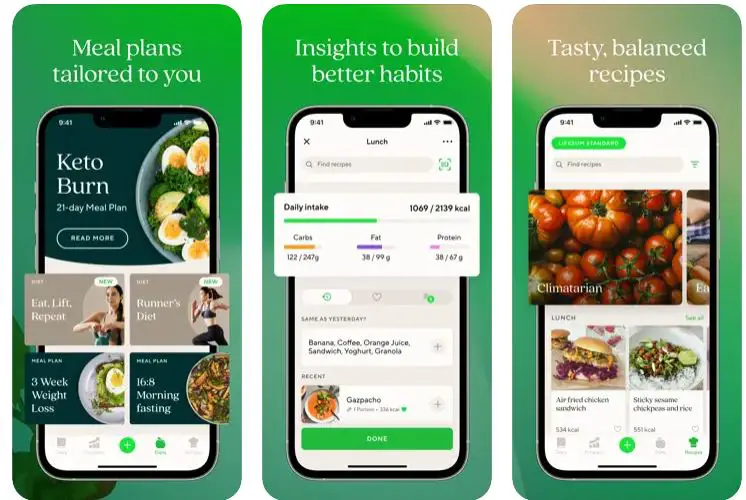
One of the standout features of Lifesum is its food diary. With a vast database of food items, the app makes it easy for users to track their daily calorie intake. By monitoring calorie consumption, individuals can ensure they are in a caloric surplus, which is crucial for weight gain.
The app’s comprehensive food database includes various options catering to different dietary preferences, making tracking and managing nutritional intake easier.
Additionally, Lifesum offers meal planning features that give users nutritious meal suggestions to support weight gain. These meal plans consider individual preferences and dietary restrictions, ensuring a well-balanced diet to promote healthy weight gain.
Lifesum also includes progress tracking tools that allow users to monitor their weight gain journey. By logging their weight regularly and visualizing progress over time through charts and graphs, individuals can stay motivated and make informed decisions about their diet and exercise routines.
Furthermore, Lifesum incorporates social features that create a sense of community among users. Connecting with others with similar weight gain goals provides support, encouragement, and an opportunity to share experiences and insights.
In conclusion, Lifesum is an excellent choice among apps to gain weight. With its calorie tracking, personalized meal plans, progress tracking, and supportive community, Lifesum provides a comprehensive and user-friendly experience to help individuals achieve their weight gain goals healthily and sustainably.
How it supports weight gain:-
Lifesum supports weight gain through various features and functionalities that assist individuals in their journey to gain weight in a healthy and controlled manner.
Calorie Tracking: Lifesum allows users to track their daily caloric intake through its food diary feature. By logging meals and snacks, users can monitor their calorie consumption and ensure they are in a caloric surplus, essential for weight gain. Calorie tracking helps individuals control their nutrition and adjust as needed.
Personalized Meal Plans: Lifesum offers personalized meal plans tailored to individual goals, including weight gain. These meal plans provide users with nutritious and calorie-dense food suggestions to support their weight gain journey. By following these meal plans, individuals can ensure they are consuming the necessary nutrients and calories to facilitate weight gain.
Progress Tracking: The app includes tools that allow users to monitor their weight gain journey. By logging their weight regularly, individuals can visualize their progress over time and stay motivated. Tracking progress helps individuals identify trends and adjust their diet and exercise routine to optimize their weight gain efforts.
Nutritional Insights: Lifesum provides users with nutritional insights and information about food items’ macronutrient and micronutrient composition. This knowledge helps individuals make informed decisions about their diet, ensuring they consume a well-balanced and nutrient-rich diet to support healthy weight gain.
Community Support: Lifesum offers a community where users can connect with others on a similar weight gain journey. Engaging with the community provides individuals a supportive environment, motivation, and the opportunity to share experiences and advice. Community support fosters a sense of accountability and encouragement throughout the weight gain process.
By combining calorie tracking, personalized meal plans, progress tracking, nutritional insights, and community support, Lifesum provides comprehensive support for weight gain.
The app empowers individuals to take control of their nutrition, make informed choices, and track their progress effectively, all while offering a supportive community to keep them motivated on their weight gain journey.
Download The App From Google Play Store
Download The App From Apple App Store
4. Fitness & Bodybuilding by VGFIT
Regarding achieving weight gain goals, Fitness & Bodybuilding by VGFIT is a top apps to gain weight. Designed to cater to individuals looking to build muscle and gain weight, this app offers comprehensive features to support their journey.
One key element that sets Fitness & Bodybuilding by VGFIT apart as an app to gain weight is its extensive exercise library. The app provides a wide range of strength training exercises, targeting different muscle groups and allowing users to customize their workouts according to their goals. With proper strength training, individuals can promote muscle growth and support weight gain.
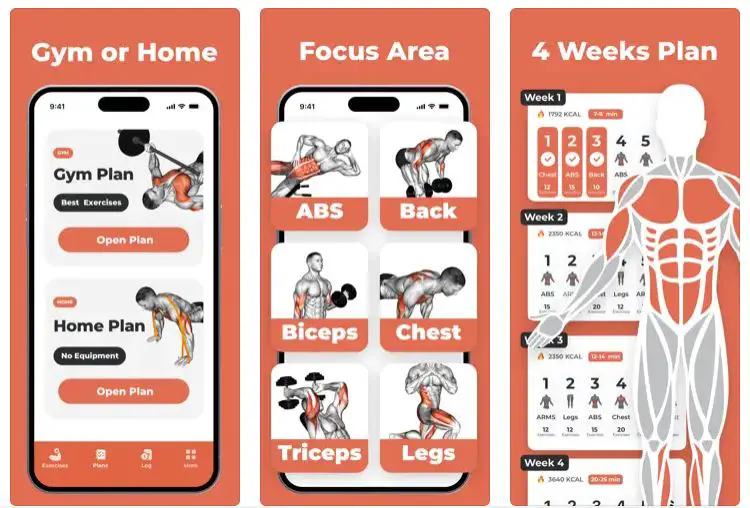
In addition to the exercise library, the app also offers personalized workout plans. These plans are tailored to the individual’s fitness level and objectives, ensuring a structured approach to gaining weight. By following these plans, users can focus on progressive overload and effectively stimulate muscle growth.
Furthermore, Fitness & Bodybuilding by VGFIT incorporates a nutrition tracking feature. Users can monitor their macronutrient intake by logging their meals and tracking their protein, carbohydrate, and fat consumption. This feature helps individuals meet their nutritional needs to support muscle growth and weight gain.
The app also provides a platform for progress tracking. Users can log their weight, take measurements, and track their body composition changes. This feature allows individuals to monitor their progress and adjust their workout and nutrition plans.
In conclusion, Fitness & Bodybuilding by VGFIT is an outstanding choice for individuals seeking to gain weight and build muscle. With its comprehensive exercise library, personalized workout plans, nutrition tracking, and progress tracking features, this app provides a solid foundation for a successful weight gain journey.
Whether you want to increase muscle mass or enhance overall strength, this app offers the tools and guidance to achieve your weight gain goals effectively.
How it supports weight gain:-
Fitness & Bodybuilding by VGFIT provides several features that support weight gain in a targeted and effective manner.
Strength Training Exercises: The app offers a diverse exercise library focusing on strength training. Strength training is crucial for gaining weight as it promotes muscle growth. The app provides exercises targeting different muscle groups, allowing users to tailor their workouts to specific weight gain goals.
Personalized Workout Plans: Fitness & Bodybuilding by VGFIT offers personalized workout plans based on the user’s fitness level and objectives. These plans are designed to optimize muscle growth and weight gain. By following the tailored workout plans, users can ensure they engage in the right exercises and progressively challenge their muscles for optimal results.
Nutrition Tracking: The app includes a nutrition tracking feature that allows users to monitor their macronutrient intake. Tracking protein, carbohydrates, and fats is essential for weight gain as it ensures individuals consume enough calories and nutrients to support muscle growth. Users can make necessary adjustments to their diet by monitoring their nutrition to facilitate weight gain.
Progress Tracking: Fitness & Bodybuilding by VGFIT provides tools that allow users to monitor their weight gain journey. Users can log their weight, take measurements, and track changes in their body composition. This feature enables individuals to track their progress over time, stay motivated, and adjust their workout and nutrition plans.
Community Support: The app fosters a supportive community where users can connect with like-minded individuals. Engaging with the community can provide motivation, support, and valuable insights from others on the weight gain journey. Sharing experiences and advice within the community can contribute to a positive and encouraging environment.
By combining strength training exercises, personalized workout plans, nutrition tracking, progress tracking, and community support, Fitness & Bodybuilding by VGFIT offers comprehensive support for weight gain. The app empowers individuals to engage in effective workouts, monitor their nutrition, track their progress, and receive support from fellow fitness enthusiasts.
Download The App From Google Play Store
Download The App From Apple App Store
5. MyNetDiary
Regarding finding effective apps to gain weight, MyNetDiary is a standout choice. With its comprehensive features and user-friendly interface, MyNetDiary provides invaluable support for individuals looking to achieve their weight gain goals healthily and controlled.
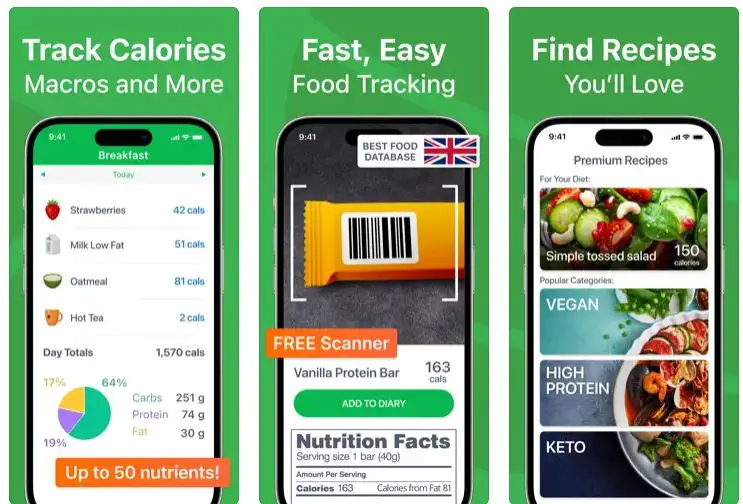
One of the key features that sets MyNetDiary apart as an app to gain weight is its calorie-tracking functionality. The app allows users to easily track their daily food intake, making monitoring and managing their calorie consumption convenient. Individuals can effectively support their weight gain efforts by ensuring a calorie surplus.
In addition to calorie tracking, MyNetDiary offers features such as macronutrient tracking and meal planning. Users can monitor their intake of proteins, carbohydrates, and fats, ensuring they consume the right nutrient balance for healthy weight gain. The app also provides personalized meal plans and recipes, offering convenient and nutritious options to support weight gain.
MyNetDiary includes a progress tracking feature, allowing users to monitor their weight gain journey. Individuals can stay motivated and track their advancements by regularly logging their weight and visualizing their progress through charts and graphs. This feature enables informed decision-making and adjustments to diet and exercise plans as needed.
Moreover, the app fosters a supportive community where users can connect with others on a similar weight gain journey. Engaging with the community provides support, motivation, and the opportunity to share experiences and insights. This community support fosters a sense of accountability and encouragement throughout the weight gain process.
In conclusion, MyNetDiary is an excellent choice among apps to gain weight. With its calorie tracking, macronutrient tracking, meal planning, progress tracking, and community support features, MyNetDiary provides a comprehensive and user-friendly experience.
Whether you’re an Android or iPhone user, this app offers the tools and guidance to achieve your weight gain goals effectively.
How it supports weight gain:-
MyNetDiary supports weight gain through its various features and functionalities designed to assist individuals in their weight gain journey.
Calorie Tracking: MyNetDiary allows users to track their daily caloric intake by logging their meals and snacks. This feature helps individuals ensure they are consuming a sufficient amount of calories to support weight gain. Users can maintain a calorie surplus by monitoring calorie consumption, which is essential for gaining weight.
Macronutrient Tracking: Besides calorie tracking, MyNetDiary enables users to track their macronutrient intake, including proteins, carbohydrates, and fats. This feature helps individuals get the right balance of nutrients to support muscle growth and weight gain. By monitoring macronutrients, users can optimize their diet for effective weight gain.
Meal Planning and Recipes: MyNetDiary offers personalized meal plans and a vast library of recipes catering to individuals seeking weight gain. These meal plans and recipes provide users with nutritious and calorie-dense options to support their weight gain goals. By following the meal plans and incorporating the recipes, individuals can ensure they consume the right nutrients for healthy weight gain.
Progress Tracking: The app includes tools that allow users to monitor their weight gain journey. Users can log their weight regularly and track their progress over time. This feature helps individuals stay motivated and adjust their diet and exercise plans based on their progress.
Community Support: MyNetDiary fosters a supportive community where users can connect with others who share similar weight gain goals. Engaging with the community provides support, motivation, and the opportunity to share experiences and tips. Community support encourages individuals throughout their weight gain journey.
By combining calorie tracking, macronutrient tracking, meal planning, progress tracking, and community support, MyNetDiary provides comprehensive support for weight gain.
The app empowers individuals to track their nutrition, make informed dietary choices, monitor their progress, and receive encouragement from a community of like-minded individuals.
Download The App From Google Play Store
Download The App From Apple App Store
6. Cronometer
When finding effective apps to gain weight, Cronometer is a powerful tool. With its comprehensive features and intuitive design, Cronometer provides valuable support for individuals looking to achieve their weight gain goals in a healthy and controlled manner.
One key feature that sets Cronometer apart as an app to gain weight is its nutrient-tracking functionality. The app allows users to log their daily food intake and track their nutrient consumption.
By monitoring key nutrients such as proteins, carbohydrates, and fats, individuals can ensure they consume adequate calories and macronutrients to support weight gain.
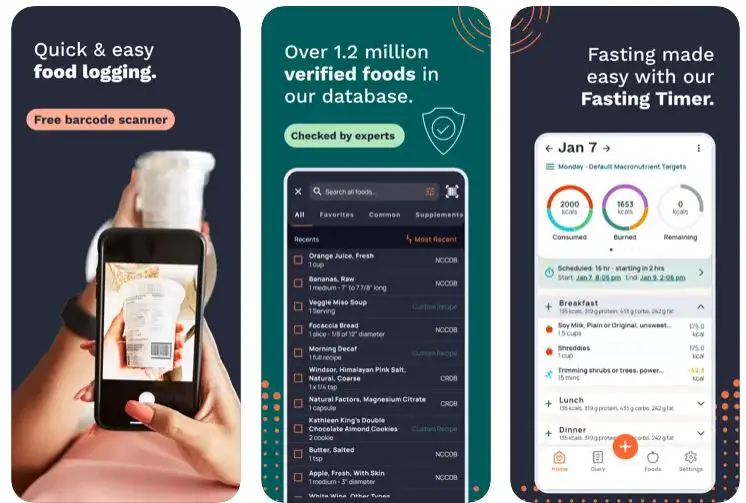
Cronometer also offers a detailed food database that includes various items, allowing users to accurately track their calorie and nutrient intake. This feature helps individuals make informed dietary choices to optimize their weight gain efforts.
In addition to nutrient tracking, Cronometer provides personalized nutrition goals based on the individual’s weight gain objectives. The app calculates the recommended caloric intake and nutrient targets to support healthy weight gain. This personalized approach ensures individuals have clear guidance in their weight gain journey.
Cronometer offers a biometrics feature that allows users to track additional health metrics such as body weight, body fat percentage, and measurements. This feature enables individuals to monitor their progress and adjust their diet and exercise plans.
Furthermore, the app provides insights and analysis of nutrient data, allowing users to identify any nutrient deficiencies or imbalances that may hinder weight gain progress. This feature helps individuals fine-tune their diet and meet their nutritional needs.
In conclusion, Cronometer is an excellent choice among apps to gain weight. With nutrient tracking, personalized nutrition goals, a comprehensive food database, biometrics tracking, and insightful analysis, Cronometer provides a comprehensive and user-friendly experience supporting healthy weight gain.
Whether you’re an Android or iPhone user, this app offers the tools and guidance to achieve your weight gain goals effectively.
How it supports weight gain:
Cronometer supports weight gain through its various features and functionalities designed to assist individuals in their weight gain journey.
Nutrient Tracking: The Cronometer allows users to track their daily food intake and nutrient consumption. This feature is crucial for weight gain as it enables individuals to ensure they are consuming enough calories, proteins, carbohydrates, and fats to support their weight gain goals. Individuals can make informed dietary choices and adjust their eating habits by tracking their nutrient intake.
Personalized Nutrition Goals: The app provides personalized nutrition goals based on an individual’s weight gain objectives. By setting specific caloric and macronutrient targets, Cronometer helps individuals establish a clear plan to achieve their weight gain goals. These personalized goals ensure individuals consume the right nutrients needed for healthy weight gain.
Comprehensive Food Database: Cronometer offers a detailed food database with many items. This feature allows users to track their calorie and nutrient intake accurately, ensuring they meet their daily nutritional requirements. The comprehensive food database helps individuals make informed decisions about their food choices, ensuring they consume a balanced diet to support weight gain.
Biometrics Tracking: The app enables users to track additional health metrics such as body weight, body fat percentage, and measurements. This feature allows individuals to monitor their progress and track changes in their body composition throughout their weight gain journey. Users can track their progress and adjust their diet and exercise routines by tracking biometrics.
Insights and Analysis: Cronometer provides insights and analysis of nutrient data, allowing users to identify any nutrient deficiencies or imbalances. This feature helps individuals fine-tune their diet and meet their nutritional needs for effective weight gain. Individuals can adjust their meal plans and optimize their nutrient intake by identifying gaps.
In conclusion, Cronometer supports weight gain through its nutrient tracking, personalized nutrition goals, comprehensive food database, biometrics tracking, and insightful analysis.
The app empowers individuals to monitor their nutrient intake, set specific goals, track their progress, and make informed decisions about their diet to support healthy weight gain.
Download The App From Google Play Store
Download The App From Apple App Store
7. Eat This Much
Eat This Much stands out as a powerful tool for finding effective weight gain apps. With its unique features and personalized approach, Eat This Much provides valuable support for individuals looking to achieve their weight gain goals healthily and sustainably.
One of the key features that sets Eat This Much apart as an app to gain weight is its meal-planning functionality. The app generates personalized meal plans based on the individual’s dietary preferences, calorie goals, and weight gain objectives. These meal plans ensure individuals consume enough calories and nutrients to support weight gain.
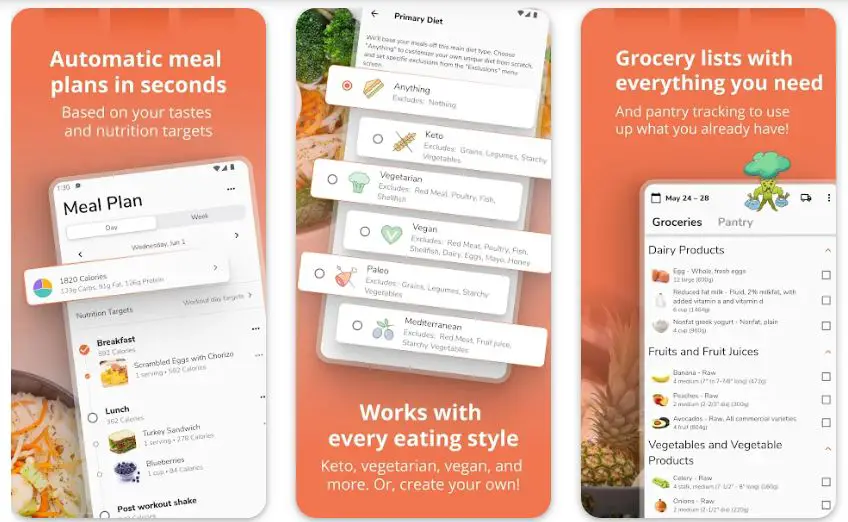
Eat This Much offers a vast food database with various options for different dietary needs. Users can customize their meal plans by selecting specific foods or excluding certain ingredients, making accommodating individual preferences and dietary restrictions easy.
Additionally, the app provides calorie and macronutrient tracking to help users monitor their nutritional intake. By tracking calories, proteins, carbohydrates, and fats, individuals can ensure they are meeting their daily requirements for healthy weight gain.
Another standout feature of Eat This Much is its automation capabilities. Users can set the app to automatically generate meal plans and grocery lists, saving time and effort in meal preparation. This feature streamlines the weight gain process and ensures individuals have a well-rounded diet.
In conclusion, Eat This Much is a valuable choice among apps to gain weight. With its personalized meal plans, extensive food database, calorie and macronutrient tracking, and automation features Eat This Much provides a comprehensive and user-friendly experience.
Whether you’re an Android or iPhone user, this app offers the tools and guidance to achieve your weight gain goals effectively.
How it supports weight gain:-
Eat This Much supports weight gain through its various features and functionalities that help individuals achieve their weight gain goals in a structured and effective manner.
Personalized Meal Plans: The app generates personalized meal plans based on the user’s dietary preferences, calorie goals, and weight gain objectives. These meal plans are designed to provide individuals with the right balance of calories, macronutrients, and nutrients needed for healthy weight gain. By following the tailored meal plans, users can ensure they consume enough food to support their weight gain goals.
Calorie and Macronutrient Tracking: Eat This Much allows users to track their calorie and macronutrient intake. Users can set specific calorie targets and track their progress to ensure they consistently have a caloric surplus necessary for weight gain. Tracking macronutrients such as proteins, carbohydrates, and fats helps individuals monitor their nutrient distribution and adjust as needed.
Food Customization and Preferences: The app offers a vast food database with various options. Users can customize their meal plans by selecting specific foods or excluding ingredients based on their preferences and dietary restrictions. This flexibility ensures that individuals can enjoy the foods they like while still meeting their weight gain goals.
Automation and Convenience: Eat This Much provides automation features that simplify the meal planning process. Users can set the app to automatically generate meal plans and grocery lists, saving time and effort in meal preparation. This convenience allows individuals to stay consistent with their nutrition and focus on other aspects of their weight gain journey.
Nutritional Guidance: The app offers nutritional guidance and recommendations to help individuals make informed choices. Eat This Much provides information on the nutrient composition of foods, helping users understand the nutritional value of their meals and make adjustments to optimize their weight gain progress.
By combining personalized meal plans, calorie and macronutrient tracking, food customization, automation, and nutritional guidance, Eat This Much provides comprehensive support for weight gain.
The app empowers individuals to make informed food choices, stay consistent with their nutrition, and progress toward their weight gain goals in a structured and sustainable manner.
Download The App From Google Play Store
Download The App From Apple App Store
8. Gain Weight App By OHealthApps Studio
The Gain Weight App By OHealthApps Studio provides the necessary tools and guidance if you’re on a mission to gain weight. This app, developed by OHealthApps Studio, offers a comprehensive approach to help individuals achieve their weight gain goals healthily and sustainably.
One of the standout features of the Gain Weight App is its customized workout plans. The app provides a range of exercises specifically designed to promote muscle growth and weight gain.

These exercises target different muscle groups and incorporate resistance training and weightlifting techniques. The app ensures users perform exercises correctly and effectively with clear instructions and detailed videos.
In addition to workout plans, the app also offers tailored meal plans to support weight gain. These meal plans are designed to provide individuals with the right balance of macronutrients and calories needed for muscle growth. The app includes various nutritious and calorie-dense foods to ensure users have diverse and satisfying meals.
The progress tracking feature allows users to monitor their weight gain journey. Users can track their progress and adjust their workout and meal plans by logging their weight regularly. This feature helps individuals stay motivated and provides valuable insights into their weight gain progress.
Furthermore, the community support feature allows users to connect with others who share similar weight gain goals. Engaging with the community provides individuals with support, encouragement, and the opportunity to share tips and experiences. Community support fosters a sense of accountability and motivation throughout the weight gain journey.
In conclusion, the Gain Weight App By OHealthApps Studio offers a comprehensive approach to support weight gain. With customized workout plans, tailored meal plans, progress tracking, and community support, this app provides individuals with the tools and resources they need to effectively achieve their weight gain goals.
How it supports weight gain:-
The Gain Weight App By OHealthApps Studio provides various features and functionalities to support weight gain effectively.
Customized Workout Plans: The app offers tailored workout plans to promote muscle growth and weight gain. These plans include exercises targeting different muscle groups, incorporating resistance training and weightlifting techniques. By following these plans, individuals can stimulate muscle growth and increase overall body weight.
Tailored Meal Plans: The app provides personalized meal plans to support weight gain. These meal plans include a variety of nutrient-dense and calorie-rich foods to ensure individuals are consuming enough calories to create a calorie surplus for weight gain. Users can optimize their nutrition by following these meal plans for effective weight gain.
Progress Tracking: The app allows users to track their progress on their weight gain journey. Individuals can monitor their gains over time by regularly logging their weight and measurements. This feature provides valuable insights into their progress, helping them stay motivated and make necessary adjustments to their workout and nutrition plans.
Community Support: The app offers a community support feature where users can connect with others who have similar weight gain goals.
Engaging with the community provides individuals with support, encouragement, and the opportunity to share experiences and tips. This support system fosters a sense of accountability and motivation, helping individuals stay committed to their weight gain journey.
Expert Guidance: The Gain Weight App provides expert guidance through instructional videos, informative articles, and tips on effective weight gain strategies. Users can access valuable information and advice from professionals in the field, ensuring they have the knowledge and resources to support their weight gain goals.
Overall, the Gain Weight App By OHealthApps Studio supports weight gain by providing customized workout plans, tailored meal plans, progress tracking, community support, and expert guidance. These features work together to create a comprehensive and supportive environment for individuals striving to achieve their weight gain objectives.
Download The App From Google Play Store
9. YAZIO Fasting & Food Tracker
When it comes to achieving weight gain goals from the comfort of your own home, YAZIO Fasting & Food Tracker stands out as one of the best apps available. With its comprehensive features and user-friendly interface, YAZIO provides valuable support for individuals looking to gain weight in a controlled and convenient manner.
One key feature that sets YAZIO Fasting & Food Tracker apart as the best app for weight gain at home is its food-tracking functionality.
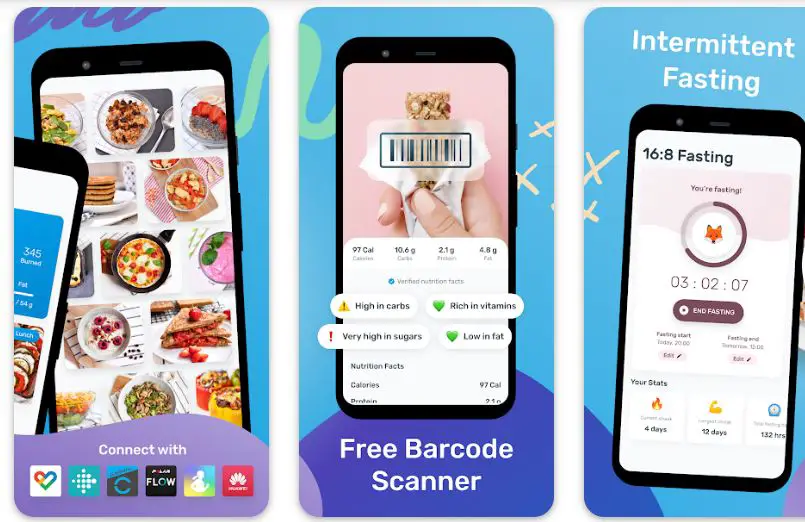
The app allows users to easily log their daily meals and snacks, making monitoring and managing their calorie intake simple. By tracking their food consumption, users can ensure they are in a calorie surplus, essential for gaining weight.
In addition to food tracking, YAZIO offers a vast food database with various options. This feature lets users find nutritional information for different foods and accurately track their macronutrient intake.
By monitoring their macronutrients, including proteins, carbohydrates, and fats, individuals can ensure they are meeting their nutritional needs for effective weight gain.
YAZIO also provides meal planning features that offer personalized meal suggestions and recipes to support weight gain. Users can set their goals, and the app will provide customized meal plans based on their preferences and calorie requirements. These meal plans include calorie-dense and nutrient-rich foods to help individuals reach their weight gain goals.
Moreover, YAZIO Fasting & Food Tracker offers a progress tracking feature that allows users to monitor their weight gain journey. By recording their weight regularly and visualizing their progress through charts and graphs, individuals can stay motivated and track their advancements. This feature enables them to make informed decisions and adjust their diet and exercise plans based on their progress.
In conclusion, YAZIO Fasting & Food Tracker is the best home weight gain app. With its food tracking, extensive food database, meal planning, and progress tracking features, YAZIO provides a comprehensive and user-friendly experience.
Whether you’re an Android or iPhone user, this app offers the tools and guidance needed to effectively achieve your weight gain goals in the comfort of your home.
How it supports weight gain:-
YAZIO Fasting & Food Tracker supports weight gain through its various features and functionalities designed to assist individuals in their weight gain journey.
Food Tracking: The app allows users to track their daily meals and snacks, making it easy to monitor their calorie intake. By tracking food consumption, individuals can ensure they are in a calorie surplus necessary for weight gain. The app provides a clear overview of calorie intake, helping users make informed decisions about their eating habits to support their weight gain goals.
Macronutrient Tracking: YAZIO offers a comprehensive food database with detailed nutritional information. Users can track their macronutrient intake, including proteins, carbohydrates, and fats, to ensure they consume adequate nutrients for weight gain. Monitoring macronutrients helps individuals optimize their diet to support muscle growth and weight gain.
Meal Planning: The app provides personalized meal plans and recipes tailored to individuals’ weight gain goals. These meal plans include calorie-dense and nutrient-rich foods to support weight gain. By following the suggested meal plans, individuals can ensure they consume the necessary calories and nutrients for healthy weight gain.
Progress Tracking: YAZIO Fasting & Food Tracker allows users to track their weight gain progress over time. Individuals can monitor their advancements by recording their weight regularly and visualizing their progress through charts and graphs. This feature helps individuals stay motivated, adjust their diet or exercise plans if necessary, and track their overall weight gain journey.
Community Support: The app offers a supportive community where users can connect with others on similar weight gain journeys. Engaging with the community provides individuals with support, motivation, and the opportunity to share experiences and insights. This community support fosters a sense of accountability and encourages individuals to stay committed to their weight gain goals.
Overall, YAZIO Fasting & Food Tracker supports weight gain by providing food tracking, macronutrient tracking, personalized meal planning, progress tracking, and community support. These features work together to create a comprehensive and supportive environment for individuals striving to achieve their weight gain objectives.
Download The App From Google Play Store
Download The App From Apple App Store
Other Supporting Apps for Weight Gain
In addition to the popular weight gain apps, several other supporting apps offer unique features and functionalities to assist individuals on their weight gain journey.

These other supporting apps for weight gain provide valuable tools, guidance, and tracking features to optimize training, nutrition, and overall progress.
Let’s explore some of these remarkable apps:-
Fitbod: Fitbod is a cutting-edge strength training app with intelligent and personalized workout plans. The app utilizes advanced algorithms to generate workout routines tailored to an individual’s goals, fitness level, and available equipment.
Fitbod focuses on progressive overload and variation to promote muscle growth and weight gain. With its extensive exercise library and demonstration videos, Fitbod ensures individuals can effectively access various exercises to target different muscle groups.
StrongLifts 5×5: StrongLifts 5×5 is a highly regarded app that follows the 5×5 training program, emphasizing compound exercises to stimulate overall muscle growth. The app simplifies weightlifting by focusing on five sets of five reps for each exercise.
With a progressive overload approach, StrongLifts 5×5 helps individuals gradually increase their weight, resulting in strength gains and muscle development. The app provides clear instructions and a straightforward interface, making it suitable for beginners and experienced lifters.
Gymaholic: Gymaholic is a comprehensive fitness app with many features to support weight gain and muscle development. The app provides customizable workout plans based on individual goals and preferences.
Users can learn proper form and technique with its extensive exercise library and detailed exercise videos. Gymaholic also offers progress tracking, allowing individuals to monitor their performance and adjust as needed. The app’s intuitive interface and user-friendly experience make it a valuable tool for weight gain enthusiasts.
MyPlate: MyPlate is a nutrition-focused app that assists individuals in tracking their dietary intake to support weight gain. The app allows users to log their meals, track calorie consumption, and monitor macronutrients such as proteins, carbohydrates, and fats.
MyPlate offers a barcode scanner feature for easy food tracking and provides access to a comprehensive food database. With personalized recommendations and goal tracking, MyPlate helps individuals ensure they are consuming enough calories and nutrients for effective weight gain.
JEFIT: JEFIT is a versatile workout app that caters to individuals seeking weight gain and muscle building. The app offers many features, including customizable workout plans, progress tracking, exercise demonstrations, and social interaction with a community of fitness enthusiasts.
JEFIT allows users to track their training progress, set goals, and record their lifting achievements. With its exercise library and ability to create personalized workout routines, JEFIT provides individuals with the tools to optimize their weight gain efforts.
Expert Advice
Gaining weight healthily and sustainably requires more than just increasing calorie intake. It’s important to seek guidance from nutritionists or dietitians who can provide personalized advice based on individual needs and goals. Incorporating their expertise can significantly enhance weight gain and promote overall well-being.

One key aspect nutritionists and dietitians emphasize is the role of a balanced diet in weight gain. A balanced diet includes a variety of macronutrients, such as carbohydrates, proteins, and healthy fats, along with micronutrients from fruits, vegetables, and whole grains.
These nutrients are essential for supporting overall health and facilitating muscle growth. Working with a professional can help create a customized meal plan that aligns with specific weight gain objectives, ensuring adequate caloric intake and proper nutrient distribution.
In addition to nutrition, incorporating regular exercise is crucial for healthy weight gain. Exercise, especially resistance training, stimulates muscle growth and promotes weight gain through lean muscle mass. It also improves overall strength, endurance, and metabolic health.
A well-designed exercise routine tailored to individual capabilities and goals can complement the dietary aspect of weight gain and contribute to overall body composition changes.
While weight gain is a desired outcome for some individuals, it’s essential to be aware of the dangers of unhealthy weight gain. Unhealthy weight gain refers to a rapid and excessive increase in body weight, often driven by consuming highly processed foods, sugary beverages, and a sedentary lifestyle.
This weight gain can lead to various health issues, including obesity, cardiovascular problems, and metabolic disorders. Seeking professional guidance helps ensure weight gain occurs controlled and sustainably, minimizing the risk of these adverse effects.
To avoid unhealthy weight gain, focusing on nutrient-dense foods rather than calorie-dense, low-nutrient options is crucial. This means incorporating whole foods like fruits, vegetables, lean proteins, and whole grains into the diet. Additionally, monitoring portion sizes and being mindful of overall caloric intake is important.
In conclusion, when aiming to gain weight, it’s vital to incorporate advice from nutritionists or dietitians to develop a personalized plan. This plan should emphasize a balanced diet rich in essential nutrients and align with individual goals.
Coupled with a well-designed exercise routine, this approach supports healthy weight gain and overall well-being. However, it’s crucial to be mindful of the dangers of unhealthy weight gain, which can lead to various health problems.
By prioritizing the guidance of professionals and focusing on a balanced approach, individuals can achieve their weight gain goals sustainably and healthily.
Real-Life Success Stories
Personal success stories can be highly inspiring and motivating when achieving weight gain goals. Hearing from individuals who have successfully gained weight using these apps provides valuable insights and encouragement for others on a similar journey.

Let’s delve into some compelling testimonials that highlight the effectiveness of these weight gain apps.
John’s Journey: John, a 25-year-old fitness enthusiast, struggled to gain weight despite consistent efforts. After discovering a weight gain app, he decided to try it.
With the app’s personalized meal plans and workout routines, John was able to optimize his nutrition and training. Over time, he started seeing significant muscle mass and overall weight improvements. John credits the app’s guidance, tracking features, and community support for his successful weight gain journey.
Sarah’s Transformation: Sarah, a 30-year-old busy professional, struggled to prioritize weight gain amidst her hectic schedule. She discovered a weight gain app that offered convenient meal planning and tracking features.
By incorporating the app into her daily routine, Sarah could stay consistent with her calorie intake and monitor her progress. With the app’s support and easy-to-follow recommendations, she gradually gained weight and achieved her desired physique.
Michael’s Muscle Gain: Michael, a dedicated gym-goer, was focused on building lean muscle mass and increasing his overall weight. He discovered a weight gain app with tailored workout plans and comprehensive exercise libraries.
By following the app’s expertly designed routines and tracking his progress, Michael could track his muscle gain journey effectively. The app’s clear instructions and visual representations of exercises helped him achieve remarkable results in terms of muscle development and weight gain.
Emily’s Nutritional Guidance: a health-conscious individual, Emily struggled with finding the right balance between healthy eating and weight gain. She turned to a weight gain app that emphasized the importance of a balanced diet and offered customized meal plans.
With the app’s extensive food database and nutritional guidance, Emily could incorporate nutrient-dense foods into her diet while ensuring a sufficient calorie surplus. As a result, she experienced gradual weight gain while maintaining a healthy lifestyle.
Alex’s Community Support: Alex, a motivated individual aiming to gain weight, found solace in a weight gain app’s vibrant community support. Through the app, he connected with like-minded individuals who shared their experiences, challenges, and success stories.
The community gave Alex valuable insights, advice, and constant motivation throughout his weight gain journey. With their support, he stayed focused, consistently tracked his progress, and celebrated every milestone achieved.
These testimonials of individuals who have successfully gained weight using these apps highlight the positive impact these tools can have on one’s weight gain journey.
Combining personalized guidance, meal plans, workout routines, progress tracking, and community support offers a comprehensive approach to achieving weight gain goals.
Whether it’s overcoming challenges, staying consistent, or finding the right balance, these success stories demonstrate how these apps can transform individuals’ lives and help them attain the desired weight gain results.
In conclusion, sharing testimonials of individuals who have successfully gained weight using these apps is a powerful source of inspiration and motivation. These personal stories showcase the effectiveness of these weight gain apps in providing guidance, structure, and support.
As more individuals share their success stories, the community grows stronger, fostering an environment of encouragement, accountability, and continuous progress. These testimonials serve as a reminder that with the right tools and determination, anyone can achieve their weight gain goals and transform their lives for the better.
📗FAQ’s
Is there an app to help you gain weight?
Yes, there are several apps available that can assist you in your weight gain journey. These apps offer features such as personalized meal plans, calorie tracking, exercise routines, and progress monitoring.
| App Name | User Rating | Platform |
|---|---|---|
| MyFitnessPal | 4.7/5 | iOS, Android |
| Lifesum | 4.6/5 | iOS, Android |
| Gain Weight For Women and Men – Diet & Exercises | 4.4/5 | Android |
| Eat This Much | 4.5/5 | iOS, Android |
| Fitness & Bodybuilding by VGFIT | 4.6/5 | iOS, Android |
| MyPlate Calorie Tracker by LIVESTRONG | 4.5/5 | iOS, Android |
| MyNetDiary | 4.6/5 | iOS, Android |
| 8fit Workouts & Meal Planner | 4.7/5 | iOS, Android |
| Cronometer | 4.6/5 | iOS, Android |
| YAZIO Calorie Counter, Nutrition Diary & Diet Plan | 4.5/5 | iOS, Android |
How can I gain weight quickly?
While it’s important to prioritize a healthy approach to weight gain, you can try consuming calorie-dense foods, increasing portion sizes, and incorporating strength training exercises into your routine to promote muscle growth.
How can I gain weight right now?
Gaining weight instantly is not realistic or healthy. However, you can focus on consuming nutritious meals with a caloric surplus and engaging in regular exercise to achieve weight gain gradually over time.
How to get in 3,000 calories a day?
To reach a target of 3,000 calories per day, you can include calorie-dense foods like nuts, avocados, and oils. Eating frequent meals and snacks can also help you meet your caloric goal.
Can you use MyFitnessPal to gain weight?
Yes, MyFitnessPal can be a useful tool for tracking your calorie intake and monitoring your macronutrient distribution, which can support weight gain efforts. Simply set your goals accordingly within the app.
Are there weight gain pills?
While supplements available in the market claim to aid in weight gain, it’s important to consult with a healthcare professional before considering any such pills. They can provide guidance based on your individual needs.
Why can’t I gain weight?
Difficulty in gaining weight can be influenced by various factors, including genetics, metabolism, and underlying health conditions. Consulting a healthcare professional or registered dietitian can help identify potential reasons and develop a personalized plan.
How can I gain weight if I am underweight?
If you are underweight, focus on consuming nutrient-dense meals with a calorie surplus. Incorporate resistance exercises to stimulate muscle growth and consider working with a healthcare professional for personalized guidance.
Why am I so skinny but eat a lot?
Being skinny despite eating a lot can be due to a high metabolic rate, increased physical activity, or inadequate nutrient absorption. Consulting a healthcare professional can help determine the underlying cause and develop an appropriate plan.
How can a girl gain weight fast?
Girls can gain weight by consuming a well-balanced diet with lean proteins, healthy fats, and complex carbohydrates. Strength training exercises can also be beneficial for building muscle mass.
Which protein is best for weight gain?
Protein sources like lean meats, poultry, fish, dairy products, legumes, and plant-based proteins such as tofu and quinoa can support muscle growth and weight gain.
What food is high in calories?
Calorie-dense foods include nuts, nut butter, avocados, olive oil, cheese, whole grains, dried fruits, and fatty cuts of meat.
How to get 5000 calories a day?
Consuming 5,000 calories a day may not be necessary or appropriate for everyone. However, you can increase your calorie intake by eating larger portions, incorporating calorie-dense foods, and adding healthy fats to your meals.
How many calories eat per day?
The number of calories you need daily depends on age, gender, weight, activity level, and goals. Consulting a healthcare professional or registered dietitian can help determine your specific calorie needs.
Is FatSecret app good?
FatSecret is a popular app for tracking food intake and managing calorie goals. It provides a comprehensive database of food items and offers features for monitoring progress.
How does the weight app work?
Weight apps help track nutrition, exercise, and progress toward weight gain goals. They provide personalized meal plans, workout routines, and tracking tools to assist users in achieving their desired weight.
Can an app tell you how much you weigh?
No, an app cannot directly measure your weight. However, it can help you track your weight by allowing you to input your measurements and regularly update your progress.
How many calories daily to gain weight?
The number of calories needed to gain weight varies depending on individual factors. Generally, a caloric surplus of 250-500 calories per day above the maintenance level is recommended for gradual weight gain.
How many calories to gain weight?
The number of calories required to gain weight depends on factors such as basal metabolic rate, physical activity, and goals. Working with a healthcare professional or registered dietitian is important to determine the appropriate calorie intake for your specific needs.
How much protein per day?
The recommended protein intake varies based on age, weight, and activity level. However, a general guideline is to consume 0.8 to 1 gram of protein per kilogram of body weight.
Which pill causes more weight gain?
Certain medications, such as antidepressants, antipsychotics, and corticosteroids, may be associated with weight gain as a side effect. It’s important to consult with a healthcare professional regarding any concerns about medication and weight gain.
Why am I so skinny?
Being skinny can be influenced by various factors, including genetics, metabolism, dietary habits, and physical activity level. Maintaining a healthy lifestyle and consult with a healthcare professional if you have concerns is essential.
Why am I getting skinny all of a sudden?
Sudden weight loss or changes in body composition can indicate underlying health issues. It’s crucial to seek medical advice to rule out potential causes and receive appropriate care.
How to gain weight in 7 days?
Gaining significant weight in just seven days may not be healthy or sustainable. Focusing on gradual weight gain through a balanced diet and exercise routine is more advisable.
What is underweight in kg?
Underweight is typically defined as having a body mass index (BMI) below 18.5. However, it’s important to note that BMI is a general indicator and may not be suitable for everyone.
How many hours should I sleep to gain weight?
Adequate sleep is essential for overall health but does not cause weight gain directly. However, quality sleep can support optimal hormonal balance and aid muscle recovery and growth.
Can a skinny person ever gain weight?
Skinny individuals can gain weight by consuming a calorie surplus, engaging in resistance training to build muscle mass, and following a balanced and nutritious diet.
Should I eat more if I’m skinny? If you are skinny and looking to gain weight, you may need to consume more calories than your body expends to create a caloric surplus. Consulting with a healthcare professional or registered dietitian can help determine the appropriate calorie intake for your goals.
Why am I always hungry but not gaining weight?
Constant hunger without weight gain could be attributed to factors such as high metabolic rate, inadequate calorie intake, or underlying health conditions. It’s advisable to consult with a healthcare professional to address the underlying cause.
How do you know if you are too skinny?
Being too skinny can be assessed by evaluating body mass index (BMI), body fat percentage, and overall health. Consulting with a healthcare professional can comprehensively assess your weight status.
Where do girls first gain weight?
The pattern of weight gain in girls can vary. However, it is common for weight gain to occur in areas such as the hips, thighs, and breasts during puberty.
Where do girls gain the most weight?
The distribution of weight gain in girls can vary. Some common areas include the hips, thighs, buttocks, and breasts. However, it’s important to remember that individual body shapes and genetics play a significant role.
Can a skinny girl become thick?
Yes, a skinny girl can build muscle mass and achieve a more muscular and curvier physique with proper nutrition, exercise, and strength training.
Which food helps to gain weight?
Calorie-dense foods such as nuts, nut butter, avocados, olive oil, whole grains, lean proteins, and dairy products can aid in healthy weight gain.
Is it OK to drink protein to gain weight?
Protein shakes can be a convenient supplementing your daily protein intake, especially if you struggle to meet your requirements through whole foods alone. However, it’s important to consider overall caloric intake and consult a healthcare professional or registered dietitian for personalized guidance.
Can I drink protein to gain weight?
Protein supplements can be a part of a weight gain strategy, as they provide an additional source of calories and support muscle growth. However, ensuring overall caloric intake aligns with your weight gain goals is essential.
How to eat 4,000 calories a day?
Consuming 4,000 calories a day may not be necessary or suitable for everyone. However, you can increase your calorie intake by including calorie-dense foods, eating frequent meals and snacks, and incorporating healthy fats and protein sources into your diet.
How to hit 2,000 calories a day?
To reach a daily target of 2,000 calories, focus on consuming a well-balanced diet that includes lean proteins, whole grains, fruits, vegetables, and healthy fats. Monitoring portion sizes can also help ensure you meet your calorie goals.
What is the most calorie-heavy food?
Calorie-dense foods include fats and oils, such as butter, coconut, and olive oil, which provide many calories per gram.
What happens if I eat 10,000 calories in one day?
Consuming 10,000 calories in one day is excessive and can lead to discomfort, digestive issues, and potential weight gain. It’s important to maintain a balanced and moderate approach to nutrition.
What happens if I eat 1,000 calories per day?
Consuming only 1,000 calories daily is considered very low and may lead to inadequate nutrient intake, nutrient deficiencies, fatigue, and potential health risks. It’s important to consume a well-rounded diet that meets your energy needs.
What happens if I take 700 calories a day?
Consuming only 700 calories daily is extremely low and can lead to severe nutrient deficiencies, muscle loss, weakness, and health complications. It is essential to maintain a balanced and nourishing diet.
How many calories are in one egg?
One large egg typically contains approximately 70-80 calories, depending on the size.
How many calories in a roti?
A single roti or chapati, a traditional Indian bread, typically contains around 70-100 calories, depending on its size and ingredients.
In Conclusion, on the apps to gain weight list
Gaining weight can be as daunting as losing it, especially when the resources are limited or confusing. However, with the evolving technology and the development of intuitive, user-friendly apps, this task is becoming significantly easier and more manageable.
In this article, we’ve explored the best apps to gain weight that offer a wide range of features, such as personalized diet plans, exercise regimes, progress tracking, and community support. With the right approach and digital tools, your journey to healthy weight gain can be much smoother and more effective.
Remember, it’s not just about gaining weight but healthily. Don’t rush the process; focus on consuming nutrient-dense foods, exercising appropriately, and, most importantly, maintaining consistency. These apps are here to support and guide you in achieving your goals.
Now that you’re equipped with all this information, it’s time to take the next step. Try out these apps and experience how they can transform your weight gain journey. Share your progress, challenges, and successes with others in the same journey.
Together, you can make gaining weight a more enriching and fulfilling process. Here’s to a healthier, stronger you!