
























This post will show some of the best Autonomous Sensory Meridian Response or ASMR apps.
Let’s explore this guide.
The human body has a phenomenon known as Autonomous Sensory Meridian Response (ASMR). Tingling sensations start on the scalp and travel up to the neck and spine.
Many people are affected by a certain sound, such as whispering or tapping on a hard surface.
These odd sensations, according to experts, cause a short burst of pleasure and good sentiments among individuals. YouTube users have discovered that ASMR-triggering noises assist with depression, sleeplessness, tension, and anxiety, among other issues.
Sound needs personal attention, so individuals can focus on reducing tension and anxiety. These factors have made ASMR a new and exciting phenomenon on the Internet.
Numerous films on YouTube and other video-sharing sites have ASMR-triggering noises, which can be helpful for individuals suffering from insomnia or other forms of stress and anxiety issues.
Apps and games have also been developed to promote mental wellness using ASMR noises. The greatest ASMR apps and games for Android and iOS are discussed in this post.
What is ASMR? 🤷♂️
Since its discovery in 2010, ASMR has been used to describe a soothing, typically serene sensation that begins on the scalp and goes down the body until it reaches your extremities. Hearing whispers, accents, or crackles triggers “brain massage.”
When someone plays with your hair or strokes your back with their fingertips, it gives you the shivers, explains Heather Feather, a prominent “ASMRtist” with over 400,000 YouTube fans.
Bob Ross’ dulcet tones are among the most prominent ASMR triggers. ‘Bob Ross’, ‘Heather Feather,’ and ‘GentleWhispering,’ another top ASMRtist on YouTube, are among the most commonly used words to describe the phenomenon.
Heather Feather, for example, creates videos that evoke the ASMR sensation. The number of ASMR videos on YouTube has risen to around 5.2 million, and there is interest from worldwide (see chart below).
Searches for ASMR on YouTube rose by over 200 percent YoY in 2015 and continue to climb yearly.
A top ASMR video may generate over 16 million views on its own, according to YouTube.
Mobile devices account for more than half of searches as consumers seek out this material in moments of relaxation.
When individuals are shutting down for the evening, searches on Google tend to peak at about 10:30 p.m. in all time zones.
In the top five related terms, “ASMR sleep” comes in at number 5. 6
Pay attention, brands!
At Google BrandLab, we work with companies to help them use YouTube’s full potential. Various noises may trigger ASMR, so companies should pay attention.
There is a huge engaged audience waiting to be tapped, but there is also a huge engaged audience that is currently utilizing your brand.
For example, ASMRtists will crinkle wrappers, chew candy, and break open cans to generate a tingling feeling.
There are approximately 81,000 videos on YouTube that contain the phrase “beer ASMR.” Brands such as Tic Tac, Swedish Fish, and Taco Bell appear in YouTube creators’ videos.
KFC has jumped on board with the craze. Recently, the actor George Hamilton portrayed Colonel Sanders in a YouTube video. In the video, he talks about pocket squares and KFC’s new crispy fried chicken.
As KFC’s CMO Kevin Hochman told The Washington Post, “There are those who are completely enamored with the sensory experience of music.” Because of ASMR, our food offers a lot of comforts.
Chinese advertising firm BBDO produced ASMR video advertisements to recreate the “tingling of silky smooth delight” that buyers experienced when eating Dove chocolates in 2015. Neuroscientists are now studying the outcomes of scientific testing on the flicks.
They range from beauty fans to technophiles.
Interested audiences can be reached even if brands don’t make their ASMR videos.
Who is it that you’re looking for? There is interest in ASMR material from both men and women, with most viewers being young adults (18- to 24-year-olds). Most (77%) are also interested in beauty and fitness information.
Cosmetics dominate trendy items. In the past, YouTube had a lot of makeup lessons, but once people learned how soothing they were, many became ASMR videos.
One technique is to pretend to be a cosmetic artist, while another is to use makeup brushes to produce calming noises.
While making tapping and scratching noises, several producers show off their manicures in ASMR nail art videos that can be seen on YouTube.Michelle Phan, the queen of beauty, has created ASMR videos, and she has 8.6 million subscribers.
Somewhat less obviously, the ASMR audience is dominated by technophiles and gamers in significant numbers.
Online ASMR enthusiasts are more than twice as likely to be shopping for consumer electronics like laptops, mobile phones, and gaming consoles as people who are not interested in ASMR.
There’s even a YouTube channel for ASMR gamers. Fast-paced video games may benefit from ASMR, as studies have shown that playing video games may heighten the senses.
There is no doubt that ASMR has a big, engaged, and increasing audience that responds to it, regardless of how it works.
To profit from it as a brand, you don’t need to “get it.” You only need to find innovative methods to engage this unique and mostly untapped population. Isn’t that a good-sounding idea?
Best ASMR Apps – ASMR on The Go👌👌
1. TeasEar – best ASMR apps ios
It doesn’t matter whether they’re virtual. As a result of TeasEar’s ability to imitate more than 100 slimy textures, Some of the more popular textures to play with are yogurt, honey, and confetti, but there are many more.
If you want to induce ASMR, you may place your fingertips on the surface of your smartphone to make a sound.
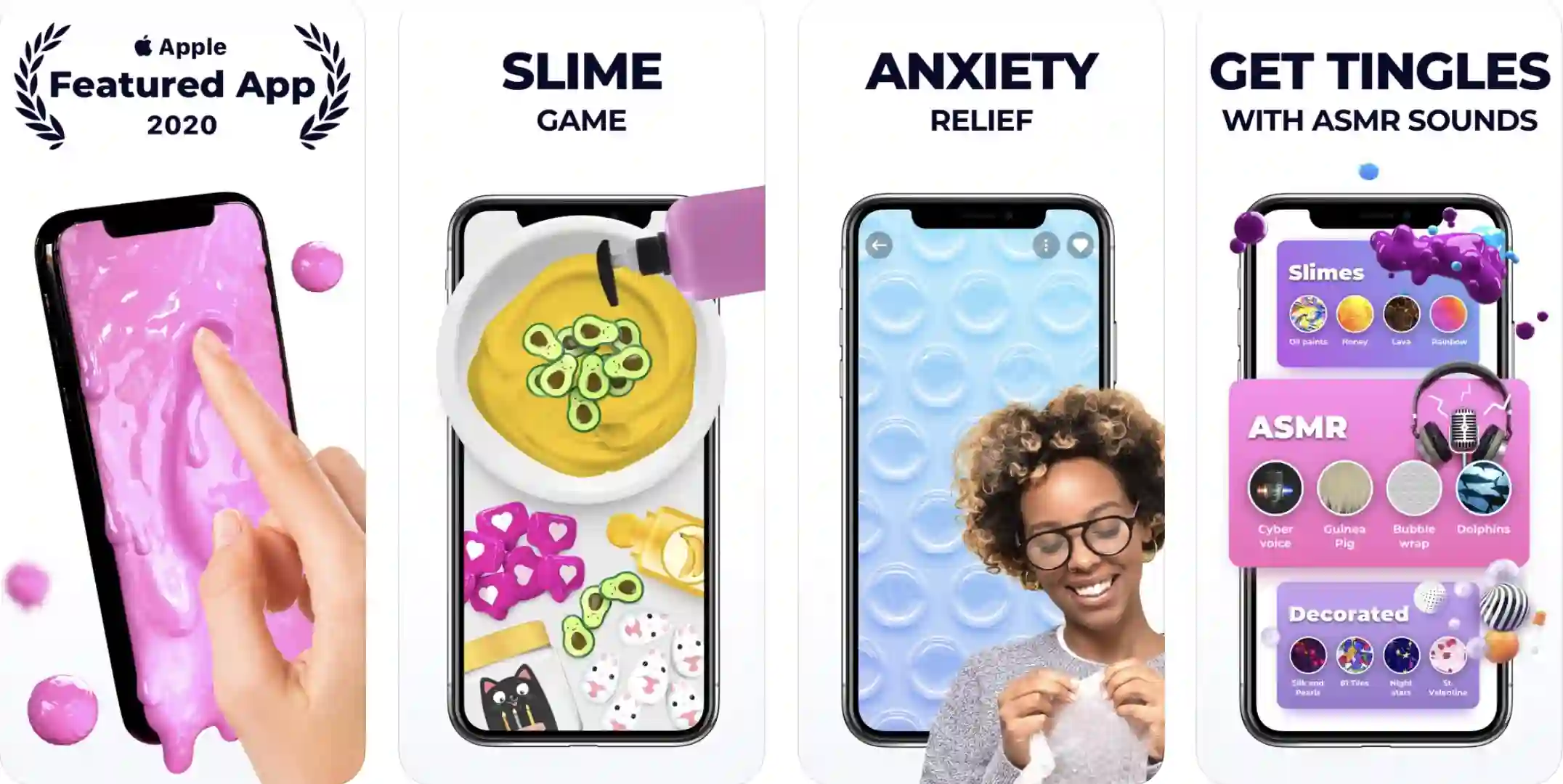
As far as ASMR apps go, TeasEar is my top pick. It’s not just a collection of ASMR-inducing sounds; it’s also a collection of fun activities.
For example, you may calm your senses by playing with slime, bubble gum, foam, yogurt, and other things.
Most importantly, you may interact with these materials while listening to music, which enhances the experience. Also included is a large collection of sounds, like wood to bonus scraping, dolphins, and children”slaughter.
And unlike many other ASMR apps, TeasEar is completely free. You won’t find any advertisements on this application either, which is essential since it allows you to focus on the sound.
You should certainly check out TeasEar, which I believe is one of the greatest ASMR apps.
A weekly or monthly subscription is required to unlock the app’s triggers in the free edition.
Download the App from Google Play Store
Download the App from Apple App Store
2. Tingles ASMR – Relaxing & Soothing Sleep Sounds
Try downloading Tingles if you’re seeking scraping can help you conquer insomnia, enhance your sleep quality, or deal with anxiety. More than 1500 content providers are available for viewing.
Even if your screen is turned off, you can still listen to the video on Tingles. You can also download content from Tingles and enjoy it offline using the app.
Thousands of hours of programming are available for you to select from. Using a sleep timer, you’ll be sure to awaken exactly at the appointed hour with this software!
If you are feeling a bit lazy and don’t to leave the comfort of your bed, you can increase the timer for half an hour.
On Android and iOS Tingles is widely regarded as the best ASMR app. Recently the app’s content was put behind a paywall, which did not sit well with free users.
Currently, Tingles’ free tier offers only five pre-selected ASMR sounds. On the plus side, the sounds may still be played as background music or as videos, if you’re interested.
Aside from that, keep in mind that most of the prominent artists are only available through the premium plan. Hence, it is one of the best ASMR apps.
On the other hand, Tingles delivers the greatest ASMR experience if you choose the premium package. The whispering sound might help you relax and sleep better after 10 minutes.
It also includes more than 1500 content providers, making it the greatest destination to have a multi-sensory ASMR experience. Tingles is a nice ASMR app in general.
Download the App from Google Play Store
Download the App from Apple App Store
3. Somnia
According to the app’s name, it’s meant to help users get a better night’s sleep. It mostly focuses on audio triggers since it has a large library of fully configurable sounds to select from.
There is a True 3D soundscape that is spatialized in Somnia to assist you in going off to sleep.
For the soundscapes, binaural audio provides an immersive experience, and you may use the Wind Down Timer to choose how long the soundscape will be played until it is turned off for the day or evening.
Moreover, the program allows you to select your preferred sound themes and adapt them to your tastes over time.
As an alternative to creating your soundscape, Somnia provides you with Audits, constantly blended sound bits, and mixed audio bits. Be aware that if you wish to use this software regularly, you must subscribe.
On Android and iOS, Somnia is one of the most popular ASMR apps because of its high-quality 3D sounds. Many other types of noises may be found in the program, including brushing, scratching, tapping, squishing, and more.
The best thing about Somnia is that it delivers a tailored experience depending on users’ concerns and listening preferences. Choose a different set of sounds in case you’re having trouble sleeping, and there are also options for sadness, anxiety, and more.
Additionally, you may modify the sounds to create a more personalized listening experience if you so choose.
Lastly, it utilizes Spatial 3D Audio for dynamic binaural audio that may provide peace and tranquility to your confusing mind. So, if you like great music and sound is your priority, go for Somnia
4. Mindwell
Despite its name, Mindwell is not an ASMR app, as it does not provide visual, tactile, or aural ASMR triggers.
Although the program offers more than 350 daily meditations lasting between one and thirty minutes, it nevertheless helps its users enhance their sleep quality.
Aside from unique Solfeggio frequencies and isochronic tones, Mindwell synchronizes with your brainwaves and helps you attain a state of tranquility.

In addition to increasing alertness, Mindwell may help you achieve emotional equilibrium by providing you with different sound waves that help you achieve a certain objective or get into a specific mood.
This software allows you to construct a playlist of specialized mediation programs, which is a great way to finish the day. You’ll need to subscribe if you want to use all of Mindwell’s features.
A few firms have invested significantly in digital wellness to aid people with depression, sleeplessness, stress, anxiety, etc. Mindwell is one of these companies.
As you listen to it, you’ll feel awake, peaceful, sleepy, and emotionally balanced thanks to the succession of sound waves it emits. ASMR tracks are among the app’s most popular collections.
Your spine and the back of your neck may tingle, giving you something to focus on. The app heightens the ASMR feeling within a few minutes of listening, allowing you to unwind, alleviate tension, and go into a deep slumber.
To keep track of your ASMR activities, you may build playlists on the app, similar to Tingles. Most of the functions are limited to free users; therefore, if you want the full benefits of the software, you’ll need a premium subscription.
Mindwell offers some of the rich ASMR features, but they come at a price.
Download the App from Google Play Store
Download the App from Apple App Store
5. Youtube
All you need to do to start listening to ASMR material on the move is download the YouTube app on your smartphone.
Discover new ASMR videos daily, follow your favorite ASMR channels, and share your favorite ASMR videos on social media with the app.
When using the YouTube app, it’s simple to find ASMR material because so many channels produce videos with different ASMR triggers to choose from.
It is possible to locate videos on YouTube that feature visual ASMR triggers, such as presenters whispering into the microphone or lightly touching it.
However, if you want access to a wider range of ASMR videos, consider buying YouTube Red or YouTube Premium.
The ASMR movement began on YouTube, so we can’t ignore it. Starting your ASMR journey on YouTube is best if you’re new to ASMR.
I recommend Gentle Whispering ASMR and Bob Ross for the traditional ASMR experience and ASMRtists Emerge and ASMRMagic.
You may need to upgrade to YouTube Premium, though, if you want to continue listening to ASMR noises on YouTube in a serious way.
You’ll see banners, pop-ups, and frequent video advertising because the site is ad-supported.
As a bonus, the premium plan allows you to listen to various ASMR songs in the background, which can help you sleep better, relax, and enhance your mental health and wellness.
To sum it up, you can’t afford to miss out on the wide variety of ASMR music that YouTube offers.
You may install Youtube on Android and iOS devices (Free, offers in-app purchases).
6. Spotify
Listening to podcasts and music isn’t the only way to find ASMR material on Spotify. It is extremely unlikely that you will have problems discovering content that will help you relax or fall asleep because there are whole playlists dedicated to ASMR.
To store your favorite ASMR music to a playlist that you can access quickly, you may use the app’s modernly designed player.
It also allows you to find new ASMR recordings every day, according to the Spotify algorithm, which suggests music based on your previous listening habits.
The app also has a sleep timer, so you can drift off without worrying about waking up on time. In-app purchases are required to access Spotify’s premium features.
You can also listen to ASMR sounds on Spotify. A new ASMR genre has emerged, including playlists for sleep, whispering, tapping and scratching, slime, and other ASMR-related topics.
Spotify is essentially providing you with all of the ASMR categories for free. Isn’t it amazing? If you like the service, you may upgrade to a premium subscription.
It may also be used as a default music streaming and podcasting service. Aside from that, you can make playlists for ASMR tunes, and unlike the popular Tingles app, it’s free.
My research on ASMR sounds shows that Spotify is an easy-to-use and uncomplicated option. Summary: If you already use Spotify, start listening to your favorite ASMR playlist as soon as possible. You’re in for a tingling experience.
Download the App from Google Play Store
Download the App from Apple App Store
7. ASMRtist – ASMR sleep sounds
A basic app, ASMRtist, offers nothing more than a selection of ASMR sounds. Just tap on one of the 36 ASMR sound icons, and you’ll hear sounds like crumpling paper or a fire. You may let the program choose ASMR sounds in the shuffle mode.
The ASMRtist’s sounds may be listened to even while your smartphone is locked, allowing you to go about your daily routine or fall asleep while listening to ASMR noises.
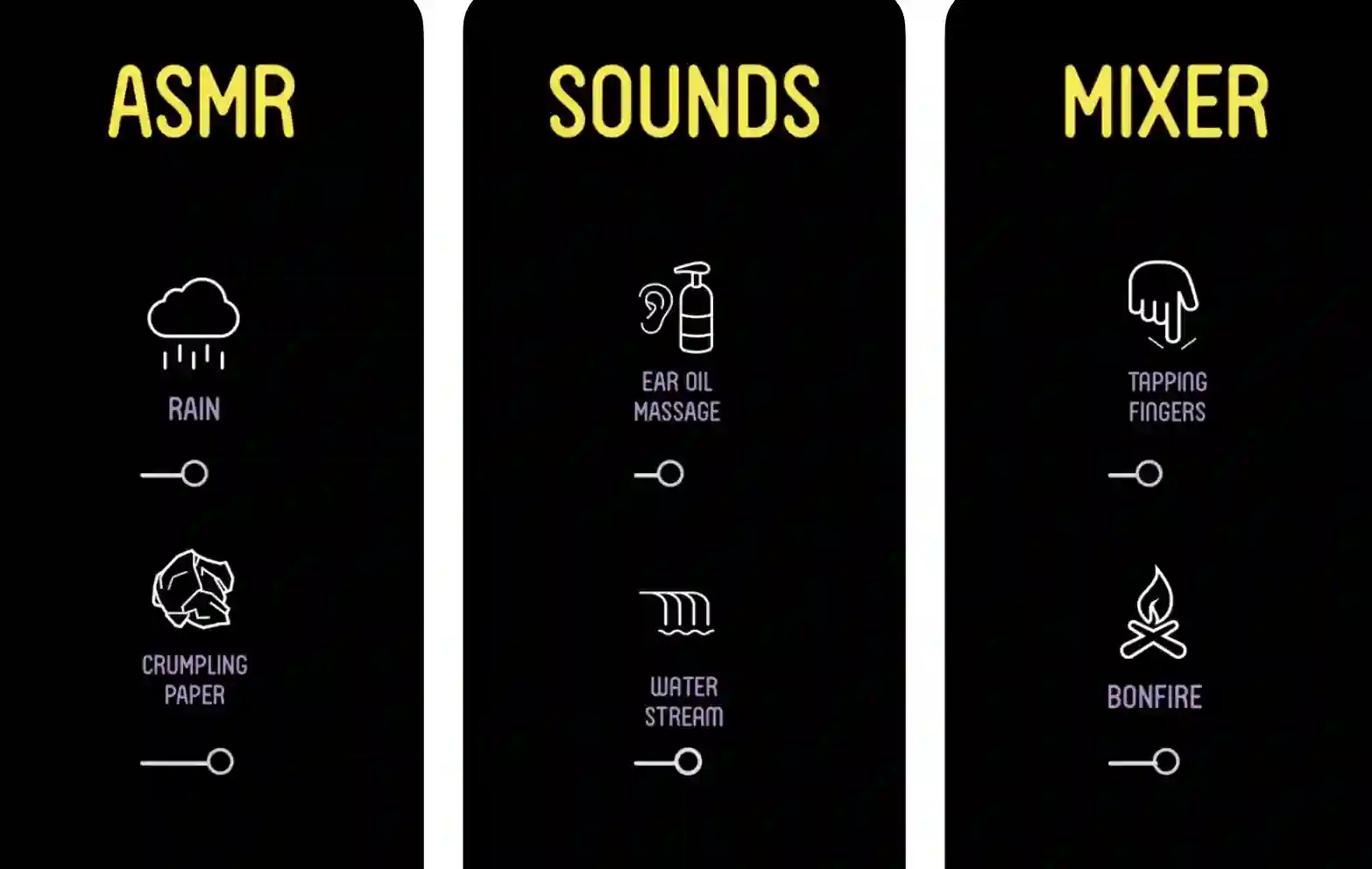
You may pick how long you wish to sleep when using the app. Because of its dark backdrop, the app has a peaceful and relaxing effect on the user.
The ASMRtist app is one of the greatest ASMR apps available. No fancy UI, but you may listen to over 100 ASMR sounds and feel the odd sensation behind your spine.
Unusual satisfaction will result in a relaxed and restful sleep. There is nothing better than being able to listen to a variety of ASMR sounds all at once.
There are adverts within the app, but they aren’t a major deal regarding listening. ASMR tracks are included, but there are also some unusual ones like crumpling paper, water stream, and ice cubes. It’s a great ASMR app, and it’s free.
Download the App from Apple App Store
8. Super Slime Simulator
Super Slime Simulator is a must-have for anybody who enjoys playing with slime and listening to its noises.
In the app’s extensive slime library, you’ll find options like metallic or milky, and you can even build your slime simulations. Slime may be squished, stretched, or popped once you’ve chosen the type.
The texture of each slime varies, as well as the 3D noises it makes when interacting. Lu Lu’s Slime quests, picture slime, and slime painting can all be found in the app’s Fun Area.
Shake your phone to undo a stretch, and you may continue playing with the slime you picked once it is undone. Though it requires in-app purchases to playfully, Super Slime Simulator delivers a unique ASMR experience that you won’t find anywhere.
ASMR game Super Slime Simulator is a must-have. In only a few minutes, you may be having a nap or resting with peace of mind thanks to this game.
Slime appears on your screen, and you must stretch, crush, or knead it. Just keep playing about, and you’ll feel the ASMR tingling. Due to the realism of the slime simulation, you will feel a tingling feeling behind your neck.
A lot of people find that this whole procedure is soothing and helps them to relax. You may also make your slime using various materials, colors, foam, glitter, and other additives.
Bonus:- ASMR noises in the background make for a fantastic experience. If you want to relax, you should play Super Slime Simulator, one of the greatest ASMR games.
Download the App from Google Play Store
Download the App from Apple App Store
9. ASMR Slicer
When you’re cutting through sand, the sound may be soothing and cause the AMSR to activate. This software allows you to chop through various sand-based things.
Because of its realistic modeling and because it makes sounds as you cut through items, playing this video game is very enjoyable.
Gold is gathered, and new things are unlocked, which makes the game more enjoyable as you continue.
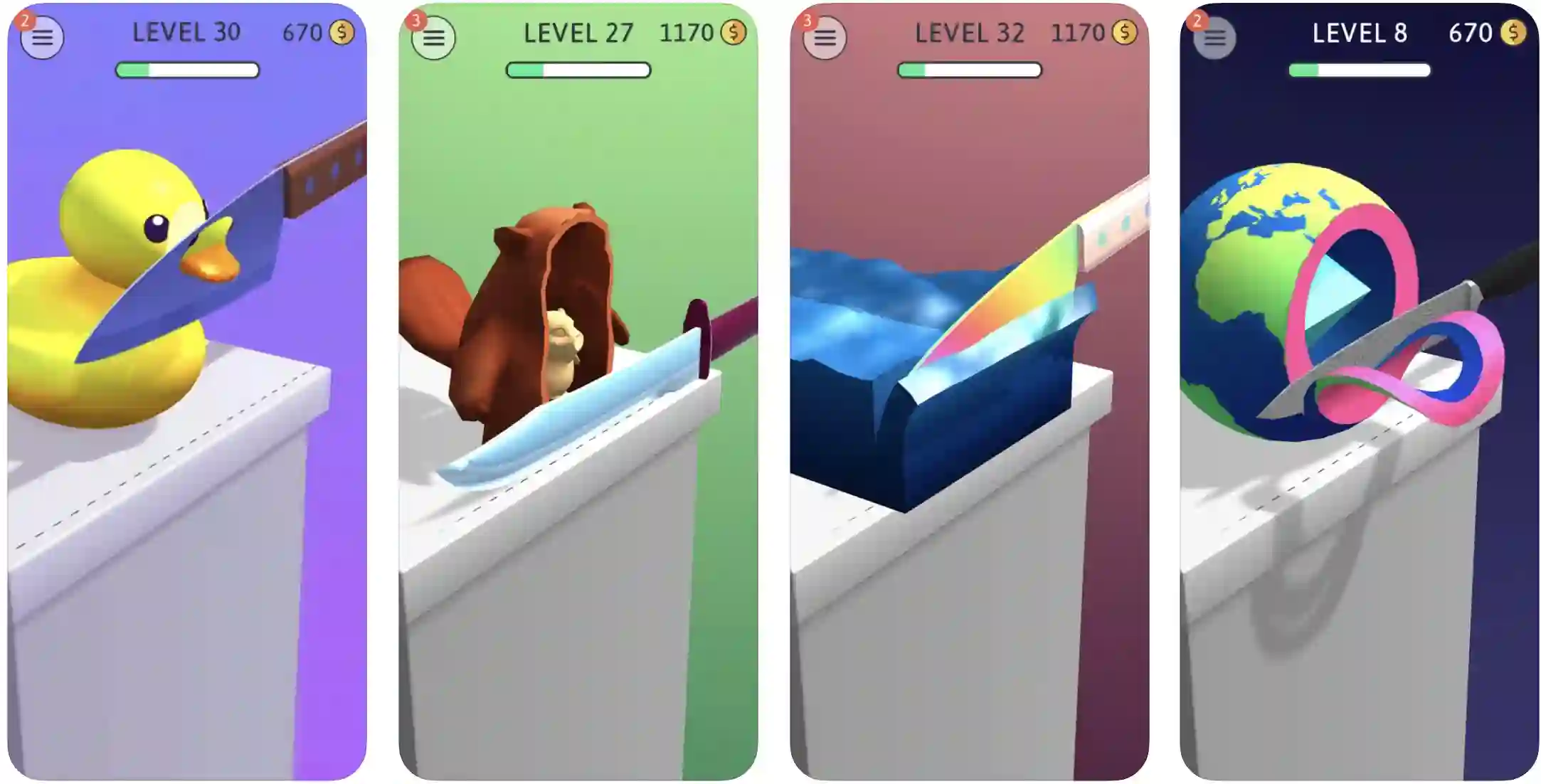
ASMR Slicing is a great way to relieve tension by producing pleasant noises while cutting items. Despite this, the app doesn’t improve sleep quality or help you deal with worry or sadness.
This software is perfect if you enjoy watching ASMR videos on YouTube that include slicing everything and anything. This game is for you if you’ve ever wanted to carve a vast collection of kinetic sand items.
The ASMR sensation may also be felt by cutting and dicing various items. In addition, because the software is so easy and well-designed, it feels almost genuine and offers a strangely gratifying sense.
It also gives haptic input when cutting the item, enhancing your experience. A peaceful ASMR sound is playing in the background, which is wonderful.
Download the App from Google Play Store
Download the App from Apple App Store
10. ASMR Breakfast
Even the act of preparing meals is a pleasurable one, and it frequently allows us to forget about our worries. Gameplay replicates the process of making breakfast and challenges you to create the ideal meal in the ASMR Breakfast video game.
You can go on to the next more complex meal if you don’t waste any food. Purchasing interactive features and in-app items as you progress through the game is required to enjoy it fully.
Ads are also displayed, which might ruin the experience and make it less enjoyable.
It turns out that cooking breakfast has become a popular ASMR fad on YouTube. The ASMR Breakfast game allows you to create the ideal breakfast and enjoy the tingling sensation anytime you are bored. While playing, players must prepare breakfast without spilling or wasting any food.
Each degree of difficulty increases as your efficiency improves. Even though bonus the game is virtually flawless and free, you’ll have to deal with a lot of advertising, which might detract from the experience.
While cooking may be therapeutic for some, ASMR Breakfast is a fun and relaxing game that will brighten your day.
Download the App from Google Play Store
Download the App from Apple App Store
📗FAQ📗
Where can I listen to ASMR for free?
You may listen to ASMR for free online in a lot of locations. A few choices are as follows:-
YouTube:– There are innumerable ASMR videos, including channels devoted only to ASMR material. To see a plethora of ASMR videos, perform a YouTube search for “ASMR.”
Podcasts:– Some podcasts have ASMR content to calm listeners and promote sleep. These podcasts are available on websites like Google, Apple, and Spotify.
Streaming platforms:– ASMR content is available on some streaming services, including Amazon Prime and Netflix. Type “ASMR” into the search bar on these platforms to find several ASMR videos.
ASMR websites:– Websites like ASMRtist and ASMR University are particularly devoted to hosting ASMR content. These websites frequently offer different ASMR videos that you can watch for free.
What does ASMR stand for?
Autonomous Sensory Meridian Response is the abbreviation for it. It describes a tingling feeling that is frequently felt on the back, neck, and scalp in reaction to specific stimuli like whispering, tapping, or brushing sounds.
For some people, ASMR triggers are soothing and can ease tension or promote sleep. Others might not have any experience with ASMR. More research is required to identify ASMR’s causes and potential advantages because the phenomenon is poorly understood.
Is watching ASMR healthy?
Since each person’s experience with ASMR content is unique, there is no clear-cut solution to this query.
Some people say that watching ASMR relaxes them and helps them sleep, and some study has suggested that ASMR may have potential health advantages like lowering stress and anxiety and enhancing sleep.
But suppose you are dealing with stress, worry, or other mental health issues. In that case, it’s crucial to remember that ASMR is not a substitute for medical care and should not be utilized instead of getting support from a healthcare provider.
A healthcare professional should always be consulted if you are considering utilizing ASMR as a relaxing treatment to ensure it is suitable for you.
Is listening to ASMR healthy?
Some individuals discover that ASMR helps them unwind and fall asleep. Some research has revealed that ASMR may have prospective health advantages like lowering tension and anxiety and enhancing sleep.
But suppose you are dealing with stress, worry, or other mental health issues. In that case, it’s crucial to remember that ASMR is not a substitute for medical care and should not be utilized instead of getting support from a healthcare provider.
A healthcare professional should always be consulted if you consider utilizing ASMR as a relaxing treatment to ensure it is suitable for you.
It’s vital to be aware that ASMR listening can be a very personal experience, and what one person finds pleasant or relaxing may not have the same effect on another.
It is vital to cease listening to ASMR if you realize it is not calming you down or causing you distress. If necessary, get expert medical assistance.
How do I listen to ASMR?
You can perform the following actions to hear ASMR:-
1. Look for ASMR videos on YouTube or other online video-sharing sites. A lot of ASMR channels create videos with a variety of auditory and visual triggers.
2. Try out several ASMR content to see which suits you best. While some find the sound of tapping or crinkling calming, others prefer the sound of whispering or soft speech.
3. To listen to the ASMR content, find a quiet, comfortable area. Utilizing headphones can aid some people in concentrating on the ASMR noises by obstructing outside noise.
4. To a volume that is comfortable for you, adjust the volume. Increasing the level may be necessary to hear ASMR noises because they can be rather delicate clearly.
5. Unwind and permit yourself to enjoy the ASMR sensation. Being relaxed and experiencing ASMR’s benefits may take some time, so be patient and give yourself time.
Can you listen to ASMR on Spotify?
There is ASMR music available on Spotify, yes. A condition known as ASMR, or autonomous sensory meridian response, occurs when certain people are exposed to particular stimuli like quiet sounds or a gentle touch.
ASMR content aims to give the listener a calming, tingling feeling. Searching for terms like “ASMR,” “whisper,” “relax,” or “sleep” on the platform will turn up a wealth of ASMR recordings created and shared by numerous ASMR artists and channels.
Search for terms like “ASMR playlist” or “ASMR relaxation” on Spotify to find tailored playlists of ASMR music.
You need a Spotify account, the Spotify app, or a device that works with the platform to listen to ASMR on Spotify.
Should I watch ASMR to sleep?
It is a good idea to start by watching a few different ASMR videos to see if you experience any benefits if you want to attempt the technique as a sleep aid.
The use of ASMR as a sleep aid may benefit some people, but it is not a replacement for good sleep hygiene.
It shouldn’t be used instead of other tested methods for increasing sleep, such as creating a comfortable sleep environment, adhering to a regular sleep schedule, and engaging in relaxation exercises.
Can ASMR be inappropriate?
ASMR is not thought to be improper. However, some individuals could find some ASMR triggers or videos unsettling or uncomfortable. The context in which ASMR is being employed should also be considered.
For instance, some people could deem some ASMR role-play scenarios unpleasant or improper.
Any activity involving exposure to physical or emotional stimuli should be done considering other people’s boundaries and preferences.
Awareness of your audience and avoiding doing anything that can make someone feel uneasy or distressed is crucial if you’re producing or consuming ASMR content.
Can ASMR damage your ears?
According to any available scientific research, ASMR (autonomous sensory meridian response) cannot harm your ears.
Some persons who experience ASMR respond to certain stimuli, such as whispering or soft speech, by experiencing a tingling feeling in their scalp, neck, and back. ASMR videos frequently use non-harmful stimuli that don’t produce loud noises that can impair hearing.
However, it is always advisable to safeguard your hearing by using headphones with a manageable volume and pausing audio playback if you experience any pain.
When listening to ASMR or any other audio, it’s crucial to stop listening immediately and get medical advice if you experience ringing in the ears, discomfort, or pain.
Why is ASMR better without headphones?
Some folks might prefer ASMR without headphones for several reasons. One explanation is that headphones can deliver sound directly to the ears, which some individuals may find intense. Those who are sensitive to loud noises or have sensitive hearing may find this to be especially true.
Another factor is the solitary, immersive experience that might be overpowering for certain people when using headphones.
When they are not entirely immersed in the ASMR trigger and can still hear other sounds in their environment, some people may find it easier to unwind and fall asleep.
Last but not least, some people could only prefer the sound of ASMR triggers coming from external speakers because they think it sounds more realistic or authentic.
What do ASMR tingles feel like?
Some people may feel tingles known as ASMR in reaction to stimuli like delicate whispering, subtle scraping, or tapping sounds.
A tingling or prickling sensation that starts in the scalp and may travel down the spine and to other parts of the body is how the experience is frequently described.
Depending on the stimulation, the tingles’ strength can change from person to person and may even be stronger or weaker.
A feather delicately brushing against the skin or getting goosebumps are two ways some individuals have compared the sensation. Others compare it to a massage or a soft touch and describe it as a warm, comforting sensation.
Not everyone experiences ASMR tingles, and the sensation varies depending on the individual. Others may feel tingles all over their bodies, while others may only feel them in select parts of their bodies.
While some people might only infrequently experience tingles, others might experience them every time they hear an ASMR trigger.
The sensation of ASMR tingles is generally personal and varies from person to person.
If you want to experience ASMR tingles, it might be useful to experiment with listening to different ASMR triggers and find what works for you.
Does ASMR change your brain?
Others might not experience ASMR at all, while some find it calming and claim that it helps them sleep or deal with stress.
There has been some scientific study on the possible effects of ASMR on the brain, but more study is required to comprehend how it functions and its possible impacts completely.
According to some studies, ASMR could be attributed to the release of brain chemicals like oxytocin and serotonin, which are associated with emotions of joy, connection, and relaxation.
More research is required to validate these results and examine ASMR’s potential advantages and disadvantages because the precise processes that may impact the brain are not yet fully understood.
Can ASMR be triggered by music?
Some people may experience ASMR when listening to music because it can produce certain sounds or rhythms that may be calming or relaxing to them.
Some individuals may discover that particular genres of music, such as ambient or classical, are more likely to cause ASMR than others.
It’s crucial to remember that not everyone experiences ASMR and that each person’s triggers might differ significantly.
Can ASMR cause anxiety?
There is no evidence that ASMR causes anxiety. A lot of people employ ASMR as a means of stress relief.
However, some people may likely find specific ASMR triggers or videos upsetting or uncomfortable, especially if they have a phobia or other anxiety issues related to the stimuli being employed.
Who invented ASMR?
To connect with others who had experienced the same phenomenon, a woman named Jennifer Allen coined the word “ASMR” in 2010. She then started an “ASMR Support Group” Facebook group.
The phrase became more well-known and understood during the ensuing years as ASMR videos, and other content started to spread on YouTube and other social media sites.
Why does my kid like ASMR videos?
Children frequently become drawn to ASMR videos because they may find the tranquil sounds and enjoyable pictures mesmerizing. Some kids might even watch ASMR videos to unwind after a stressful day or fall asleep.
It’s crucial to remember that each child is unique, and they may have particular reasons for appreciating ASMR videos.
A physician or mental health specialist should always be consulted if you have any worries regarding your child’s use of ASMR videos.
What happens if you watch too much ASMR?
Watching ASMR videos has neither a risk of injury nor any unfavorable side effects supported by scientific research.
But suppose someone watches ASMR videos for extended periods rather than doing other things. In that case, it’s likely that they could become dependent on them for sleep or relaxation or that it will interfere with their everyday activities.
What age is ASMR for?
There is no particular age range where ASMR is more likely to occur, and individuals of all ages can locate ASMR videos or other stimuli that cause them to experience the response.
Can ASMR be addictive?
There is no proof in the scientific community that ASMR is fundamentally addictive. The fact that some people find ASMR stimuli calming and enjoy doing so regularly does not necessarily indicate that they are addicted to it.
There is no evidence to show that ASMR entails a compulsive need to engage in a behavior despite negative consequences, a characteristic of addiction.
However, people can form negative behavioral patterns or routines using ASMR stimuli, such as obsessively searching for and watching ASMR videos.
It is crucial to practice ASMR in a balanced and healthy manner, as part of a generally healthy lifestyle, just like any other activity.
Is ASMR good for trauma?
Some individuals find ASMR calming and may use it to promote relaxation or relieve stress. However, it is not a trauma treatment.
Is ASMR good for your heart?
There is no solid scientific proof that ASMR, or autonomous sensory meridian response, is especially good for the heart.
A phenomenon known as ASMR causes tingling in certain people’s head, neck, and spine in response to specific stimuli like whispering or soft speaking.
Even though some individuals find ASMR calming and even utilize it to help them fall asleep, it is not a medication or a way to get rid of any illnesses.
A nutritious diet, frequent exercise, and stress management are all critical components of total physical and mental well-being. You should consult a healthcare provider if you have questions about your heart’s well-being.
Does ASMR help ADHD?
Even though there is no known cure for ADHD, it can be effectively controlled with a mix of medication, treatment, and lifestyle modifications.
Speaking with a healthcare provider or mental health expert for an accurate diagnosis and suitable treatment recommendations is crucial if you are worried about your or a loved one’s ADHD symptoms.
Conclusion
With ASMR apps for iOS or Android, you can rest and unwind wherever you are, which is a precious ability.
Some of them provide different ASMR triggers, and you should select one that provides the material that can assist you in inducing ASMR and reducing your tension.
As well as YouTube, apps like Super Slime Simulator and TeasEar allow you to feel various textures beneath your fingertips.
Are you going for one of the finest ASMR apps for Android and iOS devices? Comment and let us know what you think!


