
























We all know how immensely huge the agricultural industry is. With the advancement of technology, farming has taken a new course with better facilities and a lot more using some high-tech agricultural software.
If you want to know more, you can check out the list of best farming apps.
Everyone has access to a smartphone these days, whether a business person or a farmer on the field. You can do loads of things if the technology is used correctly.
You may find multiple kinds of apps that have been very useful for farmers’ everyday activities. For example, you can track and keep a note of your livestock and about each farmer through such apps.
Some apps can track the present weather and what’s coming next so that the farmers are prepared earlier.
All of the above are simple ideas adopted with the brilliant use of technology. More is coming, and the increase in smartphone users in such a sector will pave the way.
The agricultural sector is as important as any other, and we must educate ourselves about farming apps.
Best Farming Apps – Farm Smarter, Not Harder👌
1. FarmLogs
Well, FarmLogs is a superb App when it comes to providing everything that a farmer might need to manage their farm digitally.
Thousands of farmers worldwide use this farm management app to get the maximum benefit they can on their fields.
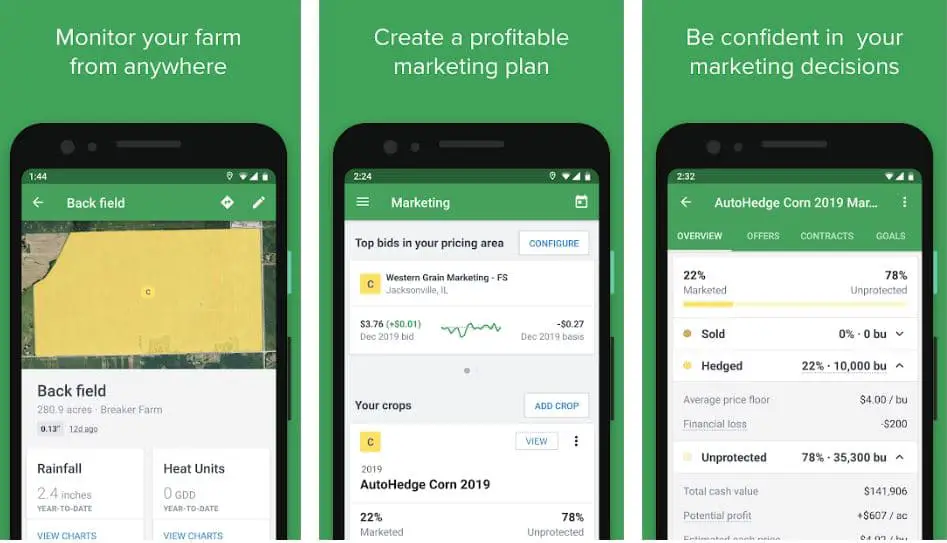
It helps farmers keep their farms’ records, monitor field and crop conditions, and analyze their farm’s financial performance.
In the long run, this will be the most useful to the farmers since it will help them keep track of their finances to make the necessary changes to cut costs and increase profitability.
You can use the app from anywhere without being in the field to get the data. It also has a special section where you can keep track of the marketing section and make bids.
The most interesting aspect is that you can get alerts on your smartphone when it’s raining and record heat accumulation. With this, you can compare the data of the last 10-year average and make smarter decisions.
To add more to this, we loved the entire app design. Everything is perfectly laid out and user-friendly as well. Its technology uses GPS to map fields and provide directions to your location.
Moreover, fill up all the data about your crops and needs, showing you the best and nearest store where you can get the best price for your crop.
Furthermore, it keeps all your data organized and up-to-date so you do not miss out on anything.
Pros:-
- Simple and easy to use the app
- Keeps all the data organized
- Monitor field and crops condition
- It can be used anywhere
- View in-season satellite images
Cons:-
- Lags a bit
- The Premium version is expensive
Platform Availability
Android (Download Here), iOS (Download Here)
2. NOAA Weather Radar Live & Alerts
NOAA is a weather app; as indicated, it is one of the best farming apps we have come across and very important to every farmer.
The best part about the entire app was its highly interactive map with every bit of information that you would need for your crops and what’s next to come.
The app gives out severe weather warnings no matter whichever region you live in so that you can act accordingly on how you can protect your cops.
The app works to provide real-time updates on the weather. It gives accurate information such as precipitation, humidity, current temperature, pressure changes, and much more that can benefit the farmers in the field.
If you are not interested in the updates, you can choose to customize your weather report and receive as limited info as you would want entirely.
Even if you are not using your smartphone, the app will immediately alert you with notifications in case of any weather emergency.
Apart from this, you can move from multiple maps and watch over the different weather conditions in other parts of the world.
These alerts and features are available worldwide; anyone can download them to keep themselves updated.
You can download it from the store for free, use the premium version for more features, and eliminate ads. The design is pretty good, and you can easily navigate it.
Pros:-
- 24×7 weather forecast alerts
- Easy locations search
- Easy to navigate the app
- Accurate information on everything
- Alert notification during an emergency
Cons:-
- Subscription is expensive
- The free version has too many ads
Platform Availability
Android (Download Here), iOS (Download Here)
3. Agrivi
Agrivi is another farm management app that helps farmers take care of their activities and make the necessary decisions worldwide. Every farmer has to look over many things rather than just the crops.
It includes livestock, crop prices, machines, weather, etc. This farm management software will provide better insights into their current production and help them improve productivity and profitability.
Such apps have been provided with databases and knowledge about agricultural practices such that these data can help farmers make better production decisions and increase productivity after that. It is simple to use and much faster than most of the apps on the market.
Fill up all your data needed on the app and make for better planning, monitoring, and tracking of every farm activity, which earlier may have been left unchecked.
One of the major aspects that every farmer needs is financial analysis, and Agirvi keeps your expenses in check to take control of them.
You may not need any separate app for weather forecasting since this app gives a 7-day forecast which is very accurate.
Also, you can check the 3-year weather history and compare accordingly, including the feature of smart disease risk detection alarms.
As we spoke, the app had been provided with a detailed analysis of every aspect of about 60 crops for accurate planning.
Pros:-
- Very knowledgeable app
- Simple yet fast in execution
- Have a huge database for smarter decision
- It provides accurate weather forecasting too
- Good for farm management entirely
Cons:-
- Only free trial available
- Error while loading data
Platform Availability
Android (Download Here), iOS (Download Here), Windows (Download Here), Mac(Download Here), and Linux (Download Here)
FiledBee is a tractor navigation app that uses GPS technology to get accurate results as required. Often, farmers lose track of their tractors on the field, so they may have to start all over again.
But using this app, you can keep track of all your tracks with a click on your smartphone. It has been in the market for five years, benefiting thousands of farmers worldwide.
Apart from simply the app, a lot is happening in engineering the associated devices. Now, attach the RTK GNSS manual guide to the tractors and track them by providing them with proper instructions.
You can also buy an auto-steer that is cruelly used by farmers in their tractors so that you have to set up the parallel line on the field that the tractors would move into.
This has a lot more accuracy and precision as compared to manual instructions. The app gives out functions such as navigating, making notes, and recording your work.
With the help of the autosteer system, you can even make the tractors work at night time with the highest precision so that you are always a step ahead in your work.
In the free format, you get everything you want from the app. Moving to a premium version only makes sense if you are willing to spend any money.
Pros:-
- The app is very intuitive and useful
- GPS tracking works perfectly well
- It saves money and time
- Very easy to use
- Helps to increase overall productivity
Cons:-
- Limited features in the free version
- Login issues
Platform Availability
Android (Download Here)
5. Farm Dog
Farm Dog is known to be one of the best apps for farming and has been very popular since it was launched.
This app makes it easier for every farmer to keep track of their field and all the activities associated with it.
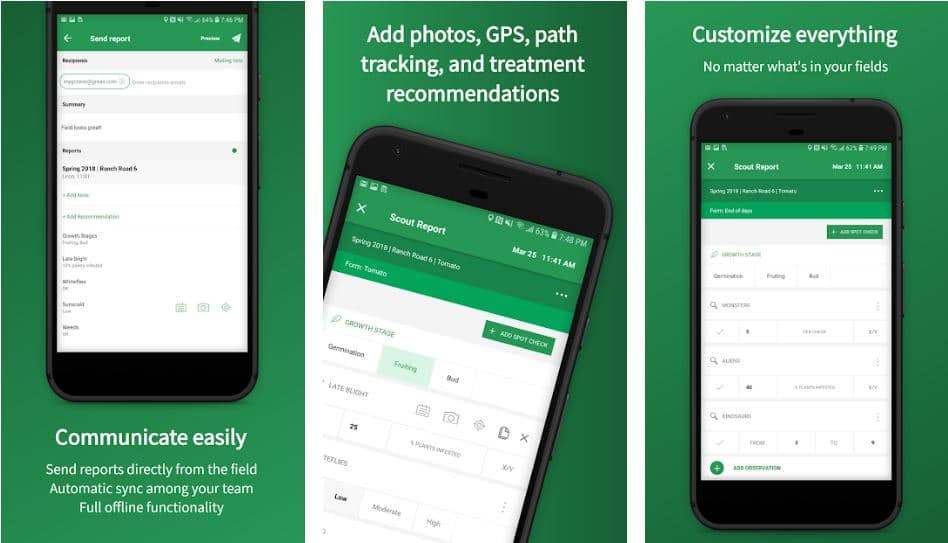
It saves you time and money and allows you to share your field observations easily. Some of the major features you can achieve through this app make it a remarkable find.
You can view the field weather report to take necessary actions before emergencies occur. While using the app on the smartphone, you can easily capture images of the field, tale observations, etc., made possible with GPS technology.
It plays a major role in the entire process or says every process. Since many farmers work with others, keeping track of them while in the field becomes important. This app helps you track your scout path in the field; you need not be near it.
As we had mentioned, with an accurate observation from the field, you can send all the reports directly through the app, saving a lot of time for you.
The best part of this app is that the free version is sufficient for your entire team. You can look for a professional package. You can try out their trial version and choose whichever suits you.
Below is the summary of the main Pros and Cons of the Farm Dog app that makes it add to the Best free Farming Apps list.
Pros:-
- Easy to use and navigate
- Creates reports and observations pretty easily
- GPS technology is the key here
- The free version is perfect to start with
- Get accurate weather info
Cons:-
- Issues with the connection at times
- Premium package available too
Platform Availability
Android (Download Here), iOS (Download Here), Web
6. Farm At Hand
Farm At Hand is a unique app built by farmers for their fellow farmers worldwide. Yet another farm management app is free of cost and available to everyone looking to manage their farming activities best.
All your data and activities are directly stored in the cloud; you can access them anywhere, anytime in the world. Moreover, it is platform-independent, meaning you can download it on Android or iOS or even operate it from your desktop.
Everything has been taken care of in this app, from seeds to machines to weather, and you need not look for anything else.
First, the design or interface is highly intuitive, and you will love using it and all its features.
All the activities on the field, such as sowing the seeds, spraying, observations, harvesting the crops, tracking, and scheduling any activity, have been recorded and taken care of with this single app on your smartphone.
After this, you can even track and keep details of the buyer, such as the contracts and the deliveries. Apart from the field activities, you can track the equipment, and the fleet, keep logs, etc.
Another important aspect of this free app is its safety and security. No one can access your data without your permitting yourself.
If you want, share access with your other team members as well. Everyone looks for free benefits, and there isn’t anything more beneficial than this app since it has all the features.
Pros:-
- Great web interface and design
- Platform independent
- Free of cost
- Easy to use and intuitive
- Cloud-based farm app
Cons:-
- The support system isn’t the best
- Lags sometimes
Platform Availability
Android (Download Here), iOS (Download Here), Web
7. AgriWebb
Agriwebb is a cloud-based farm management software designed to help farmers take their businesses to the digital world with better decision-making capabilities.
This app is here to help you with your on-field activities and provides you with Livestock management, task management, farm mapping, real-time data, and a lot more.

Not only can you access all the data on your smartphone while online, but everything is available offline, too, if you have no connectivity.
All the records you create are saved in your device apart from the cloud so you can access them anytime, anywhere in the world. Moreover, the app syncs your data every 30 minutes but will need an internet connection.
It is available for both Android as well as iOS devices. Using the Map, you can track your Livestock and field.
You can also create your map on the app rather than going for any other separate app that may cost you extra money.
AgriWebb uses Google maps to create clear images of the field on your smartphone, so you must always keep your GPS on.
With the help of this mobile app, you can assign tasks to your employees or partners. Whether a broken fence or anything has gone wrong on the field, you can create an alert on the app and forward it to other employees.
All the tasks are visible on the map, so you can track them too easily. This entire process will save time and money and increase productivity.
Below is the summary of the main Pros and Cons of the AgriWebb app that makes it add to the Best Farming Apps list.
Pros:-
- Very simple to use and navigate
- Perfect for carrying on work offline
- Manage farm visually using GPS
- Create tasks easily
- Real-time stock level update
Cons:-
- Expensive
- Issues with lagging at times
Platform Availability
Android (Download Here), iOS (Download Here)
8. Cropio
Cropio is a satellite field management software that helps farmers remotely manage crops or agricultural land.
You can easily get real-time updates on the condition of the crops, vegetation, problem areas, if any, and the weather forecast.
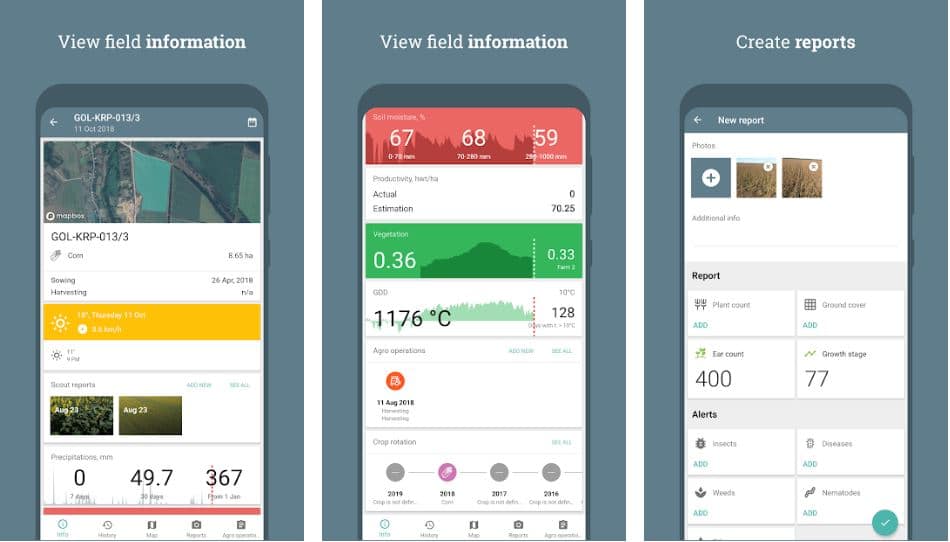
This app is also used by agricultural companies that manage huge sections of land and sources.
Once you have fed your data to the app, you can access information on your field every day, satellite images, the status of agricultural works, current weather data, field status reports, etc.
All the data is synced to the cloud, and you can access it while offline to make better decisions and plan without interference or delay.
With the help of the images and data, you can get a report from the app so that it can be shared with your patterns involved with you or for any other purposes.
It’s free of cost, available to remote parts of the world, and easy to use. Some of the features you will notice on the app include real-time vegetation monitoring.
Also, with the integration of Google maps and GPS monitoring systems, you can better view the field and even learn more about the weather.
Any weather emergency will be alerted by the app on your smartphone so that you are prepared.
You can save a good amount of money and increase productivity overall. In fact, with a huge amount of data on the app store by various organizations, you can compare past years’ data and make an informed decision on the field.
Below is the summary of the main Pros and Cons of the Cropio app that makes it add to the Best Farming Apps for Android list.
Pros:-
- Works well and provides frequent updates
- Customer support is amazing
- Reports available on the data
- It helps to minimize risks and uncertainties.
- Simplicity and ease of use
Cons:-
- Too many functions for a small app
- language availability is limited
Platform Availability
Android (Download Here), iOS (Download Here), and Web
9. Agrimap
Agrimap is our final product on the list here, but one of the best farming apps you cannot ignore. It has made managing the farm easier than before with the perfect technology.
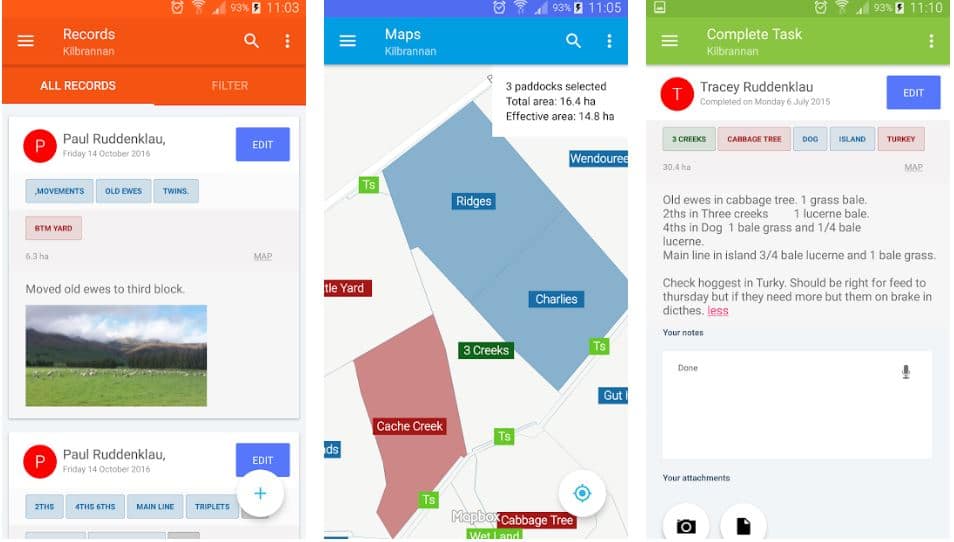
All the data is stored in the cloud, and you can easily access it without any internet connection. Make sure to sync all the data once you are back with the connectivity on the cloud to save it.
Agrimap has made keeping your farm record much easier with a few simple clicks. Similar to what we have seen in the other apps, you can create tasks based on the analysis of the file and send it to the respective people directly from the app.
Furthermore, once the tasks are done, you will be notified and can keep it as a part of the record in the cloud for future reference.
Making plans using all the data on the app is super quick and very valuable. There is nothing that you cannot achieve now. Such plans are not only based on your analysis, but with the help of historical events, you can make better decisions.
You can easily bring the entire team on the app and share all the info so everyone is updated similarly.
As a manager, you can also set up privacy settings so that only limited data is available to other employers, and you need not share confidential data.
You may not have seen the search option in other apps. Using this, you can easily search for any aspect of your farm on the map.
Below is the summary of the main Pros and Cons of the Agrimap app that makes it add to the Best Farming Apps list.
Pros:-
- Simple yet dynamic interface
- Interactive farm map
- Easy for farmers to use
- Color coding paddock is a great feature
- Customer service is top-notch
Cons:-
- It can be a little expensive for some
- Not available for iOS devices
Platform Availability
Android (Download Here) and Web
📗FAQ
Is there any app for farmers?
Yes, there are many apps available for farmers. Some popular farming apps include FarmLogs, AgriSync, TractorPal, and Climate FieldView.
These apps can help farmers manage their crops, track weather conditions, monitor soil health, and access helpful resources.
Best Farming Apps for Android
Looking for top farming apps for Android? Consider Agrobase, FarmLogs, Farmers Edge, and Cropio.
These apps help manage farms by providing real-time weather updates, crop management tools, and market analysis. Monitor expenses, profits, and livestock too. Streamline farming operations and maximize productivity with these apps.
App for Farmers to Sell
Farmers can sell products directly to consumers with apps like Farmstand, Farmigo, and Local Line. These apps offer inventory management and payment processing, removing the need for a middleman. Manage sales with ease.
Best Farming App Games
For fun farming games on mobile, try Farming Simulator 20, Stardew Valley, and Hay Day. Manage your own farm, plant crops, raise animals, and sell products in these relaxing games.
Best Grain Market App
Grain farmers can track prices and trends with GrainBridge, GrainCoat, and Commodity Prices. These apps provide real-time market data, analysis, and insights for informed selling decisions.
Farming Simulator Apps
For a realistic and immersive farming experience on mobile, try Farming Simulator 18, Real Farming Simulator, and Farmer Sim 2018. Manage farms, plant crops, raise animals, and operate machinery with these apps.
What is the easiest farming to make money?
The easiest farming to make money depends on various factors, such as location, market demand, and available resources. Some profitable farming options include raising chickens, growing herbs and spices, selling eggs and dairy products, and growing high-value crops like mushrooms and microgreens.
Does anyone make money farming?
Yes, many farmers can make a living from their farm operations. However, farming can be challenging and unpredictable, and success often requires hard work, strategic planning, and a bit of luck.
What is the best farm to make money?
The best farm to make money on depends on the individual farmer’s goals and resources. Some profitable options include organic vegetable farming, raising grass-fed livestock, cultivating high-value crops like berries and nuts, and producing artisanal products like cheese or honey.
What app connects local farmers?
Several apps connect local farmers and consumers, such as LocalHarvest, Farmstand, and Farmigo. These apps allow consumers to purchase fresh, locally grown food directly from farmers in their area.
How do I connect with local farmers?
To connect with local farmers, you can attend farmers’ markets, join a community-supported agriculture (CSA) program, or visit local farms and talk to the farmers directly.
You can also use online resources like LocalHarvest and Farmigo to find and connect with farmers in your area.
How to make money with 5 acres?
There are many ways to make money with 5 acres of land, such as growing high-value crops, raising livestock, or starting a small-scale agribusiness like a farm stand or agritourism operation.
It’s important to research market demand and potential profitability before investing in a specific farming venture.
Can a hobby farm make money?
Yes, a hobby farm can make money, but keeping realistic expectations and carefully managing expenses is important.
Some potential revenue streams for hobby farms include selling produce at farmers’ markets, offering farm tours and workshops, or selling artisanal products like honey or soap.
Is 1 acre enough for a farm?
It is possible to farm on 1 acre of land, but the specific type of farming and the individual farmer’s goals and resources will determine whether or not it is sufficient.
Small-scale intensive farming methods like market gardening or micro-farming can be successful on 1 acre of land.
Why are farmers so rich?
Not all farmers are rich, and farming can be challenging and unpredictable. However, some farmers can build successful and profitable operations through hard work, careful planning, and strategic business decisions.
How can I make money on a small farm?
There are many ways to make money on a small farm, such as selling produce at farmers’ markets, offering agritourism experiences, selling value-added products like jams or cheese, or raising livestock.
It’s important to research market demand and potential profitability before investing in a specific venture.
Can you live off farming?
It is possible to live off farming, but it can be a challenging and unpredictable business. Success often requires hard work, strategic planning, and diverse revenue streams. It’s important to carefully manage expenses and understand the local market and demand for agricultural products.
What is the most profitable crop to grow as a farmer?
The most profitable crop to grow as a farmer depends on various factors, such as location, market demand, and available resources.
Some generally considered high-value and profitable crops include specialty fruits and vegetables, herbs and spices, nuts, and medicinal plants.
What is the most profitable thing to sell on a farm?
The most profitable thing to sell on a farm depends on the individual farm’s resources, location, and market demand.
Some profitable options include high-value crops like berries and herbs, value-added products like honey or cheese, and artisanal products like handcrafted soaps or candles.
What’s the most expensive crop to grow?
The most expensive crop to grow depends on various factors, such as location, weather conditions, and farming methods. Some crops that are typically expensive to grow include saffron, truffles, and vanilla.
Does Walmart use local farmers?
Walmart works with some local farmers, but most of its produce is sourced from large-scale commercial suppliers. In recent years, Walmart has implemented programs to increase its support of local and regional growers.
What is a click farm app?
A click farm app uses fake users and bots to generate fake clicks, likes, or views on social media platforms or websites. These apps are used to artificially inflate engagement metrics and boost the perceived popularity of a website or social media account.
How does the Smart Farm app work?
It is unclear which specific app you call “Smart Farm app.” However, many farming apps work by providing users with tools and resources to manage their farm operations, such as tracking weather conditions, monitoring soil health, and managing crop growth.
How do I find local farmers in my area?
You can find local farmers in your area by attending farmers’ markets, visiting local farms, or joining a community-supported agriculture (CSA) program. You can also use online resources like LocalHarvest and Farmigo to find and connect with farmers in your area.
How do you get a farm together?
Getting a farm together typically requires careful planning, hard work, and a significant investment of time and resources.
Some important steps include researching land options, obtaining necessary permits and licenses, developing a business plan, and securing financing.
What is farmers only dating site?
Farmers Only is a dating site specifically designed for people who live in rural areas and work in agriculture. The site aims to connect farmers and people with similar values and lifestyles.
What can I grow on 1 acre for profit?
It is possible to grow crops on 1 acre of land for profit, depending on the individual farmer’s goals and resources. Some options include high-value crops like berries, herbs, and microgreens or value-added products like honey or cheese.
Can you make a living on 50 acres?
It is possible to make a living on 50 acres of land, but it depends on various factors, such as location, market demand, and the specific farming methods used. Some profitable options for small-scale farming on 50 acres include raising livestock or growing high-value crops.
How do you make land pay for itself?
There are many ways to make land pay for itself, such as by using it for farming or ranching operations, leasing it for hunting or recreation, or developing it for residential or commercial use.
It’s important to research potential revenue streams and carefully manage expenses to ensure profitability.
What does the IRS consider a farm?
The IRS considers a farm to be a business that produces crops, livestock, or other agricultural products for sale, rent, or uses in a trade or business. The farm must be operated to make a profit and meet certain size and income requirements.
Can you write off farm expenses?
Farmers can generally write off expenses related to their farm operations on their taxes, such as the cost of Seeds, fertilizer, and equipment. However, it’s important to keep accurate records and follow IRS guidelines for deducting farm expenses.
How many acres can 1 person farm?
The number of acres one can farm depends on various factors, such as the type of farming and the individual farmer’s goals and resources.
Some small-scale farming methods, like market gardening or micro farming, can be successful on just a few acres, while larger operations may require more land and additional labor.
What is the easiest farm animal to raise?
The easiest farm animal to raise depends on the individual farmer’s experience and resources. Some common options for beginners include chickens, ducks, and rabbits, which require relatively low maintenance and can provide a source of eggs or meat.
What is the easiest crop to grow for farmers?
The easiest crop to grow for farmers depends on various factors, such as location, climate, and available resources. Some generally considered easy to grow and low-maintenance crops include beans, peas, and leafy greens.
How many houses fit on 1 acre?
The number of houses that can fit on 1 acre of land depends on local zoning laws and building codes. In general, most areas require at least half an acre of land per single-family home, so one acre of land could potentially accommodate two houses.
Who is the richest farmer in America?
It is difficult to determine the richest farmer in America, as wealth can be difficult to measure and varies depending on the individual’s assets and investments. Some well-known wealthy farmers include David Hula, Ken Dallmier, and John R. Block.
Do most farms lose money?
Not all farms lose money, but farming can be challenging and unpredictable. Success often requires hard work, strategic planning, and a bit of luck.
However, many farmers can make a living and build profitable operations through careful management and diversifying revenue streams.
What income is rich?
The definition of “rich” varies depending on the individual’s location, lifestyle, and other factors. However, in the United States, the top 1% of earners make over $400,000 per year, and the top 0.1% make over $1.6 million per year.
What can you write off on taxes for hobby farms?
Farmers with hobby farms can typically write off expenses related to their farming activities on their taxes, such as the cost of feed or equipment. However, the amount that can be deducted may be limited depending on the individual’s income and other factors.
What is micro farming?
Microfarming is small-scale, intensive agriculture that maximizes productivity on a small amount of land. Microfarms typically use crop rotation, companion planting, and vertical farming to produce high yields on just a few acres of land.
Can you start farming with no money?
It is possible to start farming without money, but it can be challenging. Some potential options for starting a farm with limited funds include leasing or renting land, starting a small-scale market garden, or seeking grants or loans for beginning farmers.
Is owning a farm stressful?
Owning a farm can be stressful, as farming can be a challenging and unpredictable business. However, it can also be rewarding and fulfilling for those who enjoy working with the land and producing agricultural products.
How much does a farm make per acre?
The amount of money a farm makes per acre depends on various factors, such as the type of farming and the local market demand.
Some profitable options for small-scale farming include organic vegetable farming, raising grass-fed livestock, or growing high-value crops like berries or nuts.
Am I too old to become a farmer?
There is no age limit to becoming a farmer; many people start farming later in life. However, it’s important to consider the physical demands of farming and have a solid business plan before starting a farm operation.
What can I grow in my backyard to make money?
Many crops, such as herbs, specialty fruits and vegetables, and microgreens, can be grown in a backyard to make money. It’s important to research market demand and potential profitability before investing in a specific crop.
What is the cheapest crop to grow?
The cheapest crop to grow depends on various factors, such as location, climate, and available resources. Some generally considered low-cost and low-maintenance crops include beans, peas, and leafy greens.
What type of food does a farmer make the most money from?
The type of food from which a farmer can make the most money depends on various factors, such as market demand and local growing conditions. Some high-value crops typically profitable for farmers include berries, herbs, and mushrooms.
What are the biggest expenses on a farm?
The biggest expenses on a farm depend on the individual farm’s operations and resources. However, some common expenses include land, equipment, seeds and fertilizer, and labor.
Do farm owners make a lot of money?
Farm owners can make significant money if they can build successful and profitable operations. However, farming can be challenging and unpredictable, and success often requires hard work, careful planning, and diversifying revenue streams.
What is the best business type for a farm?
The best business type for a farm depends on the individual farmer’s goals and resources. Some common business types for farms include sole proprietorships, partnerships, and limited liability companies (LLCs).
What is the most cash crop?
Most cash crop depends on various factors, such as location, market demand, and available resources. Some high-value cash crops include cannabis, saffron, and truffles.
How much is an acre of lavender worth?
The value of an acre of lavender depends on various factors, such as soil quality, climate conditions, and market demand. However, the wholesale value of dried lavender can range from $5 to $15 per pound.
How much money does 1 acre of corn yield?
The yield of 1 acre of corn depends on various factors, such as weather conditions and farming methods. However, the average yield of corn in the United States is around 168 bushels per acre, translating to roughly $1,000 in revenue per acre.
What app do farmers use?
Hundreds of apps are available on the app store and on the web for farmers. Among them, some of the best ones are AgWorld, ClimateApp, etc.
These apps will help in farm management used by farmers worldwide. They can keep track of the inventory, crops, climate, pests, and more.
How is GPS used in agriculture?
Monitoring the soil and the crops is one of the most important aspects for farmers. With the help of GPS, farmers can navigate to locations to collect soil samples.
All these collected data are then further used to map the infestations on the field and take proper measures for it.
What is the best farming technology?
With the introduction of technology into farming, the production and the safekeeping of crops have increased on a massive scale.
Some of the best farming technology you can find are GIS-based agriculture, where GPS or satellites collect data on soil, climate, weather, etc. Another one is the use of data for crop monitoring which is done with the help of apps and software.
What is the smart farming system?
Smart Farming uses advanced or future technology such as IoT, Big data, AI, etc., to enable efficient crop monitoring, tracking, automation, operations, and other aspects of farming.
Is farming profitable?
Yes, Farming is highly profitable if you are dedicated to making the best use of your land. Well, it surely isn’t something that can instantly get you money since growing crops and farming takes time.
You need to have a piece of land to start with, and as you proceed further, you will learn how to make farming profitable.
Final Verdict on farming apps
Here we are with the nine best farming apps you cannot move past without knowing more about. We did our best so that you can get the best apps for your farm management. These apps are perfect for all activities on and off the field.
It includes apps that give you detailed insight into weather forecasting, livestock management, taking reports, scheduling tasks, etc.
We have tried to mention as much info as possible, but make sure you go through each app.
Some are free, while some may not be. So, if you are okay with spending some money, then there is no limit to all the premium subscriptions you can use in the best manner; we love all the apps and have used them thoroughly to give you detailed info.
If you have been using any other app, let us know in the comment section below so we can update ourselves and benefit others too.


