
























Do you feel overwhelmed by the intricate demands of your lawn?💁 The constant cycle of watering, fertilizing, mowing, and weeding can become daunting, especially without expert knowledge or ample time.
Uncertainties like when to water, which fertilizers to use, or how to deal with pests may leave you second-guessing your lawn care decisions and potentially compromising your lawn’s health.
Perhaps you’ve tried to take control of your lawn care using a mixture of advice from gardening books, neighborhood folklore, and trial and error. Still, the results are inconsistent, and the amount of time and effort invested isn’t worth it.
Maybe you’ve considered hiring professional services, only to be discouraged by the prohibitive costs and less personalized care for your green space.
But what if there was a way to simplify your lawn care routine, saving you time, and energy and ensuring the best for your yard? Welcome to the future of gardening – Lawn Care Apps.
These applications bring expert advice and smart scheduling to your fingertips, customizing your lawn care approach based on your lawn’s needs. From irrigation schedules to pest control tips, these apps take the guesswork out of lawn care, leaving you with a lush, healthy lawn you can be proud of.
Let’s delve into the world of lawn care apps and discover how they can revolutionize your green routine.
The Growing Trend of Smart Gardening
Smart gardening has emerged as a notable trend in horticulture in recent years. This innovative approach to gardening leverages advanced technologies to optimize plant care and create sustainable, eco-friendly landscapes.
With the increasing popularity of Internet of Things (IoT) devices and smart home technology, it’s no wonder that smart gardening has captured the imagination of gardening enthusiasts and eco-conscious individuals alike.

One of the key elements of smart gardening is smart irrigation systems. These systems employ soil moisture sensors and weather data to deliver precise amounts of water to plants, ensuring efficient water usage and minimizing wastage.
By automating the irrigation process, smart gardening allows for optimal hydration, promoting plant health and conserving water resources. Another aspect of smart gardening is the integration of smart sensors that monitor various environmental factors.
These sensors provide real-time data on temperature, humidity, light levels, and soil conditions, enabling gardeners to make informed decisions about plant care. With this information, gardeners can adjust watering schedules, optimize fertilizer application, and even receive alerts in unfavorable conditions or pest infestations.
Moreover, smart gardening extends beyond outdoor spaces. Indoor gardening enthusiasts can benefit from smart indoor gardening systems that utilize LED grow lights, automated watering mechanisms, and smart apps to create ideal indoor plant growth conditions. This allows individuals to enjoy fresh herbs, vegetables, and ornamental plants year-round, regardless of limited space or unfavorable weather conditions.
In conclusion, the growing trend of smart gardening represents a fascinating blend of nature and technology. By harnessing the power of IoT devices, smart sensors, and automation, gardeners can achieve more efficient and sustainable plant care, leading to healthier plants and a greener future.
So, whether you have a sprawling backyard or a cozy apartment, consider joining the smart gardening revolution and journey towards a smarter, greener garden.
Best Lawn Care Apps To Transform Your Yard
1. GreenPal
In the realm of lawn care apps, GreenPal stands out as a true gem. It’s exceptional features and user-friendly interface have earned the reputation of being one of the best lawn care apps available today.
GreenPal revolutionizes the way homeowners connect with lawn care professionals. With just a few taps on their smartphones, users can effortlessly find and hire reliable and skilled lawn care providers in their area. The app’s robust algorithm ensures that only the most qualified and vetted professionals are listed, guaranteeing top-notch service for customers.
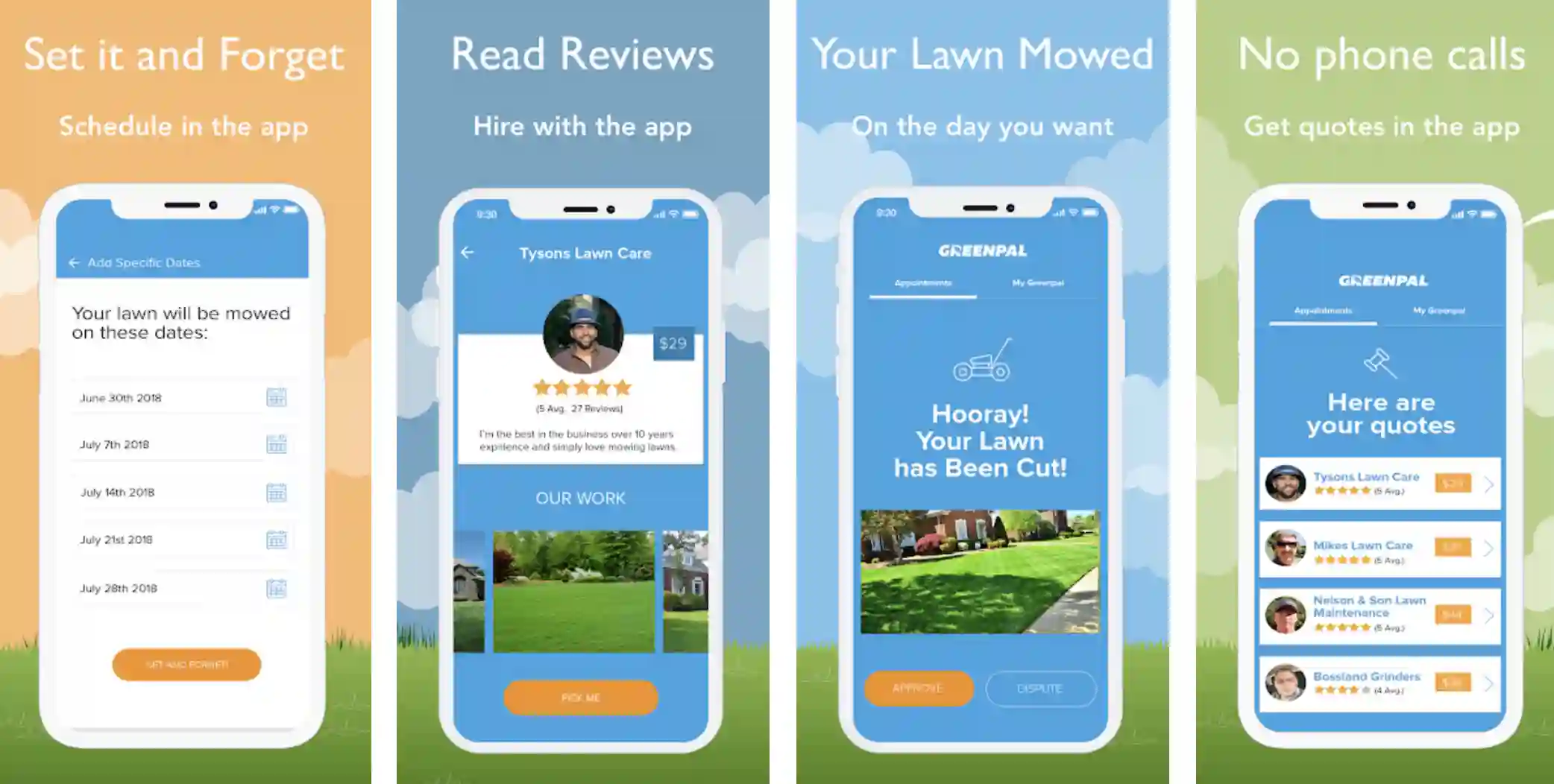
What sets GreenPal apart from other apps is its seamless payment system. Gone are the days of fumbling with cash or writing checks.
With GreenPal, users can conveniently pay for their lawn care services through the app, eliminating hassle. The app also offers secure transactions, giving users peace of mind regarding their financial information. Moreover, GreenPal provides transparent communication between homeowners and lawn care providers.
Users can easily discuss their lawn care needs, share specific instructions, and even receive real-time updates on the progress of their lawn maintenance. This level of convenience and efficiency ensures homeowners have complete control over their lawn care experience.
In conclusion, GreenPal is the epitome of excellence among lawn care apps. Its commitment to quality, convenience, and customer satisfaction makes it the go-to choice for homeowners seeking top-tier lawn care services. So, if you’re searching for a reliable and efficient way to maintain your lawn, look no further than GreenPal – the best lawn care app in the market.
Pros:-
Convenience: GreenPal offers unmatched convenience by allowing users to easily find and hire lawn care professionals with just a few smartphone taps. It eliminates the need for time-consuming research and phone calls.
Vetted Professionals: The app’s robust vetting process ensures that only qualified and reliable lawn care providers are listed on GreenPal. Users can have peace of mind knowing they hire professionals with a proven track record.
Transparent Communication: GreenPal facilitates clear and direct communication between homeowners and service providers. Users can discuss their specific needs, provide instructions, and receive real-time updates on the progress of their lawn care services.
Secure Payments: With GreenPal, users can conveniently pay for lawn care services through the app. The secure payment system eliminates the need for cash or checks and provides a hassle-free transaction process.
Cons:-
Limited Availability: While GreenPal operates in many areas, it may not be available in all regions. Users in less populated areas might have limited options for finding lawn care providers through the app.
Reliance on Technology: As with any app, technology is reliant. If users encounter technical issues or glitches, it may hinder their ability to access or use the app effectively.
Service Quality Variations: While GreenPal screens its providers, there may still be variations in the quality of services provided. Some users may have different experiences based on the individual lawn care professional they hire.
Service Limitations: GreenPal primarily focuses on standard lawn care services. Users requiring specialized services or landscaping beyond basic maintenance may need to seek additional resources outside the app.
Considering these pros and cons can help homeowners determine if GreenPal is the right lawn care app for their needs. Ultimately, the convenience, vetted professionals, and transparent communication offered by GreenPal make it a popular choice among users seeking reliable and efficient lawn care services.
Download the App from Google Play Store
Download the App from Apple App Store
2. LawnStarter
Regarding effortless and efficient lawn care, LawnStarter is a name that shines. As an innovative and user-friendly platform, LawnStarter has garnered a well-deserved reputation for its commitment to providing exceptional lawn care services.
With LawnStarter, homeowners can say goodbye to the complexities of finding and scheduling reliable lawn care professionals.
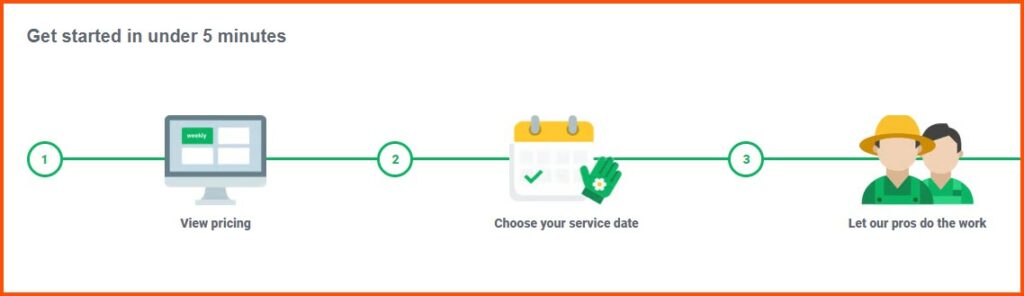
The platform’s intuitive interface and advanced algorithms ensure that users can easily connect with top-rated and vetted lawn care providers in their area.
One of the standout features of LawnStarter is its emphasis on convenience. Users can input their address and select the desired services, and LawnStarter takes care of the rest. The platform offers comprehensive services to meet diverse lawn care needs, from mowing and trimming to fertilization and weed control.
LawnStarter also takes pride in its commitment to customer satisfaction. With transparent pricing, detailed service reports, and the ability to rate and review providers, homeowners have complete visibility and control over their lawn care experience. The platform’s reliable customer support further enhances the overall user experience.
Moreover, LawnStarter leverages technology to provide real-time updates and notifications to inform homeowners about their scheduled services. The seamless integration of mobile apps and communication channels ensures users can easily manage and track their lawn care appointments.
In conclusion, LawnStarter is a leading player in the lawn care industry, offering a simplified and streamlined approach to maintaining beautiful lawns. Its focus on convenience, customer satisfaction, and technological advancements make it a top choice for homeowners seeking hassle-free and professional lawn care services.
Experience the difference with LawnStarter and elevate your lawn care to new heights of excellence.
Pros:-
Convenience: LawnStarter offers a convenient and user-friendly platform for homeowners to book and manage lawn care services.
Users can schedule appointments, select desired services, and communicate with lawn care professionals with just a few clicks.
Vetted Professionals: LawnStarter’s thorough vetting process ensures that users are connected with reliable and skilled lawn care providers. This gives homeowners peace of mind, knowing that their lawns are cared for by experienced professionals.
Transparent Pricing: The platform provides transparent pricing, allowing homeowners to see the cost of services upfront. This transparency helps users plan their budgets and avoid unexpected charges or hidden fees.
Quality Assurance: LawnStarter maintains a high standard of service quality by offering a satisfaction guarantee. If homeowners are not satisfied with the service they receive, LawnStarter will work to make it right.
Cons:-
Limited Availability: LawnStarter may not be available in all areas, particularly in remote or less populated regions. Homeowners in such areas may not have access to the platform’s services.
Service Variation: While LawnStarter screens its providers, there may still be variations in the quality of service from one provider to another. Some homeowners may have different experiences depending on the individual lawn care professional assigned to their property.
Dependency on Technology: As with any online platform, technical issues or outages can impact the user experience. Reliance on technology means users may face challenges if the platform experiences technical difficulties.
Service Limitations: LawnStarter primarily focuses on standard lawn care services, which may not cover specialized or complex landscaping needs. Homeowners with unique requirements may need additional resources or services outside the platform.
By considering these pros and cons, homeowners can decide whether LawnStarter fits their lawn care needs. With its convenience, vetted professionals, transparent pricing, and quality assurance, LawnStarter offers an attractive option for homeowners seeking reliable and professional lawn care services.
Download The App From Google Play Store
Download The App From Apple App Store
3. TruGreen
TruGreen is a trusted name in the industry regarding expert lawn care. With its comprehensive range of services and commitment to customer satisfaction, TruGreen has established itself as a leader in transforming lawns into lush and healthy landscapes.
At the heart of TruGreen‘s success lies its team of skilled professionals with extensive lawn care knowledge. They employ cutting-edge techniques and industry-leading products to address various lawn issues, from weed control and fertilization to pest management and disease prevention.
One of the key strengths of TruGreen is its customized approach to lawn care. The team recognizes that each lawn is unique and requires individual attention. By conducting thorough assessments and considering factors such as soil composition, grass type, and local climate conditions, TruGreen tailors its services to meet the specific needs of every customer.
Moreover, TruGreen is committed to promoting environmentally friendly practices. The company offers various sustainable lawn care options, including organic fertilizer treatments and integrated pest management techniques. This demonstrates their dedication to preserving the health and balance of the ecosystem.
The exceptional customer experience is another hallmark of TruGreen. The company ensures open and clear communication, providing customers with detailed service explanations and recommendations.
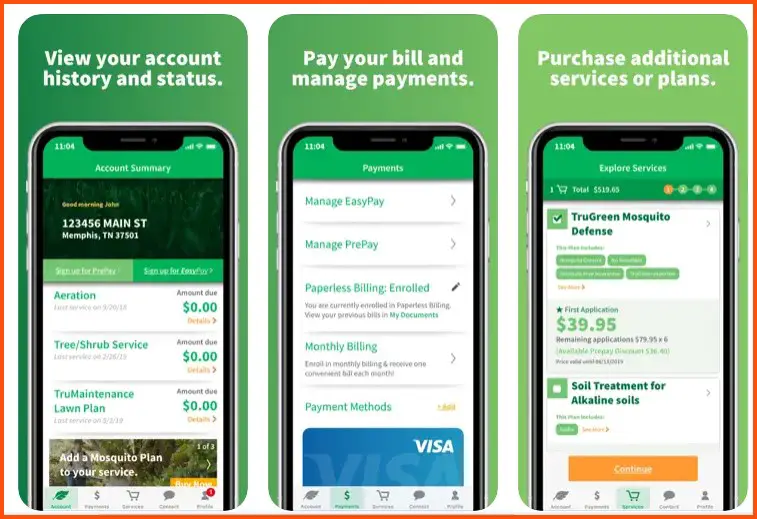
Additionally, TruGreen offers convenient online account management, allowing homeowners to schedule services, view service history, and access informative resources at their fingertips.
In conclusion, TruGreen sets the bar high in professional lawn care. With its knowledgeable team, customized solutions, and commitment to sustainability, TruGreen excels in transforming lawns into vibrant and thriving outdoor spaces. Experience the expertise and dedication of TruGreen and unlock the full potential of your lawn’s beauty.
Pros:-
Expertise and Knowledge: TruGreen boasts a team of skilled professionals with extensive knowledge in lawn care. Their expertise allows them to effectively address a wide range of lawn issues, ensuring optimal results.
Customized Approach: TruGreen understands that every lawn is unique, and they tailor their services to meet specific needs.
By conducting thorough assessments and considering various factors, they provide customized solutions that target individual lawn requirements.
Environmentally Friendly Practices: TruGreen offers sustainable lawn care options, including organic fertilizer treatments and integrated pest management techniques. Their commitment to environmentally friendly practices promotes the health and balance of the ecosystem.
Exceptional Customer Experience: TruGreen values clear and open communication with its customers. They provide detailed service explanations, recommendations, and convenient online account management, enhancing customer experience.
Cons:-
Pricing: TruGreen’s services may be relatively higher in price compared to some other lawn care providers. Homeowners on a tight budget might find the cost of their services to be a potential drawback.
Service Availability: While TruGreen operates in many areas, its services may not be available in all locations. Homeowners in certain regions may not have access to TruGreen’s lawn care services.
Limited Scope: TruGreen primarily focuses on lawn care services and may not offer additional landscaping or tree care services. Homeowners requiring a broader range of services may need assistance from other providers.
Service Quality Variations: Although TruGreen maintains a high standard of service quality, there may still be variations in the level of service provided by individual technicians. Some customers may have different experiences based on the assigned technician.
Considering these pros and cons can help homeowners evaluate whether TruGreen fits their lawn care needs. With its expertise, customized approach, commitment to sustainability, and emphasis on customer satisfaction, TruGreen remains a reputable choice for professional lawn care services.
Download The App From Google Play Store
Download The App From Apple App Store
4. LawnGuru
LawnGuru leads with its innovative approach and seamless user experience in on-demand lawn care services.
By leveraging technology and connecting homeowners with local lawn care professionals, LawnGuru has transformed how people take care of their lawns. With LawnGuru, homeowners can effortlessly request and schedule lawn care services whenever needed.
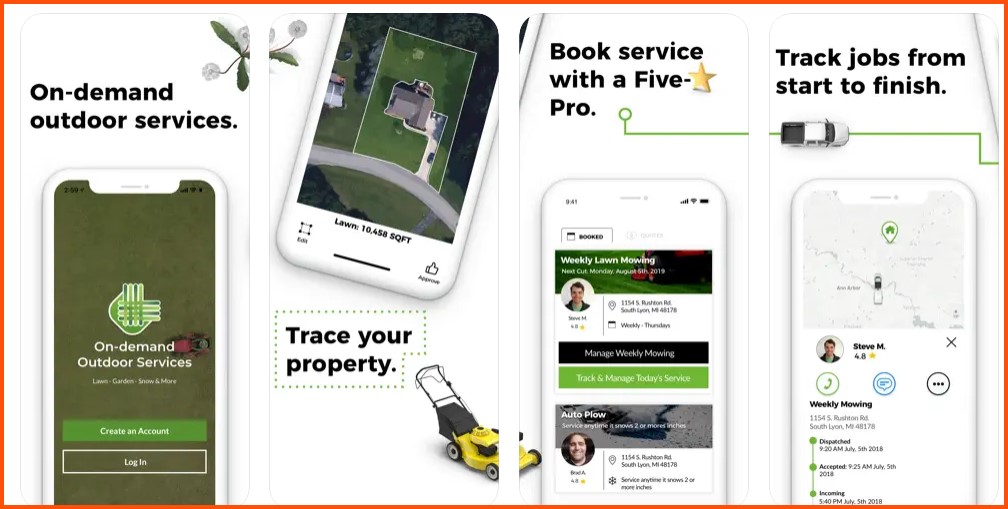
The platform’s user-friendly interface and advanced algorithms match users with highly skilled and vetted lawn care providers in their area, ensuring reliable and efficient service.
One of the standout features of LawnGuru is its flexibility. Whether you need a one-time service or regular maintenance, the platform allows users to customize their lawn care requests to meet their needs.
LawnGuru offers comprehensive services to keep lawns pristine year-round, from mowing and edging to leaf cleanup and snow removal.
Furthermore, LawnGuru prioritizes transparency and convenience. Users can easily manage their lawn care requests, communicate with service providers, and make secure payments through the platform. Real-time updates and notifications keep homeowners informed about the progress of their services, ensuring a seamless and hassle-free experience.
With its on-demand model, LawnGuru caters to the modern lifestyle, where convenience and efficiency are paramount. Whether you’re a busy professional or prefer a hassle-free approach to lawn care, LawnGuru delivers the convenience you crave.
In conclusion, LawnGuru has reimagined the concept of lawn care by providing a platform that combines technology, convenience, and reliable service. Its on-demand model, customizable options, and commitment to user satisfaction make it a top choice for homeowners seeking a modern solution to their lawn care needs.
Experience the power of LawnGuru and unlock the potential of a well-maintained and beautiful lawn with just a few taps on your smartphone.
Pros:-
On-Demand Convenience: LawnGuru offers the convenience of on-demand lawn care services. Users can request and schedule services at their preferred time, providing flexibility and accommodating busy schedules.
Vetted Professionals: The platform connects homeowners with vetted lawn care professionals in their local area. This ensures that users receive service from reliable and skilled providers.
Customization: LawnGuru allows users to tailor their lawn care requests to their needs. Users can customize their requirements whether it’s a one-time service or ongoing maintenance.
Transparent Communication: The platform facilitates direct communication between users and service providers, ensuring clear and transparent instructions and expectations. This enhances the overall customer experience.
Cons:-
Service Availability: LawnGuru’s services may be limited to certain geographic areas. Homeowners in remote or less populated regions might not have access to the platform’s services.
Quality Variations: While LawnGuru vets its providers, there may be variations in the quality of service from one provider to another. Some homeowners may have different experiences based on the individual service provider assigned to their property.
Reliance on Technology: As with any online platform, technical issues or outages can impact the user experience. Users may encounter challenges if they rely solely on the app and face technological difficulties.
Service Limitations: LawnGuru primarily focuses on lawn care services and may not offer additional services like landscaping or tree care. Homeowners with diverse needs may need to seek assistance from other providers.
Considering these pros and cons can help homeowners assess whether LawnGuru fits their lawn care needs. With its on-demand convenience, vetted professionals, customization options, and transparent communication, LawnGuru offers an appealing solution for those seeking convenient and reliable lawn care services.
Download The App From Google Play Store
Download The App From Apple App Store
5. TaskEasy
When simplifying the lawn care experience for homeowners, TaskEasy is a name that stands out. With its innovative platform and comprehensive services, TaskEasy has revolutionized how people approach lawn maintenance needs.
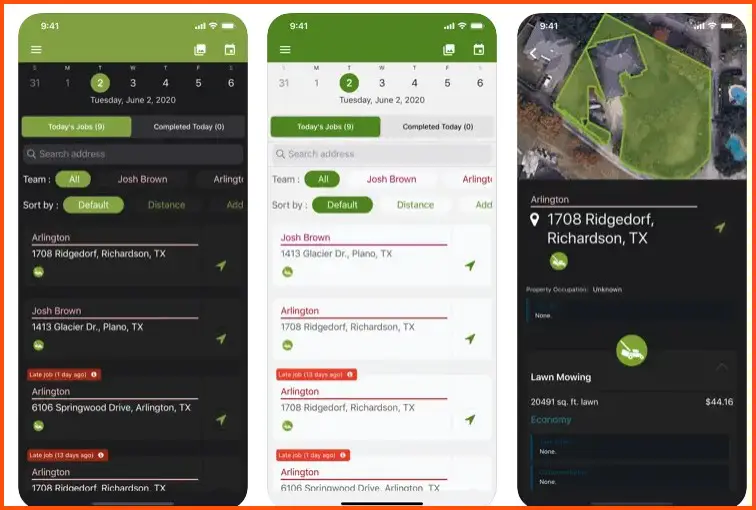
At the heart of TaskEasy‘s success lies its commitment to providing a hassle-free experience. The platform connects homeowners with skilled lawn care professionals who are experienced in their craft.
By leveraging advanced technology, TaskEasy streamlines the scheduling and managing of lawn care services, eliminating the complexities often associated with traditional methods.
One of the standout features of TaskEasy is its transparent pricing model. Homeowners can receive instant quotes for their specific lawn care needs, enabling them to make informed decisions based on their budget. This transparency ensures no surprises or hidden costs along the way.
Moreover, TaskEasy offers a wide range of lawn care services, including mowing, edging, fertilization, and more. The platform’s network of qualified professionals ensures homeowners receive reliable, high-quality service, resulting in beautifully maintained lawns.
In addition to its user-friendly platform, TaskEasy provides exceptional customer support. Homeowners can easily communicate with the TaskEasy support team for inquiries or assistance, enhancing the overall customer experience.
In conclusion, TaskEasy has emerged as a leader in simplifying lawn care for homeowners. With its seamless platform, transparent pricing, extensive range of services, and dedicated customer support, TaskEasy transforms how people approach and enjoy their outdoor spaces.
Experience the convenience and reliability of TaskEasy and discover a new level of ease in maintaining a beautiful and well-manicured lawn.
Pros:-
Hassle-Free Experience: TaskEasy simplifies the lawn care process by connecting homeowners with skilled lawn care professionals and streamlining the scheduling and management of services. This convenience saves time and effort for homeowners.
Transparent Pricing: TaskEasy provides instant quotes for specific lawn care needs, ensuring transparency and allowing homeowners to make informed decisions based on their budget. This eliminates surprises or hidden costs.
Wide Range of Services: TaskEasy offers a comprehensive range of lawn care services, including mowing, edging, fertilization, and more. Homeowners can rely on TaskEasy’s network of qualified professionals for reliable, high-quality service.
Customer Support: TaskEasy provides exceptional customer support, allowing homeowners to easily communicate with their support team for inquiries or assistance. This dedication to customer service enhances the overall experience.
Cons:-
Limited Availability: TaskEasy’s services may not be available in all areas. Homeowners in certain regions may not have access to TaskEasy’s lawn care services, limiting their options.
Quality Variations: While TaskEasy ensures skilled professionals, there may still be variations in the level of service provided by individual technicians. Some homeowners may have different experiences based on the assigned technician.
Service Limitations: TaskEasy primarily focuses on lawn care services and may not offer additional landscaping or tree care services. Homeowners with diverse needs may need to seek assistance from other providers.
Lack of Personalization: As an online platform, TaskEasy may lack the personal touch that some homeowners prefer. Communication with service providers may be limited, which may not suit those seeking more customized or detailed lawn care.
By considering these pros and cons, homeowners can evaluate whether TaskEasy aligns with their lawn care needs.
With its hassle-free experience, transparent pricing, a wide range of services, and customer support, TaskEasy offers a convenient and reliable option for homeowners seeking professional lawn care services.
Download The App From Google Play Store
Download The App From Apple App Store
6. Lawn Journal – Master your yard
Keep track of lawn and landscape care and maintenance routine most effectively and productively. Lawn Journal is a free lawn care and landscaping app for Apple users. The app helps you track your lawn care management and landscaping tasks.
With the help of a simple map interface of the app, you can effortlessly do multiple things, including measuring the entire yard, calculating how much fertilizer is required for your lawn, the perfect ratio of minerals and other essentials in the fertilizer, and much more.
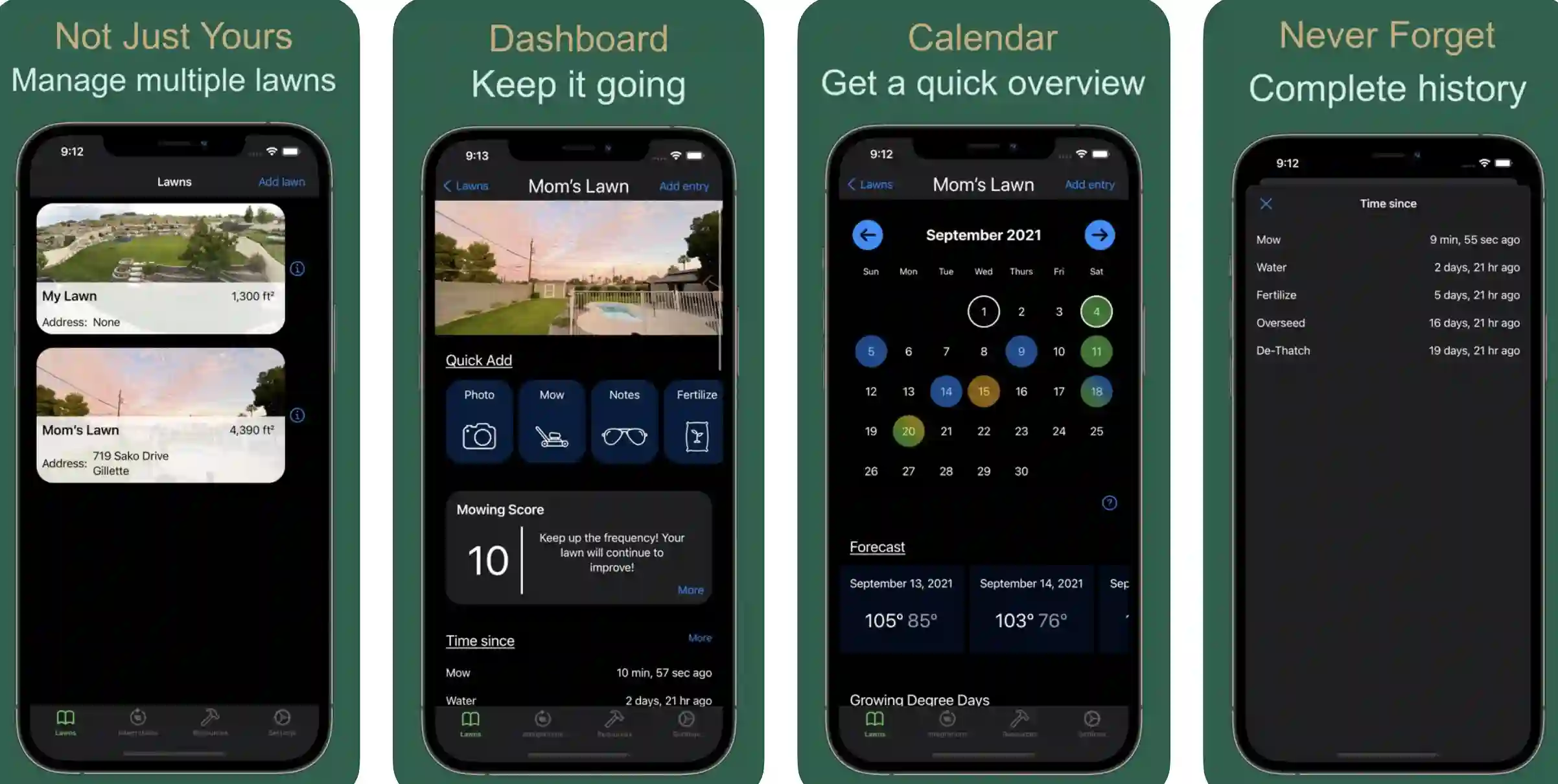
A powerful calendar in the app allows you to track all the tasks related to lawn care in one place. What more? You can add photos and journal notes and set customized timers for sprinklers and other time-based tasks.
Real-time weather forecasts and soil temperature analyses make it one of the most preferred lawn care apps. Using the app, you can easily receive the real-time status of your landscape, and that too, without relying on algorithms to predict your status.
Features:-
- Simple, easy-to-use interface
- Allows you to set lawn care schedules and alerts
- One of the very few apps that allows you to work in metric and imperial amounts.
- Square footage calculator for easy and accurate calculation
- Journal for keeping a record of previous tasks
Devices – IOS Devices Like iPhone, iPad, and iPod Touch
Ratings on Apple Store– 4.8 / 5
Download the App from Apple App Store
7. PlantNet Plant Identification
One of the very few lawn care apps that helps you to identify wild plants with excellent accuracy. PlantNet is an application that helps you to easily identify plants only by uploading their photos through your smartphone.
The app can be very useful in lawn care projects, especially if you don’t know the plants you should and should not have on your lawn. Want to participate in studies related to plants and nature without much effort? Yes, the app helps you to do that as well! How?🧐
The photographs you upload on the app are received, collected, and studied by renowned scientists worldwide for proper study and understanding of the specific plants.
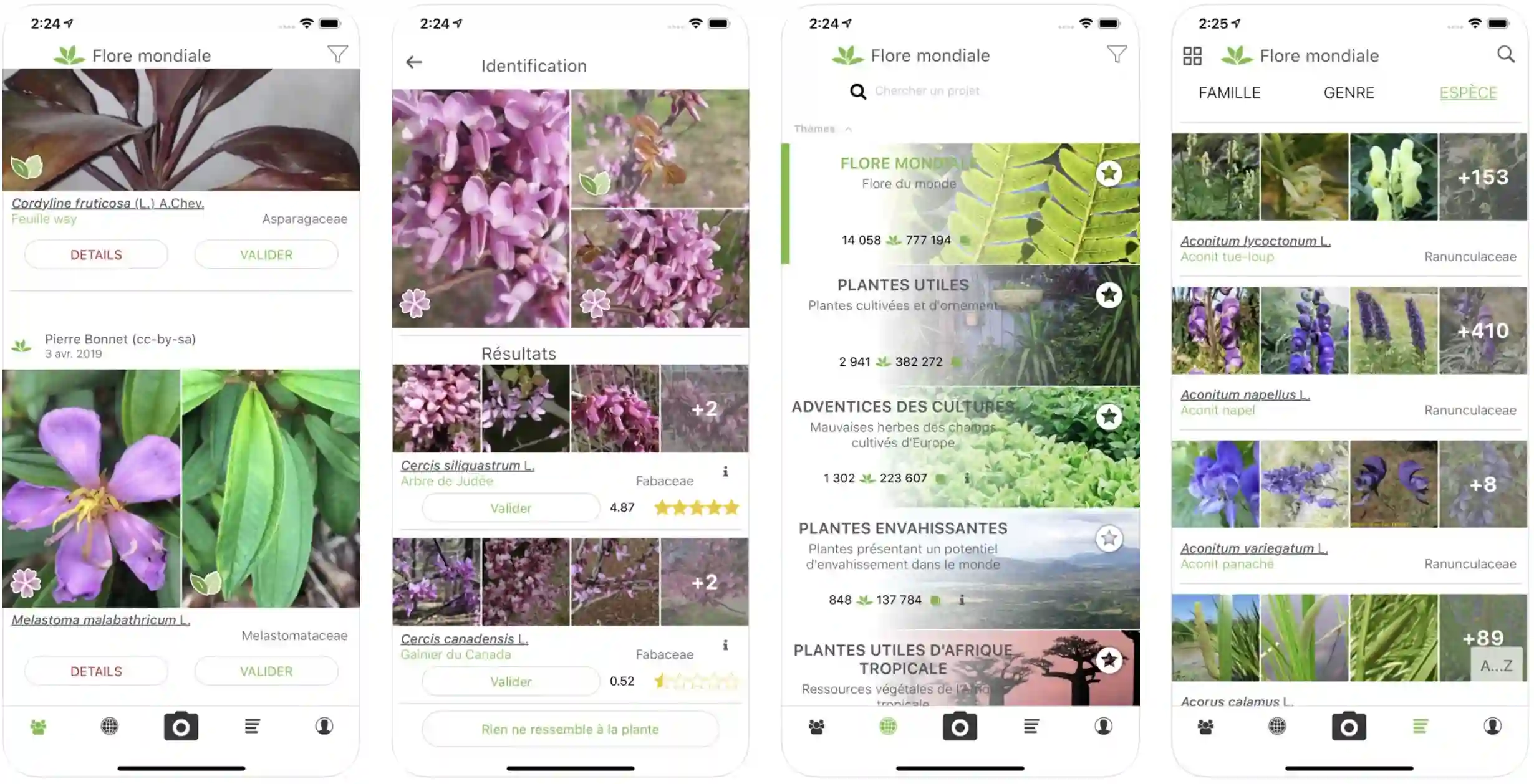
The app helps you learn about all types of plants, including flowering plants, grasses, conifers, trees, cacti, wild salads, ferns, vines, etc.
The app also identifies the huge number of cultivated plants in gardens, lawns, and parks. The clearer and more visual information you provide to the app, the more accurate identification you get!
Features:-
- Recognizes more than 20,000 species of the plants
- The app is getting only bigger and richer, with constant updates for improvements.
- Re-identification of shared studies and observations
- Easy navigation at a wide range of taxonomic levels
- Links to a wide range of useful factsheets
Device – Android and iOS
Ratings:- Google Play Store – 4.6 / 5 | 1,00,00,000+ Downloads and 4.6/5 on Apple App Store
Download the App from Google Play Store
Download the App from Apple App Store
8. iScape
iScape is one of the most trusted and loved lawn care apps that help you to design and manage your outdoor living spaces. Whether you want the DIY formula or are an industry professional, iScape can be a great companion.
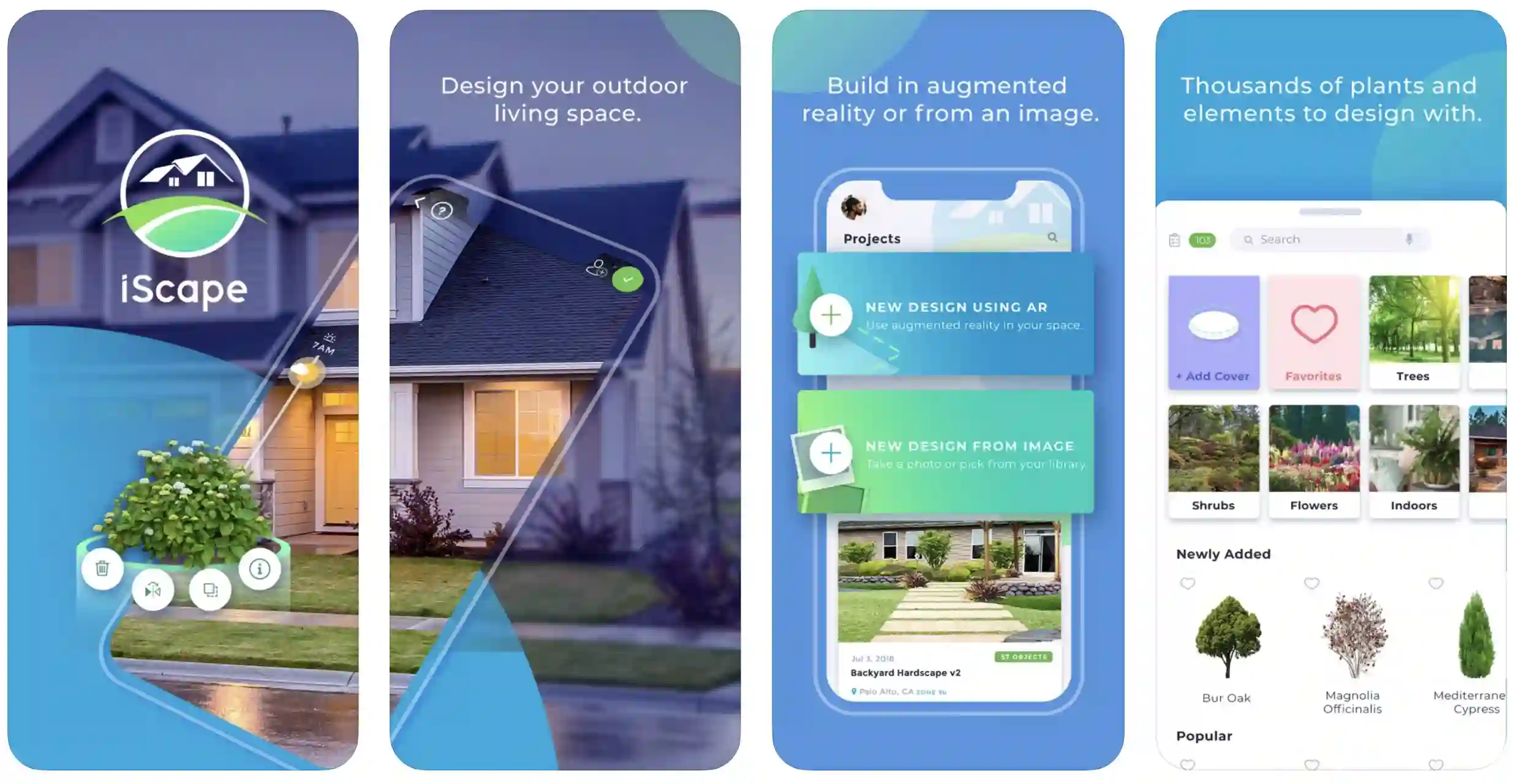 The app is already featured in leading channels and websites, including Forbes, The New York Times, HGTV, HBO, USA Today, Fox, and many more!
If you want to follow the DIY lawn care and landscaping method, the app makes everything simple. And if you are planning to hire a local landscaper, the app helps you explore ideas and share your vision.
The user-friendly features like a virtual pen, the ability to insert and delete items, and a beautiful design make it a handy lawn care app.
From visualizing the results of DIYing or hiring a professional to virtually designing your outdoor space and sharing it with others for collaboration, the app allows you to do everything you expect from a lawn care app!
Features:-
- Allows you to visualize and overlay virtual landscapes, trees, shrubs, flowerbeds, etc., so that you can make the right decision
- Perfect estimate of the lawn care projects for easier, more effective planning
- Very simple, eye-catching user interface
- Useful for both professional lawn care service providers and amateur landscapers
- All the designs and ideas are saved for future references
Devices – IOS Devices Like iPhones and iPad
Ratings:- Apple Store – 4.6 / 5
Download the App from Apple App Store
9. The Weather Channel
One of the best and most important apps for lawn care and maintenance. The Weather Channel helps you properly plan your lawn care routine with a detailed weather prediction.
It’s, of course, needless to mention that lawn care depends heavily on the weather forecast. And it doesn’t matter if you are a lawn and landscape care service provider or love taking care of your lawns; you have to consider the weather forecast before planning.
The Weather Channel is your live, reliable, and most accurate weather tracker and radar app. It lets you view all the local weather predictions, get live and accurate updates, and receive an air quality index directly on your device.
You can easily track all the weather possibilities, including monsoon storms, rains, dry heat, etc., and decide whether you should plan for a lawn care routine. Features like Sweat Index, Umbrella Index, and Weather News help plan your day.
Features:-
- The local weather forecast, rain predictions, and temperature checking
- Live storm radar and flood alerts
- Detailed data on phases of the moon and tides through GPS
- One of the best lawn care apps from a planning point of view
Device – Android
Ratings:- Google Play Store – 4.5 / 5 | 10,00,00,000+ Downloads
Download the App from Google Play Store
10. FlowerChecker, plant identify
One of the most reliable lawn care apps for those who always struggle when it comes to identifying plants and flowers. The app helps you with an excellent plant identification service by real-life experts. Get the first answer free, and then choose from affordable plans!
All you have to do is to take and upload a picture of a plant you don’t know about. Not only plants, but you can also get an idea about fungi, moss, and even lichen so that you can easily plan your lawn care routine.
The identification process is not based on computers or artificial intelligence. And hence, it may take some time before you get a satisfactory answer.
And that’s what this app is known for! Accurate, satisfied, and honest answers through human involvement.
You pay only when you get the right identification from the app! If the app cannot identify a plant, it won’t ask you to pay a single penny!
Features:-
- Real-time identification of the plants from real experts
- One free identification for trial
- Quick response from the international plant experts
- The app can accurately identify more than 90% of plants.
Device – Android and iOS
Ratings:- Google Play Store – 4.5 / 5 | 1,00,000+ Downloads
Download the App from Google Play Store
Download the App from Apple App Store
11. My Lawn
The My Lawn app from The Scotts Miracle-Gro Company makes lawn care much simpler, easier, and fun with an easy-to-follow lawn and landscape maintenance plan. The app specifically helps you choose the right products for your outdoor space and teaches you when to use them.
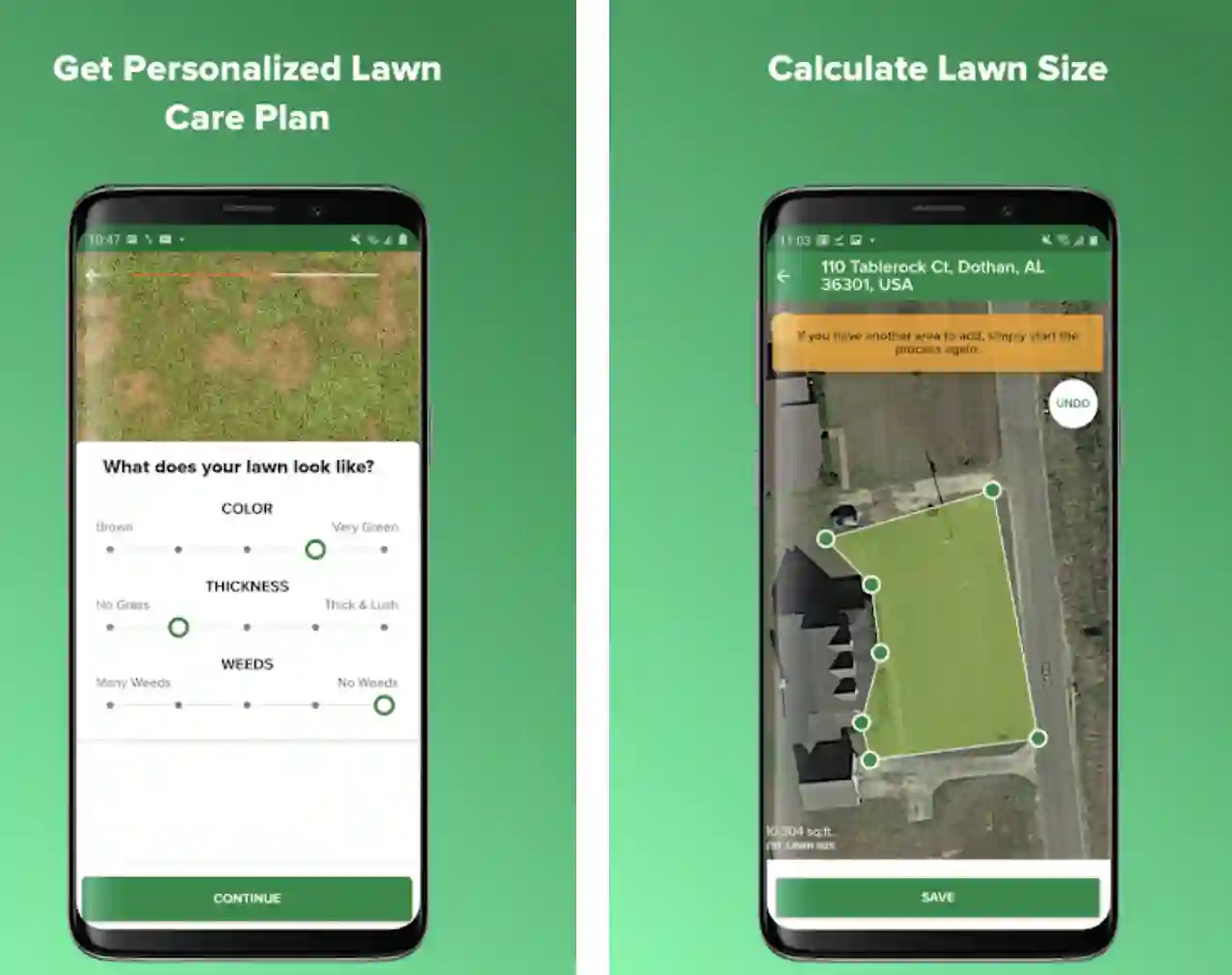
You can use the app to create a plan for product recommendations. The app smartly generates a personalized plan according to your location, lawn’s grass type, size, and weather conditions.
According to the weather conditions and product specifications, the app also notifies you of the right time to apply the products. If you face problems while purchasing products during the growing season, the app also helps!
You can easily and conveniently purchase all the lawn care products from Scotts at very reasonable prices. And guess what? You will get all the products delivered to your home without shipping charges!
Features:-
- Allows you to add or remove the lawn care products according to your preferences
- Accurate calculation of the lawn size for proper lawn care
- An easy and convenient way of getting in touch with Scotts
- Some very useful lawn care tips
- Water tracking for accurate watering of the lawn
Devices – Android and IOS
Ratings:- Google Play Store – 4.2 / 5 | Ratings on Apple Store – 3.6 / 5
Download the App from Google Play Store
Download the App from Apple App Store
12. Landscaper
The landscaper is one of the most suitable lawn care apps if you want some help, especially for accurately calculating the amount of soil, mulch, rocks, and plants you need for proper lawn care management.
All you have to do is enter your lawn’s square footage with the depth you want to spread the mulch. The app will quickly tell you how much mulch you should add to that area.
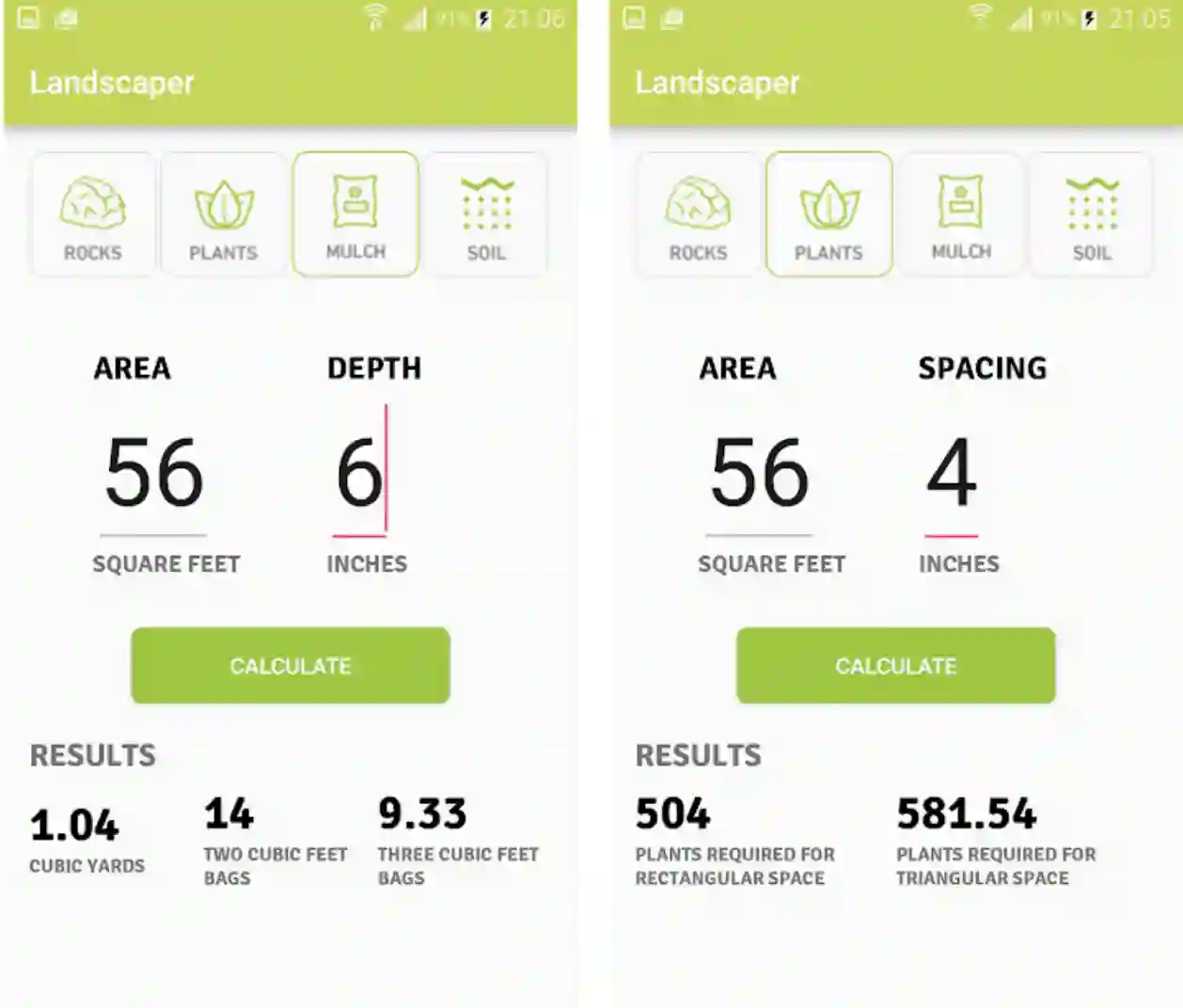
And then, enter the square footage of the area with the number of plants you want to plant. The app will accurately calculate the most suitable number of plants for you. A useful tab in the app calculates how much rock soil you should use for a lawn care project.
Features:-
- A very easy and accurate calculation for all lawn care and landscaping purposes
- The perfect calculation for easy, effective, and affordable lawn care
- Simple user interface that anyone can use
Device – Android
Ratings:- Google Play Store – 4.0 / 5 | 10,000+ Downloads
Download the App from Google Play Store
13. Yard Mastery
Get the most suitable and personalized recommendations from experts for your lawn, journal all your lawn care activities, and measure your yard! The Yard Mastery app supports you with step-by-step, personalized lawn care suggestions and recommendations for your geographic location and specific soil.
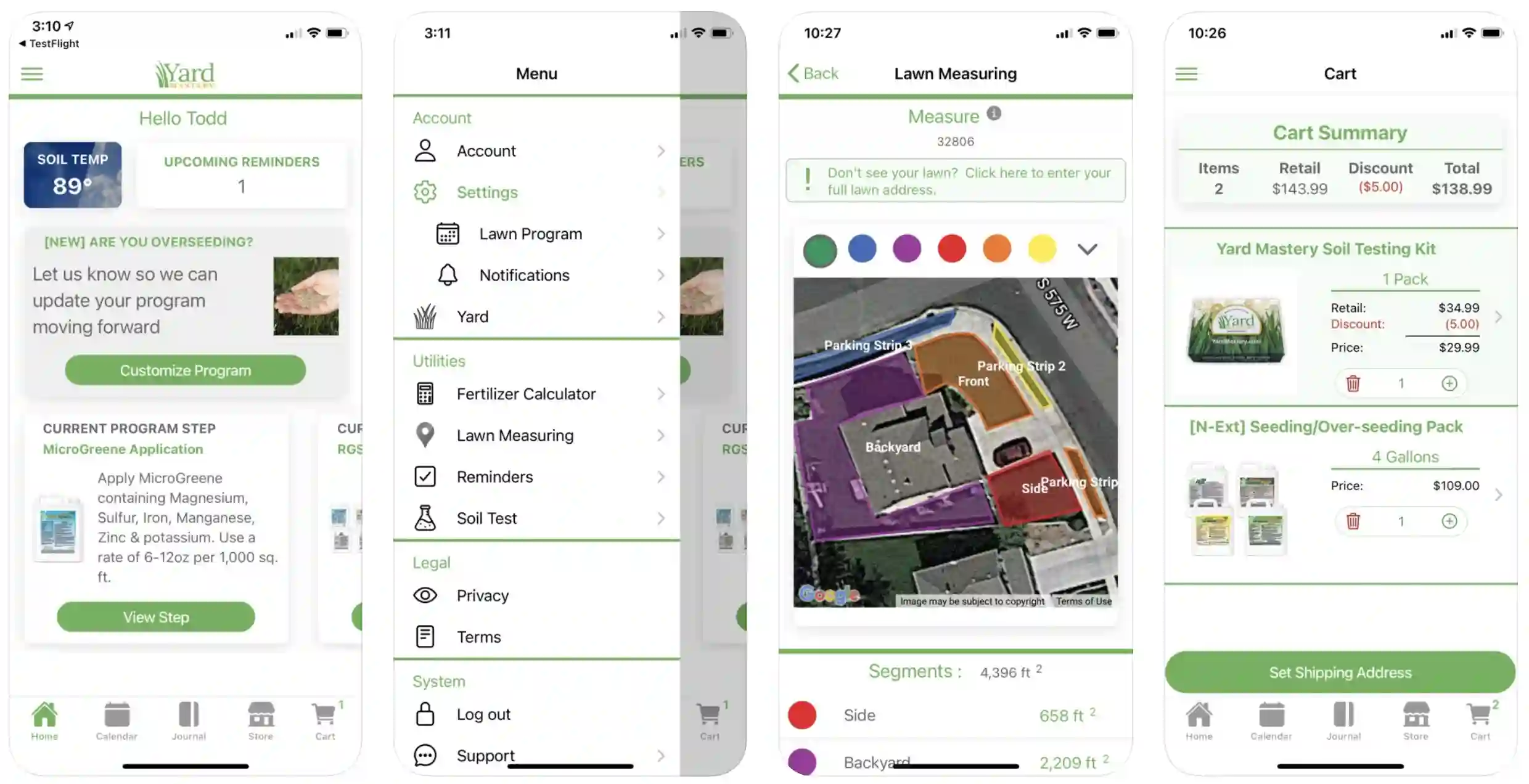
Features like a fertilizer calculator, a journal for tracking your progress, and measuring and segmenting the lawn make it a decent app on your smartphone.
The app also gives you other important suggestions, like what you should remove from your lawn and when to remove it. And the custom lawn journal is there for easily tracking down all your lawn-related tasks and helps you to avoid possible mistakes or irregularities.
You can also upload photos of your outdoor space, see the difference before and after your lawn care efforts, and set reminders for the next tasks. There are endless DIY lawn care strategies to choose from.
You can go with any of these strategies based on your location, the dimensions of your lawn, and the type of soil you are using. The suggestions from the app are customized for every user and dynamically change according to the conditions.
Features:-
- Educates users about different important aspects of lawn care and maintenance
- Accurately checks the soil temperature.
- Informs the users of the exact timing of different lawn care tasks
- Journal for proper recording of the tasks done
- Fertilizer calculator for accurate application of fertilizers
Devices – Android and IOS
Ratings:- Google Play Store – 3.8 / 5 | Ratings on Apple Store – 4.0 / 5
Download the App from Google Play Store
Download the App from Apple App Store
14. GrowIt!
GrowIt! is more than a gardening or lawn care app. It’s among the few lawn care apps that help you with lawn care inspiration, finding plants, planning, and connecting with gardening experts.
The app helps you to start a lawn care and gardening for a social cause! Whether you want inspiration, are looking for information about particular plants, or want to be a part of the gardening and plantation community; the app does everything for you.
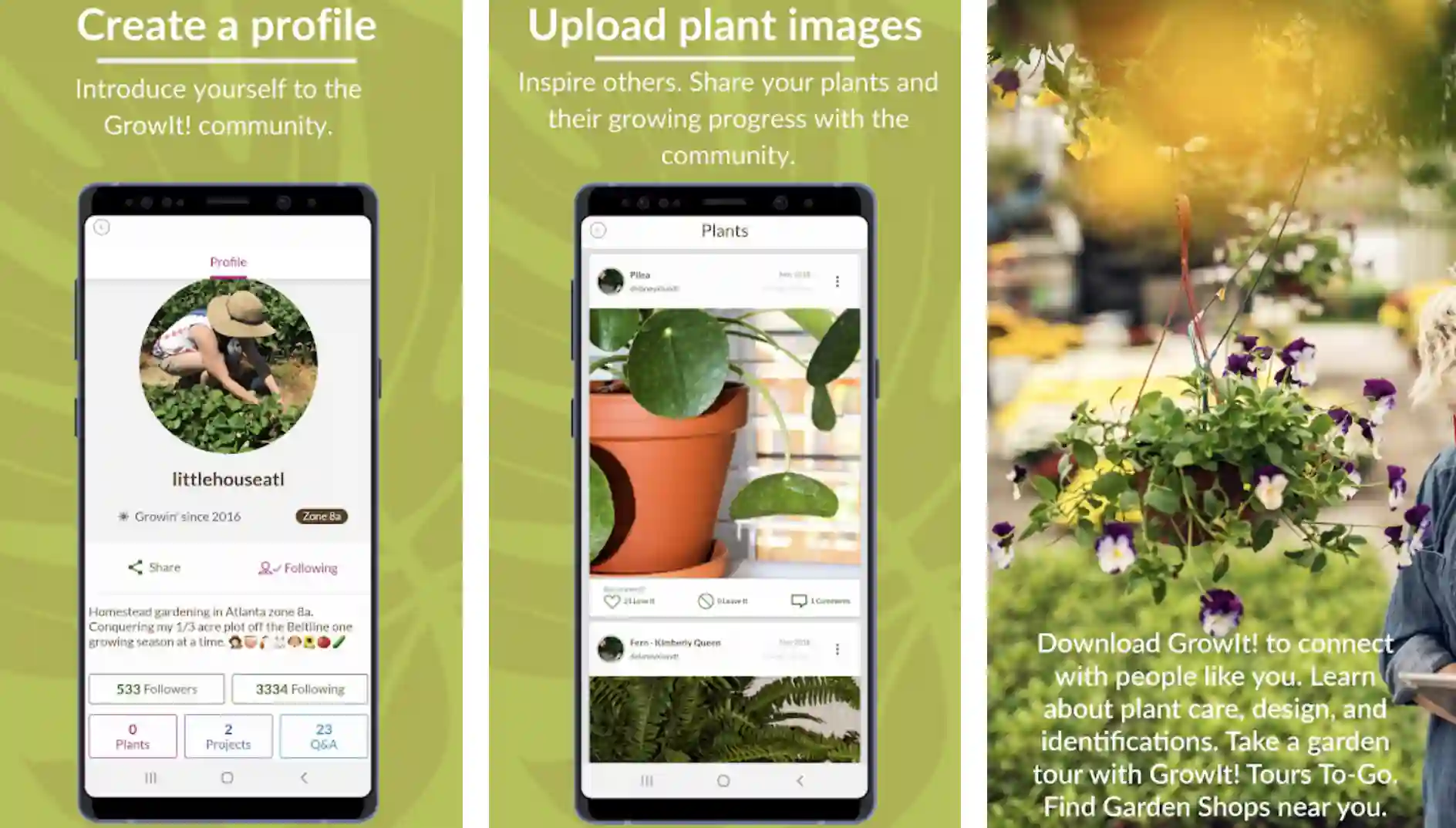
Get all your gardening and lawn cares questions answered by the best in business! From the real people who are already been gardening for a long time! GrowIt! also helps you with suggestions on the best plants for your lawn based on geographical location, lawn space, and soil type.
Features:-
- Find relevant and important information about the plants, lawn care, soils, and fertilizers
- Get all the answers from the real people already involved in gardening
- Get the identification of your plants done by the experts
- Add and share your lawn care projects to get recommendations and suggestions
- Search for a wide range of scientific plants, comments, and trends related to lawn care
Device – Android
Ratings:- Google Play Store – 3.6 / 5 | 5,00,000+ Downloads
Download the App from Google Play Store
Best Lawn Care Business Apps
In today’s digital age, lawn care businesses can gain a competitive edge by harnessing the power of cutting-edge mobile applications.
These best lawn care business apps streamline operations and enhance productivity, customer satisfaction, and ultimately, business growth.
One of the top contenders in this domain is GreenGuru, an all-in-one lawn care management app designed to simplify and optimize various aspects of your business.
From scheduling and routing to tracking expenses and invoicing, GreenGuru offers a comprehensive suite of features tailored specifically for the lawn care industry. It’s intuitive interface and seamless integration with other software solutions make it a favorite among lawn care professionals.
Another noteworthy app is LawnMaster, specializing in real-time job tracking and communication. With LawnMaster, you can efficiently assign tasks to your team members, monitor their progress, and receive instant updates, ensuring smooth workflow management.
Furthermore, this app empowers you to provide top-notch customer service by offering GPS-enabled notifications that inform clients about estimated arrival times and completion status.
For scheduling and route optimization, GreenScape stands out as a powerful tool. This app employs advanced algorithms to create the most efficient routes for your crews, minimizing travel time and maximizing productivity.
Additionally, GreenScape boasts features such as automated client reminders and customizable job calendars, enabling you to stay organized and never miss a beat.
In conclusion, embracing the best lawn care business apps is a strategic move for any ambitious lawn care entrepreneur. With their features and functionalities, these apps pave the way for seamless operations, improved customer experiences, and business success.
Stay ahead of the curve and leverage the power of technology to elevate your lawn care business to new heights.
Here’s a table showcasing some of the best lawn care business apps based on user ratings:-
| App Name | Platform | User Ratings (Out of 5) |
|---|---|---|
| GreenPal | iOS, Android | 4.9 |
| Jobber | iOS, Android | 4.8 |
| Service Autopilot | iOS, Android | 4.7 |
| LawnGuru | iOS, Android | 4.6 |
| Yardbook | iOS, Android | 4.5 |
| Landscaper’s Companion | iOS | 4.4 |
| Yardbook | iOS, Android | 4.3 |
| LawnStarter | iOS, Android | 4.2 |
| ServiceTitan | iOS, Android | 4.1 |
| ScaperSoft | iOS, Android | 4.0 |
How Lawn Care Apps Work
In the era of digital advancements, lawn care apps have revolutionized how we maintain our outdoor spaces.
These innovative applications blend technology with the green thumb, simplifying the entire process for homeowners and professional lawn care providers. How do lawn care apps work?
Let’s delve into the intricacies.
1. User Registration and Account Setup: To get started, users create an account by providing essential information such as their location, lawn size, and specific requirements.
2. Service Selection and Customization: Once registered, users can browse through a comprehensive range of services offered by lawn care professionals.
These services can be customized based on individual needs, including mowing, fertilizing, and weeding.
3. Scheduling and Appointment Management: The app lets users conveniently schedule appointments by selecting preferred dates and times for lawn care services.
Advanced scheduling algorithms optimize route planning for service providers, minimizing travel time and maximizing efficiency.
4. Communication with Service Providers: Seamless communication channels within the app allow users to interact directly with service providers.
From discussing specific instructions to receiving updates on the task’s progress, real-time communication enhances the overall experience.
5. Payment and Billing Options: Lawn care apps provide secure and hassle-free payment options. Users can make payments through the app, with the ability to save payment details for future transactions.
Digital invoices are generated, ensuring transparent and efficient billing processes.
By leveraging the power of mobile technology, lawn care apps streamline the entire lawn care journey, bringing convenience and efficiency to homeowners’ fingertips.
Whether seeking professional assistance or managing your outdoor oasis, these apps have simplified lawn care. Embrace the digital transformation and embrace a beautifully maintained lawn.
Advantages of Using Lawn Care Apps
The advent of lawn care apps has ushered in a new era of convenience and efficiency for homeowners and lawn enthusiasts.
These innovative applications offer many advantages transforming how we care for our outdoor spaces. Let’s explore the benefits of using lawn care apps.
1. Convenience and Time-saving: With a few taps on your smartphone, you can effortlessly schedule and manage lawn care services.
Say goodbye to the time-consuming task of searching for local service providers and coordinating schedules. Lawn care apps streamline the process, saving you valuable time and effort.
2. Access to a Wide Range of Services and Professionals: Lawn care apps connect you with a diverse network of experienced professionals offering various services, from mowing and trimming to landscaping and pest control. You can easily find the right service provider for your specific needs.
3. Transparent Pricing and Cost Estimation: Gone are the days of haggling over prices or uncertain cost estimates. Lawn care apps provide transparent pricing models, allowing you to compare rates and choose services that align with your budget.
4. Easy Communication and Feedback System: You can communicate directly with service providers through in-app messaging and notifications, ensuring your requirements are understood and executed accurately. Additionally, you can provide feedback and ratings, fostering accountability and improving service quality.
5. Automated Reminders and Notifications: Never miss a lawn care appointment again. Lawn care apps send automated reminders and notifications, informing you about upcoming services, weather-related delays, or any other relevant updates.
Embrace the power of technology and elevate your lawn care experience with these advantageous lawn care apps.
Simplify your life, enhance your outdoor spaces, and enjoy the benefits of a well-maintained lawn with just a few taps on your smartphone.
Tips for Choosing the Right Lawn Care App
Choosing the right lawn care app can make a difference in how you maintain and beautify your outdoor space.
With many options available, it’s crucial to consider a few key factors to ensure you select the ideal lawn care app for your needs.
Here are some tips for choosing the right lawn care app:-
1. Assessing Your Specific Needs and Requirements: Identify your lawn care needs. Determine whether you require basic services like mowing and trimming or more specialized services such as fertilization, pest control, or landscaping. Understanding your requirements will help you narrow down your options.
2. Reading User Reviews and Ratings: Take the time to read user reviews and ratings of different lawn care apps.
This feedback provides valuable insights into the app’s reliability, user experience, and overall customer satisfaction. Look for apps with consistently positive reviews and high ratings.
3. Comparing Pricing and Service Options: Compare the pricing structures and service options offered by different apps.
Look for transparent pricing models that provide detailed information about costs, additional fees, and potential discounts. Consider the range of services available and choose an app that aligns with your budget and requirements.
4. Checking the App’s Reliability and Customer Support: Ensure that your lawn care app is reliable and has responsive customer support.
Look for features like real-time tracking of service providers, prompt resolution of issues, and accessible customer support channels such as phone, email, or chat.
By following these tips for choosing the right lawn care app, you can make an informed decision and select an app that meets your needs.
Remember, the right app can simplify your lawn care journey, provide quality service, and ultimately contribute to the beauty and health of your outdoor space.
Future Trends in Lawn Care Apps
As technology continues to evolve, the future of lawn care apps holds exciting possibilities and innovative advancements.
These future trends in lawn care apps are set to revolutionize how we maintain and care for our outdoor spaces.
Let’s explore what lies ahead:
1. Integration of Artificial Intelligence and Machine Learning:- Lawn care apps of the future will harness the power of artificial intelligence and machine learning algorithms.
These technologies will enable apps to analyze data, optimize service schedules, and provide personalized recommendations for lawn care based on specific environmental conditions and user preferences.
2. Enhanced Customization and Personalization Features: Future lawn care apps will offer enhanced customization options, allowing users to tailor their preferences to a higher degree.
From specific mowing patterns to personalized fertilization schedules, users will have greater control over the care of their lawns.
3. Expansion to Smart Home Automation: With the rise of smart home technology, lawn care apps will integrate with smart home automation systems.
Users can control and monitor their lawn care activities remotely, adjusting irrigation systems, activating robotic mowers, and receiving real-time lawn health and maintenance updates.
4. Incorporation of IoT Devices for Monitoring and Maintenance:- Internet of Things (IoT) devices will play a significant role in future lawn care apps.
Sensors and connected devices will collect data on soil moisture, temperature, and other environmental factors.
This data will be utilized to optimize watering schedules, diagnose lawn issues, and provide proactive maintenance recommendations.
The future of lawn care apps is exciting, focusing on advanced technologies and personalized experiences.
Embracing these future trends will enable homeowners to achieve healthier, greener, and more beautiful lawns while leveraging the convenience and efficiency of cutting-edge digital solutions.
📗FAQ’s
Is there an app for lawn care?
Yes, many available lawn care applications exist on the App Store and Google Play store. Some of the best names are Lawn Journal, PlantNet Plant Identification, iScape, The Weather Channel, FlowerChecker, etc.
Is there an app for landscaping jobs?
Yes, Landscape Maintenance, Lawn Journal, Landscaper, Lawn & Landscape Magazine, etc., are great apps to streamline all your jobs related to landscaping completely.
Is the GreenPal app free?
Yes, the GreenPal app is free of cost and offers a comprehensive guide to take your lawn, schedule lawn mowing dates, and hire the best lawn care services in your area.
How do you keep track of the lawn mowing schedule?
Advertising your business on the website is one of the most effective ways of bringing customers to your lawn care services. You can also use your website to give details about your services, take care of customer details, and post positive comments about your existing customers.
How can I improve my landscaping business?
Your first focus should be diversifying your client base. Offer as many add-on services as possible, organize landscaping seminars, and don’t charge for visiting.
Focus more on retaining your old clients instead of making new ones. Expand your service areas, and start bringing in customers from neighborhoods. Provide off-season services at affordable prices. Try offering bundle services instead of one or two landscaping solutions.
How do I get clients for my landscaping business?
And what is meant by your already existing business and already completed landscaping projects can be very effective in getting new clients? Try investing in damage-reducing and time-saving equipment to increase efficiency.
Make the most of Instagram and Facebook advertising, and show the audience why you are the best. Don’t be afraid to try old methods, and get involved in your community through socializing.
What time of year is best for landscaping?
April and May are probably the best time to begin landscaping and planting shrubs, trees, and perennials. The early spring months give plants ample time to grow and acclimate to the conditions.
How do you get leads for landscaping?
You can utilize your website to get more lawn care and landscaping leads. Get ready with advertisements for the upcoming season’s services.
You can also try joining local trade associations and landscaper groups to learn from them, reach out to local customers as much as possible, and use attractive door hangers to showcase your landscaping services. Advertising through local newspapers can also be very effective in getting landscaping leads.
Are landscaping businesses profitable?
The landscaping business involves many risks, and decent profit is not guaranteed. According to reports, the average profitability for a lawn care and landscape company is net 5%.
However, a well-managed company should be between 10 and 12 percent. It means that even the companies that consider themselves profitable usually fall short of their targets.
Is there an app to track mowing?
Several lawn mowing tracking apps are available, including Lawn Care App, LawnStarter, GreenPal, Yardbook, and Mowing Master. These apps facilitate scheduling, progress tracking, and hiring of lawn care professionals.
Mowing Master is a specialized app for tracking mowing time, location, and frequency. Research is crucial before selecting an app that suits your preferences and requirements.
What apps are like LawnStarter?
Apps that connect you with lawn care services in your area are plentiful. GreenPal, for example, offers a satisfaction guarantee and in-app payment options, while TaskEasy provides upfront pricing and a satisfaction guarantee.
Plowz & Mowz provides on-demand lawn care services with snow removal options, and LawnGuru offers recurring or one-time lawn care services with upfront pricing and a satisfaction guarantee. Research is necessary to find the app that suits your preferences and requirements.
How can I do my own lawn?
To maintain your lawn on your own, follow these steps:-
1. Mow regularly, avoiding cutting over one-third of the grass’s height. Adjust the mower height based on the grass type and season.
2. Water deeply and infrequently to encourage deep root growth. Water in the morning to prevent evaporation and fungal growth.
3. Apply slow-release fertilizer according to the season and grass type, being careful not to over-fertilize.
4. Remove weeds by hand or use herbicides that don’t harm the grass.
5. Promote root growth and alleviate soil compaction through lawn aeration in the spring or fall when the soil is moist.
6. Reseed bare or thin spots in the lawn in the spring or fall.
7. Determine soil pH level and nutrient content through soil testing. Amend the soil as necessary to ensure proper grass growth.
Is there a grass app?
Apps can assist in identifying and learning about different grass species. Lawnifi offers personalized lawn care recommendations based on location and climate. Scotts My Lawn offers customized lawn care plans for fertilization, weed, and pest control.
GrassSnap uses artificial intelligence to identify grass species using photos. Turfgrass Management provides information on grass species, diseases, pests, and weed control strategies.
Landscaper’s Companion features a comprehensive plant database, including grasses, with growth habit, care requirements, and landscape use information.
Lawn care professionals, landscapers, and homeowners can benefit from these apps. Choose an app that fits your needs and preferences through research.
To Sum it Up
Maintaining a healthy and lush lawn is not easy, especially with the juggling act of watering schedules, fertilizer use, mowing patterns, and more.
The traditional hit-and-miss methods can be time-consuming and frustrating, potentially leading to an underwhelming lawn.
Thankfully, with the advent of lawn care apps, expert lawn maintenance knowledge is now at the palm of your hands.
These apps demystify the process of lawn care, providing tailored advice, reminders, and resources to help you cultivate a verdant lawn that turns heads.
With a lawn care app in your toolbelt, you’ll have more than just a digital gardening assistant. You’ll possess the confidence that comes with the right knowledge and an organized approach.
Imagine the satisfaction of looking out on a beautifully kept lawn, knowing you achieved it with less stress and more success.
In the evolving world of lawn maintenance, these apps are the future, simplifying and personalizing how we care for our outdoor spaces.
So why wait? It’s time to embrace the technology that could turn your lawn care nightmares into a true dream.


