
























Have you ever been interested in the different phases and shapes of the moon at night? Sometimes it’s half, sometimes crescent, and sometimes full like a circle!
But how can you better understand when the moon gets a specific shape? How can you rightly guess the different phases of the moon? How can you determine on what date of the month you can witness the full moon?
There are so many interesting questions related to the moon. But thankfully, you no longer have to explore those costly books written on the moon.
With some innovative moon phase apps available for Android and IOS, you can get an accurate idea of moon phases.
There are dozens of such apps available to download, and it can be confusing which one you should try. And things can get trickier if you are very picky, just like me!
But you don’t have to dedicate so much time comparing different apps and selecting the best one.
Why? Because, like always, I am here taking the initiative to make things easy for you! All you have to do is to check this review of mine out!
Best Moon Phase Apps – Our Top Pick👌👌
1. Daff Moon Phase
Certainly, the best apps are available for correctly checking different moon phases. The application doesn’t only help you with the current phases of the moon but with different months of the year as well.
And you can check other important, real-time information about the moon, sun, and all other planets you are interested in.
The Daff Moon Phase app enables you to check the moon’s rise and set time, the moon, the position of the moon on different nights, and so on.
The app draws dramatic images related to moon phases with dramatic accuracy. You get all the data according to a specified point in time and, of course, your geographic location.
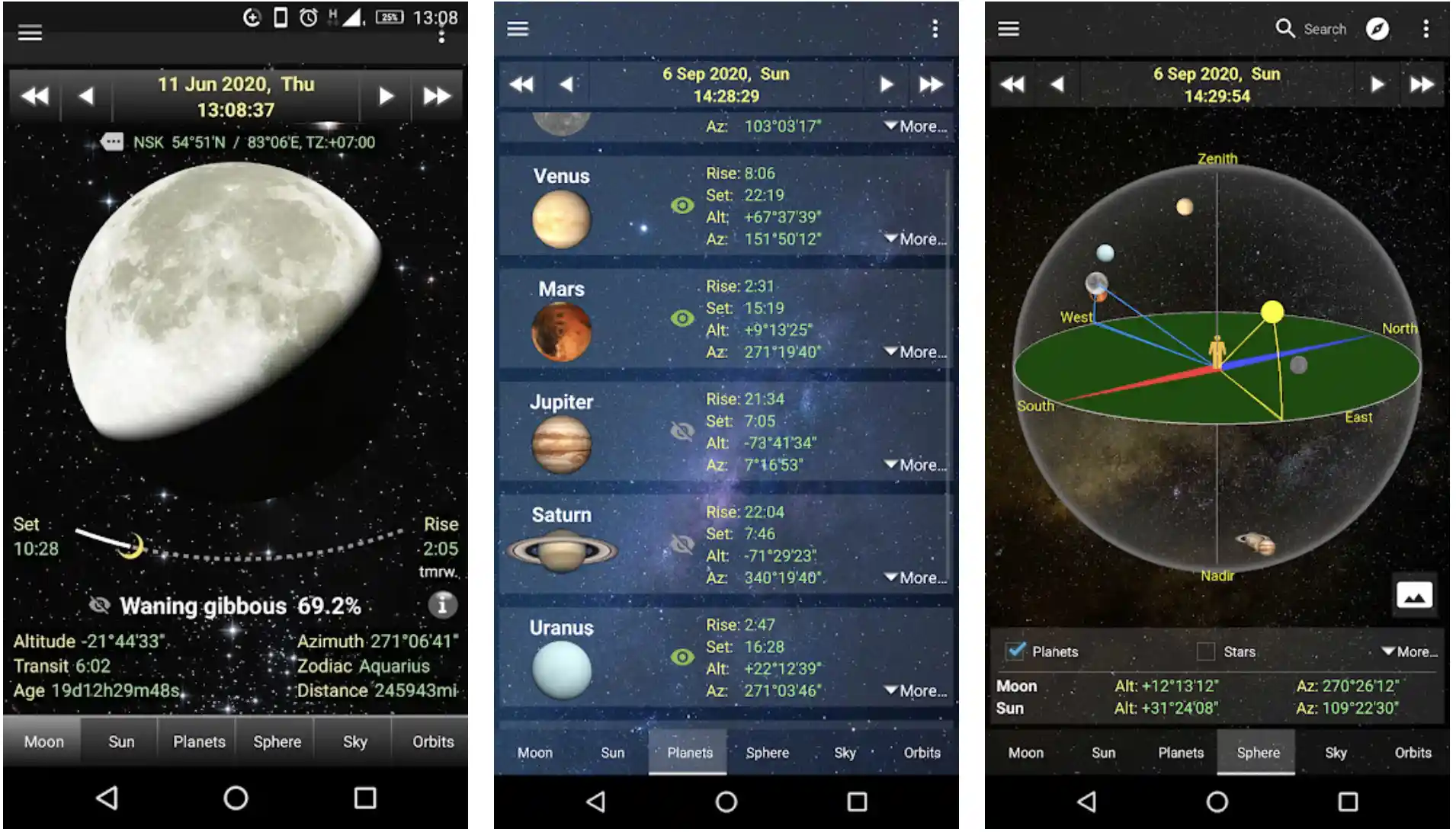
And the best part I’ve noticed about the app is it’s free, and you can use it without worrying about the annoying ads.
Check out different phases of the moon, age, node passages, and moon positions. Want to get information about Solar Eclipses & Lunar Eclipses?
Don’t go anywhere because one of the leading moon phase apps enables you to do that too! Altitudes, Rise and Set Times, Azimuth, Day-Length, Transit Times, and more!
Detailed information about the different orbits of the planets! Yes, the name suggests it’s a dedicated moon app, but you can also get all the important information about other plants!
Features of Daff Moon Phase:-
- It allows you to check different phases as well as the age of the moon
- Check the interesting node passages of the moon
- Supermoon calendar based on different moon phases
- Seven interesting home widgets to get access right from the home screen
- Allows you to study equinoxes and solstices
Device – Android
Ratings on Google Play Store – 4.9 / 5 | 10,00,000+ Downloads
Download the App from Google Play Store
2. My Moon Phase Pro – Moon, Golden Hour & Blue Hour!
Here is another excellent moon phase app designed for Android users! My Moon Phase Pro is a reliable app for tracking the full moon, blue moon, lunar calendar, and other moon aspects.
The sleek, simple, and dark design of the app makes it a very easy tool for getting important information such as the current moon phase, moon cycle, moonrise and set times, and at the same time, the expected date on which you can see a full moon.
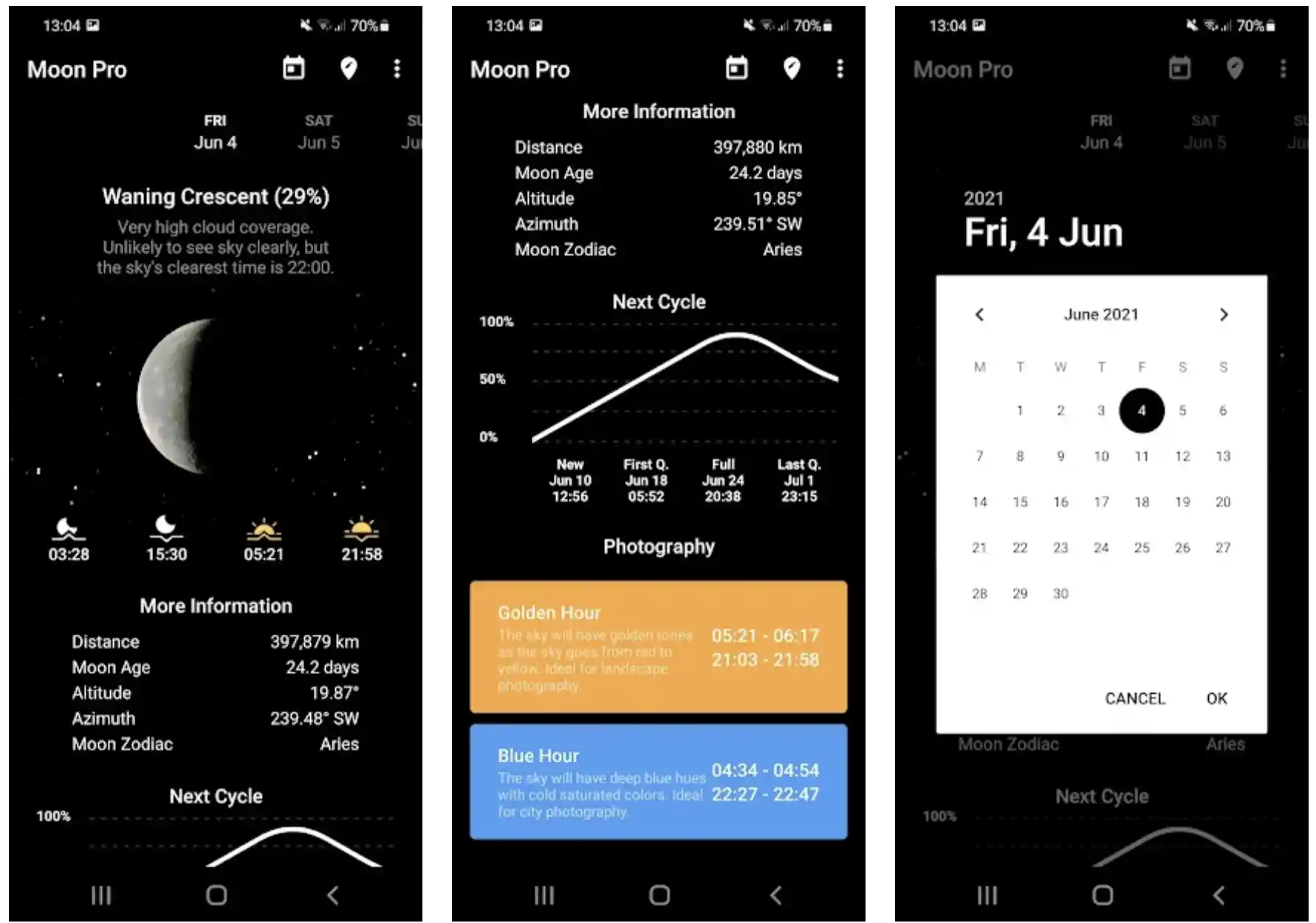
If you are always excited about moon photography, you can get the correct idea of when you can see the blue and golden hours to get the best shots in your camera.
Check out the moon cycle for any date, even in the future. And you can do it all simply by scrolling down or tapping the calendar.
The app will ask for your permission before accessing your current, accurate location. You have both options of opting for automatic and manual location detection.
You can also use the My Moon Phase Pro app to check the expected clarity and visibility of the sky. The app will tell you, almost accurately, when is the right time to see the moon!
You can instantly know when the full moon will be short when you can get out to see the new moon, the first and last quarters of the moon, and so on.
Are you interested in astronomy? You can easily rely on the app to know the moon’s distance from the Earth, the age and current altitude of the moon, the lunar calendar, and a lot more!
Features of My Moon Phase Pro:-
- Age, altitude, phase, distance, and more details about the moon
- One of the best apps for those who are interested in Astronomy
- Check out the expected visibility of the sky, and find the right time to check moon phases
- Select your favorite phases of the moon, and get notifications when the moon reaches there
- Other exclusive features include widgets with the premium version
Device – Android and iOS
Ratings on Google Play Store – 4.9 / 5 | 10,000+ Downloads and 4.8/5 on iOS
Download the App from Google Play Store
Download the App from Apple App Store
3. Moon Phase Calendar & Compass
One of the most advanced moon phase apps with a lunar calendar, push notifications, widgets, and other great features. The free app is available for offline use as well.
The app can be a reliable source to get valuable information about the moon in any location.
You can check various aspects of the moon, including the current moon phase, dates of different subsequent phases, illumination, and more.
The app also lets you get detailed information about the Sun and the important phenomena of light, dawn, and twilight.
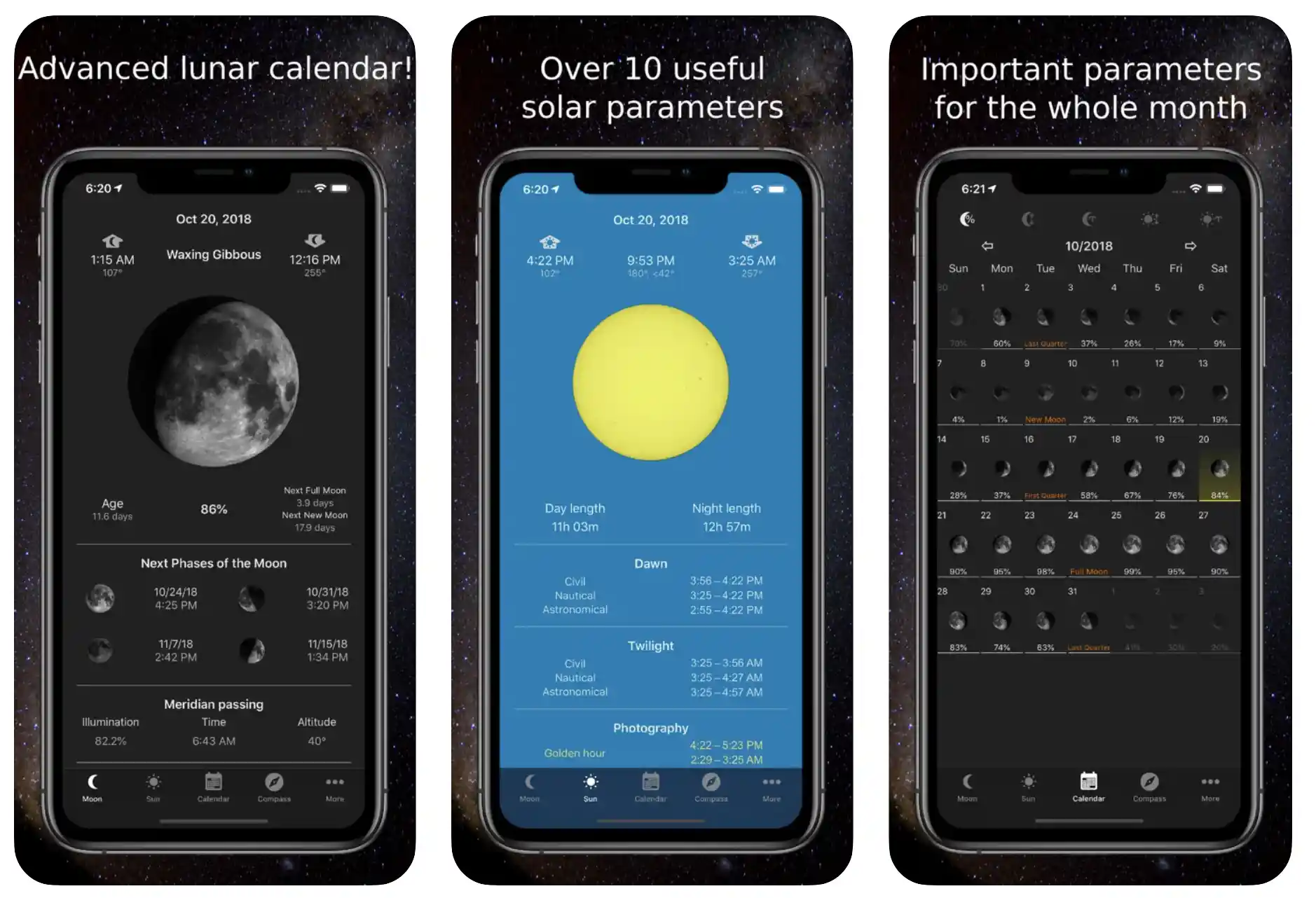
You must try this app once if you are always searching for interesting facts about the moon.
And if you believe in the Moon’s effects on your life, you can plan your important events according to this app’s moon calendar to get the moon’s favor.
The app notifies you three days before about the full moon, the first quarter, the new moon, and the last quarter.
You can observe important phenomena using the app, including perigee, apogee, etc. You can also know when the moon’s effect is the most and when it’s least.
Undoubtedly, a reliable friend for amateur astronomists! You can use the compass to determine the different directions and revolutions of the moon. Also, visualize the azimuths of the moon as well as the Sun.

The strong, in-built compass shows you the colored arches of the Sun’s visibility in the selected location.
All in all, more than a complete app for those who are always interested in studying about different attributes of the moon.
Features of Moon Phase Calendar & Compass:-
- An advanced moon phase tool with the lunar calendar
- More than ten useful solar parameters for both moon and the sun
- All the parameters are available for the whole month
- Compass for determining the position of the sun and the moon
- Widget for finding the current phase of the moon anytime and anywhere
Devices – Android and IOS
Ratings on Apple Store – 4.8 / 5 | Ratings on Google Play Store – 4.8 / 5
Download the App from Google Play Store
Download the App from Apple App Store
4. Deluxe Moon Premium – Moon Calendar
Probably among the most advanced moon phase apps with moon days, lunar forecast, moon calendar, moon phases, and more.
Deluxe Moon Premium app helps you get a precise idea of moon phases times, the moon’s current age, the moon, the cycle of the moon, etc.
You can also check the percentage of the illuminated area of the moon. The app is also very simple to check out the moonrise and moonset times throughout the month.
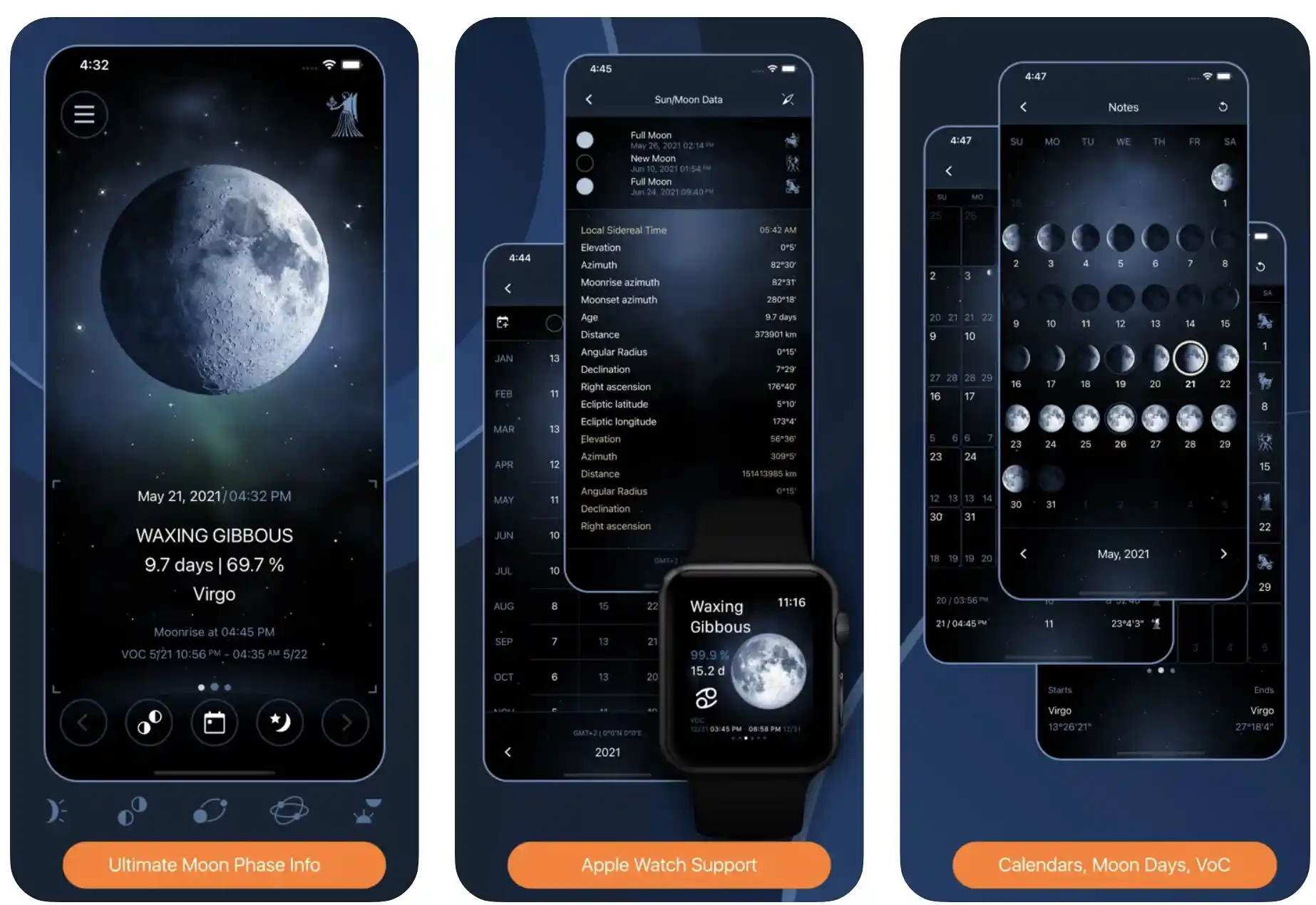
The simple and easy interface of the app makes things even more interesting. You can check different rotations and directions of the moon with simple touch-n-turn and swipe features.
The Moon calendar features zodiac signs that allow you to check the details of the moon on any day of the month.
There are four different, beautiful widgets in the app too, and you can use them to access almost all the app’s features right from your phone’s home screen.
Animated zodiac circles, including sidereal and tropical, with astronomical constellations, are also included in the app. The app helps you to know the exact timing of the moon entering and leaving the zodiac sign.
The sidereal calculation gets even better thanks to the multiple algos in the app! Explore different moon days, rate them according to your experience, collect the statistics for future reference, and more!
Features of Deluxe Moon Premium – Moon Calendar:-
- Moon phase calendar and zodiac calendar
- Accurate moon phase times based on locations
- Allows you to check the illuminated area of the moon
- Azimuths, along with moonrise and moonset timings
- Ecliptic latitude and longitude
Devices – Android and IOS
Ratings on Apple Store – 4.8 / 5 | Ratings on Google Play Store – 4.4 / 5
Download the App from Google Play Store
Download the App from Apple App Store
5. The Moon: Calendar Moon
Here is another very simple, easy-to-use, and informative moon calendar app available for Android and IOS users.
The Moon app contains useful features, including moonrise, moonset, lunar days, moon phases, illumination, position, distance, and more!
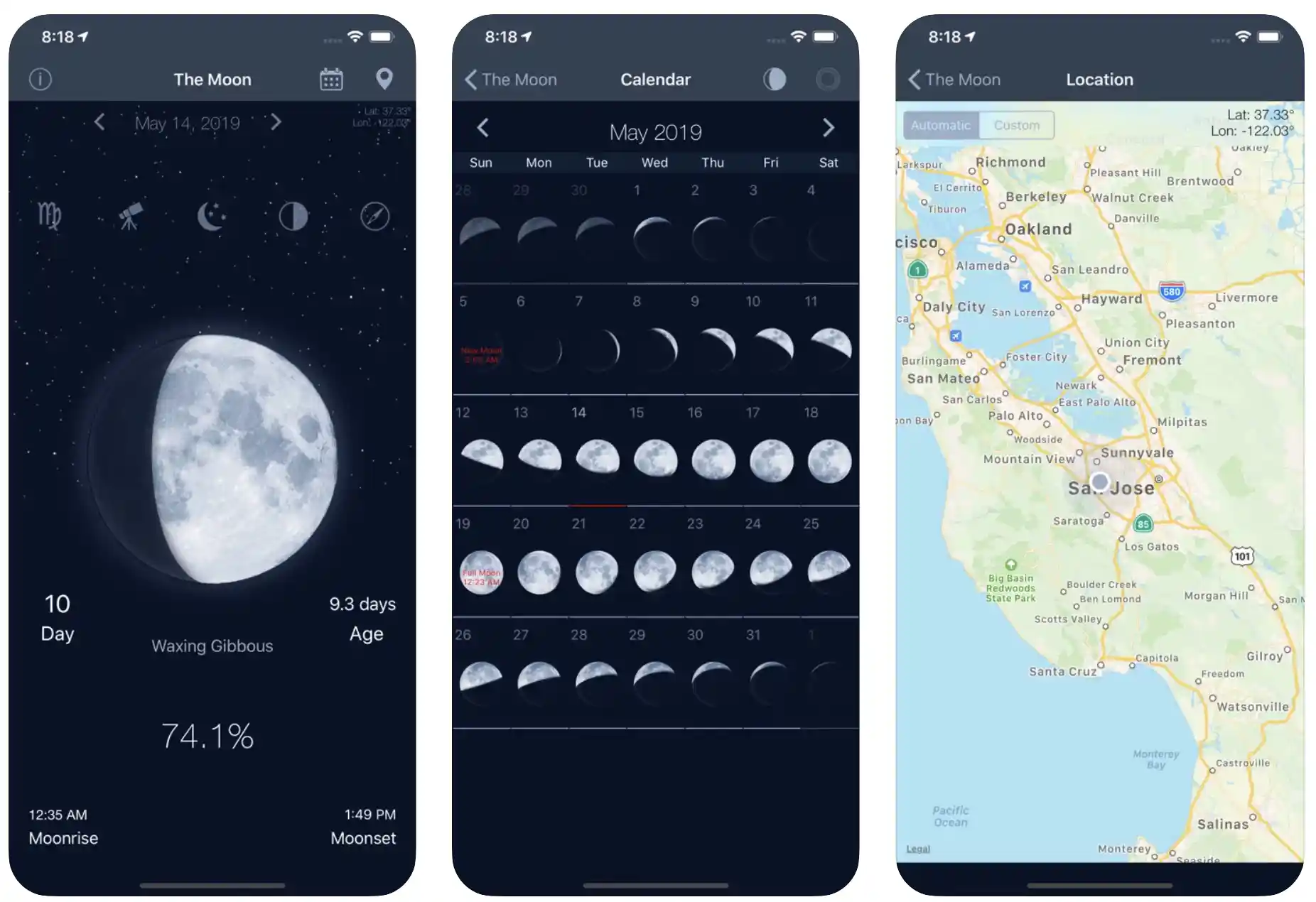
And the app is not limited to information related to the Moon only. You can also get some bonus information, including the Sunrise, Sunset, Azimuth, different sun distances, Altitude of the Sun, etc.
The app also helps you with the accurate, clear, and visible surface of the moon, its state, and its age at present!
And the best part about the app is that you get all the information about the moon on the first page! So, you don’t even have to swipe here and there to get the desired information.
All the information in the app is detailed with very simple, striking, and eye-catching fonts. You won’t have to put a lot of strain on your eyes while using the app! Everything is as clear as crystal!
The app helps you with accurate information about the moon based on your geographic location. The simple, clean, and detailed map is there for manually selecting the location.
And, if you don’t want that, you can always opt for the automatic location detection feature of the app. You get a bonus, a very useful feature in the app as well!
A powerful but-in compass uses your phone’s magnetometer sensor and helps you get accurate directions, irrespective of location!
Features of The Moon – Phases Calendar:-
- Simple, light, but very powerful moon calendar app
- Universal lunar calendar for all locations and years
- It also helps you with different details related to the sun
- Lunar days, illumination, distance, position, and more
- Clear, striking fonts for easy access
Devices – Android and IOS
Ratings on Apple Store – 4.8 / 5 | Ratings on Google Play Store – 4.2 / 5
Download the App from Google Play Store
Download the App from Apple App Store
6. Full Moon Phase– Best moon phase app ios
The Full Moon Phase app is designed for IOS users to check the moon’s current phase, the countdown for upcoming moon phases, the current moon sign, the current elemental influence, and more.
Thanks to the beautiful, attractive, and clean interface, you can learn about various attributes of the moon only with simple, easy taps.
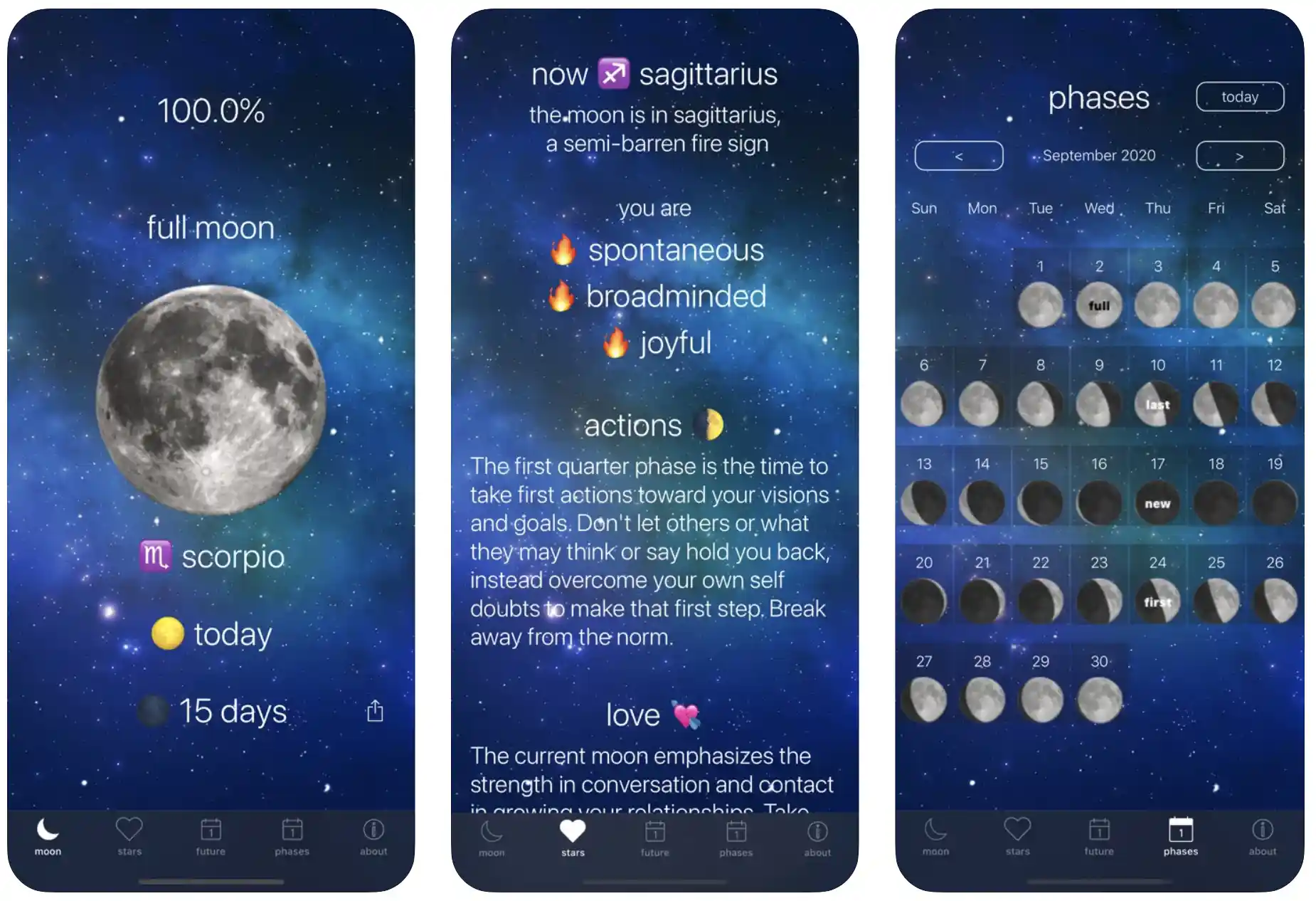
You can also learn about the different influences of the moon in your life in its different phases. The app also notifies you about the moon’s movement into different astrological signs.
All the details and information in the app are based on your location and time zone. You don’t even have to select the location – the app does it automatically within a few minutes of installation.
You can also use the app to know the astrological moon sign transiting through your zine. What more? The app is also featured some very clear, high-definition pictures of the moon, showing different phases.
The astrological prediction based on the moon phases can be handy for you to learn how the moon will affect you on a particular day!
Whether you will be more daring, passionate, sensual, impulsive, playful, or spontaneous, the app can predict with some accuracy thanks to the zodiac signs.
If you are not satisfied yet, the app offers more! Premium users can access the Lunar calendar to check the moon signs, past dates, and future.
Features of Full Moon Phase:-
- The accurate countdown for the next full moon phase
- Astrological predictions based on different phases of the moon
- The current influence of the moon on different things
- Near-perfect calculation of what percent of the moon is illuminated by the sun
- Various other exclusive features for premium users
Devices – IOS Devices, Including iPhone and iPad
Ratings on Apple Store – 4.8 / 5
Download the App from Apple App Store
7. Moon Phase Calendar Plus
Live interestingly by the Moon! See different moon phases with one of the best moon phase calculator apps developed especially for IOS users.
The app allows you to check the current phase of the moon. And, at the same time, make it easy for you to even check the countdown for the next phase of the moon!
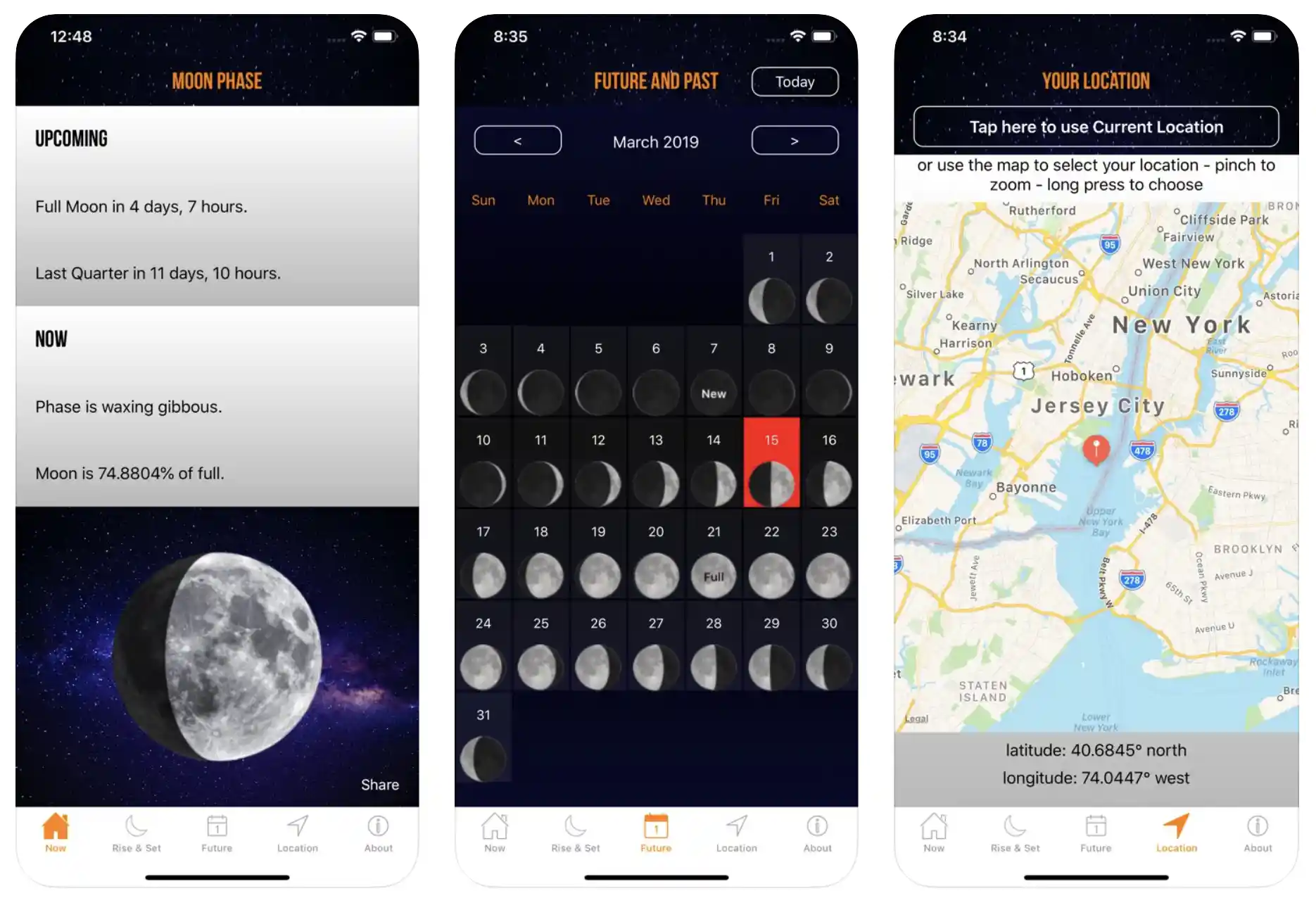
Check the phases by weeks, days, and even minutes with Moon Phase Calendar Plus! The app tells you whether the moon is full, half, or in its first quarter or last!
You can also see the current, real-time simulation of the moon right when it appears to you. Check the current simulation, or of the past or future, right from your phone’s 6-inch display!
The app also lets you check the sunrise and set times accurately. You can check them anywhere and anytime to decide on various lunar activities.
Check out the color and current appearance of the moon, even without getting out of your room! The moon locator compass in the app accurately points toward the moon in the sky.
You also get gentle notifications related to upcoming phases of the moon and lunar events. The app also tells you the current distance of the moon from the Earth with surprising accuracy.
What more? If you want, you can also check out how many parts of the moon are illuminated by the Sun! Check out whether the moon is lighter or darker at different times.
And, the last, but certainly not the least thing – the app doesn’t ask for your device’s current location! So you don’t have to worry about data privacy!
Features of Moon Phase Calendar Plus:-
- A complete moon phase tracker
- Allows you to check out the illumination due to the Sun
- Check different phases of the moon from the past as well
- Accurate location, distance, and altitude of the moon
- All these features without accessing your device’s location
Devices – IOS Devices, Including iPhone and iPad
Ratings on Apple Store – 4.8 / 5
Download the App from Apple App Store
8. Moon Phase Calendar – MoonX
Imagine you have a mini space right in your smartphone and can access precise knowledge and accurate information about the phases of the moon and its different influences on all spheres of life.
The MoonX app is designed to explore some of the most complicated details about the moon in the simplest and easiest ways.
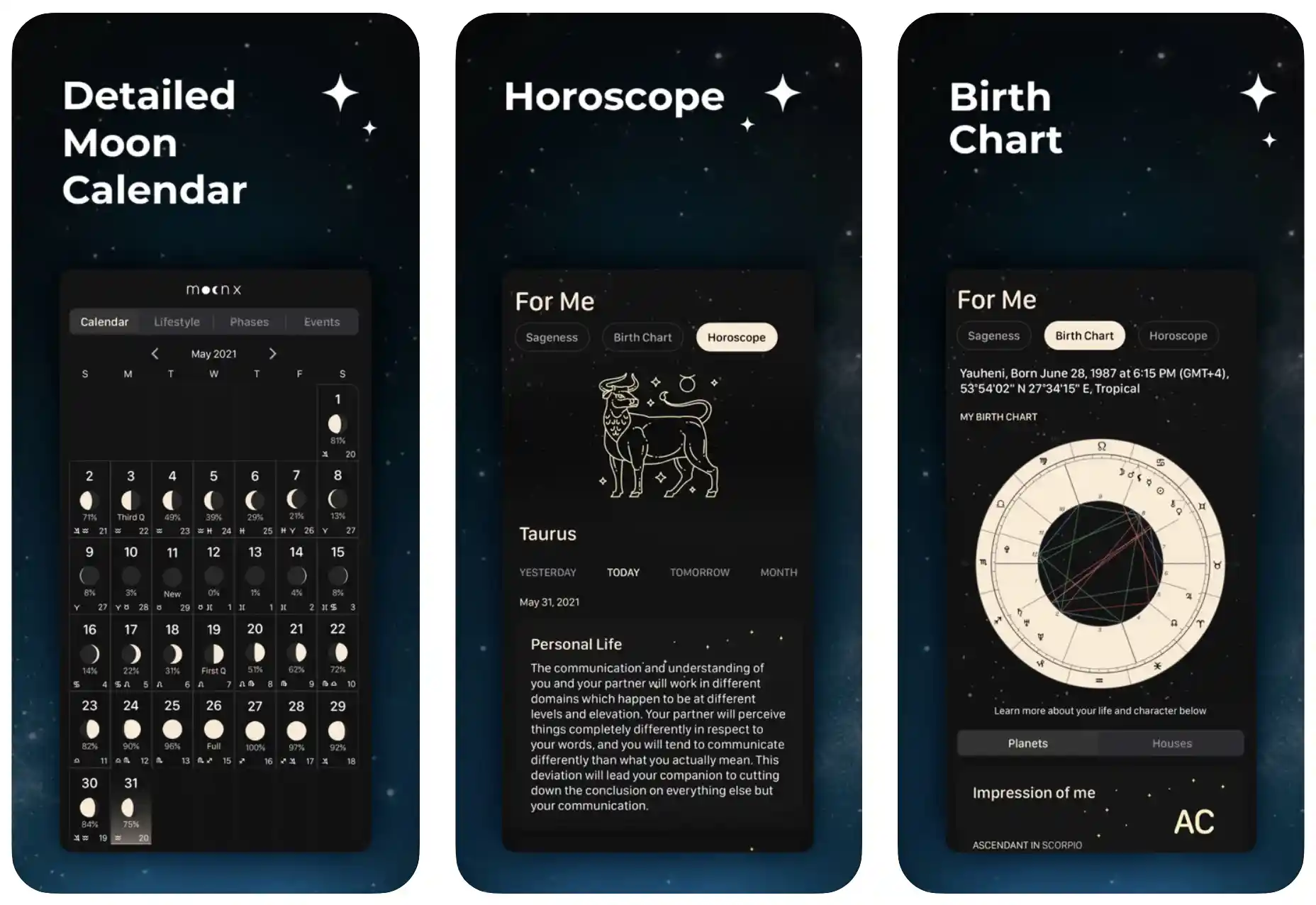
Suppose you habitually find inspiration from the night sky and the moon. In that case, you can use this amazing app to be aware of different moon phases, lucky Lunar days, and appearances of the Lunar at different events.
You can also check out the actual age of the moon, void, of course, the moon, and the moon’s day only with a few simple taps.
You can have some fun with your friends while explaining the exact distance of the moon from Earth using real-time moon data.
You can also track the percentage of moonlight with sunrise and sunset times. The Moon compass is there to check the moon’s directions and movements.
If you cannot find the moon on a cloudy night, you can get instant help from the app with the Live Moon feature, irrespective of the date and location.
The app can be more than handy for you to plan the upcoming months according to different zodiac signs and moon calendars.
Get deep into the affirmations and understand their meanings. Be the first member of your group with all the important knowledge about the moon!
Features of Moon Phase Calendar – MoonX:-
- Complete moon calendar with excellent features
- Genuine articles based on the theory of Moon Energy
- Different appearances of the moon on different dates
- Affirmations and meditations according to moon phases
- Moon compass for determining the direction and movements of the moon
Devices – Android and IOS
Ratings on Apple Store – 4.8 / 5 | Ratings on Google Play Store – 4.2 / 5
Download the App from Google Play Store
Download the App from Apple App Store
9. Moonly: Moon Cycle Calendar & Lunar Sign Astrology
Check different moon phases with the moon calendar and moon phase tracker. Heal your soul, live with the moon’s rhythm, and harmonize your life with one of the most exciting moon phases apps – Moonly.
If you believe in the effects of moon phases in your life, you can get the exact information right on your mobile’s screen with only a few taps.
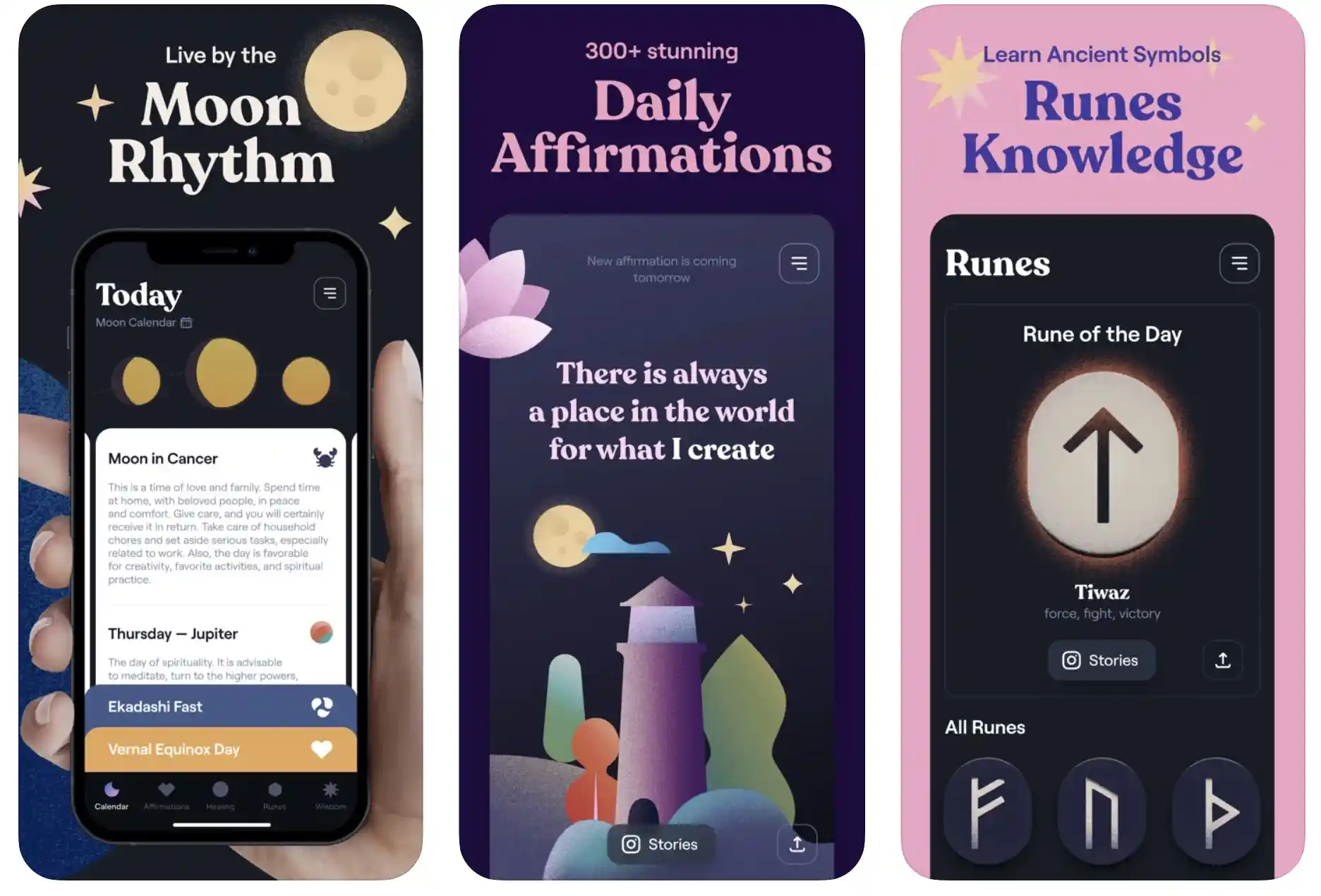
Different astrology stars in the app will show you the right way to move forward. Daily tips, rituals, holidays, etc., are in the app to attain much-needed positivity.
The app is based on the popular Eastern moon cycle calendar and is much more precise than most similar apps.
You can dive deep into the astrology and moon phases and get help from ancient wisdom to plan different life events.
The Lunar Calendar in the app will help you check Lunar’s primary and secondary stages. On your mobile phone, you can also learn about space cycles, the moon’s influence, hidden powers, etc.
Positive affirmations in the app can give you much-needed awareness and motivation and even empower you to control your thoughts and live happily daily.
Moonly is one of those apps that also help you to control your emotions with guided motivation and mindfulness. You can breathe deeply, control your mind, and relax your body – all with a single app only!
Features of Moonly:-
- Live your life happily and calmly with the powerful moon rhythm
- Get yourself inspired by daily affirmations
- Acquire important knowledge about Runes
- Teaches you to practice meditation and mindfulness
- Celebrate the astrological holidays using the Lunar calendar
Device – Android and IOS
Ratings on Apple Store – 4.7 / 5 | Ratings on Google Play Store – 4.5 / 5
Download the App from Google Play Store
Download the App from Apple App Store
While exploring the 11 Best Moon Phases For Full Moon Phases & Moon Alerts, I found an awesome video on “45 Amazing Moon Facts You Know Nothing About,” worth watching.😎😎👍

10. Phases of the Moon
If you are a moon lover, you will love this moon phase app with amazing features like 3-D simulation, monthly calendar, atlas, live wallpaper, moon phases checker, fishing forecast, Astrology zodiac signs, and more.
You will feel like you can hold the whole moon in your hand with this extraordinary 3-D moon app.
You get important information like moon phases and directions, and distance from the Earth right on your phone’s screen, and that too, without much effort.
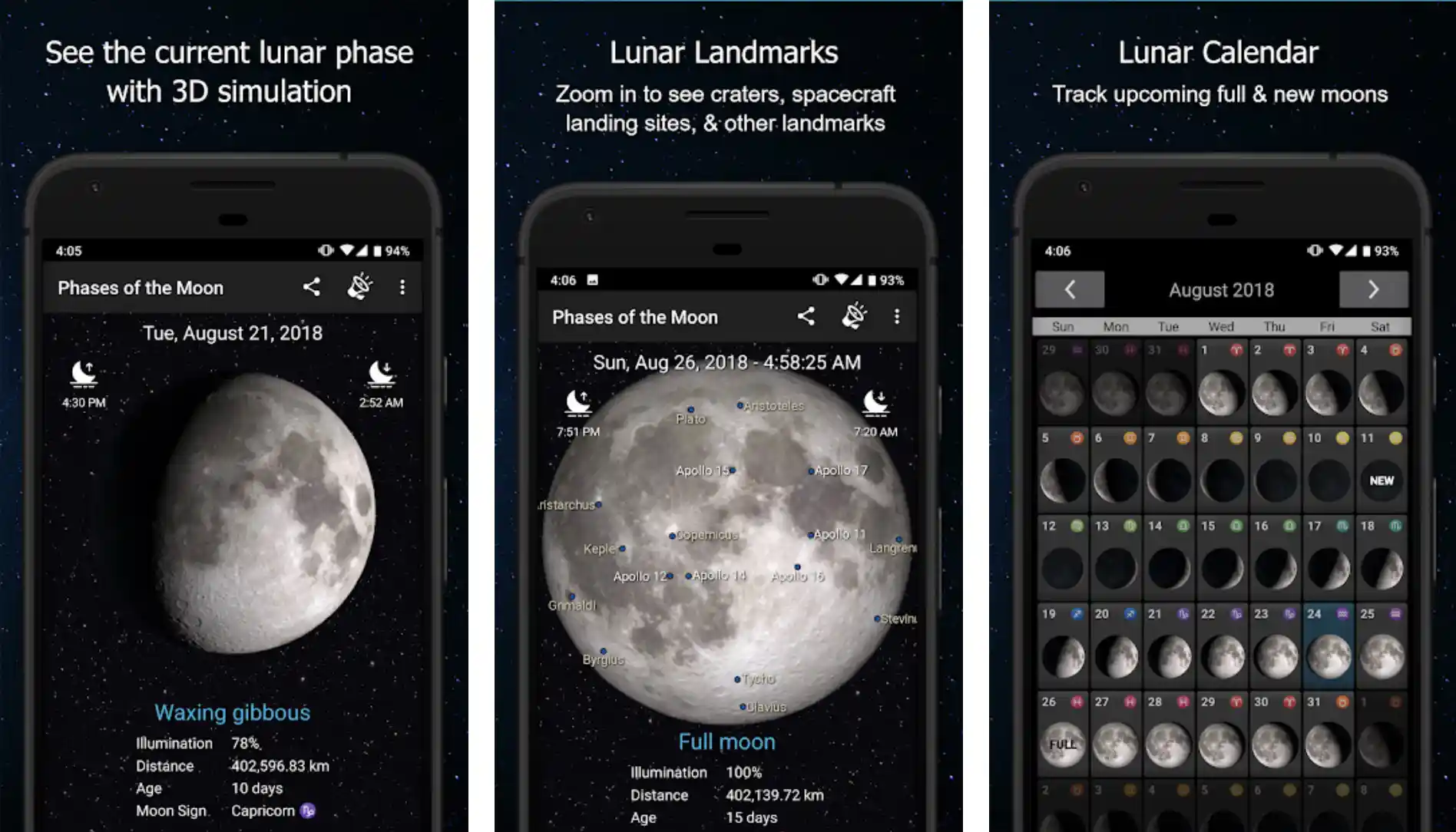
The app’s easy-to-control, swipe forth, and back features allow you to check different important aspects of the moon, including moon illumination, rise and set times, the distance of the moon, etc.
You can set simple yet very powerful reminders for different events affected by the moon’s phases, movements, and directions.
Track different moon cycles with the moon calendar feature, including the new moon, full moon, waning gibbous, first quarter, last quarter, etc.
3-D simulation is exclusively designed according to NASA data and can be more than effective for checking different lunar phases throughout the month.
Check moonrise and moonset times, see the liberation of the moon, view moon landing sites and craters, and share them with your friends.
What more? The app is packed with other features, including Live Lunar Wallpaper and a widget so you can check all the information from your phone’s home screen.
Features of Phases of the Moon:-
- 3D simulation for checking different lunar phases
- Zoom in on the app and check spacecraft landing sites, craters, and other important lunar landmarks
- Track all the upcoming new and full moons with the Lunar calendar
- Beautiful, interactive live moon wallpapers
- Widgets displaying the exact moon phases right on your device’s home screen
Device – Android
Ratings on Google Play Store – 4.6 / 5 | 50,00,000+ Downloads
Download the App from Google Play Store
11. Lunar Phases – Moon Phases Calendar
An excellent moon phase app allows you to check upcoming moon phases, lunar eclipses, solar, etc., with features like a lunar calendar and advanced notifications.
The app is also packed with extraordinary synodic cycle explorers as well! The app’s first page helps you check the moon’s current phase, age in days, distance from the Earth, visibility percentage, and the zodiac constellation around which the moon is moving.
You can also check the four upcoming phases of the moon with exact phase time and duration; the moon rises and sets times.
With great accuracy and visibility, different moon images show micro moons, super moons, and eclipses.

You can tap on them anytime to get different information about the moon. All the images in the app are adjusted according to your hemisphere and location.
The Lunar calendar shows different phases of the moon across days, weeks, and months. You can select the date according to your choice and see the details of a particular day.
This feature of one of the most impressive apps has touched me a lot! All the full moons are named differently in the app!
Wolf, Worm, Snow, Pink, Strawberry, Flower, Sturgeon Buck, Corn, Beaver, Cold. Harvest and Hunter are some very interesting names given to the moon.
Features of Lunar Phase – Moon Phases Calendar:-
- Check current and future moon phases instantly.
- Advanced calendar for planning based on moon phases
- Instant, minute-to-minute details right on your smartphone’s screen
- Powerful lunar eclipse tracker
- Solar eclipse preview and synodic cycle explorer
Devices – Android and IOS
Ratings on Apple Store – 4.4 / 5 | Ratings on Google Play Store – 4.4 / 5
Download the App from Google Play Store
Download the App from Apple App Store
(Q) How do you make a moon phase calendar?
You can check this video and learn how to make a moon phase calendar.

📗 FAQ
What is the most accurate moon phase app?
The accuracy of a moon phase app can vary depending on the app and its data source. However, some of the most accurate moon phase apps include Moon Phase Calendar & Widget, Deluxe Moon, and Moon Phase Pro.
Is there an app that tells the moon phases?
Yes, many moon phase apps are available for iOS and Android devices. Some popular options include Moon Phase Calendar & Widget, Deluxe Moon, and Moon Phase Pro.
Is there a moon phase widget?
Yes, many moon phase apps come with a widget that you can add to your home screen for quick access to the current moon phase information. Moon Phase Calendar & Widget and Deluxe Moon are two examples of apps that offer this feature.
Is the moon phase app free?
Some moon phase apps are free, while others require a purchase to access all their features. Moon Phase Calendar & Widget, Moon Phase Pro, and Deluxe Moon all offer free versions with basic features.
How accurate is the moon phases indicator?
The accuracy of a moon phase indicator depends on the data source and algorithms the app uses. However, most moon phase apps are generally accurate within a few hours of the actual moon phase.
What is the lunar phase app on iPhone?
The lunar phase app on iPhone is a built-in feature of the device’s Clock app. To access it, open the Clock app, tap on the World Clock tab, and then scroll down to the Lunar Phases section.
How do you get moon phases on iPhone?
To get moon phases on iPhone, you can use the built-in lunar phase feature in the Clock app or download a moon phase app from the App Store. Moon Phase Calendar & Widget and Deluxe Moon are two popular options.
Is the Full Moon Features app free?
Full Moon Features is a production company that produces movies and television shows and does not offer a moon phase app. There may be other apps with similar names, but it’s unclear if they are free or paid without more information.
Does Google Calendar show the moon phase?
Google Calendar does not have a built-in feature to display moon phases. However, you can add moon phase events to your calendar using a moon phase app and then import those events into your Google Calendar.
How do you predict moon phases on a calendar?
Moon phases can be predicted using mathematical calculations based on the moon’s orbit around the Earth. However, using a moon phase app or calendar that has already done the calculations for you is much easier.
Does the Moonly app cost money?
The Moonly app offers a free version with basic features and a premium version with additional features for a monthly or yearly subscription fee.
What is the moon phase app with widget free?
Moon Phase Calendar & Widget, Deluxe Moon, and Moon Phase Pro all offer a free version with a moon phase widget.
What is the walking moon app?
We could not find information about a moon phase app called Walking Moon. It’s possible that this app doesn’t exist or is not available in your country.
Do moon phases look the same everywhere?
Yes, moon phases look the same everywhere on Earth because they are caused by the relative position of the moon, Earth, and sun.
How often can we see each moon phase?
Each moon phase occurs approximately once every 29.5 days, the length of a lunar month. However, the visibility of each phase can vary depending on the moon’s position relative to the observer and the time of day.
How accurate is JLC moon phase?
JLC (Jaeger-LeCoultre) is a luxury watchmaker that produces watches with moon phase complications. The accuracy of a JLC moon phase watch depends on the quality and precision of its mechanical movement, which can vary between individual watches.
What is the best free moon phase astrology app for iPhone?
Many moon phase astrology apps are available for iPhone, and some popular free options include Moon Phase Calendar & Widget, Deluxe Moon, and TimePassages.
What happened to full moon features?
Full Moon Features is a production company that is still active and producing movies and television shows. You may think of a different app or service with a similar name.
How do you activate full moon?
Full moon is a natural occurrence when the moon is fully illuminated by the sun and appears as a complete circle in the night sky. You don’t need to activate it – it happens automatically.
What is the full moon app?
Many apps are related to the full moon, including moon phase apps that display information about the current moon phase and apps that provide full moon rituals and meditation practices. The specific Full Moon app you are referring to is unclear without more information.
What is the most accurate moon phase app?
Daff Moon Phase, My Moon Phase Pro, Moon Phase Calendar & Compass, Deluxe Moon Premium, etc., are among the most accurate moon phase apps and enable you to check different moon phases along with the moon age easily. You also get a wide range of home widgets with these apps too.
What is the best free moon phase app for iPhone?
My Moon Phase is the best moon phase application for iPhone and enables you to track the lunar calendar.
The app has a beautiful, sleek dark design, and it’s super easy to view information like the current moon cycle, moon rise and moon set times, the upcoming full moon, etc.
Is there a free moon app?
Moon Phase Calendar, The Moon – Phases Calendar, and LunarMap are three amazing free moon apps that allow you to get all the details related to the moon right on your smartphone.
How do I add moon phases to my Android calendar?
It’s super easy! Open your calendar in the left-hand pane, add a calendar, browse calendars of interest, go through the list, and see “phases of the moon,” and you are more than ready to go!
Does iPhone show moon phases?
The Lunar Phase widget is a popular iOS application widely used to check out all the important information about the moon.
The application elegantly shows you all the details, including the current moon phase, moon rise, moon set, and the next full moon, eclipse, new moon, etc.
What weather app shows moon phases?
1Weather is a very reliable weather application and is also used for checking out moon phases. The app can check temperature graphs, forecasts, current conditions, weather maps, precipitation tables, moon phases, and sunrise and sunset times.
How do I get a moon phase widget?
The Lunar Phase Widget is one of the most popular wills. You can try to add moon phase widgets on your smartphone screen.
To add it to your home screen, you have to press long on the space on the home screen, tap the plus button, and search for the lunar phase widget. You will only see it in your widget section, of course, if you have downloaded it.
Can the Samsung calendar show moon phases?
You can easily check the moon’s phases on your Samsung devices. The feature is easily available through Google Calendar, and you have to sync it with the Samsung Calendar to check the moon phase whenever you want.
Tap the “Hamburger” icon on the top left and navigate down. You will easily find the moon phase there.
How do you add a lunar calendar to Google Calendar on Android?
Open the Google Calendar on your phone, tap the “menu” option from the top left of the screen, and tap settings. Now, tap “General”, and go to “Alternate Calendars”, Now, you have the option to select your preferred calendar, including “Lunar Calendar”.
How do I add the lunar calendar to my Samsung calendar?
Open “Settings”, Go to “Apps”, Tap on “Calendar”, and tap “Calendar Settings”. Now, hit the “Alternate Calendar” option to select the calendar you want, including the “Lunar Calendar”.
The Conclusion
Whether you believe in the effects of moon phases in your life, you are interested in astrology, or you want to get some important about various attributes of the moon, you can try some of these amazing moon phase apps.
All of them are packed with different features and can be more than handy for you to learn about the moon and its phases. If you have liked this review, don’t forget to show your love in the comments section.


