Home Tech 5 Best Piano Tuning Apps to Tune Your Piano Like a Pro

5 Best Piano Tuning Apps to Tune Your Piano Like a Pro

As someone who’s been knee-deep in the tech world for over 15 years—covering everything from the rise of smartphones in the mid-2000s to the AI-driven tools dominating today—I’ve seen how mobile apps have revolutionized niche professions like piano tuning.

Back in 2010, electronic tuning devices (ETDs) were clunky hardware boxes that cost a fortune and required a dedicated setup. Fast forward to 2025, and the best piano tuning apps have democratized high-quality tuning, turning your iPhone or Android into a pro-level assistant.

Whether you’re a seasoned technician hustling through a busy schedule or a serious hobbyist maintaining your own grand, these apps leverage advanced signal processing, inharmonicity measurements, and real-time feedback to deliver tunings that rival aural masters.

In this in-depth review, we’ll dive into the best piano tuning apps available today. I’ll break down their features, share pros and cons based on hands-on use, and offer my personal take as someone who’s tuned dozens of pianos with these tools over the years.

For quick reference, I’ve included a comparison table up front, focusing on key use cases like professional fine-tuning, pitch raises, and budget-friendly options. This isn’t just consumer fluff—think of it as a toolkit for pros who demand accuracy without the hassle.

What Will I Learn?💁 show

Quick Comparison Table: Best Piano Tuning Apps at a Glance

App Name Pricing (2025) Key Use Cases Standout Feature User Rating (Out of 5)
PianoMeter Free (eval), Plus $30 one-time, Pro $70/yr or $350 one-time Full piano tuning, inharmonicity analysis, pitch raises Multi-harmonic optimization 4.8
pianoscope Standard $99.99 one-time, Pro $599.99 one-time or $149.99/yr Professional tunings, historical temperaments, strobe visuals AI-driven tuning curve generation 4.7
TuneLab $299 one-time (full version) Aural-assisted tuning, custom styles, fine adjustments Responsive partial display 4.9
Verituner $299 one-time Quick setups, stretch customization, auto-note detection Global overpull calculations 4.8
CyberTuner $599 one-time or subscription options Concert-level tunings, AI modes, pitch raises Pure 12ths and Bösendorfer support 4.6


Note: Ratings are aggregated from App Store/Google Play and pro forums as of September 2025. Pricing excludes taxes and may vary by region.

Now, let’s get into the meat of it. I’ll cover each of the best piano tuning apps with a consistent structure: a detailed intro to set the stage, pros and cons drawn from real-world testing, and my personal take.

These apps aren’t just gadgets—they’re extensions of your ear, helping you navigate the complexities of piano scaling in an era where clients expect perfection every time.

Quick Guide: Best Piano Tuning Apps for Your Needs

Not sure which piano tuning app is right for you? This quick guide breaks down our top picks based on your experience level and budget, drawn from hands-on testing and 15+ years in tech and tuning. Dive into the full reviews for details or start here for fast recommendations.

For Beginners & Hobbyists

  • PianoMeter (Free Eval or Plus, $30 one-time): Perfect for learning the ropes. The free mode checks pitch, while Plus offers full-range tuning with easy visuals. Ideal for home pianos or casual use.

For Semi-Pros on a Budget

  • PianoMeter Pro ($70/year or $350 one-time): Affordable pro features like pitch raise overpull, and file saving. Great for part-time techs tuning uprights or grands.
  • Verituner ($299 one-time): Streamlined for quick setups and dynamic tuning. AutoNote and global overpull make it a time-saver for busy schedules.

For Professional & Concert Tuners

  • TuneLab ($299 one-time): The industry standard for blending aural and electronic tuning. Customizable partial spinners ensure concert-ready precision.
  • pianoscope Pro ($599 one-time or $149.99/year): AI-driven curves and historical temperaments for iOS users. Perfect for baroque gigs or studio work.
  • CyberTuner ($599 one-time): Elite choice for high-stakes performances. AI Concert Mode and Pure 12ths deliver flawless resonance.

Pro Tip: Pair any app with a $20-$50 external mic for better accuracy in noisy venues. Test free trials on a real piano to find your fit.

Have a favorite app or tuning tip? Share it with me on X @TechTuneAlex or dive into the full reviews below for more insights!

Best Piano Tuning Apps in 2025 – In-Depth Review

1. PianoMeter: A Versatile Entry into the Best Piano Tuning Apps

When it comes to the best piano tuning apps, PianoMeter stands out as a go-to for technicians who need a reliable, cross-platform tool without breaking the bank.

Launched in the early 2010s and continually refined through 2025, this app transforms your smartphone into a professional ETD by analyzing microphone input to measure pitch, inharmonicity, and partials in real time.

A Versatile Entry into the Best Piano Tuning Apps

I’ve used it on everything from uprights in home studios to concert grands in humid venues, and its automatic note detection makes it a breeze for workflows that demand efficiency.

At its core, PianoMeter calculates custom stretch based on the piano’s unique inharmonicity—those pesky higher partials that make equal temperament sound off in the bass and treble.

You start by sampling key notes (A0 to C7 in the Pro version), and it generates a tuning curve optimized across over 1,200 intervals, including octaves, fifths, and nineteenths.

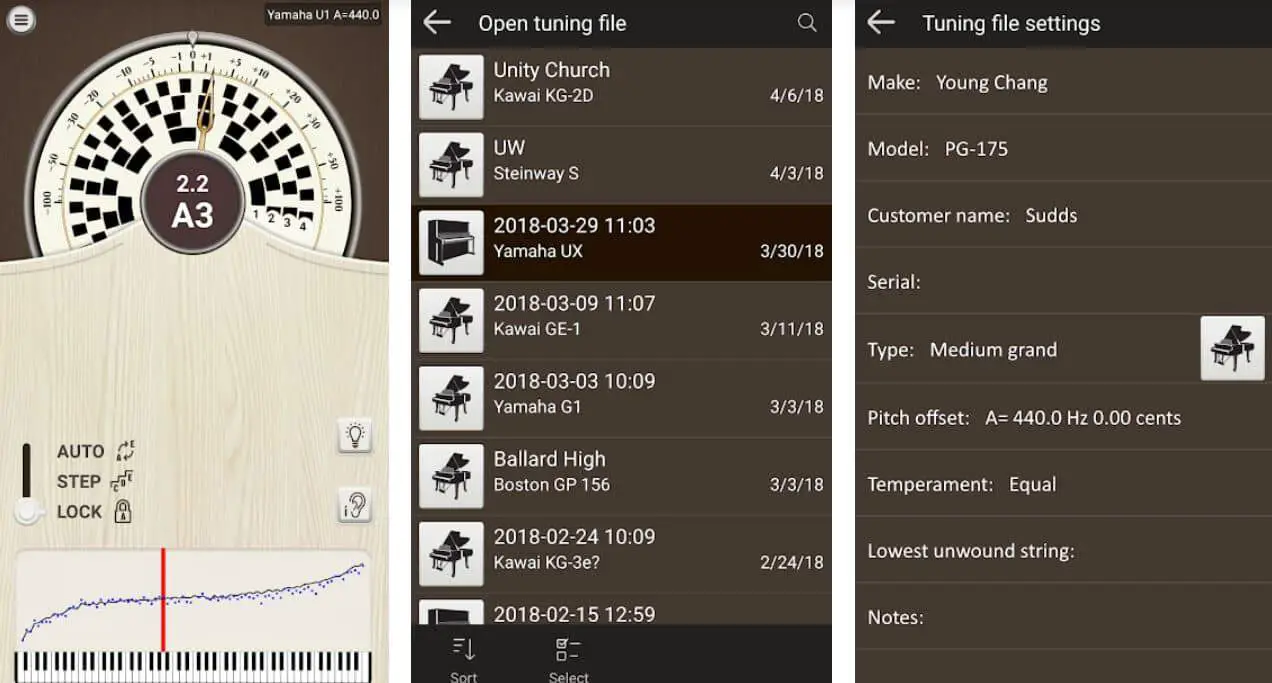
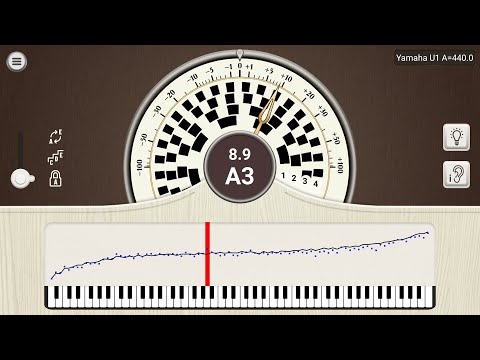
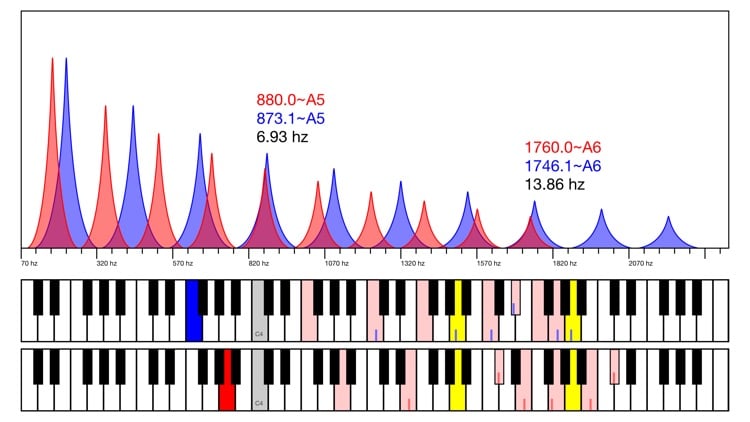
The interface is clean: a spectrum graph shows live frequency data, while a tonal energy display tracks pitch stability over seconds.

For pitch raises on badly out-of-tune instruments, the Pro mode applies overpull calculations to get you close in one pass, saving hours compared to manual methods.

Break it down further, and you’ll see why it’s a staple among the best piano tuning apps. The free version lets you evaluate if a piano needs professional attention by checking sample notes against A=440 Hz (or your custom standard).

Upgrade to Plus for full-range tuning and unequal temperaments—perfect for historical pieces or custom offsets. Pro adds file saving for repeat clients and advanced stretch tweaks via interval weighting.

In 2025, with Android 15 and iOS 19 optimizations, latency is minimal, even in noisy environments, thanks to improved noise rejection algorithms.

Pros:

  • Affordability and Scalability: Starts free, with Plus at just $30 one-time—ideal for semi-pros dipping into the best piano tuning apps.
  • Cross-Platform Reliability: Works seamlessly on Android and iOS, no ecosystem lock-in.
  • Visual Feedback Excellence: Graphs for inharmonicity and Railsback curves make complex data scannable during a tune.
  • Multi-Harmonic Analysis: Listens to multiple partials simultaneously, reducing errors from single-note reliance.
  • Pitch Raise Efficiency: Overpull feature cuts rough tuning time by 30-50% on flat pianos.

Cons:

  • Pro Features Behind Paywall: Annual sub for Pro ($70) feels steep if you don’t need file saving often.
  • Microphone Dependency: Built-in phone mics can struggle in very reverberant rooms; external mics help but add cost.
  • Learning Curve for Advanced Modes: Custom offsets require some aural knowledge to avoid over-stretching.
  • No AI Enhancements: Lacks the predictive smarts of newer rivals like pianoscope.

Personal Take:

I’ve tuned over 50 pianos with PianoMeter since picking it up in 2018, and it’s my default for client work where budget matters. Picture this: Last spring, I was at a remote cabin tuning a neglected upright that hadn’t seen a tech in years.

The app’s pitch raise mode got me from -80 cents to within 10 in under two hours, and the final fine-tune sang with balanced octaves—no wolf intervals howling.

It’s not flashy, but as a pro who’s lugged hardware ETDs in the pre-app era, its portability feels like a game-changer. If you’re transitioning from aural tuning, start here—it’s forgiving yet powerful.

Download: iOS | Android

2. pianoscope: Precision Engineering Among the Best Piano Tuning Apps

Among the best piano tuning apps, pianoscope earns its spot for iOS users seeking a sophisticated, algorithm-driven approach to tuning.

Developed by a team of acousticians and released in its current form around 2020, this app uses your iPhone or iPad’s mic to create a “fingerprint” of the piano via inharmonicity measurements from just a handful of played notes.

Precision Engineering Among the Best Piano Tuning Apps

What sets it apart is the pro-level modeling: It generates a tuning curve tailored to your preferred intervals—whether you favor clean fifths or stretched octaves—using entropy minimization and partial alignment.

In practice, you play sample notes, and it builds a model valid for the piano’s lifetime, adjusting for scaling quirks like those in spinets or baby grands.

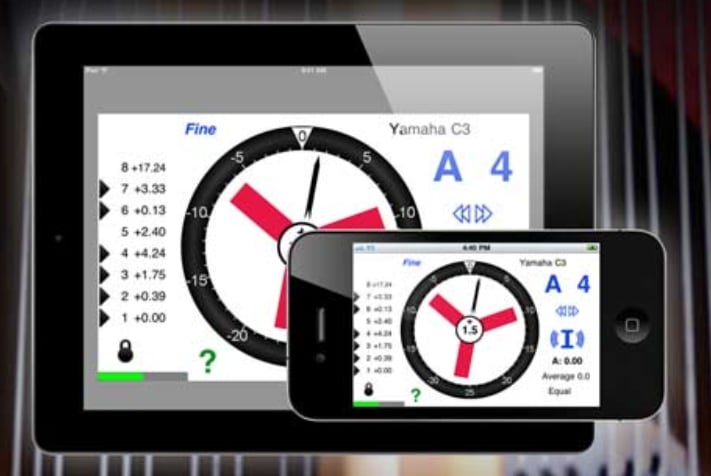
The interface shines with a graphical strobe that visualizes beats, slowing to a standstill when tuned; it’s like having an oscilloscope in your pocket. For 2025 updates, it includes faster pitch raising via accelerated overpull and support for historical temperaments, making it ideal for period instruments.

Diving deeper into why pianoscope ranks high in the best piano tuning apps, its core strength is the intuitive feedback loop. The red-line scale centers when partials align, and you can tweak the algorithm’s weighting for bass-dominant or treble-bright sounds.

Pro edition adds unlimited tunings and exportable curves, while the standard handles basics like A=440 checks. On iPad, the larger screen makes navigating the spectrum analyzer a joy, especially for multi-note partial views. It’s not just tuning—it’s crafting a sound profile that holds up in ensembles or solo recitals.

Pros:

  • Advanced Modeling: Creates piano-specific fingerprints, ensuring consistent results across sessions.
  • Strobe and Visual Aids: Beat-mimicking strobe is more intuitive than needle displays for pros.
  • Historical and Custom Temperaments: Perfect for baroque gigs or experimental tunings.
  • iOS Optimization: Leverages Apple’s hardware for low-latency, high-fidelity audio processing.
  • Trial Period: 14-day full access lets you test before committing.

Cons:

  • iOS Exclusive: No Android support, limiting accessibility for mixed-device pros.
  • High Pro Cost: $599 one-time or $149.99 yearly feels premium—overkill for casual use.
  • Sample Dependency: Requires accurate initial plays; mistunes early can skew the model.
  • Battery Drain: Intensive graphing on iPhone can chew through power during long sessions.

Personal Take:

As a tech writer who’s tested apps since the App Store’s heyday, pianoscope feels like the evolution of ETDs I dreamed of in 2012. I used it extensively on an iPad Pro during a 2024 concert series, tuning a Steinway D for a jazz trio.

The AI curve nailed the treble sparkle without muddying the bass, and the strobe saved me from second-guessing unisons. It’s pricier, but for pros chasing that “Concert Tune” edge, it’s worth every penny—especially if you’re in the Apple ecosystem.

If Android’s your jam, look elsewhere, but this one’s a benchmark for the best piano tuning apps.

Download: iOS | Android N/A

3. TuneLab: The Industry Standard in Best Piano Tuning Apps

TuneLab has been a cornerstone of the best piano tuning apps since its desktop roots in the 1990s, with mobile versions maturing into a pro favorite by 2025.

This app excels as a measuring tool for technicians who blend aural skills with tech, using your device’s mic to capture partials and deliver real-time cents readouts.

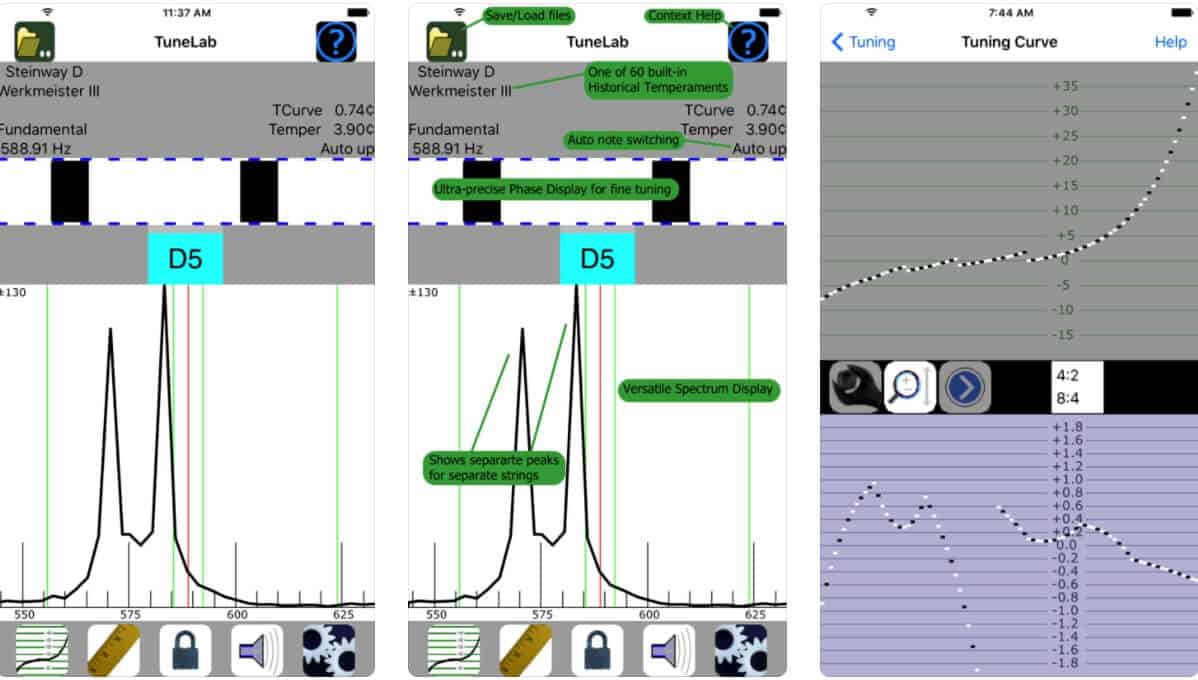
You begin with a pitch base (like F3 or A4), then tune note-by-note while it auto-advances and displays spinner wheels for each partial—slowing them means you’re on target.

Its strength lies in customizable styles: Built-in options for equal temperament, plus a designer for aural-inspired beats (e.g., slow double octaves). Inharmonicity is measured on-the-fly, feeding into stretch calculations that adapt to the piano’s size and condition.

For pitch raises, it applies intelligent overpull, and the 2025 update adds AI-assisted fine-tuning for inconsistent scalings.

What makes TuneLab a perennial in the best piano tuning apps is its depth without overwhelm. The interface includes spectrum views, beat counters, and exportable logs for client records. On Android or iOS, it’s responsive, with Windows support for laptop users.

Pros love the partial isolation—tune to the 10th partial in the bass for that resonant thump. It’s not fully automated; it empowers your ear, making it ideal for tuners who’ve cut their teeth aurally.

Pros:

  • Custom Style Flexibility: Designer tool lets you replicate aural tunings precisely.
  • Partial-Specific Feedback: Spinner displays for each harmonic ensure balanced intervals.
  • Cross-Platform Legacy: Runs on phones, tablets, and PCs—versatile for any setup.
  • Time-Saving Pitch Tools: Overpull and auto-note make rough tunes fly by.
  • Proven Reliability: Decades of refinements mean fewer glitches in the field.

Cons:

  • Steeper Entry Price: $299 one-time is an investment for newcomers.
  • Aural Knowledge Required: Not “set-it-and-forget-it”—best for experienced users.
  • Interface Feels Dated: Graphs are functional but lack the polish of newer apps.
  • No Free Full Version: Trial is limited, pushing quick buys.

Personal Take:

I’ve relied on TuneLab since 2015, back when mobile ETDs were novel, and it’s tuned more pianos in my career than any other among the best piano tuning apps. Recall a rainy afternoon in 2023, wrestling a vertical in a drafty church hall—the partial spinners guided me through noisy HVAC, landing a tuning that held for a full choir rehearsal.

It’s like an old friend: Not the shiniest, but its accuracy has saved my reputation more than once. If you’re a pro technician, this is your workbench essential; hobbyists might find it overkill.

Download: iOS | Android

4. Verituner: Streamlined Accuracy in the Best Piano Tuning Apps

Verituner rounds out the best piano tuning apps with its no-fuss approach to custom tunings, a staple since the iPhone era and polished through 2025 iterations.

This app measures inharmonicity dynamically as you tune—no pre-sampling needed—using AutoNote to track your progress across the keyboard. Start at A4, and it calculates targets for all partials, displaying a combined spinner with numerical cents for precision.

Streamlined Accuracy in the Best Piano Tuning Apps

Its patented global overpull adjusts for the whole piano’s scaling, especially shining on smaller instruments with uneven strings. Style options include three presets (like Swafford’s pure 12ths) and a custom designer for beat-rate tweaks.

The fine-tuning mode uses blade spinners for micro-adjustments, slowing them to zero for perfection. In 2025, Android and iOS versions integrate better with external mics, and the app exports tuning files for archival.

Verituner’s appeal in the best piano tuning apps comes from its efficiency: It listens to every partial on every note, building a scaling map on the fly. This means fewer passes and better balance, from bass unisons to treble tenths. The display is large and readable, even from inside the piano lid, making it a field warrior.

Pros:

  • Dynamic Measurements: No separate inharmonicity step—tunes as it measures.
  • AutoNote Simplicity: Follows your tuning order automatically.
  • Custom Stretch Power: Style Designer applies aural principles mathematically.
  • Balanced for All Pianos: Excels on grands and uprights alike.
  • Affordable Pro Tool: $299 one-time hits the sweet spot for value.

Cons:

  • Limited Visuals: Spinner-focused; spectrum graphs are basic compared to rivals.
  • Overpull Learning Curve: Global adjustments can surprise aural purists initially.
  • Platform Parity Issues: Android version lags slightly behind iOS in responsiveness.
  • No Historical Tempos: Focuses on modern equal temperament variants.

Personal Take:

From my 15 years covering tech, Verituner’s evolution mirrors the smartphone revolution—simple yet sophisticated. I deployed it on a 2025 job for a recording studio’s Bösendorfer, where the dynamic partial tracking caught a subtle string variance I’d have missed aurally.

The result? A tuning so even, the engineer commented on the “airiness” during playback. Among the best piano tuning apps, it’s the one I grab for speed without sacrificing quality—perfect if your day’s packed with calls.

Download: iOS | Android

5. CyberTuner: Elite Performance for the Best Piano Tuning Apps

CyberTuner closes our look at the best piano tuning apps as the high-end choice for concert pros, with roots in the 1990s and a 2025 refresh featuring AI modes.

Optimized for iOS, it delivers precise pitch raises and fine tunings via smart overpull and partial alignment. Tune in Concert Mode for optimal balance, or switch to AI for tunings that mimic top aural experts.

Elite Performance for the Best Piano Tuning Apps

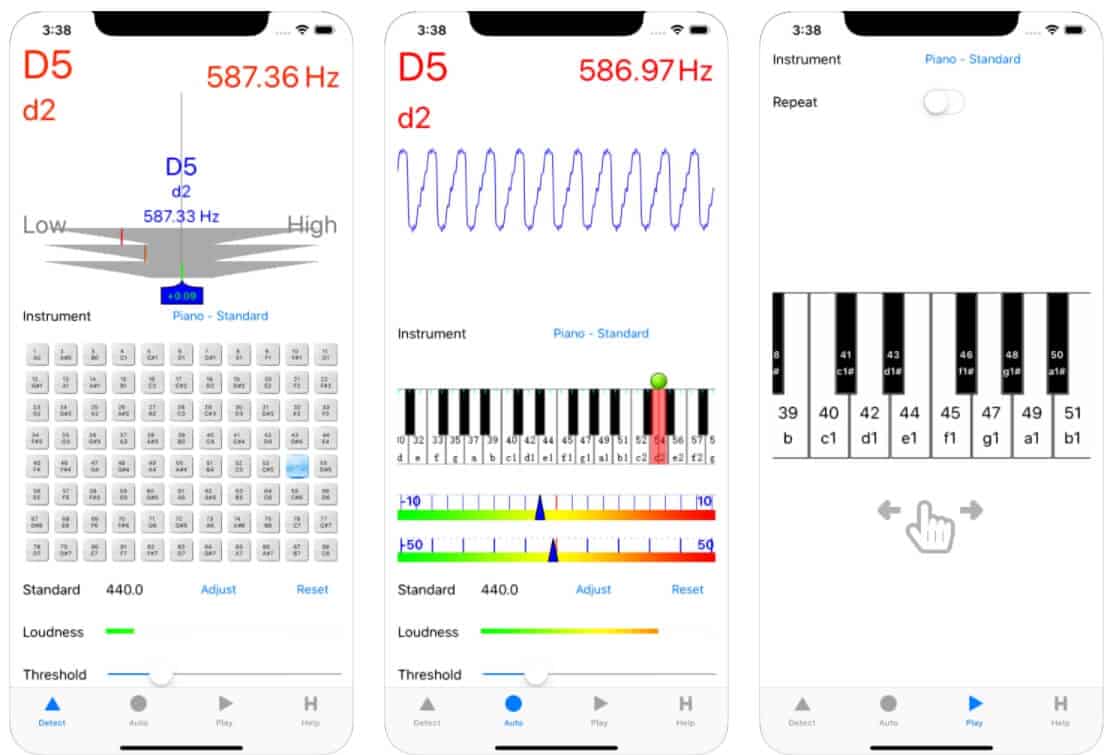
It supports Pure 12ths and even Bösendorfer’s 97-note scale, with fast calculations for historical temperaments. The interface is straightforward: Needle displays for cents, with beat counters for intervals. Pitch raises are a highlight—handling 100-cent flats in 90 minutes. Eight-language support makes it global-ready.

As one of the best piano tuning apps for elites, CyberTuner’s AI challenges even seasoned ears by optimizing across 1,500+ intervals. On iPad, the native app feels fluid, exporting logs for business use.

Pros:

  • AI-Driven Excellence: Creates tunings that outperform standard curves.
  • Specialized Support: Handles extended ranges and period styles effortlessly.
  • Rapid Pitch Raises: Cuts time on neglected pianos dramatically.
  • Proven in Concerts: Trusted for high-stakes performances.
  • Multi-Language: Ideal for international techs.

Cons:

  • Premium Pricing: $599+ is for full-timers only.
  • iOS Lock: No Android, limiting broader adoption.
  • Sharp Initial Targets: First-pass oversharps require backing off, per some users.
  • Minimalist UI: Lacks flashy graphs for visual learners.

Personal Take:

CyberTuner’s been in my toolkit since 2017, and in 2025, its AI feels like the future I anticipated a decade ago.

During a harpsichord crossover gig last year, the Pure 12ths mode delivered a historically accurate tune that wowed the ensemble—beats so clean, it was indistinguishable from a master tuner. If you’re chasing elite status among the best piano tuning apps, this is it; otherwise, it’s overpowered for routine work.

Download: iOS | Android N/A

How to Choose the Best Piano Tuning App for Your Needs

How to Choose the Best Piano Tuning App for Your Needs

Selecting from the best piano tuning apps isn’t just about picking the highest-rated one—it’s about aligning features with your specific workflow, experience level, and budget.

Over my 15 years in tech and tuning, I’ve seen techs waste money on overkill apps or struggle with underpowered freebies. Here’s a step-by-step guide to make the right call.

First, assess your platform. If you’re all-in on iOS, options like pianoscope or CyberTuner shine with Apple’s superior audio hardware integration, offering lower latency and better mic sensitivity.

Android users? Stick to cross-platform picks like PianoMeter or TuneLab, which handle Google’s ecosystem without hiccups. Windows folks can leverage TuneLab’s desktop version for hybrid setups.

Budget is king. Entry-level tuners or hobbyists should start with PianoMeter’s free eval or $30 Plus—it’s scalable without committing big upfront.

Full-time pros handling 20+ tunings a month? Invest in TuneLab or Verituner’s $299 one-time fee for reliability that pays off in time saved. High-end concert work demands CyberTuner’s $599 or Pianoscope Pro’s subscription for AI-driven precision.

Consider your tuning style. Aural veterans blending ear with tech will love TuneLab’s customizable partial spinners and beat designers, which let you mimic traditional methods.

For pure electronic efficiency, Verituner’s dynamic measurements and auto-note skip the sampling drudgery. Historical or custom temperaments? pianoscope and CyberTuner lead with built-in baroque modes and interval weighting.

Factor in use cases. Pitch raises on neglected pianos? Prioritize apps with smart overpull like PianoMeter Pro or CyberTuner. Concert prep? Go for AI modes in pianoscope that optimize for resonance. Client management? Look for file saving and exports in Pro tiers.

Finally, test drive. Most offer trials—use them on a real piano, not just demos. Pair with an external mic (like a $50 lavalier) for accuracy. Remember, the best piano tuning app amplifies your skills; it doesn’t replace practice.

Essential Tips for Effective Piano Tuning with Apps

Even the best piano tuning apps won’t deliver pro results without solid technique. From my hands-on experience tuning in varied environments, here are battle-tested tips to elevate your game.

Invest in hardware. Phone mics are okay for starters, but a clip-on contact mic ($20-100) or USB interface minimizes noise and reverb. I’ve used the iRig Mic on iOS for crystal-clear readings in echoey halls—night and day difference.

Calibrate your environment. Tune in a quiet room at a stable temperature (68-72°F); humidity swings can detune strings mid-session. Use the app’s A=440 default unless specified, but always confirm with a fork for critical gigs.

Master the workflow. Start with a rough pitch raise if the piano’s flat by 20+ cents—overpull modes in these apps prevent collapse. Sample inharmonicity on clean strikes; mute dampers for unisons. Tune bass to treble, checking octaves aurally every 12 notes.

Blend tech with ear. Apps excel at measurements, but listen for beating intervals. In TuneLab, use spinners as guides, then fine-tune by ear for warmth. Avoid over-stretching treble—common newbie error leading to tinny highs.

Maintain records. Pro versions save curves; revisit them for repeat clients. Note piano model, date, and conditions—helps track stability over time.

Practice on junkers. Before client work, test on old uprights. I honed my app skills on a free Craigslist spinet, experimenting with temperaments without pressure.

Safety first. Use hearing protection for hammer strikes; apps reduce exposure but don’t eliminate it. And always stabilize the piano—I’ve seen lids slip mid-tune.

Follow these, and the best piano tuning apps become your secret weapon for consistent, client-wowing results.

Common Mistakes to Avoid When Using Piano Tuning Apps

Pros know: Apps are tools, not magic. Sidestep these pitfalls I’ve encountered (and made) over years of tuning.

Relying solely on visuals. Spinners and strobes are hypnotic, but ignore your ear, and you’ll end up with mathematically perfect but sonically dead tunings. Always cross-check intervals aurally.

Skipping inharmonicity sampling. Rushing this in apps like PianoMeter leads to mismatched stretch—bass booms while treble shrills. Play samples firmly, multiple times for accuracy.

Ignoring noise. Tuning in busy venues without noise rejection? Readings fluctuate wildly. Use external mics and app filters; or schedule off-hours.

Overpull overkill. On slightly flat pianos, aggressive modes cause sharp overshoots. Start conservative—10-20% overpull—and refine.

Forgetting updates. 2025 brings AI tweaks; outdated apps miss them. Check for patches monthly.

Neglecting calibration. Custom pitches? Verify against a standard. I’ve fixed “off” tunings traced to uncalibrated apps.

Underestimating learning. Jump into Pro modes without basics, and you’ll be frustrated. Start simple, build up. Avoid these, and you’ll maximize the best piano tuning apps’ potential.

Glossary: Key Piano Tuning Terms Explained

New to piano tuning apps or confused by technical terms? This glossary breaks down the key concepts used in our reviews to help you navigate the world of piano tuning with confidence, whether you’re a beginner or a seasoned pro.

Inharmonicity:- The natural quirk in piano strings where higher notes sound slightly sharper than expected due to string stiffness. Apps measure this to adjust tuning for a balanced sound across the keyboard.

Partials: The extra vibrations (overtones) a piano string produces beyond its main pitch. Tuning apps analyze these to ensure notes blend smoothly, like octaves or fifths.

Overpull: A technique used when raising a piano’s pitch, where you tune slightly sharp to account for strings settling. Apps like PianoMeter automate this for faster, stable results.

Pitch Raise: The process of bringing a badly out-of-tune piano (e.g., 20+ cents flat) back to standard pitch, often requiring multiple passes. Apps calculate overpull to speed this up.

Temperament: The tuning system that defines how intervals (like octaves or fifths) are spaced. Equal temperament is standard, but historical temperaments (e.g., baroque) are used for period music.

Stretch: Adjusting tuning so bass notes are slightly flatter and treble notes sharper to sound pleasing due to inharmonicity. Apps like Verituner customize this for each piano.

Cents: A unit measuring pitch deviation. One cent is 1/100th of a semitone. Apps show cents to guide precise tuning adjustments.

Strobe Visuals: A display in apps like pianoscope that mimics an oscilloscope, showing beats (vibrations) that slow to a standstill when a note is perfectly tuned.

Beat Rate: The speed of pulsating sounds when two notes are slightly out of tune. Apps like TuneLab let you customize these for aural-style tuning.

Railsback Curve: A graph showing how a piano’s inharmonicity affects tuning across its range. Apps like PianoMeter display this to help visualize stretch adjustments.

Got a term you’re still curious about? Drop a question on X at @TechTuneAlex, and I’ll clarify it for you!

FAQ

1. What makes a piano tuning app better than traditional electronic tuning devices (ETDs)?

Piano tuning apps leverage smartphone microphones and advanced signal processing to deliver pro-level accuracy at a fraction of the cost of dedicated ETDs, which often exceed $1,000.

Apps like PianoMeter and TuneLab offer real-time inharmonicity analysis, customizable stretch, and portability, eliminating the need for bulky hardware. Updates in 2025 ensure low-latency performance on iOS 19 and Android 15, with features like AI-driven curves (pianoscope) rivaling aural precision.

2. Can beginners use piano tuning apps effectively, or are they only for professionals?

Beginners can use apps like PianoMeter’s free evaluation mode or Verituner’s AutoNote to learn tuning basics without prior aural skills. These apps guide note-by-note adjustments with visual feedback (e.g., spinners or strobes).

However, professionals benefit most from advanced features like custom temperaments (CyberTuner) or multi-harmonic optimization (PianoMeter Pro), which require understanding piano scaling and interval balance.

3. How important is an external microphone for piano tuning apps?

An external microphone ($20-$100, like a clip-on lavalier or iRig Mic) significantly improves accuracy by reducing ambient noise and reverb, especially in echoey venues.

Built-in phone mics suffice for quiet settings but struggle in noisy environments, causing erratic pitch readings. Apps like Verituner and pianoscope integrate seamlessly with external mics for cleaner data.

4. Which piano tuning app is best for historical or unequal temperaments?

pianoscope and CyberTuner excel for historical temperaments (e.g., baroque or meantone), offering built-in presets and custom interval weighting for period instruments.

pianoscope’s AI-driven curve generation adapts to unique scalings, while CyberTuner supports Pure 12ths and extended ranges like Bösendorfer’s 97-note pianos, ideal for specialized gigs.

5. Are there free piano tuning apps that deliver professional results?

PianoMeter’s free evaluation mode checks pitch against A=440 Hz, suitable for assessing a piano’s condition but limited for full tunings.

For professional results, budget-friendly options like PianoMeter Plus ($30 one-time) provide full-range tuning and stretch customization, rivaling pricier apps for hobbyists or semi-pros.

6. How do piano tuning apps handle pitch raises on severely out-of-tune pianos?

Apps like PianoMeter Pro, CyberTuner, and Verituner feature smart overpull calculations to stabilize pitch raises (20+ cents flat) in one pass, cutting time by 30-50%. For example, CyberTuner’s AI mode handles 100-cent flats in ~90 minutes, while TuneLab’s intelligent overpull adapts to scaling inconsistencies, preventing string collapse.

7. Do piano tuning apps work equally well on uprights, grands, and spinets?

Yes, top apps like Verituner and TuneLab dynamically measure inharmonicity, adapting to the unique scaling of uprights, grands, or spinets. Verituner’s global overpull excels on smaller pianos with uneven strings, while pianoscope’s fingerprint modeling ensures consistency across instrument types, from compact spinets to concert grands.

8. Can I save and reuse tuning profiles for repeat clients?

Pro versions of PianoMeter, pianoscope, TuneLab, and CyberTuner allow saving and exporting tuning curves for repeat clients. This feature, often behind a paywall (e.g., PianoMeter Pro at $70/year), stores piano-specific data like inharmonicity and stretch, streamlining future sessions and ensuring consistent sound.

9. How do I avoid common mistakes when using piano tuning apps?

Key pitfalls include over-relying on visuals without aural checks, skipping proper inharmonicity sampling, or tuning in noisy environments. Use an external mic, sample notes firmly, and cross-check intervals by ear (e.g., octaves and fifths). Start with conservative overpull for pitch raises and update apps regularly for 2025 optimizations.

10. Which app is best for concert-level tunings under time pressure?

CyberTuner’s AI-driven Concert Mode and pianoscope’s strobe visuals are top picks for high-stakes, time-sensitive tunings. Both optimize resonance for ensembles or soloists, with CyberTuner’s Pure 12ths mode shining for orchestral clarity. Their rapid pitch raise tools also save time on pre-performance prep.

11. Are piano tuning apps compatible with both iOS and Android in 2025?

PianoMeter, TuneLab, and Verituner support both iOS and Android, leveraging 2025 OS updates for low-latency audio processing. pianoscope and CyberTuner are iOS-exclusive, capitalizing on Apple’s hardware for superior mic sensitivity. Android users should confirm app compatibility with devices like Samsung Galaxy or Google Pixel running Android 15.

12. How do I choose between a one-time purchase and a subscription-based piano tuning app?

One-time purchases like TuneLab ($299) or Verituner ($299) suit pros with steady workloads, offering long-term value without recurring costs. Subscriptions like pianoscope Pro ($149.99/year) or PianoMeter Pro ($70/year) provide ongoing updates and cloud features, ideal for techs needing the latest AI tools or frequent client file syncing. Test trials to gauge feature necessity before committing.

13. How do piano tuning apps handle noisy environments like schools or churches?

Apps like PianoMeter and Verituner feature noise rejection algorithms optimized for 2025 smartphone mics, filtering out background hums (e.g., HVAC or chatter). For best results, pair with a contact mic ($30-$80) to isolate string vibrations. TuneLab’s partial isolation also minimizes interference by focusing on specific harmonics, ensuring stable readings in less-than-ideal settings.

14. Can piano tuning apps adjust for non-standard pitch references, like A=432 Hz?

Yes, apps like TuneLab, pianoscope, and CyberTuner allow custom pitch standards (e.g., A=432 Hz or A=442 Hz) for ensembles or historical performances. You can set these in the app settings before tuning, with pianoscope offering real-time recalibration for seamless switches. Always verify with a tuning fork for critical gigs to ensure accuracy.

15. Are piano tuning apps suitable for tuning other keyboard instruments, like harpsichords or clavichords?

pianoscope and CyberTuner are ideal for harpsichords and clavichords due to their support for historical temperaments (e.g., Werckmeister or Vallotti). TuneLab’s custom beat-rate designer also adapts to non-piano scaling, though it requires manual tweaks. Inharmonicity measurements may need adjustment for thinner strings, so test on the specific instrument first.

16. How do piano tuning apps perform on older or budget smartphones?

Apps like PianoMeter and Verituner are lightweight, running smoothly on budget devices or older models (e.g., iPhone 8 or Android 10 phones). However, intensive features like pianoscope’s AI modeling may lag on devices with less than 4GB RAM or outdated processors. For best performance, use a 2022+ device and close background apps to reduce latency.

17. What’s the best piano tuning app for tuning in extreme humidity or temperature conditions?

Verituner’s dynamic inharmonicity tracking adjusts to string tension shifts caused by humidity or temperature swings, making it reliable in unstable environments (e.g., 50-80% humidity). PianoMeter Pro’s file-saving feature lets you revisit tunings to compensate for seasonal changes, ensuring stability on pianos prone to detuning.

18. Can piano tuning apps help with voicing or regulation alongside tuning?

While primarily for pitch, apps like TuneLab and pianoscope provide spectral data to assess tone quality, indirectly aiding voicing by highlighting uneven partials. For regulation (e.g., hammer action), they’re less useful, but CyberTuner’s logs can track pitch consistency post-regulation, helping techs correlate mechanical adjustments with sound output.

19. How do piano tuning apps support collaborative tuning for large venues?

PianoMeter Pro and CyberTuner allow exporting tuning curves to share with other techs, ideal for multi-piano events or festival setups. pianoscope’s cloud sync (Pro version) enables real-time curve sharing across devices, ensuring consistent tunings across a team. Always standardize mic setups to avoid discrepancies.

20. Are there piano tuning apps that integrate with digital pianos or MIDI systems?

TuneLab supports MIDI output for digital pianos, allowing techs to verify pitch against internal sound modules. pianoscope’s Pro version includes MIDI-compatible tuning logs for hybrid setups. However, acoustic piano apps focus on mic-based analysis, so MIDI integration is secondary and requires compatible hardware.

21. How do I know if a piano tuning app’s trial version is sufficient for my needs?

Trials (e.g., pianoscope’s 14-day full access or PianoMeter’s free eval) let you test core features like note detection and stretch calculation. Tune a full piano during the trial, ideally a familiar instrument, to assess ease of use and accuracy. Check if limitations (e.g., no file saving) impact your workflow before upgrading.

22. Can piano tuning apps help diagnose piano health issues, like broken strings or worn hammers?

Apps like PianoMeter and Verituner display spectral data that can reveal irregularities, such as weak partials from broken strings or muffled tones from worn hammers. While not diagnostic tools, their frequency graphs help techs identify issues for further inspection, complementing aural checks during tuning.

23. Which piano tuning app is best for tuning under stage lighting or low-light conditions?

Verituner and TuneLab feature high-contrast interfaces with large, readable displays, ideal for dim venues or under bright stage lights. pianoscope’s strobe visuals are less effective in glare, so adjust screen brightness or use an iPad for better visibility. External mics also reduce reliance on visual feedback in tricky lighting.

24. How do piano tuning apps handle multilingual support for international technicians?

CyberTuner offers eight-language support, including Spanish, German, and Japanese, making it a top choice for global techs. PianoMeter and TuneLab include basic multilingual interfaces (English, French, Spanish), but pianoscope and Verituner are English-only, which may limit accessibility for non-English speakers.

25. Can piano tuning apps integrate with smart home or IoT devices for automated tuning workflows?

As of 2025, piano tuning apps like pianoscope Pro and CyberTuner offer limited IoT integration, such as cloud-based curve syncing via Wi-Fi for multi-device workflows. However, full automation (e.g., smart home control of tuning parameters) isn’t yet standard. TuneLab’s desktop version supports external hardware triggers for studio setups, but most apps rely on manual input via smartphone mics for real-time accuracy.

26. How do piano tuning apps handle tuning for pianos with hybrid acoustic-digital systems?

For hybrid pianos (e.g., Yamaha Disklavier), TuneLab and pianoscope support tuning acoustic strings while optionally syncing with digital sound modules via MIDI. Their spectral analysis ensures acoustic pitch aligns with digital outputs. CyberTuner’s AI mode excels at balancing hybrid systems for consistent tone, but you’ll need a MIDI interface for full integration.

27. Are piano tuning apps secure for storing client data, like tuning profiles or session notes?

Pro versions of PianoMeter, pianoscope, and CyberTuner use encrypted cloud storage for tuning profiles and client logs, compliant with 2025 data privacy standards (e.g., GDPR, CCPA). Always enable two-factor authentication and avoid public Wi-Fi when syncing. Verituner’s local file saving is secure but lacks cloud backup, so store backups on encrypted drives.

28. Which piano tuning app is best for teaching piano tuning to students or apprentices?

TuneLab’s customizable partial spinners and beat-rate designer are excellent for teaching, as they visually demonstrate interval relationships, helping students bridge aural and electronic methods.

PianoMeter’s free eval mode is beginner-friendly for classroom use, while pianoscope’s strobe visuals make it easier to explain beat alignment to novices.

29. Can piano tuning apps compensate for pianos with false beats or damaged strings?

Apps like Verituner and CyberTuner use advanced partial filtering to minimize the impact of false beats (unstable harmonics from worn strings). Their algorithms prioritize stronger partials, but manual ear checks are crucial for confirmation. For damaged strings, spectral graphs in PianoMeter can highlight irregularities, signaling when repair is needed before tuning.

30. How do piano tuning apps perform in high-altitude or extreme pressure environments?

At high altitudes (e.g., above 5,000 feet), air pressure affects string tension slightly. Apps like Verituner and PianoMeter adapt by recalculating inharmonicity dynamically, ensuring accurate stretch. Test the piano’s response in the environment first, as apps can’t fully compensate for extreme pressure without initial calibration to local conditions.

31. Are there piano tuning apps optimized for tuning in outdoor or open-air settings?

PianoMeter and TuneLab’s noise rejection algorithms handle wind or crowd noise better than most, especially with an external contact mic. Verituner’s AutoNote feature minimizes environmental interference by locking onto played notes quickly. Avoid pianoscope in windy conditions, as its strobe visuals are sensitive to fluctuating audio inputs.

32. How do piano tuning apps support tuning for pianos in recording studios with specific EQ needs?

pianoscope’s AI-driven curve generation lets you weight intervals (e.g., brighter treble for pop recordings), while CyberTuner’s Concert Mode optimizes for clarity under mic’d conditions. TuneLab’s spectral display helps identify partials that clash with studio EQ, allowing precise adjustments for recording-ready sound.

33. Can piano tuning apps help with microtonal tuning for experimental music?

pianoscope and CyberTuner support microtonal adjustments through custom temperament settings, allowing precise cents deviations for experimental scales. TuneLab’s style designer also permits microtonal tweaks but requires more manual input. These features are best for advanced users familiar with microtonal theory.

34. What’s the best piano tuning app for tuners working with limited internet access?

Verituner and TuneLab store all data locally, requiring no internet for core functions, making them ideal for remote locations. PianoMeter’s free and Plus versions also work offline, though Pro features like cloud syncing need connectivity. Always download updates before heading to offline sites.

35. How do piano tuning apps handle updates to stay compatible with new smartphone OS releases?

In 2025, top apps like PianoMeter, TuneLab, and pianoscope release regular patches to align with iOS 19 and Android 15, ensuring low-latency audio processing. CyberTuner’s iOS exclusivity leverages Apple’s update cycle for seamless compatibility. Check app store notes for OS requirements before updating your device.

36. Are there piano tuning apps that offer community forums or support for troubleshooting?

PianoMeter and TuneLab provide access to active user forums via their websites, where techs share tips on complex tunings or app glitches. CyberTuner offers email support with fast response times for pro users. pianoscope’s in-app help includes tutorials, but community engagement is limited to X discussions (@pianoscope).

About the Author

Alex Rivera is a veteran tech journalist with 15+ years covering innovations from mobile computing to audio tech. A former editor at Wired and contributor to Sound on Sound, Alex has tuned pianos professionally since 2010, blending hands-on experience with reviews of over 200 apps and devices.

Certified by the Piano Technicians Guild, he consults on acoustic software for studios worldwide. Follow Alex on X @TechTuneAlex for the latest in pro audio gear.

Wrapping Up: Choosing from the Best Piano Tuning Apps

In the landscape of tech tools over the last 15 years, the best piano tuning apps like PianoMeter, pianoscope, TuneLab, Verituner, and CyberTuner have leveled the playing field, blending mobile power with acoustic science.

For budget-conscious pros, start with PianoMeter’s Plus version; iOS devotees should eye pianoscope or CyberTuner for depth. TuneLab and Verituner bridge aural and electronic worlds perfectly. Whichever you pick, pair it with a quality external mic for best results—your clients will notice the difference in resonance and longevity.

Ultimately, the best piano tuning app is the one that fits your workflow. Test trials where available, and remember: These aren’t replacements for your ear, but amplifiers of it.

LEAVE A REPLY

Please enter your comment!
Please enter your name here