
























Are you a gardening enthusiast or a plant lover who often finds yourself admiring a beautiful plant, but you’re unsure of what it’s called or how to care for it?
The world is teeming with diverse plant species with unique care and growth requirements. Not knowing what plants you’re dealing with can be frustrating, particularly when you want to introduce them to your home or garden or if you come across a plant in the wild and want to know more about it.
It’s a problem that can stifle your green-thumb ambitions and limit your ability to engage with the world of botany fully.
But imagine if you could instantly identify any plant species right at your fingertips. That’s where plant identification apps come in. These innovative tools can help you identify various plant species within seconds, offering details about their care requirements, native habitats, and more.
In this article, we will delve into the world of plant identification apps, showcasing the best ones available for you to become a more informed and confident plant enthusiast. So read on and take a step towards demystifying the green world around you.
Importance of Plant Identification
Plant identification is crucial in understanding and appreciating the botanical world around us. With the sheer diversity of plant species inhabiting our planet, discerning one from another becomes an invaluable skill for scientists, researchers, and nature enthusiasts alike.

Accurate plant identification empowers us to delve into the intricate ecosystems that sustain life on Earth. By recognizing different plants, we can comprehend their ecological relationships, identify their medicinal properties, and discover their potential as bioindicators. Each plant possesses unique adaptations and interactions, serving as building blocks in the complex tapestry of nature.
Furthermore, plant identification forms the backbone of several vital disciplines, including botany, horticulture, and agriculture. For botanists, accurate identification is the gateway to discovery, enabling the classification and cataloging of plant species.
In horticulture, identification ensures cultivating the right plants in suitable environments, leading to thriving gardens and landscapes. In agriculture, recognizing plants helps optimize crop management and control invasive species, safeguarding food security.
In a broader context, plant identification fosters an appreciation for biodiversity and environmental stewardship. By understanding the distinct characteristics of plants, we become more aware of the delicate balance within ecosystems, emphasizing the need for conservation efforts and sustainable practices.
In conclusion, the importance of plant identification cannot be overstated. It empowers us with knowledge, encourages scientific exploration, and inspires a deeper connection with the natural world. By embracing the art of plant identification, we unlock a realm of possibilities and cultivate a profound appreciation for the wonders of botanical life.
Factors to Consider When Choosing a Plant Identification App
In today’s digital age, plant identification apps have become invaluable tools for nature enthusiasts, gardeners, and curious individuals seeking to unlock the secrets of the botanical world. However, with many options available, it’s essential to consider several factors before choosing the right app for your needs.

Accuracy is paramount when it comes to plant identification. Look for an app with advanced algorithms and machine learning techniques for precise species recognition. A reliable app should have a vast plant species database, including common and rare specimens.
User-friendly interface and ease of use are essential for a seamless experience. Opt for an app with a straightforward navigation system and clear instructions for capturing and uploading plant images. The app should also have a user-friendly design that enhances the overall usability.
Consider the features offered by the app. Does it provide detailed descriptions, habitats, or growing tips for identified plants? Can it recognize plants through leaf patterns, flowers, or bark textures? Additional features like offline functionality and community engagement can enhance the app’s usefulness.
Another crucial aspect is the app’s compatibility. Ensure it is available for your operating system and supports your camera capabilities. Compatibility with multiple platforms, such as smartphones, tablets, and web browsers, ensures flexibility and accessibility.
Lastly, reputation and reviews should be considered. Research user feedback and ratings to gain insights into the app’s performance, reliability, and customer support.
By considering these factors when choosing a plant identification app, you can find the perfect companion to unravel the botanical wonders and enrich your journey into the realm of plants.
Reviews of Top Plant Identification Apps
1. PictureThis
PictureThis is a top choice for Android and iPhone users regarding plant identification apps. This powerful app combines advanced technology, a vast plant database, and user-friendly features to provide an exceptional experience for nature enthusiasts and gardening enthusiasts.
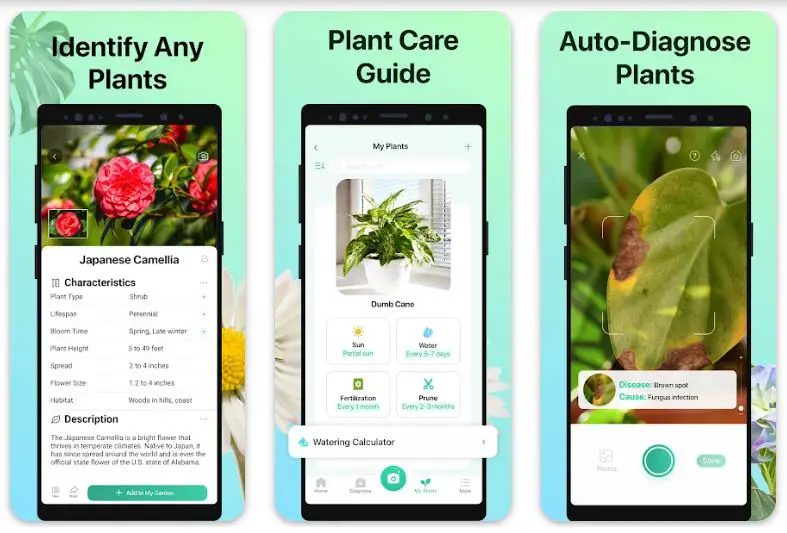
One of the key strengths of PictureThis lies in its accuracy. Powered by cutting-edge AI algorithms and machine learning, this app excels at recognizing various plant species. Whether you’re captivated by the vibrant petals of a flower or the intricate details of a leaf, PictureThis can swiftly identify the plant with precision.
With a comprehensive plant database, PictureThis ensures you have access to an extensive collection of plants. This app covers a wide spectrum of species, from common household plants to rare botanical wonders. The database also includes detailed descriptions, habitats, and growing tips, providing valuable information for plant enthusiasts at all levels of expertise.
PictureThis offers a user-friendly interface that simplifies the identification process. The app’s intuitive camera feature allows you to capture plant images effortlessly.
Once the image is uploaded, PictureThis employs sophisticated algorithms to analyze the visual characteristics and provide accurate identification results in seconds. The app also allows users to browse previously identified plants and create personalized collections.
Available for both Android and iPhone users, PictureThis offers seamless compatibility across various devices. Whether you have an Android smartphone or an iPhone, PictureThis is designed to optimize performance and provide a consistent experience.
With its outstanding accuracy, extensive plant database, user-friendly interface, and cross-platform compatibility, PictureThis has established itself as one of Android and iPhone users’ best plant identification apps.
Whether you’re an avid gardener, a nature enthusiast, or simply curious about the botanical world, PictureThis is a reliable and invaluable tool to explore and appreciate the wonders of plants.
Unique Features:-
PictureThis, renowned as one of the best plant identification apps for Android and iPhone, sets itself apart from the competition with its unique features. These distinctive elements enhance the user experience and make PictureThis an indispensable tool for plant enthusiasts.
1. Global Community: PictureThis fosters a vibrant and engaging global community of plant lovers. Users can connect with fellow enthusiasts, share their plant discoveries, and seek advice within the app. This interactive platform creates a sense of belonging and encourages knowledge sharing among plant enthusiasts worldwide.
2. Plant Care Reminders: The app offers personalized plant care reminders beyond simple identification. Once users add plants to their collection, PictureThis provides timely notifications for watering, fertilizing, and other essential care tasks. This feature helps users easily maintain their plants’ health and well-being.
3. Plant Disease Diagnosis: PictureThis goes the extra mile in plant care by offering plant disease diagnosis. Users can capture images of plants showing signs of disease or distress, and the app’s advanced algorithms can identify potential issues and provide guidance for treatment and prevention. This invaluable feature assists users in maintaining healthy and thriving plants.
4. Plant Expert Q&A: PictureThis provides direct access to a team of plant experts for users seeking professional advice. Users can ask questions, seek guidance on plant care, and receive expert answers within the app. This feature ensures that users have reliable support and expert insights whenever they need them.
5. Plant Encyclopedia: PictureThis is a comprehensive plant encyclopedia with an extensive plant database. Users can explore detailed information on various plant species, including their characteristics, origins, and uses. This rich source of botanical knowledge adds depth to the user experience and encourages continuous learning.
In conclusion, PictureThis stands out as a top plant identification app, thanks to its unique features. The app’s global community, plant care reminders, disease diagnosis capability, expert Q&A support, and extensive plant encyclopedia make it an invaluable companion for enthusiasts seeking accurate identification and comprehensive plant care guidance.
Whether you are a novice gardener or an experienced botanist, PictureThis offers an exceptional user experience beyond mere plant identification.
Pros:-
Accurate Plant Identification: PictureThis utilizes advanced AI algorithms and machine learning to provide precise and reliable plant identification results, helping users correctly identify a wide range of plant species.
Comprehensive Plant Database: The app boasts an extensive plant database, including common and rare species. This allows users to access detailed information, descriptions, and growing tips for various plants, enhancing their knowledge and understanding of the botanical world.
User-Friendly Interface: PictureThis offers a user-friendly interface, making it easy for users to navigate through the app and capture plant images for identification. The intuitive design ensures a seamless and enjoyable user experience.
Cross-Platform Compatibility: The app is available for Android and iPhone devices, providing flexibility and accessibility to a broader user base. Users can enjoy the benefits of PictureThis regardless of their preferred mobile platform.
Personalized Plant Collection: PictureThis allows users to create their personalized plant collection, enabling them to keep track of identified plants and organize their botanical discoveries in one place.
Cons:-
Limited Free Features: While PictureThis offers a free version, it may have limitations on the number of plant identifications or access to certain features. Users who desire full functionality and unrestricted access to the app’s resources may need to upgrade to a paid subscription.
Internet Connectivity Requirement: PictureThis heavily relies on an internet connection to access its extensive plant database and perform accurate identifications. This dependency on connectivity might be inconvenient for users in areas with limited or no internet access.
App Performance: Some users may experience occasional performance issues, such as slower response times or glitches. However, the app developers regularly release updates to address any performance-related concerns.
Language Availability: Although PictureThis supports multiple languages, the availability of detailed plant information, descriptions, and growing tips may vary depending on the user’s preferred language. Users who require information in less common languages may encounter limitations in the app’s content.
Price:-
- Free with In-App Purchases
- PictureThis Premium $29.99
- PictureThis Gold $2.99
- PictureThis Pro$7.99
Download The App From Google Play Store
Download The App From Apple App Store
2. PlantSnap
When effortlessly identifying plants through images, PlantSnap emerges as an exceptional choice. With its advanced technology and user-friendly interface, PlantSnap revolutionizes how we explore and learn about the botanical world.
PlantSnap stands out as a powerful plant identifier by picture. The app swiftly analyzes uploaded photos and provides accurate plant identifications using sophisticated image recognition algorithms and artificial intelligence. PlantSnap can identify a vast array of plant species from leaves to flowers with remarkable precision.
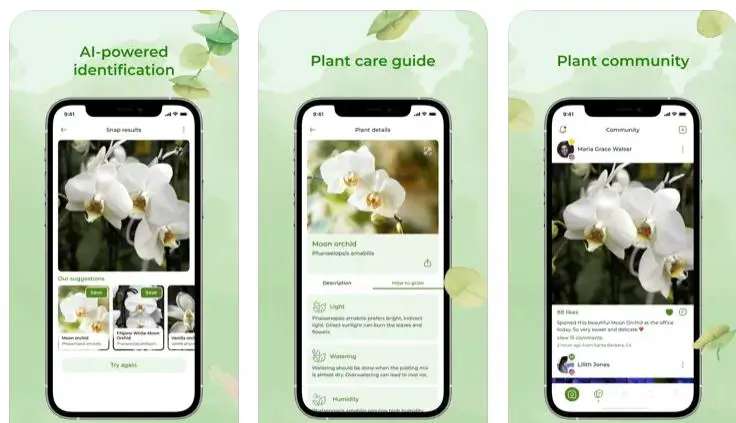
The app’s extensive plant database is a treasure trove for plant enthusiasts. It encompasses a wide range of species, including both common and rare plants. Each entry offers detailed information, including scientific names, descriptions, and ecological notes, enabling users to expand their botanical knowledge effortlessly.
PlantSnap’s user-friendly interface ensures a seamless experience. The intuitive camera feature allows users to capture plant photos easily. Once the image is uploaded, the app’s powerful algorithms compare it against the database, delivering near-instant identification results. The app also allows users to save and organize identified plants for future reference.
Whether you’re an avid hiker, gardener, or nature enthusiast, PlantSnap’s convenience and accuracy make it an invaluable tool. It enables users to satisfy their curiosity, discover new plant species, and deepen their understanding of the natural world.
Available for both Android and iOS devices, PlantSnap offers wide accessibility and caters to a broad user base. With regular updates and improvements, the app continues to evolve, enhancing its identification capabilities and expanding its plant database.
In conclusion, PlantSnap’s prowess as a plant identifier by picture sets it apart as a reliable and indispensable tool for plant enthusiasts. Its advanced technology, extensive plant database, user-friendly interface, and broad accessibility make it a must-have app for anyone eager to explore and engage with the diverse wonders of the botanical realm.
Unique Features of PlantSnap:-
PlantSnap sets itself apart from other plant identification apps with its unique and innovative features, providing users with an exceptional experience and adding value to their botanical explorations. Here are some of its standout features:
1. Multi-Image Recognition: PlantSnap’s multi-image recognition feature allows users to upload multiple photos of a plant from different angles. This enhances the accuracy of identifications by providing a more comprehensive view of the plant’s visual characteristics.
2. Explore Mode: With the Explore mode, users can dive deeper into the world of plants. They can browse through curated collections, such as rare species, plants of a specific region, or unique ecological adaptations. This feature enables users to discover new plants and expand their botanical knowledge.
3. Instant Plant Recognition: PlantSnap’s powerful algorithms enable instant plant recognition. Users can snap a photo, and within seconds, the app provides accurate identification results, eliminating the need for manual searches or waiting for responses.
4. Educational Content: PlantSnap offers educational content to enrich users’ understanding of plants. This includes articles, trivia, and fun facts about different species. Users can delve into the fascinating world of botany, learning about plant biology, ecological relationships, and more.
5. Offline Mode: Unlike many other plant identification apps, PlantSnap offers an offline mode, allowing users to identify plants without an internet connection. This feature is particularly useful for outdoor adventures in areas with limited network coverage.
6. Social Sharing: PlantSnap allows users to share their plant discoveries with the app’s community and on social media platforms. This feature encourages worldwide engagement, collaboration, and knowledge exchange among plant enthusiasts.
These unique features make PlantSnap a versatile, comprehensive plant identification, exploration, and education tool. By incorporating advanced technology, educational content, and community engagement, PlantSnap enhances the user experience, making it a top choice for those seeking a deeper connection with the botanical world.
Pros:-
Accurate Plant Identification: PlantSnap utilizes advanced image recognition algorithms and artificial intelligence to provide precise and reliable plant identifications, enhancing the user’s botanical knowledge.
Extensive Plant Database: The app boasts an extensive plant database with many species, including common and rare plants. Users can access detailed information, scientific names, and ecological notes, expanding their understanding of various plants.
User-Friendly Interface: PlantSnap offers a user-friendly interface, making it easy for users to capture and upload plant photos for identification. The app’s intuitive design enhances the overall user experience.
Accessibility: Available to Android and iOS devices, PlantSnap caters to a wide range of users, regardless of their preferred mobile platform.
Continuous Updates: The app developers regularly update PlantSnap, ensuring that it stays up to date with new plant species and improves its identification algorithms’ accuracy and performance.
Cons:-
Limited Free Features: While PlantSnap offers a free version, some features may be limited or locked behind a paid subscription. Users who desire access to the app’s full functionality may need to upgrade to a premium plan.
Dependence on Image Quality: PlantSnap’s accuracy is influenced by the quality of the uploaded images. In certain cases, unclear or low-resolution photos may result in less accurate identifications.
Internet Connectivity Requirement: The app heavily relies on an internet connection to access its plant database and perform identifications. Users with limited or no internet access may experience difficulties using the app.
Occasional Errors: While PlantSnap’s identification algorithms are advanced, occasional errors or misidentifications are still possible. Users should cross-verify results and consult additional sources for confirmation when necessary.
Despite these limitations, PlantSnap’s accurate plant identification, extensive database, user-friendly interface, and wide accessibility make it a valuable tool for enthusiasts exploring and learning about the botanical world.
Price:-
- Free with In-App Purchases
- Yearly premium subscription$19.99
- Monthly premium subscription$2.99
- Lifetime premium access$39.99
- 5 Snaps $0.99
Download The App From Google Play Store
Download The App From Apple App Store
3. PlantNet
Regarding plant identification apps, PlantNet stands out as one of the best choices for iPhone and Android users. With its exceptional features, extensive plant database, and user-friendly interface, PlantNet provides an unmatched experience for plant enthusiasts.
PlantNet’s accuracy in identifying plants sets it apart as a top contender. Using advanced image recognition technology and crowdsourced data, the app analyzes uploaded photos and delivers precise plant identifications. Whether it’s a vibrant flower or a unique leaf pattern, PlantNet can reliably identify a wide range of plant species.
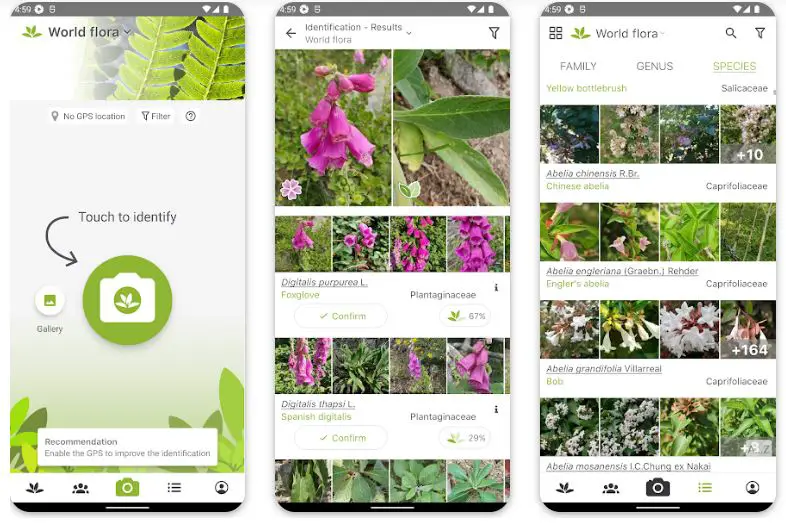
The app boasts an extensive plant database covering various plant types, including flowers, trees, and fruits. With detailed information and high-quality images for each species, users can learn about plant characteristics and habitats, and even discover their traditional uses.
PlantNet’s user-friendly interface makes plant identification a breeze. The intuitive design allows users to upload photos and receive identification results within moments easily. Additionally, the app enables users to browse their identification history, facilitating organization and future reference.
Available for both iPhone and Android devices, PlantNet ensures broad accessibility and compatibility. Its regular updates and improvements continually enhance its performance and expand its plant database, keeping users up-to-date with the latest botanical discoveries.
In conclusion, PlantNet is one of iPhone and Android’s best plant identification apps. With its accurate identifications, extensive plant database, user-friendly interface, and broad device compatibility, PlantNet is an indispensable tool for plant enthusiasts seeking to deepen their knowledge and explore the wonders of the natural world.
Unique Features of PlantNet:-
PlantNet offers a range of unique features that set it apart from other plant identification apps, enriching the user experience and providing valuable botanical insights. Here are some of its standout features:
1. Collaborative Platform: PlantNet allows users to contribute to plant identification. Users can verify identifications made by others, participate in discussions, and help refine the accuracy of the app’s plant database through their collective expertise.
2. Offline Mode: PlantNet offers an offline mode, unlike many plant identification apps. Users can access their previously identified plants and browse the extensive plant database without an internet connection. This feature is particularly useful when venturing into areas with limited network coverage.
3. Geolocation Integration: PlantNet leverages geolocation technology to provide users with relevant plant species information based on location. This integration enables users to explore the local flora, learn about native plants, and deepen their understanding of regional botanical diversity.
4. Multiple Plant Parts Recognition: PlantNet recognizes specific plant parts besides identifying whole plants. Users can capture images of leaves, flowers, fruits, or bark, and the app’s advanced algorithms can provide accurate identifications based on these specific features.
5. Observation Sharing: PlantNet allows users to share their plant observations and contribute to citizen science efforts. By sharing information about rare or unusual plant sightings, users contribute to the collective knowledge of plant distribution and help in conservation efforts.
These unique features make PlantNet a dynamic and interactive platform for plant enthusiasts, fostering collaboration, offline accessibility, geolocation integration, specific plant part recognition, and citizen science engagement. With PlantNet, users identify plants and actively contribute to botanical knowledge and conservation initiatives.
Pros:-
Accurate Plant Identification: PlantNet utilizes advanced image recognition technology and crowdsourced data to provide accurate plant identifications, enhancing the user’s botanical knowledge.
Extensive Plant Database: The app boasts an extensive plant database that covers a wide range of plant species. Each entry includes detailed information and high-quality images, enabling users to learn about plant characteristics, habitats, and traditional uses.
User-Friendly Interface: PlantNet offers a user-friendly interface, making it easy for users to quickly upload photos and receive identification results. The intuitive design enhances the overall user experience.
Broad Compatibility: Available for both iPhone and Android devices, PlantNet ensures broad accessibility and compatibility across various mobile platforms.
Regular Updates: PlantNet receives regular updates and improvements to enhance its performance, expand its plant database, and stay up-to-date with the latest botanical discoveries.
Cons:-
Dependence on Image Quality: PlantNet’s accuracy is influenced by the quality of the uploaded images. Unclear or low-resolution photos may result in less accurate identifications.
Reliance on Crowdsourced Data: While crowdsourced data can enhance the plant database, it also introduces the possibility of errors or inconsistencies in identification results. Users should exercise caution and verify information from reliable sources.
Language Availability: PlantNet’s detailed information and descriptions may be limited to certain languages. Users who require information in less common languages may encounter limitations in the app’s content.
Internet Connectivity Requirement: PlantNet heavily relies on an internet connection to access its plant database and provide identification results. Users with limited or no internet access may experience difficulties using the app.
Despite these limitations, PlantNet’s accurate plant identification, extensive plant database, user-friendly interface, and broad compatibility make it a valuable tool for enthusiasts exploring and learning about the botanical world.
Price:-
- Free
Download The App From Google Play Store
Download The App From Apple App Store
4. LeafSnap
LeafSnap is a remarkable app that immerses users in the captivating world of leaves. With its advanced features and user-friendly interface, LeafSnap empowers nature enthusiasts to identify leaves, learn about trees, and deepen their appreciation for the natural environment.
At the heart of LeafSnap lies its powerful leaf identification capabilities. Using cutting-edge image recognition technology, the app analyzes leaf images uploaded by users, swiftly providing accurate identifications. Whether you’re intrigued by a leaf’s unique shape or its veins’ intricate patterns, LeafSnap can precisely identify a diverse range of leaf species.
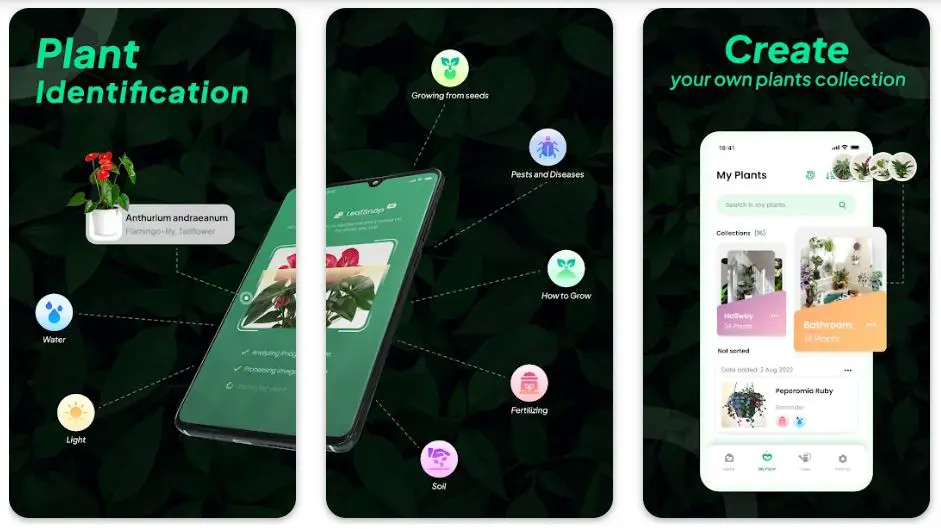
LeafSnap’s extensive leaf database serves as a rich resource for leaf identification. With a wide collection of leaf images and detailed information about associated tree species, users can expand their botanical knowledge and gain insights into the characteristics and habitats of different trees.
The user-friendly interface of LeafSnap ensures a seamless experience. Its intuitive design lets users easily capture leaf photos and navigate the app’s features. Additionally, LeafSnap offers interactive quizzes and educational content to engage users and deepen their understanding of leaves and trees.
Available for Android and iPhone users, LeafSnap provides accessibility to a broad audience. Its regular updates and continuous expansion of the leaf database ensure that users have access to the latest information and discoveries in the world of leaves.
In conclusion, LeafSnap is a powerful tool for leaf identification and tree exploration. With its accurate leaf identifications, extensive leaf database, user-friendly interface, and broad compatibility, LeafSnap is an invaluable companion for nature enthusiasts seeking to unravel the mysteries of leaves and deepen their connection with the natural world.
Unique Features of LeafSnap:-
LeafSnap distinguishes itself from other plant identification apps with its unique features, elevating the user experience and providing valuable botanical insights. Here are some of its standout features:
1. High-Resolution Leaf Images: LeafSnap offers high-resolution leaf images, allowing users to examine leaves’ intricate details and unique characteristics. This feature enhances the accuracy of leaf identification and enables users to appreciate the beauty of nature’s designs.
2. Leaf Comparison Tool: LeafSnap’s leaf comparison tool enables users to compare multiple leaf images. This feature is particularly useful when identifying similar-looking leaves or distinguishing between different varieties of the same plant species.
3. Seasonal Leaf Changes: LeafSnap captures the beauty of seasonal leaf changes. Users can explore how leaves transform throughout the year, providing insights into the cyclical nature of plants and showcasing the stunning colors of autumn foliage.
4. User Contributions: LeafSnap encourages user contributions by allowing users to submit their leaf images. This collaborative feature enriches the app’s leaf database and fosters community and engagement among leaf enthusiasts.
5. Interactive Leaf Quizzes: LeafSnap offers interactive leaf quizzes to test users’ knowledge and enhance their understanding of leaves. These quizzes provide an enjoyable and educational experience, allowing users to deepen their botanical expertise.
These unique features make LeafSnap a versatile and engaging app for leaf enthusiasts, providing high-resolution images, leaf comparison tools, seasonal leaf changes, user contributions, and interactive quizzes. With LeafSnap, users can unlock a deeper appreciation for leaves and expand their knowledge of the botanical world.
Pros:-
Accurate Leaf Identification: LeafSnap utilizes advanced image recognition technology to provide accurate leaf identifications, allowing users to identify a wide range of leaf species confidently.
Extensive Leaf Database: The app features an extensive database of leaf images and associated tree species, providing users with a wealth of information and insights into the world of leaves and trees.
User-Friendly Interface: LeafSnap offers a user-friendly interface, making it easy for users to capture leaf photos and navigate the app’s features. The intuitive design enhances the overall user experience.
Educational Content: LeafSnap goes beyond leaf identification by offering interactive quizzes and educational content. Users can expand their knowledge of trees, learn about different leaf characteristics, and deepen their understanding of the natural environment.
Regular Updates: LeafSnap receives regular updates to enhance its performance, improve leaf identification accuracy, and expand its leaf database, ensuring that users have access to the latest information and discoveries.
Cons:-
Dependence on Image Quality: LeafSnap’s accuracy is influenced by the quality of the uploaded leaf images. Blurry or low-resolution photos may result in less accurate identifications.
Limited Accessibility: LeafSnap is currently available only for Android and iPhone users, limiting accessibility for users of other platforms.
Internet Connectivity Requirement: LeafSnap requires an internet connection to access its leaf database and perform identifications. Users with limited or no internet access may experience difficulties using the app.
Variability in Leaf Species: While LeafSnap provides an extensive leaf database, there may be variations in the availability and coverage of leaf species, especially for less common or region-specific trees.
Despite these limitations, LeafSnap’s accurate leaf identification, extensive leaf database, user-friendly interface, and educational content make it a valuable tool for nature enthusiasts seeking to explore and learn about the diverse world of leaves and trees.
Price:-
- Free with In-App Purchases
- LeafSnap Premium$25.99
- LeafSnap Premium 1 month$4.99
- LeafSnap Premium 6 months$24.99
- LeafSnap Premium 3 months$14.99
Download The App From Google Play Store
Download The App From Apple App Store
5. iNaturalist
iNaturalist is an exceptional app that brings together nature enthusiasts and scientists in a global community dedicated to documenting and exploring the natural world.
Available for Android and iPhone, iNaturalist empowers users to contribute to scientific research, learn about biodiversity, and foster a deeper connection with nature.
At the heart of iNaturalist is its citizen science approach. With the app, users can capture photos of plants, animals, and fungi, and upload them to the iNaturalist community.
The collective observations and identifications form a valuable dataset for researchers and conservationists, facilitating important studies and initiatives.
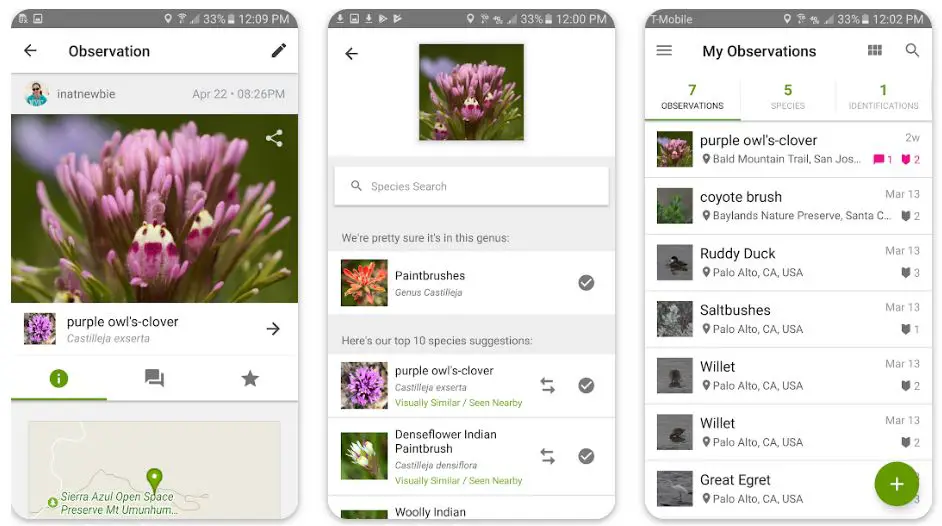
iNaturalist’s species identification feature is powered by artificial intelligence and expert community input. Users can receive identification suggestions for their observations, contributing to the accuracy and richness of the app’s species database. It allows users to expand their knowledge and gain insights into the flora and fauna around them.
The app’s global community aspect is a highlight of iNaturalist. Users can connect with fellow nature enthusiasts, share their observations, and receive feedback and assistance. This collaborative environment fosters learning, encourages engagement, and creates a sense of belonging among individuals passionate about the natural world.
Furthermore, iNaturalist offers educational resources to help users learn about different species, ecosystems, and conservation efforts. Users can access articles, tutorials, and expert insights, deepening their understanding of the natural world and inspiring them to participate in environmental stewardship actively.
In conclusion, iNaturalist is more than just a nature identification app. It is a platform that promotes citizen science, encourages community collaboration, and inspires individuals to appreciate and protect our planet’s biodiversity.
By connecting people to nature, iNaturalist ignites a sense of wonder and encourages active participation in understanding and conserving the natural world we share.
Unique Features of iNaturalist:-
iNaturalist offers a range of unique features that make it a standout app in citizen science and nature exploration. These features enhance the user experience and contribute to the app’s success as a powerful tool for connecting people with the natural world.
Here are some of its standout features:-
1. Community-Driven Identification: iNaturalist leverages the power of community by allowing users to receive identification suggestions from a network of fellow nature enthusiasts and experts. This collaborative approach enhances the accuracy of species identifications and fosters a sense of belonging within the community.
2. Research-Grade Observations: The app supports research-grade observations validated and curated by experts. This feature ensures the quality and reliability of the data collected, making iNaturalist a valuable resource for scientific research and conservation initiatives.
3. Global Biodiversity Network: iNaturalist is part of a global network of biodiversity databases, allowing users to contribute to a vast and interconnected repository of observations. This network facilitates data sharing and enables researchers to gain insights into the distribution and status of species across different regions.
4. Automated Image Recognition: iNaturalist employs advanced image recognition algorithms to suggest species identifications based on uploaded photos automatically. This feature provides users with immediate feedback and accelerates the identification process, making it accessible to individuals with varying levels of expertise.
5. Gamified Experience: iNaturalist incorporates gamification elements into the user experience. Users can earn badges, participate in challenges, and set personal goals, adding excitement and achievement to their nature exploration journey.
These unique features set iNaturalist apart, creating an immersive and interactive platform for citizen science, species identification, community engagement, and contribution to global biodiversity knowledge. With iNaturalist, users can explore, learn, and contribute meaningfully to our understanding and conservation of the natural world.
Pros:-
Citizen Science Community: iNaturalist allows users to contribute to scientific research by documenting and sharing observations actively. Users become part of a global community engaged in citizen science, promoting biodiversity conservation and generating valuable data for researchers.
Species Identification: The app provides species identification suggestions based on uploaded photos powered by artificial intelligence and community input. This feature enables users to learn about different species and expand their knowledge of the natural world.
Global Networking: iNaturalist facilitates connections among nature enthusiasts worldwide. Users can engage with the community, receive feedback on their observations, and learn from experts in various fields. The app encourages collaboration and fosters a sense of camaraderie among users.
Educational Resources: iNaturalist offers many educational resources, including articles, tutorials, and expert insights. These resources deepen users’ understanding of biodiversity, ecosystems, and conservation efforts, fostering a greater appreciation for the natural world.
Accessibility and Compatibility: iNaturalist is available for Android and iPhone users, ensuring broad accessibility across different mobile platforms. It accommodates diverse users, encouraging widespread participation in citizen science.
Cons:-
Learning Curve: The app may have a slight learning curve for new users, especially regarding navigating the features and understanding the identification process. However, the supportive community and available resources help users overcome this initial challenge.
Reliance on Photo Quality: Accurate species identification relies on the quality and clarity of uploaded photos. Low-quality or blurry images may result in less precise identifications, requiring users to improve their photography skills for optimal results.
Dependence on Internet Connectivity: iNaturalist requires an Internet connection to upload observations, access identification suggestions, and engage with the community. Limited or no internet access in remote areas may hinder the real-time usage of the app.
Variability in Identification Accuracy: While iNaturalist’s identification suggestions are generally reliable, occasional misidentifications or uncertainties may occur. Users should exercise caution and verify identifications when necessary.
Despite these minor limitations, iNaturalist’s citizen science community, species identification capabilities, global networking opportunities, educational resources, and broad accessibility make it an outstanding app for nature enthusiasts and contribute to our natural world’s collective understanding and conservation.
Price:-
- Free
Download The App From Google Play Store
Download The App From Apple App Store
6. Plantum
Plantum is an exceptional app that harnesses the power of artificial intelligence to unravel the mysteries of the natural world.
Whether you’re an avid botanist, a curious nature enthusiast, or someone seeking to deepen their knowledge of plants, Plantum is your gateway to understanding and appreciating the wonders of nature.
Powered by advanced AI algorithms, Plantum offers a seamless and accurate plant identification experience. The app swiftly analyzes the image by capturing a photo of a plant or leaf, extracting key features, and matching them against an extensive plant database.
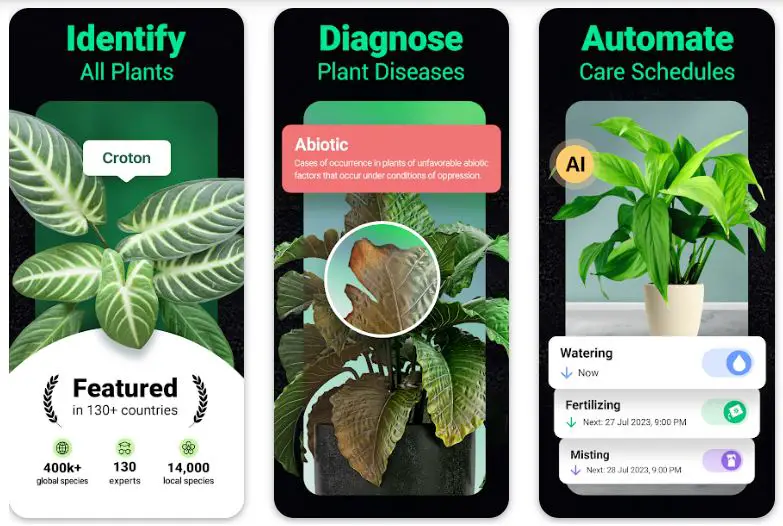
The result is a precise identification that unravels the scientific and common names and provides detailed information about the plant’s characteristics and habitat.
What sets Plantum apart is its ability to identify plants and other natural elements, such as flowers, trees, and even animal breeds. This versatility makes the app a comprehensive nature companion, catering to various interests and inquiries.
With its user-friendly interface and intuitive design, Plantum ensures a seamless experience for users of all levels. The app’s database is regularly updated, incorporating new species and expanding the knowledge base, keeping users informed about the latest discoveries and advancements in the world of plants and nature.
In conclusion, Plantum is a powerful tool that empowers individuals to explore and understand the natural world around them. Its AI-powered identification, comprehensive plant database, versatility in identifying various elements, and user-friendly interface make it an invaluable companion for nature enthusiasts and a key resource for deepening our connection with nature’s abundant beauty.
Unique Features of Plantum:-
Plantum sets itself apart from other plant identification apps through its unique and innovative features, offering users a comprehensive and immersive experience in the world of plants. Here are some of its standout features:
1. Multi-Element Identification: Plantum goes beyond plant identification and encompasses many natural elements. From plants and flowers to trees and leaves, the app provides users a versatile identification tool, allowing them to explore and learn about various aspects of the natural world.
2. AI-Powered Accuracy: The app utilizes advanced artificial intelligence technology to deliver highly accurate plant identifications. Its sophisticated algorithms allow Plantum to analyze and match uploaded photos with its extensive database, providing users with precise species identifications.
3. Rich Plant Database: Plantum boasts an extensive and diverse plant database encompassing many species. Users can access detailed information about each identified plant, including descriptions, scientific names, growth habits, and habitat preferences, enhancing their botanical knowledge and understanding.
4. User-Friendly Interface: Plantum offers a user-friendly interface that allows users to capture photos, receive identifications, and access plant information. The intuitive design and navigation ensure a seamless and enjoyable user experience, even for those new to plant identification.
5. Offline Functionality: One of Plantum’s standout features is its offline functionality. Users can access the app and perform identifications without an internet connection, making it a reliable companion for nature explorations in remote areas or places with limited connectivity.
These unique features make Plantum a versatile and invaluable tool for plant enthusiasts, nature lovers, and anyone seeking to deepen their knowledge of the natural world.
Whether identifying various elements, benefiting from AI-powered accuracy, or exploring the extensive plant database, Plantum provides a comprehensive and enriching experience for users’ botanical adventures.
Pros:-
AI-Powered Identification: Plantum’s advanced artificial intelligence technology enables accurate and swift plant identification, making it a valuable tool for botanists, nature enthusiasts, and anyone interested in plant identification.
Versatile Identification: Plantum goes beyond plant identification and allows users to identify other natural elements such as flowers, trees, and animal breeds. This versatility expands the app’s utility and caters to various interests.
Comprehensive Plant Database: With an extensive plant database, Plantum provides users with detailed information about identified plants, including scientific and common names, characteristics, and habitats. This wealth of knowledge enhances users’ understanding and appreciation of the natural world.
User-Friendly Interface: Plantum features a user-friendly interface that makes capturing photos, receiving identifications, and exploring plant information easy. The intuitive design ensures a seamless and enjoyable user experience.
Regular Updates: Plantum’s developers regularly update the app’s database, adding new plant species and incorporating advancements in plant identification technology. This commitment to updates keeps the app current and reliable.
Cons:-
Limited Language Support: The app’s information and descriptions may be limited to specific languages, which could limit users who prefer to access content in less commonly supported languages.
Internet Connectivity Requirement: Plantum requires an internet connection to identify plants and access the extensive plant database. The app’s functionality may be compromised in areas with limited or no internet access.
Reliance on Image Quality: The accuracy of plant identification in Plantum is dependent on the quality and clarity of the uploaded images. Users may need to ensure good lighting and focus when capturing plant photos for optimal identification results.
Despite these limitations, Plantum’s AI-powered identification, versatile functionality, comprehensive plant database, user-friendly interface, and regular updates make it a valuable tool for plant and nature enthusiasts.
Download Plantum today and unlock the natural world’s secrets with a single tap.
Price:-
- Free with In-App Purchases
- Plant Identification $6.99
- Plant Identification $59.99
- Plant Identifier $29.99
- Plantum PRO $39.99
- Premium $19.99
Download The App From Google Play Store
Download The App From Apple App Store
7. Flora Incognita
Flora Incognita is an extraordinary app that revolutionizes how we identify and explore the fascinating world of plants.
With its cutting-edge technology and comprehensive features, Flora Incognita empowers both botanists and nature enthusiasts to delve into the depths of plant identification with ease and precision.
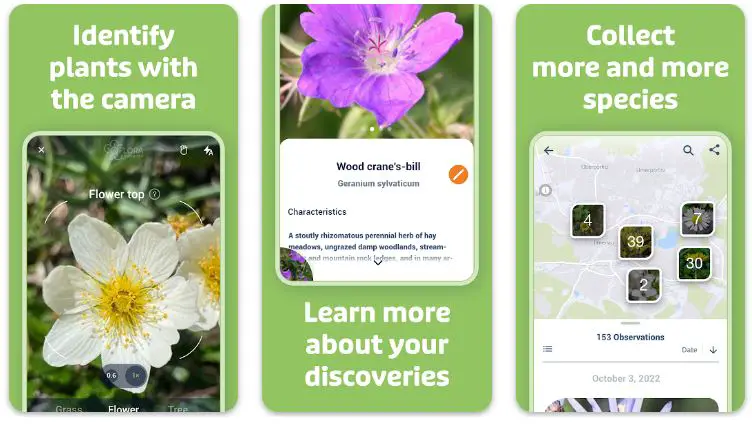
Advanced artificial intelligence algorithms power flora Incognita and offers seamless plant identification capabilities. The app swiftly analyzes its unique characteristics by simply capturing a plant photo, extracting key features such as leaf shape, flower color, and growth patterns. Within moments, Flora Incognita provides accurate species identifications, unveiling the secrets of the plant kingdom.
What sets Flora Incognita apart is its expansive plant database that encompasses a wide range of species from various regions. With a vast collection of botanical information, including descriptions, habitat preferences, and conservation statuses, the app is a comprehensive botanical encyclopedia at your fingertips.
The app’s user-friendly interface and intuitive design ensure a seamless experience for users of all levels. Whether you’re a seasoned botanist or a novice nature enthusiast, Flora Incognita easily guides you through plant identification, enhancing your understanding and appreciation of the natural world.
In conclusion, Flora Incognita is a game-changer in plant identification. Its advanced AI technology, comprehensive plant database, and user-friendly interface make it an invaluable tool for professionals and amateurs.
Explore the wonders of the botanical world with Flora Incognita and unlock the mysteries of plant identification with precision and ease.
Unique Features of Flora Incognita:-
Flora Incognita stands out among other plant identification apps due to its unique and innovative features that enhance the user experience and set it apart from the competition. Here are some of its standout features:
1. Advanced AI Technology: Flora Incognita utilizes state-of-the-art artificial intelligence algorithms to provide accurate and swift plant identifications. The app’s AI capabilities enable it to analyze intricate plant features and deliver precise results, ensuring reliable identification for users.
2. Multiple Language Support: Flora Incognita offers multilingual support, allowing users to access plant information and descriptions in various languages. This feature caters to a diverse user base and enhances accessibility for individuals worldwide.
3. Offline Functionality: One of Flora Incognita’s standout features is its offline functionality. Users can identify plants without an internet connection, making it a convenient tool for nature enthusiasts exploring remote areas or locations with limited connectivity.
4. User Contributions and Feedback: Flora Incognita encourages users to contribute their plant observations and provide feedback on identifications. This collaborative approach fosters a sense of community and enables users to actively participate in improving the app’s accuracy and expanding the knowledge base.
5. Educational Resources: The app offers many educational resources, including articles, guides, and plant-related information. Users can expand their botanical knowledge, learn about plant characteristics, and explore the fascinating world of flora through curated content within the app.
These unique features make Flora Incognita a standout app in plant identification, providing users with an advanced AI-driven experience, multilingual support, offline functionality, user contribution opportunities, and educational resource access.
Discover the wonders of Flora Incognita and unlock the secrets of the plant kingdom with ease and precision.
Pros:-
Accurate Plant Identification: Flora Incognita utilizes advanced artificial intelligence algorithms to provide accurate plant identifications. Users can confidently rely on the app’s technology to correctly identify plant species.
Comprehensive Plant Database: The app boasts a comprehensive plant database encompassing diverse species from different regions. This extensive database provides users detailed plant information, including descriptions, habitat preferences, and conservation statuses.
User-Friendly Interface: Flora Incognita offers a user-friendly interface, making it accessible and easy for users of all levels to navigate. The intuitive design ensures a seamless and enjoyable user experience, enhancing the app’s overall usability.
Educational Resource: Flora Incognita serves as an educational resource, offering valuable information about plants and their characteristics. Users can expand their botanical knowledge and deepen their understanding of the natural world through the app’s extensive plant database.
Contribution to Citizen Science: The app encourages users to contribute to citizen science by sharing their plant observations and contributing to research efforts. This collaborative feature fosters engagement and allows users to contribute to the collective knowledge of plant species.
Cons:-
Limited Availability: Flora Incognita may not be available in all regions, limiting its accessibility for users in certain areas. Availability may vary depending on the app store and device compatibility.
Reliance on Image Quality: Accurate plant identification in Flora Incognita relies on the quality and clarity of the uploaded photos. Users must ensure proper lighting and focus to achieve the best identification results.
Language Support: The availability of plant information and descriptions in Flora Incognita may be limited to certain languages. Users who prefer accessing content in less commonly supported languages may face limitations.
Dependence on Internet Connectivity: Flora Incognita requires an internet connection to access its comprehensive plant database and perform identification tasks. Limited or no internet access may hinder the app’s functionality in remote areas.
Despite these limitations, Flora Incognita’s accurate plant identification, comprehensive database, user-friendly interface, educational value, and contribution to citizen science make it a valuable tool for plant enthusiasts, researchers, and nature lovers.
Price:-
- Free
Download The App From Google Play Store
Download The App From Apple App Store
8. Plant Parent
Are you ready to embark on a fulfilling journey as a Plant Parent? The Plant Parent app guides you through the exciting world of plant care, offering invaluable resources and support to help you become a confident and successful plant caregiver.
With the Plant Parent app, you can tap into a wealth of knowledge and expertise to ensure the well-being of your green companions. From houseplants to garden treasures, this app provides comprehensive plant care guides tailored to the specific needs of each plant species.
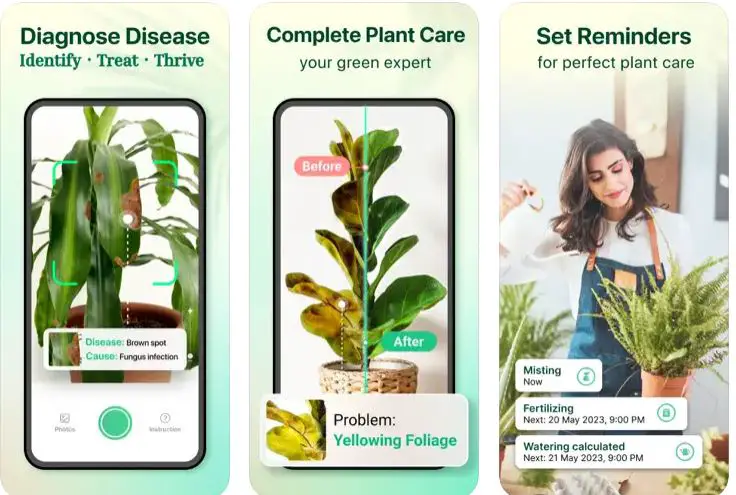
Whether it’s watering schedules, sunlight requirements, or pest management, you’ll find all the information you need to keep your plants thriving.
As a Plant Parent, you’ll appreciate the app’s intuitive interface and user-friendly features. Set reminders for watering, fertilizing, and other essential tasks to stay on top of your plant care routine. The app also offers a community platform to connect with fellow plant lovers, sharing experiences, tips, and even troubleshooting advice.
What sets Plant Parent apart is its personalized approach to plant care. The app allows you to create a profile for each plant in your collection, tracking their growth progress and recording specific care details. This level of customization ensures that you can cater to the unique needs of each plant, promoting their health and vitality.
In conclusion, Plant Parent is your trusted companion in the wonderful world of plant care. With its comprehensive plant care guides, user-friendly interface, and personalized features, the app empowers you to nurture your green family with care and confidence.
Embrace the joy of being a Plant Parent and watch your plants thrive under your loving care.
Unique Features of Plant Parent:-
Plant Parent sets itself apart from other plant care apps through its unique and innovative features that enhance the user experience and provide exceptional guidance for plant enthusiasts. Here are some of its standout features:
1. Expert Guidance from Horticulturists: Plant Parent offers expert guidance and advice from experienced horticulturists. The app’s team of plant experts ensures that users receive accurate and reliable information, giving them the confidence to care for their plants effectively.
2. Personalized Plant Care Recommendations: The app provides personalized plant care recommendations based on the specific needs of each plant species. Plant Parent tailors its recommendations to create an optimal care plan for each plant by considering light levels, humidity, and temperature.
3. Visual Plant Identification: Plant Parent incorporates visual plant identification, allowing users to identify plants by simply taking photos. The app’s advanced image recognition technology quickly analyzes the photo and provides accurate plant identifications, making it easier for users to manage their plant collection.
4. Plant Care Reminders and Notifications: Plant Parent features customizable reminders and notifications for watering, fertilizing, and other plant care tasks. Users can set their preferred schedule, ensuring that they never miss an important care routine and promoting the health and well-being of their plants.
5. Community Interaction: Plant Parent fosters a vibrant community where users can interact, share their plant journeys, and seek advice. The app’s community features allow users to connect with fellow plant enthusiasts, exchange tips and experiences, and find inspiration in their plant care endeavors.
These unique features make Plant Parent a valuable tool for plant enthusiasts, providing expert guidance, personalized care recommendations, visual plant identification, customizable reminders, and a supportive community.
Whether you’re a novice plant parent or an experienced green thumb, Plant Parent offers the tools and resources to help you cultivate a thriving and fulfilling plant collection.
Pros:-
Comprehensive Plant Care Guide: Plant Parent provides a comprehensive plant care guide with detailed information on various aspects of plant care, including watering, lighting, fertilization, and pest control. This resourceful information helps users make informed decisions and provide the best care for their plants.
Personalized Reminders: The app offers personalized reminders and notifications for watering, fertilizing, and other plant care tasks. This feature ensures that users stay on top of their plant care routine, promoting healthy growth and preventing neglect.
User-Friendly Interface: Plant Parent features a user-friendly interface that is easy to navigate and understand. The intuitive design allows users to access plant care information quickly and efficiently, making it suitable for beginners and experienced plant enthusiasts.
Plant Database: The app includes a comprehensive plant database, enabling users to access information on various plant species. This database helps users identify their plants accurately and provides specific care instructions tailored to each plant’s needs.
Community Engagement: Plant Parent fosters a sense of community among plant enthusiasts. Users can connect with other plant parents, share their experiences, and seek advice or inspiration. This community engagement adds a social element to the app, making it a hub for plant lovers to connect and learn from one another.
Cons:-
Limited Availability: Plant Parent may not be available in all regions, limiting access for some users. Availability may vary depending on the app store and device compatibility.
Language Support: The availability of plant care information and descriptions in Plant Parent may be limited to certain languages. Users who prefer accessing content in less commonly supported languages may face limitations.
Dependency on User Input: The accuracy of the app’s reminders and care recommendations relies on users inputting correct plant information and care schedules. Inaccurate or incomplete information may affect the app’s reminders and guidance effectiveness.
Device Compatibility: Plant Parent’s compatibility may vary across devices and operating systems. Some features may not be fully optimized or available on all devices, limiting the user experience for certain users.
Despite these limitations, Plant Parent’s comprehensive plant care guide, personalized reminders, user-friendly interface, plant database, and community engagement make it a valuable tool for plant enthusiasts seeking to provide optimal care for their plants.
Price:-
- Free with In-App Purchases
- Plant Parent Premium$7.99
- Plant Parent Premium$4.99
- Plant Parent Family Premium$29.99
Download The App From Google Play Store
Download The App From Apple App Store
How to Get the Most Out of Your Plant Identification App
Plant identification apps have revolutionized how we explore and understand the natural world. With their advanced algorithms and extensive plant databases, these apps empower us to identify plant species with ease and precision. However, to truly maximize the benefits of your plant identification app, there are a few key strategies to keep in mind.
Here’s how to get the most out of your Plant Identification App.
1. Capture Clear and Detailed Photos: When using a plant identification app, ensure you capture clear and detailed photos of the plant you want to identify. Take close-up shots of the leaves, flowers, and any distinctive features. A high-quality image allows the app’s algorithms to analyze the plant more accurately, resulting in more precise identifications.
2. Provide Additional Context: While capturing photos is essential, providing additional context about the plant can significantly improve the identification process. Include information such as the plant’s habitat, location, and other relevant details. This additional context helps narrow down the possibilities and increases the accuracy of the identification.
3. Explore App Features: Take the time to explore all the features offered by your plant identification app. Many apps provide additional functionalities beyond identification, such as plant care tips, educational resources, and community engagement. Familiarize yourself with these features to enhance your overall experience and expand your botanical knowledge.
4. Contribute to Citizen Science: Many plant identification apps allow users to contribute their observations and findings to citizen science projects. Participating in these initiatives helps improve the app’s database’s accuracy and contributes valuable data to scientific research. Take advantage of this opportunity to engage with the app’s community and make a meaningful impact.
5. Stay Updated: Keep your plant identification app up to date by regularly checking for app updates and new releases. Developers often introduce improvements, bug fixes, and expanded plant databases through updates. By staying updated, you ensure access to the latest features and enhancements, enhancing the app’s performance and accuracy.
6. Engage with the Community: Many plant identification apps have a community of users who share their experiences, tips, and knowledge. Engage with this community by asking questions, sharing your insights, and participating in discussions. This collaborative environment fosters learning, provides support, and allows you to connect with fellow plant enthusiasts.
In conclusion, following these strategies can truly get the most out of your plant identification app. Capturing clear photos, providing additional context, exploring app features, contributing to citizen science, staying updated, and engaging with the community all contribute to a richer and more fulfilling experience.
Embrace the power of technology and botanical knowledge with your plant identification app and uncover the wonders of the plant kingdom with confidence and enthusiasm.
📗FAQ’s
Is there a free app that identifies plants?
Yes, there are several free apps available that can help you identify plants. Some popular free options include PlantNet, iNaturalist, and PictureThis.
What is the best app to identify garden plants?
The best app for identifying garden plants depends on your needs and preferences. However, some top choices for identifying garden plants include PlantSnap, PictureThis, and Flora Incognita.
| No. | App Name | Platform | Average User Rating (out of 5) | Notable Features |
|---|---|---|---|---|
| 1 | PlantSnap | iOS, Android | 4.3 | Identify plants, flowers, trees, cacti, succulents, and mushrooms in seconds |
| 2 | iNaturalist | iOS, Android | 4.6 | Helps identify plants and animals around you |
| 3 | PictureThis | iOS, Android | 4.7 | Offers plant care tips and watering reminders |
| 4 | PlantNet | iOS, Android | 4.4 | Uses crowdsourced data to identify plants |
| 5 | LeafSnap | iOS, Android | 4.2 | Specializes in tree identification |
| 6 | Garden Answers | iOS, Android | 4.5 | Answers to your gardening questions along with plant identification |
| 7 | FlowerChecker | iOS, Android | 4.1 | Uses botanists to identify plants, not AI |
| 8 | Agrobase | iOS, Android | 4.4 | Geared towards farmers and agronomists, but useful for plant ID |
| 9 | SmartPlant | iOS, Android | 4.3 | Offers premium membership for expert advice |
| 10 | NatureGate | iOS, Android | 4.2 | Identifies plants and animals; includes birds, butterflies and fishes |
What iPhone app identifies plants?
Several iPhone apps, such as PlantSnap, PictureThis, and iNaturalist, can identify plants. These apps use advanced image recognition technology to analyze photos and provide accurate plant identifications.
Can you identify plants with Google?
Yes, you can use Google Lens, a feature available on Android and iOS devices, to identify plants. Simply take a photo of the plant and use the Google Lens app or access it through Google Photos to get information about the plant.
Is PlantSnap completely free?
PlantSnap offers a free version of its app that allows users to identify a limited number of plants. However, a premium subscription is available to access additional features and unlimited identifications.
Is Nature ID app free?
Yes, the Nature ID app is free to download and use. It provides plant and animal identification features, allowing users to identify various natural species.
How do I identify my garden plants?
To identify your garden plants, you can use a plant identification app by photographing the plant and submitting it for analysis. The app will match the photo to its extensive plant database and provide you with the plant’s identification.
How do you identify a plant?
You can use a plant identification app or consult field guides and botanical resources to identify a plant. Pay attention to the plant’s features, such as leaves, flowers, and overall growth habits, and compare them to available references.
Can iPhones detect plants?
Yes, iPhones can detect plants using plant identification apps available on the App Store. These apps use image recognition technology to identify plants based on photos taken with the iPhone’s camera.
Can iPhones scan plants?
Yes, iPhones can scan plants using plant identification apps that utilize image recognition technology. It can analyze the image and provide identification by taking a photo of a plant and submitting it to the app.
Can iPhone tell plants?
Yes, with the help of plant identification apps, an iPhone can tell you the name and information about plants. These apps use advanced algorithms to analyze plant photos and provide accurate identifications.
How do I turn on Google Lens?
To use Google Lens on an iPhone, you can access it through the Google app or Google Photos. Open the app, tap on the Google Lens icon, and follow the prompts to enable and use Google Lens.
Where is Google Lens on my iPhone?
Google Lens can be accessed through the Google app or Google Photos on your iPhone. Look for the Google Lens icon within the apps to access its features.
What is the plant name?
The plant name refers to the scientific or common name given to a particular plant species. It helps identify and categorize plants based on their specific characteristics and attributes.
How can I identify a plant by photo for free?
You can identify a plant by taking photos and using a free plant identification app such as PlantNet, iNaturalist, or PictureThis. These apps use image recognition technology to match photos with their extensive plant databases.
Is LeafSnap free?
LeafSnap offers a free version of its app, allowing users to identify a limited number of plants. However, a premium subscription is available to access the full range of features and unlimited identifications.
What does Nature ID app cost?
The Nature ID app is free to download and use. There are no costs associated with using its plant and animal identification features.
What are 5 ways to identify a plant?
Five ways to identify a plant include using plant identification apps, consulting field guides, and reference books, seeking help from botanical experts or nurseries, joining online plant communities for assistance, and visiting botanical gardens or arboretums for plant identification resources.
How do I ask Google to identify a plant?
To ask Google to identify a plant, you can use Google Lens by opening the Google app, tapping the Google Lens icon, and following the prompts to take a photo or upload an existing photo for analysis.
Is the PictureThis app free?
PictureThis offers a free version of its app that allows users to identify a limited number of plants. However, a premium subscription is available to unlock additional features and access unlimited identifications.
What are 3 parts of a plant you can identify?
You can identify three parts of a plant: the leaves, flowers, and stems. These plant parts possess distinct characteristics and can provide important clues for plant identification.
Can plants see images?
Plants do not have a visual perception like humans or animals. While they respond to light, they do not possess the ability to see images or perceive them in the same way we do.
Can plants detect touch?
Plants can respond to physical stimuli, including touch. Their specialized cells and structures allow them to detect and respond to various environmental cues.
How do I use plant search on my iPhone?
To use plant search on your iPhone, you can download and install a plant identification app from the App Store. Open the app, follow the instructions to take a photo or select an existing photo, and submit it for analysis to receive plant identification results.
Is PlantNet free on iPhone?
PlantNet is a free app available for iPhone users. It lets users identify plants using photos and offers a vast plant database and community-contributed observations.
Is iPlant free?
iPlant is a free app available for download on iPhone. It provides plant identification features, allowing users to identify various plant species using photos.
What can iPhones scan?
iPhones can scan various objects and items, including barcodes, QR codes, documents, and images. The scanning capabilities depend on the apps and features available on the iPhone.
Why doesn’t my iPhone look up plants?
If your iPhone can’t look up plants, it could be due to the absence of a plant identification app or the relevant features not being enabled. Install a plant identification app and ensure the necessary permissions and settings are in place.
Is there a free iPhone app to identify plants and flowers?
Yes, several free iPhone apps are available to identify plants and flowers, such as PlantNet, iNaturalist, and PictureThis. These apps offer plant identification features and a wealth of botanical information.
What is better than Google Lens?
Several plant identification apps, such as PlantSnap, PictureThis, and iNaturalist, offer similar or enhanced capabilities compared to Google Lens. These apps often provide more extensive plant databases and additional features tailored specifically for plant identification.
Is Google Lens app safe?
Yes, the Google Lens app is considered safe to use. However, it’s always recommended to download apps from trusted sources and exercise caution while granting permissions to ensure the security and privacy of your device.
How do I use Google Lens without the app?
You can use Google Lens without the app by accessing it through Google Photos. Open an image in Google Photos, tap on the Google Lens icon, and follow the prompts to use Google Lens for image analysis.
Who named the first plant?
The process of naming plants began long ago, and the credit for naming the first plant species goes to various early botanists and scientists who made significant contributions to taxonomy and plant classification. Carl Linnaeus, a Swedish botanist, is widely recognized as the father of modern plant taxonomy and naming system.
Conclusion
In conclusion, the world of plants is vast and incredibly diverse, offering us a never-ending journey of learning and discovery. With the right plant identification apps, we can embark on this journey equipped with the tools to understand and appreciate the myriad species that populate our world.
These apps help identify plants and provide crucial information about their care, history, and significance. Whether you’re a seasoned botanist, a home gardener, or someone who loves the great outdoors, these apps are valuable companions in exploring the green world around us.
But remember, while technology can be a fantastic guide, nothing quite beats the feeling of getting your hands dirty and connecting with nature on a personal level. Use these apps as a stepping stone to deepen your knowledge and broaden your understanding, but don’t forget to soak in the serenity of a simple walk in a garden, park, or forest.
We hope this article inspired you to download and explore a plant identification app today.
Happy gardening!


