
























Have you ever faced heavy sanctions only because of minor speeding violations? I am sure you can’t deny that! Not everyone wants to create havoc on the roads or put up a show of overspeeding.
But, almost all of us tend to violate the maximum speed rules now and then. Your mistakes can be minor, but penalties are more often than not major, heavy at times!
So, how do you avoid those regular but unintentional speed violations while driving?
“Radar detector” is always the number one answer to this question! But those old-school radar detectors are slowly but surely losing their popularity, especially after the rapid evolution of smartphones.
These days, many radar detector apps are easily available to download and make it easy for you to detect not only speed cameras on the roads but also beware of the police officers in nearby areas.
Let’s find out in detail about these innovative and highly useful apps.
Best Radar Detector Apps – Our Top Pick👌👌
1. Speed Camera Detector: GPS Map
Let’s directly explain why a speed camera detector is number one on my list of the best radar detector apps.
You get everything you expect from a reliable radar detector, including traffic alerts, directions, cop detector, speedometer, and speed camera detector.
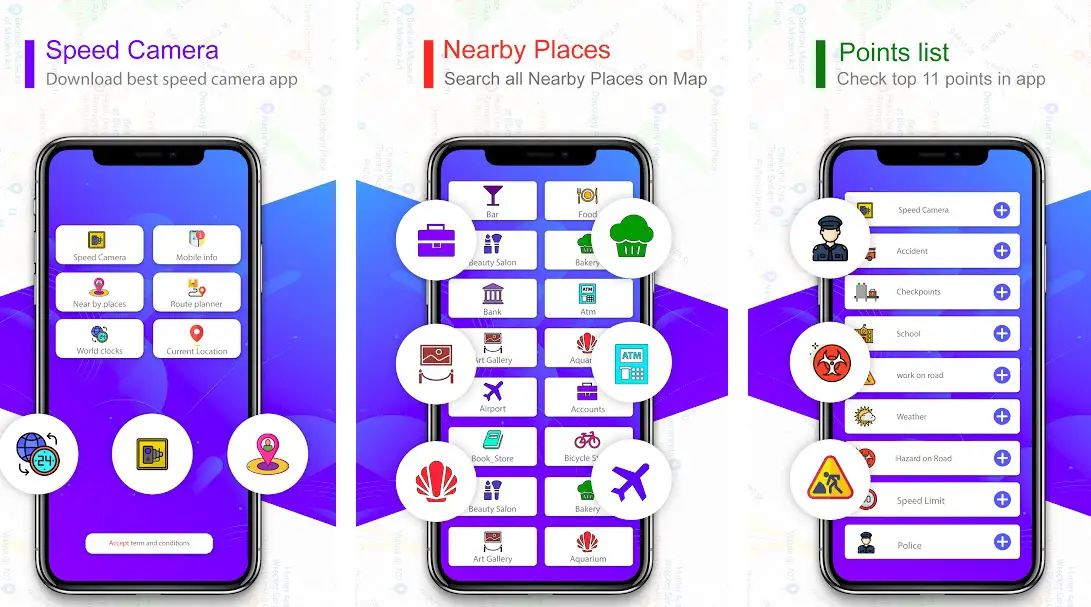
The innovative app effectively warns you against overspeeding, road accidents, and limited traffic mobility and makes your driving safer, time-saving, and more importantly, responsible.
With the app, you can warn other users against radars and obstructions and help them avoid traffic jams.
A complete traffic app featured enhanced threads, signs, and a warnings database. With the app, you also get speed limit indications, notifications, and real-time traffic data on your smartphone’s screen.
The app is 100% legal, and there is no doubt about its reliability. Forget those mind-boggling traffic penalties, drive safely and help others avoid traffic violations.
Keep an eye on both your driving speed and the speed limit in different regions. The app is free of cost; no subscription or registration is required.
Features of Speed Camera Detector: GPS Map:-
- A highly interactive speed camera app
- Stay ahead of traffic jams and other obstructions
- Get information related to nearby places on the map
- Directions, alerts, warnings, and more
- Indicates speed limits in different regions
Device – Android
Ratings on Google Play Store – 4.9 / 5 | 1,00,000+ Downloads
Download the App from Google Play Store
Navigation got simplified with Waze Navigation & Live Traffic App! With the app, you can remain informed about whatever is happening around the road!
Even if you are driving on your usual route, the app informs you instantly about traffic, speed cameras, construction, police, accidents, & a lot more!
If traffic is not alright on your route, the app will help you with a completely different route altogether, saving you a lot of time!
Beware of everything, including different obstructions, when you are on the go.
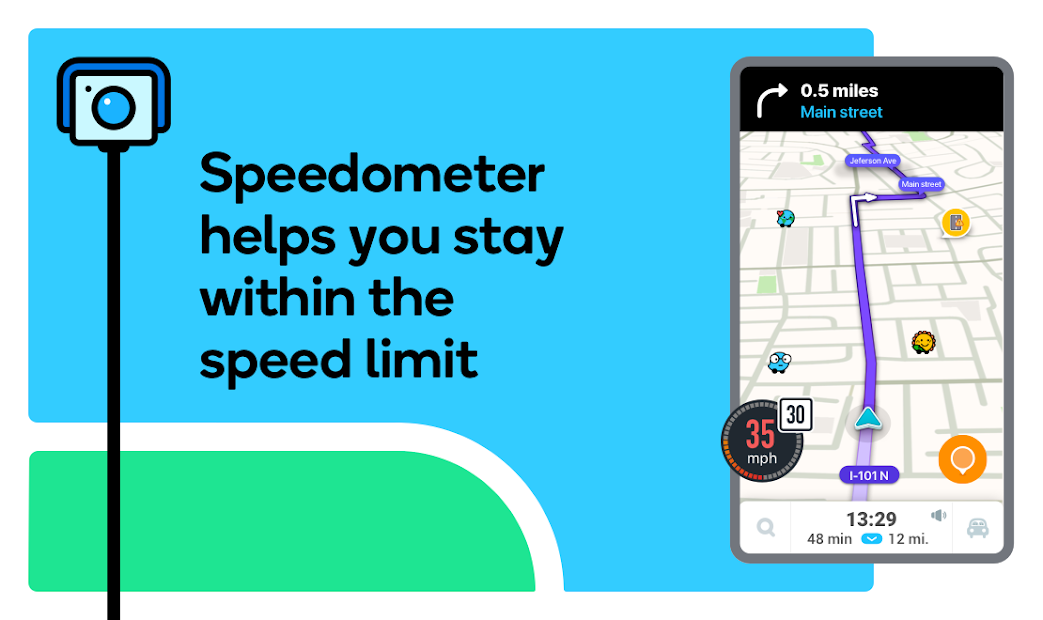
Reach your destination faster with instant route changing. And you don’t need to compromise your music experience even when using the app.
Waze lets you enjoy your favorite music, podcasts, and more right from the app’s user interface.
Check out a near-accurate estimated arrival time based on different factors, including live traffic data. Find the cheapest and most reliable gas station along your route.
Features of Waze:-
- Real-time traffic alerts to keep you ahead on your journey
- Beware of speed cameras and police vehicles
- Check out actually data for accidents and other factors
- Listen to in-app music, podcasts, and more
- Find parking, gas stations, and more on your route
Devices – Android and iOS
Ratings on Apple Store – 4.8 / 5 | Ratings on Google Play Store – 4.4 / 5
Download the App from Google Play Store
Download the App from Apple App Store
Sygic GPS Navigation & Maps is one of the world’s most advanced GPS navigation and radar detector apps for Android and iOS with some extraordinary features.
You get many advanced navigation features, highly interactive 3D offline maps, and a simple and sophisticated user interface for an exceptional traffic navigation experience.
Always be informed of off-speed cameras and police vehicles on your route, avoid overspeeding, and ensure your and other passengers’ safety.
Never be that bad guy by violating overspeeding rules, even by mistake!
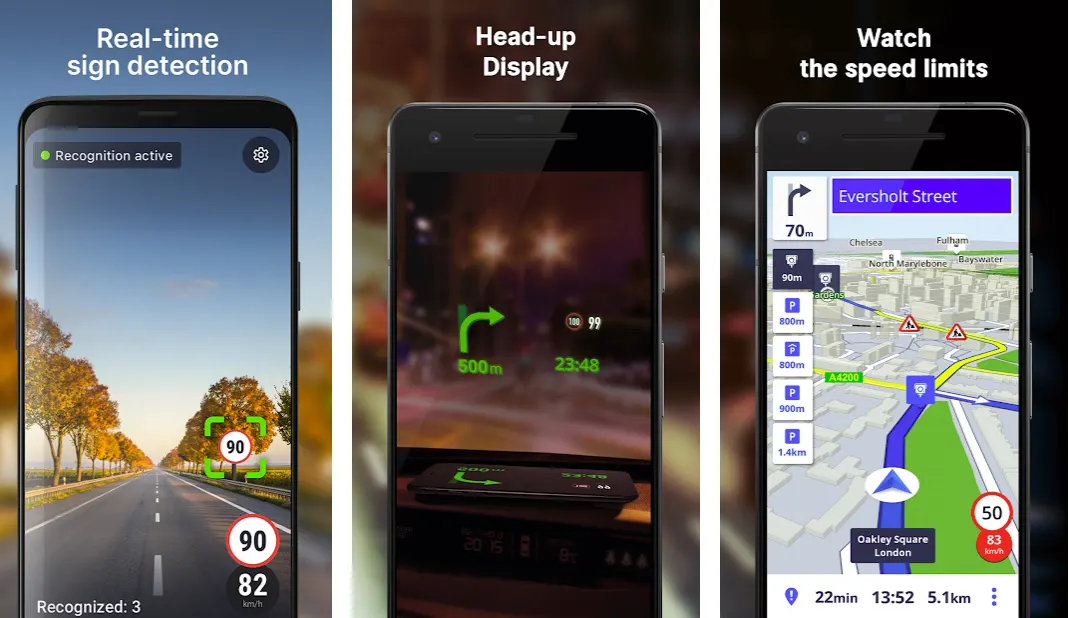
You get a wide range of additional features with the app. There are dozens of offline maps of almost all countries in the world. Highly trusted navigation providers design these maps.
Thanks to voice-guided GPS navigation, you get precise directions and spoken street names to easily reach your destination on time.
If you usually walk down the road, the app also helps you with a unique pedestrian GPS navigation system.
Always stay ahead of the traffic with real-time and accurate traffic information right on your smartphone’s screen! With extraordinary safety features, you get a safe and sound driving experience even when you are in unfamiliar territories.
Instant speed limit warnings by the app make it even more useful. The app has made life easier for more than 200 million happy drivers worldwide.
And there is no reason why you can’t be the next to join them!
- One of the finest GPS navigation systems with a real view
- It helps you to avoid speed violations
- Real-time sign detection for safe driving
- Fully compatible with Apple CarPlay
- Head-up display with real-time dashcam
Devices – Android and iOS
Ratings on Apple Store – 4.6 / 5 | Ratings on Google Play Store – 4.4 / 5
Download the App from Google Play Store
Download the App from Apple App Store
4. Radarboat: Speed Camera Detector & Speedometer
Radarboat is one of the most reliable radar detector apps, perfectly drive protected, and helps you to drive safely without overthinking about speed violations. Enjoy driving like never before with some exciting features of the app.
It is one of the rare apps that easily combines real-time alerts and the best offline radar detection.
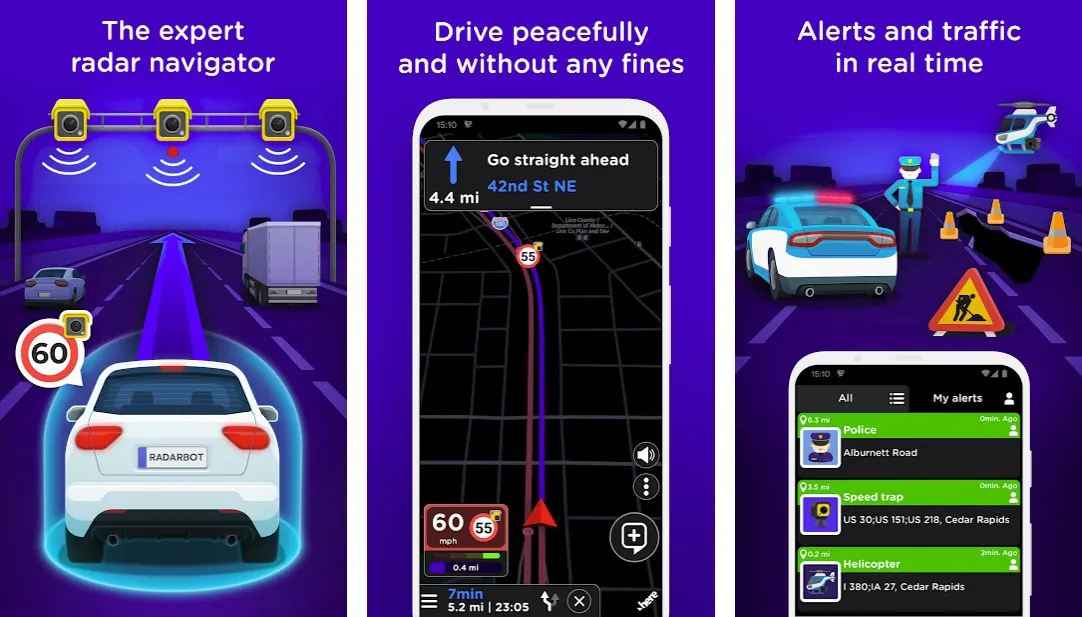
With the app, you can have real-time traffic alerts, instant radar alerts, and specified speed limit alerts for all types of vehicles, including motorbikes, cars, trucks, and commercial vehicles. Enjoy your trip while focusing only on what matters to you.
With Radarboat, you can finally start driving better, safer, and more peacefully. Stop worrying about jeopardizing your driving license are your safety and start driving like a responsible citizen and professional driver.
Why would you wait for clear warnings from traffic police if you can have things in your control? That’s what the app is all about! Having full control over your driving and avoiding hefty traffic violation penalties.
Whether it’s about speed trap hotspots, tunnel radars, fixed radars, traffic light cameras, or even average speed cameras, you can protect yourself from all types of radars without investing in those old-school radar detectors.
Are you looking for some bonuses? The app also offers other features, including seat belt and cell phone used cameras, potholes, speed bumps detection, restricted area access, and a lot more!
Works in all countries and is compatible with various leading applications, Radarboat is the app you need to make your driving safe and responsible!
Features of Radarboat:-
- An advanced radar navigator right in your smartphone
- Drive peacefully without worrying about fines
- Real-time traffic alerts with all types of warnings
- Choose the best route based on real-time data
- Vibration mode for bikers
Devices – Android and iOS
Ratings on Apple Store – 4.6 / 5 | Ratings on Google Play Store – 4.3 / 5
Download the App from Google Play Store
Download the App from Apple App Store
5. Cobra iRadar
Here is one of the most revolutionary radar detector apps! Cobra iRadar takes radar detection to a completely different level by uploading all the data to the cloud!
The app is professionally designed to offer the best and most comprehensive protection from overspeeding and camera enforcement threats on the road.
With the app, you get an enhanced map view with direction-up mode, calm night mode, embedded traffic, and auto-zoom based on your vehicle’s speed.
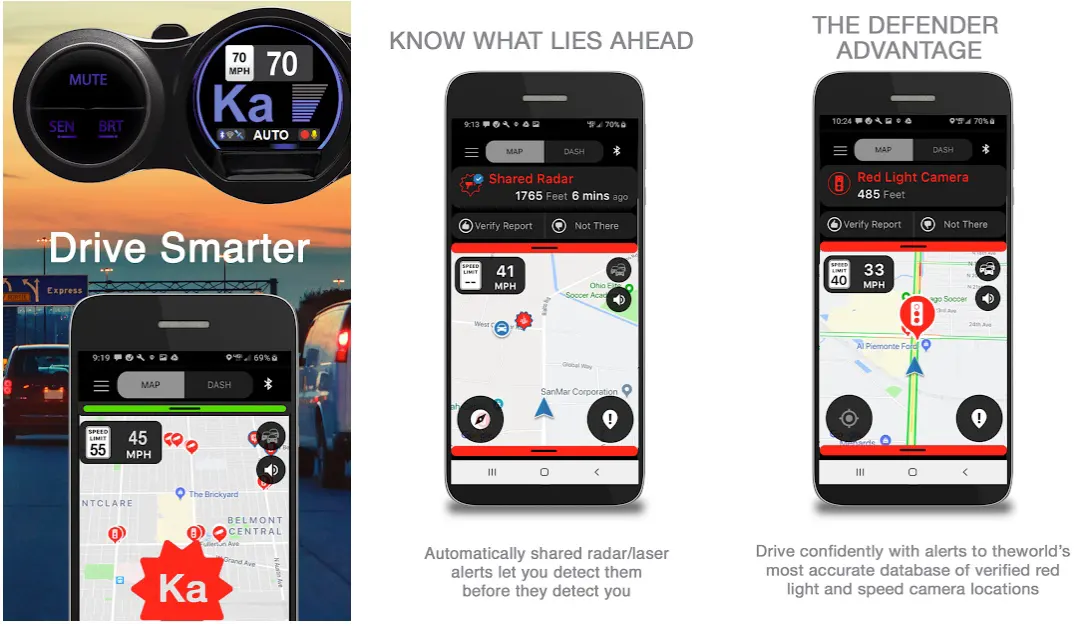
You can remain sure of an improved driving experience with Cobra iRadar. Thanks to a re-imagined user interface, the app reduces distractions and makes it easy to focus solely on driving.
Stay on top of your driving with timely information and relevant driving alerts.
What more? The app is also packed with a very useful car Finder feature that makes it more than possible to find your car, even in the most crowded parking lots. So, never get confused after parking your car; find it easily.
To make things even more interesting, the app also offers community-based alerts related to accidents, work zones, detours, police-spotted speed traps, road hazards, traffic jams, and all types of traffic obstructions.
The app is also easily integrated with compatible Cobra products, making driving safe and fun. Be smart, use the app while driving, and drive like a professional without worrying about untimely traffic fines.

Features of Cobra iRadar:-
- Community-based alerts for various types of traffic radars
- A highly interactive user interface for an enhanced driving experience
- Direction-up mode with an advanced map view
- Modern car Finder to help you to find your car in parking lots
- Fully customizable vehicle icons
Devices – Android and iOS
Ratings on Apple Store – 4.4 / 5 | Ratings on Google Play Store – 4.2 / 5
Download the App from Google Play Store
Download the App from Apple App Store
6. Escort Live Radar
Escort Live Radar is one of the most innovative radar detector apps specially designed for iOS users.
With one of the world’s most advanced real-time radar detection features, you are the master of driving while remaining informed with unprecedented traffic warnings.
Join the millions of drivers who already trusted the app, and make driving easier and safer for yourself and your co-passengers.
Become a proud community member doing your best to make driving safer for everyone. You don’t need to fear violating over-speeding rules or facing burdensome fines by the police.
With features like Car Finder, get directions, live traffic, day/ night mode, and fully customizable car icons, Escort Live Radar can be the ultimate app you need to make things safer and a bit more responsible while driving.
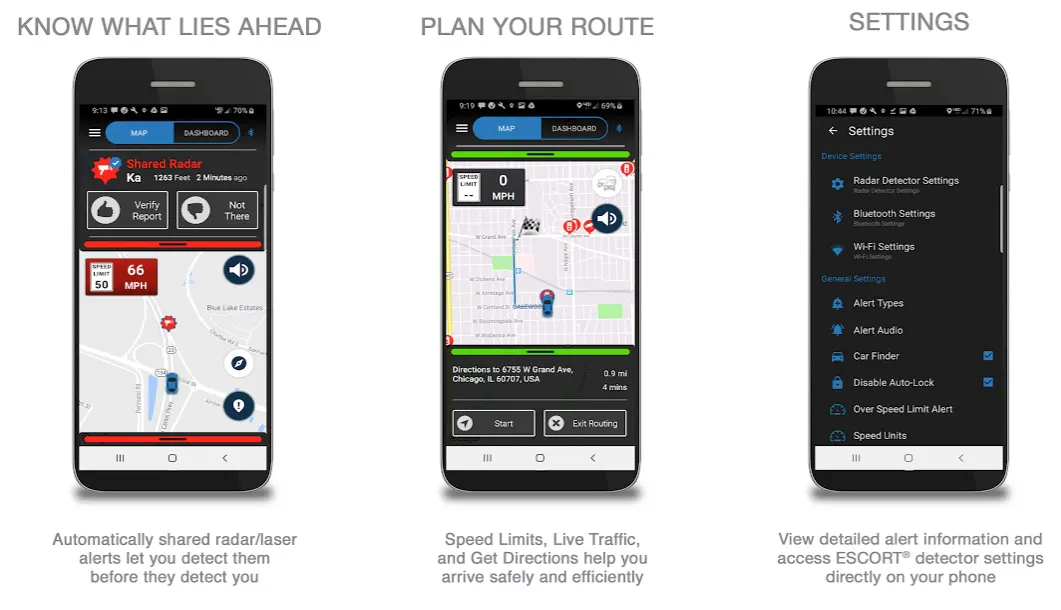
In addition, the app also supports you with police-spotted locations, automatic radar detection, laser detection zones, and a lot more.
Fully compatible with ESCORT products, the app is no less than a blessing for those who are already relying on different types of ESCORT products for various purposes.
Features of Escort Live Radar:-
- Stay informed of what life is ahead with a live detector
- Drive smarter and more responsibly with the real-time traffic information
- Manage all detector settings directly from your smartphone
- Different types of community-based alerts
- Additional advanced features with the premium version
Devices – Android and iOS Devices, Including iPhone and iPad
Ratings on Apple Store – 4.4 / 5 and 4/5 on Google Play Store
Download the App from Google Play Store
Download the App from Apple App Store
7. Speed Camera Radar
Speed camera radar is next on my list. You can successfully use the app to detect almost all types of hazards on the road, including red light cameras, speed cameras, bad roads, speed bumps, etc.
The application perfectly uses a detailed database input provided by other conscious users. Starting with the app is as easy as it gets.
Download the app, find your region from the list, and you are ready to go!
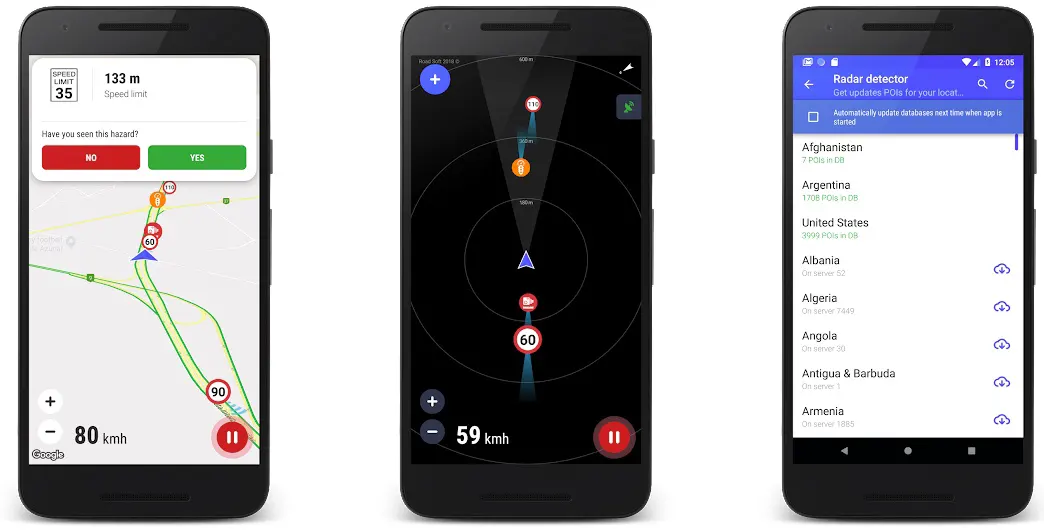
You will start seeing all the alerts on a highly interactive map. Turn on the detection in the app, and it will automatically inform you when something that can spoil your day is on the way.
Want to avoid different types of hazards without falling into the overspeeding trap? Filter the traps and hazards based on your preferences in the app, and never get disturbed!
If you notice false information without any actual hazard on your route, you can inform other users and help them save time.
Last birth not least, the app is always open for those who want to add different important points to the database.
All in all, wonderful app for those who want to drive safely, carefully, and responsibly.

Features of Speed Camera Radar Detector:-
- Simple yet effective radar detector
- Warns against a wide range of traffic hazards
- It enables you to rate down the false information
- Works perfectly in various countries
- Preferences page for setting up the app the way you want
Devices – Android and iOS
Ratings on Apple Store – 4.4 / 5 | Ratings on Google Play Store – 4.3 / 5
Download the App from Google Play Store
Download the App from Apple App Store
8. Highway Radar
Highway radar also finds a very respectable place when discussing the top radar detector apps. The app effectively helps spot many road hazards and speed traps as early as possible.
With the app, you can avoid speeding another traffic violation by remaining informed about all local traffic-related information.
The traffic database is perfectly featured with the information provided by real people based on their experience.
The app connects directly to a server aggregating crowdsourced alerts and showing them on the map.
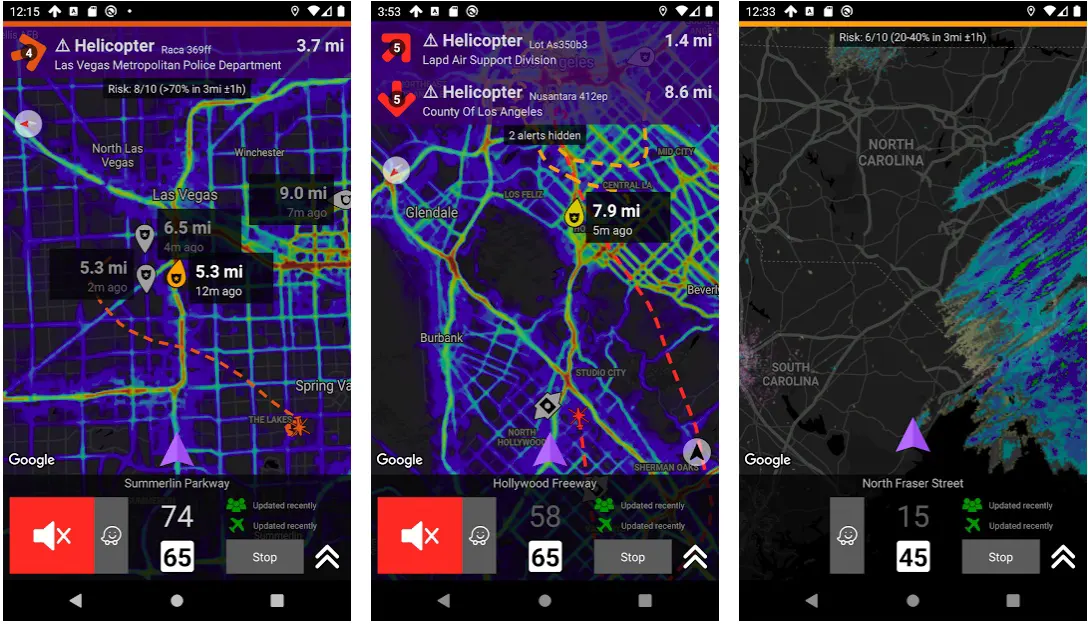
You can also access the historical data based on past police and speed trap reports, which accurately estimate the risk in a particular location.
With an excellent “heat map” feature, you can also check out the locations with frequent speed trap reports to stay aware of specifically in such areas.
What more? As an additional feature, you also get weather radar information related to nearby areas on the app!
So, never rush yourself into speed violations; stay in control whenever you drive!
Features of Highway Radar:-
- Historical data analysis for accurate traffic information
- Get access to weather radar for nearby areas
- Red-light and over-speed camera detector
- Crowd-source information based on geological data
- Warnings against potential risks on the road
Device – Android
Ratings on Google Play Store – 4.3 / 5 | 10,000+ Downloads
Download the App from Google Play Store
9. Radardroid Lite International
Another smart and reliable radar detector application for Android users. Radardroid Lite International is no less than a revolution in radar detection through smartphones.
The app effectively helps you with audible and visual warnings when you are close to any fixed or mobile speed camera.
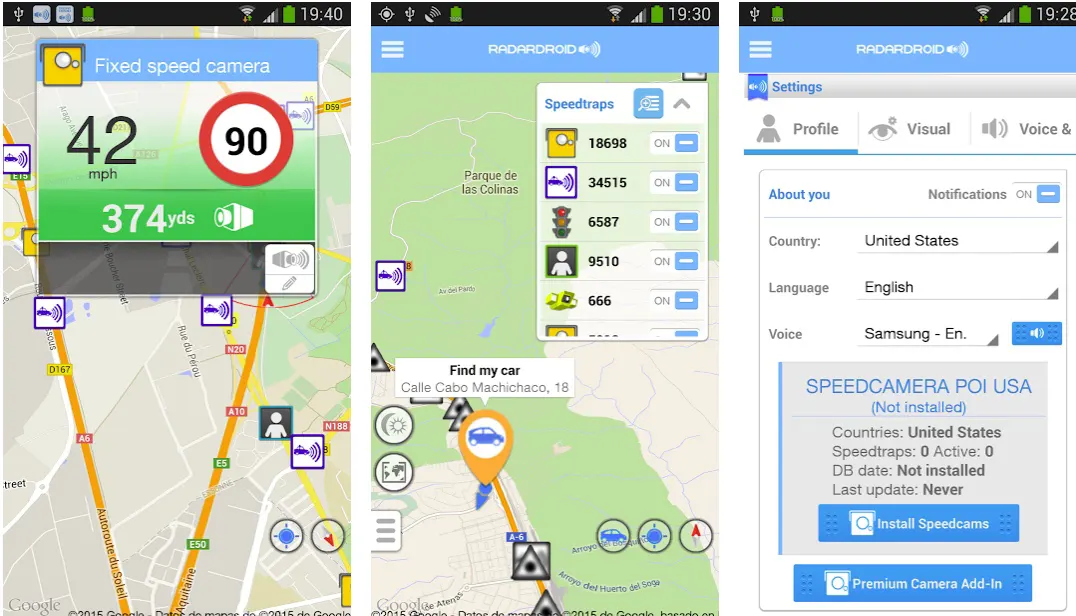
Almost all types of radar detector cameras are in the app database, and the app identifies them as soon as you approach them while driving.
This app will automatically reduce potential speeding threads thanks to a wide range of ever-improving features.
The app developers believe that no one should support overspeeding, and no one should be affected by someone else’s ignorance or mistake on the road.
And, if you are also someone who doesn’t want to violate the laws just because of silly ignorance, this app can be proven a savior for you!
You don’t need to open and close the app regularly, as it works perfectly in the background.
You can use the navigator of your choice or even enjoy your favorite music while being aware of everything while driving.
Features of Radardroid Lite International:-
- Timely detection and warning for all types of radars
- It helps you reduce the risk of penalties while driving
- Fully functional even in the background
- Permits you to use the navigator of your choice
- Listen to your favorite music even from the app itself
Device – Android
Ratings on Google Play Store – 4.2 / 5 | 5,000,000+ Downloads
Download the App from Google Play Store
10. Police Detector (Speed Camera Radar)
Police Detector is also among the top radar detector apps that help you mark the location of police vehicles and speed cameras on your map.
You can even access the markers and information uploaded by other users. Beware of hazards on your way, including road repairs, accidents, weight control, slow traffic, and avoiding different types of problems.
The best part about the app is it’s available free of cost, and you can use all the features without spending a penny. No registration is required, no hidden charges, and no trap whatsoever.
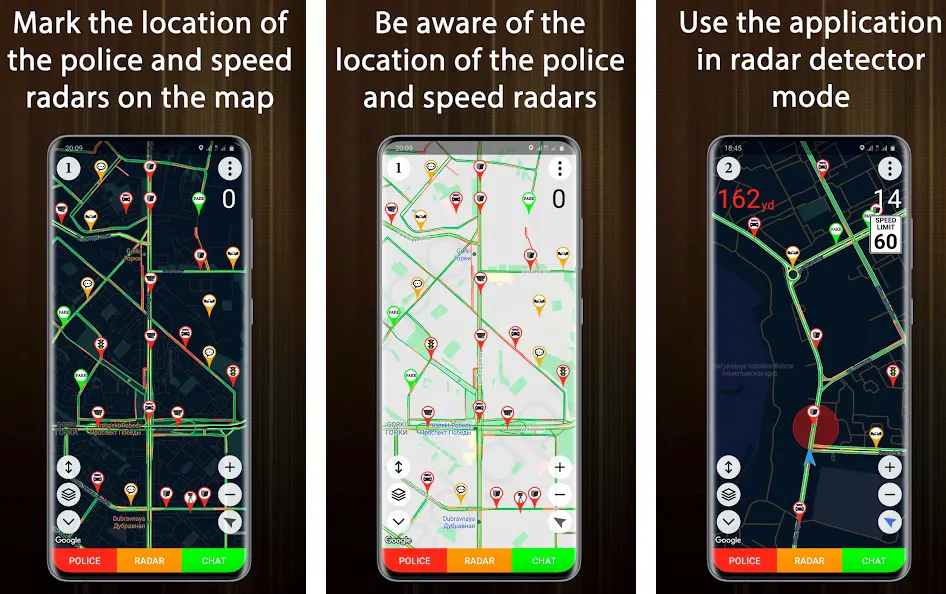
The app also works perfectly well, even in radar detector mode. It helps you with various local road sections and speed limits to make it easy for you to avoid hefty penalties. With updated geolocation data, you can expect oh very satisfying user experience from the app.
And if you want to help other passengers with detailed information about obstructions or hazards, the app also allows you to upload relevant photos. Confirm or reject the already uploaded markers, and make it easy for other passengers.
Features of Police Detector:-
- It enables you to mark different types of speed radars and obstructions
- Be informed about the police vehicles and speed limits
- Radar detector mode for an enhanced and safe experience
- Satellite mode for clearer and specified details
- Simple and improved user interface
Device – Android
Ratings on Google Play Store – 4.0 / 5 | 10,000,000+ Downloads
Download the App from Google Play Store
11. Glob – GPS, Traffic, Radar & Speed Limits
Enjoy relaxing and distraction-free driving with one of the most useful and reliable radar detector apps – Glob! The app is designed to contribute and benefit from different types of goods.
But that’s not all! It is a sleek combination of world-class car navigation technology and modern, real-time traffic information.
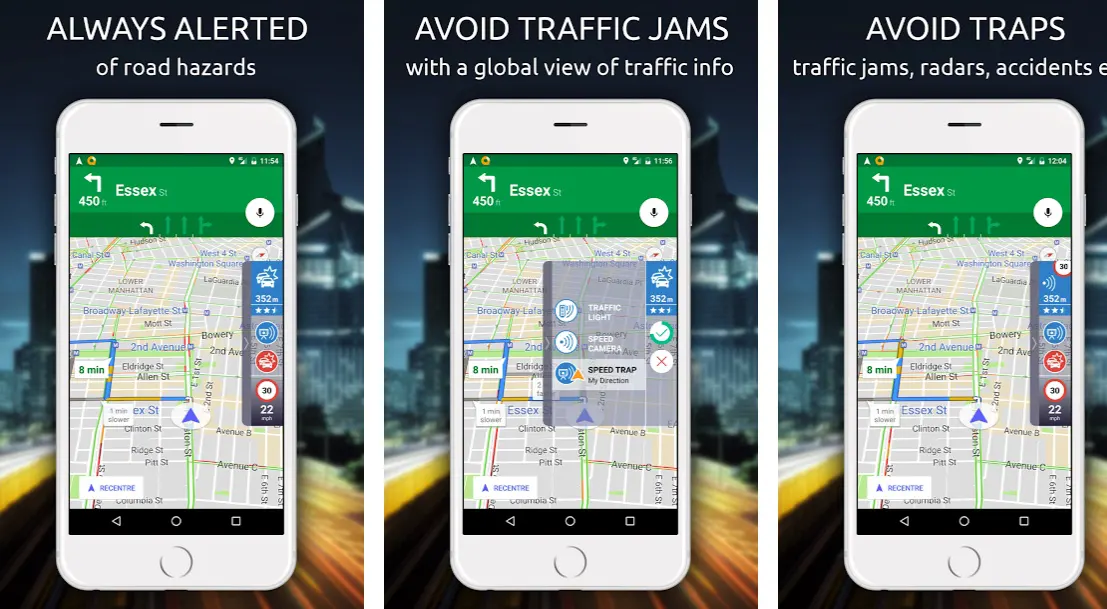
With an advanced radar detection feature, you can always control your driving, ensure road safety parameters, and avoid violating overspeeding the launch.
With accurate and timely alerts for traffic jams and speed cameras, you don’t need to worry about anything but controlling your steer.
Be responsible and actively report police traps, accidents, and hazards you notice along your route.
What more? You can even send locations, share photos of obstructions, and other traffic information directly from the app with your family and friends.
Access community-reported alerts and drive safely, avoiding the route full of risks. Thanks to the acoustic and visual warning, you don’t even have to get your phone again and again, add can fully focus on driving.
Features of Glob:-
- Always stay informed of road hazards
- Global view of traffic to avoid traffic jams
- Save your time by avoiding accidents, radars, and other obstructions
- Customize the app the way you want
- A dedicated interface for bikers
Device – Android
Ratings on Google Play Store – 4.2 / 5 | 1,000,000+ Downloads
Download the App from Google Play Store
📗FAQs on Best Radar Detector Apps📗
Do radar detector apps work?
Radar detector apps can provide some level of protection against police radar. However, their effectiveness can be limited as they rely on the phone’s GPS and are less sensitive than dedicated radar detectors.
Moreover, some radar detector apps may not be legal in certain states, and their use can result in a fine or legal trouble.
Is there a real radar detector app?
Yes, there are several real radar detector apps available in app stores. These apps use the phone’s GPS and provide alerts for red light cameras, speed traps, and other law enforcement activity.
However, their effectiveness can be limited, and they are less reliable than dedicated radar detectors.
What app warns you of the police?
Several apps can warn you of police, including Waze, Cobra iRadar, and Escort Live. These apps use crowd-sourced information to alert drivers of potential speed traps, red light cameras, and other law enforcement activity.
How can I turn my phone into a radar detector?
You can download one of the radar detector apps available on app stores to turn your phone into a radar detector. However, it’s worth noting that these apps are not as effective as dedicated radar detectors and may not be legal in certain states.
Can radar detect cops?
Radar detectors can detect the presence of police radar guns that emit electromagnetic waves. However, they may not be effective against other forms of police speed detection, such as LIDAR or pacing.
Can cops sense radar detectors?
No, police officers cannot sense radar detectors. However, some states have laws that prohibit using radar detectors, and using one can result in a fine or legal trouble.
Does Waze detect police radar?
Yes, Waze can detect police radar. It uses crowd-sourced information to alert drivers of potential speed traps, red light cameras, and other law enforcement activity.
Is Waze a good radar detector?
Waze can provide some level of protection against police radar. However, its effectiveness can be limited and may not be as reliable as dedicated radar detectors.
How much does the iRadar app cost?
The Cobra iRadar app is available for free on app stores. However, some features may require a subscription or in-app purchase.
Are police tracking apps illegal?
The legality of police tracking apps can vary by state. In some states, using such apps can result in a fine or legal trouble.
Is there a safe that alerts the police?
Yes, safes are available that can alert the police in case of a break-in or other emergency. These safes can be connected to a security system or have built-in alarms that trigger when someone tries to tamper with them.
Can police read your phone?
In general, police officers cannot read the contents of your phone without a warrant. However, they may obtain certain information, such as call logs and text messages, through legal means.
How do you place a radar detector without getting caught?
The best way to place a radar detector in your car without getting caught is to mount it in a discreet location, such as behind the rearview mirror or in the center console. However, it’s important to check your state’s laws regarding using radar detectors before installing one.
Where can I hide my radar detector in my car?
You can hide your radar detector in various places, such as behind the rearview mirror, in the center console, or the glove box. However, it’s important to ensure it is mounted securely and does not obstruct your view while driving.
Is it worth getting a radar detector?
Whether or not a radar detector is worth getting depends on your driving habits and the frequency of police radar in your area.
Suppose you frequently drive on highways or in areas with a high presence of police radar. In that case, a radar detector can provide valuable protection and save you from costly speeding tickets.
How far can a radar detector detect a cop?
The range of a radar detector depends on several factors, including the quality of the detector, the type of radar gun used by police, and the terrain and weather conditions. Generally, a good radar detector can detect police radar from several hundred feet away.
Can police radar see through walls?
No, police radar cannot see through walls. Radar signals can be blocked by solid objects, such as walls and buildings, and cannot penetrate them.
How do cops beat radar detectors?
Police officers can use several tactics to defeat radar detectors, including using LIDAR or pacing methods to measure speed or hiding behind obstacles to avoid detection.
Additionally, some states have banned using radar detectors, and using one can result in a fine or legal trouble.
Should I turn off the K band on my radar detector?
K band is a frequency used by some radar guns, but other sources of electromagnetic interference, such as automatic doors and motion sensors, can also trigger it.
Turning off the K band on your radar detector can reduce false alarms, but it may also reduce its effectiveness against certain types of police radar.
What devices detect cops?
Dedicated radar detectors and some radar detector apps can detect the presence of police radar. Some GPS navigation systems, such as those made by Escort and Cobra, also include radar detection capabilities.
To add hidden police to Waze, tap the report button and select “Police” from the list of options. You can then provide additional details, such as the location and direction of the police activity.
How does Waze spot cops?
Waze uses crowd-sourced information to spot police activity, including speed traps, red light cameras, and other law enforcement activity.
Users can report police activity in real time, and the app uses this information to alert other drivers in the area.
How do I report a police officer on Waze while driving?
To report a police officer on Waze while driving, tap the report button and select “Police” from the list of options.
You can then provide additional details, such as the location and direction of the police activity. It’s important to use this feature responsibly and only reports actual police activity.
The best hidden radar detector depends on your specific needs and preferences. Some popular options include the Escort Redline 360c, the Uniden R7, and the Valentine One Gen2.
Do radar jammers work?
Radar jammers are illegal in most states and do not work reliably against police radar. Additionally, using a radar jammer can result in a fine or legal trouble.
What’s a really good radar detector?
Some popular and highly rated radar detectors include the Escort Redline 360c, the Uniden R7, and the Valentine One Gen2. However, the best radar detector for you depends on your specific needs and budget.
Can an iPhone be used as a radar detector?
Yes, several radar detector apps on the App Store can turn your iPhone into a radar detector. However, these apps are less effective than dedicated radar detectors and may not be legal in certain states.
How much should I spend on a radar detector?
The price of a radar detector can vary widely, ranging from under $100 to over $1,000. The best radar detector for you depends on your specific needs and budget.
What does Cobra radar do?
Cobra is a brand of radar detectors and related accessories. Cobra radar detectors are designed to detect police radar and provide drivers with an advanced warning to help avoid speeding tickets.
How can I avoid being tracked by the police?
To avoid being tracked by police, you can take several precautions, such as obeying traffic laws, avoiding high-risk areas, and not using a radar detector or other prohibited devices.
Is it legal to track your spouse?
The legality of tracking your spouse can vary by state and depend on the tracking method and the circumstances surrounding it. Tracking someone without their consent is illegal and can result in legal trouble.
Can cops track you online?
Police officers can use various methods to track someone online, including social media monitoring, IP tracking, and GPS tracking. However, these methods typically require a warrant or other legal authorization.
Is there an app to alert danger?
Yes, several apps can alert you to potential dangers, such as natural disasters, crime, and emergencies. Examples include the Red Cross Emergency app, the Citizen app, and the Nextdoor app.
Can the police see your phone remotely?
In general, police officers cannot access the contents of your phone remotely without a warrant or other legal authorization. However, they may obtain certain information, such as call logs and text messages, through legal means.
Can police tap your phone without your knowledge?
In most cases, police officers cannot tap your phone without a warrant or other legal authorization. However, some exceptions exist, such as in national security cases or imminent danger.
What does K on a radar detector mean?
K band is a frequency used by some radar guns to measure speed. When your radar detector detects K band, it means that there may be police radar in the area.
What triggers a radar detector?
Any electromagnetic interference source can trigger a radar detector, including police radar guns, automatic doors, and motion sensors. Some radar detectors also have GPS capabilities and can alert you to speed cameras and red light cameras.
What does C mean on a radar detector?
C band is a frequency some radar guns use, primarily in Europe and Asia. When your radar detector detects C band, it means that there may be police radar in the area.
Does tint affect radar detectors?
Tinted windows can potentially affect a radar detector’s performance, as the tint film can block or absorb radar signals. However, the extent of the effect can vary widely depending on the quality and thickness of the tint film.
Is there a way to block radar?
Radar jamming and blocking devices are illegal in most states and do not work reliably against police radar. The best way to avoid getting caught by police radar is to obey traffic laws and drive safely.
Why do some cars set off my radar detector?
Some cars may trigger a radar detector due to the presence of blind spot monitoring or collision avoidance systems, which use radar to detect objects around the car. Additionally, some newer cars emit electromagnetic interference that can trigger false alarms on radar detectors.
To Sum it Up
Staying in control of driving and avoiding overspeeding is important for everyone’s safety. But sometimes, it gets ignored simply because of negligence and misinformation, especially if you are in unknown territory.
But these radar detector apps are designed to make things easier for those who never want to violate traffic rules and stay within the speed limit.
Not only that, but you can also stay on top of your routes by getting information related to traffic jams, vehicle breakdowns, accidents, and other different types of obstructions.
Simply put, these apps are designed to make your driving safer without worrying about investing in costly but old-fashioned radar detectors.


