A smart doorbell can offer unparalleled peace of mind in a rapidly evolving world where convenience and security intertwine. With its seamless integration, robust features, and user-friendly interface, the Ring Doorbell has held a prime spot in the market for some time.
However, as more homeowners and renters invest in smart home technology, some concerns have surfaced – privacy issues, subscription costs, compatibility with other smart home devices, and more.
Finding yourself constantly worried about who’s at your door, sifting through numerous false alerts, or struggling with the ongoing costs of video storage can make your Ring Doorbell feel less like a solution and more like a stressor.
Plus, the complexity of integrating your Ring Doorbell with non-Amazon devices can be an unforeseen challenge, limiting the full potential of your smart home system. But what if you could have a smarter doorbell that matches your specific needs? This is where exploring Ring Doorbell alternatives can open up a new horizon of possibilities.
This comprehensive guide will delve into the top competitors in the smart doorbell market, comparing them based on various factors such as video quality, motion detection, security features, ease of installation, and more.
We aim to empower you with the knowledge you need to choose a doorbell that offers more than just a ring – a perfect fit for your smart home ecosystem.
Criteria for Evaluating Doorbell Alternatives
In today’s fast-paced and technology-driven world, doorbells have evolved beyond their traditional form, offering a range of alternatives that cater to various needs and preferences.
Criteria for evaluating doorbell alternatives have become essential to ensure optimal selection. When considering these alternatives, several key factors come into play.
Firstly, functionality stands as a fundamental criterion. It encompasses transmitting a reliable signal, providing clear audio, and offering secure video footage. Modern doorbell alternatives often include features like two-way communication, motion detection, and integration with smart home systems, enriching the user experience.
Compatibility emerges as another vital aspect to assess. Verifying whether the chosen alternative aligns with existing infrastructure and devices, such as smartphones, tablets, or home automation systems, is imperative. Seamless integration allows for effortless control and monitoring.
Design and aesthetics hold considerable weight, as the alternative should blend harmoniously with the home’s architectural style. Whether sleek and minimalist or ornate and traditional, the doorbell alternative must be visually appealing and enhance the overall curb appeal.
Durability and weather resistance represent crucial factors in evaluation. A doorbell alternative that can withstand extreme temperatures, humidity, and exposure to the elements ensures long-lasting performance and longevity.
Lastly, cost plays a significant role in the decision-making process. The evaluation of doorbell alternatives should consider upfront costs, ongoing expenses such as subscriptions or maintenance, and the value the chosen alternative provides.
By considering these criteria for evaluating doorbell alternatives, individuals can make informed decisions and select a doorbell alternative that best suits their unique needs, enhancing their home’s convenience, security, and aesthetics.
Deep-Dive into Ring Doorbell Alternatives
1. Google Nest Doorbell
The Google Nest Doorbell (Wired) is a standout choice regarding Ring doorbell alternatives. Packed with cutting-edge features and advanced technology, it offers an exceptional home security experience.
With 24/7 streaming, the Google Nest Doorbell ensures you never miss a moment. Its high-quality HDR video captures crisp and detailed footage, allowing you to monitor your doorstep with clarity and precision. The night vision capability enables round-the-clock surveillance, even in low-light conditions.
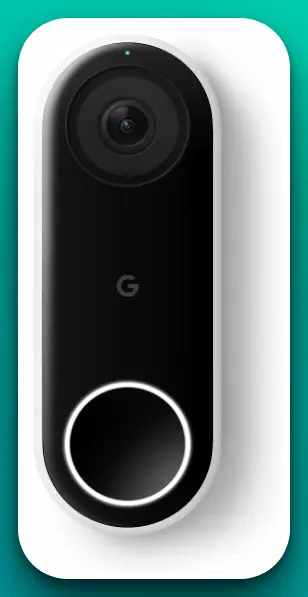
One of the standout features of the Google Nest Doorbell is its HD Talk and Listen functionality. This lets you have clear and seamless two-way communication with visitors at your doorstep, enhancing convenience and security. You can interact with delivery personnel and guests at home or on the go or even ward off potential intruders.
The Google Nest Doorbell is equipped with person alerts, which utilize advanced AI algorithms to differentiate between people and other motion-triggered events. This intelligent feature ensures that you receive alerts only when a person is detected, reducing false alarms and providing accurate notifications.
Installation is a breeze with the Google Nest Doorbell, as it is a wired device. You don’t have to worry about frequent battery changes or recharging. It seamlessly integrates with your existing doorbell wiring and connects to your home Wi-Fi network for reliable and consistent performance.
In summary, the Google Nest Doorbell emerges as one of the best Ring doorbell alternatives on the market. Its exceptional video quality, advanced features such as HD Talk and Listen, night vision, and person alerts, along with the convenience of being wired, make it an excellent choice for those seeking a top-notch smart doorbell camera for their home.
Elevate your home security and enjoy peace of mind with the Google Nest Doorbell.
Pros:-
High-Quality Video: The Google Nest Doorbell offers HDR video with 24/7 streaming, ensuring clear and detailed footage of your doorstep, even in challenging lighting conditions.
HD Talk and Listen: The two-way communication feature allows you to have seamless conversations with visitors, delivery personnel, or potential intruders, enhancing convenience and security.
Night Vision: The doorbell’s vision capability ensures visibility and surveillance even in low-light or nighttime situations, providing round-the-clock monitoring.
Person Alerts: Advanced AI algorithms enable the Google Nest Doorbell to differentiate between people and other motion-triggered events, reducing false alarms and delivering accurate notifications.
Wired Installation: Being a wired device, the Google Nest Doorbell eliminates the need for frequent battery changes or recharging, providing reliable and consistent performance.
Cons:-
Higher Price: Compared to other doorbell alternatives, the Google Nest Doorbell may have a higher initial cost, especially considering additional accessories or subscription fees for certain features.
Dependency on Wi-Fi: The doorbell’s functionality relies on a stable internet connection, so any issues with the Wi-Fi network may impact its performance or accessibility.
Limited Compatibility: While the Google Nest Doorbell integrates well with Google ecosystem products, it may have limited compatibility with other smart home devices or platforms, potentially limiting the overall integration possibilities.
Professional Installation: Although wired installation offers reliability, it may require professional assistance or technical knowledge to set up, which could add additional cost or complexity for some users.
Privacy Concerns: As with any smart doorbell, there may be privacy concerns regarding video and audio recording and data storage and sharing. Reviewing and understanding the privacy policies and settings associated with the Google Nest Doorbell is essential.
The Google Nest Doorbell is a top-notch Ring doorbell alternative, offering exceptional video quality, advanced features, and convenient wired installation. However, it’s important to consider factors such as pricing, compatibility, and privacy implications before making a final decision.
2. Arlo Essential Wired Video Doorbell
When seeking a Ring doorbell alternative, the Arlo Essential Wired Video Doorbell stands out as a top contender. Packed with impressive features and cutting-edge technology, it offers a reliable and secure solution for your home.
The Arlo Essential Wired Video Doorbell boasts HD video capabilities, providing crystal-clear footage with exceptional detail. With its 180° view, you can have a comprehensive perspective of your doorstep, allowing you to easily monitor any activity or visitors.
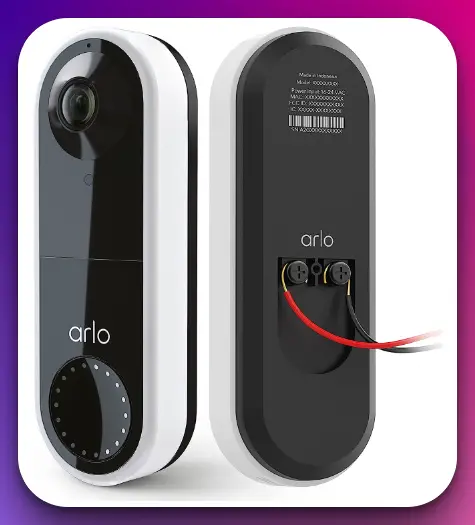
Equipped with night vision, this doorbell alternative ensures visibility even in low-light conditions. Whether a package delivery in the evening or an unexpected visitor at night, you can rely on the Arlo Essential Wired Video Doorbell to capture clear footage and maintain security.
The two-way audio feature enables seamless communication with anyone at your doorstep. Whether receiving a package or greeting a guest, you can interact with them in real time, enhancing convenience and control.
Installation is hassle-free with the Arlo Essential Wired Video Doorbell, thanks to its DIY installation approach. While wiring is required, the straightforward setup process lets you have the doorbell up and running quickly without needing professional assistance.
As a part of the Arlo ecosystem, the Essential Wired Video Doorbell integrates seamlessly with other Arlo cameras and security systems, providing a comprehensive home security solution. The intuitive Arlo app lets you easily manage and control all your Arlo devices.
The Arlo Essential Wired Video Doorbell is one of the best Ring doorbell alternatives. With its high-definition video, wide-angle view, night vision, two-way audio, and easy installation, it offers a reliable and robust solution for enhancing the security of your home.
Consider the Arlo Essential Wired Video Doorbell for a smart, effective doorbell camera that prioritizes functionality and convenience.
Pros:-
HD Video: The Arlo Essential Wired Video Doorbell provides high-definition video quality, ensuring clear and detailed footage of your doorstep.
Wide-Angle View: With its 180° view, this doorbell alternative offers a comprehensive perspective, allowing you to monitor a larger area and capture more details.
Night Vision: The vision capability enables the Arlo Essential Wired Video Doorbell to capture clear footage even in low-light or nighttime conditions, ensuring round-the-clock surveillance.
Two-Way Audio: The two-way audio feature lets you communicate with visitors or delivery personnel at your doorstep in real time, enhancing convenience and security.
DIY Installation: The Arlo Essential Wired Video Doorbell offers a DIY installation approach, making it easy to set up without needing professional assistance.
Cons:-
Wiring Required: While the DIY installation is straightforward, the Arlo Essential Wired Video Doorbell requires wiring, which may pose a challenge for those who prefer a wireless setup.
Limited Integration: Although the Arlo Essential Wired Video Doorbell integrates well with other Arlo devices, its compatibility with third-party smart home systems or platforms may be limited.
Additional Subscription: Some advanced features, such as cloud storage for video recordings or access to premium functionalities, may require a subscription, incurring additional costs.
Dependence on Wi-Fi: The functionality of the Arlo Essential Wired Video Doorbell relies on a stable internet connection, so any issues with the Wi-Fi network may affect its performance.
Cost: Compared to other doorbell alternatives, the Arlo Essential Wired Video Doorbell may have a higher initial cost, especially considering potential subscription fees for certain features.
Overall, the Arlo Essential Wired Video Doorbell offers impressive features such as HD video, wide-angle view, night vision, and two-way audio, making it a strong contender as a Ring doorbell alternative. However, it’s important to consider factors like wiring requirements, integration options, potential subscription costs, and reliance on Wi-Fi before making a final decision.
3. Blink Video Doorbell
The Blink Video Doorbell is a strong contender when exploring Ring doorbell alternatives. Packed with innovative features and user-friendly functionality, it offers a reliable and versatile solution for your home security needs.
The Blink Video Doorbell boasts HD video capabilities, allowing you to monitor your doorstep with clear and crisp footage. Whether it’s identifying visitors, checking on deliveries, or ensuring the safety of your home, high-quality video ensures optimal visibility.
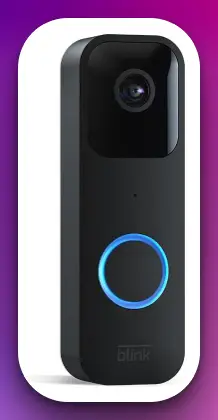
Equipped with two-way audio, this doorbell alternative enables seamless communication with visitors or delivery personnel. You can have real-time conversations, provide instructions, or even deter potential intruders, all from the convenience of your smartphone.
Motion detection is a standout feature of the Blink Video Doorbell, as it sends chime app alerts to your mobile device whenever movement is detected at your doorstep. This feature lets you stay informed about any activity, whether at home or away, enhancing your sense of security.
The Blink Video Doorbell is also Alexa-enabled, allowing for convenient voice control and integration with other smart home devices. You can easily manage and control your doorbell using voice commands, creating a seamless smart home experience.
Installation options are flexible with the Blink Video Doorbell, as it can be installed wired or wire-free, depending on your preference and setup requirements. This versatility ensures you can find the most suitable installation method.
The Blink Video Doorbell is one of the best Ring doorbell alternatives available. Its HD video, two-way audio, motion and chime app alerts, and Alexa integration provide a comprehensive and user-friendly solution for enhancing home security.
Consider the Blink Video Doorbell for a reliable, feature-rich doorbell alternative that prioritizes convenience and peace of mind.
Pros:-
HD Video: The Blink Video Doorbell offers high-definition video quality, ensuring clear and detailed footage of your doorstep.
Two-Way Audio: The two-way audio feature lets you have real-time conversations with visitors or delivery personnel, enhancing communication and convenience.
Motion and Chime App Alerts: The motion detection feature sends chime app alerts to your smartphone whenever movement is detected, keeping you informed about activity at your doorstep.
Alexa-Enabled: The Blink Video Doorbell is Alexa-enabled, allowing for convenient voice control and integration with other smart home devices.
Flexible Installation: Whether you prefer a wired or wire-free setup, the Blink Video Doorbell offers installation options to suit your needs.
Cons:-
Limited Integration: While the Blink Video Doorbell offers Alexa integration, its compatibility with other smart home systems or platforms may be limited compared to other doorbell alternatives.
Lack of Continuous Video Recording: Unlike some competitors, the Blink Video Doorbell does not offer continuous video recording, so it may not capture events occurring immediately before motion detection.
Storage and Subscription: To access certain advanced features, such as cloud storage for video recordings, a subscription may be required, incurring additional costs.
Dependence on Wi-Fi: The functionality of the Blink Video Doorbell relies on a stable internet connection, so any issues with the Wi-Fi network may impact its performance or accessibility.
Limited Field of View: While the Blink Video Doorbell provides clear footage, its field of view may be narrower than other doorbell alternatives, potentially affecting coverage.
The Blink Doorbell offers HD video, two-way audio, motion and chime app alerts, and Alexa integration. However, it’s important to consider factors like limited integration, absence of continuous video recording, potential subscription costs, and Wi-Fi dependency before making a final decision.
The Blink Video Doorbell provides a reliable and convenient doorbell alternative, but it is essential to evaluate how well it aligns with your specific requirements and preferences.
4. AOSU Doorbell
The AOSU Doorbell stands out as a top contender when searching for the best Ring doorbell alternatives. Packed with advanced features and cutting-edge technology, it offers a seamless and secure solution for your home security needs.
The AOSU Doorbell boasts an impressive 5MP Ultra HD resolution, providing unparalleled clarity and detail in your video footage. With its high-resolution capabilities, you can precisely monitor your doorstep and ensure clear visuals.
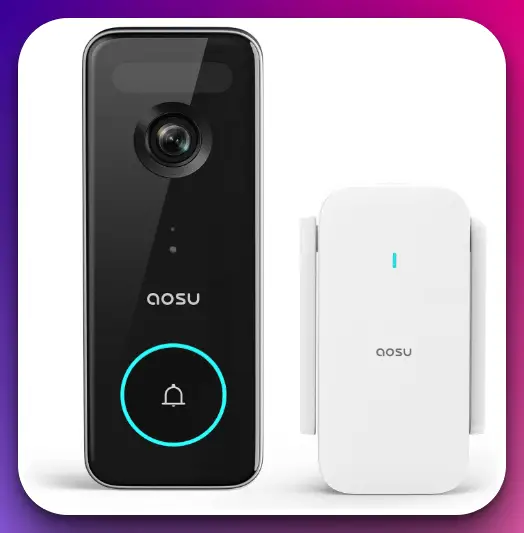
One of the standout features of the AOSU Doorbell is its triple motion detection capability. It utilizes advanced algorithms to detect motion from multiple angles, enhancing accuracy and reducing false alerts. This ensures that you receive notifications only when necessary, improving the overall efficiency of the doorbell.
The doorbell’s enhanced (2.4/5 GHz) WiFi connectivity ensures a strong and reliable connection to your home network. This feature guarantees seamless live streaming, smooth video playback, and real-time notifications on your smartphone or other compatible devices.
With an impressive 180-day battery life, the AOSU Doorbell eliminates the hassle of frequent battery changes or recharging. It ensures long-lasting performance, allowing you to enjoy uninterrupted security monitoring.
Furthermore, the AOSU Doorbell is compatible with popular voice assistants such as Alexa and Google Assistant, providing convenient hands-free control and integration with your smart home ecosystem.
The AOSU Doorbell offers an exceptional alternative to the Ring doorbell, thanks to its 5MP Ultra HD resolution, triple motion detection, enhanced WiFi connectivity, long battery life, and compatibility with popular voice assistants.
Consider the AOSU Doorbell for a reliable and feature-rich doorbell camera that prioritizes high-quality video, advanced motion detection, and seamless integration with your smart home devices. Elevate your home security with the AOSU Doorbell.
Pros:-
5MP Ultra HD Resolution: The AOSU Doorbell offers exceptional video quality with its 5MP Ultra HD resolution, ensuring clear and detailed footage of your doorstep.
Triple Motion Detection: The advanced triple motion detection feature reduces false alerts and enhances accuracy, ensuring you receive notifications only when necessary.
Enhanced (2.4/5 GHz) WiFi: The doorbell’s enhanced WiFi connectivity provides a strong and reliable connection to your home network, enabling seamless live streaming and real-time notifications.
Long Battery Life: With an impressive 180-day battery life, the AOSU Doorbell eliminates the need for frequent battery changes or recharging, providing long-lasting performance.
Compatibility with Voice Assistants: The AOSU Doorbell is compatible with popular voice assistants like Alexa and Google Assistant, offering convenient hands-free control and integration with your smart home ecosystem.
Cons:-
Limited Brand Recognition: AOSU may not have the same level of brand recognition as Ring, which could be a consideration for some users.
Potential Setup Complexity: Depending on the user’s technical expertise, setting up the AOSU Doorbell might be more challenging than user-friendly alternatives.
Limited Third-Party Integration: The AOSU Doorbell may have limited compatibility with third-party smart home devices or platforms compared to more widely recognized brands.
Less Extensive Ecosystem: The ecosystem around AOSU products might not be as extensive as that of larger brands, which could impact the availability of additional accessories or services.
Limited Customer Support: As a smaller brand, AOSU may have limited customer support resources compared to larger companies, potentially affecting the support experience.
Overall, the AOSU Doorbell offers impressive features such as 5MP Ultra HD resolution, triple motion detection, enhanced WiFi connectivity, and long battery life. However, it’s important to consider factors like brand recognition, setup complexity, third-party integration, ecosystem availability, and customer support before making a final decision.
The AOSU Doorbell provides a compelling alternative to Ring, delivering high-quality video and advanced motion detection capabilities for enhanced home security.
5. SimpliSafe Doorbell
When seeking a reliable alternative to Ring doorbells, the SimpliSafe Doorbell proves to be a top contender. Its impressive features and seamless integration with the SimpliSafe Home Security System offer a comprehensive solution for enhancing your home security.
The SimpliSafe Doorbell boasts 1080p resolution, ensuring high-definition video quality that captures clear and detailed footage of your doorstep. Whether it’s identifying visitors, monitoring deliveries, or keeping an eye on your home, the doorbell delivers sharp visuals for enhanced security.
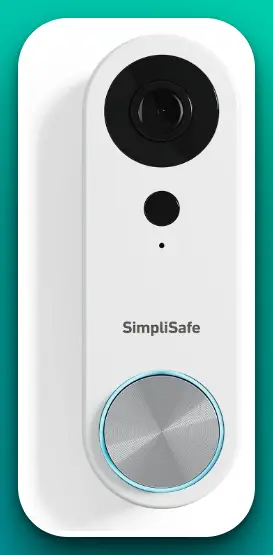
One of the standout features of the SimpliSafe Doorbell is its compatibility with the SimpliSafe Home Security System, allowing for seamless integration. Integrating the doorbell with your existing security system lets you receive alerts, view live video feeds, and control your security settings, all from the SimpliSafe app.
The doorbell’s two-way audio feature enables real-time communication with visitors or delivery personnel at your doorstep. You can have interactive conversations, provide instructions, or listen and observe at home or away.
Installation is hassle-free with the SimpliSafe Doorbell, offering a DIY approach that allows for easy setup without needing professional assistance. The doorbell seamlessly connects to your home Wi-Fi network, ensuring reliable and consistent performance.
Additionally, the SimpliSafe Doorbell is designed to be compatible with popular voice assistants such as Alexa and Google Assistant, enabling convenient voice control and integration with your smart home ecosystem.
The SimpliSafe Doorbell is one of the best Ring doorbell alternatives available. With its 1080p resolution, compatibility with the SimpliSafe Home Security System, two-way audio, easy DIY installation, and compatibility with voice assistants, it offers a comprehensive and user-friendly solution for enhancing your home security.
Consider the SimpliSafe Doorbell for a reliable and seamlessly integrated doorbell camera that prioritizes convenience and peace of mind.
Pros:-
Seamless Integration: The SimpliSafe Doorbell is designed to seamlessly integrate with the SimpliSafe Home Security System, allowing for a unified and comprehensive home security experience.
1080p Resolution: The doorbell offers high-definition video quality with its 1080p resolution, ensuring clear and detailed footage of your doorstep for enhanced security monitoring.
Two-Way Audio: The two-way audio feature enables real-time communication with visitors or delivery personnel, enhancing convenience and allowing for interactive conversations.
DIY Installation: The SimpliSafe Doorbell offers a DIY installation approach, making it easy to set up without needing professional assistance.
Voice Assistant Compatibility: The doorbell is compatible with popular voice assistants like Alexa and Google Assistant, enabling convenient voice control and integration with your smart home ecosystem.
Cons:-
Limited Brand Compatibility: The SimpliSafe Doorbell is designed to work with the SimpliSafe Home Security System, which may limit compatibility with other third-party devices or systems.
Dependency on SimpliSafe Ecosystem: To fully utilize the features and functionality of the SimpliSafe Doorbell, having or purchasing the SimpliSafe Home Security System is necessary, which could be an additional cost for some users.
Subscription Requirement: Some advanced features, such as cloud storage for video recordings, may require a subscription to a SimpliSafe monitoring plan, incurring ongoing costs.
Limited Field of View: While the SimpliSafe Doorbell provides clear footage, its field of view may be narrower than other doorbell alternatives, potentially affecting coverage.
Reliance on Wi-Fi: The functionality of the SimpliSafe Doorbell relies on a stable internet connection, so any issues with the Wi-Fi network may impact its performance or accessibility.
Overall, the SimpliSafe Doorbell offers impressive features such as seamless integration, 1080p resolution, two-way audio, DIY installation, and voice assistant compatibility.
However, it’s important to consider factors like limited brand compatibility, dependency on the SimpliSafe ecosystem, potential subscription costs, the field of view, and reliance on Wi-Fi before making a final decision.
The SimpliSafe Doorbell provides a reliable and user-friendly alternative to Ring doorbells, prioritizing integration and convenience for enhanced home security.
6. Remo+ DoorCam 2
The Remo+ DoorCam 2 is a top contender when finding the best alternatives to Ring doorbells. Packed with innovative features and advanced technology, it offers a reliable and convenient solution for enhancing home security.
The Remo+ DoorCam 2 features 1080p HD video, providing crystal-clear footage of your doorstep with exceptional detail. Whether monitoring visitors, deliveries, or potential security threats, the high-definition video ensures optimal visibility.
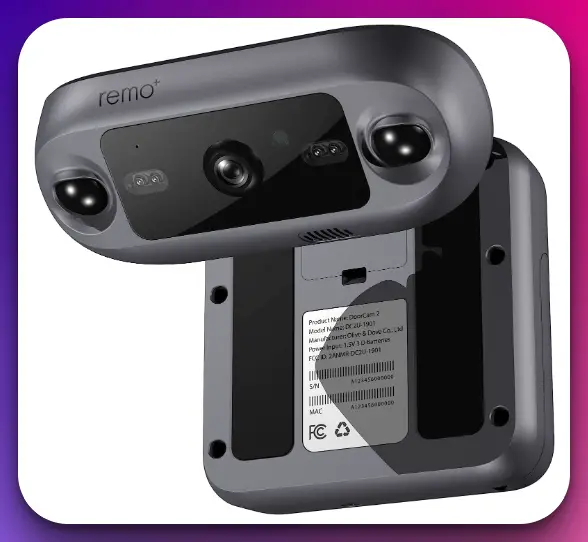
Equipped with a motion sensor, this smart security camera detects movement and triggers instant notifications to your smartphone. You’ll be alerted whenever someone approaches your door, allowing you to take necessary action or monitor the situation remotely.
The 2-way talk functionality enables seamless communication with visitors or delivery personnel. With the built-in microphone and speaker, you can have real-time conversations, provide instructions, or even deter unwanted visitors, all from the convenience of your smartphone.
One of the standout features of the Remo+ DoorCam 2 is its wireless over-the-door design, eliminating the need for complex installation or wiring. Simply mount the camera over your door, and you’re ready to go. This design also allows for easy relocation if needed.
The Remo+ DoorCam 2 is Alexa-enabled, allowing for convenient voice control and integration with other smart home devices. You can check the camera feed, receive alerts, or control settings using voice commands.
Additionally, the DoorCam 2 offers free cloud storage, eliminating the hassle of monthly fees for video storage. You can access and review recorded footage anytime, providing peace of mind without additional costs.
The Remo+ DoorCam 2 is one of the best Ring doorbell alternatives. Its 1080p HD video, motion sensor, 2-way talk, wireless over-the-door design, Alexa integration, and free cloud storage offer a comprehensive and user-friendly solution for enhancing home security.
Consider the Remo+ DoorCam 2 for reliable and convenient doorbell-like functionality without complex installation or monthly fees. Elevate your home security with the Remo+ DoorCam 2.
Pros:-
1080p HD Video: The Remo+ DoorCam 2 provides high-definition video quality, ensuring clear and detailed footage of your doorstep.
Motion Sensor: The built-in motion sensor detects movement and sends instant notifications to your smartphone, allowing you to stay aware of any activity at your door.
2-Way Talk: The 2-way talk functionality enables real-time communication with visitors or delivery personnel, providing convenience and the ability to interact remotely.
Wireless Over-The-Door Design: The DoorCam 2’s wireless design allows for easy installation by mounting it over your door, eliminating the need for complex wiring or installation processes.
Alexa Enabled: With Alexa integration, you can conveniently control and access the DoorCam 2 using voice commands, enhancing the overall smart home experience.
Cons:-
Limited Field of View: The DoorCam 2 may have a narrower field than other doorbell alternatives, potentially affecting the coverage area.
Reliance on Wi-Fi: The functionality of the DoorCam 2 relies on a stable Wi-Fi connection, so any issues with the network may impact its performance or accessibility.
Lack of Continuous Recording: The DoorCam 2 does not offer continuous video recording, so it may not capture events occurring immediately before motion detection.
No Battery Backup: In a power outage, the DoorCam 2 relies solely on a stable power source, which could affect its functionality during power disruptions.
Limited Integration: While the DoorCam 2 provides Alexa integration, its compatibility with other smart home devices or platforms may be limited compared to other doorbell alternatives.
The Remo+ DoorCam 2 offers impressive features such as 1080p HD video, motion sensor, 2-way talk, wireless over-the-door design, and Alexa integration. However, it’s important to consider factors like the limited field of view, reliance on Wi-Fi, lack of continuous recording, absence of battery backup, and limited integration possibilities before making a final decision.
The DoorCam 2 provides a reliable and convenient alternative to traditional doorbell cameras, offering ease of installation and user-friendly functionality for enhanced home security.
7. Lindo Pro Dual Camera Video Doorbell
The Lindo Pro Dual Camera Video Doorbell stands out as an exceptional choice when it comes to finding the best alternatives to Ring doorbells. It’s innovative features and advanced technology offer a comprehensive and reliable solution for enhancing your home security.
The Lindo Pro Dual Camera Video Doorbell features an impressive 2K resolution with dual cameras, providing unparalleled clarity and detail in your video footage. Its dual-camera setup offers an over 190° widest field of view, eliminating blind spots and ensuring comprehensive coverage of your doorstep.
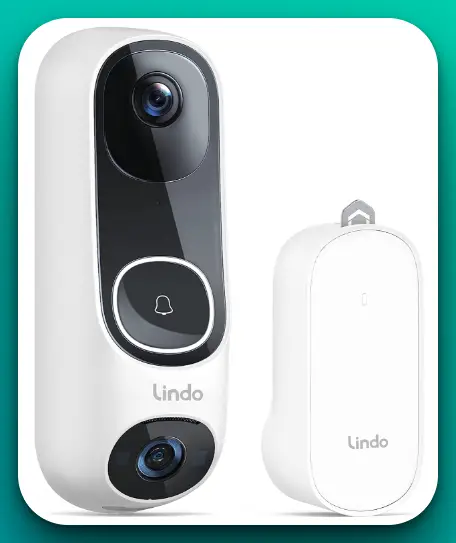
Equipped with triple detection technology, this wireless doorbell camera combines passive infrared (PIR) motion detection, human body shape recognition, and facial detection to accurately identify and notify you of any activity at your door. You can rest assured that you’ll receive real-time alerts when someone approaches your home.
Installation is a breeze with the Lindo Pro Dual Camera Video Doorbell, offering a self-installation process that can be completed in just 5 minutes. No complex wiring or professional assistance is required, making it accessible for all users.
One of the standout features of the Lindo Pro Dual Camera Video Doorbell is its long-lasting battery power. With efficient power management, it offers extended battery life, reducing the need for frequent recharging or battery replacements.
The Lindo Pro Dual Camera Video Doorbell also comes with a chime, allowing you to hear doorbell notifications even if your phone is not nearby. This ensures you never miss a visitor or delivery, providing convenience and peace of mind.
The Lindo Pro Dual Camera Video Doorbell is an outstanding alternative to Ring Doorbells. Its 2K resolution, dual cameras, triple detection technology, easy self-installation, long-lasting battery power, and included chime offers a comprehensive and user-friendly solution for enhancing your home security.
Consider the Lindo Pro Dual Camera Video Doorbell for exceptional video quality, extensive coverage, and advanced detection capabilities.
Pros:-
2K Resolution with Dual Cameras: The Lindo Pro Dual Camera Video Doorbell offers high-quality video footage with its 2K resolution and dual cameras, ensuring clear and detailed visuals of your doorstep.
Over 190° Widest Field of View: With its wide field of view, the doorbell eliminates blind spots and provides comprehensive coverage, ensuring you don’t miss any activity near your doorstep.
Triple Detection Technology: The combination of passive infrared motion detection, human body shape recognition, and facial detection enables accurate and reliable notifications, reducing false alerts.
Easy Self-Installation: The Lindo Pro Dual Camera Video Doorbell can be easily installed in just 5 minutes without needing professional assistance or complex wiring, making it convenient for users.
Long-Lasting Battery Power: With efficient power management, the doorbell offers extended battery life, reducing the need for frequent recharging or battery replacements.
Cons:-
Brand Recognition: Lindo may have limited brand recognition compared to more well-known brands, which could be a consideration for some users.
Limited Integration: The doorbell’s compatibility and integration with other smart home devices or platforms may be limited compared to more popular alternatives.
Reliance on Battery Power: As a battery-powered doorbell, the performance, and functionality of the Lindo Pro Dual Camera Video Doorbell may be affected if the battery power runs out and needs to be recharged.
Potential Connectivity Issues: The doorbell’s wireless connection relies on a stable Wi-Fi network, so any issues with the network may affect its performance or accessibility.
Limited Cloud Storage Options: The availability and storage capacity of cloud storage options for video recordings may be limited compared to other alternatives.
Overall, the Lindo Pro Dual Camera Video Doorbell offers impressive features such as high-resolution dual cameras, a wide field of view, triple detection technology, easy self-installation, and long-lasting battery power.
However, it’s important to consider factors like brand recognition, integration capabilities, reliance on battery power, potential connectivity issues, and cloud storage options before deciding.
The Lindo Pro Dual Camera Video Doorbell provides a reliable and user-friendly alternative to traditional doorbell cameras, prioritizing video quality, comprehensive coverage, and advanced detection capabilities for enhanced home security.
8. Amcrest AD410
When searching for the best alternatives to Ring doorbells, the Amcrest AD410 emerges as a top contender. Its advanced features and high-resolution capabilities offer a reliable and comprehensive solution for enhancing your home security.
The Amcrest AD410 is an outdoor smart home WiFi doorbell security camera that combines convenience and functionality. Its 2K resolution provides crisp and clear video footage, ensuring you can monitor your doorstep with exceptional detail.
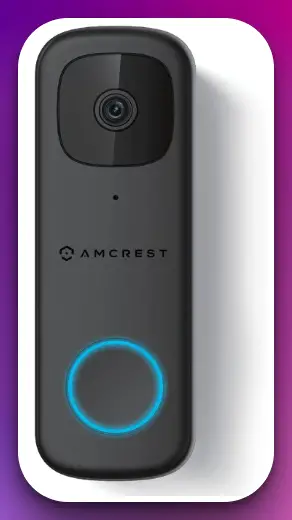
This doorbell alternative focuses on motion detection, offering a motion-only alert feature. It notifies you whenever motion is detected near your front door, allowing you to promptly attend to visitors, deliveries, or potential security threats.
Equipped with a wide-angle lens, the Amcrest AD410 provides a broad field of view, ensuring you can capture a large area around your front entrance. This comprehensive coverage helps eliminate blind spots and enhances your overall security monitoring.
The Amcrest AD410 is designed for outdoor use, featuring a durable and weather-resistant construction that can withstand various weather conditions. This ensures the doorbell camera remains operational and provides reliable security monitoring, even in challenging environments.
Installation is made easy with WiFi connectivity, allowing for a wireless setup that eliminates the need for complex wiring. Simply connect the doorbell to your WiFi network and mount it near your front door, and you’re ready to go.
The Amcrest AD410 can also be integrated with your smart home ecosystem, allowing seamless connectivity and control. It provides compatibility with voice assistants like Alexa and Google Assistant, enabling hands-free operation and integration with other smart devices.
The Amcrest AD410 is one of the best Ring doorbell alternatives available. Its 2K resolution, motion-only alert feature, wide-angle lens, durable construction, wireless setup, and smart home integration offers a comprehensive and user-friendly solution for enhancing your home security.
Consider the Amcrest AD410 for reliable, high-resolution doorbell-like functionality that prioritizes convenience and peace of mind.
Pros:-
2K Resolution: The Amcrest AD410 offers high-resolution video quality, ensuring clear and detailed footage of your doorstep for enhanced security monitoring.
Motion-Only Alert: The motion detection feature notifies you when motion is detected near your front door, informing you of any activity and potential security threats.
Wide-Angle Lens: With its wide-angle lens, the AD410 provides a broad field of view, ensuring comprehensive coverage and reducing blind spots.
Weather-Resistant: Designed for outdoor use, the AD410 is weather-resistant and can withstand various weather conditions, ensuring reliable performance in challenging environments.
Wireless Setup: The WiFi connectivity allows for a wireless setup, eliminating the need for complex wiring and making installation easier and more convenient.
Cons:-
Limited Integration: The AD410 may have limited integration with other smart home devices or platforms compared to more widely recognized brands.
Limited Features: Compared to other doorbell alternatives, the AD410 may have a more limited feature set, potentially lacking advanced functionalities like two-way audio or cloud storage.
No Continuous Recording: The AD410 does not offer continuous video recording, so it may not capture events occurring immediately before motion detection.
Reliance on WiFi: The functionality of the AD410 relies on a stable WiFi connection, so any issues with the network may affect its performance or accessibility.
Potential Subscription Requirement: Certain features or services, such as cloud storage or access to premium functionalities, may require a subscription, incurring additional costs.
Overall, the Amcrest AD410 offers impressive features such as high-resolution video, motion-only alerts, a wide-angle lens, weather-resistant construction, and a wireless setup.
However, it’s important to consider factors like limited integration, feature set, lack of continuous recording, reliance on WiFi, and potential subscription requirements before making a final decision.
The AD410 provides a reliable and convenient alternative to Ring doorbells, prioritizing video quality and motion detection for enhanced home security.
9. Kasa KD110 Smart Video Doorbell
The Kasa KD110 Smart Video Doorbell stands out as an excellent choice when finding the best alternatives to Ring doorbells. Its advanced features and high-quality performance offer a reliable and comprehensive solution for enhancing your home security.
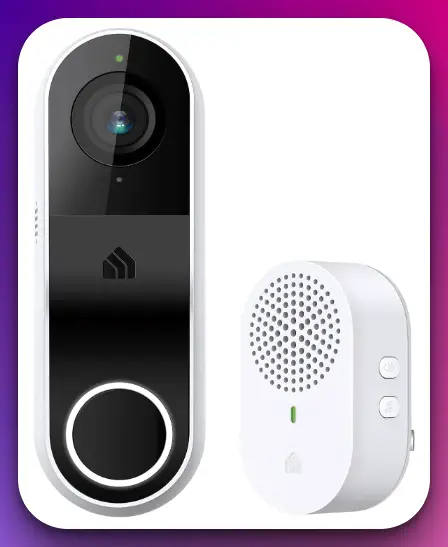
The Kasa KD110 Smart Video Doorbell features a 2K resolution, providing crisp and clear video footage with exceptional detail. Whether you monitor visitors, packages, or potential security threats, the high-resolution video ensures optimal visibility and clarity.
Designed for always-on power, the KD110 ensures uninterrupted operation without worrying about battery life. It is hardwired, allowing for a constant power source and eliminating the need for frequent charging or battery replacements.
Equipped with night vision, this smart video doorbell ensures visibility even in low-light conditions. Whether day or night, you can confidently monitor your doorstep, knowing that the KD110 captures clear footage in all lighting situations.
The KD110 also offers 2-way audio, allowing you to have real-time conversations with visitors or delivery personnel. With its built-in microphone and speaker, you can communicate seamlessly, providing instructions or monitoring the situation remotely.
Real-time notifications keep you informed about any activity at your doorstep. Whether it’s motion detection or someone ringing the doorbell, you’ll receive instant alerts on your smartphone, ensuring you never miss a visitor or delivery.
The KD110 offers multiple storage options, including cloud and SD card storage, providing flexibility and convenience in accessing and managing video recordings.
Furthermore, the KD110 is compatible with popular voice assistants like Alexa and Google Home, allowing easy integration and voice control. You can check the live video feed, receive notifications, or control settings using simple voice commands.
The Kasa KD110 Smart Video Doorbell is one of the best Ring doorbell alternatives. Its 2K resolution, always-on power, night vision, 2-way audio, real-time notifications, multiple storage options, and compatibility with voice assistants offers a comprehensive and user-friendly solution for enhancing your home security.
Consider the Kasa KD110 for reliable, high-quality doorbell-like functionality that prioritizes convenience and peace of mind.
Pros:-
2K Resolution: The KD110 offers high-quality video footage with its 2K resolution, ensuring clear and detailed visuals of your doorstep for enhanced security monitoring.
Always-On Power: Being hardwired for constant power eliminates the need for battery replacements or recharging, ensuring uninterrupted operation and peace of mind.
Night Vision: The KD110’s night vision capability allows for clear visibility even in low-light conditions, ensuring you can monitor your doorstep around the clock.
2-Way Audio: With the 2-way audio feature, you can have real-time conversations with visitors or delivery personnel, providing convenience and the ability to interact remotely.
Real-Time Notifications: The KD110 sends instant alerts to your smartphone when motion is detected, or someone rings the doorbell, informing you about any activity at your doorstep.
Multiple Storage Options: The KD110 offers cloud and SD card storage options, providing flexibility in storing and accessing video recordings.
Compatibility with Voice Assistants: The KD110 works seamlessly with popular voice assistants like Alexa and Google Home, enabling easy integration and voice control for added convenience.
Cons:-
Installation Complexity: Hardwired installation may require more effort and technical knowledge than wireless alternatives, potentially making the setup process more complex.
Limited Field of View: The KD110 may have a narrower field than other doorbell alternatives, potentially affecting the coverage area.
Reliance on External Devices: To fully utilize the KD110’s features and functionalities, such as cloud storage or voice control, you may need additional devices like a compatible smartphone or voice assistant.
Dependence on Stable Internet Connection: The functionality of the KD110 relies on a stable internet connection, so any issues with the network may impact its performance or accessibility.
Potential Subscription Requirement: Certain features or services, such as cloud storage or access to premium functionalities, may require a subscription, incurring additional costs.
Overall, the Kasa KD110 Smart Video Doorbell offers impressive features such as high-resolution video, always-on power, night vision, 2-way audio, real-time notifications, multiple storage options, and compatibility with voice assistants.
However, it’s important to consider factors like installation complexity, field of view, reliance on external devices, dependence on a stable internet connection, and potential subscription requirements before making a final decision.
The KD110 provides a reliable and feature-rich alternative to Ring doorbells, prioritizing video quality, convenience, and advanced functionalities for enhanced home security.
Factors To Consider When Choosing a Ring Doorbell Alternative
Several important factors must be considered when choosing a suitable alternative to Ring doorbells. By carefully evaluating these factors, you can select a doorbell alternative that meets your needs and enhances your home security.
Let’s explore these factors in detail.
1. Video Quality and Resolution:- One of the key factors to consider is the video quality and resolution of the doorbell alternative. Look for options that offer high-definition video, such as 2K or 1080p, to ensure clear and detailed footage of your doorstep. Higher-resolution cameras provide better image clarity, enabling you to identify people and objects accurately.
2. Field of View: Consider the doorbell alternative’s field of view (FOV). The FOV determines the coverage area captured by the camera. A wider field of view allows for a broader perspective, reducing blind spots and ensuring comprehensive monitoring of your entryway. Look for alternatives with a wide-angle lens or a 180-degree FOV to maximize coverage.
3. Power Source:- Evaluate the power source options for the doorbell alternative. Some alternatives are hardwired, which means they are connected to your home’s existing wiring and receive continuous power.
Others may be battery-powered or rechargeable, offering flexibility in installation locations. Consider your preferences, installation convenience, and maintenance requirements when choosing the power source.
4. Installation Process:- Assess the installation process required for the doorbell alternative. Look for options that offer DIY-friendly installation, allowing you to set up the device without professional assistance or complex wiring. Consider whether the alternative can be easily mounted on your doorframe or requires additional tools and expertise.
5. Motion Detection and Alerts:- Check the doorbell alternative’s motion detection capabilities and the effectiveness of its alert system. Motion detection sensors are crucial for detecting activity near your doorstep.
Look for alternatives that offer adjustable sensitivity settings, ensuring you receive notifications for relevant events while minimizing false alarms. Real-time notifications sent to your smartphone or other devices enable prompt response to visitors or potential intruders.
6. Two-Way Audio:- Consider whether the doorbell alternative provides two-way audio functionality. This feature lets you communicate with visitors or delivery personnel at your door in real-time.
It enables convenient conversations, provides instructions, or even acts as a deterrent to potential intruders. Look for alternatives that offer clear audio quality and effective noise cancellation for optimal communication.
7. Smart Home Integration:- Determine if the doorbell alternative offers compatibility with popular smart home platforms like Amazon Alexa or Google Assistant. Integration with these platforms allows for seamless connectivity with other smart devices in your home.
You can control and monitor the doorbell using voice commands, integrate it into routines, or access its features through a centralized smart home system.
8. Storage Options:- Assess the storage options available for recorded footage. Look for alternatives that offer cloud and local storage (such as SD cards). Cloud storage allows you to securely store and access video recordings remotely, while local storage provides an additional backup option. Consider the storage capacity, associated costs, and the availability of features like continuous recording or event-based recording.
9. Subscription Costs:- Be mindful of any potential subscription costs associated with the doorbell alternative. Some alternatives may require a subscription to access advanced features, extended cloud storage, or additional services. Evaluate the subscription plans, pricing tiers, and the value they provide for your needs and budget.
10. Brand Reputation and Customer Support:- Research the doorbell alternative’s brand reputation and customer support. Look for reputable brands known for producing reliable and high-quality products.
Check customer reviews and ratings to gain insights into the product’s performance, durability, and overall user satisfaction. A brand with good customer support ensures you can reach out for assistance if you encounter any issues or have questions regarding the product.
By carefully considering these factors when choosing a Ring doorbell alternative, you can make an informed decision that aligns with your requirements and enhances the security of your home. Remember to prioritize the features that matter most to you and compare alternatives to find the best combination of functionality, performance, and convenience.
📗FAQ’s
What products are similar to Ring Doorbell?
Similar to Ring Doorbell, several products include Nest Hello, Arlo Video Doorbell, Eufy Video Doorbell, SimpliSafe Video Doorbell, and August Doorbell Cam.
Who is Ring Doorbell’s biggest competitor?
One of Ring Doorbell’s biggest competitors in the market is Nest Hello, a smart doorbell offered by Google Nest.
What are alternatives to a Ring security system?
A Ring security system’s alternatives include Nest Secure, SimpliSafe, ADT, Abode, and Wyze Sense.
What is the #1 rated home security?
The #1 rated home security system may vary based on individual needs and preferences. However, some top-rated options include ADT, SimpliSafe, Ring Alarm, Vivint, and Frontpoint.
Is there a monthly fee for Ring Doorbell?
While basic functionality is available without a monthly fee, Ring offers subscription plans for additional features such as cloud storage, professional monitoring, and extended warranty.
Are doorbell cameras worth it?
Doorbell cameras can be worth it as they provide added security and convenience by allowing you to monitor your doorstep, communicate with visitors remotely, and deter potential burglars.
How to get a free Ring Doorbell?
Occasionally, Ring may offer promotions or discounts that allow customers to obtain a free Ring Doorbell. Keep an eye out for special offers or giveaways from the company.
What company is better than Ring?
Companies like Nest (Google Nest), Arlo, Eufy, and SimpliSafe offer competitive alternatives to Ring with their own unique features and capabilities.
What camera is better than the Ring?
Nest Hello, Arlo Video Doorbell, and Eufy Video Doorbell are some camera options that are often considered comparable or even superior to Ring in terms of features and performance.
What percent of Americans have a Ring Doorbell?
The exact percentage of Americans who have a Ring Doorbell is not available. However, Ring has gained significant popularity, and a considerable number of households in the United States may have installed their doorbells.
How are Ring Doorbells not stolen?
Ring Doorbells are designed to be securely mounted to the door frame, making it difficult for thieves to remove them without damaging the device or alerting the homeowner through the built-in security features.
Are there security issues with Ring?
Ring has faced some security concerns in the past, such as incidents of unauthorized access or hacking. However, the company has been actively working to enhance security measures and provide better protection for its users.
Can you have a Ring camera without a doorbell?
Yes, Ring offers standalone cameras, such as the Ring Stick Up Cam, that can be installed indoors or outdoors without the need for a traditional doorbell.
What is the number 1 security system in the US?
The number one security system in the US may vary depending on various factors. Companies like ADT, SimpliSafe, and Ring Alarm are among the popular and widely recognized security system providers.
Can burglars disable ADT?
While it is technically possible for burglars to attempt to disable an ADT security system, ADT systems are designed with multiple layers of protection and tamper-resistant features to deter such attempts and provide alerts in case of any interference.
What is the cost of ADT per month?
The cost of ADT per month can vary based on the chosen package and specific services. ADT offers various plans, and prices typically start around $28.99 per month and can go up depending on the features and level of monitoring required.
How does Ring Doorbell work without wiring?
Ring Doorbells that work without wiring rely on battery power. These models come with rechargeable batteries that can be easily removed and charged.
Is the Ring subscription worth it?
The value of a Ring subscription depends on individual needs. Subscriptions offer benefits like cloud storage, extended warranties, and professional monitoring. Consider your requirements to determine if the subscription features align with your needs.
Is Ring owned by Amazon?
Yes, Ring is owned by Amazon. Amazon acquired Ring in 2018, integrating its products and services into the Amazon ecosystem.
Can burglars disable Ring Doorbell?
While it is unlikely that burglars can disable a Ring Doorbell without triggering alerts or damaging the device, it’s important to ensure it is properly installed and securely mounted to minimize potential vulnerabilities.
Why don’t Amazon drivers ring the doorbell?
Amazon drivers may not always ring the doorbell during deliveries to avoid interrupting or disturbing occupants. They may instead choose to leave packages at the designated drop-off location as per delivery instructions.
What are the pros and cons of Ring?
Pros of Ring include easy installation, wide product range, cloud storage options, and integration with other smart home devices. Cons can include subscription costs for advanced features and occasional concerns regarding privacy and security.
What are the disadvantages of doorbell cameras?
Disadvantages of doorbell cameras can include dependence on Wi-Fi connectivity, potential privacy concerns, limitations in low-light conditions, and the need for periodic charging or battery replacement.
What is the disadvantage of wireless doorbell?
The primary disadvantage of wireless doorbells is their reliance on batteries, requiring regular replacement or recharging. They may also be susceptible to interference from other wireless devices or range limitations.
Can a Ring camera be hacked?
While Ring cameras have had isolated incidents of being hacked, implementing proper security measures such as strong passwords and two-factor authentication can greatly reduce the risk of unauthorized access.
Do Ring cameras record all the time?
By default, Ring cameras do not record continuously. They are typically triggered to record when motion is detected or the doorbell button is pressed. However, you can enable features like continuous recording with a Ring Protect subscription.
How to get a free Ring doorbell for seniors?
Ring has partnerships and programs that occasionally offer free or discounted devices to eligible seniors. Stay informed about any special promotions or initiatives targeted towards seniors.
How long does Ring battery last?
The battery life of Ring devices can vary based on usage, settings, and environmental factors. Generally, Ring battery-powered devices can last several months on a single charge, but it’s recommended to monitor battery levels and recharge or replace as needed.
What is the downside of Ring?
Some potential downsides of Ring include the need for a stable Wi-Fi connection, subscription costs for advanced features, occasional privacy concerns, and the reliance on battery power for certain models.
Is Ring useless without a subscription?
Ring devices, such as live video streaming and two-way communication, still offer basic functionality without a subscription. However, a subscription provides access to additional features like cloud storage, advanced motion detection, and professional monitoring.
Is Ring owned by China?
No, Ring is not owned by China. As mentioned, Ring is owned by Amazon, a multinational technology company based in the United States.
Why is Ring better than Arlo?
Ring and Arlo offer similar features but have some differences. Ring focuses on easy installation, affordability, and a broader product ecosystem. Arlo, on the other hand, emphasizes advanced camera technology, including options for 4K resolution and advanced AI features.
What’s the difference between Blink and Ring doorbell?
Blink and Ring are both smart home security companies owned by Amazon. The main difference is that Blink specializes in battery-powered wireless cameras, while Ring offers a wider range of security products, including wired and battery-powered doorbells, cameras, and alarm systems.
Is Ring and Blink the same company?
Yes, both Ring and Blink are owned by Amazon. While they are separate brands, they fall under the same parent company.
Does Ring doorbell use a lot of WiFi?
Ring doorbells use Wi-Fi to connect and transmit video and audio data. The amount of Wi-Fi bandwidth used can vary based on the device, video quality settings, and usage patterns.
Does Ring use a lot of WiFi?
The Wi-Fi usage of Ring devices depends on factors such as video quality, the frequency of events, and the number of connected devices. Ring devices are designed to use Wi-Fi efficiently to minimize unnecessary data consumption.
What is the Ring video controversy?
The Ring video controversy refers to incidents where unauthorized individuals accessed Ring cameras or footage. These incidents raised concerns about privacy and security, highlighting the importance of strong security measures, such as unique passwords and two-factor authentication.
How do thieves disable Ring cameras?
While it’s not common, determined thieves may attempt to disable Ring cameras by physically tampering with the device, covering it to obstruct the field of view, or cutting power to the device. Proper installation, security measures, and visible placement can deter such attempts.
Does Ring really deter burglars?
Ring and similar doorbell cameras have been shown to act as a deterrent to potential burglars. The visible presence of a camera and the ability to record and monitor activities can discourage criminals from targeting homes equipped with such devices.
What happens if someone takes your Ring doorbell?
If someone takes your Ring doorbell, you will lose the surveillance and communication features associated with the device. However, Ring provides video recording and the ability to share footage with law enforcement, which can aid in identifying the culprit.
Do police have access to my Ring doorbell?
Ring has a feature called Neighbors, which allows users to voluntarily share their footage with law enforcement agencies if they choose to do so. However, police do not have direct access to Ring doorbells without user consent.
Why are Ring cameras getting hacked?
Ring cameras have faced hacking incidents due to weak or reused passwords, phishing attacks, or breaches of other online accounts. Implementing strong security practices, including unique passwords and two-factor authentication, is crucial to minimize the risk of unauthorized access.
Can Ring employees see your camera?
Ring employees do not have continuous access to live camera feeds. However, they may access user videos shared with the company for specific purposes, such as improving product features or investigating potential security incidents.
Do Ring cameras work without Wi-Fi?
Ring cameras require a stable Wi-Fi connection for proper functionality. Without Wi-Fi, they cannot transmit video and audio data to your smartphone or the cloud. However, some Ring cameras may have local storage options that can record and store footage even if Wi-Fi connectivity is temporarily lost.
How do you install a Ring without drilling?
Ring offers various installation options that minimize or eliminate the need for drilling. These include adhesive mounts, adjustable brackets, and mounting plates that allow you to attach the doorbell to existing doorframes or other suitable surfaces.
Where is the best place to install a Ring doorbell?
The best place to install a Ring doorbell is near your front door or entryway, ensuring a clear view of visitors. It should be positioned at a height that allows for optimal coverage while maintaining accessibility for interaction with the doorbell button and camera.
Conclusion
As we’ve journeyed through the world of Ring Doorbell alternatives, it’s evident that the smart doorbell market is brimming with high-quality options. Each offering a unique blend of features, these alternatives cater to a range of needs, preferences, and budgets, demonstrating that there is no one-size-fits-all solution.
The choice between Nest Hello, Arlo, Eufy, SkyBell, and August will depend on your specific requirements.
Do you need a doorbell that seamlessly integrates with your existing smart home system? Perhaps you prioritize high-definition video and advanced motion detection capabilities? Or, it could be that privacy and security are at the top of your checklist.
Regardless of your priorities, the most important takeaway is that you’re not limited to just one player in the market. The world of smart home technology is vast and constantly evolving, offering innovative solutions that cater to different needs and lifestyles.
So, whether you’re just dipping your toes into smart home tech or looking to enhance your existing setup, remember that Ring isn’t your only option.
With this guide in hand, you’re well-equipped to make an informed decision on a smart doorbell that will provide both convenience and security, but peace of mind, too.
After all, your home is your sanctuary and deserves the smart doorbell that perfectly fits you.
References
Title: “Smart doorbell: A doorbell with facial recognition and voice interaction”
Fact: This paper discusses a smart doorbell system that uses facial recognition and voice interaction. The system is designed to recognize the faces of people who approach the door and interact with them using voice commands.
Source: Zhang, Y., & Zhang, Y. (2018). Smart doorbell: A doorbell with facial recognition and voice interaction. In Proceedings of the 2018 2nd International Conference on Computer Science and Artificial Intelligence (pp. 517-521). Link to the paper
Title: “Design and Implementation of a Smart Doorbell System”
Fact: This paper presents the design and implementation of a smart doorbell system that integrates a camera, microphone, and speaker. The system allows users to remotely monitor and communicate with visitors through a mobile application.
Source: Alotaibi, B., & Elleithy, K. (2016). Design and Implementation of a Smart Doorbell System. In Proceedings of the International Conference on Computing, Networking and Communications (ICNC) (pp. 1-5). Link to the paper
Title: “IoT based smart doorbell”
Fact: This paper discusses an IoT-based smart doorbell that can send notifications to the user’s smartphone when a visitor rings the doorbell. The system can also capture images of the visitor and send them to the user.
Source: Kshirsagar, A., Kulkarni, R., & Patil, S. (2017). IoT based smart doorbell. International Journal of Advanced Research in Computer and Communication Engineering, 6(2), 47-49. Link to the paper
Title: “Smart Doorbell”
Fact: This paper discusses the development of a smart doorbell system that uses a Raspberry Pi microcontroller. The system is capable of sending notifications to the user’s smartphone and capturing images of visitors.
Source: Bhat, S., & Shetty, S. (2017). Smart Doorbell. International Journal of Computer Applications, 163(1), 40-42. Link to the paper