
























Are you captivated by the enchanting melodies of the violin? Do you dream of effortlessly playing beautiful compositions and expressing emotions through this magnificent instrument?💁 Look no further!
In this digital age, learning the violin has become more accessible and convenient than ever, thanks to the power of technology and the advent of violin learning apps.
Gone are the days when aspiring violinists had to rely solely on traditional methods, expensive tutors, or limited resources.
With myriad innovative apps at your fingertips, you can embark on an exciting journey towards mastering the violin at your own pace, whenever and wherever you desire.
This article will explore the fascinating world of violin learning apps and how they can revolutionize your musical education.
Whether you’re a complete beginner, an intermediate player looking to enhance your skills, or even a seasoned violinist seeking fresh inspiration, these apps offer a wealth of resources, interactive lessons, and personalized guidance to propel your progress.
Join us as we delve into the benefits, features, and top recommendations of violin learning apps, ensuring you find the perfect digital companion to support your quest for violin mastery.
Let’s unlock your full potential, unleash your creativity, and embark on an exhilarating musical journey through the power of violin learning apps!
Best Violin Learning Apps To Step into the World of Violin
1. Violin by Trala – Learn violin
Violin by Trala is a revolutionary app designed to help aspiring violinists learn and improve their skills.
Whether a beginner or an advanced player, this app has everything you need to elevate your playing to the next level.
One of the standout features of Violin by Trala is its AI-powered feedback system. The app listens to you play and provides instant feedback on intonation, timing, and overall performance.
This feedback allows you to identify areas of weakness and focus on improving your technique.
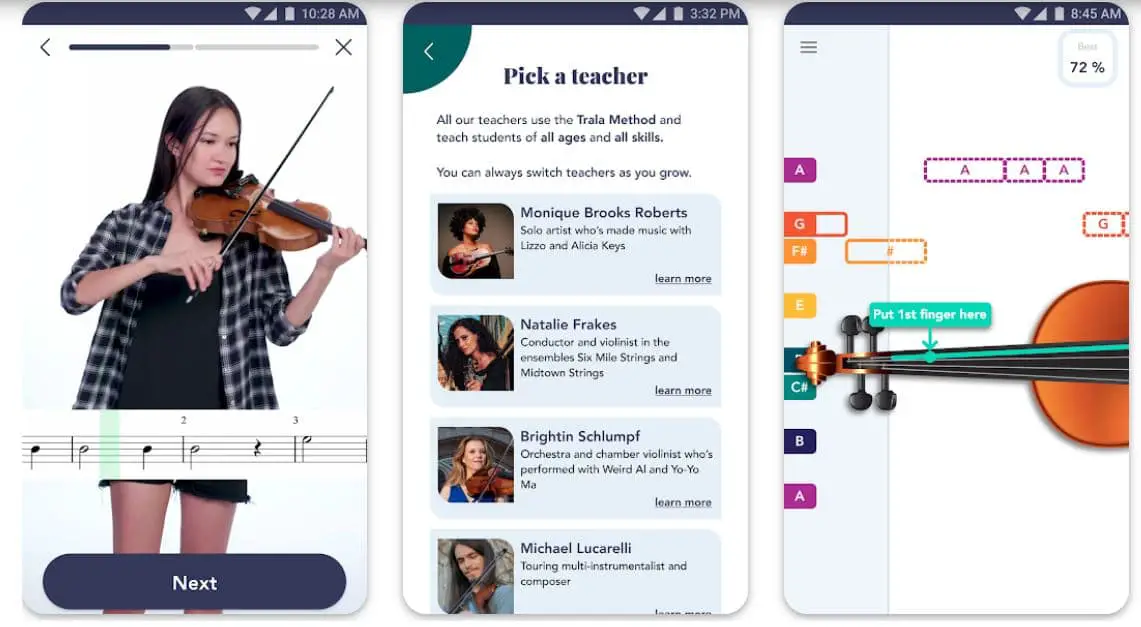
The app also offers a comprehensive library of songs and exercises catering to players of all levels.
From classical masterpieces to popular tunes, the repertoire is diverse and extensive, allowing you to explore and expand your musical horizons.
The interactive lessons provided by Violin by Trala are engaging and informative. The app’s expert instructors guide you through each lesson, breaking down complex techniques into simple, manageable steps.
This approach ensures that you learn at your own pace, with the support of experienced professionals.
The app’s user-friendly interface makes navigation and customization a breeze. You can create your practice routines, adjust the tempo, and choose from various practice modes, such as slow motion and loop mode.
In conclusion, Violin by Trala is the best violin learning app available today. Its innovative features, an extensive library, and expert guidance make it the perfect tool for anyone looking to learn or improve their violin skills. Embrace the future of violin learning with Violin by Trala.
Features:-
- Video tutorials with step-by-step instructions
- Playlist classier
- Exercises in scales, arpeggios, and vibrato
- Violin tuner built-in
- Large sheet music collection
- Theoretical music
- All available are pitch correctors (in real-time), metronomes, and traditional or “video-game-like” graphic notation.
Devices Compatibility – Android, IOS
Ratings & Reviews :- Google Play Store – 4.4/5 and Apple App Store – 4.6/5
2. Violin: Magical Bow
Violin: Magical Bow is a unique app designed specifically to cater to the needs of violin enthusiasts. Whether you’re a beginner or an experienced player, this app offers an engaging and informative approach to learning the violin.
One of the standout features of Violin: Magical Bow is its comprehensive library of lessons and exercises.
The app offers a range of tutorials and songs covering everything from basic techniques to advanced skills. This diverse repertoire lets you learn quickly and explore new styles and genres.
The app’s user-friendly interface makes navigating and customizing your practice sessions easy. You can adjust the tempo, pitch, and other parameters to suit your needs and preferences. This level of customization ensures that you get the most out of each practice session, maximizing your progress and improving your skills.
The app also offers a range of performance modes, allowing you to play along with the app’s virtual orchestra or record your performances.
This immersive experience enhances your sense of rhythm and timing, helping you to develop a more nuanced and expressive playing style.
In addition to its innovative features, Violin: Magical Bow boasts a community of violin enthusiasts sharing their tips, tricks, and experiences.
This collaborative environment encourages learning and growth, allowing you to connect with other like-minded musicians worldwide.

Features:-
- Play library chords
- Access hundreds of violin bowstrings
- PLAY Viola and Cello
- Select multiple songs to play on the Violin, viola, and cello instrument
- Press notes on the Fingerboard to choose from various Violin Scales to free play or pieces to learn.
Devices Compatibility– Android, IOS
Ratings & Reviews :- Google Play Store – 4.3/5 & Apple App Store – 4.5/5
3. iReal Pro
iReal Pro is a game-changing app that revolutionizes how musicians practice and perform.
Designed to cater to the needs of both aspiring and seasoned musicians, iReal Pro combines the power of advanced technology with a user-friendly interface, providing an unparalleled experience.
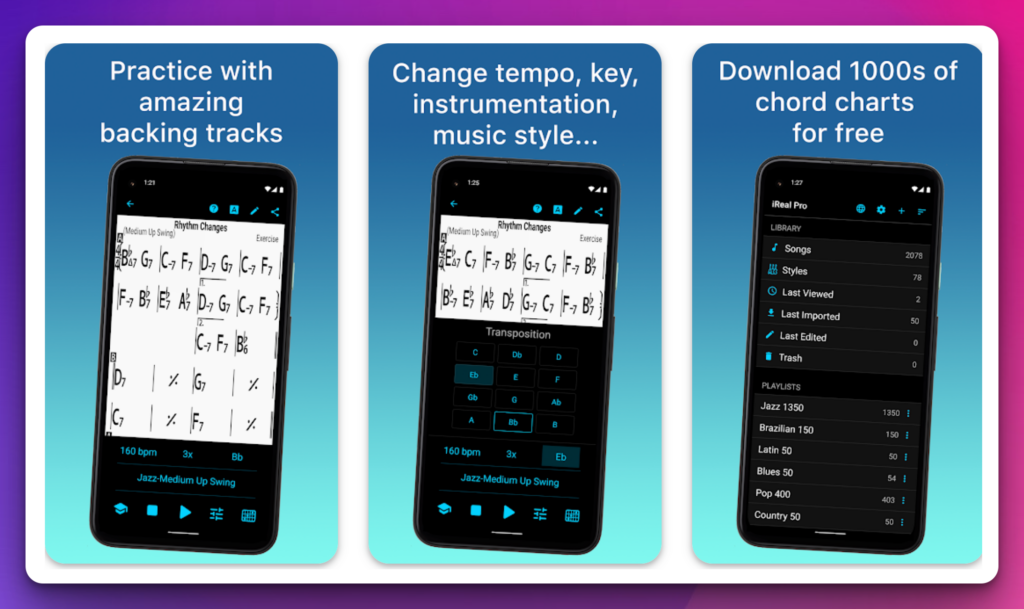
With iReal Pro, musicians can immerse themselves in a virtual world of musical exploration.
The app boasts an extensive library of chord progressions, allowing users to effortlessly create, customize, and practice chord charts in any key and style. Whether you’re a jazz enthusiast, a classical virtuoso, or a pop aficionado, iReal Pro has got you covered.
One of the standout features of iReal Pro is its ability to generate realistic accompaniments. The app’s built-in virtual band can flawlessly accompany your practice sessions, making you feel like you’re playing alongside talented musicians.
This immersive experience enhances your sense of rhythm, timing, and improvisation skills.
The app also doubles as a comprehensive learning tool. Musicians can access a vast collection of songs across various genres, complete with sheet music and backing tracks. This rich repository allows for endless exploration and learning from the masters.
Thanks to its portability, iReal Pro becomes a musician’s trusted companion wherever they go.
Whether in the practice room, on stage, or the road, this app ensures that you have all the tools you need at your fingertips.
Features:-
- a virtual band that will accompany you as you practice
- high-quality digital audio that can be mixed and transposed into any key
- Select from 51 different accompaniment styles included.
- You can listen to, alter, and download any music you want.
- Share, modify, and export your music to take it everywhere!
Devices Compatibility – Android, IOS
Ratings & Reviews :- Google Play Store – 4.8/5 | Apple App Store – 4.8/5
4. Violy
Violy is the place to be if you want to connect with other musicians, instructors, and educators to learn violin. Violy is a smart music school using remote music classes and practice to link music educators and students.
On Android and iPhone, the intelligent school of Violy helps you to practice and play instruments like violin, viola, cello, flute, etc., online and master them.
Video call lessons, accompaniment, auditions, music followings, and more are just a few amazing features of Violy. With Violy, you also get the support of music cloud and creator’s studio, which are great features.
Features :-
- All musical instruments are eligible for the Live Class video call.
- Violy is a smart app that links music educators, instrument students, and enthusiasts.
- Supports the sharing of daily Challenge
- automatic score revolution, video demo horizontal screen, and “Inspire” mode;
- Added temporary scaling for over-densified music scores
- Live Class supports automatically adjusting the microphone volume and reducing background noise;
- Fixed several issues and adjusted some UI.
Devices Compatibility – Android, IOS
Ratings & Reviews:- Google Play Store –3.7/5 & Apple App Store – 4.3/5
5. Master Violin Tuner
Master Violin Tuner is a remarkable app that is an essential tool for violinists of all levels. With its comprehensive features and user-friendly interface, it has established itself as the top choice among violin learning apps.
One of the standout features of the Master Violin Tuner is its advanced tuning capabilities. The app utilizes cutting-edge technology to provide precise and accurate tuning for your violin.
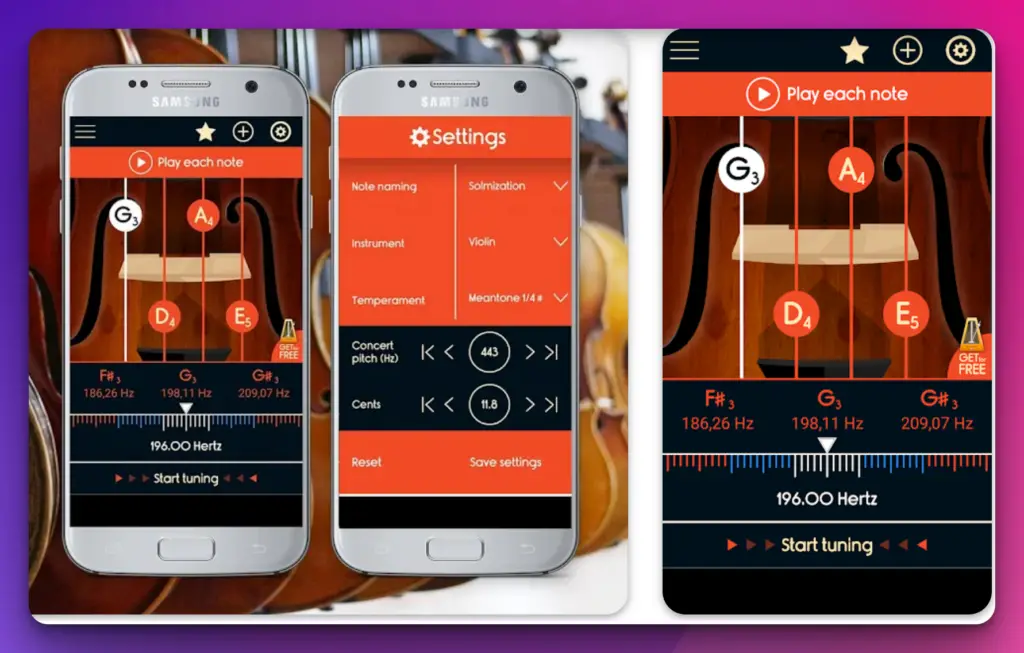
Whether you’re a beginner struggling to find the right pitch or an experienced player looking for flawless intonation, this app covers you.
In addition to its exceptional tuning function, Master Violin Tuner offers a wealth of educational resources.
The app provides a holistic learning experience, from interactive lessons to in-depth tutorials. It covers various topics, including proper bowing technique, finger placement, and music theory, helping violinists develop a solid foundation and refine their skills.
The app’s user-friendly interface makes navigating through its various features easy. With just a few taps, you can access different tuning modes, switch between violin types, and explore the app’s extensive library of exercises and practice materials.
Furthermore, Master Violin Tuner goes beyond basic tuning and instruction. It offers features like metronome integration, allowing you to develop a strong sense of rhythm and timing while practicing.
The app’s recording function lets you capture and assess your progress, empowering you to track your growth as a violinist.
Features:-
- Accuracy gadget that will quickly assist you in tuning your violin
- Professional musicians designed and tested it.
- Tuner and Pitchfork are the two modes available.
- It is suitable for both professionals and amateurs
Devices Compatibility – Android, IOS
Ratings & Reviews:- Google Play Store- 4.5/5 and Apple App Store – 3.6/5
6. Tuner – gStrings
Tuner – gStrings is an exceptional app that offers violinists a comprehensive set of tools for tuning and learning. Its innovative features and user-friendly interface make it one of the best violin learning apps available.
At the heart of Tuner – gStrings lies its advanced tuner, which provides precise and accurate tuning for your violin.
The app utilizes sophisticated algorithms to analyze the pitch and frequency of your instrument, ensuring that you achieve optimal intonation.
With just a few adjustments, you can fine-tune your violin to perfection.
But Tuner – gStrings is more than just a tuner. It offers a range of valuable features for violinists looking to enhance their learning experience.
The app includes a vast library of scales, arpeggios, and exercises, allowing you to develop your technique and improve your musicality.
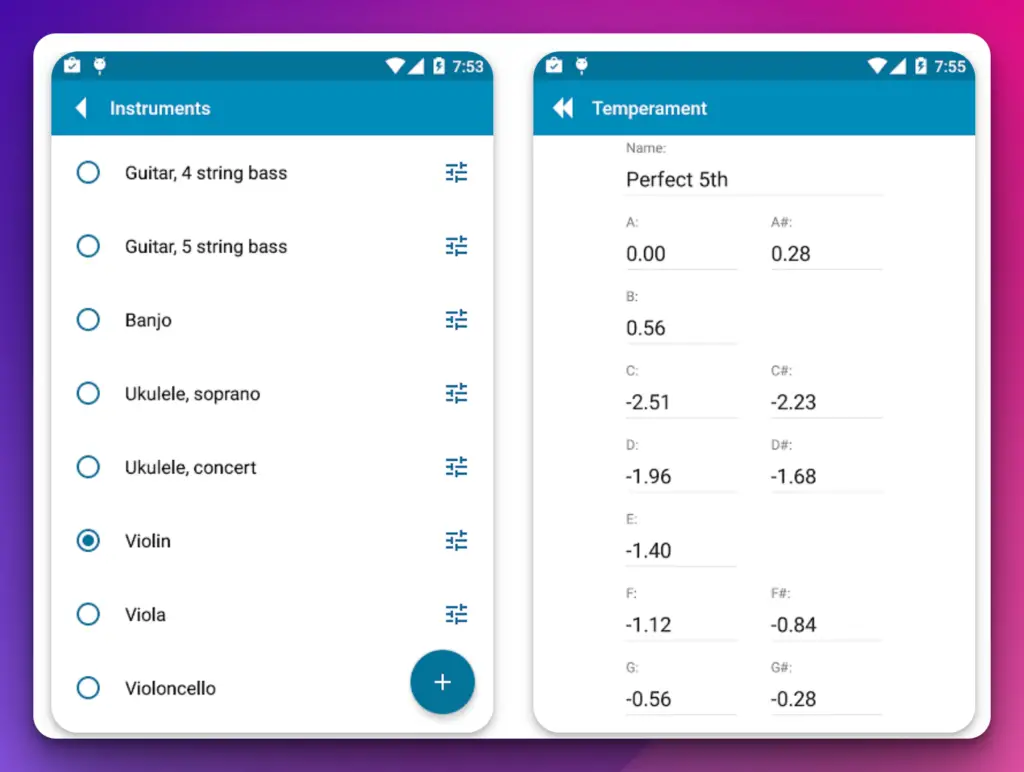
Additionally, the app’s metronome function helps you refine your sense of rhythm and timing, a crucial aspect of violin playing.
The app’s user-friendly interface makes navigating through its various features easy. You can easily customize your tuning preferences, adjust the metronome settings, and access the extensive library.
The clear and intuitive design ensures you can focus on your practice without distractions.
Features:-
- numerous instruments and tunings built-in,
- support for custom tunings defined by the user
- The vast array of pre-programmed temperaments (just, Pythagorean, comma, etc.),
- support for bespoke characters set by the user
- tuning an ensemble (shifting/redefining tone frequencies),
Devices Compatibility– Android
Ratings & Reviews :- Google Play Store-4.7/5
7. Guitar and Violin Tuner
Guitar Tuner, Violin: Tuneo is an exceptional app that provides violinists with a comprehensive set of tools for tuning and learning.
Its innovative features and user-friendly interface have established itself as one of the best violin learning apps.
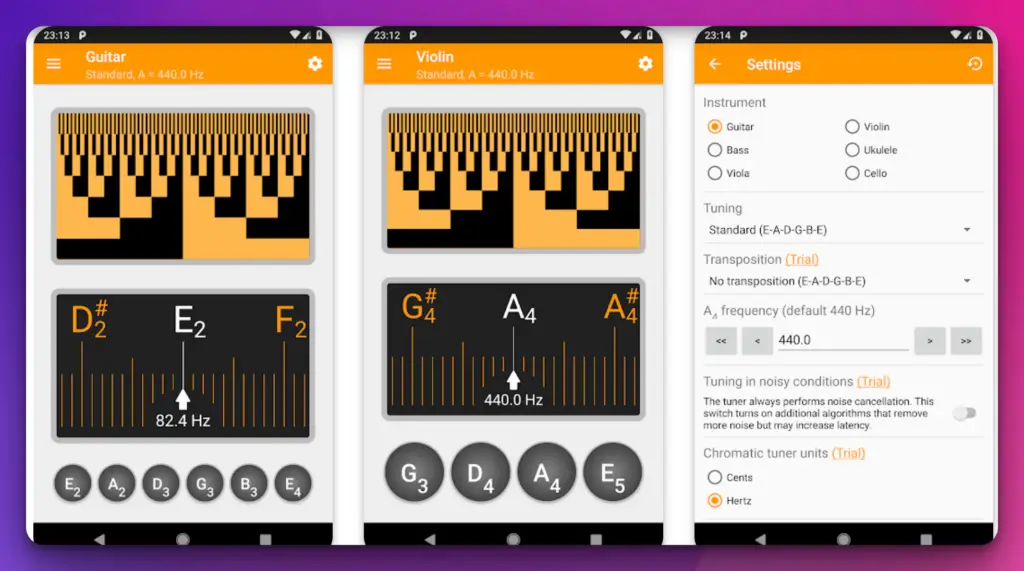
At the core of Guitar Tuner, Violin: Tuneo is its advanced tuner, which offers precise and accurate tuning for your violin.
The app’s sophisticated algorithms analyze the pitch and frequency of your instrument, ensuring optimal intonation. With its customizable settings, you can fine-tune your violin to suit your preferences.
But Guitar Tuner, Violin: Tuneo goes beyond basic tuning. The app’s extensive library of scales, arpeggios, and exercises allows you to develop your technique and improve your playing.
You can choose from a wide range of exercises, catering to different proficiency levels and musical styles. This library enables you to diversify your practice routine and enhance your musicality.
The app’s user-friendly interface makes navigation and customization a breeze. You can adjust the tuning parameters, choose the exercise type, and easily access the library. The clear and intuitive design ensures you can focus on your practice without distractions.
In addition to its tuning and learning capabilities, Guitar Tuner, Violin: Tuneo also offers a metronome function, allowing you to refine your sense of rhythm and timing.
This feature is essential for violinists looking to improve their performance and develop a nuanced playing style.
Features:-
- Beginners and professionals alike will benefit from this guitar tuner.
- Advanced noise suppression works even with a metronome on
- The most popular alternate guitar, ukulele, banjo, and samisen tunings
- Precision tuner for experts Plays reference tones
- First-start tutorial to learn how to use the software
- Built-in help to get a better understanding of the app
Devices Compatibility – Android
Ratings & Reviews :- Google Play Store-4.6/5
8. Tempo – Metronome with Setlist
Tempo is the most popular rhythm learning fixing app available for Android. This program is unique in its capacity to give stability and accuracy.
The best part is that even if your phone is locked, this Android software may work magic and assist you.
Tempo is the most popular and accurate metronome available on the App Store. Apple’s main iTunes landing page is listed as “New and Noteworthy” and “Staff Favorite.”
Tempo Lite is available for free download today if you want to try it out before buying it.
As a result, it consumes little of your time and allows you to devote more time to the instruments. This app will win your heart with over 35 time signatures and six rhythm pattern combinations.
Tempo is compatible with Bluetooth controllers, allowing you to assign specific actions to each pedal. Playback may be started and stopped, the pace can be adjusted, and set lists can be navigated.
Features:-
- It includes a revolutionary interface that morphs between modes,
- Displays a unique set of functionalities tailored to the task at hand
- Tempo has continuously ranked in the top 100 of the Music category in over 30 countries
- It is the most popular metronome software in most of them.
Devices Compatibility – Android, IOS
Ratings & Reviews:- Google Play Store – 3.6/5 and Apple App Store – 4.8/5
9. Eastern Virtual Violin
Eastern Virtual Violin app is one of the best violin learning apps you can try on iOS. This iPhone app can stimulate various musical instruments, modes, and characteristics and give us the feeling of playing.
If you’re trying to learn violin, this iOS app is highly suggested. Furthermore, this program goes above and beyond the norm in that it can play western, Iranian, and oriental music.
This software enhances your learning experience by providing a variety of rhythm and harmony styles.
Features:-
- Up to 36 different Arabic/Iranian/oriental/western/pop rhythm types to select
- This program simulates the Violin musical instrument you’ve never seen before.
- We made playing easy with oriental / Iranian / western tunes with accords and rhythm styles. You won’t find any app like this in the entire world store.
- There are 13 accords in this genre of music.
- It features quarter-flat tunes, which are commonly heard in oriental music.
- It comes with 12 distinct songs for 12 different styles of music.
- It can alter the tempo of the rhythm.
- It has two octaves to choose from
Devices Compatibility– IOS
Ratings & Reviews:- Apple App Store- 4.7/5
10. Violin Notes for Beginners
Violin Notes for Beginners is a great app to start learning violin. As a beginner, this app is like a blessing for you. This app provides all the required knowledge and lessons you need to become a pro at violin.
This learning app will guide you correctly if you’re looking for a simple and accurate app to learn Violin at home online. This program can also make the layout simpler for beginners and more precise for experts for better learning.
Features:-
- Learning the Violin from the comfort of your own home is entirely possible. You have the option of learning at your own pace.
- Take 15-20 hours to progress from beginner to public playing.
- In 3-10 hours, you can have fantastic music.
- If you want to get to the top level, these are the steps.
- For Apple users, this completely free app is a significant find.
Devices Compatibility – Android
Ratings & Reviews: Google Play Store – 3.3/5
11. Tonal Energy Tuner & Metronome
Here’s another top app to check out if you’re interested in violin. With its extensive feature set, the truth is that this iPhone software may benefit both pros and amateurs.
There is something for everyone’s tastes and much more than a tuner. It gives you unequaled control over the sound, tempo, meters, subdivision patterns, and graphic displays.
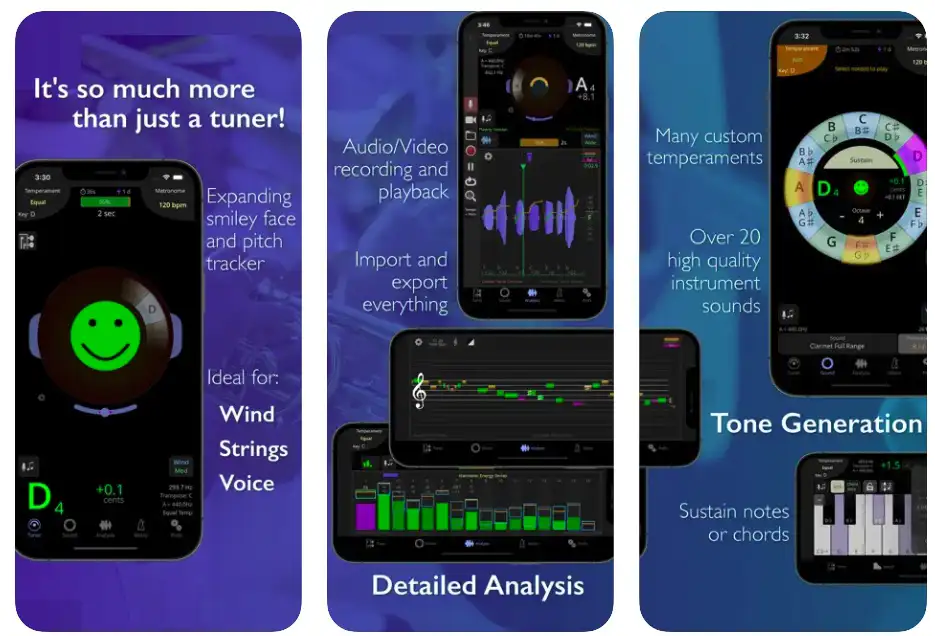
This all-in-one app can provide you with high-quality audio and video. The metronome is cutting-edge and praise-worthy, and the features are simple to use.
Features:-
- Musicians of all levels are welcome, from beginners to world-class performers.
- From elementary school through retirement
- Professional players will benefit from this resource.
- Singers, brass and woodwind players, percussionists, stringed instruments, and guitar players of all types
- Listen to our dynamic sound library and improve your tone!
- Use our cutting-edge data collection tools to keep track of your practice.
Devices Compatibility – IOS
Ratings & Reviews :- Apple App Store- 4.9/5
12. n-Track Tuner Pro
With the n-track tuner, you must connect your instrument to your device and start playing. With great sensitivity and precision for the smoothest and easiest tuning software, the n-track for iPhones has exceeded most expectations. But that isn’t the case.
It also features a proprietary audio recognition system that can tune various other instruments and your Violin. Choose n-track for the greatest pro features, varied views, and advanced collection of functions.
N-Track Tuner can be used to tune guitars, violins, violas, violoncellos, basses, pianos, and wind instruments.
The spectrum analyzer shows a little arrow to emphasize the harmonic whose pitch the tuner is tracking and provides visual feedback on the notes played by the device.
Features:-
- Simply place your gadget near your instrument and begin playing each string.
- The tuner will detect the note you’re playing and inform you whether you need to reduce or raise the string’s pitch.
- A frequency slider allows you to select the note’s frequency manually; experiment with it to find what frequencies you can hear!
Devices Compatibility – Android, IOS
Ratings & Reviews:- Google Play Store – 4.3/5 and Apple App Store – 4.7/5
13. Tonestro
Depending on your level of expertise, the Tonestro Learning Apps for Android and IOS can teach you from basic to advance levels of the violin.
From grade 1 to 5, you can unlock and master the Violin while succeeding in your ability to recognize all musical patterns.
Furthermore, this game will allow you to test yourself and challenge yourself to improve. The Tonestro can greatly assist if you wish to be a well-rounded learner with precise abilities.
Features:-
- Quickly identify key musical features
- Video tutorials
- Track progress
- Awesome UI and UX
- violin learning app free
Devices Compatibility – Android, IOS
Ratings & Reviews :- Google Play Store-3.7/5 and Apple App Store- 4.6/5
14. Scales Practice
To learn violin, you should practice scaling and understand your scales. With the help of Scales Practice, you’ll get a clear idea of violin scales and how those operate.
This app helps count beats, display music notes, change octaves, etc. The best configurable tempos, scales, noises, and letters are found in this Android app.
Features:-
- You can choose a scale and see all its music notes with Scales Practice.
- Press play to hear how the scale sounds, or you may play along with your instrument to improve your pitch and practice music.
- Create Playlists of your favorite scales to play through one by one, or have the program randomly select a scale for you.
- violin notes app
Devices Compatibility– Android, IOS
Ratings & Reviews :- Google Play Store – 4.2/5 and Apple App Store – 4.8/5
15. Violin Sight Reading Trainer
With this all-rounder app, you can practice sight-reading. You can use the software to match your finger positions to the notes in the C key.
The most appealing feature of this iPhone software is its simple music notation display.
It’s simple but effective for the student, and you’ll notice results quickly. It features 155 brand-new sight-reading pieces for Violin Grades 1 to 5. However, you must first unlock them before you may play them!
A series of games precede each piece to hone your ability to recognize the music’s features, rhythms, and characteristics before playing it.
Put yourself to the test and see if you can get a three-star rating in these entertaining games.
Features:-
- Hear the piece of music’s rhythms
- Identify the relevant sign by sight-reading
- Learn how to make the 30 seconds you have to prepare for your exam truly count
- To unlock the parts and begin a practice streak, complete the challenges.
- Strong sight-reading abilities enable musicians to communicate with one another using music as a medium.
Devices Compatibility – IOS
Ratings & Reviews :- Apple App Store- 4.1/5
The Advantages of Using a Violin Learning Apps
Violin learning apps are useful and can connect you to your instrument no matter where you are. Some of these violin learning apps don’t require such a large investment, whether you own a violin or not. Surprisingly, you can learn at least the primary settings even if you don’t hold a violin.
These apps are also helpful for musicians of all levels when tuning their instruments. Professional violinists will find violin apps quite useful, especially if they need to keep track of their songs and strings while practicing.
Whether these apps are free or not, the experiences are real-time and suitable for both novices and experts.
Furthermore, if you choose correctly, you can share your music, collaborate with others, and have the greatest interface. These apps are the finest for training, learning, and memory reinforcement.
📗FAQ
Are there apps to learn violin?
Yes, there are some great apps to learn violin easily. For example, you can try violin-learning apps like Trala, Violin, and iRealh. Pro, Violy, Master Violin Tuner, Tuner, etc., to learn all the basic and even advanced techniques of violin playing from scratch.
Can violin be self-taught?
Yes, in a nutshell, though not without some work. While rudimentary scales and methods are available online or through apps, playing the violin beyond these simple levels requires manual dexterity.
Can I learn violin online for free?
You very certainly can! Success in music depends on the student and teacher having a solid understanding of one another.
Online violin classes allow students to select the ideal violin teacher for them. This will enable you to gain knowledge from a very great specialist.
How many years does it take to learn the violin?
If you put in a lot of work and remain dedicated to learning the violin, you can advance quickly.
It is plausible to anticipate achieving a fairly “professional” level in ten years. You can still get better even when you reach a professional level, though!
How many hours a day should I practice violin?
Daily for 1.5 to 2 hours
It’s wonderful to make improvements to your instrument. You have enough time to practice your repertoire and orchestral pieces and do scales, exercises, and etudes.
Serious students pursuing a professional career while still in school can put this into reality.
Is violin easier than guitar?
The quick answer is: Yes, learning the violin is more difficult than learning the guitar. There are several causes behind that. First, the violin, for starters, lacks a fretboard, so you must identify every tone by ear.
Second, many beginners find it difficult to play even one note beautifully since it takes a lot of skill to produce a lovely sound with a violin bow.
What is the hardest instrument to play?
Oboe, Violin, French horn, Piano, Hammond Organ, Drums, Accordion etc., are the hardest instruments to learn and play.
Why is the violin so hard?
The precise bow stroke execution is where violin playing gets challenging. A violinist must be able to manage both the bow’s angle and the pressure put on its hair at the same time.
You will hear a scratching sound if you apply too much pressure.
Is violin harder than piano?
When selecting a musical instrument, the degree of the technical complexity of the instrument is crucial.
Since the player must master playing in tune with a pleasing tone, the violin is more difficult to learn than the piano. Pitch and other essential components of sound quality are incorporated into the keyboard.
Is the flute or violin harder?
Even though learning the flute is better and simpler than learning the violin, you must pursue your love.
Of course, you can play any instrument, but your interest will help the journey go more smoothly.
How can I teach myself violin?
Finding a nice beginner’s violin and some lessons to get you started are the first steps you should take if you want to learn how to play the violin.
Most music stores provide beginner violins, and there are many internet resources with tutorials and classes to guide you through the fundamentals.
Finding a teacher or mentor who can provide direction and support while you learn might also be helpful.
Is violin can be self-taught?
Yes, you can learn to play the violin on your own. Many people have self-taught how to play the violin using tools like books, online tutorials, and instructional videos.
However, remember that learning to play an instrument is difficult and time-consuming, and it might be good to have a teacher or mentor to lead and support you.
Having a tutor can also aid in the formation of positive habits and the avoidance of errors or traps that might impede your progress.
What is the best method to learn violin?
Best Ways for Adults to Learn the Violin
- Locate an Appropriate Instrument: Purchase of a Violin for Novices.
- Establish a violin practice schedule.
- Get Started Learning the Violin: Practicing is everything.
- Obtain commentary from a violin instructor.
- Play for Other People playing the violin in public.
- Never give up!
How can I teach myself violin?
The Violin Can Be Learned on Your Own in 6 (Not So) Simple Steps
- Practice your scales and fundamental violin exercises for at least 30 minutes daily.
- Remove the hardest elements from the practice pieces and only work on those.
- Play the violin as much as you can.
- Observe violinists who have more experience playing.
- Make acquaintances with other violinists.
- Find a more significant reason for your practice mission.
Conclusion
After examining the benefits and features of various violin learning apps, it is clear that these tools can greatly enhance one’s progress in mastering this beautiful instrument.
With features such as personalized lesson plans, interactive exercises, and real-time feedback, violin learning apps offer a level of convenience and accessibility that was once unimaginable.
Not only do these apps provide flexibility in terms of when and where one can practice, but they also offer a cost-effective alternative to traditional in-person lessons.
Whether you are a beginner just starting your musical journey or a seasoned player looking to refine your skills, the right violin learning app can be a valuable asset in your pursuit of excellence.
So, take some time to explore the options available and find the app that best suits your needs and learning style. With dedication, hard work, and the help of a great violin learning app, you can reach your full potential and become the skilled musician you’ve always dreamed of being.


