
























Do you remember the exhilarating feeling when you first learned to maneuver the rooks, knights, and bishops on the chessboard? Or that thrill of outsmarting your opponent with a well-planned strategy?🤷♂️
While these memories may be vivid, finding the time and the right opponent to relive these moments can often be challenging. Moreover, the traditional chessboard does not always provide the tools to analyze your game, learn from your mistakes, and, thus, improve over time.
We live in a digital era, where smartphones can become a gateway to virtually any hobby or interest. This includes chess, a timeless game of strategy and intellect.
But with many chess apps out there, each promising to be the next best thing for your game, finding the perfect app that aligns with your skill level, learning objectives, and gameplay preferences can be overwhelming.
Choosing the wrong app may lead to subpar experiences, hamper your progress, or make you lose interest in this beautiful game. However, don’t let this discourage you. We’ve taken the time to analyze and compare the multitude of offerings in the chess app space.
Our in-depth research and reviews from chess players worldwide have led us to identify the best chess apps available. These apps will enable you to play the game at your convenience and provide valuable learning tools and communities to help you improve and connect with other chess enthusiasts.
So, we’ve got you covered whether you’re a beginner just starting to learn the ropes, an intermediate player aiming to break into advanced levels, or an expert looking for worthy opponents.
Let’s journey to find the best chess app for you!
Evolution of Chess Apps🤴
Chess, an ancient game of strategy and intellect, has seen a remarkable transformation with the advent of technology. Over the years, the evolution of chess apps has revolutionized how enthusiasts engage with the game, expanding its reach and enhancing the overall experience.

Gone are the days when players were restricted to physical boards and opponents in their vicinity. The digital era has spawned many chess apps that cater to players of all levels, from casual beginners to seasoned grandmasters.
These apps offer many features, such as interactive tutorials, challenging puzzles, and real-time online multiplayer options, making chess accessible to a global community.
With the integration of artificial intelligence (AI) algorithms, modern chess apps can analyze games, provide insightful feedback, and suggest optimal moves. Players can now harness the power of machine learning to refine their strategies and improve their gameplay.
Additionally, advanced chess engines embedded within these apps enable players to play against computer opponents of varying difficulty levels, replicating the experience of facing human adversaries.
The evolution of chess apps has enhanced gameplay and facilitated learning. Many apps offer comprehensive databases of historical games, allowing users to study the moves of legendary players and analyze their strategies.
Furthermore, features like opening libraries and position analysis empower players to delve deeper into the game’s complexities. As technology advances, the evolution of chess apps shows no signs of slowing down.
With virtual reality (VR) and augmented reality (AR) integration, players may soon find themselves immersed in lifelike chess environments, engaging in battles on virtual boards that blur the line between reality and imagination.
In conclusion, the evolution of chess apps has been a game-changer, propelling the ancient game into the digital age. These apps have expanded accessibility, provided learning resources, and pushed the boundaries of what is possible in chess. Each iteration brings us closer to a future where chess enthusiasts can enjoy the game in increasingly immersive and captivating ways.
The Essentials of a Great Chess App
In the digital age, chess enthusiasts have been blessed with many chess apps that cater to their passion for the game. However, not all apps are created equal. A great chess app must possess certain essential features and qualities to stand out in this competitive landscape.

First and foremost, a great chess app should provide a seamless and intuitive user experience. It should have an elegant and user-friendly interface, allowing players to navigate the app’s functionalities effortlessly. Every action should be smooth and fluid, from challenging opponents to analyzing games.
Moreover, a great chess app must offer diverse playing modes. Whether it’s a casual game against the computer or an intense online multiplayer match, players should have options to suit their preferences.
Additionally, the app should support tournaments and ranked play, enabling players to test their skills against a wider community. One crucial aspect that sets a great chess app apart is its commitment to continuous improvement.
Regular updates and enhancements are essential to keep the app relevant and engaging. This includes bug fixes, new features, and performance optimizations that ensure a top-notch user experience.
Furthermore, a great chess app should offer robust learning resources. From tutorials that guide beginners through the basics to chess puzzles that challenge advanced players, the app should be a comprehensive educational tool.
Additionally, analysis tools and access to grandmaster games enable players to study and refine their strategies. Lastly, the app should foster a sense of community. It should include chat functionality, leaderboards, and player profiles to connect chess enthusiasts worldwide.
Creating a vibrant and supportive community enhances the overall experience and encourages players to return.
In conclusion, a great chess app encompasses more than just a platform to play the game. It provides an immersive experience, seamless gameplay, diverse playing modes, continuous improvements, comprehensive learning resources, and a thriving community. By incorporating these essentials, developers can create chess apps that captivate and inspire chess lovers worldwide.
Top Chess Apps – In-depth Review and Comparison
1. Chess – Play and Learn
When it comes to chess apps that offer an unparalleled playing experience, Chess – Play and Learn by chess.com unquestionably stands out as one of the best chess apps available.
With its comprehensive range of features and commitment to player development, it has solidified its position as a favorite among chess enthusiasts. Chess – Play and Learn provides a dynamic platform that caters to players of all levels, from beginners to seasoned experts.
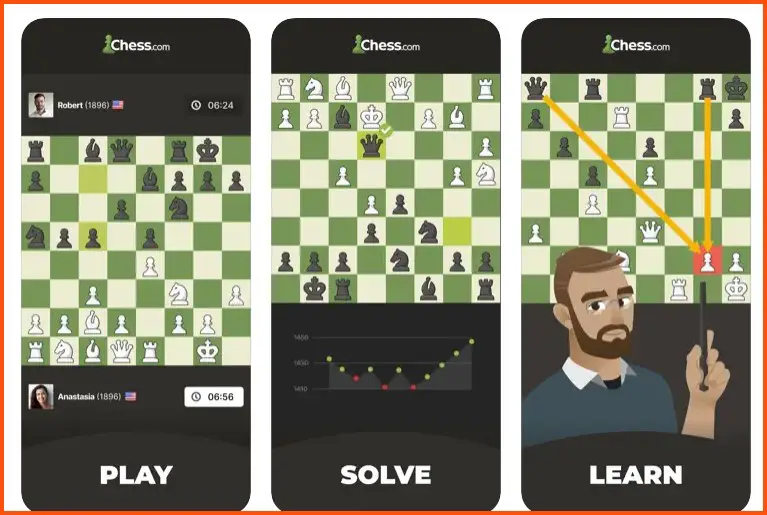
The app’s intuitive interface and seamless gameplay mechanics create an immersive environment where players can indulge in the game’s complexities.
One of the app’s defining features is its emphasis on learning. With an extensive library of interactive lessons, tutorials, and puzzles, players can enhance their skills and broaden their understanding of various chess concepts.
This robust educational aspect sets it apart from other apps and ensures continual growth for players. In addition to its focus on learning, Chess-Play and Learn offer many playing modes.
The app provides diverse individual preferences and skill levels options, from live games against opponents worldwide to solo challenges against computer-generated adversaries.
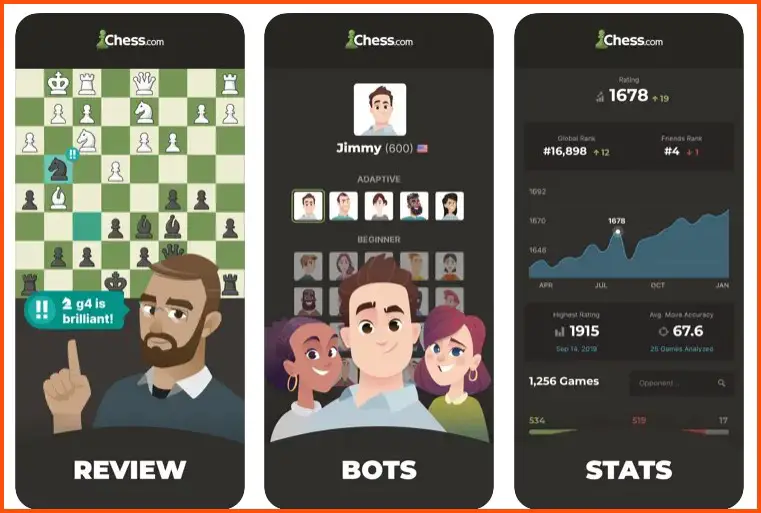
Moreover, the app incorporates a powerful analysis tool that allows players to review their moves, evaluate their strategies, and identify areas for improvement.
This valuable feature empowers players to refine their gameplay and elevate their performance. Furthermore, Chess – Play and Learn fosters a vibrant community of chess enthusiasts. Players can join clubs, engage in friendly matches, and participate in tournaments, creating an environment that encourages social interaction and friendly competition.
In conclusion, Chess – Play and Learn by chess.com represents the epitome of chess apps, offering an exceptional playing experience, a wealth of learning resources, powerful analysis capabilities, and a thriving community.
It is the ultimate choice for chess enthusiasts seeking a comprehensive and immersive app. Download it today and embark on an exciting chess journey to enhance your skills and passion.
Pros:-
Comprehensive Learning Resources: Chess – Play and Learn by chess.com offers interactive lessons, tutorials, and puzzles, catering to players of all skill levels and facilitating continuous improvement.
Intuitive Interface: The app’s user-friendly interface ensures a seamless and enjoyable experience, allowing players to navigate its features and functionalities effortlessly.
Diverse Playing Modes: With options for live games against opponents worldwide and solo challenges against computer-generated adversaries, the app offers a wide range of playing modes to suit different preferences and skill levels.
Powerful Analysis Tools: The app incorporates a robust analysis feature that enables players to review their moves, evaluate strategies, and identify areas for improvement, enhancing overall gameplay and understanding.
Thriving Community: Chess – Play and Learn fosters an active and engaging community of chess enthusiasts. Players can join clubs, participate in tournaments, and interact with fellow players, promoting social interaction and friendly competition.
Cons:-
In-app Purchases: While the app is free to download and use, it offers additional premium features and content through in-app purchases, which may limit access to certain resources for free users.
Internet Connection Dependency: Chess – Play and Learn requires a stable internet connection to access its features and play against other players, making offline play unavailable.
Limited Free Features: Some of the more advanced functionalities and learning resources may be locked behind a paid subscription, restricting access for free users.
Advertisements: The app displays advertisements that occasionally interrupt the gameplay experience. However, these ads can be removed with a subscription.
Complexity for Beginners: The app’s extensive features and options may appear overwhelming or complex for beginners, requiring some time to familiarize themselves with its functionalities.
Chess – Play and Learn by chess.com offers a comprehensive learning resource package, an intuitive interface, diverse playing modes, powerful analysis tools, and a vibrant community.
While considerations such as in-app purchases, internet connectivity, limited free features, advertisements, and complexity for beginners exist, the overall strengths of the app make it an excellent choice for chess enthusiasts looking to enhance their skills and engage with a passionate community.
Download The App From Google Play Store
Download The App From Apple App Store
2. Real Chess 3D
Regarding engaging in captivating chess matches with friends, Real Chess 3D stands out as one of the best chess apps available.
Its immersive gameplay and stunning visual representation provide an exceptional experience for chess enthusiasts. The app’s key strength lies in its realistic 3D graphics, which bring the game to life on mobile devices. Each piece is intricately designed and beautifully rendered, creating a visually stunning chessboard that enhances the gameplay experience.
Real Chess 3D offers various features that make it ideal for playing with friends. Its multiplayer mode allows players to connect with friends locally or online, engaging in challenging matches regardless of distance.
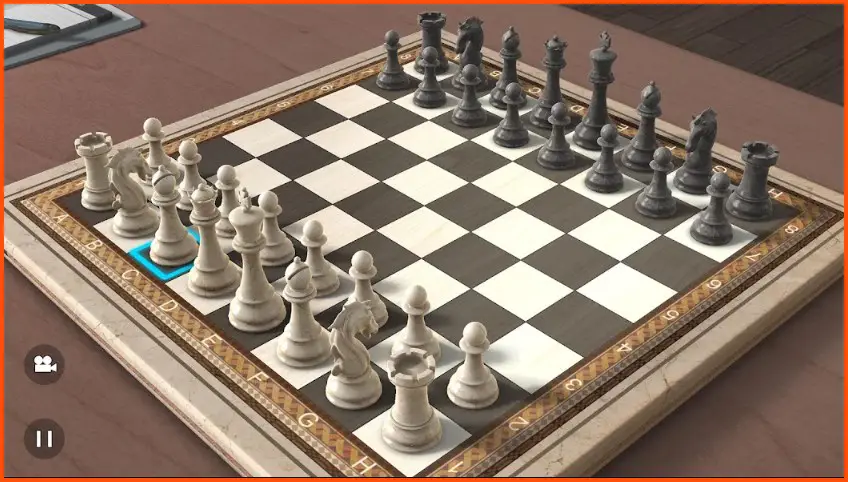
The app provides a smooth and seamless platform for friendly competition, ensuring players can enjoy their chess battles fully.
One notable aspect of Real Chess 3D is its variety of game modes. From live multiplayer matches where players can test their skills against friends in real-time to correspondence games that enable turn-based play over an extended period, the app offers flexibility and caters to different preferences.
The app’s intuitive controls make it easy to navigate the chessboard and make moves, ensuring that players can focus on their strategies without any unnecessary complications. The built-in hints and tutorials also guide beginners and are a useful learning tool for players of all levels.
While primarily known for its multiplayer functionality, Real Chess 3D also offers the option to play against computer opponents of varying difficulty levels.
This feature allows players to sharpen their skills and practice their strategies, even when friends are unavailable for a game.
In conclusion, Real Chess 3D excels as a chess app for friends. Its stunning 3D graphics, multiplayer capabilities, diverse game modes, intuitive controls, and computer opponent options make it a top choice for chess enthusiasts seeking engaging and enjoyable matches with their companions.
Download Real Chess 3D today and embark on a thrilling chess adventure with your friends, wherever they may be.

Pros:-
Realistic 3D Graphics: Real Chess 3D stands out with its stunning 3D graphics, providing an immersive and visually appealing chess experience on mobile devices.
Multiplayer Mode: The app’s functionality lets players connect with friends locally or online, fostering engaging chess matches and friendly competition.
Variety of Game Modes: Real Chess 3D offers diverse game modes, including live multiplayer matches and correspondence games, providing flexibility and catering to different playing preferences.
Intuitive Controls: The app’s intuitive controls make it easy to navigate the chessboard and make moves, ensuring a smooth and user-friendly experience for players.
Built-in Hints and Tutorials: Real Chess 3D provides helpful hints and tutorials, assisting beginners in learning the game and serving as a valuable resource for players of all levels.
Cons:-
Limited Features in Free Version: The free version of Real Chess 3D may have limitations or ads, potentially restricting access to certain features or interrupting gameplay.
Dependency on Internet Connection: Multiplayer matches in Real Chess 3D require a stable internet connection, making offline play unavailable.
Learning Resources may be Limited: While the app offers hints and tutorials, the depth of learning resources may not be as extensive as in other dedicated chess learning apps.
Potential for In-app Purchases: Real Chess 3D may offer additional features or content through in-app purchases, which could require additional spending to access certain functionalities.
Lack of Advanced Analysis Tools: The app may not provide advanced tools or in-depth game analysis features that some advanced players may seek.
In summary, Real Chess 3D excels in providing realistic graphics, multiplayer capabilities, diverse game modes, and intuitive controls.
However, considerations such as limited features in the free version, internet connectivity requirements, potential in-app purchases, limited learning resources, and the absence of advanced analysis tools should be considered.
Nevertheless, Real Chess 3D remains a top choice for chess enthusiasts interested in captivating matches with friends.
Download The App From Google Play Store
Download The App From Apple App Store
3. Real Chess
Regarding immersive chess experiences on mobile devices, Real Chess reigns supreme as one of the best chess apps available for both Android and iOS platforms. Its realistic gameplay and extensive features offer an unparalleled chess experience for enthusiasts.
Real Chess stands out with its exceptional graphics that bring the game to life on the screen. The intricately designed chess pieces and beautifully rendered boards create a visually stunning environment that adds depth and authenticity to each game.
The app’s intuitive user interface ensures smooth navigation and ease of use, allowing players to focus on their strategies and moves without distractions.
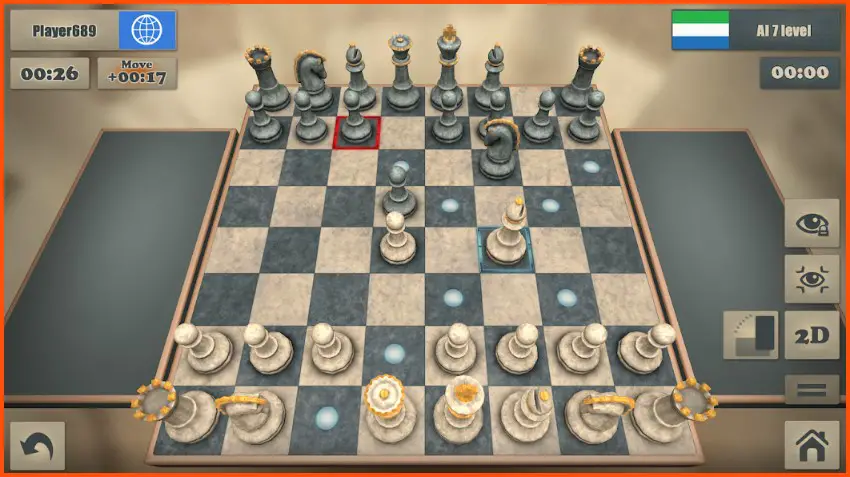
Its well-designed controls make selecting and moving pieces a breeze, enhancing the overall gameplay experience.
Real Chess offers a variety of playing modes, catering to players of all skill levels. Whether you’re a casual player looking for a quick match or a seasoned chess enthusiast seeking challenging tournaments, the app provides options to suit every preference.
In addition to its engaging gameplay, Real Chess incorporates a powerful AI engine that provides different difficulty levels, allowing players to hone their skills and progressively improve their gameplay. The AI opponents adapt to the player’s abilities, ensuring a consistently challenging experience.
Real Chess also offers the opportunity to play online against opponents worldwide, further expanding the competitive aspect of the app. With its online multiplayer functionality, players can engage in thrilling matches, test their strategies, and compete for rankings.
In conclusion, Real Chess is the go-to chess app for Android and iOS users. Its realistic graphics, intuitive user interface, diverse playing modes, powerful AI engine, and online multiplayer capabilities provide an exceptional chess experience for players of all levels.
Download Real Chess today and embark on an immersive journey into the chess world right at your fingertips.
Pros:-
Realistic Graphics: Real Chess features exceptional graphics that enhance the game’s visual appeal, creating an immersive and authentic chess experience on Android and iOS devices.
Intuitive User Interface: The app’s intuitive interface ensures easy navigation and a seamless user experience, allowing players to focus on their strategies and moves without hassle.
Diverse Playing Modes: Real Chess offers various playing modes, catering to different preferences and skill levels. Whether you prefer casual matches or competitive tournaments, the app has options to suit your needs.
Powerful AI Engine: The app’s robust AI engine challenges opponents at different difficulty levels, allowing players to sharpen their skills and gradually improve their gameplay.
Online Multiplayer: Real Chess allows players to engage in online multiplayer matches, allowing them to compete against opponents worldwide and test their strategies in real time.
Cons:-
Limited Free Features: While Real Chess is free, certain advanced features or functionalities may require in-app purchases, limiting access for free users.
Internet Connection Dependency: Online multiplayer matches in Real Chess require a stable internet connection, making it unavailable for offline play.
Possible Advertisement Interruptions: The app may display advertisements, which can interrupt the gameplay experience. However, these ads can often be removed through in-app purchases.
Lack of Advanced Analysis Tools: Real Chess may not provide extensive tools, or in-depth game analysis features that some advanced players may desire.
Device Compatibility: Depending on device specifications, Real Chess may require a certain level of performance, limiting its compatibility with older or less powerful devices.
In summary, Real Chess offers realistic graphics, an intuitive user interface, diverse playing modes, a powerful AI engine, and online multiplayer capabilities for chess enthusiasts on Android and iOS.
However, considerations such as limited free features, internet connectivity requirements, possible advertisement interruptions, limited analysis tools, and device compatibility should be considered.
Nevertheless, Real Chess remains a top choice for chess lovers looking for an engaging and enjoyable chess app on their mobile devices.
Download The App From Google Play Store
Download The App From Apple App Store
4. Learn Chess with Dr. Wolf
Are you ready to embark on an extraordinary chess journey? Look no further than Learn Chess with Dr. Wolf, where the secrets of the royal game await.
Dr. Wolf, a renowned chess expert and mentor, is your guide to unlocking the depths of strategic brilliance and tactical mastery.
Learn Chess with Dr. Wolf offers a comprehensive curriculum designed to transform chess enthusiasts of all levels into formidable players. The app’s immersive lessons and Dr. Wolf’s unrivaled expertise provide a unique learning experience that transcends the ordinary.
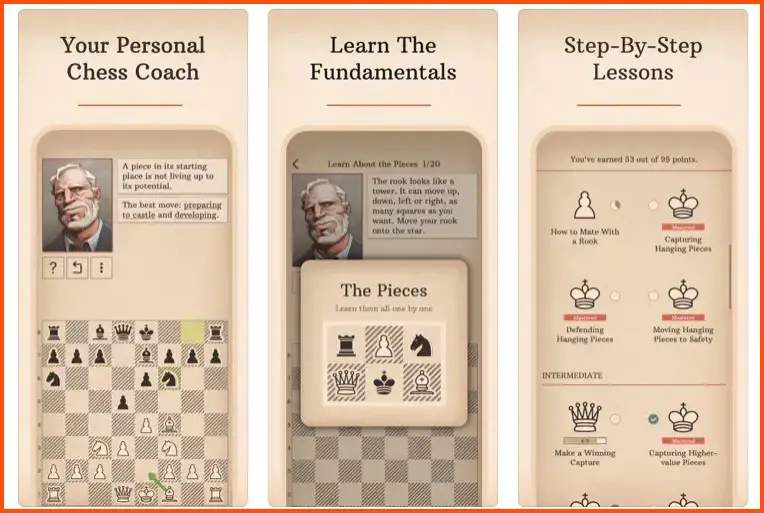
Delve into the intricacies of opening theory, unravel the mysteries of middlegame maneuvering, and master the art of endgame finesse.
Dr. Wolf’s engaging teaching style and ability to simplify complex concepts make learning chess a captivating adventure. But it doesn’t stop there. Learn Chess with Dr. Wolf embraces cutting-edge technology with its adaptive learning algorithm.
This intelligent system analyzes your gameplay, identifies your strengths and weaknesses, and tailors personalized training exercises to address your needs. The app’s ability to adapt to your progress ensures that you receive targeted practice and continuous improvement.
Connect with a community of like-minded chess enthusiasts within the app. Engage in spirited discussions, challenge fellow players to friendly matches, and participate in thrilling tournaments. The app fosters growth, camaraderie, and shared passion for the game.
Don’t miss this opportunity to elevate your chess skills to new heights. Download Learn Chess with Dr. Wolf now and immerse yourself in the grandmaster’s wisdom. Unleash your inner strategic genius and conquer the chessboard with finesse.
Pros:-
Expert Guidance: With Dr. Wolf as your mentor, you benefit from the expertise of a renowned chess expert. His guidance and teaching style help demystify complex concepts and improve your understanding of the game.
Comprehensive Curriculum: “Learn Chess with Dr. Wolf” offers a comprehensive curriculum that covers all aspects of chess, from opening theory to endgame strategies. The structured lessons ensure a systematic and thorough learning experience.
Adaptive Learning Algorithm: The app’s adaptive learning algorithm analyzes your gameplay and tailors personalized training exercises to address your weaknesses. This personalized approach helps you focus on areas that need improvement and optimize your learning progress.
Engaging Community: The app fosters a vibrant community of chess enthusiasts. Engage in discussions, challenge other players, and participate in tournaments. The community aspect adds a social and interactive dimension to your chess learning journey.
User-Friendly Interface: The app features a user-friendly interface, making navigating and accessing the various learning resources easy. The intuitive design ensures a seamless and enjoyable experience for users of all levels.
Cons:-
Limited Free Content: While the app offers valuable features, some advanced functionalities may require a premium subscription or in-app purchases. Users seeking a completely free learning experience might find certain sections restricted.
Lack of Real-Time Multiplayer: The absence of real-time multiplayer options may disappoint players who prefer live competitive matches. The app primarily focuses on self-paced learning and asynchronous gameplay.
Limited Offline Access: The app heavily relies on an internet connection, limiting access to content in offline situations. This might pose challenges for users who prefer to learn or practice chess without constant internet access.
Learning Curve: Some users may find that the app has a learning curve in understanding all its features and functionalities. Becoming fully acquainted with the app’s interface and utilizing its capabilities may take time.
Limited Chess Variants: “Learn Chess with Dr. Wolf” primarily focuses on traditional chess, so users looking for a wide variety of chess variants or alternative game modes may find the options limited within the app.
It’s important to note that individual experiences may vary, and these pros and cons are subjective based on personal preferences and expectations.
Download The App From Google Play Store
Download The App From Apple App Store
5. Chess Universe: Online Chess
Embark on an extraordinary chess journey with Chess Universe: Online Chess, a captivating platform that transports you to the boundless realms of strategic brilliance.
Within this virtual universe, players from around the globe converge to engage in thrilling battles of wits and tactics. The Chess Universe: Online Chess app offers an immersive and user-friendly experience, inviting chess enthusiasts of all levels to partake in the cosmic spectacle of online play.

Whether you’re a budding novice or a seasoned grandmaster, this celestial platform caters to your ambitions. Immerse yourself in a celestial array of gameplay options. Engage in fast-paced blitz battles that test your quick thinking and decision-making skills.
Dive into intense correspondence matches that allow you to strategize and ponder your moves carefully. Or join thrilling tournaments that pit you against players from across the celestial expanse.
Harness the power of the celestial algorithm that underlies Chess Universe: Online Chess. This innovative technology analyzes your gameplay, evaluates your celestial strategies, and provides celestial insights to aid your improvement.
Explore the depths of the celestial library, where annotated games and celestial wisdom await, providing inspiration and guidance on your celestial journey.
Connect with a vibrant community of celestial chess enthusiasts. Engage in celestial conversations, form alliances, and challenge fellow players to epic celestial duels.

The platform’s social features enhance the interactive and engaging nature of the celestial chess experience. Step into the vast expanse of Chess Universe: Online Chess and unleash your celestial brilliance. Sharpen your celestial skills, conquer celestial adversaries, and ascend to the celestial heights of chess mastery.
Pros:-
Global Player Base: With Chess Universe: Online Chess, you can access a vast and diverse player base worldwide. Engage in matches with opponents of various skill levels and styles, ensuring a rich and challenging gaming experience.
Multiple Gameplay Modes: The app offers a range of gameplay modes, including blitz battles, correspondence matches, and tournaments.
This variety allows you to choose the style and pace that suits your preferences, whether you enjoy quick and intense battles or prefer deep contemplation over extended periods.
Celestial Algorithm: The celestial algorithm employed by Chess Universe: Online Chess adds a unique dimension to the gameplay.
The algorithm analyzes your moves, evaluates your strategies, and provides celestial insights to aid your growth as a player. This adaptive feature enhances your learning and improvement process.
Interactive Community: The app fosters a thriving community of chess enthusiasts. Engage in celestial conversations, exchange ideas, and connect with fellow players.
The interactive nature of the community provides opportunities for learning, sharing experiences, and enjoying the social aspect of chess.
User-Friendly Interface: The app’s user-friendly interface ensures a seamless and enjoyable experience. Easy navigation, intuitive controls, and visually appealing design create a smooth and immersive gaming experience.
Cons:-
In-App Purchases: While the app is free to download, it may offer in-app purchases for additional features or virtual items. Some players might find this aspect restrictive if they prefer a free gaming experience.
Learning Curve: New users may find the app’s features and options overwhelming initially, requiring time to become familiar with all its functionalities. A learning curve is involved in navigating the various game modes and settings.
Connectivity Dependence: Since Chess Universe: Online Chess is an online platform, it relies on a stable internet connection. This dependence on connectivity may limit accessibility and gameplay in areas with poor or unreliable network coverage.
Limited Offline Options: The app’s focus on online play means that offline features and gameplay options might be limited. Players seeking a fully offline chess experience may find the app less suitable for their preferences.
Possible Skill Disparities: Due to the wide range of players on the platform, there can be significant skill disparities between opponents. This may result in uneven matches, particularly for newcomers facing more experienced players.
Download the app today and embark on a cosmic chess adventure.
Download The App From Google Play Store
Download The App From Apple App Store
6. Chess By AI Factory Limited
Experience the pinnacle of virtual chess with Chess by AI Factory, an immersive app that combines cutting-edge technology with the timeless allure of the royal game.
With its stunning interface and advanced features, this digital masterpiece sets the stage for epic battles of strategic brilliance. Chess by AI Factory brings the age-old game into the digital realm with elegance and precision.
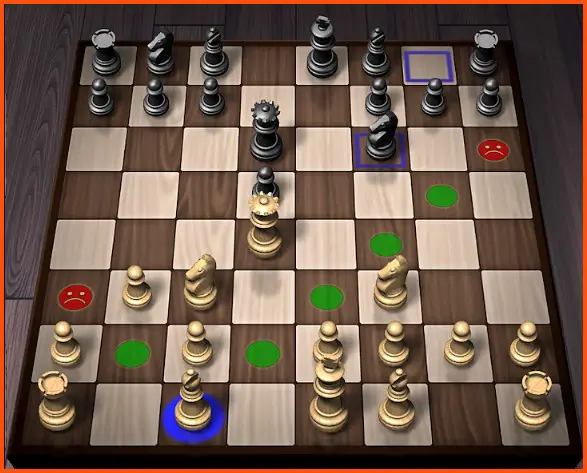
Every aspect, from the intricately designed chessboard to the beautifully crafted pieces, reflects a commitment to excellence. The intuitive interface ensures smooth navigation, allowing players to focus on the true essence of the game: the strategic dance of kings and pawns.
Harness the power of artificial intelligence as you challenge AI opponents of varying difficulty levels. The app’s sophisticated algorithms simulate the thinking processes of human adversaries, providing a dynamic and engaging experience.
Whether you seek a casual match or fierce competition, the AI opponents in Chess by AI Factory adapt to your skill level, providing an appropriate challenge at every stage.
Expand your horizons with a plethora of gameplay options. Engage in local multiplayer battles, pitting your skills against friends and family.
Or venture into the vast online community and challenge players worldwide in exhilarating online multiplayer matches. The app seamlessly integrates with popular online chess platforms, offering a gateway to global competition.
Chess by AI Factory isn’t just about gameplay—it’s an immersive learning experience. Access an extensive library of chess tutorials and training exercises to refine your skills and expand your strategic repertoire.
The app offers valuable insights, tips, and analyses, empowering players to unlock their potential on the digital chessboard. Whether you’re a seasoned grandmaster or a curious beginner, Chess by AI Factory invites you to embark on a journey of intellectual conquest.
Pros:-
Advanced AI Opponents: Chess by AI Factory features sophisticated AI opponents with varying difficulty levels. Players can test their skills against intelligent virtual opponents, providing a challenging and engaging gameplay experience.
Beautifully Designed Interface: The app boasts a visually stunning interface with meticulously crafted chessboards and pieces. The attention to detail enhances the immersive experience, making every move a delight to execute.
Multiplayer Options: Chess by AI Factory offers local and online multiplayer modes. Players can engage in matches with friends and family locally or connect with chess enthusiasts worldwide, fostering a sense of community and competitive spirit.
Learning Resources: The app provides many learning resources, including tutorials and training exercises. Players can enhance their understanding of chess strategies, tactics, and concepts, making it an excellent tool for beginners and a valuable resource for those looking to improve their skills.
User-Friendly Experience: The intuitive interface and smooth navigation make Chess by AI Factory user-friendly. Players can focus on the game without being hindered by complex controls or a steep learning curve.
Cons:-
In-App Advertisements: The free version of Chess by AI Factory may include occasional in-app advertisements, which can be a minor distraction during gameplay. However, an ad-free version is usually available for purchase to eliminate this inconvenience.
Limited Customization: Some players may desire more customization options for the chessboard and pieces. While the app offers visually appealing designs, additional customization features would provide a more personalized experience.
Connectivity Requirements: Chess by AI Factory requires an internet connection for online multiplayer matches and certain features. This dependency on connectivity may limit gameplay options for players in areas with poor or unreliable network coverage.
AI Limitations: While the AI opponents are impressive, they may not match human players’ strategic creativity and adaptability. Experienced players seeking highly nuanced and unpredictable gameplay may prefer the challenge of facing human opponents.
Paid Features: Certain advanced features, such as additional AI difficulty levels or special game modes, may require in-app purchases. While the free version offers a fulfilling chess experience, players seeking more specialized gameplay options may need to make additional purchases.
Download the app today and immerse yourself in a world where strategy meets technology, kings clash, and pawns rise to glory. Let the digital battlefield be your canvas, and may victory be yours in Chess by AI Factory.
Download The App From Google Play Store
7. Play Magnus – Play Chess
Step into chess mastery with Play Magnus – Play Chess, a captivating app that offers a unique and immersive experience.
Developed in collaboration with World Chess Champion Magnus Carlsen, this app allows players of all skill levels to test their mettle against a digital incarnation of the prodigious grandmaster. Play Magnus – Play Chess is a virtual battleground where players can challenge Magnus Carlsen at various stages of his chess career.

From the young prodigy to the seasoned champion, the app simulates Magnus’s playing style and strategies, providing a compelling challenge for chess enthusiasts.
Immerse yourself in the app’s sleek and intuitive interface, which allows for seamless navigation and effortless gameplay. With its visually stunning chessboard and meticulously crafted pieces, every move becomes a visually captivating experience.
One of the standout features of Play Magnus – Play Chess is its adaptive difficulty. The app employs advanced algorithms that adjust the playing strength of Magnus Carlsen based on the player’s skill level, ensuring a challenging and engaging experience for all.
Whether you’re a beginner seeking to learn the game or an experienced player looking to test your skills, the app caters to your aspirations.
Enhance your chess knowledge and skills through the app’s comprehensive training resources. Access instructional videos, solve puzzles, and participate in interactive lessons to sharpen your tactical acumen and strategic thinking. Challenge friends, participate in tournaments, and engage with the app’s global community of chess enthusiasts.
Play Magnus – Play Chess provides a platform for players to connect, share experiences, and engage in friendly competition, fostering a sense of camaraderie and mutual growth.
Download Play Magnus – Play Chess today and immerse yourself in grandmaster chess. Unleash your genius, refine your gameplay, and discover the thrill of facing the legendary Magnus Carlsen on the digital battlefield.
Pros:-
Authentic Magnus Carlsen Experience: Play Magnus – Play Chess provides an opportunity to challenge a virtual version of Magnus Carlsen, the reigning World Chess Champion. The app strives to simulate his playing style and strategies, offering an immersive and authentic chess experience.
Adaptive Difficulty: The app’s adaptive difficulty feature adjusts the playing strength of Magnus Carlsen based on the player’s skill level. This ensures that players of all abilities can enjoy a challenging and engaging gameplay experience, whether they are beginners or experienced chess enthusiasts.
Training Resources: Play Magnus – Play Chess offers many training resources to enhance chess skills. Instructional videos, puzzles, and interactive lessons allow players to learn and improve their tactical and strategic abilities.
User-Friendly Interface: The app features a sleek and intuitive interface, allowing for seamless navigation and easy gameplay. The visually appealing chessboard and pieces add to the overall user experience, making each move a visually captivating moment.
Community Engagement: The app provides a platform for players to connect with a global community of chess enthusiasts. Users can challenge friends, participate in tournaments, and engage in friendly competition, fostering a sense of camaraderie and mutual growth.
Cons:-
Limited Gameplay Variety: Play Magnus – Play Chess primarily focuses on challenging Magnus Carlsen at different career stages.
While this offers a unique experience, players seeking a wider range of gameplay options, such as different game modes or playing against other real players, may find the options limited.
Dependence on Internet Connectivity: The app requires a stable Internet connection for optimal functionality, including challenging Magnus Carlsen and accessing online features. Users in areas with poor or unreliable network coverage may experience interruptions or limited access to certain features.
Frequent Advertisements: The free version of the app may display advertisements, which can occasionally interrupt the gameplay experience. However, an ad-free version is typically available for users who prefer an uninterrupted experience.
In-App Purchases: While the app offers a free experience, it may include in-app purchases for additional features or content. Some players may find this aspect restrictive if they prefer a free gaming experience.
Limited Customization: Play Magnus – Play Chess may have limited options for customization, such as modifying the appearance of the chessboard or pieces. Players seeking a more personalized experience may desire additional customization features.
Download The App From Google Play Store
Download The App From Apple App Store
Unique Features to Look Out for in Chess Apps
Chess enthusiasts seeking an immersive and stimulating gaming experience can enhance their gameplay by exploring chess apps with unique features.
These innovative functionalities augment traditional gameplay, providing an array of opportunities for players to expand their skills and enjoy the game in new and exciting ways.
One captivating feature to consider is adaptive AI. This cutting-edge technology adapts its difficulty level according to the player’s skill, ensuring a challenging yet balanced experience. The AI opponent evolves with the player by analyzing gameplay patterns and adjusting its strategies, fostering growth and improvement.
Interactive tutorials are another invaluable feature to seek. These comprehensive guides provide step-by-step instructions, allowing beginners to grasp fundamental concepts while advanced players can refine their techniques. Practicing and honing one’s skills through engaging tutorials is valuable in any chess app.
Multiplayer functionality is a must-have to add a social element to the game. By connecting players from all corners of the globe, chess apps enable users to compete in real-time matches, challenge friends, and join vibrant chess communities.
Collaborative play and healthy competition enhance the gaming experience and foster community among chess enthusiasts.
Moreover, analytical tools are a boon for those looking to delve deeper into the game’s intricacies. Advanced apps offer motion analysis, position evaluation, and historical game databases.
These tools provide valuable insights, enabling players to study their moves, learn from past games, and refine their strategies.
When exploring chess apps, keep an eye out for these unique features.
By embracing innovation and incorporating these functionalities into your gameplay, you can take your chess experience to new heights, whether you’re a novice seeking to learn or a seasoned player looking for fresh challenges.
Choosing the Right App Based on Your Chess Level
In the vast realm of chess apps, finding the right app tailored to your specific chess level can greatly enhance your gaming experience. With the abundance of options available, it’s essential to consider a few key factors to ensure optimal gameplay and skill development.

For novice players, apps offering interactive tutorials prove invaluable. These tutorials guide beginners through the fundamentals, teaching them the basic rules, piece movements, and essential strategies. These apps empower novices to build their chess prowess gradually by providing a solid foundation.
Intermediate players seeking to elevate their skills to the next level benefit from apps that blend instructional content and challenging gameplay.
Look for apps that provide adaptive AI opponents capable of adjusting their difficulty level based on your performance. This dynamic challenge ensures a stimulating experience while encouraging continuous growth.
Advanced players, well-versed in the game’s intricacies, require apps that cater to their need for deeper analysis and competitive engagement. Look for apps with advanced analytical tools such as position evaluation, move analysis, and access to extensive game databases.
These features allow advanced players to refine their strategies, study historical games, and stay ahead of the ever-evolving chess landscape.
It’s worth noting that multiplayer functionality is crucial across all chess levels. Engaging in real-time matches with players of similar or higher skill levels fosters healthy competition, provides a platform for learning from stronger opponents, and creates a vibrant chess community.
In conclusion, selecting the right chess app based on your chess level is essential to optimize your gaming experience and skill development.
Consider the app’s tutorial offerings, AI adaptability, analytical tools, and multiplayer functionality to find the perfect fit for your chess journey.
The Future of Chess Apps
As technology advances at an astonishing pace, the future of chess apps is poised to revolutionize how we engage with the game. These innovative applications will introduce unprecedented features and elevate the chess experience.

One of the most anticipated developments in chess app technology is the integration of artificial intelligence. Advanced AI algorithms will not only serve as formidable opponents but also as personalized coaches.
These AI-powered coaches will analyze players’ gameplay, provide insightful feedback, and suggest tailored strategies for improvement, akin to having a virtual chess mentor.
The advent of virtual reality (VR) and augmented reality (AR) technologies will immerse players in a truly immersive chess environment. Picture yourself walking around a three-dimensional chessboard, interacting with virtual pieces and opponents, making the game incredibly lifelike.
AR overlays, on the other hand, could project holographic chessboards onto any surface, transforming everyday settings into captivating battlefields.
Another exciting prospect is the integration of blockchain technology into chess apps. Blockchain can ensure transparent and secure gameplay, preventing cheating and fostering trust among players. Additionally, it opens up possibilities for decentralized chess tournaments, where players worldwide can compete globally without intermediaries.
Furthermore, machine learning algorithms will continue to evolve, allowing chess apps to adapt to players’ styles, preferences, and skill levels. These algorithms will analyze vast databases of games, extracting patterns and strategies and generating personalized recommendations to enhance gameplay.
In conclusion, the future of chess apps holds tremendous promise. With the integration of artificial intelligence, virtual and augmented reality, blockchain technology, and machine learning algorithms, the chess experience is set to be more immersive, personalized, and secure than ever before.
Brace yourself for a new era of chess, where innovation and technology converge to reshape how we play and enjoy this timeless game.
📗FAQ’s
What is the best chess app for free?
When finding the best chess app for free, enthusiasts are spoilt for choice in today’s digital landscape.
While personal preferences may vary, a few exceptional apps stand out regarding features, gameplay, and user experience.
One such app is Chess.com. Renowned for its extensive community and vast features, Chess.com offers a robust free version that caters to players of all levels.
With its intuitive interface, online multiplayer functionality, interactive tutorials, and puzzles, Chess.com provides a comprehensive chess experience without needing a premium subscription.
Another notable contender is lichess.org. This open-source platform offers a free chess app emphasizing fair play and transparency.
Lichess.org provides access to a powerful engine for analysis, an array of practice tools, live tournaments, and a friendly community. Its commitment to open-source principles ensures continuous improvement and a thriving user base.
For those seeking a more visually engaging experience, Chess24 offers an impressive free app with a sleek and modern design.
Chess24 boasts high-quality video lessons, live streams of top tournaments, and a variety of training resources.
Additionally, it provides a unique feature called “Play Magnus,” allowing users to play against a simulated version of world chess champion Magnus Carlsen at different stages of his career.
While numerous chess apps are available, Chess.com, lichess.org, and Chess24 consistently rank among the best chess apps for free.
These apps offer a wide range of features, access to a vibrant chess community, and a captivating chess experience without needing a financial investment.
Which chess app has the most users?
The question often arises in chess apps: Which chess app has the most users?
While exact figures may vary over time, one app consistently stands out in terms of its immense user base and global popularity: Chess.com.
Chess.com has emerged as a dominant force in online chess, boasting millions of registered users. With its comprehensive features, engaging gameplay, and vibrant community, Chess.com has attracted chess enthusiasts from all corners of the globe.
The app offers many options, including online multiplayer matches, interactive tutorials, puzzles, and access to a vast library of educational resources.
The vast user base of Chess.com translates into a bustling community, providing ample opportunities for players to connect, compete, and learn from each other.
Whether you are a beginner seeking to improve your skills or an experienced player looking for challenging opponents, Chess.com’s vast user base ensures a diverse and dynamic chess experience.
While other chess apps may also have substantial user communities, Chess.com stands at the forefront, consistently recognized for its immense user base and unwavering commitment to providing a top-notch chess experience to players worldwide.
Is chess good for the brain?
Whether chess is good for the brain has intrigued researchers and enthusiasts alike.
Scientific studies have shed light on the cognitive benefits that chess can provide, making a compelling case for its positive impact on the brain.
Engaging in chess stimulates various cognitive processes, including strategic thinking, problem-solving, and memory recall. The complex and dynamic nature of the game challenges the brain to analyze positions, plan, and make decisions based on limited information.
Furthermore, chess promotes the development of critical thinking skills and mental flexibility. Players must consider multiple possibilities, evaluate consequences, and adapt their strategies accordingly. This mental exercise strengthens neural connections and enhances cognitive agility.
Research suggests that regular chess practice can improve executive functions, such as attention, planning, and decision-making.
These cognitive skills extend beyond the chessboard, benefiting individuals in various aspects of their lives, from academics and professional endeavors to daily problem-solving.
Moreover, chess fosters creativity and imagination as players explore variations and combinations. The game’s intricacies nurture the ability to envision possibilities and think outside the box.
In conclusion, the answer to the question “Is chess good for the brain?” is a resounding yes. The mental demands of chess, including strategic thinking, problem-solving, memory recall, critical thinking, and creativity, contribute to the overall cognitive development of individuals.
So, whether you’re a seasoned player or just starting your chess journey, know that your brain is reaping the benefits with every move.
Conclusion
The chessboard may have transitioned from wood to digital screens, but chess’s intellectual challenge and thrill remain the same.
The digital revolution has not only made chess more accessible but has also opened up avenues for players to learn, improve, and compete from the comfort of their homes.
Choosing the best chess app for you boils down to understanding your personal needs, whether that’s advanced AI competition, a wide range of learning resources, interactive communities, or just a simple interface to play a quick game.
From Chess.com’s robust features for players of all levels to Lichess’s open-source platform ideal for customization and Play Magnus’s unique opportunity to play against Magnus Carlsen’s simulated levels across different ages – there’s an app for every chess enthusiast.
With our guide to the best chess apps, you can make an informed choice and enhance your chess-playing experience.
Remember, the key to chess mastery lies in consistent practice and the willingness to learn from every move.
So, choose your app, set up your board, and let the game begin. May your journey in the chess world be as exciting and enriching as the game itself!


