
























As an avid golfer, you know the importance of keeping track of your handicap using a digital scorecard. It’s the core measure of your golfing prowess and is key to ensuring fair play during matches.
Keeping a record of your score history and hole scores is also crucial for tracking progress and improving your game. Plus, using an official USGA scorecard ensures accuracy in your handicap calculations.
However, calculating and updating your handicap can be complex and time-consuming without a reliable calculator. Keeping track of your score history is crucial for improving your golf game, but manual data entry can be tedious. Choosing the right golf clubs for your skill level is important to help improve your handicap.
You might often find yourself lost amidst the sea of numbers, struggling to determine your precise standing in a golf tournament. With a phone and a simple handicap tracker, you can easily keep track of your progress and improve your golf handicap.
Remember when you had to interrupt your game to make calculations using a golf handicap calculator, or worse still, when inaccuracies sneaked in and threw off your entire game?
With a golf handicap tracker, such as a handicap calculator app, you can easily keep track of your progress and be well-prepared for any tournament.
Keeping track of your GHIN handicap shouldn’t be a task that takes you away from your love for the game or create unnecessary stress. Use a GHIN calculator to make it easier! And if you’re playing at 55places like Diablo Grande, it’s important to stay on top of your handicap.
Enter the world of Golf Handicap Apps. These game-changing apps, available on Android, take the stress out of tracking your golf handicap with a GHIN calculator, leaving you more time to focus on what truly matters – improving your game and enjoying your time on the green. Plus, if you’re a member of 55places, you can easily connect your account for seamless tracking.
From automating complicated calculations to track your progress over time, golf handicap apps bring accuracy and convenience right to your fingertips.
Let’s dive into this article to understand how these applications, including handicap tracker and handicap calculator, can transform your golfing experience by providing a simple handicap calculation.
This makes it more enjoyable and competitive, especially for players looking to improve their game.
The Concept of Golf Handicap🚏
Golf, an elegant sport known for its precision and skill, incorporates a fascinating concept known as the golf handicap. This unique system, combined with a golf handicap tracker, enables players of varying abilities to compete equitably using a simple handicap system.

It promotes fair play and enhances the game’s overall experience, which can be further improved by using a free golf handicap app. Whether you’re playing at 55places or any other golf course, this system ensures that everyone has a fair chance to win.
At its core, the golf handicap represents a numerical measure that reflects a player’s skill level. It allows golfers to compete against one another, regardless of their differing capabilities.
The essence of this concept lies in its ability to level the playing field, ensuring a competitive balance for all participants with the help of a handicap calculator. The golf handicap calculation considers various factors, such as a golf course’s slope and course ratings, which quantify its difficulty.
These ratings are derived from meticulously analyzing multiple variables, including hazards, terrain, overall layout intricacies, and handicap calculator.
By factoring in a player’s performance against the Course Rating and accounting for the Slope Rating, the golf handicap system generates an index representing an individual’s relative skill level. This index, expressed in strokes, enables golfers to compete with others possessing different abilities while maintaining fairness.
As players improve their skills and demonstrate consistent performance, their golf handicap can be adjusted accordingly, reflecting their progress and accurately measuring their playing abilities.
The golf handicap system is a testament to the sport’s commitment to inclusivity and fairness. It enables individuals of varying skill levels to engage in spirited competition, fostering camaraderie and sportsmanship within the golfing community.
Through this ingenious concept, golf transcends the realm of mere athletic prowess, embracing the ideals of fairness, respect, and the pursuit of excellence. The golf handicap truly exemplifies the spirit of the game, making it an enduring and cherished tradition among golf enthusiasts worldwide.
The Intersection of Golf and Technology
Golf, a sport steeped in tradition, is at the captivating intersection of golf and technology. The marriage of these two seemingly disparate worlds has given rise to a new era of innovation and enhanced experiences on the fairways.
Technological advancements have permeated every aspect of the game, revolutionizing how golfers approach their craft. From the moment a player steps onto the tee box to the final putt on the 18th green, technology has become an invaluable companion, enriching the golfing journey.

One of the most prominent areas where technology has profoundly impacted is golf club design. Manufacturers utilize cutting-edge materials and advanced manufacturing processes to create unparalleled performance clubs.
Adjustable hosels and weight distribution systems enable players to fine-tune their clubs to suit their unique swings, maximizing distance and accuracy.
Launch monitors have ushered in a new era of data-driven analysis. These devices give golfers instant feedback on various swing parameters, such as clubhead speed, ball spin rate, and launch angle. With this information, players can make informed decisions to optimize their performance and adjust their swing mechanics.
Course management has also transformed with the integration of GPS and rangefinder technologies. Golfers can now precisely measure distances to hazards and greens, gaining a strategic advantage.
These digital caddies empower players to make calculated decisions, confidently selecting the optimal club for each shot. Furthermore, the digital realm has witnessed the rise of golf mobile applications offering many features.
From score tracking and statistical analysis to course mapping and tee time reservations, these apps have become indispensable tool for golfers, enhancing convenience and facilitating social connectivity among players.
As the intersection of golf and technology continues to evolve, exciting possibilities emerge. Virtual reality simulations allow golfers to experience renowned courses worldwide without leaving their practice facilities.
Artificial intelligence-driven swing analysis systems provide personalized coaching, enabling players to refine their technique and reach new performance levels. Technology integration in golf has undeniably transformed how the sport is played and experienced.
As boundaries are pushed, and breakthroughs emerge, the synergy between golf and technology propels the game forward, captivating enthusiasts and ushering in a new era of possibilities on the hallowed fairways.
Golf Handicap Apps: What are they?
In the modern digital landscape, Golf Handicap Apps have emerged as indispensable tools for golfers seeking to track and manage their performance on the course.
These innovative applications combine the power of technology with the intricacies of the handicap system, providing golfers with a convenient and efficient way to calculate and monitor their playing abilities.

Golf Handicap Apps serve as virtual scorekeepers, allowing players to record their scores, differentials, and other relevant data for handicap calculation.
By inputting information about their rounds, including the course’s rating and slope, these apps can accurately calculate a golfer’s handicap index, reflecting their skill level relative to the difficulty of the courses they play.
These apps go beyond scorekeeping, offering additional features to enhance the golfing experience. Players can analyze their statistics, such as fairways hit, greens in regulation, and putts per round, providing valuable insights into their strengths and areas for improvement.
Some apps even incorporate GPS functionality, offering precise course mapping and yardage measurements, enabling golfers to make informed decisions on club selection and shot execution.
The convenience of Golf Handicap Apps extends to their ability to connect golfers with fellow enthusiasts. These platforms often foster a vibrant community, allowing users to share their achievements, engage in friendly competition, and schedule tee times with like-minded players.
With their user-friendly interfaces and comprehensive features, Golf Handicap Apps have become essential companions for golfers of all skill levels.
By harnessing the power of technology, these apps provide a seamless and efficient solution for managing handicaps, analyzing performance, and connecting with the wider golfing community.
The Benefits of Using Golf Handicap Apps
Golf is a sport that thrives on precision, strategy, and continuous improvement. In this digital age, Golf Handicap Apps have emerged as invaluable companions for golfers, offering a range of benefits that enhance the playing experience and promote growth in the game.

One of the primary advantages of utilizing these apps is their ability to calculate and track a golfer’s handicap index accurately. These apps streamline the process, eliminating the need for manual calculations and ensuring accuracy. By inputting scores and course information, golfers can instantly obtain their handicap, providing a fair and equitable measure of their skill level.
These apps also facilitate the comparison of performance over time. Golfers can analyze their progress, identifying trends and patterns in their game. With access to historical data, players can set realistic goals, measure their improvements, and identify areas that require attention.
This valuable insight enables golfers to focus their efforts on specific aspects of their game, leading to more effective practice and, ultimately, better results on the course.
Another notable benefit of Golf Handicap Apps is their ability to foster community among golfers. Many apps offer social features that allow players to connect, share their achievements, and engage in friendly competition. This virtual camaraderie enhances the game’s enjoyment and provides a platform for exchanging tips, experiences, and golfing stories.
Furthermore, these apps often incorporate GPS functionality and course mapping features. Golfers can access accurate yardage measurements, hazard locations, and green layouts, enabling them to make informed decisions and strategize their shots effectively. This information empowers golfers to navigate the course and optimize their performance confidently.
In summary, Golf Handicap Apps bring numerous benefits to golfers of all levels. From precise handicap calculations to performance tracking, community engagement, and course management features, these apps offer many tools and insights that enhance the overall golfing experience.
By leveraging the power of technology, golfers can unleash their full potential and enjoy the game even more.
Best Golf Handicap Apps To Master Your Handicap
1. SwingU
When it comes to golf handicap apps, SwingU stands out as a true game-changer—offering a comprehensive suite of features and a user-friendly interface.
SwingU has established itself as the go-to choice for golfers seeking to manage their handicaps precisely and easily. One of the standout features of SwingU is its accurate handicap calculation.
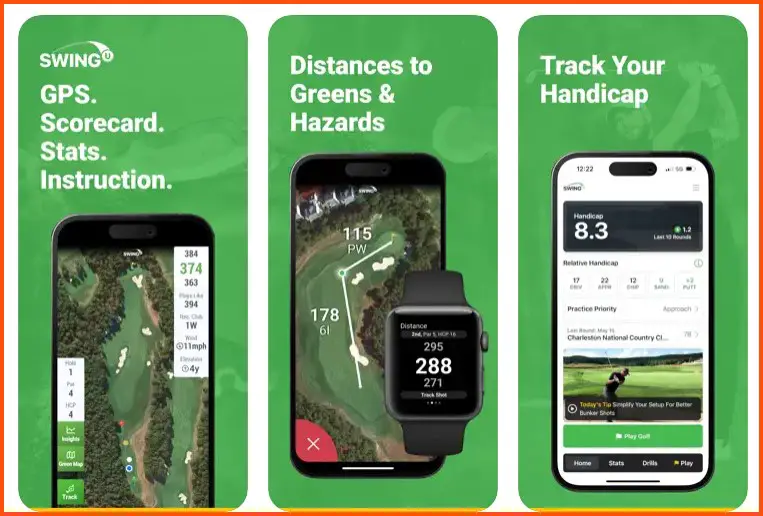
By integrating data from the player’s rounds, course ratings, and slope ratings, SwingU generates a reliable handicap index, providing golfers with an accurate reflection of their playing abilities. This precision enables players to compete on a level playing field and monitor their progress effectively.
SwingU goes beyond handicap calculations, offering a range of additional tools that enhance the overall golfing experience.
Golfers can leverage the app’s GPS functionality to access detailed course maps, precise yardage measurements, and hazard locations. This information allows players to make informed decisions, select the optimal clubs, and strategize their shots effectively.
Furthermore, SwingU provides valuable statistical analysis capabilities. Golfers can track their fairways hit, greens in regulation, and putts per round, gaining insights into their strengths and areas for improvement. This data-driven approach enables players to fine-tune their game and focus their practice efforts where it matters most.
SwingU also promotes community engagement with its social features. Golfers can connect with fellow players, share achievements, and participate in challenges and competitions. This virtual camaraderie fosters a sense of belonging and adds an element of fun and friendly competition to the golfing journey.
In conclusion, SwingU is the epitome of the best golf handicap app. Its accurate handicap calculations, comprehensive features, and community engagement capabilities make it an indispensable tool for golfers of all skill levels.
Whether you’re looking to improve your game, track your progress, or connect with fellow enthusiasts, SwingU delivers a top-notch experience that elevates your golfing journey to new heights.
Pros of SwingU:-
Accurate Handicap Calculation: SwingU excels at providing precise handicap calculations, allowing golfers to compete fairly and monitor their progress effectively.
Comprehensive Features: The app offers a wide range of features, including GPS functionality, course mapping, statistical analysis, and social engagement, providing golfers with a comprehensive toolkit for managing their game.
User-Friendly Interface: SwingU boasts an intuitive and easy interface, ensuring a seamless experience for golfers of all skill levels.
Data-Driven Insights: The app’s statistical analysis capabilities empower golfers to gain valuable insights into their game, identify strengths and weaknesses, and make informed decisions for improvement.
Community Engagement: SwingU fosters a community among golfers, enabling users to connect with fellow players, share achievements, and participate in challenges and competitions.
Cons of SwingU:-
Subscription-Based Model: While SwingU offers a free version, some of its more advanced features and functionalities may require a subscription, which could be a downside for users looking for a free experience.
Limited Course Database: While SwingU covers a significant number of golf courses, there may be instances where certain courses or lesser-known locations may not be available in the app’s database.
Reliance on Mobile Devices: SwingU is primarily designed as a mobile app, which means users may need to rely on their smartphones or tablets during their rounds, which could be a potential inconvenience for golfers who prefer to limit their screen time on the course.
Battery Drain: Utilizing GPS and other features on the course can consume battery life quickly, potentially requiring users to carry portable chargers or manage their device’s battery usage accordingly.
Despite a few minor limitations, SwingU remains a top choice for golfers seeking an excellent golf handicap app, offering accurate calculations, comprehensive features, and a vibrant community that enhances the overall golfing experience.
Download The App From Google Play Store
Download The App From Apple App Store
2. Golfshot
When it comes to golf handicap apps, Golfshot rises above the rest, securing its position as a top choice for both iPhone and Android users.
With its impressive features and user-friendly interface, Golfshot stands out as a comprehensive and reliable companion for golfers seeking to manage their handicaps easily and precisely. One of the standout qualities of Golfshot is its accuracy in handicap calculation.
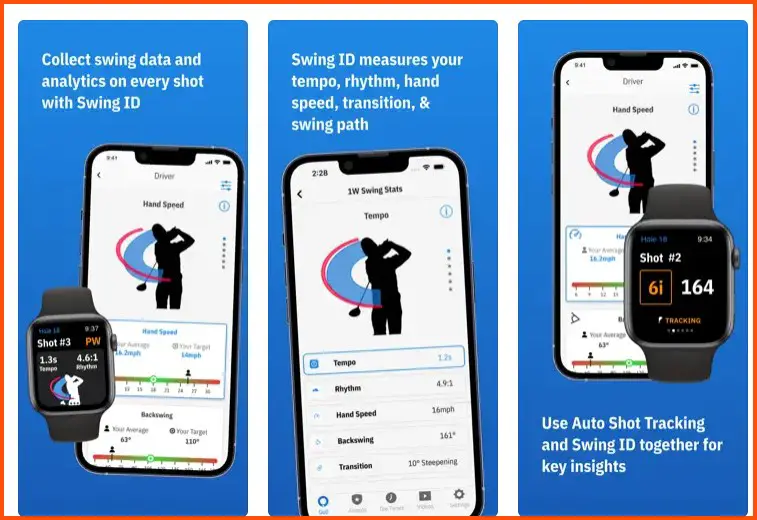
By seamlessly integrating with a golfer’s rounds, course ratings, and slope ratings, Golfshot generates a dependable handicap index, accurately reflecting a player’s abilities. This precision allows golfers to compete on a level playing field and track their progress effectively.
Golfshot’s feature set goes beyond handicap calculations, offering a wealth of tools to enhance the overall golfing experience. The app provides GPS functionality, enabling golfers to access detailed course maps, precise yardage measurements, and hazard locations.
This information lets players make well-informed decisions, strategize their shots, and confidently navigate the course. Moreover, Golfshot boasts comprehensive statistical analysis capabilities.
Golfers can track key metrics such as fairways hit, greens in regulation, and putts per round, gaining valuable insights into their game and identifying areas for improvement. This data-driven approach empowers players to fine-tune their skills and focus their practice efforts where it matters most.
Golfshot also excels in fostering community engagement among golfers. With its social features, users can connect with fellow players, share achievements, and participate in challenges and competitions, fostering camaraderie and adding fun to the golfing journey.
In conclusion, Golfshot stands as a top-notch golf handicap app for both iPhone and Android users. Its accurate handicap calculations, comprehensive features, and commitment to community engagement make it an invaluable tool for golfers of all levels.
Whether you seek precise data analysis, course navigation assistance, or a platform for connecting with fellow enthusiasts, Golfshot delivers a premium experience that elevates your golfing journey to new heights.
Pros of Golfshot:-
Accurate Handicap Calculation: Golfshot provides precise handicap calculations, ensuring fair competition and accurately assessing a golfer’s skill level.
Comprehensive Features: The app offers a wide range of features, including GPS functionality, course mapping, statistical analysis, and social engagement, providing golfers with a comprehensive toolkit for managing their game.
User-Friendly Interface: Golfshot boasts an intuitive and easy interface, ensuring a seamless experience for golfers of all skill levels.
Detailed Course Information: With access to detailed course maps, accurate yardage measurements, and hazard locations, Golfshot empowers golfers to make informed decisions, strategize their shots, and navigate the course effectively.
Community Engagement: Golfshot fosters a community among golfers through its social features, allowing users to connect, share achievements, and participate in challenges and competitions, enhancing the overall golfing experience.
Cons of Golfshot:-
Subscription-Based Model: While Golfshot offers a free version, some of its advanced features and functionalities may require a subscription, which could be a downside for users seeking a free experience.
Battery Usage: Utilizing GPS and other features on the course can drain the device’s battery quickly, requiring users to manage their battery usage or carry portable chargers.
Course Database Limitations: While Golfshot covers a significant number of golf courses, there may be instances where certain courses or lesser-known locations may not be available in the app’s database.
Occasional GPS Inaccuracies: Like any GPS-based app, Golfshot may occasionally encounter inaccuracies in yardage measurements or course mapping, potentially impacting shot decision-making.
Overall, Golfshot remains a top choice for golfers looking for a reliable and feature-rich golf handicap app for iPhone and Android devices. Its accurate handicap calculations, comprehensive features, and commitment to community engagement make it a valuable tool for golfers of all levels, facilitating progress and enhancing game enjoyment.
Download The App From Google Play Store
Download The App From Apple App Store
3. TheGrint
Regarding golf apps that cater to the needs of golfers in terms of handicap tracking, GPS functionality, and scoring, TheGrint reigns as a top choice.
This remarkable app offers many features and an intuitive interface, making it a go-to option for golfers seeking a comprehensive solution that won’t break the bank.
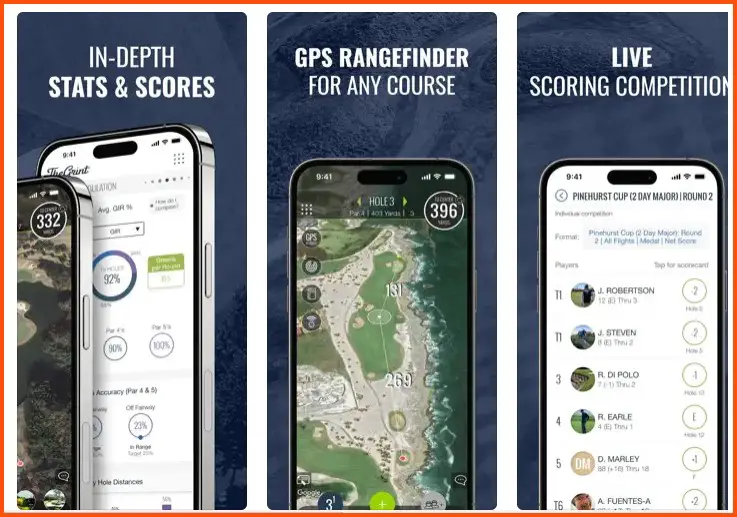
One of the standout qualities of TheGrint is its robust handicap tracking system. The app seamlessly integrates with a golfer’s rounds, allowing them to record scores and calculate their handicap index easily. This feature ensures fair competition and provides players with an accurate measure of their playing abilities.
TheGrint’s GPS functionality adds another layer of convenience and precision to the golfing experience. Golfers can access detailed course maps, accurate yardage measurements, and hazard locations. This information lets players make well-informed decisions, strategize their shots, and confidently navigate the course.
Furthermore, TheGrint excels in scoring capabilities. The app offers a user-friendly interface that enables golfers to input their scores easily, track their performance, and analyze their statistics. The scoring feature allows golfers to monitor their progress, identify improvement areas, and set game goals.
What sets TheGrint apart is its commitment to providing these essential features in a free app. While premium options are available, the core features of handicap tracking, GPS functionality, and scoring are accessible to all users without any additional cost.
In summary, TheGrint is a top free golf app that caters to golfers’ needs for handicap tracking, GPS functionality, and scoring. With its robust features, accurate calculations, and cost-effectiveness, TheGrint offers a comprehensive solution for golfers looking to enhance their game and enjoy the benefits of technology on the fairways.
Pros of TheGrint:-
Comprehensive and Free: TheGrint offers a wide range of features, including handicap tracking, GPS functionality, and scoring, all available for free, making it an attractive choice for golfers on a budget.
Accurate Handicap Tracking: The app seamlessly calculates and tracks a golfer’s handicap index, ensuring fair competition and accurately measuring playing abilities.
Intuitive Interface: TheGrint boasts a user-friendly interface that is easy to navigate, allowing golfers to input scores, analyze statistics, and access GPS functionality with ease.
GPS Functionality: With detailed course maps, accurate yardage measurements, and hazard locations, TheGrint’s GPS feature provides golfers valuable information for shot decision-making and course navigation.
Community Engagement: TheGrint fosters a sense of community among golfers, allowing users to connect, share achievements, and participate in challenges and competitions, enhancing the social aspect of the game.
Cons of TheGrint:-
Limited Premium Features: While the core features are free, some advanced features, such as detailed stat tracking and personalized training plans, require a premium subscription.
Occasional Technical Glitches: Like any app, TheGrint may occasionally encounter technical issues, such as slow loading times or syncing problems, which can be a minor inconvenience for users.
Limited Course Database: While TheGrint covers a wide range of golf courses, there may be instances where certain courses or lesser-known locations are not available in the app’s database.
Battery Consumption: Utilizing GPS and other features on the course can drain the battery life of mobile devices more quickly, requiring users to manage their device’s battery usage or have a backup plan.
Despite these minor limitations, TheGrint remains a top choice for golfers seeking a comprehensive, free golf app with features for handicap tracking, GPS functionality, and scoring. Its accuracy, user-friendly interface, and community engagement make it a valuable tool for golfers of all skill levels, enhancing the overall golfing experience.
Download The App From Google Play Store
Download The App From Apple App Store
4. Golf Pad
Golf Pad stands out as a reliable choice for golf apps that provide a fast and accurate golfing experience. With its powerful features as a golf GPS rangefinder, scorecard, and shot tracker, Golf Pad offers golfers a comprehensive toolkit for enhancing their game.
One of the standout qualities of the Golf Pad is its fast and accurate GPS rangefinder functionality.
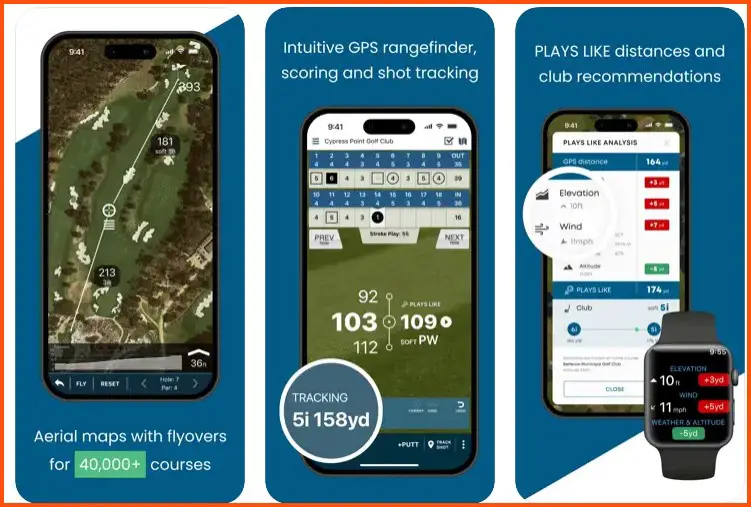
The app utilizes advanced technology to give golfers precise yardage measurements to various points on the course, including hazards, greens, and layup positions. This information allows golfers to select clubs and make strategic shot decisions confidently.
Golf Pad’s scorecard feature allows golfers to record their scores, track their progress, and analyze their performance effortlessly.
The intuitive interface makes it easy to input scores, add notes, and review statistical data. This comprehensive scorecard functionality enables golfers to identify areas for improvement and set goals for their game.
Furthermore, Golf Pad is a shot tracker, enabling golfers to record each shot during their rounds meticulously. This valuable feature provides insights into shot dispersion, distances, and trends, helping golfers identify strengths and weaknesses in their game.
With this data-driven approach, players can focus their practice efforts and make informed decisions on the course.
In summary, Golf Pad stands out as a fast and accurate golf app that combines the functionalities of a GPS rangefinder, scorecard, and shot tracker.
Its advanced technology, intuitive interface, and comprehensive features make it a valuable tool for golfers looking to enhance their game, make data-driven decisions, and confidently navigate the course.
Pros of Golf Pad:-
Fast and Accurate GPS Rangefinder: Golf Pad provides golfers with precise and real-time yardage measurements, allowing them to make informed club selections and strategic shot decisions.
Comprehensive Scorecard Functionality: The app’s scorecard feature allows golfers to record scores, track progress, and analyze performance easily. It provides valuable insights for identifying areas of improvement and setting goals.
Shot Tracking Capability: Golf Pad’s shot tracking feature lets golfers record detailed shot data, including dispersion, distances, and trends. This information helps players identify strengths and weaknesses, leading to more focused practice and improved performance.
Intuitive User Interface: Golf Pad offers a user-friendly interface that is easy to navigate, making it accessible for golfers of all skill levels.
Data Analysis and Insights: The app’s ability to analyze shot data and statistics gives golfers valuable insights into their game, facilitating better decision-making and continuous improvement.
Cons of Golf Pad:-
Limited Free Features: While Golf Pad offers a free version, some advanced features, such as club tracking and advanced statistics, may require a premium subscription.
Battery Consumption: Utilizing GPS and other features on the course can drain the battery life of mobile devices more quickly, requiring users to manage their device’s battery usage or have a backup plan.
Course Database Limitations: While Golf Pad covers a wide range of golf courses, there may be instances where certain courses or lesser-known locations are not available in the app’s database.
Lack of Social Features: Golf Pad focuses primarily on providing GPS, scorecard, and shot tracking functionalities, which means it may not have extensive social features for connecting with other golfers.
Golf Pad is a powerful tool for golfers seeking a fast and accurate golf GPS rangefinder, scorecard, and shot tracker. Its advanced features, user-friendly interface, and data-driven insights make it a valuable companion on the course.
While there may be some limitations in the free version and certain features require a subscription, Golf Pad remains a reliable choice for golfers looking to enhance their game.
Download The App From Google Play Store
Download The App From Apple App Store
5. Hole19
Hole19, an exceptional golf app, allows golfers to calculate and receive a more accurate handicap that enables them to compete on a level playing field with golfers of various skill levels. This feature is a game-changer for golfers looking to measure and improve their game accurately.
One of the standout qualities of Hole19 is its handicap calculation functionality. By inputting scores and course information, the app generates a precise handicap index, reflecting a golfer’s true playing abilities.
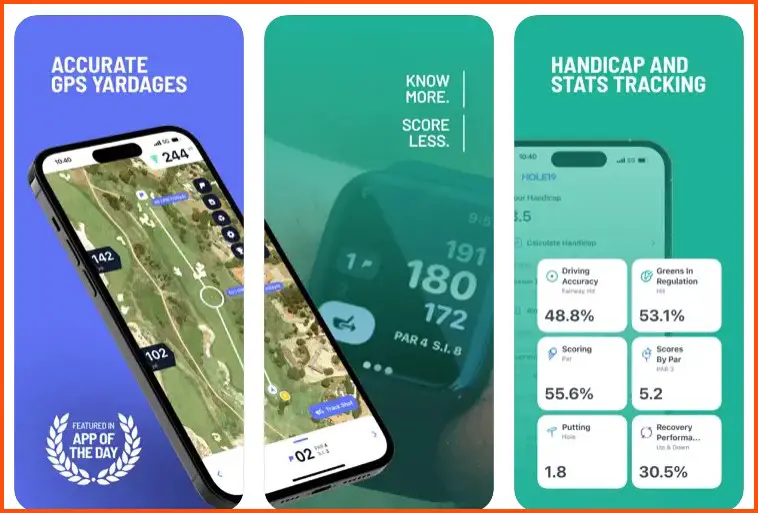
This accuracy allows golfers to compete fairly and provides a reliable benchmark for their performance. The more accurate handicap calculation of Hole19 empowers golfers to participate confidently in competitions, outings, and events, knowing that their handicap reflects their skill level.
This promotes fairness and ensures a competitive environment where all golfers have a chance to succeed, regardless of their experience or ability. Beyond its handicap calculation feature, Hole19 offers a range of other tools to enhance the golfing experience.
From GPS functionality that provides detailed course mapping and precise yardage measurements to shot tracking capabilities that allow golfers to analyze their performance, Hole19 provides valuable insights and data-driven assistance.
In summary, Hole19 stands out as an excellent golf app that not only calculates and provides a more accurate handicap but also offers a range of features to enhance the overall golfing experience.
With Hole19, golfers can compete confidently with players of all skill levels, fostering fairness, and enabling personal growth on the golf course.
Pros of Hole19:-
Accurate Handicap Calculation: Hole19 provides accurate handicap calculations, enabling golfers to compete on a level playing field and ensuring fairness in competitions.
Compete with Golfers of All Skill Levels: The more accurate handicap provided by Hole19 allows golfers to compete confidently with players of different abilities, fostering inclusive and fair competition.
Comprehensive Golf Tools: Hole19 offers a range of tools, including GPS functionality for detailed course mapping, precise yardage measurements, and shot tracking capabilities for performance analysis, providing valuable insights to enhance the golfing experience.
User-Friendly Interface: The app boasts a user-friendly interface that is easy to navigate, making it accessible for golfers of all levels of technological proficiency.
Community Engagement: Hole19 fosters a sense of community among golfers, allowing users to connect, share achievements, and participate in challenges and competitions, enhancing the game’s social aspect.
Cons of Hole19:-
Limited Free Features: While Hole19 offers a free version, some advanced features, and functionalities, such as premium statistics and training programs, may require a subscription.
Course Database Limitations: While Hole19 covers a significant number of golf courses, there may be instances where certain courses or lesser-known locations are not available in the app’s database.
Battery Consumption: Utilizing GPS and other features on the course can drain the battery life of mobile devices more quickly, requiring users to manage their device’s battery usage or have a backup plan.
Occasional Technical Issues: Like any app, Hole19 may encounter occasional technical glitches, such as slow loading times or syncing problems, which can be a minor inconvenience for users.
Hole19 is a comprehensive golf app with accurate handicap calculations, valuable tools, and community engagement opportunities. While there may be limitations in the free version and certain features require a subscription, Hole19 remains a reliable choice for golfers looking to improve their game and compete with players of all skill levels.
Download The App From Google Play Store
Download The App From Apple App Store
How To Choose The Right Golf Handicap App
Choosing the right golf handicap app is crucial for golfers who want to manage their game and track their progress effectively. With various options available, it’s important to consider several key factors to select the app that best suits your needs.
Here are some essential guidelines to help you make an informed decision:-
1. Features and Functionality:- When evaluating golf handicap apps, consider their range of features and functionalities. Look for an app with accurate handicap calculations, GPS rangefinder capabilities, scorecard tracking, and statistical analysis. Assess your requirements and preferences to find an app that aligns with your goals.
2. User-Friendly Interface:- Opt for a golf handicap app with a user-friendly interface. The app should be easy to navigate, with intuitive menus and clear instructions. A well-designed interface allows you to effortlessly input scores, access relevant information, and navigate various features without hassle.
3. Accuracy and Reliability:- Accuracy is paramount when it comes to a golf handicap app. Look for an app that follows the guidelines of the official handicap system and provides precise calculations based on the course rating and slope. Consider the app’s reputation and read reviews to ensure it is reliable and regularly updated with accurate data.
4. Compatibility and Accessibility:- Check the app’s compatibility with your device’s operating system, whether iOS, Android, or others. Ensure that the app is compatible with your smartphone or tablet, allowing you to access it conveniently. Additionally, consider if the app offers web-based access for flexibility across different devices.
5. Course Database:- Assess the app’s course database to ensure it covers a wide range of golf courses, including the ones you frequently play. A comprehensive course database enhances the accuracy of distance measurements and ensures that relevant course information is readily available.
6. Community and Social Features:- Consider whether the app provides opportunities for community engagement and social interaction with other golfers. Some apps have features that allow users to connect, share achievements, and participate in challenges or tournaments. These community features can enhance the golfing experience and foster a sense of belonging.
7. Pricing Model:- Evaluate the app’s pricing structure, as some golf handicap apps offer free versions with limited features, while others require a subscription to access premium features. Determine your value on additional features and consider your budget before deciding.
8. User Reviews and Recommendations:- Read user reviews and seek recommendations from other golfers who have used the app. Their feedback and experiences can provide valuable insights into the app’s functionality, user satisfaction, and overall performance.
By carefully considering these factors, you can make an informed decision when choosing the right golf handicap app. Take the time to assess the features, interface, accuracy, compatibility, course database, community engagement, pricing, and user reviews.
Remember, the right app can significantly enhance your golfing journey, helping you track progress, improve your game, and connect with fellow golf enthusiasts.
Tips For Using Golf Handicap Apps Effectively
Golf handicap apps have revolutionized the way golfers track and manage their games.

To make the most of these powerful tools, here are some valuable tips for using golf handicap apps effectively:-
1. Understand the Handicap Calculation:- Take the time to familiarize yourself with how the handicap calculation works in your app. Each app may have its algorithm, so understanding the process will help you interpret your handicap accurately and make informed decisions on the course.
2. Keep Score Consistently:- Consistency is key when using a golf handicap app. Ensure you enter accurate scores for every round you play. Pay attention to penalties, hole-by-hole scores, and adjusting for equitable stroke control (ESC) rules. This will provide a more accurate reflection of your abilities and maintain the integrity of your handicap.
3. Utilize GPS and Course Mapping:- Take full advantage of the app’s GPS and course mapping features. Use the GPS rangefinder to measure distances and plan your shots accordingly and accurately. Familiarize yourself with the course maps to strategize your game and avoid hazards.
4. Track Key Statistics:- Many golf handicap apps provide options for tracking statistics such as fairways hit, greens in regulation, and putting. Utilize these features to gain insights into your strengths and weaknesses. Identifying areas for improvement can guide your practice sessions and help you focus on specific aspects of your game.
5. Review Historical Data:- Regularly review your historical data and trends in the app. Analyze your scoring patterns, handicap trends, and statistical performance over time. This analysis can provide valuable insights into your progress, highlight areas for improvement, and help you set realistic goals.
6. Set Realistic Goals:- Establish realistic goals based on your handicap and performance trends. Whether lowering your handicap index or improving specific aspects of your game, setting achievable goals will help you stay motivated and focused on continuous improvement.
7. Engage with the Golfing Community:- Many golf handicap apps offer features to connect with fellow golfers. Engage with the community through forums, challenges, or social sharing. This interaction can provide inspiration, advice, and a sense of camaraderie as you navigate your golfing journey.
8. Stay Updated:- Keep your golf handicap app up to date with the latest software version. App updates often include bug fixes, performance enhancements, and new features. Staying updated ensures you have access to the best functionalities and the most accurate calculations.
9. Seek Support:- If you have any questions or encounter issues while using the app, contact the app’s support team. They can provide guidance, resolve technical difficulties, or address any concerns you may have.
10. Enjoy the Process:- Embrace the convenience and benefits of using a golf handicap app. Enjoy tracking your progress, analyzing your game, and witnessing your improvement over time.
Use the app to enhance your golfing experience and maximize your time on the course. By following these tips, you can maximize the effectiveness of your golf handicap app and elevate your golfing journey.
Embrace the technology, utilize the features, and engage with the golfing community to enhance your skills, set achievable goals, and enjoy becoming a better golfer.
Future Trends in Golf Handicap Apps
Golf handicap apps have already transformed how golfers track and manage their handicaps, but the future holds exciting developments that will further enhance the golfing experience.

Here are some future trends in golf handicap apps that we can expect to see:-
1. Artificial Intelligence (AI) Integration:- AI is making its way into various industries, and golf handicap apps are no exception. In the future, these apps could utilize AI algorithms to analyze data, provide personalized recommendations for improving performance, and offer real-time insights during rounds.
2. Virtual Reality (VR) Training:- VR technology can revolutionize golf training. Future golf handicap apps may incorporate VR simulations that allow golfers to practice their swings, experience different course layouts, and receive instant feedback on their technique—all from the comfort of their homes.
3. Enhanced Shot Tracking: Current apps offer shot-tracking features, but future trends will likely bring advancements. We can anticipate more precise shot tracking using sensors and wearable devices, allowing golfers to gather detailed data on their shots, such as clubhead speed, launch angle, and ball spin rate.
4. Gamification and Social Engagement:- Future golf handicap apps may incorporate gamification elements to make tracking and improving handicaps more enjoyable. Leaderboards, challenges, and virtual tournaments can foster a sense of competition and community, encouraging golfers to engage with the app and connect with fellow players.
5. Machine Learning for Handicap Calculations:- Handicap calculations can become even more accurate by integrating machine learning algorithms. These algorithms can analyze vast data, including historical scores, course ratings, and playing conditions, to provide more precise and tailored handicap indexes.
6. Integration with Wearable Technology:- With the growing popularity of wearable devices, future golf handicap apps may seamlessly integrate with smartwatches or fitness bands. Golfers can view their handicaps, track their scores, and receive real-time course data directly on their wrists, eliminating the need for additional devices.
7. Augmented Reality (AR) Course Navigation:- AR technology can enhance golfers’ navigation of the course. In the future, golf handicap apps may use AR overlays to provide real-time course information directly on the golfer’s smartphone screen, including yardage markers, green contours, and hazards.
8. Personalized Training Programs:- Golf handicap apps can evolve into comprehensive training platforms, offering personalized practice programs based on an individual’s handicap, strengths, and weaknesses. These programs can include drills, video tutorials, and performance tracking to help golfers optimize their training and reach their full potential.
9. Advanced Statistical Analysis:- Future golf handicap apps will likely offer more advanced statistical analysis, providing golfers with deeper insights into their game. Features like advanced shot dispersion analysis, statistical comparisons against golfers of similar handicaps, and trend identification will help golfers pinpoint areas for improvement with precision.
10. Seamless Integration with Golf Course Management Systems
To enhance the overall golfing experience, future golf handicap apps may seamlessly integrate with golf course management systems. Golfers can book tee times, view live course conditions, and receive personalized recommendations based on their handicaps and preferences within the app.
As technology advances, golf handicap apps will evolve to meet the ever-changing needs of golfers. From AI integration and VR training to enhanced shot tracking and personalized training programs, the future of golf handicap apps holds immense potential to elevate the game and provide golfers with invaluable tools for improvement and enjoyment on the course.
📗FAQ’s
Is there an app that calculates golf handicaps?
Yes, there are several golf apps available that can calculate your golf handicap. These apps use algorithms based on the USGA Handicap System or other recognized handicap systems to determine your handicap index. Examples of such apps include Golfshot, SwingU, and TheGrint.
How do I track my handicap in golf?
Tracking your handicap in golf is made easy with the help of golf handicap apps. Simply download a reliable app with handicap tracking functionality, such as Golfshot or TheGrint.Enter your scores for each round you play, along with relevant course and slope ratings, and the app will calculate your handicap index for you.
Does the Garmin golf app give you a handicap?
Yes, the Garmin golf app provides a handicap calculation feature. It utilizes the USGA Handicap System to calculate and track your golf handicap.
By entering your scores and relevant course information, the app will calculate your handicap index, allowing you to track your progress and compete on a level playing field.
What is a decent golf handicap?
A decent golf handicap can vary depending on factors such as skill level, course difficulty, and the level of competition.
However, a handicap between 10 and 20 is generally considered decent for amateur golfers. Lower handicaps indicate a higher skill level, while higher handicaps indicate a beginner or less experienced golfer.
Is SwingU app free?
SwingU offers a free version of its app, providing basic features such as GPS distance tracking, scorecard, and shot tracking. However, a paid subscription may offer additional premium features and benefits.
Is 18Birdies free?
Yes, 18Birdies offers a free version of its app that includes features such as GPS distance tracking, scorekeeping, and social networking capabilities. However, 18Birdies also offers a premium subscription that unlocks additional features and benefits.
How to go from 20 handicap to 10?
To go from a 20 handicap to a 10, focus on improving your golf skills and consistency. Work on your swing technique, practice regularly, and seek guidance from a golf instructor.
Analyze your game, identify areas for improvement, and dedicate time to practice those specific aspects. Play more rounds, track your progress using a golf handicap app, and set realistic goals to lower your handicap over time steadily.
What is the maximum handicap in golf?
The maximum handicap in golf is currently set at 54 for both men and women. This means that a golfer with a handicap index of 54 or higher can compete in events and use their handicap for scoring purposes.
What is a beginner golf handicap?
A beginner golf handicap refers to the handicap index assigned to a golfer who is new to the game or has limited playing experience.
Typically, beginner golfers start with a higher handicap index, which reflects their initial skill level and allows them to compete fairly against more experienced players.
How do I set my handicap on Garmin golf?
To set your handicap on Garmin golf devices, enter your handicap index into the device’s settings. Consult the user manual or the Garmin support website for specific instructions on accessing the handicap setting and input your index.
How does Garmin S62 calculate handicap?
The Garmin S62 calculates handicap based on the USGA Handicap System. By inputting your scores and course information into the Garmin S62, the device utilizes the appropriate calculations to determine your handicap index.
Can I use my Garmin for golf?
Yes, Garmin offers various GPS golf devices, such as the Approach series, specifically designed for golfing purposes. These devices provide accurate distance measurements, course mapping, and other features tailored to enhance the golfing experience.
What handicap am I if I shoot 90?
To determine your handicap based on a score of 90, you need to consider the course and slope ratings of the course you played. Using these ratings and the USGA Handicap System calculations, you can determine your handicap index.
How many golfers can break 80?
Breaking 80 is considered a significant milestone in golf, indicating a high skill level. However, the percentage of golfers who can consistently break 80 varies depending on the specific golfing population. Generally, a small percentage of golfers can consistently achieve scores below 80.
What’s my handicap if I shoot 100?
To determine your handicap based on a score of 100, you need to consider the course and slope ratings of the course you played. Using these ratings and the USGA Handicap System calculations, you can determine your handicap index.
Can I use my phone as a golf GPS?
You can use your phone as a golf GPS by downloading golf GPS apps available for iOS and Android devices. These apps provide GPS functionality, allowing you to measure distances, track your shots, and access course information.
Can my Apple Watch be used for golf?
Yes, Apple Watch can be used for golf by downloading golf apps that are compatible with the device. These apps offer golf-specific features such as GPS rangefinders, score tracking, and shot analysis, providing convenient access to golf-related information on your wrist.
Is GolfLogix free?
GolfLogix offers both free and premium versions of its app. The free version provides basic GPS functionality, score tracking, and access to limited courses.
The premium version unlocks additional features like advanced stats, club tracking, and premium course maps.
Is 18Birdies a real handicap?
18Birdies provides a handicap index feature that follows the USGA Handicap System guidelines. While the app allows golfers to calculate and track their handicap, it’s important to note that the official handicap certification is typically issued through a golf association or club.
Is Golf Master free?
Golf Master offers a free version of its app with basic features such as GPS distance measurement and score tracking. However, a paid subscription may offer additional premium features and benefits.
Is Golfshot app free?
Golfshot offers both free and premium versions of its app. The free version provides basic GPS distance measurement and score-tracking features.
The premium version offers additional features, including detailed statistics, advanced club tracking, and real-time course updates.
How to go from 25 to 15 handicaps?
To reduce your handicap from 25 to 15, focus on improving your golf skills and consistency. Seek guidance from a golf instructor, practice regularly, and work on specific areas for improvement.
Analyze your game, track your progress using a golf handicap app, and set achievable goals to gradually lower your handicap over time.
How do I drop my handicap fast?
To drop your handicap quickly, dedicate time to practice and play regularly. Work on improving your weaknesses and focus on consistency.
Seek guidance from a golf instructor, track your scores accurately, and ensure you enter all rounds into your golf handicap app to maintain an up-to-date and accurate handicap index.
How do you shoot 90 in golf?
Shooting 90 in golf requires skill, strategy, and mental focus. Practice your swing technique, work on your short game, and develop a solid course management strategy.
Additionally, maintain a positive mindset, stay focused on each shot, and manage your emotions effectively throughout the round.
Who has the lowest handicap on the PGA Tour?
The lowest handicap on the PGA Tour can fluctuate depending on the individual performances of professional golfers.
However, golfers who consistently rank among the top players worldwide, such as Dustin Johnson, Justin Thomas, or Jon Rahm, often maintain some of the lowest handicaps on the tour.
How many strokes can a 15 handicap take?
A 15 handicap means that a golfer can deduct 15 strokes from their gross score to calculate their net score.
Therefore, a golfer with a 15 handicap can take a maximum of 15 strokes off their total score for a given round to determine their net score.
What does a +7 handicap in golf mean?
A +7 handicap in golf indicates an exceptional level of skill and competitiveness. It signifies that the golfer consistently shoots scores significantly below the course rating and can compete at a high level against scratch or professional golfers.
Is handicap 1 easiest or hardest?
In golf, handicap 1 is the lowest handicap index and generally represents the most skilled and competitive players.
The lower the handicap index, the more difficult the course rating adjustment is for that golfer, as they are already performing at a high level relative to the course difficulty.
How many strokes can a 20 handicap take?
A golfer with a 20 handicap can deduct a maximum of 20 strokes from their gross score to calculate their net score. The net score is the total score after deducting the handicap strokes, allowing golfers of different skill levels to compete on a more even playing field.
How many over par is bad?
In golf, the term “over par” refers to a score higher than the designated par for a specific hole or the entire round.
While determining what is considered “bad” is subjective, consistently shooting scores significantly higher than the course’s par may indicate areas for improvement in one’s game.
It’s important to focus on personal progress and set achievable goals rather than comparing oneself to others.
How do I increase my golf handicap?
To increase your golf handicap, focus on improving specific areas of your game and challenging yourself on more difficult courses.
By consistently shooting scores above the course rating, your handicap index will increase over time, reflecting your improved performance.
What is Garmin Golf?
Garmin Golf is a suite of golf-related products and services offered by Garmin, a renowned technology company.
These products include GPS golf devices, watches, and apps that provide golfers with accurate distance measurements, course mapping, score tracking, and other features to enhance their golfing experience.
How does Garmin track golf?
Garmin offers various devices and apps with golf-specific features to track and enhance your golf game.
Garmin golf devices utilize GPS technology to provide accurate distance measurements, course maps, and score tracking. Additionally, Garmin golf apps integrate with these devices to provide comprehensive golfing data and analytics.
How accurate is Garmin S62?
The Garmin S62 golf watch provides accurate and reliable information for golfers. With advanced GPS technology and course mapping, the S62 delivers precise distance measurements, accurate shot tracking, and real-time course updates, ensuring golfers have the information they need for confident decision-making.
Does the Garmin S62 keep score?
Yes, the Garmin S62 golf watch lets you keep score directly on the device. It provides a scorecard feature where you can input your scores for each hole, track your progress throughout the round, and record your scores for future reference and analysis.
Can Garmin S62 measure swing speed?
No, the Garmin S62 golf watch does not have a built-in swing speed measurement feature. Its primary focus is providing golfers with accurate distance measurements, course mapping, and score-tracking capabilities.
Does Garmin S62 have slope?
The Garmin S62 golf watch does not have a built-in slope feature. It provides distance measurements to various points on the course but does not account for elevation changes or provide adjusted distances based on slope or gradient.
Which Garmin watches have golf mode?
Several Garmin watches have golf mode, including models from the Garmin Approach series, such as the Approach S62, Approach S42, Approach S12, and Approach S40. These watches offer golf-specific features and functionality designed to enhance the golfing experience.
Is The Garmin S62 waterproof?
Yes, the Garmin S62 golf watch is water-resistant and designed to withstand water immersion up to a certain depth.
It is rated as 5 ATM (50 meters), which means it can withstand water pressure equivalent to a depth of 50 meters. This makes it suitable for use in rainy conditions or during water-related activities.
What is a 21 handicap in golf?
A 21 handicap in golf indicates a moderately skilled golfer. It represents the number of strokes above the course rating that a golfer can deduct from their gross score to calculate their net score.
A lower handicap signifies a higher skill level, while a higher handicap indicates a less experienced or beginner golfer.
How many golfers can break 100?
The ability to consistently break 100 in golf depends on several factors, including individual skill level, practice, and course difficulty.
While it varies among golfers, with dedication, practice, and proper instruction, many golfers can achieve the goal of consistently shooting scores below 100.
How many golfers can break 85?
Breaking 85 in golf is considered a significant achievement and requires a solid level of skill and consistency.
While the percentage may vary, many golfers can reach this milestone with dedicated practice, improving their techniques, and gaining course management skills.
How many golfers can break 70?
Breaking 70 in golf is an exceptional accomplishment and represents high skill and precision. Few golfers, including professionals and elite amateurs, can consistently score below 70.
It requires a combination of exceptional ball-striking, short-game proficiency, and mental fortitude.
What was Tiger Woods’ best score?
Tiger Woods’ best score in a professional golf tournament is 61. He achieved this remarkable score multiple times, showcasing his exceptional skill and dominance in the game.
How do you hit a draw in golf?
Aim slightly to the right of your target (for right-handed golfers) and close your clubface slightly at the address to hit a draw in golf.
During the swing, focus on swinging inside the target line, allowing the clubface to rotate slightly closed through impact. This promotes a right-to-left ball flight for right-handed golfers, creating a draw-shot shape.
How do I calculate my handicap index?
To calculate your handicap index, follow the formula outlined by the USGA Handicap System. The formula considers your adjusted gross scores, the course and slope ratings, and other factors.
Using a golf handicap app or online handicap calculators can simplify the process and provide accurate calculations.
What is par for 18 holes?
Par for 18 holes is the total number of strokes an expert golfer must take to complete a round on a specific golf course.
Par typically ranges between 70 and 72 for most golf courses, with par 72 being the most common for regulation courses.
How many rounds do you need for a handicap?
According to the USGA Handicap System, golfers need a minimum of five 18-hole rounds (or ten 9-hole rounds) to establish an initial handicap index. Once established, subsequent scores are used to calculate and adjust the handicap index over time.
Conclusion
In conclusion, the world of golf has seen a significant transformation with the advent of technology, and golf handicap apps are at the forefront of this revolution.
These apps have taken the complex task of tracking and calculating handicaps into a simple, efficient, and mobile-friendly process.
As we’ve explored, they come packed with various features that save time and effort and enable golfers to focus on their game strategy and improvement.
No matter your level of golfing prowess, a golf handicap app is a must-have tool in your digital caddie. They promise to make your golfing experience more engaging, fair, and enjoyable.
So why wait? Embrace these innovations and let them guide you toward becoming the best golfer you can be.
Remember, the key to success in golf isn’t just about mastering your swing and leveraging the right tools to understand and improve your game. And that’s precisely what golf handicap apps offer.
Happy golfing!


