
























Have you ever been on a leisurely hike, spotted a peculiar bug, and wished you could instantly identify it? Or perhaps you’ve found a bug in your home and are worried it might be harmful.
Identifying bugs traditionally requires extensive knowledge or physical field guides, which aren’t always handy or straightforward.
The mystery of not knowing what’s buzzing around can be quite unsettling. We know how frustrating it can be when facing a bug you don’t recognize. Is it harmful or harmless?
Does it benefit the ecosystem around you, or is it a potential pest? Even the most curious minds are left in the dark without proper identification, potentially leading to unnecessary worry or harm to beneficial insects.
But worry no more! With the advancement of technology, identifying these tiny creatures has become as simple as a click. Enter the age of the ‘App to Identify Bugs.’ These powerful apps allow you to identify bugs quickly and easily, right from your smartphone.
This article will explore today’s top bug identification apps, their features, and how they can quickly turn you into a citizen scientist.
Say goodbye to uncertainty and embrace your curiosity as we dive into the digital world of bug identification.
Importance of Identifying Bugs
Bugs, those tiny inhabitants of our natural world, play a significant role in maintaining the delicate balance of ecosystems.
They are the unsung heroes, diligently carrying out crucial tasks that often go unnoticed by the human eye. Understanding the role of bugs in the ecosystem is vital to appreciating their contribution to biodiversity.
Bug identification is a powerful tool for unraveling life’s intricate web. By recognizing different species and understanding their ecological niches, we can gain insights into their interdependencies and the vital functions they perform.
From pollination to decomposition, bugs contribute to processes that are essential for the survival of countless plant and animal species.
Furthermore, bug identification plays a critical role in maintaining biodiversity. By identifying bugs, scientists and conservationists can assess the health of ecosystems, detect invasive species, and monitor population dynamics. This knowledge empowers us to make informed decisions and take proactive measures to protect vulnerable species and their habitats.
Apart from the ecological significance, there are also personal benefits of being able to identify bugs. It fosters a deeper connection with nature, allowing us to appreciate the intricate beauty and diversity surrounding us. Identifying bugs can also serve as a source of intellectual stimulation, nurturing curiosity and a desire to explore the world around us.
In conclusion, bugs are indispensable players in the grand theater of life. Understanding the role of bugs in the ecosystem and embracing bug identification as a tool for conservation can help us preserve biodiversity and safeguard the intricate tapestry of nature.
Moreover, identifying bugs enriches our lives, giving us a deeper appreciation for the natural wonders at our doorstep.
Traditional Methods of Bug Identification
In the vast realm of entomology, identifying bugs has been a pursuit that spans centuries. Before modern technology and sophisticated techniques, traditional bug identification methods formed the foundation of this scientific discipline.
These methods, honed through meticulous observation and classification, paved the way for our understanding of insect diversity.
One of the traditional methods of bug identification is morphological examination.
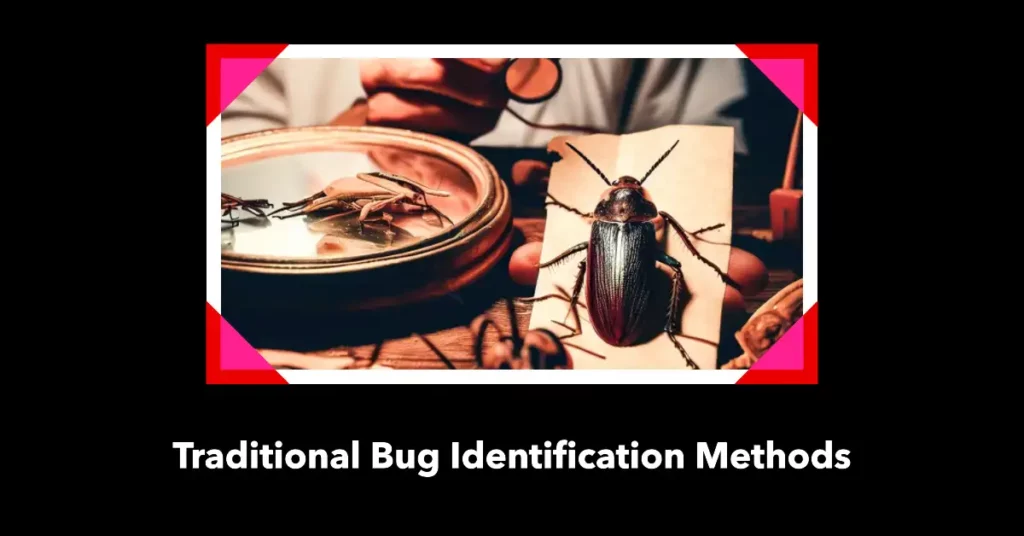
Taxonomists could discern key differences between species by scrutinizing the physical characteristics of insects, such as their body shape, coloration, and wing venation.
Microscopes, with their ability to reveal intricate details, became indispensable tools in this process, enabling researchers to delve into the microscopic structures of insects.
Another traditional method is the use of dichotomous keys. These systematic guides present a series of paired statements that lead to identifying a particular insect.
Entomologists could narrow the possibilities by carefully considering each statement, selecting the appropriate option, and pinpointing the species.
Furthermore, habitat observation played a crucial role in traditional bug identification. Insects are intimately tied to specific ecosystems and have adapted to thrive in diverse environments. By studying the habitats in which insects reside, researchers could make educated guesses about the species likely to be encountered.
Although modern technology has revolutionized bug identification, traditional methods remain relevant and valuable. They provide a solid framework for understanding insect taxonomy and serve as a reminder of the importance of meticulous observation and attention to detail.
In conclusion, the traditional bug identification methods laid the groundwork for the entomological discoveries we enjoy today. Through morphological examination, dichotomous keys, and habitat observation, early entomologists pieced together the puzzle of insect diversity.
While technology continues to advance, the significance of these traditional methods should not be overlooked, as they continue to shape and inform our understanding of the vast world of bugs.
Technological Revolution in Bug Identification
In recent years, bug identification has experienced a technological revolution transforming how entomologists explore and understand the insect world.
Advancements in technology have unlocked new possibilities, enabling more efficient and accurate bug identification processes.
One key aspect of the technological revolution in bug identification is the rise of DNA barcoding. This innovative technique involves sequencing an insect’s DNA region to create a unique genetic identifier.
By comparing these genetic markers to a vast database, entomologists can quickly determine the species of an insect, even when traditional morphological features may be challenging to discern. DNA barcoding has revolutionized bug identification, allowing for rapid and precise species identification.
Additionally, the development of high-resolution imaging techniques has revolutionized bug identification. Advanced microscopy tools and digital imaging technologies enable researchers to capture detailed images of insects, revealing intricate structures and subtle characteristics.
These images can be shared and analyzed remotely, facilitating collaboration among experts worldwide. Furthermore, the technological revolution has given rise to mobile applications and online platforms that allow citizen scientists to contribute to bug identification efforts.
With just a smartphone and a dedicated app, enthusiasts can capture images of insects, which can then be analyzed using artificial intelligence algorithms or shared with experts for identification. This democratization of bug identification has significantly expanded the reach and scope of research.
In conclusion, the technological revolution in bug identification has ushered in a new era of efficiency and accuracy. Through DNA barcoding, high-resolution imaging, and citizen science initiatives, technology has empowered researchers and enthusiasts alike to delve deeper into the intricacies of the insect world.
As technology advances, we expect even more exciting developments to enhance our understanding of bugs and their vital roles in our ecosystems.
Best App To Identify Bugs To Become a Bug Expert
1. Picture Insect
Are you fascinated by the intricate world of insects and eager to explore their diverse species? Look no further than Picture Insect, the unparalleled app designed for bug enthusiasts and nature lovers.
Whether you own an Android or iPhone, this exceptional application stands out as the best app to identify bugs and unravel the secrets of the insect kingdom.
Picture Insect simplifies bug identification with a seamless user interface and state-of-the-art image recognition technology.
Capture a photograph of the insect you wish to identify, and let the app’s advanced algorithms work their magic. With an extensive and comprehensive database covering many species, accurate results are just a tap away.
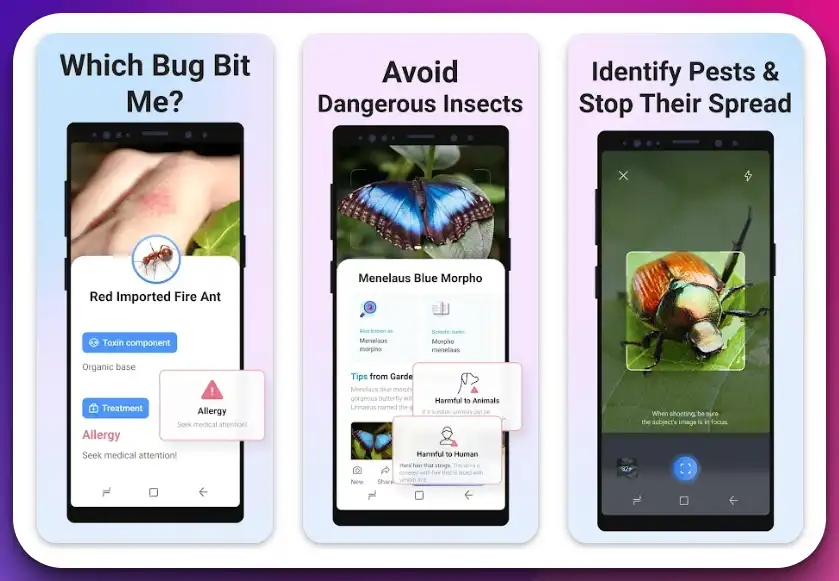
What sets Picture Insect apart is its wealth of information. Each identified bug has detailed descriptions encompassing taxonomy, behavior, habitat, and intriguing facts.
Immerse yourself in the captivating realm of entomology as you discover the life cycles, feeding habits, and ecological significance of various insect species.
The app’s interactive community feature fosters engagement among users. Connect with like-minded bug enthusiasts, share your discoveries, and exchange valuable identification tips. With a vibrant community at your fingertips, your bug identification journey is bound to become even more enriching.
Picture Insect caters to individuals of all levels, from curious beginners to seasoned entomologists. Its user-friendly interface and visually appealing design make bug identification a delightful and educational experience.
Don’t hesitate any longer. Embark on your bug identification adventure by downloading Picture Insect from the Google Play Store for Android or the App Store for iPhone.
Unlock the wonders of the insect world, one photo at a time, with the finest bug identification app available.
Pros:-
Accurate Bug Identification: Picture Insect utilizes advanced image recognition technology, ensuring precise bug identification and reducing the margin of error.
Extensive Database: The app boasts an extensive database covering a wide range of insect species, allowing users to identify various bugs easily.
Detailed Information: Each identified bug comes with comprehensive descriptions, including taxonomy, behavior, habitat, and interesting facts, providing users with in-depth knowledge about the insects they encounter.
User-Friendly Interface: Picture Insect features a user-friendly interface that makes bug identification intuitive and accessible to users of all levels, from beginners to experts.
Community Engagement: The app provides a platform for bug enthusiasts to connect, share discoveries, and exchange valuable identification tips, fostering community among users.
Cons:-
Limited Offline Functionality: Picture Insect heavily relies on online connectivity for bug identification and accessing the extensive database, which may be a drawback in areas with limited or no internet access.
Device Compatibility: While the app is available for Android and iPhone, it may not be compatible with older device models, limiting its accessibility to some users.
Cost: Depending on the pricing structure of Picture Insect, there may be a cost associated with accessing premium features or removing advertisements, which could be a consideration for budget-conscious users.
Language Availability: The app’s availability in multiple languages may vary, which could limit its accessibility to non-English speaking users.
In conclusion, Picture Insect offers many benefits, including accurate bug identification, an extensive bug database, detailed information, a user-friendly interface, and community engagement. However, potential drawbacks include limited offline functionality, device compatibility, cost considerations, and language availability.
Despite these cons, Picture Insect remains an exceptional app for bug identification, catering to bug enthusiasts and nature lovers’ needs.
Download The App From the Google Play Store
Download The App From the Apple App Store
2. Bug Identifier
Bug Identifier stands out as the ultimate solution for identifying bugs with accuracy and ease. Available on both the App Store and Google Play Store, it has earned its reputation as the best app to identify bugs.
Whether you’re a curious nature enthusiast or a seasoned entomologist, this app provides an invaluable resource for bug identification. With its comprehensive database and advanced recognition technology, Bug Identifier simplifies identifying bugs.
Simply snap a photo of the insect in question and let the app’s algorithms analyze the image. From spiders to butterflies, flies to beetles, the app covers a wide range of species, ensuring accurate results.
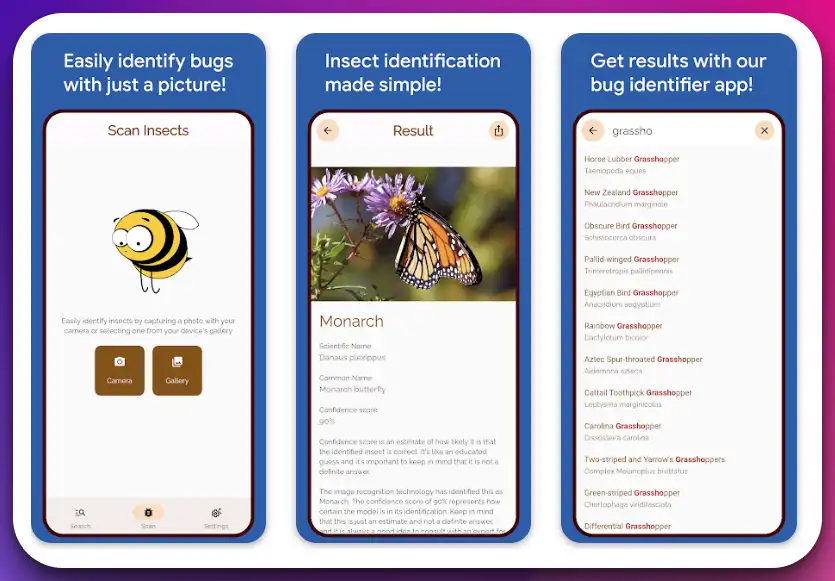
What sets Bug Identifier apart is its user-friendly interface and intuitive design. Navigating the app is a breeze, allowing users of all levels to access the information they need easily.
Each identified bug has detailed descriptions, including physical characteristics, habitat, and behavioral patterns. This wealth of information helps users better understand the bugs they encounter.
Furthermore, Bug Identifier provides a platform for users to contribute to the community. Share your bug sightings, engage in discussions, and connect with fellow bug enthusiasts. This collaborative aspect enhances the overall experience and fosters a sense of belonging within the bug identification community.
Embrace the world of bugs and unlock the secrets of nature with Bug Identifier.
Pros:-
Accurate Identification: Bug Identifier employs advanced recognition technology and a comprehensive database, ensuring precise bug identification and reducing errors.
Extensive Species Coverage: The app covers a wide range of bug species, including spiders, butterflies, flies, and beetles, providing a valuable resource for users interested in diverse insect identification.
User-Friendly Interface: Bug Identifier offers a user-friendly interface with intuitive navigation, making it accessible to users of all levels, from beginners to experts.
Detailed Information: Each identified bug comes with comprehensive descriptions, including physical characteristics, habitat, and behavior, enhancing users’ understanding of the bugs they encounter.
Community Engagement: The app provides a platform for users to connect with fellow bug enthusiasts, share sightings, and engage in discussions, fostering a sense of community.
Cons:-
Platform Limitations: Bug Identifier is currently available on the App Store for iOS devices and the Google Play Store for Android devices. This may limit access for users with devices outside of these platforms.
Internet Dependency: The app heavily relies on internet connectivity for bug identification and accessing the extensive database, which may pose limitations in areas with poor or no internet connection.
Potential Bugs and Updates: Like any app, Bug Identifier may have occasional bugs or require regular updates to improve performance and address user feedback.
In conclusion, Bug Identifier offers numerous advantages, including accurate identification, extensive species coverage, a user-friendly interface, detailed information, and community engagement.
However, it’s essential to consider platform limitations, internet dependency, and potential bugs or updates when using the app. Despite these cons, Bug Identifier remains a top choice for bug enthusiasts and nature lovers seeking a reliable and informative bug identification tool.
Download the app from the App Store or Google Play Store today and embark on a captivating bug discovery and identification journey.
Download The App From the Google Play Store
Download The App From the Apple App Store
3. Bug ID: Insect Identifier AI
Discovering and identifying bugs has never been easier with Bug ID, the ultimate app for bug enthusiasts and nature lovers. Designed exclusively for iPhone, Bug ID is widely regarded as the best app to identify bugs on this platform. Its cutting-edge technology and user-friendly interface provide an unparalleled bug-identification experience.
Equipped with advanced artificial intelligence, Bug ID utilizes powerful algorithms to identify a wide variety of bugs accurately.
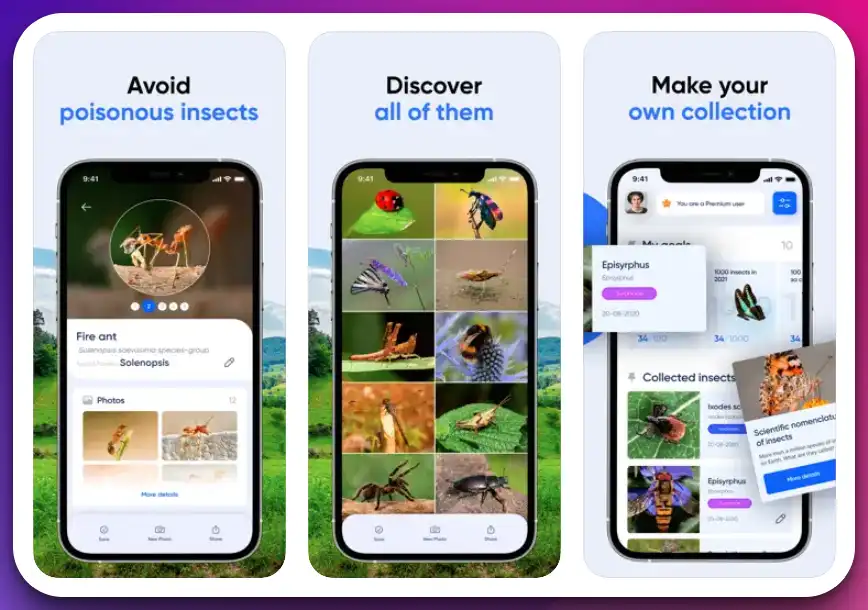
Simply photograph the bug using your iPhone’s camera, and let the app’s intelligent system analyze the image. With swift precision, it will provide you with the name and information of the identified bug.
What sets Bug ID apart is its comprehensive bug database. It encompasses many insect species, from common garden bugs to rare and exotic creatures. Whether you encounter a spider, butterfly, beetle, or any other bug, Bug ID can swiftly recognize and provide valuable insights about the species.
The user-friendly interface of Bug ID ensures a seamless bug identification process. The app’s sleek design and intuitive navigation make it accessible to users of all levels of expertise. You can easily explore detailed information about each bug, including its classification, behavior, habitat, etc.
Embrace the world of bugs and expand your knowledge with Bug ID. Download the app from the App Store today and experience the joy of identifying bugs right from your iPhone.
Let Bug ID be your trusted companion in unraveling the mysteries of the insect kingdom.
Pros:-
Accurate Bug Identification: Bug ID utilizes advanced artificial intelligence algorithms to provide precise bug identification, ensuring reliable results.
Comprehensive Bug Database: The app boasts a comprehensive database that covers a wide range of insect species, offering users access to a wealth of information about various bugs.
User-Friendly Interface: Bug ID features a user-friendly interface with intuitive navigation, making it accessible and easy for users of all levels of expertise.
Detailed Bug Information: Each identified bug comes with detailed information, including classification, behavior, habitat, and more, enabling users to learn about the characteristics and traits of different species.
The convenience of iPhone Compatibility: As an app designed exclusively for iPhone, Bug ID takes advantage of the platform’s capabilities, providing a seamless bug identification experience tailored to iPhone users.
Cons:-
Platform Limitation: Bug ID is currently available only for iPhone users, limiting access for devices outside the iOS ecosystem.
Dependence on Image Quality: The accuracy of bug identification may be influenced by the quality of the captured image. Poor lighting or blurry images might affect the app’s ability to identify bugs correctly.
Limited Offline Functionality: Bug ID may require an internet connection to access its database and perform bug identification, which can be a limitation in areas with poor or no network coverage.
In conclusion, Bug ID offers numerous advantages, including accurate bug identification, a comprehensive bug database, a user-friendly interface, and detailed bug information.
However, it’s important to consider the platform limitation, image quality dependence, and limited offline functionality when using the app. Despite these limitations, Bug ID remains a valuable tool for iPhone users interested in exploring and identifying the fascinating world of bugs.
Download The App From the Apple App Store
4. Smart Identifier
Discovering the wonders of the natural world has never been easier than with Smart Identifier, the premier plant and insect identification app.
Available on the App Store, Smart Identifier is a revolutionary tool that empowers nature enthusiasts and curious minds to explore and identify the flora and fauna around them.
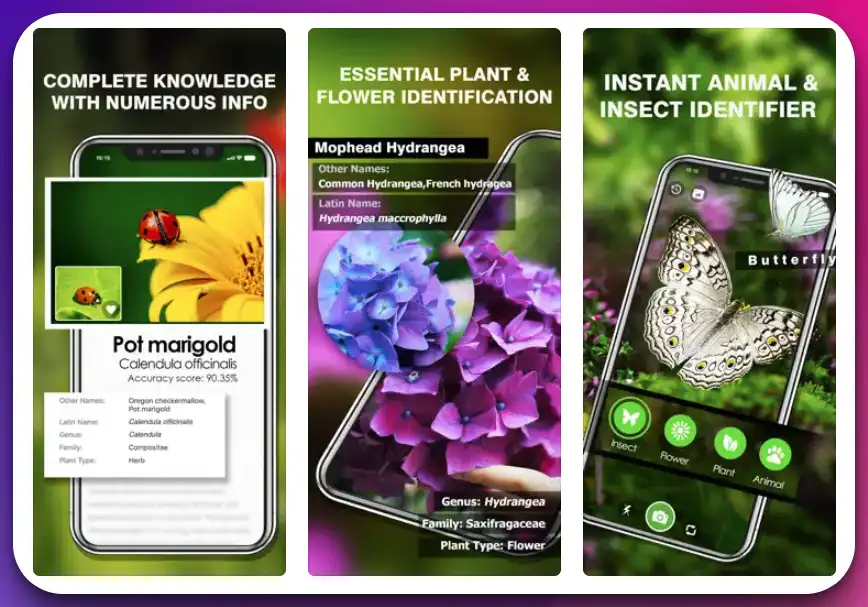
With its advanced image recognition technology, Smart Identifier is your botanist and entomologist. Simply snap a photo of a plant or insect and let the app’s intelligent algorithms analyze the image. You will receive accurate identification results within seconds, unlocking the natural world’s secrets.
What sets Smart Identifier apart is its comprehensive database, encompassing a vast array of plant species and insect varieties. From rare flowers to common garden pests, the app provides in-depth information about each identified species, including taxonomy, habitat, and key characteristics.
The user-friendly interface of Smart Identifier makes it accessible to users of all levels of expertise. Navigate through the app’s sleek design, explore detailed descriptions, and easily delve into the fascinating world of plants and insects.
Whether you’re an avid gardener, an aspiring botanist, or a nature enthusiast, Smart Identifier is your indispensable companion. Download the app from the App Store today and embark on a journey of discovery and knowledge with this remarkable plant and insect identification tool.
Let Smart Identifier be your guide as you unravel the mysteries of the natural world right at your fingertips.
Pros:-
Accurate Identification: Smart Identifier utilizes advanced image recognition technology and a comprehensive database to provide accurate identification results for plants and insects.
Wide Range of Species: The app covers many plant and insect varieties, offering users diverse species to explore and identify.
Detailed Information: Each identified plant or insect has detailed descriptions, including taxonomy, habitat, and key characteristics, enhancing users’ understanding of the natural world.
User-Friendly Interface: Smart Identifier features a user-friendly interface with intuitive navigation, making it accessible and easy for users of all levels of expertise.
The convenience of iPhone Compatibility: As an app designed exclusively for iPhone users, Smart Identifier leverages the platform’s capabilities, providing a seamless identification experience tailored to iPhone users.
Cons:-
Platform Limitation: Smart Identifier is currently available only for iPhone users, limiting access for users with devices outside of the iOS ecosystem.
Dependence on Image Quality: The accuracy of identification may be influenced by the quality of the captured image. Poor lighting or blurry images might affect the app’s ability to identify plants and insects correctly.
Limited Offline Functionality: Smart Identifier may require an internet connection to access its database and perform identification, which can be a limitation in areas with poor or no network coverage.
In conclusion, Smart Identifier offers numerous advantages, including accurate identification, a wide range of species coverage, detailed information, a user-friendly interface, and iPhone compatibility.
However, it’s important to consider the platform limitation, image quality dependence, and limited offline functionality when using the app.
Despite these limitations, Smart Identifier remains a valuable tool for iPhone users interested in exploring and identifying the captivating world of plants and insects.
Download The App From the Apple App Store
5. Seek by iNaturalist
Step into the fascinating world of nature exploration with Seek by iNaturalist, a powerful app that invites you to unlock the natural world’s mysteries. Whether you’re a seasoned naturalist or an aspiring explorer, Seek is your ultimate companion in discovering and identifying the wonders of the environment.
Available on both Google Play Store and App Store, Seek by iNaturalist combines cutting-edge technology and community engagement to provide an immersive and educational experience.
With a simple photo, the app’s advanced image recognition system analyzes and accurately identifies plants, animals, and fungi.
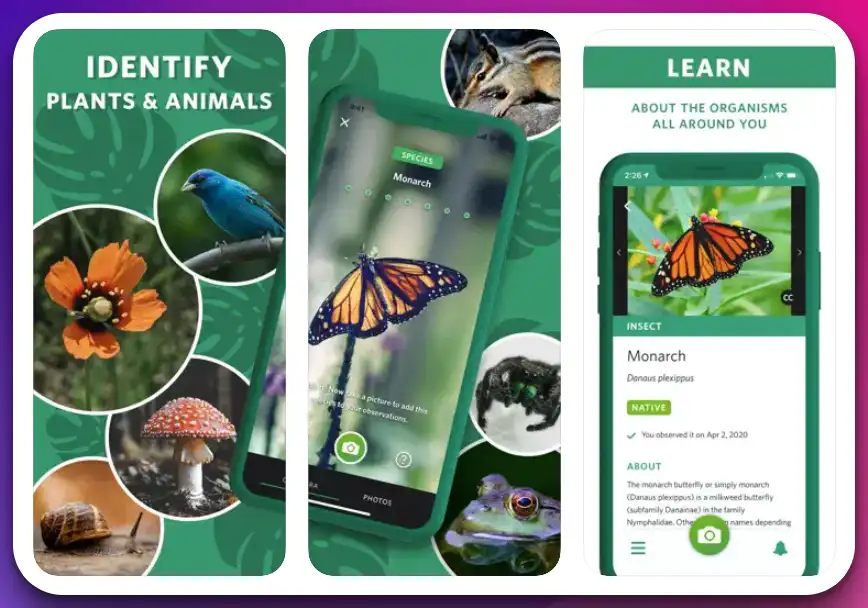
What sets Seek apart is its integration with the iNaturalist community. By connecting to iNaturalist, users can contribute their observations, share findings, and engage with a global network of nature enthusiasts.
This collaboration fosters a sense of collective knowledge and empowers users to actively participate in citizen science initiatives.
From identifying local flora and fauna to exploring ecosystems and learning about biodiversity, Seek offers a wealth of information and insights. Educational challenges and gamification encourage curiosity and foster a deeper connection to the natural world.
So, unleash your curiosity, download Seek by iNaturalist today, and embark on a journey of discovery. Let the app guide you as you unravel nature’s mysteries, one observation at a time.
Pros:-
Accurate Identification: Seek utilizes advanced image recognition technology to accurately identify plants, animals, and fungi, enhancing your knowledge and understanding of the natural world.
Extensive Species Database: The app offers a vast species database, allowing you to discover and identify a wide range of flora and fauna.
Integration with iNaturalist Community: Seek seamlessly integrates with the iNaturalist community, enabling you to contribute your observations, connect with fellow nature enthusiasts, and engage in citizen science initiatives.
Educational Challenges and Gamification: Seek incorporates educational challenges and gamification elements to make nature exploration more interactive, fun, and engaging.
Availability on Multiple Platforms: Seek is available on Android (Google Play Store) and iOS (App Store), ensuring accessibility to a wide range of users.
Cons:-
Dependence on Image Quality: The accuracy of identification may be influenced by the quality of the captured image. Poor lighting or unclear photos may affect the app’s ability to identify species correctly.
Limited Offline Functionality: Seek heavily relies on internet connectivity to access its extensive database and perform identification, which can be a limitation in areas with poor or no network coverage.
Platform Limitation: Seek is currently available for Android and iOS devices only, excluding users with devices on other platforms.
In conclusion, Seek by iNaturalist offers numerous advantages, including accurate identification, an extensive species database, integration with the iNaturalist community, educational challenges, and multi-platform availability.
However, it’s important to consider the dependence on image quality, limited offline functionality, and platform limitations when using the app.
Despite these limitations, Seek remains a valuable tool for nature enthusiasts and provides an engaging and informative experience in exploring the wonders of the natural world.
Download The App From the Google Play Store
Download The App From the Apple App Store
6. Leps by Fieldguide
Unlock the captivating world of butterflies and moths with Leps by Fieldguide, the ultimate app for lepidopterists and nature enthusiasts. Available on the App Store, Leps by Fieldguide is a powerful tool that brings these winged creatures’ wonder to your fingertips.
With its extensive database and advanced features, Leps by Fieldguide is designed to cater to beginners and field experts. Whether on a stroll in the park or conducting scientific research, this app provides an invaluable resource for butterfly and moth identification.
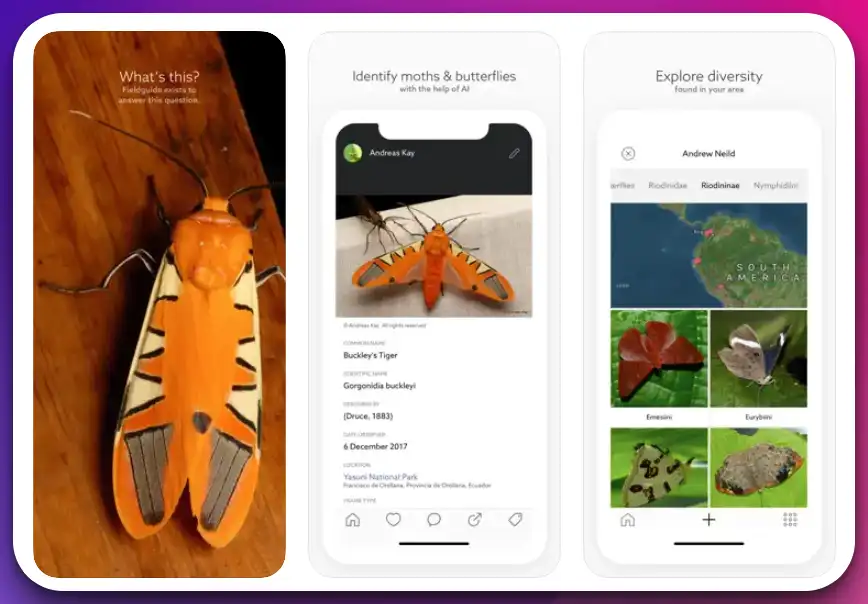
The app’s intuitive interface allows you to browse and search for specific species easily. Simply snap a photo or enter relevant characteristics, and Leps by Fieldguide will provide accurate suggestions and detailed information about the species in question.
What sets Leps by Fieldguide apart is its comprehensive collection of lepidopteran species. From the vibrantly colored butterflies to the intricately patterned moths, the app covers a vast range of taxa, offering a wealth of knowledge about these fascinating insects.
Immerse yourself in the world of Lepidoptera as you explore in-depth species descriptions and learn about their life cycles, behaviors, and habitat preferences.
Leps by Fieldguide also allows you to record your sightings, create personal species lists, and contribute to citizen science initiatives, making your butterfly and moth encounter even more meaningful.
Embrace the beauty and diversity of butterflies and moths with Leps by Fieldguide. Download the app from the App Store and embark on an enchanting lepidopteran discovery and identification journey.
Let Leps by Fieldguide be your trusted companion as you unravel the mysteries of these delicate creatures.
Pros:-
Extensive Database: Leps by Fieldguide offers a comprehensive collection of butterfly and moth species, providing users with a wide range of taxa to explore and identify.
Accurate Identification: The app utilizes advanced algorithms and image recognition technology to provide accurate species identification based on photos or entered characteristics.
Detailed Information: Each species in Leps by Fieldguide has detailed descriptions, including life cycles, behaviors, and habitat preferences, enhancing users’ understanding of butterflies and moths.
Personalization and Record Keeping: Users can record their sightings, create personal species lists, and contribute to citizen science initiatives, making their butterfly and moth encounters more meaningful.
User-Friendly Interface: Leps by Fieldguide features an intuitive interface that allows for easy browsing and searching, making it accessible to users of all levels of expertise.
Cons:-
Platform Limitation: Leps by Fieldguide is available only on the App Store, limiting access for users with devices outside the iOS ecosystem.
Limited Offline Functionality: The app heavily relies on internet connectivity to access its extensive database and perform species identification, which can be a limitation in areas with poor or no network coverage.
Dependence on Image Quality: The accuracy of species identification may be influenced by the quality of the captured photo. Poor lighting or unclear images might affect the app’s ability to identify butterflies and moths correctly.
In conclusion, Leps by Fieldguide offers numerous advantages, including an extensive database, accurate identification, detailed information, personalization features, and a user-friendly interface.
However, it’s important to consider the platform limitation, limited offline functionality, and dependence on image quality when using the app.
Despite these limitations, Leps by Fieldguide remains a valuable tool for butterfly and moth enthusiasts, providing an immersive and educational experience in Lepidoptera.
Download The App From the Apple App Store
7. Spider Identifier
Unleash your curiosity and conquer your fear of spiders with Spider Identifier, the ultimate app designed to make spider identification a breeze.
Available on the Google Play Store, Spider Identifier is the best spider identification app for Android. Whether you’re a spider enthusiast, a nature lover, or intrigued by these eight-legged creatures, this app is your go-to resource.
With its comprehensive database and advanced image recognition technology, Spider Identifier simplifies identifying spiders.
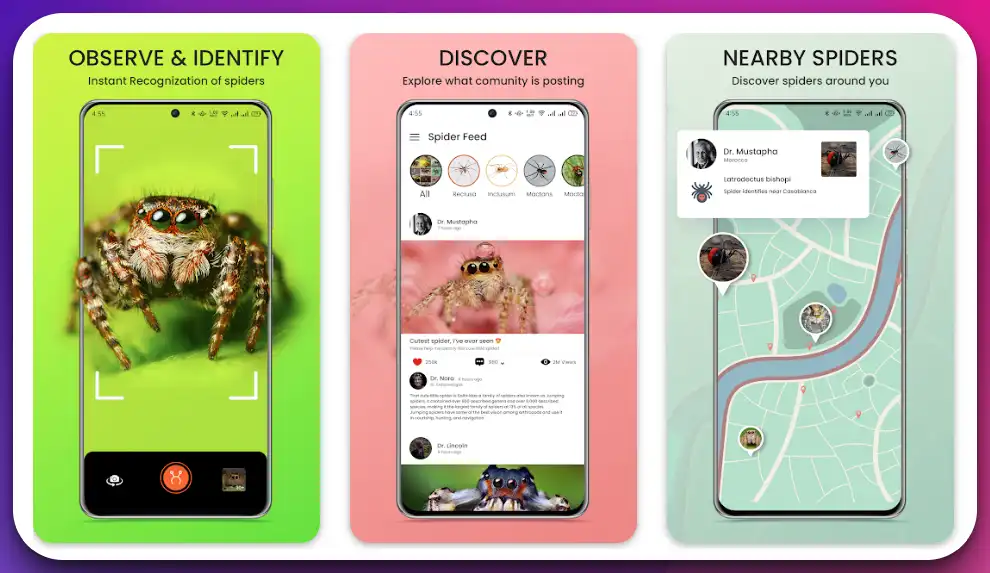
Simply capture a photo of the spider you want to identify, and let the app’s algorithms work their magic. In seconds, you’ll receive accurate identification results and detailed information about the species.
What sets Spider Identifier apart is its extensive collection of spider species. From common house spiders to rare and exotic species, the app covers a wide range, ensuring you can identify spiders you encounter in various environments.
The user-friendly interface of Spider Identifier makes it accessible to users of all levels of spider knowledge. Navigating through the app is intuitive, allowing you to explore detailed descriptions, behavioral patterns, venomous species, and more.
Don’t let the fear of spiders hold you back from appreciating their unique beauty and ecological importance. Download Spider Identifier from the Google Play Store today and embark on a fascinating journey into the world of spiders.
Let Spider Identifier be your trusted companion as you gain a deeper understanding of these fascinating arachnids and overcome spider-related anxieties.
Pros:-
Accurate Identification: Spider Identifier utilizes advanced image recognition technology and a comprehensive spider database, ensuring accurate identification results and enhancing users’ understanding of spider species.
Extensive Spider Database: The app covers a wide range of spider species, from common house spiders to rare and exotic ones, providing users with a diverse collection of spiders to identify and learn about.
User-Friendly Interface: Spider Identifier features a user-friendly interface that makes spider identification intuitive and accessible to users of all levels of spider knowledge.
Detailed Information: Each identified spider has detailed descriptions, including physical characteristics, habitat, behavior, and venomous species information, offering users in-depth insights into the spiders they encounter.
The convenience of Android Compatibility: Spider Identifier is designed for Android devices, ensuring seamless performance and compatibility for Android users.
Cons:-
Platform Limitation: Spider Identifier is currently available only for Android devices, limiting access for users outside the Android ecosystem.
Dependence on Image Quality: The accuracy of spider identification may be influenced by the quality of the captured image. Poor lighting or blurry photos might affect the app’s ability to identify spiders correctly.
Limited Offline Functionality: Spider Identifier may require an internet connection to access its spider database and perform identification, which can be a limitation in areas with poor or no network coverage.
In conclusion, Spider Identifier offers numerous advantages, including accurate identification, an extensive spider database, a user-friendly interface, and detailed spider information. However, it’s important to consider the platform limitation, dependence on image quality, and limited offline functionality when using the app.
Despite these limitations, Spider Identifier remains a valuable tool for spider enthusiasts, providing an immersive and informative experience in the world of spiders.
Download The App From the Google Play Store
8. Insect identifier by Photo Cam
Embark on an enthralling journey of discovery with Insect Identifier by Photo Cam, the ultimate app designed to unravel the secrets of the insect world. Available on the Google Play Store, Insect Identifier by Photo Cam is your gateway to understanding and identifying the fascinating creatures surrounding us.
Equipped with advanced image recognition technology, this app revolutionizes insect identification. Simply photograph the insect using your phone’s camera, and let the app’s algorithms analyze the image. You’ll receive accurate identification results in seconds, unlocking the mystery behind the insect’s species.
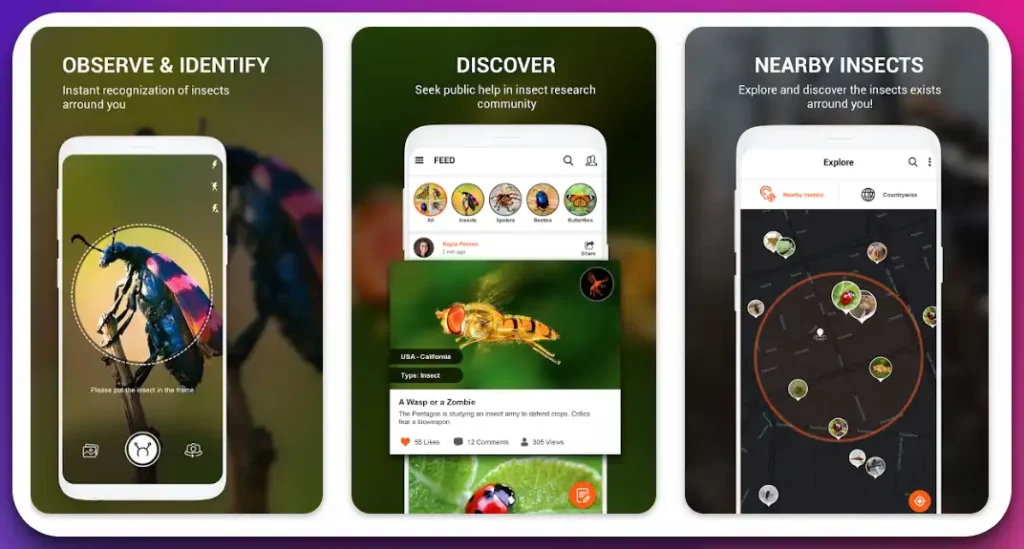
What sets Insect Identifier by Photo Cam apart is its comprehensive insect database. The app covers many insect species, from beetles to butterflies, ants to aphids, offering a wealth of knowledge and information at your fingertips.
The user-friendly interface of Insect Identifier by Photo Cam ensures a seamless and immersive experience. Navigate through the app’s intuitive layout, explore detailed insect descriptions, and discover fascinating facts about their morphology, behavior, and ecological significance.
With its convenient and precise identification capabilities, Insect Identifier by Photo Cam is a valuable tool for nature enthusiasts, researchers, and curious minds.
Download the app from the Google Play Store today and delve into the mesmerizing world of insects. Let Insect Identifier by Photo Cam be your guide as you uncover the hidden wonders of the insect realm and gain a deeper appreciation for these extraordinary creatures.
Pros:-
Accurate Identification: Insect Identifier by Photo Cam utilizes advanced image recognition technology to provide accurate identification results, enabling users to identify insects precisely.
Comprehensive Insect Database: The app offers a comprehensive database of insect species, covering many insects, from beetles to butterflies, ants to aphids, providing users with a diverse collection of species to explore.
User-Friendly Interface: Insect Identifier by Photo Cam features a user-friendly interface with intuitive navigation, making it accessible and easy for users of all levels of expertise.
Detailed Insect Information: Each identified insect has detailed descriptions, including morphology, behavior, and ecological significance, enhancing users’ understanding of the insects they encounter.
The convenience of Android Compatibility: Insect Identifier by Photo Cam is specifically designed for Android devices, ensuring seamless performance and compatibility for Android users.
Cons:-
Platform Limitation: Insect Identifier by Photo Cam is currently available only for Android devices, limiting access for users outside the Android ecosystem.
Dependence on Image Quality: The accuracy of insect identification may be influenced by the quality of the captured image. Poor lighting or blurry photos might affect the app’s ability to identify insects correctly.
Limited Offline Functionality: Insect Identifier by Photo Cam may require an internet connection to access its insect database and perform identification, which can be a limitation in areas with poor or no network coverage.
In conclusion, Insect Identifier by Photo Cam offers numerous advantages, including accurate identification, a comprehensive insect database, a user-friendly interface, and detailed information.
However, it’s important to consider the platform limitation, dependence on image quality, and limited offline functionality when using the app.
Despite these limitations, Insect Identifier by Photo Cam remains a valuable tool for insect enthusiasts and provides an immersive and informative experience with insects.
Download The App From the Google Play Store
Criteria for Selecting the Best Bug Identifier
When selecting the best bug identifier, there are several important criteria to consider. By evaluating these criteria, you can make an informed choice and find an app or tool that meets your needs.
Accuracy is crucial when it comes to bug identification. Look for an app with a high success rate in accurately identifying bugs based on images or descriptions. User reviews and ratings can provide insights into the accuracy of a bug identifier.
Ease of use is another key criterion. The best bug identifier should have a user-friendly interface and intuitive navigation. It should allow you to effortlessly capture and upload images or provide clear instructions for describing the bug’s characteristics.
A comprehensive database is essential for a bug identifier to be effective. The app should have a vast collection of insect species, including common and rare ones, to ensure accurate identification across various regions.
Geographical coverage is important, especially if you plan to use the bug identifier in different locations. Look for an app that covers a wide range of geographic regions to ensure accurate identification regardless of where you are.
Additional features can enhance your bug identification experience. Some bug identifiers provide information about the identified bug, including its behavior, habitat, and potential threats. Others offer educational resources, such as articles or videos, to further enrich your knowledge.
Compatibility with your device is crucial. Check if the bug identifier is available for your specific operating system, whether Android or iOS. Ensure the app is regularly updated to maintain compatibility with the latest devices and operating system versions.
Cost is also a consideration. While some bug identifiers are free, others may require a one-time purchase or offer premium features at a cost. Determine your budget and evaluate the value provided by the app before making a decision.
By evaluating these criteria for selecting the best bug identifier, you can find an app or tool that combines accuracy, ease of use, comprehensive database, geographical coverage, additional features, compatibility, and cost to meet your bug identification needs.
How to Choose the Right Bug Identification App for You
When selecting a bug identification app, several factors should be considered to ensure you find the perfect fit for your needs. Accuracy is paramount as you want an app that can precisely identify bugs.
Look for apps with advanced image recognition technology and a comprehensive database to enhance their identification capabilities.
Ease of use is another crucial factor. Choose an app with a user-friendly interface and intuitive navigation, allowing you to navigate the app’s features and identify bugs easily. Consider apps that provide clear instructions and a streamlined workflow.
Geographical coverage is essential, especially if you plan to use the app in different regions. Look for apps that offer a wide range of bug species and have extensive coverage of various geographical locations. This ensures that you can identify bugs specific to your area and explore the diversity of insect life wherever you go.
Additionally, personalizing your choice based on specific needs is crucial. Consider whether you require the app for educational purposes, where comprehensive information and interactive features may be important.
Features like personal species lists and social engagement with a community of bug enthusiasts may be appealing to hobbyists. Professional users may prioritize features like data export and integration with scientific databases for research purposes.
In conclusion, consider factors such as accuracy, ease of use, and geographical coverage when choosing a bug identification app. Personalize your choice based on your specific needs, whether for education, hobby, or professional use.
Considering these aspects, you can find an app that caters to your requirements and enhances your bug identification journey.
Beyond Apps: Other Digital Resources for Bug Identification
In the quest for bug identification, it’s important to explore beyond apps and tap into various other digital resources. While bug identification apps offer convenience and accuracy, there are additional resources that can further enhance your knowledge and understanding of insects.
One such resource is online bug identification platforms. These platforms often feature extensive databases, interactive tools, and expert advice.
They allow users to submit photos or descriptions of insects for identification by a community of enthusiasts and experts. The collaborative nature of these platforms fosters learning and enables users to engage with a broader network of bug enthusiasts.
Online forums and discussion boards also provide valuable insights and assistance. These platforms allow individuals to seek guidance, share observations, and participate in discussions related to bug identification. The collective wisdom and expertise of the community can help unravel complex identification challenges.
Another avenue to explore is entomology websites and online guides. These resources offer detailed information on insect taxonomy, morphology, behavior, and natural history. They often include high-quality photographs and illustrations, enabling users to visually compare and study different insect species.
Social media groups and hashtags dedicated to bug identification can also be a treasure trove of knowledge. Platforms like Facebook, Twitter, and Instagram host communities where users can share their insect photos, seek help with identification, and discuss with fellow bug enthusiasts.
In conclusion, while bug identification apps are invaluable tools, venturing into other digital resources can broaden your understanding of insects.
Online bug identification platforms, forums, entomology websites, and social media communities provide additional avenues for learning and engaging with like-minded individuals. Embrace these resources’ power and uncover the insect world’s wonders beyond apps.
📗 FAQs on the list of apps to identify bugs
What is the best bug identifier app?
The best bug identifier app is subjective and depends on individual preferences. However, popular choices include Picture Insect, Bug Identifier, and Seek by iNaturalist. These apps offer accurate identification and comprehensive databases.
Can I take a picture of a bug and tell me what it is?
Yes, bug identifier apps allow you to take a picture of a bug and provide identification based on the image. Simply upload the photo, and the app’s algorithms will analyze it to determine the bug’s species.
Can Google identify an insect from a picture?
Yes, Google Lens, a feature available on Android devices, can identify insects from pictures. Open the Google Photos app, select the image of the insect, tap the Lens icon, and Google will attempt to identify it.
How do you figure out what kind of bug this is?
To determine what kind of bug you have encountered, you can use a bug identifier app, consult field guides or entomology websites, or seek help from local insect experts, entomologists, or online insect identification communities.
Is there a free app to identify a bug?
Yes, free bug identifier apps are available for Android and iPhone devices. Popular options include Picture Insect, Bug Identifier, and Seek by iNaturalist.
How do you identify an unknown bug?
To identify an unknown bug, capture clear photos from different angles, note its behavior and habitat, and use a bug identifier app or consult resources like field guides, entomology websites, or insect identification communities.
Is there an app I can take a picture of something to identify it?
Several apps use image recognition technology to identify various objects, including bugs. Picture Insect, Bug Identifier, and Seek by iNaturalist are examples of apps that allow you to take pictures for identification.
Is there an app that identifies things by picture?
Yes, apps like Google Lens, Picture Insect, and Seek by iNaturalist use image recognition technology to identify various objects, including bugs.
Who can I send a picture of a bug to identify it?
You can send a picture of a bug to bug identifier apps, online insect identification communities, local entomologists, or pest control professionals to seek assistance in identifying the bug.
Is the Picture Insect app free?
Yes, the Picture Insect app is free on Android and iPhone devices, allowing users to identify bugs at no cost.
Is Google Lens free?
Yes, Google Lens is a free feature available on compatible Android devices. It allows users to identify objects, including bugs, using their device’s camera.
What is this bug on my wall?
To accurately identify the bug on your wall, it is recommended to capture a clear photo of the insect and use a bug identifier app or consult online resources, entomology websites, or insect identification communities for assistance.
What is the most common bug to find in houses?
Common bugs in houses include ants, spiders, cockroaches, flies, and silverfish. The prevalence of specific bugs may vary depending on geographical location and environmental factors.
How do you get rid of unknown bugs in your house?
If you have unidentified bugs in your house and want to eliminate them, it is recommended to consult with a pest control professional. They can identify the bugs and provide appropriate solutions for effective pest management.
What is a ghost bug?
The term “ghost bug” does not refer to a specific insect species. It might be a colloquial or descriptive term to describe a transparent or nearly invisible insect or an insect that is difficult to identify.
What are the little bugs that look like mosquitoes but aren’t?
Tiny bugs resembling mosquitoes could be midges or gnats. These insects are often harmless and commonly found around water bodies or in damp environments.
How do I use my iPhone camera to identify objects?
On an iPhone, you can use apps like Google Lens or specific object recognition apps by opening the camera app, focusing on the object, and tapping on the screen to trigger the object recognition feature.
Can Google identify objects from pictures?
Yes, Google Lens can identify objects from pictures. Using the Google Photos app or the Google Lens app, you can select and analyze an image to identify objects within the photo.
What is the iPhone app that identifies objects?
Google Lens is an iPhone app that can identify objects through image recognition technology. Other object recognition apps like CamFind are also available on the App Store.
Can the iPhone identify a picture?
Using apps like Google Lens or specific object recognition apps, iPhones can identify objects within pictures using image recognition technology.
Where is Google Lens on my phone?
On Android devices, Google Lens is typically integrated into the Google Assistant or Google Photos app. You can download the Google Lens app from the App Store on iPhones.
Is there a website that can identify an image?
Yes, various websites offer image recognition and identification capabilities. Google Images, TinEye, and Reverse Image Search are popular options for identifying images based on uploaded or pasted image URLs.
Can iPhones identify bugs?
While iPhones do not have built-in bug identification features, you can utilize third-party apps like Picture Insect, Bug Identifier, or Seek by iNaturalist to identify bugs using your iPhone’s camera.
What do bed bugs look like?
Bed bugs are small, reddish-brown insects that are oval-shaped and about the size of an apple seed. They have flat bodies, six legs, and antennae. Bed bug nymphs are smaller and lighter in color.
Is there a website to identify bugs?
Yes, there are several websites dedicated to bug identification. BugGuide, iNaturalist, and the Smithsonian’s National Museum of Natural History’s “What’s That Bug?” are reputable online resources for identifying bugs.
Is Google Lens available on every phone?
Google Lens is primarily available on Android devices but can also be downloaded as a standalone iPhone app. Not all Android or iPhone models can access the feature, so checking your device’s compatibility is recommended.
Does it cost money to use Google Lens?
Google Lens is available for free on compatible devices. However, data charges may apply if internet connectivity is required for certain features, such as searching for additional information online.
How do I turn on Google Lens?
On Android devices, Google Lens is typically accessible through the Google Assistant or Google Photos app. You can download the Google Lens app from the App Store and open it to use the iPhone feature.
Hidden bugs are difficult to detect due to their small size, camouflaging abilities, or preference for hiding in concealed areas such as cracks, crevices, or behind furniture and walls.
What are the white salt-like grains in my bed?
The white salt-like grains in your bed could indicate bed bug infestation. Bed bug excrement often appears as small, white, or pale yellow dots on bedding or mattress seams.
Why do I see bugs crawling on walls that aren’t there?
If you frequently perceive bugs crawling on walls that aren’t present, it could be due to an optical illusion called “pareidolia.” This phenomenon causes our brains to perceive familiar patterns or shapes, such as bugs, even when they don’t exist.
What is the most harmless bug?
Many insects are harmless and play important roles in ecosystems. Ladybugs, butterflies, and bees are often considered harmless and beneficial due to their pollination and pest control roles.
What is the least popular bug?
The least popular bug is subjective and varies based on personal preferences and cultural perceptions. However, some people may find spiders, cockroaches, or certain types of beetles less popular due to negative associations or fears.
What is the rarest bug?
There are numerous rare insects worldwide, many of which have restricted habitats or low population sizes. Examples include the Gooty sapphire tarantula, the Queen Alexandra’s birdwing butterfly, and the Lord Howe Island stick insect.
What is the number one household pest?
The number one household pest may vary depending on location, but common contenders include ants, cockroaches, rodents (such as mice and rats), and bed bugs.
What bugs are bad for your house?
Bugs that can cause damage to structures or transmit diseases are generally considered bad for your house. Termites, carpenter ants, powderpost beetles, and certain species of mosquitoes are examples of bugs that can cause problems.
What are these skinny bugs in my house?
Without further description, it is difficult to identify the specific skinny bugs you are encountering. It is best to capture clear photos of the bugs and consult a bug identifier app, entomology resources, or seek professional pest control advice for accurate identification.
Conclusion on the app to identify bugs list
In this age of digital revolution, there’s no need to let the mystery bugs continue to puzzle you.
Whether you’re an amateur naturalist, a concerned homeowner, or just someone fascinated by the tiny, intricate world of bugs, an ‘App to Identify Bugs’ can be a powerful tool in your arsenal.
We’ve explored the leading apps that make bug identification not just possible but easy and fun.
Each app has unique features, and the choice depends on your specific needs and interests. Remember, while these apps are incredibly helpful, they are tools to enhance, not replace, your sense of curiosity and respect for nature’s tiny critters.
As we embrace these technologies, we foster a deeper connection with our environment, contributing to the knowledge and conservation of the rich biodiversity around us.
So go ahead, download an app, and turn your smartphone into a portable entomologist’s lab. Happy bug hunting, and don’t forget to share your experiences and discoveries along the way!


