
























Have you ever woken up from a captivating dream only to find its details fading as the day unfolds?💁
Dreams have the extraordinary ability to inspire, guide, and provide a window into our subconscious minds.
But without a reliable way to capture and explore them, they can slip through our fingers like sand.
That’s where dream journal apps offer a digital sanctuary to record, interpret, and delve into the depths of your nocturnal adventures.
In this article, we’ll unveil a handpicked selection of the finest dream journal apps available today, designed to empower you on your journey of self-discovery.
Whether you’re a seasoned dream explorer or just embarking on this captivating path, these apps will revolutionize your engagement with your dreams.
Say goodbye to the frustration of forgetting your dreams and embrace a new world of possibilities.
Join us as we dive into the realm of dream journaling, and discover how these remarkable apps can assist you in unlocking the hidden wisdom and creativity within your dreams.
Let’s explore each app’s features, benefits, and unique qualities, ensuring you find the perfect companion to document and explore the extraordinary landscapes of your sleeping mind.
Prepare to embark on a transformative adventure through the labyrinthine corridors of your dreams, armed with cutting-edge technology and the tools to unravel their profound meanings.
Unleash the power of your dreams with these remarkable dream journal apps, and embrace a future where your subconscious becomes your greatest ally.
Best Dream Journal Apps To Capture, Reflect, and Explore
1. Oniri – Explore your dreams
Dreams have long been regarded as gateways to the subconscious mind, holding untapped potential for self-discovery and personal growth.
With the advent of technology, the art of dream journaling has been revolutionized, and at the forefront of this digital realm is Oniri. This visionary dream journal app transcends conventional boundaries.
Oniri embodies the essence of a sophisticated dream companion, providing a seamless platform to document, analyze, and uncover the hidden depths of your nocturnal visions.
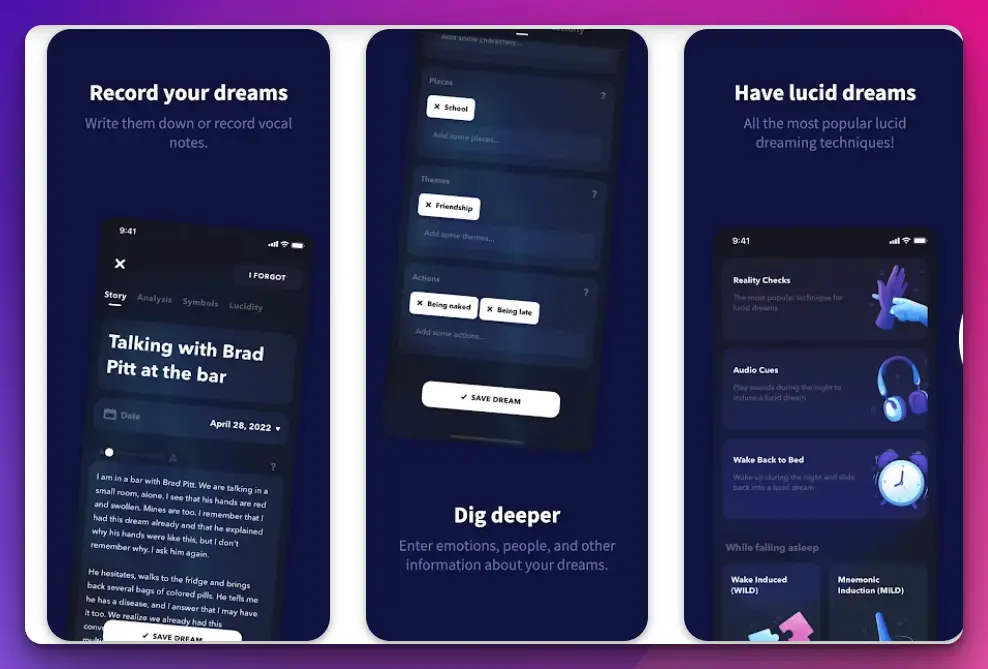
This exceptional app combines intuitive design with advanced features, catering to novice dreamers and seasoned explorers.
The allure of Oniri lies in its unparalleled user experience. Its sleek and minimalist interface allows for effortless navigation, enabling you to capture the intricate tapestry of your dreams with ease swiftly.
Seamlessly record every vivid detail, from fleeting sensations to elaborate narratives, ensuring no precious fragment slips away.
But Oniri doesn’t stop at mere documentation. Its cutting-edge algorithms employ neuro-linguistic programming to analyze your dreams, offering insightful interpretations and guiding you towards profound insights about yourself and your subconscious mind.
Embrace the power of introspection as you uncover hidden symbols, recurring themes, and cryptic messages woven within your dreams.
Moreover, Oniri fosters a sense of community among dream enthusiasts. Connect and share your experiences with like-minded individuals, gaining new perspectives and building a support network.
Exchange knowledge, techniques, and inspiring anecdotes, as dreams, take on a collective significance and become a catalyst for personal growth.
With customizable dream tags, reminder notifications, and secure cloud storage, Oniri caters to your needs, adapting to your unique dream journaling journey.
Seamlessly sync your data across multiple devices, ensuring your dreams are never out of reach.
Embrace the future of dream exploration with Oniri. Unleash the full potential of your dreams as you embark on a transformative quest of self-discovery.
Download the app today and embark on a limitless voyage through your subconscious, where the boundaries of imagination cease to exist.
Download the App From Google Play Store
Download the App From Apple App Store
2. Dream Journal & Lucid Tool
This app is one of the most popular journal apps that I know. With the help of Dream Journal, you can easily track and analyze all your dreams.
The Dream Journal app will work like a dream catcher for you. Not only dream, but you can also write down all the details of your dream.
The Dream Journal app lets you list all your dreams and their details in one place, which is very cool.
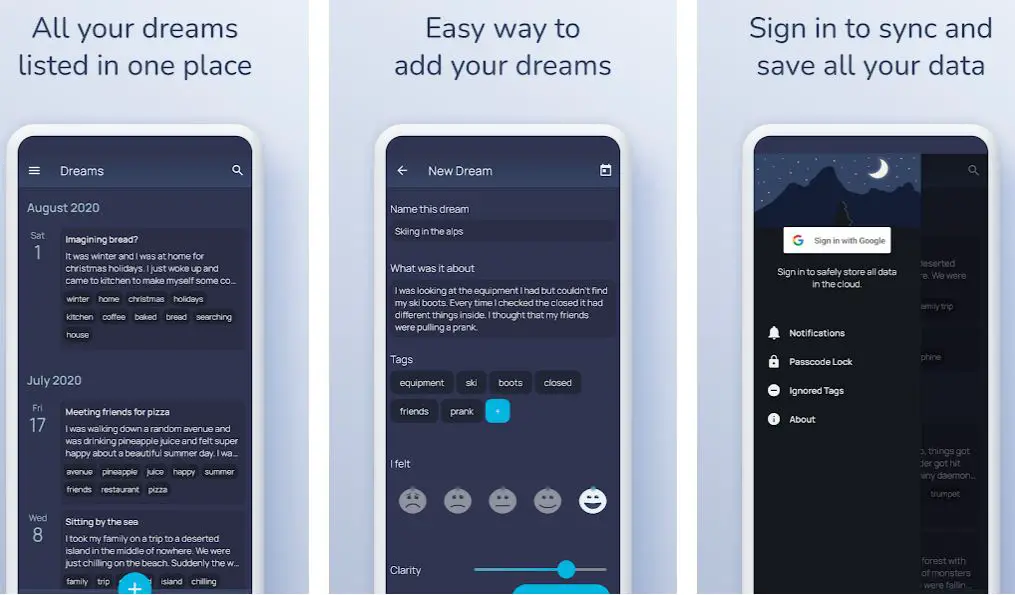
With the help of the Dream Journal app, you can save your dreams by date, which will help you to know your dream pattern.
Dream Journal features are very simple, and you can easily add your dreams to the list.
On Dream Journal, you’ll also get data sync support, which will help you save all your dream journals to the cloud.
You can access those anytime by syncing your dreams journals to the cloud.
While journaling your dreams, you can also see and analyze your dream pattern, which is very interesting. On Dream Journal, you can add tags while journaling your dreams, which will help you later track your dreams.
By adding tags to your dream journals, you can easily see what your dreams are made of. You can also secure all your dream journals with very secure passcode security.
Dream Journal provides you with the best security and keeps all your journals private from others. Dream Journal helps you note your dreams by providing daily notifications and reminders.
Catching dreams become easy with the help of the Dream Journal app. So, download Dream Journal and catch all your dreams.
Features:-
- Track and analyze your dreams
- Write down a detailed description of your dreams
- Add tags to your dreams
- Get reminders and notifications
- Sync and save to Cloud
- Passcode security
Devices: Android
Ratings: 4.4/5 On the Play Store
Download the App from Google Play Store
3. Lucid – Dream Journal 🌙
The next name on our list is Lucid. This is another great specific dream journal app that you can use. Various Lucid app features can help you create dream journals very easily.
Lucid is considered one of the best journal apps. With the help of the Lucid app, you can recall your dreams much longer and more vividly, which is amazing.
On Lucid app. You can write about dreams every morning and based on dates, which will help you to keep track of all your dreams. Lucid also provides you with daily reminders to write about your dreams.

On Lucid, you can write every detail of your dream and add tags to it for better references. These tags will later help you to know about your dreams.
This reminder feature of Lucid is very helpful; with this reminder, you never miss a dream to write.
It’s very exciting to write about your dreams, and with the help of Lucid, you can also relive all those dreams. Create dream journals day by day and create a list of all your dreams very easily.
With the help of the Lucid app, you will also be able to track, analyze and see the pattern of your dreams. On Lucid, you’ll also get the support of free cloud sync, which will help you to upload all your dream journals to cloud storage.
The best part of this cloud sync is that you can access your journals anytime.
You’ll also get an advanced reality check reminders and voice memos which will be very useful for creating quality dream journals.
Create dream journals on the Lucid app and make your dreams evergreen.
Features:-
- Create amazing video journals
- Write full descriptions and add tags
- Free Cloud Sync Support
- Advanced Reality Check Reminders
- Detailed Statistics
- Fully secure and private
Devices: Android
Ratings: 4.1/5 On the Play Store
Download the App from Google Play Store
4. Lucidity
Lucidity is a specific dream journal app that you can use. Lucidity is one of the most popular and most download among all the other apps.
With the help of the Lucidity app, you can easily save all your dreams and create a list of them. The Lucidity app allows you to create beautiful dream journals and save dreams forever.
Various dream journaling features on the Lucidity app will help you to create amazing journals.
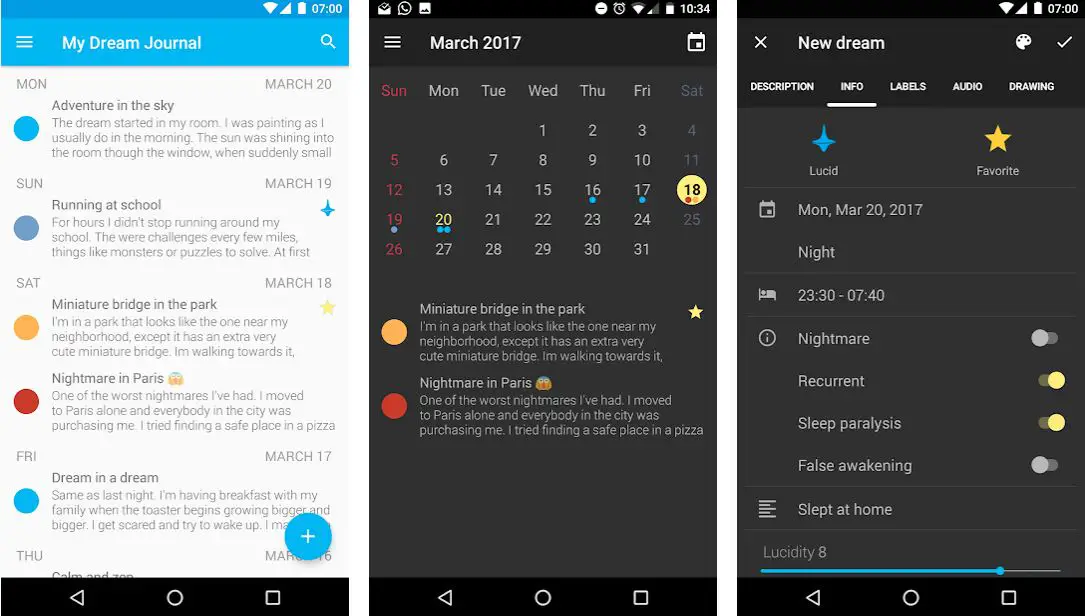
You’ll also get the support of a dream recorder on the Lucidity app, which will immensely help you to record your dreams. The UI of Lucidity is very elegant and smooth, which will ease down the journaling process.
Lucidity also maintains all the Android’s latest navigation and design guidelines, making this journal apps one of the best.
On the Lucidity app, you can add tags and levels that will help you classify your dreams. Lucidity provides you full security, and you’ll also get the support of a Password, which will add extra security to your journals.
Lucidity also provides you with morning and evening reminders to make you aware of dream journaling. With the help of the Lucidity app, you can also import and export all your dream journals to an SD card very easily which is very beneficial.
On the Lucidity app, you can also track and analyze your dreaming pattern through Lucidity statistics. With the help of the Lucidity app, you can also find recurrent dream signs and analyze the most used words.
By signing on to Lucidity premium, you’ll be able to record your complete dream via audio, which is a very interesting feature.
The biggest drawback of Lucidity is that it displays some third-party apps. But on Lucidity premium, you can remove this problem.
So, get the Lucidity app and start journaling your dreams.
Features:-
- Elegant and Smooth UI
- Various Dream Journaling features
- Create Dream Journals with Audio
- Secure with Passcode feature
- Reminders (Morning & Evening)
- Add tags and Levels
Devices: Android, IOS
Ratings: 4.1/5 On Play Store, 4+/5 On App Store
Download the App from Google Play Store
Download the App from Apple App Store
5. Dream Dictionary & Dream Journal
One of the most popular and featureful apps in Dream Dictionary. With the help of the Dream Dictionary app, you can create dream journals and document your dreams easily and smoothly.
Dream Dictionary is well known for its simplicity and all the cool features it provides. On the Dream Dictionary app, you’ll also get detailed meanings that will help you clarify your dreams.

You can use Dream Dictionary as a dream book or dream album to record and discover a dream’s meaning.
Through the Dream Dictionary app, you can also see your dream pattern and analyze it, which will help you to understand your dream.
Open Dream Dictionary every day morning and find out your dream’s meaning. On the Dream Dictionary app, you can find out the meaning of any dream, be it a lucid dream, wild dream, nightmare, or sweet dream.
With the help of the Dream Dictionary app, you can write down and create a list of your dreams and analyze it to understand the message of your subconscious mind.
On the Dream Dictionary app, you’ll also get the support of a dream calendar which will help you create a dream journal based on dates. With this dream calendar feature, you’ll never miss any dreams to write down.
With the help of the Dream Dictionary app, you can also enhance the quality of your sleep as Dream Dictionary provides you with various relaxing and peaceful sounds that will help you in peaceful, full sleep.
You can also add tags and levels to your dream that will help you to classify your dreams and analyze them in the future. There are various themes on Dream Dictionary, and you can customize your UI based on those.
You can also save all your dream journals on cloud storage and get access to them anytime you want, which is a very helpful feature.
Download Dream Dictionary & Dream Journal app and get the meanings of your dreams.
Features:-
- Dreambook and Dream Album
- Record and find out the dream’s meaning
- Analyze your dream
- Dream Dictionary
- Dream Calendar
- Relaxing and peaceful sounds
- Easy sharing
- Various themes
- Customizable UI
- Sync and backup support
- Fully secure system
Devices: Android
Ratings: 4.6/5 On the Play Store
Download the App from Google Play Store
6. Dream Journal Unlimited
Another very simple dream journal app is Dream Journal Unlimited. This app is very popular for its simple and useful features.
You’ll get so many helpful features on Dream Journal Unlimited app that will help you to create amazing journals.
The most exciting part of Dream Journal Unlimited is that you can also use it as a dream social media.
Yes, you heard it right; social media is for the dream. Isn’t it so cool? I think it’s pretty cool. Dream Journal Unlimited is the biggest online dream journal database, and your dream journaling experience will be fun.
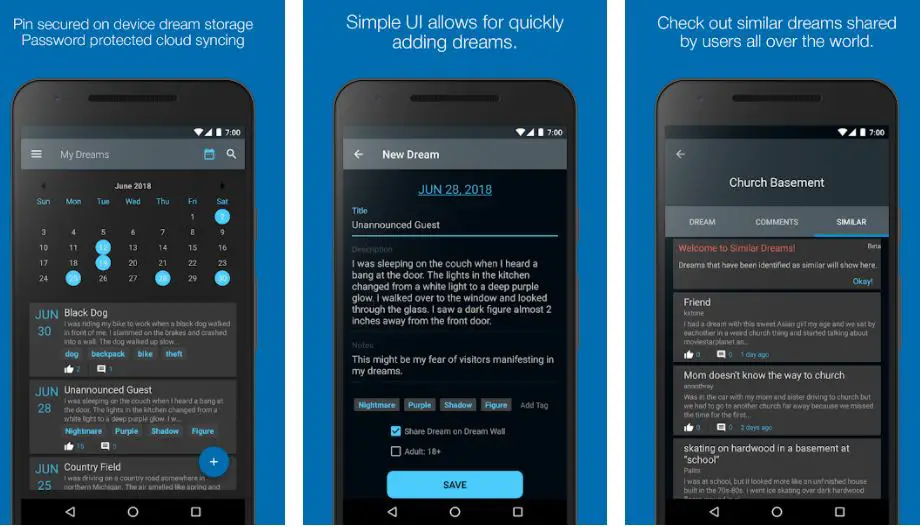
On Dream Journal Unlimited app, you can enter as many dream journals as possible as there isn’t any limit, which is very helpful.
With the help of the Dream Journal Unlimited app, you can easily write down your dreams privately, or if you want, you can also upload those dreams to the dream wall and use Dream Journal Unlimited as a social platform.
On Dream Journal Unlimited, you’ll also be able to know about the crazy dreams of other people and give your feedback. You’ll also be able to sync all your dreams to various devices and get access anytime.
On Dream Journal Unlimited app, you can secure all your dream journals by pin and passcode, providing extra security. Write down and share your dreams on the dream wall, and let others react to your interesting visuals.
You can also add tags and levels to your dream journals which will make your journals more specific. On Dream Journal Unlimited, you can also search for dreams similar to yours, which will keep you entertained.
You can also set reminders on Dream Journal Unlimited app to write down dream journals. There are many more cool features, but to experience all of those, you have to download Dream Journal Unlimited app.
Features:-
- Create secure dream journals
- Dream social media
- Sync journals to all your devices
- Secure your journals by pin and passcode
- Share your dreams to dream wall
- Give and get feedback on your dream journals
- Set reminders
Devices: Android, IOS
Ratings: 4.2/5 On Play Store, 4.3/5 On App Store
Download the App from Google Play Store
Download the App from Apple App Store
7. Luci – Intelligent Dream Journal & Lucid Guide
The next name on our list is Luci. Luci is a very popular app with many useful features that can help us create dream journals very easily.
With the help of the Luci app, you can easily record all your dreams and create beautiful dream journals. Luci is one of the best journal apps you can use.
With the help of the Luci app, you can sync all your dream journals to all of your devices and get access anytime. There are various amazing and useful features on the Luci app that will enhance the quality of your dream journals.
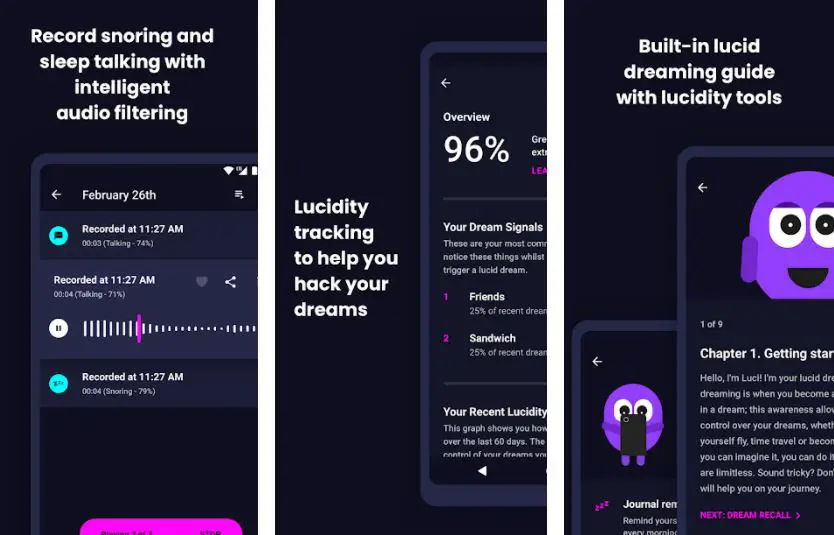
On the Luci app, you’ll get the support of snore tracking and a sleep talk recorder which will be very interesting, and by using these features, you can create fun journals.
Luci also supports intelligent audio filtering, which will help you record the right audio while snoring and sleep-talking.
Save your dreams and their concepts by writing down all the details and visuals and create perfect dream journals with the help of the Luci app.
Luci provides you with lucidity tracking, which will help you hack your dreams, which is very interesting. You’ll also find many built-in lucid dreaming guides and lucidity tools on Luci.
You don’t have to worry about privacy with Luci, as Luci provides your journals with the best possible security. The best part of Luci is that it allows you to add photos to your journals, making them more impactful.
But we must remember that Luci is a paid app, and you must pay a fee. As a paid app, Luci doesn’t contain any ads that are very helpful and make the UI cleaner.
Get this intelligent dream journal app and explore your dream journaling.
Features:-
- Smart dream journaling features and tools
- Intelligent Snore tracker and sleep-talking recorder
- Sync between devices
- Lucidity tracker
- Lucid dreaming Guide and Lucidity Tools
- Full Security and passcode support
Devices: Android
Ratings: 4.4/5 On the Play Store
Price: $3.20-$4.00 (Varies from country to country)
Download the App from Google Play Store
8. Somnio
Another great dream journaling app is Somnio. With the help of Somnio, you can easily track and analyze all your dreams.
The Somnio app lets you list all your dreams and their details in one place, which is very cool. With the help of the Somnio app, you can also track, analyze and see the pattern of your dreams.
With the help of the Somnio app, you can save your dreams by date, which will help you to know your dream pattern.

On Somnio, you’ll also get data sync support, which will help you save all your dream journals to the cloud.
You can access those anytime by syncing your dreams journals to the cloud. All the features of Somnio are very simple, and you’ll be able to add your dreams to the list easily.
On Somnio, you’ll also get the support of free cloud sync, which will help you to upload all your dream journals to cloud storage.
To create beautiful dream journals, download the Somnio app.
Features:-
- Create beautiful dream journals
- Track and analyze your dreams
- Write down a detailed description of your dreams
- Secure with Passcode feature
- Reminders (Morning & Evening
Devices: Android
Ratings: 4.1/5 On the Play Store
Download the App from Google Play Store
9. Lucidly: Dream Journal & Lucid Dreaming Helper
The next name on our list is Lucidly. On Lucidly app, you can create beautiful dream journals and save dreams forever. Various dream journaling features on the Lucidly app will help you to create amazing journals.
Lucidly is considered one of the best dream journal apps. The UI of Lucidly is very elegant and smooth, easing the journaling process.
With the help of the Lucidly app, you can recall your dreams much longer, which is amazing.
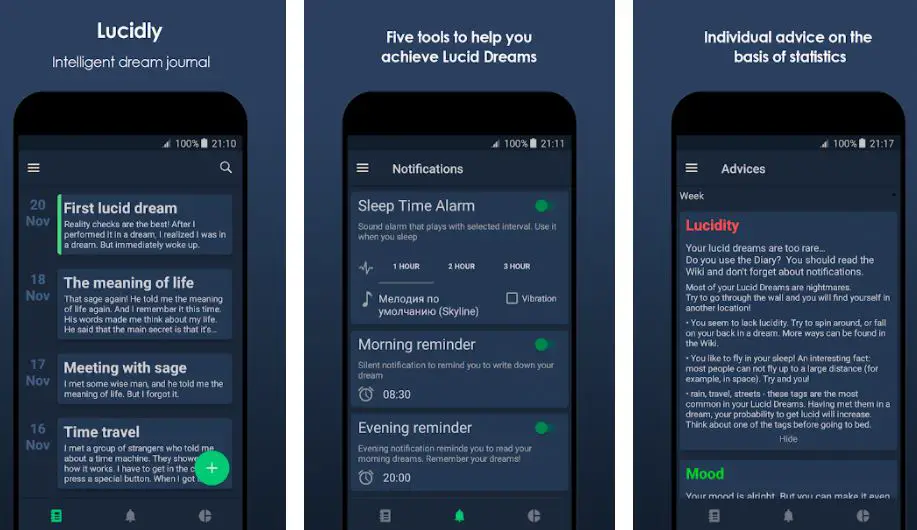
On the Lucidly app, you can add tags and levels that will help you classify your dreams. Lucidly provides you full security, and you’ll also get the support of a Password, which will add extra security to your journals.
Lucidly also provides morning and evening reminders to make you aware of dream journaling on the Lucidly app.
You can write about dreams every morning and based on dates, which will help you to keep track of all your dreams.
Lucidly also provides you with daily reminders to write about your dreams. You can write every dream detail on Lucidly and add tags to it for better references. So, get Lucidly and enjoy your dream journaling.
Features:-
- Create intelligent dream journals
- Five amazing dream journaling tools
- Get advice based on statistics
- Full security with passcode support
- Cloud storage support
- Learn interesting facts
- Get the best techniques
Devices: Android
Ratings: 3.7/5 On the Play Store
Download the App from Google Play Store
10. Dreambox. one – AI-Powered Dream Journal & Diary
The last name on our list is Dreamone. One. This app is not very popular, but its features forced me to add it to our list.
You’ll get so many cool and useful features on Dreambox that will help you to create awesome dream journals.
With the help of Dreambox, you can make beautiful and amazing dream journals and save your dreams forever.
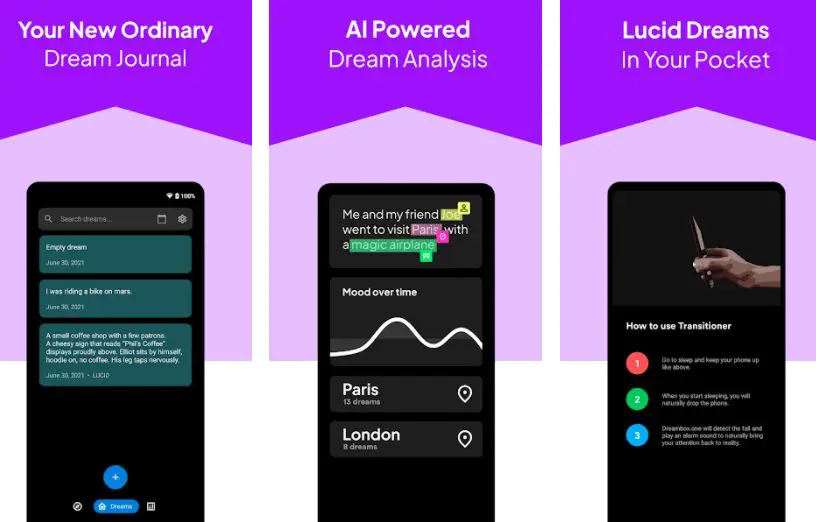
On the Dreambox app, you’ll also get the support of AI dream analysis, enabling you to analyze your dreams and their patterns.
Through Dreambox, you can carry all your lucid dreams in your pocket and get access to those anytime you want.
While writing journals on the Dreambox app, you can add keywords, concepts, sentiments, places, and people to enhance your journals’ quality.
Dreambox also provides you with the support of a dream calendar, and you can write dreams based on dates. Create amazing dream journals with AI support on the Dreambox app.
Features:-
- Smart dream journaling features and tools
- Sync journals to all your devices
- Secure your journals by pin and passcode
- AI support
- Dream calendar
- Voice notes and photos
- Figure print lock security
Devices: Android
Ratings: 4.7/5 On the Play Store
Download the App from Google Play Store
Best Dream Journal Apps for iPhone
Dreams hold a world of mystery and meaning, and capturing them is essential for unraveling their enigmatic messages.
With the best dream journal apps for iPhone, you can delve into the depths of your subconscious and gain profound insights into your inner self.
Dreamscape Pro:- Dreamscape Pro offers a sleek and intuitive interface for effortless dream recording. Its advanced features, such as voice-to-text transcription and customizable tags, make it a dreamer’s paradise.
Oneiric:- It provides a comprehensive dream symbol library and allows you to track recurring themes, empowering you to uncover the hidden meanings behind your dreams.
Somniare:- If you’re looking for a visually captivating dream journaling experience, Somniare is the perfect choice for iPhone users. Its immersive interface, complemented by stunning graphics, creates a dreamlike atmosphere for seamless dream capture.
Lucid Dreamer: With reality check reminders, dream journal integration, and sleep-tracking capabilities, it is a valuable tool on your journey to conscious dreaming.
Morpheus: It offers a wide range of features, including dream categorization, mood tracking, and data visualization, enabling you to gain deeper insights into your dream patterns.
📗FAQ’s
Is there an app to record dreams?
Yes, there isn’t one but many apps to record your dreams. These include Dream Journal & Lucid Tool, Lucid – Dream Journal, Lucidity, Dream Journal Unlimited, etc.
What is the best dream journal?
Maintaining a daily diary can be the best way to journal your dreams. However, these days, so many amazing applications are also available that enable you to journal your dreams without much problem.
You can try applications like Lucidity, Lucid – Dream Journal, Dream Journal & Lucid Tool, etc.
Can you use a phone as a dream journal?
Yes, most phones are equipped with amazing note applications, and you can use them as a dream journal.
However, there are a plethora of easily available applications like Dreambox, Somnio, Dream Journal, etc., and they are designed specifically to record your dreams.
How can I keep track of my dreams?
First thing first! You have to note whatever you have seen in the dream right after waking in the morning.
Immediacy is the most important part of dream recording. Don’t approach your dreams as things of the past, and write them in the present tense.
Try to recall the emotions you felt in the dreams instead of noting down plot points only. And there are various applications available on the App Store and Google Play store to help you effectively journal your dreams.
What is the dream journal app?
A dream journal app is designed specifically to help you journal your dream and track them to check out whether you dream in the same pattern or if there are some changes.
Various applications also offer a massive dream-sharing database, and you get the option of keeping your dreams private as well as to share with other people.
How do you start a dream diary?
You can easily start a dream diary by simply writing down what you can recall from your dreams without putting much pressure on your memory.
As you move ahead, you can start analyzing what your dreams indicate and what can be the actual meaning, especially if you dream the same things regularly.
Should I journal my nightmares?
Journaling your nightmares can be very effective, especially to help your doctor or healthcare provider, a psychologist.
They can assist you in checking out whether there are some connections between your dreams and real life.
According to multiple psychologists, there are certain links between human minds and behavior, and proper journaling, even of nightmares, can give the right insight into the mind, especially when you are sleeping.
Can a dream journal help with nightmares?
Yes, a dream journal can be very helpful, especially if you get repeated nightmares. Recording them can effectively process their content and link them to their trauma experiences.
By journaling, you can integrate them into your memory system, ultimately reducing your nightmares.
How do you make a dream notebook?
There is no clear-cut formula to making a dream notebook. It can be a simple diary, a journal, or even a notebook you use daily. However, it depends on your creativity and imagination if you want to add a bit of customization.
Canva is an excellent application. You can try to design your customizable dream notebook and adjust it the way you want.
Otherwise, you have so much scope to play with colors, pens, brushes, and other tools to design your dream diary according to your preferences.
What should I write in my dream journal?
You can start noting little things you experience in the dream in the simplest form. With every passing day, if you dream regularly, you will automatically conclude if there is any symmetry or continuation in your dreams.
If you are good at drawing or sketching, you can also try drawing images to express emotions around your dreams effectively.
What do I write in a journal?
You can write whatever you want in a journal. It can be your short-term are long-term goals. You can write two or three things you are grateful for every day.
Journaling your problems and stresses can also be very effective in tackling them. You can also write how your entire day was and eliminate the things you should have avoided in the future.
dream journal app free
Dream Diary, My Dream Log, Dream Journal, and Lucid Dreaming are the best free dream journal apps you can use to record and track your dreams.
What is the best dream journal?
Some people might prefer a physical journal that they can write in by hand, while others might prefer an electronic journal that they can access and update from their phone or computer.
Are dream journals worth it?
Some people may find that dream journals are useful tools because they allow you to record and reflect on your dreams, which may be a useful source of self-discovery and personal development.
Keeping a dream notebook can also be a creative outlet because you can create poetry, stories, and other works of art based on your dreams.
Some individuals discover that maintaining a dream journal aids them in better understanding their subconscious and in spotting themes or patterns in their dreams.
Is there an app to explain dreams?
Some popular options include Dream Dictionary, Dream Moods, and DreamsCloud.
How do I start a dream journal?
Starting a dream journal is a reasonably simple process. Here are a few steps you can follow to get started:-
1. Locate a notepad or journal that you can use to record your dreams. To capture your dreams as soon as you wake up, it can be useful to choose a notebook that is portable enough for you to carry with you at all times.
2. Try to quickly write down as much of the dream as you can recall each time you wake up from one. The characters, settings, events, feelings, and other particulars that strike you can all be considered.
3. Use your dream notebook to write down your thoughts and feelings and the details of your dreams. This can aid in your ability to comprehend your dreams’ meaning for you personally.
4. You can also use your dream diary to create stories, poems, or other artistic expressions based on your dreams and sketch or draw imagery from your dreams.
5. Review your dream notebook frequently, keeping an eye out for any trends or themes that may have developed.
This may even provide insights into your waking life and help you better comprehend your subconscious mind.
Does dream journaling improve memory?
There is some evidence to suggest that keeping a dream journal can help to improve memory.
Writing down your dreams as soon as you wake up might strengthen the memories of those dreams, increasing the likelihood that they will be kept over time.
In addition, revisiting and commenting on your dreams regularly might assist in building the links between similar memories, which in turn helps to improve memory.
The relationship between dream journaling and memory is complicated and might differ from person to person, so it’s crucial to keep that in mind.
Keeping a dream journal may help some people remember things better than others, but not everyone will experience much of a change.
It’s important to remember that a variety of other factors, like age, the quality of one’s sleep, and general health, can affect memory.
Try it out and see if it works for you if you’re interested in utilizing dream journaling to enhance memory.
Remember that it could take some time to observe any changes and that there are many other ways to sharpen your memory, such as doing memory exercises or maintaining healthy sleep habits.
Can I record my dreams?
Yes, you can record your dreams by keeping a dream journal.
Here are some tips for recording your dreams:-
1. So that you can record your dreams as soon as you wake up, keep a notepad or pencil and your dream diary close to your bed.
2. Write as many specifics about the dream’s characters, settings, and events as possible.
3. Keep a journal of your feelings and any major themes or symbols that stand out to you.
4. Each entry should be dated and contain your wake-up time.
5. Grammar and spelling are unimportant. Just concentrate on getting the data down on paper.
How can I find out what my dreams mean?
Dream interpretation can be made in various ways, and different approaches are effective for various individuals.
You might attempt the following methods to determine the significance of your dreams:-
Keep a dream journal: Reflecting on your dreams and looking for patterns or themes might be aided by writing them down.
Look for symbols:- In dreams, symbols are frequently used to represent different things. For instance, a house could stand in for your sense of self, and water could stand in for feelings.
Consider your waking life: Give some thought to the situations, feelings, and people affecting your dreams.
Consider your emotions: Consider how you felt in your dream and when you woke up. This may provide you with hints as to your dream’s significance.
Try dream interpretation techniques:- such as Freud’s theory of dream interpretation or the idea of “amplification” in Jungian analysis. You can test these strategies or look for others who speak to you.
Can blind people dream?
Yes, blind people can dream. The rapid eye movement (REM) stage of sleep is when dreams typically occur.
Dreams are a normal component of the sleeping process. Dreams are believed to be more closely linked to brain activity during sleep than visual experiences.
Research has shown that blind persons tend to dream more frequently, more vividly, and possibly more frequently use other senses like hearing, touch, and smell.
Blind persons can still experience the feelings, ideas, and experiences that come with dreaming, even though they may not be able to see images in their dreams.
So even if someone is blind, they can still have vivid and insightful dreams.
How many dreams does a person have a night?
Most people have several dreams each night, although they may not always remember them.
The average person experiences four to six dreams per night. However, this number can change depending on various variables, including how well a person can recall their dreams and the amount of time spent in various stages of sleep.
Dreams happen while a person is in the rapid eye movement (REM) stage of sleep, which usually accounts for 20–25% of an adult’s total sleep time.
People tend to have more vivid and memorable dreams at this time since the brain is quite active.
Conclusion
In conclusion, dream journal apps have revolutionized how we capture and explore the depths of our subconscious minds.
With their user-friendly interfaces, advanced features, and convenient accessibility, these apps have become indispensable tools for dreamers and those seeking personal growth.
By using a dream journal app, you can effortlessly record your dreams, analyze patterns, and gain valuable insights into your psyche.
The ability to attach images, voice recordings, and tags to your entries further enhances the depth and clarity of your dream journaling experience.
With just a few taps on your smartphone, you can document your dreams anytime, anywhere.
Additionally, these apps often offer robust analysis tools that help you understand recurring symbols, themes, and emotions in your dreams.
These insights can lead to a better understanding of your inner self, promote self-reflection, and even inspire creative ideas.
Moreover, dream journal apps foster a sense of community among users. Many apps allow you to connect with fellow dreamers, share experiences, and seek advice.
This sense of camaraderie and support adds another layer of enrichment to your dream exploration journey.
Whether you’re a seasoned dream explorer or just starting out on your journey to uncover the mysteries of your mind, dream journal apps provide a valuable platform to document, analyze, and learn from your dreams.
So why wait? Download a dream journal app today and embark on an exciting adventure into the realm of your subconscious.
Remember, dreams hold the key to unlocking your deepest desires, fears, and aspirations.
With the power of dream journal apps at your fingertips, you can transform your nocturnal adventures into a wellspring of personal growth, creativity, and self-discovery.
Start capturing your dreams and embark on a transformative journey today!


