
























We understand you’re a passionate gamer or hobbyist who loves customizing miniatures for your tabletop adventures. Hero Forge has been a go-to platform for many, offering various customization options.
However, you might feel limited by its offerings or simply looking for something different. The long wait times, occasional lack of details in models, and pricing might discourage you from exploring your full potential in 3D-printed miniatures.
What if you could unlock a world of limitless possibilities, where every detail of your custom miniature is in your hands?🤷♂️
What if there were options that better catered to your creativity, budget, and timelines? Imagine the frustration you’d save and the satisfaction you’d feel, breathing life into your tabletop games with miniatures that perfectly capture your vision.
That’s where we come in. Our comprehensive list of Hero Forge alternatives promises to provide you with the freedom and flexibility you need to create your masterpieces. We’ve scoured the market for the best platforms offering detailed, affordable, and quick 3D-printed miniature customization options.
Whether you’re a Dungeons & Dragons enthusiast or a Warhammer aficionado, you’re bound to find an alternative that’s just right for you.
Let’s embark on this journey of discovery together, shall we?
Understanding The Need for Hero Forge Alternatives
In the ever-evolving realm of tabletop gaming, Hero Forge has undoubtedly established itself as a prominent name. Players can bring their unique characters to life in intricate detail as a customizable miniature service.
However, despite its popularity, discerning gamers increasingly recognize the need for Hero Forge alternatives that offer a fresh and diverse experience.
One key aspect driving the demand for alternatives is the inherent limitation of any single platform. While Hero Forge provides an extensive library of options, it may not cater to every player’s tastes and preferences.
Variety is the spice that enriches the gaming experience, enabling players to explore uncharted territories and unleash their creativity. By seeking alternatives, gamers can break free from the confines of uniformity and discover new avenues for self-expression.
Furthermore, cost considerations play a significant role in the quest for alternatives. While Hero Forge delivers exceptional quality, its pricing structure may not be affordable for all players.
Exploring alternative options allows gamers to find more budget-friendly solutions without compromising on the quality or aesthetics of their miniatures. This opens doors for those wanting to embark on thrilling adventures without burning a hole in their pockets.
Another factor influencing the pursuit of alternatives is the desire for unique and unconventional designs. Despite its extensive customization options, Hero Forge is bound by the limitations of its pre-existing catalog.
Adventurous gamers, brimming with creativity, seek fresh platforms that offer a wider array of imaginative possibilities. By doing so, they can push the boundaries of traditional character creation and immerse themselves in a world of limitless imagination.
In conclusion, the demand for Hero Forge alternatives stems from the inherent human desire for diversity, affordability, and creativity. Gaming enthusiasts yearn for platforms that provide an extensive range of options, catering to various budget constraints, and allow the exploration of uncharted creative realms.
By embracing alternatives, gamers can unleash their imagination and breathe life into their characters like never before.
Best Hero Forge Alternatives To Craft Your Epic Heroes
1. Eldritch Foundry
Eldritch Foundry emerges as an exceptional alternative to the renowned Hero Forge in the vast realm of miniature customization. With its unparalleled features and remarkable attention to detail, Eldritch Foundry is the best Hero Forge alternative for discerning tabletop enthusiasts.
One distinguishing factor that sets Eldritch Foundry apart is its unrivaled level of customization. The platform offers many options, allowing players to create unique and distinctive miniatures.
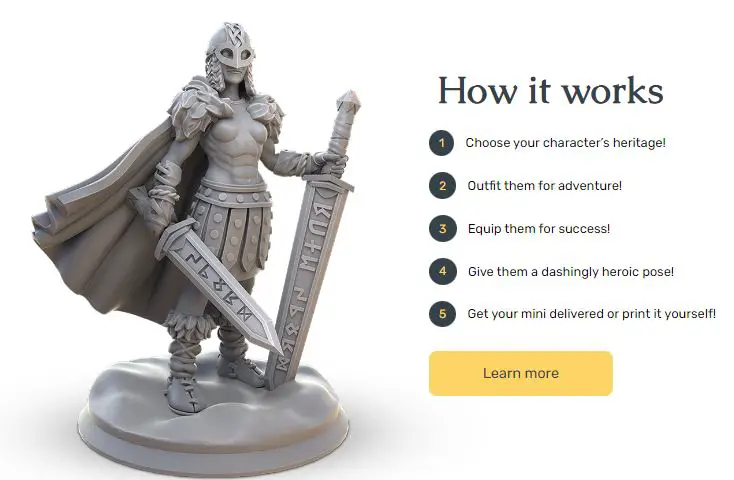
From intricate facial expressions to finely crafted weapons, Eldritch Foundry provides an extensive library of customizable features that cater to even the most discerning gamer’s preferences. This level of customization empowers players to bring their characters to life in ways previously unimaginable.
Moreover, Eldritch Foundry’s user-friendly interface ensures a seamless and enjoyable experience for all users. Navigating through the platform is intuitive, allowing players to design and personalize their miniatures effortlessly.
The smooth and streamlined process ensures that players can focus on the creative aspects without the frustration of a cumbersome interface. Eldritch Foundry’s commitment to user experience truly elevates it to the best Hero Forge alternative.
In terms of quality and craftsmanship, Eldritch Foundry surpasses expectations. The miniatures produced by the platform are meticulously crafted with utmost precision and attention to detail.
The fine textures, intricate designs, and vibrant colors result in miniatures that are truly works of art. Each piece exudes a sense of authenticity and craftsmanship that captures the essence of its character.
Lastly, Eldritch Foundry offers a competitive pricing structure, making it an attractive choice for budget-conscious gamers and those seeking premium options.
The platform provides a range of price points, allowing players to select options that suit their needs and financial constraints. This accessibility ensures gamers of all backgrounds can customize miniatures without compromising quality.
In conclusion, Eldritch Foundry is the ultimate Hero Forge alternative, offering unparalleled customization, a user-friendly interface, exceptional craftsmanship, and a diverse pricing structure.
As tabletop gaming enthusiasts seek a platform that allows them to breathe life into their unique characters, Eldritch Foundry stands tall, providing a gateway to a realm of limitless imagination and artistic expression.
Pros:-
Extensive Customization: Eldritch Foundry offers vast customization options, allowing players to create unique and distinctive miniatures that perfectly represent their characters. The platform provides an extensive library of customizable features, from facial expressions to equipment.
User-Friendly Interface: Navigating through Eldritch Foundry is intuitive and user-friendly. The platform ensures a seamless and enjoyable experience, enabling players to design and personalize their miniatures without the frustration of a complex interface.
High-Quality Craftsmanship: Eldritch Foundry places great emphasis on quality and craftsmanship. The miniatures produced are meticulously crafted with attention to detail, resulting in visually stunning pieces that capture the essence of the characters they represent. The fine textures, intricate designs, and vibrant colors contribute to a sense of authenticity.
Competitive Pricing: Eldritch Foundry offers a diverse pricing structure, catering to budget-conscious gamers and those seeking premium options. The platform provides a range of price points, ensuring accessibility for gamers with varying financial constraints.
Cons:-
Limited Catalog: While Eldritch Foundry provides extensive customization options, its catalog may not be as extensive as Hero Forge’s. Players seeking specific themes or niche options might find the selection somewhat limited.
Learning Curve: Despite its user-friendly interface, Eldritch Foundry may still require some time to familiarize oneself with its features and customization tools. Players new to the platform may need to invest some effort to harness its capabilities fully.
Brand Recognition: Hero Forge has established itself as a prominent name in the industry. While Eldritch Foundry offers a compelling alternative, it may not enjoy the same brand recognition and reputation as Hero Forge.
Community and Integration: Hero Forge has a large and established community, with many users and resources available. Eldritch Foundry, a relatively newer platform, might not have the same level of community and integration within the gaming community.
Eldritch Foundry is a strong Hero Forge alternative, providing extensive customization options, a user-friendly interface, high-quality craftsmanship, and competitive pricing. However, players must consider their specific needs and preferences when choosing between the two platforms.
Hero Forge vs eldritch foundry:-
Both Hero Forge and Eldritch Foundry offer highly customizable 3D-printed miniatures with great customer service and satisfaction guarantees.
However, Hero Forge is more established and offers a wider range of materials and pricing options. At the same time, Eldritch Foundry has a more intuitive interface and offers free shipping within the US.
Here’s a table comparing Hero Forge and Eldritch Foundry:-
| Criteria | Hero Forge | Eldritch Foundry |
|---|---|---|
| Customization | Extremely customizable with a wide range of options for physical appearance, pose, and equipment | Highly customizable with a variety of options for physical appearance, pose, and equipment |
| Material | It can be 3D printed in a variety of materials, including plastic, resin, and metal | Can be 3D printed in high-quality resin only |
| Cost | Prices range from $9.99 to $224.99 depending on size, material, and level of detail. | Prices range from $34.99 to $99.99 depending on size and level of detail |
| Shipping | Ships worldwide with varying shipping times and costs | Ships worldwide with free shipping in the US, with international shipping rates calculated at checkout |
| User Interface | Easy-to-use web interface with a drag-and-drop design feature | Intuitive web interface with a variety of customization options |
| Community | Large community with a wide range of user-generated designs available to browse and purchase | Smaller community with a limited selection of user-generated designs available to browse and purchase |
| Customer Service | Responsive customer service with a satisfaction guarantee | Responsive customer service with a satisfaction guarantee |
2. DesktopHero
In the vast realm of miniature customization, DesktopHero emerges as a compelling alternative to the well-known Hero Forge.
With its unique features and innovative approach, DesktopHero stands out as a worthy Hero Forge alternative for discerning tabletop gaming enthusiasts.
One distinguishing factor that sets DesktopHero apart is its open-source nature. Unlike other platforms, DesktopHero empowers users to customize their miniatures and create and share their designs.
This level of freedom and creativity allows players to forge their unique characters from scratch, making DesktopHero an enticing option for those seeking unparalleled customization.
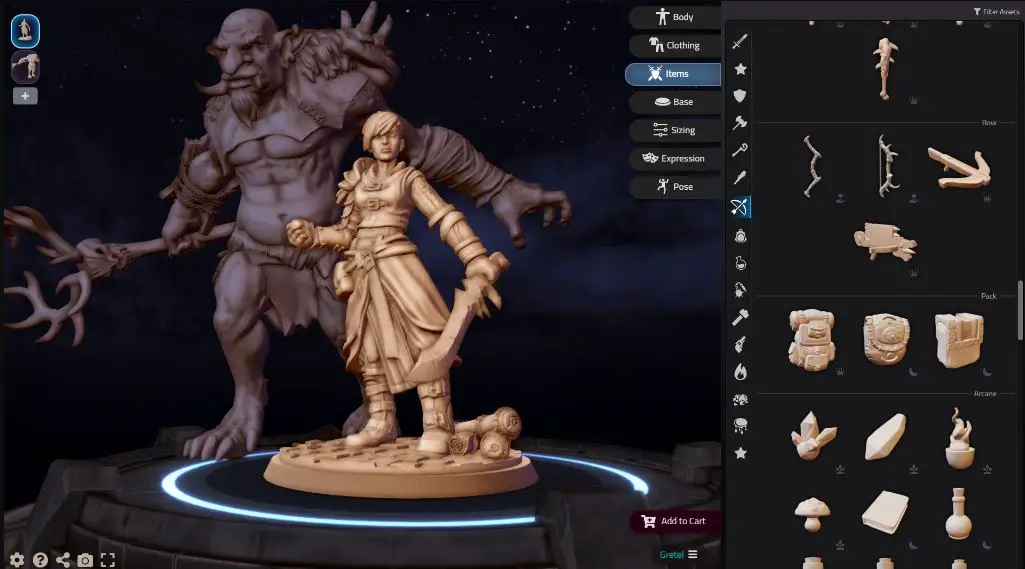
Furthermore, DesktopHero offers a cost-effective solution for gamers. While Hero Forge has gained popularity for its high-quality miniatures, it may not always match every player’s budget.
DesktopHero fills this void by providing a more affordable alternative without compromising quality. This accessibility allows aspiring adventurers to bring their characters to life without breaking the bank.
DesktopHero also boasts a user-friendly interface that simplifies the miniature creation process. The platform’s intuitive tools and streamlined workflow enable beginners and experienced designers to navigate the customization options easily.
Whether adjusting facial features, selecting weapons, or tweaking intricate details, DesktopHero ensures a smooth and enjoyable user experience.
One noteworthy aspect of DesktopHero is its 3D printing compatibility. The platform generates printable files, allowing players to bring their custom-designed miniatures to life through the magic of 3D printing technology. This integration of digital customization with tangible results adds an extra layer of immersion and personalization to the gaming experience.
In conclusion, DesktopHero presents itself as a compelling Hero Forge alternative with its open-source nature, cost-effectiveness, user-friendly interface, and compatibility with 3D printing technology.
For gamers seeking unrivaled customization options and the freedom to forge their unique characters, DesktopHero is a beacon of creativity and accessibility in miniature customization.
Pros:-
Open-Source Customization: DesktopHero allows users to create and share their miniature designs, providing unparalleled freedom and creativity in character customization. Players can forge unique characters from scratch, adding a personal touch to their gaming experience.
Affordability: DesktopHero offers a cost-effective solution for gamers who are mindful of their budget. It provides a more affordable alternative to Hero Forge without compromising on the quality of the miniatures. This accessibility allows a wider range of players to engage in miniature customization.
User-Friendly Interface: DesktopHero features a user-friendly interface that simplifies the miniature creation process. The platform’s intuitive tools and streamlined workflow make it easy for beginners and experienced designers to navigate the customization options and bring their characters to life.
3D Printing Compatibility: DesktopHero generates printable files, allowing players to bring their custom-designed miniatures into the physical world using 3D printing technology. This integration of digital customization with tangible results adds an extra layer of immersion and tangibility to the gaming experience.
Cons:-
Limited Catalog: Unlike Hero Forge, which offers an extensive pre-existing catalog of options, DesktopHero relies heavily on user-generated content. While this provides a high level of customization, it may result in a more limited selection of designs and themes than Hero Forge.
Community Size: DesktopHero, a relatively newer platform, may have a smaller community than Hero Forge. This might affect the availability of resources, tutorials, and community support for users who seek assistance or inspiration.
Learning Curve: While DesktopHero’s interface is user-friendly, users new to the platform may need to learn the intricacies of the customization tools and design process. This learning curve could be a hurdle for those seeking a quick and straightforward miniature creation experience.
Brand Recognition: Hero Forge has established itself as a prominent name in the industry, enjoying a strong reputation and recognition. DesktopHero, being a lesser-known alternative, might not have the same level of brand recognition and trust from the gaming community.
Overall, DesktopHero presents an enticing alternative to Hero Forge with its open-source customization, affordability, user-friendly interface, and compatibility with 3D printing. However, when deciding, potential users should consider the platform’s limited catalog, smaller community, learning curve, and brand recognition.
Desktop Hero vs Hero Forge:-
Both Desktop Hero and Hero Forge excel in their ways. Hero Forge offers an extensive pre-existing catalog and a robust community, while Desktop Hero emphasizes open-source customization and affordability.
Consider your preferences for customization options, user experience, pricing, community support, and integration with 3D printing when choosing between the two platforms.
Ultimately, the choice boils down to your specific needs and desires in the world of customizable miniatures.
| Features | Desktop Hero | Hero Forge |
|---|---|---|
| Customization | Open-source customization with user-generated designs. | Extensive pre-existing catalog of customization options. |
| User Experience | User-friendly interface with intuitive tools. | User-friendly interface with a wide range of customization options. |
| Pricing | More affordable alternative with varying pricing options. | Tiered pricing system with options for different quality levels. |
| Community | Active community of creators sharing designs and resources. | Large and established community with ample resources and support. |
| Integration | Generates printable files for 3D printing compatibility. | Offers 3D printing services for ordered miniatures. |
3. Hero Mini Maker
In the world of customizable miniatures, Hero Mini Maker emerges as an intriguing alternative to the renowned Hero Forge.
With its distinctive features and innovative approach, Hero Mini Maker offers a fresh and exciting experience for tabletop gaming enthusiasts seeking Hero Forge alternatives.
One notable aspect that sets Hero Mini Maker apart is its intuitive interface. Navigating the platform is a seamless experience, with user-friendly tools and a streamlined workflow. This accessibility makes it easy for beginners and experienced designers to bring their characters to life with a few simple clicks.
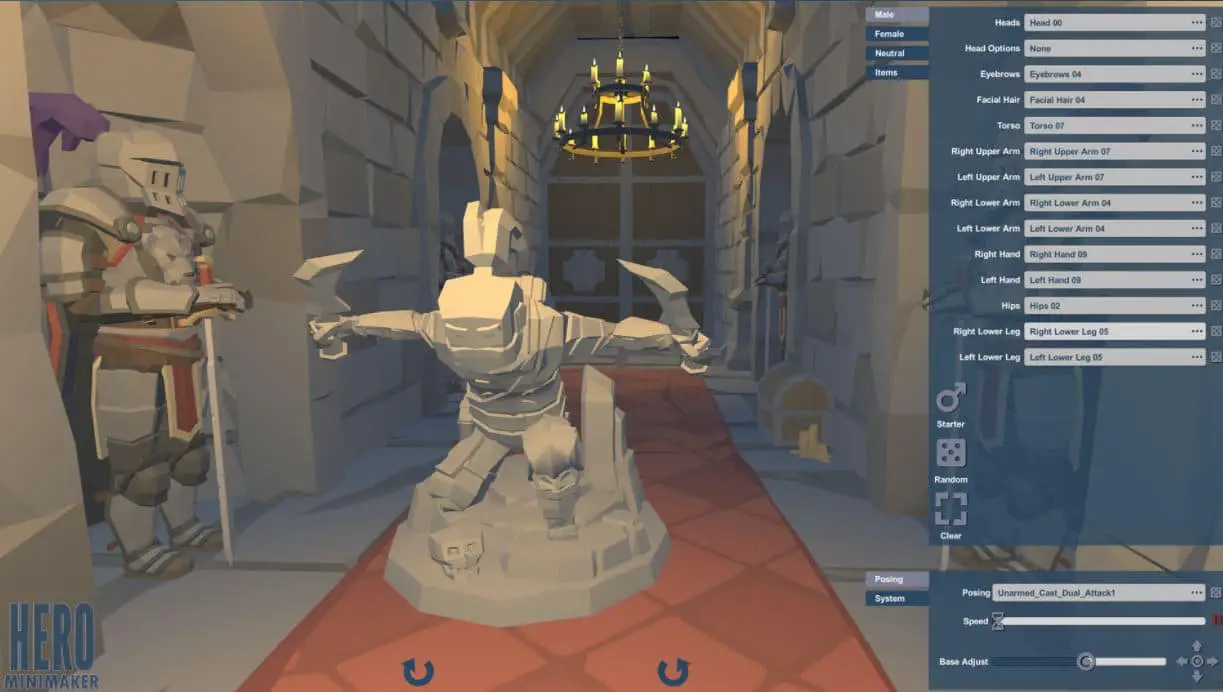
Hero Mini Maker stands out with its creative approach to customization. The platform offers various unique options, allowing players to design miniatures with extraordinary traits and features.
From exotic armor and fantastical weapons to intricate facial expressions and distinctive poses, Hero Mini Maker provides an extensive array of choices that cater to the most imaginative players.
Moreover, Hero Mini Maker embraces the spirit of collaboration. The platform fosters a community-driven environment where users can share their creations, collaborate on designs, and inspire one another. This vibrant community of creators contributes to a dynamic ecosystem, fueling the growth of unique and awe-inspiring miniatures.
In terms of affordability, Hero Mini Maker offers a cost-effective solution for gamers. The platform provides various pricing options, ensuring players with different budget constraints can access the toolset and unleash their creativity without compromising quality.
While Hero Forge has established itself as a leading player in the industry, Hero Mini Maker presents a refreshing alternative. Its intuitive interface, creative customization options, collaborative community, and affordability make it attractive for those seeking a unique and engaging experience in miniature creation.
In conclusion, Hero Mini Maker is a captivating Hero Forge alternative that offers an intuitive interface, creative customization options, a collaborative community, and budget-friendly pricing.
As the gaming community seeks new avenues for character expression, Hero Mini Maker is a beacon of innovation, inviting players to embark on extraordinary adventures with their uniquely crafted miniatures.

Pros:-
Intuitive Interface: Hero Mini Maker boasts an intuitive interface that makes the miniature customization process easy and enjoyable for users. The user-friendly tools and streamlined workflow ensure a seamless experience.
Creative Customization Options: The platform offers a wide range of unique options for customization, allowing players to design miniatures with extraordinary traits and features. From exotic armor and fantastical weapons to intricate facial expressions and distinctive poses, Hero Mini Maker provides ample choices to cater to imaginative players.
Collaborative Community: Hero Mini Maker fosters a vibrant and collaborative community of creators. Users can share their designs, collaborate on projects, and draw inspiration from others. This sense of community contributes to a dynamic and supportive environment.
Affordability: Hero Mini Maker provides various pricing options, making it an affordable alternative for gamers with different budget constraints. The platform ensures players can access its toolset and unleash creativity without breaking the bank.
Cons:-
Limited Catalog: Compared to Hero Forge, which offers an extensive pre-existing catalog, Hero Mini Maker might have a more limited selection of customization options. Players seeking specific themes or niche designs might find the choices somewhat restricted.
Brand Recognition: Hero Mini Maker may not enjoy the same level of brand recognition and reputation as Hero Forge, which has established itself as a prominent name in the industry. This might affect user confidence and familiarity with the platform.
Platform Maturity: As a potentially newer platform, Hero Mini Maker might still be evolving and refining its features. Users might encounter occasional bugs or limitations as the platform develops and expands its offerings.
Community Size: While Hero Mini Maker fosters a collaborative community, it might not have the same scale and resources as the well-established community surrounding Hero Forge. Users seeking extensive community support, resources, and inspiration might find it relatively smaller in comparison.
Overall, Hero Mini Maker offers an intuitive interface, creative customization options, a collaborative community, and affordability as a Hero Forge alternative. However, when deciding, users should consider the platform’s limited catalog, brand recognition, platform maturity, and community size.
Hero Forge vs Hero Mini Maker:-
both Hero Forge and Hero Mini Maker are exceptional platforms for customizable miniatures, each with strengths.
Hero Forge excels in its extensive pre-existing catalog and established community, while Hero Mini Maker shines in its open-ended customization options and collaborative environment.
Consider your preferences for customization, user experience, quality, community support, and pricing when choosing between these powerhouses. Ultimately, the decision rests upon your creative vision and the experience you seek in bringing your characters to life.
| Features | Hero Forge | Hero Mini Maker |
|---|---|---|
| Customization | Extensive pre-existing catalog of options. | Open-ended customization with user-generated designs. |
| User Experience | Seamless and intuitive interface. | Streamlined interface with user-friendly features. |
| Quality and Detail | Exceptional quality and attention to detail. | Meticulous craftsmanship and attention to detail. |
| Community Support | Large and established community with resources and forums. | Collaborative environment for users to share designs. |
| Pricing | Tiered pricing system with options for different quality levels. | Flexible pricing options to suit various budgets. |
4. Anvl
When it comes to unleashing creativity and customization in the realm of miniature figures, Anvl emerges as a compelling alternative to the well-established Hero Forge.
With its unique features and innovative approach, Anvl offers a fresh and exciting experience for tabletop gaming enthusiasts seeking Hero Forge alternatives.
Anvl prides itself on its cutting-edge technology and advanced customization options. The platform provides robust tools and features that allow users to create highly detailed and personalized miniatures.
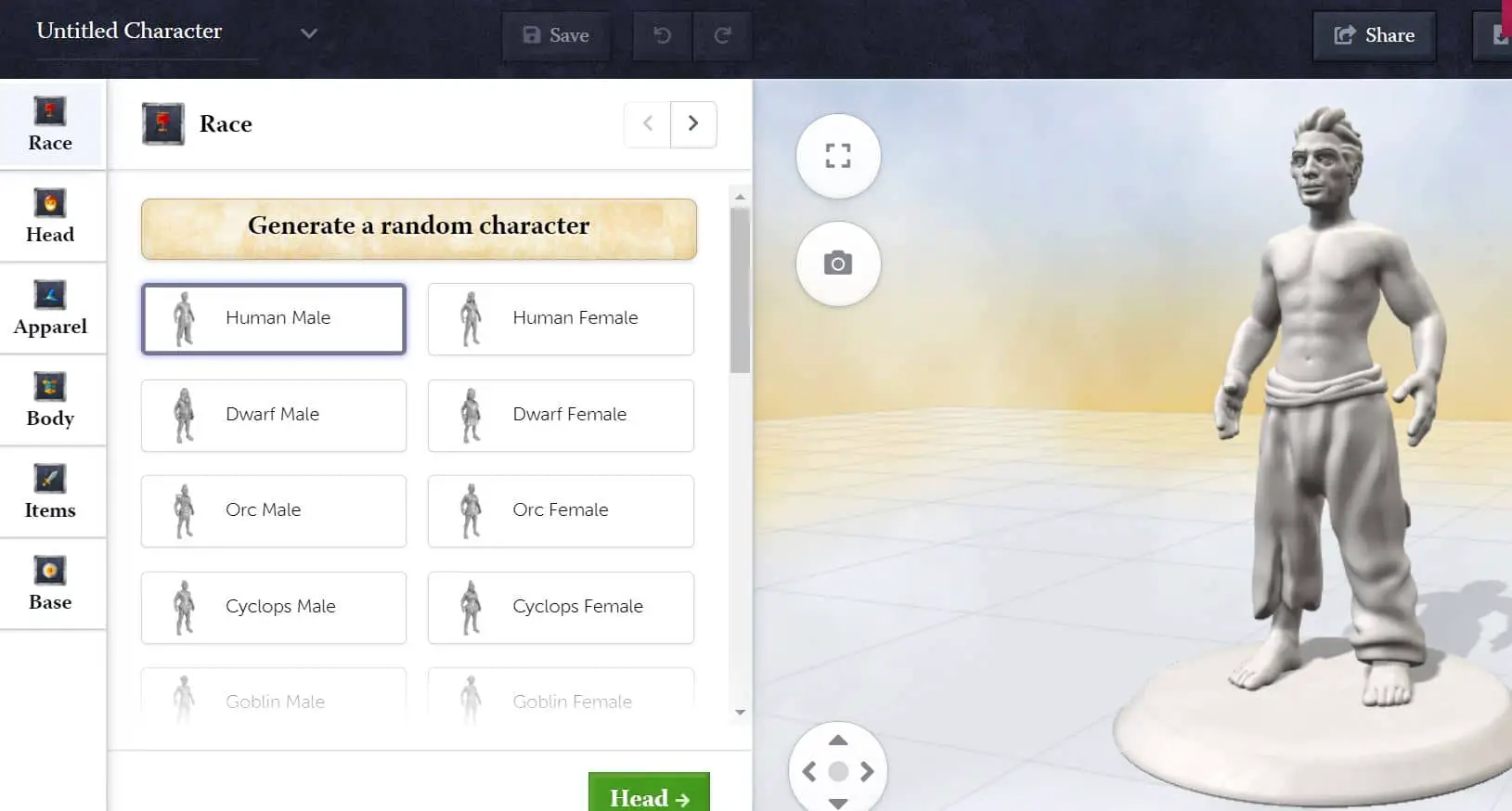
From selecting intricate facial expressions and dynamic poses to customizing every aspect of the character’s equipment and accessories, Anvl empowers gamers to bring their unique visions to life.
What sets Anvl apart is its focus on hyper-realism. The platform leverages advanced digital sculpting techniques and photorealistic rendering to produce visually stunning and lifelike miniatures.
The level of detail and realism Anvl achieves is impressive, enabling gamers to immerse themselves in a world where their characters come to life with astonishing accuracy.
Anvl also emphasizes collaboration and community engagement. The platform encourages users to share their creations, exchange ideas, and collaborate on projects. This fosters a vibrant and supportive community of like-minded individuals who inspire and push each other to new heights of creativity.
In terms of convenience, Anvl offers a seamless online experience. The platform allows users to easily design and order their custom miniatures, eliminating the need for complex software or external services. With Anvl, gamers can effortlessly transform their ideas into tangible, high-quality miniatures ready for the tabletop.
Overall, Anvl presents itself as a compelling Hero Forge alternative with its advanced customization options, focus on hyper-realism, collaborative community, and convenient online experience.
As tabletop gaming enthusiasts seek to bring their unique characters to life with unprecedented detail and creativity, Anvl is a gateway to a realm where imagination knows no bounds.
Pros:-
Advanced Customization Options: Anvl offers robust tools and features that allow for highly detailed and personalized miniature customization. Users can choose intricate facial expressions, dynamic poses and customize every aspect of the character’s equipment and accessories.
Hyper-Realism: Anvl leverages cutting-edge technology to achieve hyper-realistic miniatures. The platform utilizes advanced digital sculpting techniques and photorealistic rendering, resulting in visually stunning and lifelike figures that enhance immersion and gameplay.
Collaborative Community: Anvl fosters a vibrant and supportive community where users can share their creations, exchange ideas, and collaborate on projects. This sense of community engagement encourages inspiration and the exploration of new creative possibilities.
Convenient Online Experience: Anvl provides a seamless online experience, allowing users to easily design and order custom miniatures. The platform eliminates the need for complex software or external services, streamlining the process and enhancing convenience.
Cons:-
Limited Brand Recognition: Compared to Hero Forge, which has established itself as a well-known brand in the industry, Anvl may have limited brand recognition. This may cause potential users to be less familiar with or hesitant to try the platform.
Availability of Features: Anvl’s feature set may evolve and expand as a newer platform. Users may encounter limitations or the absence of certain features available in more established alternatives.
Pricing: Anvl’s pricing structure may vary and be higher than other alternatives. Users should consider their budget and compare pricing options to ensure it aligns with their financial considerations.
Catalog Size: Anvl’s catalog of pre-existing options may be smaller compared to alternatives like Hero Forge. This could limit the selection for users seeking specific themes or niche designs.
Anvl offers advanced customization options, hyper-realistic miniatures, a collaborative community, and a convenient online experience. However, users should consider the platform’s limited brand recognition, evolving feature set, pricing, and catalog size when evaluating it as a Hero Forge alternative.
Hero Forge vs Anvl:-
Both Hero Forge and Anvl are formidable contenders in customizable miniatures. Hero Forge shines with its extensive catalog, established community, and attention to detail.
Anvl, on the other hand, offers advanced customization tools, hyper-realism, and an emphasis on user-friendly experiences. When choosing between these two titans, consider your preferences for customization options, quality, user experience, community support, and pricing.
Ultimately, the choice rests upon your creative vision and the experience you seek in bringing your characters to life.
| Features | Hero Forge | Anvl |
|---|---|---|
| Customization | Extensive catalog of options for races, classes, poses, and equipment. | Advanced customization tools for highly detailed and personalized miniatures. |
| Quality and Detail | Meticulous craftsmanship with intricate designs and vibrant colors. | Hyper-realism achieved through advanced digital sculpting and photorealistic rendering. |
| User Experience | Seamless and intuitive interface with a wide set of customization tools. | Streamlined interfaces and user-friendly features for a smooth design experience. |
| Community Support | Large and established community with resources, forums, and tutorials. | Growing community that encourages collaboration and inspiration among users. |
| Pricing | Tiered pricing system with options for different quality levels and materials. | Pricing structure that aims to provide affordability without compromising on quality. |
5. MyMiniFactory
MyMiniFactory emerges as a captivating alternative to the well-known Hero Forge when exploring the vast landscape of custom miniatures.
With its unique features and community-driven approach, MyMiniFactory offers a fresh and exciting experience for tabletop gaming enthusiasts seeking Hero Forge alternatives.
At the heart of MyMiniFactory lies its vibrant community of talented designers and creators. The platform is a hub for users to discover a vast collection of high-quality, user-generated designs.
From fantasy creatures to iconic characters, MyMiniFactory offers an extensive library of unique and diverse miniatures that cater to every gamer’s imagination.
One of the standout features of MyMiniFactory is its emphasis on 3D printing. The platform provides a seamless experience for users to access and download digital files of their chosen miniatures.
This opens up a world of possibilities as gamers can bring their designs to life through the magic of 3D printing technology, allowing for customization and versatility in materials and finishes.
MyMiniFactory’s commitment to quality control sets it apart from other alternatives. Each design undergoes a rigorous vetting process, ensuring that the miniatures meet high-quality standards and are print-ready. This attention to detail guarantees that users receive top-notch designs that are visually stunning and structurally sound.
Moreover, MyMiniFactory offers a range of licensing options that empower both designers and users. Designers can protect their intellectual property and retain control over their creations, while users can access a variety of licensing agreements to suit their specific needs.
In terms of affordability, MyMiniFactory presents an accessible option for gamers. Users have the flexibility to choose from a wide range of pricing options, ensuring that they can find miniatures that align with their budgets without compromising on quality or creativity.
In conclusion, MyMiniFactory is an exceptional Hero Forge alternative with its vibrant community, user-generated designs, emphasis on 3D printing, commitment to quality control, and affordability.
The platform provides a gateway to limitless creativity, allowing gamers to bring their unique characters to life and embark on unforgettable adventures.

Pros:-
Vibrant Community: MyMiniFactory boasts a vibrant community of talented designers and creators, offering a vast collection of user-generated designs. This allows for a diverse range of unique and high-quality miniatures that cater to different gaming preferences.
Emphasis on 3D Printing: MyMiniFactory provides a seamless experience for accessing and downloading digital files of miniatures, enabling users to bring their designs to life through 3D printing technology. This offers customization options and versatility in materials and finishes.
Quality Control: MyMiniFactory’s rigorous vetting process ensures that each design meets high-quality standards and is print-ready. Users can expect visually stunning and structurally sound miniatures, enhancing their gaming experience.
Licensing Options: MyMiniFactory offers a range of licensing options that empower designers and users. Designers control their intellectual property, while users can access various licensing agreements to meet their specific needs.
Affordability: MyMiniFactory provides flexible pricing options, catering to different budget constraints. Users can find miniatures that align with their budgets without compromising quality or creativity.
Cons:-
Design Availability: Compared to platforms like Hero Forge with a dedicated catalog, MyMiniFactory relies on user-generated designs. While this allows for a vast collection, there may be variations in design availability, especially for specific themes or niche preferences.
Learning Curve: Users new to MyMiniFactory may experience a learning curve in navigating the platform and understanding the 3D printing process. It could require some time and effort to familiarize themselves with the tools and techniques.
Limited Pre-Made Options: For users seeking pre-made and ready-to-use miniatures, MyMiniFactory may have a more limited selection compared to alternatives like Hero Forge. This could require additional customization or adaptation based on personal preferences.
Printing and Assembly: Utilizing 3D printing technology requires access to the necessary equipment and materials and knowledge of printing and assembly techniques. Users may need to invest in a 3D printer or utilize third-party services for printing and assembly.
Overall, MyMiniFactory offers a vibrant community, user-generated designs, an emphasis on 3D printing, quality control, and affordability as a Hero Forge alternative.
Users should consider the availability of designs, the learning curve involved, the need for customization or adaptation, and the requirements of 3D printing when evaluating the platform for their miniature customization needs.
6. Thingiverse
Thingiverse is a fascinating alternative to the popular Hero Forge in custom miniatures. With its unique features and expansive library of designs, Thingiverse offers a world of possibilities for gamers seeking Hero Forge alternatives.
At the heart of Thingiverse lies its vast and diverse community of designers and makers. The platform serves as a treasure trove of user-generated designs, where gamers can explore an extensive library of miniatures that cater to various themes, genres, and preferences.
Thingiverse provides many creative options to bring characters to life, from heroic adventurers to fearsome monsters.
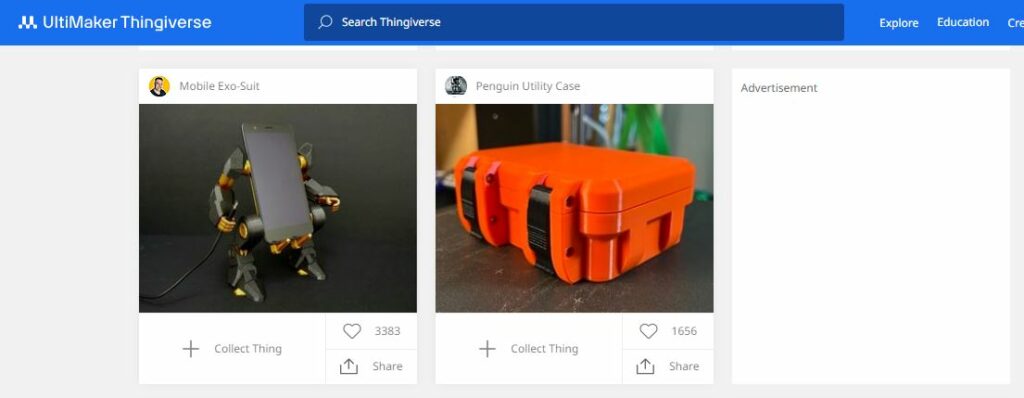
One of the standout features of Thingiverse is its commitment to open-source collaboration. Users can access and download existing designs and remix and modify them to suit their specific needs. This fosters a culture of collaboration and encourages users to build upon each other’s ideas, resulting in a rich and ever-expanding pool of design variations.
Thingiverse’s emphasis on 3D printing adds another layer of excitement and customization. The platform allows users to download digital files of their chosen miniatures, which can be printed using a 3D printer.
This integration of digital design and physical creation empowers gamers to materialize their unique characters and unleash them on the gaming table.
Moreover, Thingiverse’s free and accessible nature makes it an attractive option for gamers. The platform offers a wealth of designs without requiring any financial investment. This openness democratizes the customization process, allowing gamers of all backgrounds and budgets to participate in creating their miniatures.
In conclusion, Thingiverse is a captivating Hero Forge alternative with its vast community, user-generated designs, open-source collaboration, and emphasis on 3D printing. The platform offers limitless possibilities for gamers to explore and bring their unique characters to life.
Pros:-
Vast and Diverse Community: Thingiverse boasts a large and diverse community of designers and makers, resulting in an extensive library of user-generated designs. This provides various options and themes for gamers seeking custom miniatures.
Open-Source Collaboration: Thingiverse encourages open-source collaboration, allowing users to access, remix, and modify existing designs. This fosters a culture of creativity and collaboration, expanding gamers’ possibilities and customization options.
Integration with 3D Printing: Thingiverse’s integration with 3D printing technology allows users to download digital files of their chosen miniatures and bring them to life. This provides a tangible and customizable result, adding a unique dimension to the gaming experience.
Free and Accessible: Thingiverse offers free access to its vast library of designs, making it an affordable option for gamers. This accessibility democratizes the customization process and allows users of all backgrounds and budgets to participate.
Cons:-
Quality Control: As a platform reliant on user-generated designs, the quality of designs on Thingiverse can vary. Users may encounter less refined designs or require additional work to achieve desired results.
Limited Customization Options: Compared to platforms specifically dedicated to custom miniatures like Hero Forge, Thingiverse may have a more limited selection of customization options. Users seeking highly specific or intricate designs may need additional time modifying existing designs.
Learning Curve: Utilizing Thingiverse’s open-source collaboration and 3D printing features may require a learning curve for users who are new to the platform or unfamiliar with 3D printing technology. Familiarity with design software and printing may be necessary to achieve desired results.
Quality Consistency: Given the variety of designers on Thingiverse, the consistency of quality across different designs may vary. Users may need to carefully evaluate and choose designs that meet their expectations regarding quality and printability.
Overall, Thingiverse offers a vast community, open-source collaboration, integration with 3D printing, and accessibility as a Hero Forge alternative. Users should consider the varying quality of designs, the learning curve involved, limited customization options, and the need for quality consistency when evaluating the platform for their custom miniature needs.
7. Titan Forge
Titan Forge is a formidable alternative to the renowned Hero Forge in custom miniatures. With its exceptional craftsmanship and attention to detail, Titan Forge offers a unique and captivating experience for tabletop gaming enthusiasts seeking Hero Forge alternatives.
At the heart of Titan Forge lies a commitment to unparalleled quality. The platform prides itself on delivering miniatures that are meticulously crafted and exude an exceptional level of detail. From intricate armor engravings to lifelike facial expressions, Titan Forge elevates the art of miniature sculpting to new heights.
One of the standout features of Titan Forge is its distinctive artistic style. The platform embraces a range of themes, from fantasy to science fiction, each infused with a unique aesthetic that sets Titan Forge apart.
Whether you seek heroic warriors, monstrous creatures, or futuristic beings, Titan Forge offers a diverse selection that caters to different gaming genres and preferences.
Titan Forge’s dedication to diversity and inclusivity is evident in its vast range of character options. The platform offers a multitude of races, genders, and body types, allowing gamers to create miniatures that reflect the rich tapestry of humanity and fantasy worlds. This commitment to representation ensures that every player can find a miniature that resonates with their vision.
Furthermore, Titan Forge’s emphasis on versatility adds another layer of appeal. The platform provides various customization options, allowing users to equip their miniatures with weapons, accessories, and interchangeable parts. This flexibility empowers gamers to tailor their characters to specific campaigns and immerse themselves in unique narratives.
Regarding product availability, Titan Forge offers a range of finely crafted resin miniatures ready to use straight out of the box. This convenience saves gamers time and effort; they can dive into their adventures without additional assembly or painting.
In conclusion, Titan Forge shines as an exceptional Hero Forge alternative with its unparalleled craftsmanship, distinctive artistic style, commitment to diversity and inclusivity, versatility in customization, and convenient product availability.
Pros:-
Unparalleled Craftsmanship: Titan Forge is renowned for its exceptional craftsmanship and attention to detail. The miniatures produced by Titan Forge exhibit intricate designs and lifelike features, showcasing the platform’s commitment to quality.
Distinctive Artistic Style: Titan Forge embraces a range of themes and offers a unique artistic style for its miniatures. The platform’s diverse selection caters to different gaming genres, allowing players to find miniatures that align with their preferred aesthetic.
Diversity and Inclusivity: Titan Forge prioritizes diversity and inclusivity, providing various character options that reflect different races, genders, and body types. This commitment to representation ensures that every player can find a miniature that resonates with their vision.
Versatility in Customization: Titan Forge offers a variety of customization options, allowing users to equip their miniatures with different weapons, accessories, and interchangeable parts. This versatility enables players to tailor their characters to specific campaigns and immerse themselves in unique narratives.
Convenient Product Availability: Titan Forge provides finely crafted resin miniatures ready to use out of the box. This saves gamers time and effort; they can dive into their adventures without additional assembly or painting.
Cons:-
Limited Customization: Compared to platforms specifically dedicated to custom miniatures like Hero Forge, Titan Forge may have a more limited selection of customization options. Users seeking extensive customization possibilities may find their choices somewhat restricted.
Higher Price Point: The exceptional craftsmanship and quality offered by Titan Forge may come with a higher price point than some alternatives. Users should consider their budget and evaluate the value they place on the level of detail and artistry provided.
Availability of Designs: Titan Forge’s range of miniatures may not be as extensive as platforms with larger catalogs. Users seeking specific themes or niche designs may find their options limited.
Painting Required: While Titan Forge’s miniatures come pre-assembled, they may require additional painting or finishing touches to bring out their potential fully. This may be a consideration for users who prefer ready-to-use miniatures without additional painting work.
Overall, Titan Forge offers unparalleled craftsmanship, a distinctive artistic style, diversity and inclusivity, versatility in customization, and convenient product availability as a Hero Forge alternative.
Users should consider the limited customization, higher price point, availability of designs, and the need for additional painting when evaluating the platform for their custom miniature needs.
Hero Forge vs Titan Forge:-
Hero Forge offers various customization options and materials, while Titan Forge focuses more on pre-designed miniatures. Hero Forge offers more pricing and shipping options but may have longer turnaround times depending on the selected options.
Here’s a comparison table on Hero Forge and Titan Forge:-
| Feature | Hero Forge | Titan Forge |
|---|---|---|
| Customization Options | Offers a wide variety of customization options for creating unique characters, including different races, classes, equipment, and poses | Offers a limited selection of pre-designed miniatures with little to no customization options |
| Pricing | Offers various pricing options based on the size and material of the miniatures, ranging from $9.99 to $99.99 | Offers a flat rate of $35.00 per miniature, regardless of the size or material |
| Shipping | Offers worldwide shipping with varying shipping costs based on the destination and selected shipping speed | Offers worldwide shipping with a flat rate of $15.00 for standard shipping and $30.00 for express shipping |
| Material Options | Offers a range of material options, including plastic, premium plastic, and various metals | Offers a limited selection of materials, including resin and premium resin |
| Turnaround Time | Offers different turnaround times based on the selected shipping speed and material, ranging from 4-12 weeks | Offers a standard turnaround time of 2-4 weeks |
| Community | Has a large community of users who share and showcase their custom miniatures on social media and other platforms | Has a smaller community of users due to its limited customization options |
Hero Forge Review:-
In tabletop gaming, custom miniatures are crucial in bringing characters to life. Hero Forge has become a leading name in customizable miniatures, providing gamers the tools to unleash their creativity and create unique, personalized figures.
This Hero Forge review will delve into the platform’s features, customization options, quality, and overall user experience.
At the core of Hero Forge is its extensive catalog of options, allowing users to create highly detailed and customized miniatures. From choosing races and classes to selecting poses, equipment, and accessories, the platform offers a wide range of choices to cater to various gaming preferences.
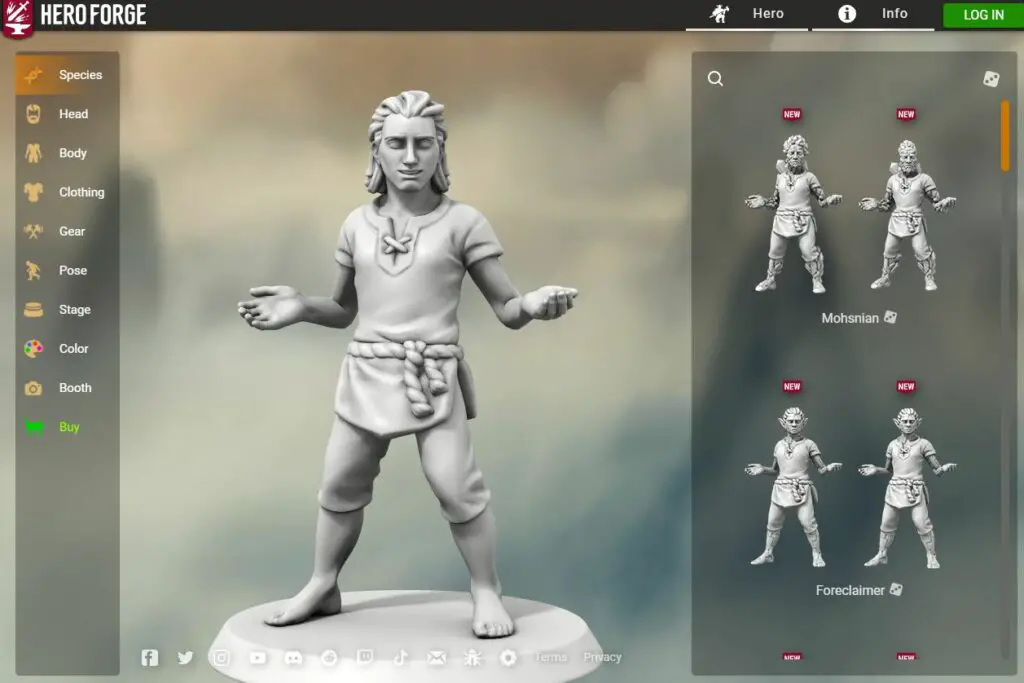
Thanks to Hero Forge’s user-friendly interface, the customization process is intuitive, allowing easy navigation and seamless design selection.
One of the standout features of Hero Forge is its advanced pose tool, which enables users to create dynamic and engaging poses for their miniatures.
This tool empowers gamers to capture the essence of their characters, whether it’s a courageous warrior charging into battle or a cunning rogue in a stealthy stance. The ability to customize and articulate the poses adds an extra layer of immersion and storytelling to tabletop adventures.
Hero Forge also offers extensive equipment options, allowing users to outfit their miniatures with various weapons, armor, and accessories. Whether it’s a magical staff, a fearsome sword, or a collection of unique trinkets, the platform’s diverse selection ensures that players can find the perfect gear to match their character’s personality and style.
When it comes to quality, Hero Forge exceeds expectations. The miniatures are crafted with meticulous attention to detail and printed using high-quality materials.
The precision and the vibrant colors bring the miniatures to life, enhancing the gaming experience. The option to choose different material qualities, such as premium plastic or metal, further enhances the visual appeal and durability of the miniatures.
Hero Forge’s customer support is commendable, with a dedicated team ready to assist users with inquiries or issues. The platform provides timely responses and ensures customer concerns are addressed promptly and satisfactorily.
However, it’s important to note that the pricing structure of Hero Forge can be a consideration for some users. The cost of a custom miniature can vary based on factors such as size, material, and additional options. While the platform offers different pricing tiers to suit various budgets, users should consider the potential costs of designing their miniatures.
In conclusion, Hero Forge excels as a platform for creating custom miniatures. Its extensive catalog, intuitive interface, advanced pose tool, and quality craftsmanship make it a top choice for gamers looking to bring their characters to life. With Hero Forge, the possibilities are endless; the only limit is your imagination.
Choosing The Right Hero Forge Alternatives
When creating custom miniatures for your tabletop adventures, choosing the right Hero Forge alternatives can make all the difference in bringing your characters to life.
With many options available, it’s important to consider various factors to find the perfect platform that aligns with your creative vision and gaming needs.
Let’s explore the key considerations for selecting the right Hero Forge alternative.
1. Customization Options: One of the primary aspects to evaluate is the range of customization options offered by alternative platforms. Look for platforms that provide diverse races, classes, poses, and equipment, allowing you to design unique and personalized miniatures that embody your characters’ essence.
2. Quality and Detail: The miniatures’ quality and level of detail are paramount to creating a captivating gaming experience. Research and examine sample images or user reviews to assess the craftsmanship and precision offered by different alternatives. Look for platforms prioritizing high-quality materials and printing techniques to ensure your miniatures exceed expectations.
3. User-Friendly Interface: An intuitive and user-friendly interface is essential for a smooth and enjoyable design process. Look for platforms that offer a seamless and intuitive interface, making it easy to navigate through the customization options, pose tools, and accessory selections. A user-friendly interface enhances your overall experience and lets you focus on unleashing your creativity.
4. Community and Resources: Consider the community and resources available on alternative platforms. Engaging with a vibrant community of designers and creators can provide inspiration, guidance, and valuable feedback. Look for platforms that offer forums, tutorials, and sharing capabilities, allowing you to connect with like-minded individuals and explore new ideas.
5. Pricing and Budget: Evaluate the pricing structure of different alternatives and consider how it aligns with your budget. While quality and customization options are important, finding a platform that offers pricing tiers that suit your financial considerations is essential. Consider the additional costs for premium materials, larger sizes, or extra features to ensure transparency and avoid surprises.
6. Printing and Assembly: Determine whether you can access 3D printing technology or prefer ready-to-use miniatures. Some alternatives provide digital files you can print using your 3D printer or third-party printing services, while others offer pre-assembled and painted miniatures. Choose the option that aligns with your preferences, skills, and available resources.
7. Customer Support: Don’t overlook the importance of customer support when choosing a Hero Forge alternative. Reliable and responsive customer support can be invaluable in resolving any issues or answering your queries.
Look for platforms with a reputation for providing excellent customer service, ensuring your experience remains smooth and enjoyable.
Considering these key factors, you can make an informed decision when choosing the right Hero Forge alternative. Remember, the perfect platform is the one that aligns with your creative vision, offers the customization options you desire, provides high-quality miniatures, and fits within your budget.
Embark on your quest to find the ideal Hero Forge alternative and unleash your creative potential in custom miniatures.
📗FAQ’s
Is there something like Hero Forge for monsters?
While Hero Forge primarily focuses on customizable miniatures for heroes, there are alternatives like Eldritch Foundry that offer options specifically designed for creating monstrous creatures and fantastical beings.
What is the difference between Hero Forge and Titan Forge?
Hero Forge is a platform that allows users to create highly detailed custom miniatures, while Titan Forge is a company known for producing finely crafted resin miniatures. The main difference lies in the customization process, as Hero Forge offers more flexibility in designing personalized characters.
Can you use Hero Forge for free?
Hero Forge offers a free-to-use online design tool where you can create and customize your miniatures. However, additional charges may be for purchasing and printing physical copies of your designs.
Is Desktop Hero free?
Yes, Desktop Hero is a free-to-use software that enables users to create and customize digital miniatures. However, printing or exporting the designs may require a paid subscription.
Does Hero Forge have scars?
Yes, Hero Forge includes scars and other customization options such as tattoos, battle damage, and facial features to add uniqueness and detail to your miniatures.
How big are Eldritch Foundry Minis?
Eldritch Foundry offers miniatures in 32mm scale, a commonly used scale in tabletop gaming. This scale provides good detail while still being compatible with various game systems.
Can I sell Hero Forge Minis?
Hero Forge allows users to sell and distribute miniatures they have created through their platform. However, it is important to review and comply with Hero Forge’s terms and conditions regarding commercial use.
Does Dimension 20 use Hero Forge?
Dimension 20, a popular actual play web series, does not explicitly use Hero Forge. The show features a mix of pre-made and custom-painted miniatures sourced from various manufacturers.
Hero Forge offers two main material options: premium plastic and plastic. Premium plastic provides higher detail and durability than standard plastic but comes at a higher cost.
Do Hero Forge credits expire?
Hero Forge credits do not have an expiration date. Once you have purchased or acquired credits, you can use them at any time to customize and order miniatures on the Hero Forge platform.
How much does Hero Forge cost?
The cost of creating and ordering a custom miniature from Hero Forge depends on various factors, including the size, material, and additional options chosen. Prices typically range from around $20 for a basic miniature in plastic to over $100 for larger, premium material miniatures with added features.
How do I download STL from Hero Forge?
Hero Forge offers the option to download your designs’ digital STL (Standard Tessellation Language) files. This allows you to 3D print the miniatures or send them to a third-party printing service. The download option is available after purchasing the digital STL file for a fee.
Does Hero Forge have an app?
Hero Forge has a mobile app for iOS and Android devices. The app allows you to create and customize your miniatures on the go, providing a convenient and user-friendly experience.
Can you do tattoos on Hero Forge?
Yes, Hero Forge offers tattoo customization options. You can choose from a selection of tattoo designs and apply them to specific areas of your miniature’s body, adding a personal touch to their appearance.
Does Hero Forge have lightsabers?
Due to copyright and licensing restrictions, Hero Forge does not provide specific lightsaber designs. However, using the platform’s weapon customization options, you can create a custom weapon design that resembles a lightsaber.
Does Hero Forge 3D print?
Hero Forge does not provide 3D printing services directly. Instead, they offer the option to download your designs’ digital files (STL), which you can print using your 3D printer or through a third-party printing service.
How big are Reaper Minis?
Reaper Miniatures offers a range of sizes, including 28mm, 32mm, and larger scales. The size of a Reaper Miniature depends on the particular model or line of miniatures you choose.
What means Eldritch?
“Eldritch” refers to something strange, eerie, or supernatural. It often describes things that are otherworldly, mystical, or associated with cosmic horror and ancient powers.
How big is a gargantuan miniature?
In tabletop gaming, a gargantuan miniature typically refers to a large-scale miniature representing an enormous creature. The exact size can vary depending on the game system, but it is generally larger than the standard-size miniatures, often measuring several inches in height or width.
Is there a cheaper version of Hero Forge?
While Hero Forge is known for its high-quality custom miniatures, there are alternative platforms that offer more budget-friendly options. Desktop Hero, for example, provides free-to-use software that allows users to create and customize digital miniatures, which can be 3D printed at a lower cost than ordering physical miniatures.
Can you layer clothes in Hero Forge?
Yes, Hero Forge can layer clothes and accessories on your custom miniatures. This feature allows for greater customization and creating unique and detailed outfits for your characters.
When did Hero Forge start?
Hero Forge was founded in 2012 by Joshua Bennett, Teagan Morrison, and Sarah Kodama. Since its launch, it has gained popularity among tabletop gamers and miniature enthusiasts for its customizable options and high-quality miniatures.
Is Dimension 20 real?
Dimension 20 is a popular actual play web series produced by CollegeHumor. It features a group of comedians and actors playing tabletop role-playing games, such as Dungeons & Dragons, in an entertaining and comedic format.
What is the strongest plastic available?
Polycarbonate is considered one of the strongest and most durable plastics available. It offers excellent impact resistance, heat resistance, and mechanical properties, making it suitable for high-strength and tough applications.
Which plastic is better for 3D printing?
Different plastics are used for 3D printing, depending on the project’s specific requirements. Popular options include ABS (Acrylonitrile Butadiene Styrene) for its strength and durability, PLA (Polylactic Acid) for its ease of use and biodegradability, and PETG (Polyethylene Terephthalate Glycol) for its balance of strength and flexibility.
What is the best printing on plastic?
Several printing technologies are used for printing on plastic, such as screen printing, pad printing, and digital printing. The best printing method depends on factors like the complexity of the design, the type of plastic, and the desired durability and quality of the print.
Where is Hero Forge located?
Hero Forge is headquartered in Phoenix, Arizona, United States. However, they offer worldwide shipping, allowing customers to order their custom miniatures from various locations.
Does Hero Forge have plasmoids?
Hero Forge does not have specific plasmoid designs. However, the platform offers a wide range of customization options, allowing you to create unique and imaginative characters that can resemble plasmoids or other fantastical creatures through the combination of different features, accessories, and color choices.
Is Hero Forge a game?
Hero Forge is not a game but a platform for designing and ordering custom miniatures. The miniatures created through Hero Forge can be used in various tabletop role-playing games, wargames, or other gaming systems.
How long does Hero Forge production take?
The production time for Hero Forge miniatures can vary depending on the number of orders and the chosen material. Typically, the miniatures take several weeks to be manufactured and shipped to the customer. It’s recommended to check the estimated production and shipping times Hero Forge provided when placing an order.
What scale is Hero Forge?
Hero Forge miniatures are typically designed on a 28mm scale, a common scale used in tabletop gaming. This scale ensures compatibility with various gaming systems and details the miniatures well.
How do I make Hero Forge run faster?
To optimize the performance of Hero Forge, ensure that you have a stable and fast internet connection. Additionally, using a modern web browser with the latest updates and clearing cache and cookies regularly can help improve the loading speed and responsiveness of the platform.
Can you put multiple heroes in Hero Forge?
Yes, Hero Forge allows you to create and order multiple custom miniatures. Whether you need a party of adventurers or a collection of unique characters, you can design and add multiple heroes to your cart during the customization process.
What does Hero Forge Pro do?
Hero Forge Pro is a subscription plan offered by Hero Forge that provides various benefits to subscribers, such as discounts on miniatures, exclusive content, and priority access to new features and updates. The specific details and features of Hero Forge Pro may vary, so it’s advisable to visit their website for the most up-to-date information.
Where to download 40k STL?
For downloading Warhammer 40,000 (40k) STL files, various websites, and communities are dedicated to sharing 3D printable files. Thingiverse, MyMiniFactory, and Cults are popular platforms where you can find a range of Warhammer 40k-related STL files.
When did Hero Forge 2.0 come out?
Hero Forge 2.0 was released in October 2019. This major update introduced several enhancements to the platform, including an upgraded user interface, increased customization options, improved possibility, and better rendering capabilities, providing users with an even more immersive and versatile miniature creation experience.
How much is Hero app?
The pricing for the Hero app may vary depending on the specific features and subscription plans offered. It’s best to visit the official website or app store for the most up-to-date information regarding the pricing options available for the Hero app.
Is there a heroes and icon app?
Yes, an app called “Heroes and Icons” is available for mobile devices. However, it is important to note that the specific features, content, and availability may vary based on the platform and region. It’s recommended to check the official app store for your device to find and download the “Heroes and Icons” app.
Wrap-up
In the ever-evolving world of 3D-printed miniatures, you are no longer confined to the offerings of a single platform. With the wide range of Hero Forge alternatives we’ve explored together, you’re equipped with the knowledge to find the service that best suits your unique needs, creative preferences, and budget.
Remember, the best platform for you is the one that turns your imaginative concepts into tangible realities while providing the best quality, value, and service. Whether you choose an alternative for its superior detailing, faster delivery times, or more affordable rates, the choice is now in your hands.
Keep pushing the boundaries of your creativity. After all, every epic adventure deserves a hero forged by your imagination. So start designing your dream miniatures today and let the magic of your tabletop games reach new heights. Happy gaming!


