
























In the world of web server technologies, making the right choice between Nginx and Tomcat can be a daunting task.
Whether you’re an experienced web developer or a beginner stepping into the server landscape, understanding these two popular servers’ pros, cons, and use cases often feels like navigating a maze of technical jargon, performance metrics, and intricate architectures.
Your selection can greatly influence your application’s performance, scalability, and security, and hence, making an uninformed decision can lead to unnecessary hurdles and potential setbacks in your project.
The challenge lies not just in the intrinsic complexity of web server technologies but also in the impact that your choice can have. Choose the wrong server, and you could face many issues, such as slow website speeds, poor user experience, and even security vulnerabilities.
Worse, you could invest significant time and resources into a server that does not scale as your application grows, leading to costly redesigns and frustrating downtimes.
But worry no more. In this comprehensive guide, we’ll break down the specifics of Nginx and Tomcat, providing an unbiased, in-depth comparison to help you understand their strengths and weaknesses.
By assessing their performance, security, scalability, and ease of use, we aim to equip you with all the knowledge you need to make an informed decision.
From novice web developers to seasoned tech gurus, this guide on “Nginx vs Tomcat” will act as your compass, leading you through the complex maze of web server technologies to the best choice for your unique needs.
Understanding Web Servers
Web servers are pivotal in modern Internet technology, serving as the foundational pillar upon which the World Wide Web is built.
Web servers act as intermediaries, facilitating data exchange between clients and the web applications they interact with. These servers efficiently handle and respond to incoming HTTP requests, managing content delivery and processing user input.
At their core, web servers are software applications designed to host, process, and serve web content to users across the globe. When users access a website, their browser sends a request to the web server, seeking the desired resources. The server then processes the request, identifies the specific files to be delivered, and promptly returns them to the user’s browser.
The efficiency and reliability of web servers significantly impact website performance. Load balancing techniques are often employed to distribute incoming traffic evenly among multiple servers, ensuring optimal resource utilization and minimal downtime.
In addition to serving static content like HTML, CSS, and images, modern web servers also support dynamic content generation by integrating various technologies such as PHP, Node.js, or Ruby on Rails. This dynamic aspect enables web applications to deliver personalized and interactive experiences to users.
Understanding web servers is essential for web developers and system administrators alike, as it enables them to optimize website performance, enhance security, and deliver seamless browsing experiences to users worldwide.
Brief History of Nginx
Nginx, pronounced as “Engine-X,” was created by Russian software engineer Igor Sysoev in 2002. The motivation behind Nginx’s inception was to address the C10k problem, a challenge posed by the need to handle 10,000 simultaneous connections efficiently.
Igor’s background in managing high-traffic websites led him to develop a web server that could handle massive concurrency without compromising performance.
Nginx was initially released to the public 2004 and quickly gained traction among web developers and system administrators. Its growing popularity was largely attributed to its lightweight and efficient design, which allowed it to outperform many established web servers in handling concurrent connections.
Overview of Nginx’s Main Functionalities and Features
Nginx is renowned for its ability to serve as a reverse proxy server, load balancer, and HTTP cache.
Let’s look at these key functionalities and other features that make Nginx a favorite among tech-savvy professionals.
1. Reverse Proxy Server
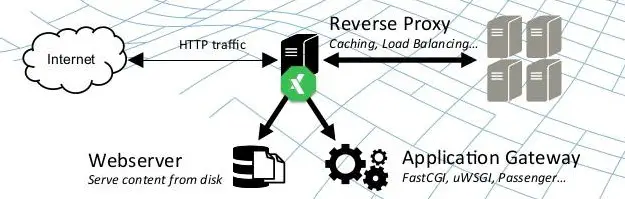
As a reverse proxy, Nginx is an intermediary between clients and backend servers. It receives incoming client requests and forwards them to the appropriate backend server to process the request. This capability enhances security by concealing the identity and characteristics of the backend servers from external clients.
2. Load Balancer
Nginx’s load balancing feature distributes incoming client requests among multiple backend servers, ensuring even resource utilization and preventing server overloads. This improves the overall performance and responsiveness of web applications and contributes to their high availability.
3. HTTP and TCP/UDP Load Balancing
Apart from HTTP load balancing, Nginx can also load balancing for TCP and UDP protocols. This versatility allows it to cater to a broader range of applications, including real-time communication services and gaming platforms.
4. HTTP Cache
Nginx includes a powerful caching mechanism that stores frequently accessed resources, such as images and CSS files, in memory. By serving these cached resources directly, Nginx reduces the load on backend servers and significantly improves response times, leading to faster page loading and a better user experience.
5. SSL/TLS Termination
Nginx can handle SSL/TLS termination, relieving backend servers of the resource-intensive task of encrypting and decrypting data. This offloading of cryptographic operations lightens the server’s load and simplifies the management of SSL certificates.
6. Security Features
Nginx offers a range of security features, including access control lists (ACLs), rate limiting, and HTTP/2 support, that help safeguard web applications against attacks, such as Distributed Denial of Service (DDoS) attacks and brute-force attempts.
7. WebSockets and HTTP/2 Support
Nginx supports WebSockets, allowing real-time, full-duplex communication between clients and servers. Additionally, Nginx fully supports HTTP/2, a major advancement in the HTTP protocol that enhances website performance through features like multiplexing and server push.
Architecture and Design of Nginx
Nginx’s architecture is designed for asynchronous, event-driven processing, which sets it apart from traditional web servers that use a thread-per-connection model. This architecture makes Nginx highly efficient and capable of handling many concurrent connections with relatively low memory usage.
At the heart of Nginx’s architecture are two main components:-
1. Master Process
The master process is responsible for managing worker processes and other essential tasks. It reads the configuration files, binds to sockets, and monitors worker processes to ensure they run correctly. In case of changes to the configuration, the master process can gracefully reload the configuration without interrupting the active connections.
2. Worker Processes
Worker processes are the workhorses of Nginx. They are responsible for handling client requests and performing all the processing tasks. Nginx typically creates multiple worker processes, each running in its event loop. This approach effectively utilizes multiple CPU cores and enables concurrently handling thousands of connections.
Nginx employs an event-driven model that utilizes efficient I/O multiplexing mechanisms, such as epoll on Linux and kqueue on FreeBSD. These mechanisms enable Nginx to handle large numbers of connections simultaneously, making it an ideal choice for high-performance web applications.
In conclusion, Nginx has come a long way since its inception, evolving into a versatile and robust web server and reverse proxy that powers numerous websites and applications worldwide.
Its lightweight architecture, powerful features, and efficient event-driven design make it a top choice for handling modern web traffic and delivering exceptional user experiences. As the internet landscape continues to evolve, Nginx’s role in shaping the future of web servers remains crucial and enduring.

Brief History of Tomcat
Tomcat traces its roots back to the late 1990s when James Duncan Davidson, a software engineer at Sun Microsystems (now Oracle Corporation), started working on a reference implementation of the Java Servlet and JavaServer Pages (JSP) specifications.
This implementation was later donated to the Apache Software Foundation, where it evolved into the project known as Tomcat. The first version, Tomcat 1.0, was released in 1999.
Initially conceived as a pure servlet container, Tomcat has matured over the years into a robust and full-featured Java web application server. Its community-driven development and adherence to open standards have contributed to its widespread adoption in the Java ecosystem.
Overview of Tomcat’s Main Functionalities and Features
Tomcat serves as a container for Java web applications, providing a runtime environment to execute servlets and JSPs.
Let’s delve into its main functionalities and features that make it an indispensable tool for Java developers.
1. Servlet and JSP Container
At its core, Tomcat is a container for servlets and JavaServer Pages. It enables the execution of Java web applications, providing an environment where servlets process incoming requests and generate dynamic content through JSPs.
2. Java Servlet API Compatibility
Tomcat is designed to be compatible with the Java Servlet API, adhering to the Java Community Process (JCP) specifications. This compatibility ensures that web applications developed for Tomcat can seamlessly run on other compliant Java application servers.
3. HTTP Server Capabilities
While Tomcat primarily operates as a servlet container, it also includes HTTP server capabilities. This means it can efficiently handle static content, such as HTML, CSS, image files, and dynamically generated content.
4. Embedded Tomcat
Tomcat provides support for embedding the server directly within Java applications. This feature allows developers to package and distribute applications with an embedded Tomcat instance, making deployment and execution more straightforward.
5. Connectors
Tomcat supports various connectors enabling communication between the server and web servers, such as Apache HTTP Server and Microsoft IIS. These connectors, like the Apache Tomcat Connector (mod_jk), facilitate load balancing and failover configurations.
6. Realms and Security
Tomcat implements security measures through the concept of realms. Realms define how users are authenticated and authorized to access resources. Tomcat supports various realms, including JDBCRealm, JNDIRealm, and more, allowing for flexible security configurations.
7. Clustering and High Availability
Tomcat supports clustering, allowing multiple instances to distribute the load and ensure high availability. With clustering, a set of Tomcat instances can share session data and handle incoming requests more efficiently.
Architecture and Design of Tomcat

To comprehend the architecture and design of Tomcat, one must understand its modular nature and the components that constitute its core.
1. Modularity
Tomcat follows a modular design, comprising several discrete components that collaborate to form the complete server. This modularity enhances extensibility, as developers can selectively enable or disable components based on their specific application requirements.
2. Catalina: The Servlet Container
At the heart of Tomcat lies Catalina, which serves as the servlet container. It handles the lifecycle of servlets, manages requests, and dispatches them to the appropriate servlet for processing. Catalina also handles JSPs, converting them to servlets on-the-fly for execution.
3. Coyote: The Connector
Coyote is responsible for handling the communication between Tomcat and external clients. It implements the HTTP and AJP (Apache JServ Protocol) connectors, enabling Tomcat to communicate with web browsers and servers. The AJP connector is particularly useful when using Tomcat with Apache HTTP Server.
4. NIO and APR Connectors
Tomcat provides two additional connectors for improved performance: NIO (New I/O) and APR (Apache Portable Runtime) connectors. The NIO connector utilizes Java’s non-blocking I/O features, while the APR connector interfaces with the native webserver libraries for enhanced performance.
5. Jasper: The JSP Engine
Jasper is Tomcat’s JSP engine, translating JSP files into Java servlets that Catalina can execute. Jasper compiles JSPs into Java source code and then into bytecode for faster execution.
6. Valves and Pipeline
Tomcat uses a Valve architecture to process requests and responses as they pass through the server. Valves can intercept and manipulate these objects, enabling custom processing of requests and responses. The combination of Valves forms the Pipeline, which constitutes the request processing chain.
As an integral part of the Java ecosystem, Tomcat has withstood the test of time and evolved into a versatile and reliable Java web application server. Its rich history, extensive functionalities, and robust architecture have made it a preferred choice for developers deploying Java-based web applications.
With continuous community-driven development and a commitment to open standards, Tomcat is expected to maintain its relevance and influence in the Java development landscape for years.
Now let’s start the In-Depth Comparison between Nginx and Tomcat.
Nginx vs Tomcat: Performance Comparison
Regarding serving web applications and handling high volumes of concurrent connections, Nginx and Tomcat are two powerful players in the game.
Both are popular choices in the web server and application server landscape, but they have distinct architectures and features that can significantly impact performance.
Let’s dive into a performance comparison between these two contenders.
Nginx is renowned for its exceptional reverse proxy and load balancer performance. Its asynchronous, event-driven architecture allows it to handle many simultaneous connections with low memory overhead.
Nginx efficiently serves static content, such as images and CSS files, making it an excellent choice for handling lightweight requests and acting as the first point of contact for client requests.
On the other hand, Tomcat excels in executing Java web applications with its robust support for the Java Servlet and JavaServer Pages (JSP) technologies.
Tomcat’s architecture is designed to execute dynamic web content, allowing developers to build feature-rich and interactive web applications. However, Tomcat’s thread-per-request model can consume more resources than Nginx’s event-driven approach, especially under heavy concurrent loads.
Nginx shines brightly for scenarios that involve a substantial number of static requests or require a reverse proxy for load balancing. Its efficiency in handling such tasks often outperforms Tomcat, making it an ideal choice for serving static content and balancing traffic among multiple backend servers.
In contrast, Tomcat is the go-to option for Java-based web applications requiring full Java Servlets and JSPs support. Its compatibility with the Java ecosystem and ability to execute complex Java code makes it the preferred choice for developers seeking robust dynamic content generation.
In conclusion, the choice between Nginx and Tomcat depends on the specific requirements of the web application. Nginx takes the lead for optimized performance in serving static content and load balancing.
Tomcat proves its worth for full-fledged Java web applications requiring Java Servlet and JSP support. Understanding the strengths and weaknesses of each server empowers developers to make an informed decisions based on their project’s unique needs.
Nginx vs Tomcat: Speed and Efficiency
Regarding delivering top-notch performance in the web server and application server domain, Nginx and Tomcat are formidable competitors, each excelling uniquely.
The speed and efficiency of these servers play a critical role in determining the overall user experience and server resource utilization.
Let’s delve into a comparison of Nginx and Tomcat concerning their speed and efficiency.
Nginx is renowned for its blazing speed and efficiency, particularly in handling static content and acting as a reverse proxy. Its asynchronous, event-driven architecture efficiently manages multiple connections with minimal memory overhead.
Nginx’s lightweight design empowers it to swiftly serve static resources like images, CSS, and JavaScript files, making it an optimal choice for scenarios that involve a high volume of lightweight requests.
On the other hand, Tomcat excels in executing dynamic web applications written in Java, offering robust support for Java Servlets and JavaServer Pages (JSP).
While its performance might not match Nginx’s speed in serving static content, Tomcat’s thread-per-request model enables it to handle dynamic content generation effectively. This makes it a preferred option for applications that require complex processing and extensive Java functionality.
Nginx is a top contender for scenarios that demand load balancing and high concurrency. Its ability to efficiently distribute incoming traffic among backend servers ensures optimal resource utilization and fault tolerance.
In contrast, Tomcat shines when executing feature-rich Java web applications that rely on Servlets and JSPs. Its robust support for Java allows developers to build interactive and dynamic web experiences, making it a go-to choice for complex applications.
In conclusion, the choice between Nginx and Tomcat primarily depends on the specific requirements of the web project. If speed, efficiency, and load balancing are the priorities, Nginx emerges as the front-runner.
However, Tomcat rises to the occasion for Java-centric applications requiring extensive dynamic content generation, showcasing its prowess in Java web servers. Understanding the strengths of each server empowers developers to make informed decisions, ultimately leading to optimal performance and a superior user experience.
Nginx vs Tomcat: Handling of Concurrent Requests
In web servers and application servers, the ability to efficiently handle concurrent requests is a critical aspect that directly impacts the overall performance and user experience. Nginx and Tomcat are prominent players in this arena, each with a unique approach to managing concurrent requests.
Thanks to its asynchronous, event-driven architecture, Nginx is renowned for its exceptional handling of concurrent requests. When a request comes in, Nginx efficiently processes it non-blocking, allowing it to swiftly handle the next request without waiting for the previous one to complete.
This approach enables Nginx to efficiently handle many concurrent connections with minimal resource consumption, making it an ideal choice for scenarios with high levels of concurrent traffic.
On the other hand, Tomcat follows a more traditional thread-per-request model. Tomcat allocates a separate thread for each incoming request to handle the processing.
While this model works well for applications that primarily deal with dynamic content and require the full support of Java Servlets and JavaServer Pages (JSP), it can pose challenges under heavy concurrent loads due to the overhead associated with thread creation and management.
Nginx leads scenarios that demand high concurrency and lightweight request handling. Its event-driven approach and low memory footprint enable it to efficiently manage thousands of simultaneous connections without breaking a sweat.
In contrast, Tomcat shines when processing dynamic content and complex Java-based applications. Its thread-per-request model ensures isolation and stability in executing Java code, making it a preferred choice for applications that rely heavily on Java technologies.
In conclusion, the choice between Nginx and Tomcat regarding handling concurrent requests depends on the specific needs of the web project. For scenarios where high concurrency and efficient resource utilization are crucial, Nginx emerges as the frontrunner.
However, for Java-centric applications requiring robust support for Servlets and JSPs, Tomcat showcases its strengths in effectively managing dynamic content and Java execution.
Understanding the strengths and limitations of each server empowers developers to make informed decisions that align with the specific requirements of their web applications.
Nginx vs Tomcat: Resource Usage
When comparing Nginx and Tomcat, an essential aspect to consider is their resource usage, as it directly impacts server performance and scalability. Both servers have distinct architectures that influence their utilization of system resources.
Nginx is renowned for its lightweight and efficient design. As an asynchronous, event-driven server, Nginx consumes significantly fewer resources than traditional web servers.
Its ability to handle multiple concurrent connections with low memory overhead makes it an excellent choice for serving static content and acting as a reverse proxy. Nginx’s event-driven architecture ensures efficient utilization of CPU cores, enabling it to handle large concurrent requests while conserving resources.
On the other hand, Tomcat employs a thread-per-request model to handle incoming connections. While this model provides isolation for executing Java Servlets and JSPs, it can lead to increased resource consumption under heavy loads due to thread creation and management overhead. As a result, Tomcat is more resource-intensive than Nginx, especially when dealing with a substantial number of concurrent requests.
The resource usage of Nginx and Tomcat makes them suitable for different use cases. Nginx’s efficiency in handling lightweight requests and its minimal memory footprint make it a preferred choice for scenarios that demand high concurrency and low resource consumption.
In contrast, Tomcat’s strength lies in executing Java web applications, providing robust support for dynamic content and extensive Java functionality. Although it may consume more resources than Nginx, Tomcat delivers feature-rich web experiences.
In conclusion, the choice between Nginx and Tomcat concerning resource usage depends on the specific requirements of the web project. Nginx emerges as the front-runner for resource-efficient handling of lightweight requests and high concurrency.
However, for Java-centric applications that necessitate the support of Servlets and JSPs, Tomcat showcases its capabilities in managing dynamic content and Java execution, albeit with higher resource utilization.
Evaluating the resource requirements of each server allows developers to make informed decisions that align with their project’s resource constraints and performance goals.
Nginx vs Tomcat: Scalability Comparison
When scaling web applications to accommodate growing user demands, Nginx and Tomcat present distinct approaches that impact their scalability.
Both servers are known for their performance, but understanding their scalability characteristics is crucial for making informed decisions in handling increasing traffic.
Nginx is lauded for its inherent scalability, primarily due to its event-driven architecture and efficient handling of lightweight requests. Its asynchronous, non-blocking model allows it to manage many concurrent connections with minimal resource consumption.
This makes Nginx an excellent choice for scenarios requiring horizontal scaling, where multiple server instances can be deployed to handle increasing loads effortlessly.
On the other hand, Tomcat follows a thread-per-request model, which can impact its scalability under extremely high levels of concurrent connections. While it can handle dynamic content and Java-based applications efficiently, vertical scaling by adding more resources to a single instance might be a common approach to scaling Tomcat.
When horizontal scaling is a priority, Nginx emerges as the more favorable option. Its lightweight design and ability to distribute incoming requests efficiently among multiple instances make it ideal for handling massive traffic spikes and ensuring high availability.
However, Tomcat still shines in vertical scaling scenarios, especially for Java-centric applications that demand extensive Java processing and the full support of Java Servlets and JavaServer Pages (JSP).
In conclusion, the scalability comparison between Nginx and Tomcat depends on the specific scaling requirements of the web project. Nginx takes the lead for horizontal scaling and efficient handling of lightweight requests.
On the other hand, Tomcat is better suited for vertical scaling and applications where Java processing and support are crucial. By evaluating the scalability characteristics of each server, developers can determine the most suitable option to meet their project’s scalability needs.
Nginx vs Tomcat: Security Comparison
Regarding securing web applications, Nginx and Tomcat take distinct approaches, each offering unique features to address various security concerns.
Understanding their security characteristics is crucial for making informed decisions in safeguarding sensitive data and protecting against potential threats.
Nginx is renowned for its robust security features, acting as a powerful shield against attacks. Its modular architecture allows for integrating security-focused add-ons, such as ModSecurity, which provides web application firewall capabilities.
Nginx’s capability to serve as a reverse proxy also enables the implementation of SSL/TLS termination, ensuring secure communication between clients and backend servers.
On the other hand, Tomcat is designed with built-in security measures to protect Java web applications. It implements the Java Security Manager, which grants fine-grained access control over application resources, minimizing the risk of unauthorized access.
Tomcat also supports various authentication methods, including JAAS (Java Authentication and Authorization Service) and JNDI (Java Naming and Directory Interface) realms, allowing flexible user authentication configurations.
Both servers actively release security updates to address vulnerabilities promptly, ensuring continuous protection against emerging threats.
In conclusion, the security comparison between Nginx and Tomcat depends on the specific security requirements of the web project. For a strong foundation in securing web servers and mitigating potential attacks, Nginx stands out with its reverse proxy capabilities and extensible security modules.
On the other hand, Tomcat offers robust security measures tailored to Java-based applications. By evaluating the security features of each server, developers can implement a comprehensive security strategy that best suits their project’s needs and safeguards their web applications from potential security breaches.
Nginx vs Tomcat: Ease of use and management
Regarding ease of use and management, both Nginx and Tomcat offer distinct advantages, catering to different user preferences and operational needs.
Nginx boasts a reputation for its straightforward and intuitive configuration. Its simple and clean syntax and extensive documentation make it easy for users to set up and deploy.
Nginx’s lightweight nature and small memory footprint make it easy to manage, allowing for smooth integration with existing infrastructures. Nginx’s event-driven architecture also makes it highly efficient, requiring less management overhead for handling many concurrent connections.
On the other hand, Tomcat is designed with ease of use in mind for Java developers. As a standard Java Servlet container, Tomcat provides a familiar environment for those well-versed in Java development.
Its comprehensive administration tools, such as the Tomcat Manager web application, simplify deployment and application management. Tomcat’s user-friendly interface allows for easy server health and performance metrics monitoring.
The choice between Nginx and Tomcat concerning ease of use and management ultimately depends on the specific requirements of the web project. Nginx is preferred if simplicity and efficiency in handling static content and load balancing are priorities.
On the other hand, for Java-based applications and developers seeking a seamless Java Servlet and JSP environment, Tomcat shines as a user-friendly solution.
In conclusion, Nginx and Tomcat each have their strengths in ease of use and management, catering to different user preferences and application scenarios.
Evaluating the web project’s specific needs and the development team’s expertise can help determine which server aligns better with the overall operational goals and management ease.
Nginx vs Tomcat: Community support and documentation
When selecting the right web server or application server, considering community support and documentation is crucial for seamless development and troubleshooting. Both Nginx and Tomcat have active communities and comprehensive documentation, offering valuable resources to users and developers.
Nginx boasts a robust and ever-growing community that actively contributes to its development and support. The Nginx community provides online forums, mailing lists, and social media groups where users can seek help, share knowledge, and exchange best practices. With a global user base, getting assistance for Nginx-related queries is usually swift and comprehensive.
In terms of documentation, Nginx sets the bar high with its detailed and well-organized official documentation. Covering everything from installation and configuration to advanced features and security considerations, the documentation provides a wealth of information for users at all levels of expertise.
Similarly, Tomcat also enjoys strong community support, particularly among Java developers. The Tomcat community actively collaborates on improving the server and promptly addresses user queries. Online forums, mailing lists, and Stack Overflow are some platforms where users can find answers to their Tomcat-related questions.
Tomcat’s official documentation is extensive and covers all aspects of its usage and administration. The documentation is comprehensive for novices and seasoned developers, from setting up Java applications to configuring security realms.
In conclusion, Nginx and Tomcat offer excellent community support and detailed documentation. The choice between the two depends on the web project’s specific requirements and the development team’s expertise.
Access to a supportive community and well-documented resources empowers users to make the most of their chosen server and effectively address challenges that may arise during development and maintenance.
Here is a table comparing some key performance aspects of Nginx and Tomcat:-
| Feature/Functionality | Nginx | Tomcat |
|---|---|---|
| Primary Function | Web server / Reverse Proxy | Application server (Java Servlet Container) |
| Language support | Any | Java (JSP and Servlets) |
| Concurrency | Event-driven, highly concurrent | Thread-based, one thread per request |
| Load Balancing | Built-in support | Requires additional configuration |
| SSL Support | Built-in support | Requires additional configuration |
| Clustering and Failover | Requires additional configuration | Built-in support |
| Static Content Serving | Highly efficient | Less efficient |
| Dynamic Content Serving | Requires passing to an app server | Directly serves via Java applications |
| Performance and Speed | High (due to event-driven model) | Lower compared to Nginx |
| Configuration complexity | Moderate | High |
| Usage scenarios | Front-facing web server, API Gateway | Application server for Java web apps |
Ideal Use Cases For Nginx
Nginx has emerged as a powerful and versatile web server, proxy server, and load balancer, offering many use cases for diverse web infrastructure needs. Its lightweight, event-driven architecture and efficient handling of concurrent connections make it a go-to solution for numerous scenarios.
Let’s explore some of the ideal use cases where Nginx excels:
1. High-Concurrency Environments
Nginx’s ability to handle many concurrent connections efficiently makes it a perfect fit for high-traffic websites and applications. Its event-driven, non-blocking nature enables it to serve static content and lightweight requests with minimal resource consumption, ensuring smooth and responsive user experiences.
2. Load Balancing
In modern web applications, distributing incoming traffic across multiple backend servers is crucial for achieving scalability and high availability. Nginx shines as a load balancer, intelligently distributing requests among backend servers based on various load-balancing algorithms. This ensures optimal resource utilization and minimizes the risk of server overload.
3. Reverse Proxy
Nginx’s reverse proxy capabilities make it a valuable asset in web application architectures. As an intermediary between clients and backend servers, Nginx can offload tasks such as SSL/TLS termination, caching, and request routing, improving overall application performance and security.
4. SSL/TLS Termination
Securing communication between clients and web servers is vital for protecting sensitive data. Nginx’s ability to handle SSL/TLS termination relieves backend servers of the computationally intensive task of encryption and decryption. This improves server performance and simplifies the management of SSL certificates.
5. Web Acceleration and Content Caching
Caching frequently accessed content is crucial for enhancing website performance and reducing server load. Nginx’s caching capabilities allow it to store and serve static content, such as images, CSS, and JavaScript files, directly from memory, significantly reducing response times and conserving resources.
6. Microservices and API Gateway
As organizations embrace microservices architectures, Nginx can serve as an efficient API gateway. Its reverse proxy functionality facilitates seamless communication between microservices, streamlining request routing and enabling better management and scaling of APIs.
7. DDoS Mitigation
Protecting web applications against Distributed Denial of Service (DDoS) attacks is paramount in today’s threat landscape. Nginx’s resilience against DDoS attacks, combined with its efficient handling of incoming requests, makes it a robust ally in safeguarding web infrastructure from malicious traffic.
8. Media Streaming and Delivery
For applications that involve media streaming and content delivery, Nginx’s ability to efficiently serve large files and support HTTP adaptive streaming protocols, such as HLS and DASH, makes it an excellent choice. Its range of features caters to diverse media delivery needs, providing users with smooth and reliable streaming experiences.
In conclusion, Nginx’s diverse feature set and exceptional performance make it an invaluable tool for various web infrastructure needs. Whether handling high concurrency, load balancing, SSL/TLS termination, caching, microservices communication, or protecting against DDoS attacks, Nginx proves its mettle as a reliable and efficient solution.
Embracing Nginx as part of the web stack empowers organizations to build scalable, secure, and high-performance web applications that meet the demands of modern internet users.
Ideal Use Cases for Tomcat
Tomcat is a robust and versatile Java-based application server known for efficiently handling Java Servlets and JavaServer Pages (JSPs). It serves as the foundation for hosting dynamic web applications and offers a plethora of ideal use cases.

Let’s explore some of the scenarios where Tomcat excels:
1. Java Web Applications
Tomcat’s primary use case is hosting Java web applications that rely on Servlets and JSPs. Its compatibility with the Java ecosystem and adherence to Java specifications make it an optimal choice for developers seeking a reliable and well-supported platform to deploy Java-based web applications.
2. Enterprise Applications
In the enterprise world, Tomcat is a dependable application server for hosting various mission-critical applications. Its stability, scalability, and support for enterprise Java technologies ensure seamless execution of complex business applications.
3. Web Services
For building and deploying web services using Java, Tomcat offers a robust and efficient environment. Its adherence to Java standards, such as Java API for RESTful Web Services (JAX-RS), allows developers to create scalable and interoperable web services.
4. Microservices Architecture
As organizations embrace microservices architectures, Tomcat can play a significant role in this ecosystem. Developers can achieve better modularity, scalability, and maintainability by deploying individual microservices as separate applications within Tomcat containers.
5. Development and Testing
Tomcat’s lightweight nature and ease of setup make it an ideal choice for development and testing environments. Developers can quickly set up a local Tomcat server to test their Java web applications before deploying them to production.
6. Educational and Learning Purposes
Due to its open-source nature and extensive documentation, Tomcat is an excellent educational tool. It provides a hands-on learning experience for students and aspiring developers looking to understand Java-based web development.
7. Web Hosting Providers
Tomcat’s popularity in the Java community has led many web hosting providers to offer Tomcat hosting services. This enables businesses and developers to deploy Java web applications on shared hosting or cloud-based environments without the complexities of managing the server infrastructure.
8. Secure Web Applications
With its built-in security features and compatibility with Java Security Manager, Tomcat is well-suited for hosting secure web applications. It allows developers to implement access control and protect sensitive resources, making it a safe option for applications handling sensitive data.
9. Customization and Extension
Tomcat’s modular architecture allows users to customize and extend its functionality by adding Java Servlets, filters, and listeners. This flexibility enables developers to tailor the server to meet specific application requirements.
In conclusion, Tomcat’s versatility as a Java-based application server makes it a top choice for hosting dynamic and secure web applications. From enterprise-level applications to microservices architectures, Tomcat’s performance, stability, and compatibility with Java technologies position it as a powerful tool in web development.
For educational purposes or production environments, embracing Tomcat empowers businesses and developers to deliver efficient, scalable, and secure Java web applications.
Considerations for Decision Making
When selecting a web server or application server for your project, several factors come into play. Nginx and Tomcat are two popular choices in web infrastructure, each offering unique strengths and capabilities.
To make an informed decision, it is essential to consider various factors and how they align with the specific needs of your application and infrastructure.
1. Performance and Scalability
The performance and scalability requirements of your application are crucial considerations. If you expect high concurrency and lightweight requests, with its event-driven, non-blocking architecture, Nginx excels in efficiently handling many concurrent connections. On the other hand, for Java-based applications that demand robust support for Servlets and JavaServer Pages (JSPs), Tomcat may be the better fit.
2. Application Type
The nature of your application plays a pivotal role in the decision-making process. If your project revolves around serving static content, acting as a reverse proxy, or load balancing, Nginx’s capabilities in these areas make it an ideal choice.
However, if your application heavily relies on Java and requires extensive Java processing, Tomcat’s specialization in executing Java Servlets and JSPs makes it a compelling option.
3. Support for Java
If your application is built on Java or requires extensive Java libraries and frameworks, Tomcat provides a Java-centric environment with built-in support for Java technologies. This simplifies the development and deployment, ensuring seamless integration with Java-based applications.
4. Infrastructure and Existing Technologies
Consider your existing infrastructure and technologies when making a decision. If you already have Java-based components in your stack, Tomcat’s compatibility may make it the more seamless choice.
On the other hand, if you seek to optimize a system focusing on high concurrency and lightweight request handling, Nginx’s capabilities in these areas align well.
5. Security Considerations
Security is paramount for web applications. Both Nginx and Tomcat offer security features, but evaluating your specific security requirements is essential. Nginx’s reverse proxy capabilities can enhance security by offloading SSL/TLS termination and serving as a buffer against potential threats. Tomcat’s Java Security Manager and authentication mechanisms cater to Java application security needs.
6. Ease of Use and Management
The ease of configuring, deploying, and managing the server is another critical factor. Nginx’s simple configuration and lightweight nature make it relatively easy to set up and manage. Tomcat’s user-friendly interface and extensive administration tools make it easy to use, particularly for Java developers.
7. Community Support and Documentation
Consider the availability of community support and comprehensive documentation. Both Nginx and Tomcat have active communities, but assessing their support channels and available resources can be beneficial when troubleshooting or seeking guidance.
In conclusion, choosing between Nginx and Tomcat involves evaluating various factors, including the performance requirements, application type, existing infrastructure, security needs, ease of use, and community support.
Carefully weighing these factors against your project’s specific needs and goals will help you make an informed decision that ensures a well-suited web infrastructure to support your application effectively.
Why use Nginx in front of Tomcat?
Nginx and Tomcat are powerful web servers with strengths and capabilities. When building a robust and high-performance web infrastructure, using Nginx as a reverse proxy in front of Tomcat can bring significant advantages.
1. Load Balancing and High Concurrency: Nginx’s event-driven architecture handles many concurrent connections with minimal resource consumption. By placing Nginx in front of Tomcat, it acts as a load balancer, efficiently distributing incoming traffic among multiple Tomcat instances. This ensures optimal resource utilization and improved response times, especially in high-traffic scenarios.
2. SSL/TLS Termination: Offloading SSL/TLS termination to Nginx enhances the security and performance of the web infrastructure. Nginx’s ability to handle SSL/TLS encryption and decryption significantly reduces the processing burden on Tomcat, enabling it to focus on executing Java Servlets and JSPs efficiently.
3. Caching and Static Content Delivery: Nginx’s built-in caching capabilities allow it to store and serve static content directly, reducing the load on Tomcat for content that does not require dynamic processing. This caching mechanism improves response times and conserves resources, creating a smoother user experience.
4. Enhanced Security: By acting as a reverse proxy, Nginx adds layer of security to the web application. It shields Tomcat from direct exposure to the internet, reducing the attack surface and acting as a buffer against potential threats.
5. Flexibility and Customization: Nginx’s flexibility enables developers to customize request handling and implement additional features through various modules. It provides the opportunity to tailor the web server configuration to suit specific application requirements.
6. Efficient Handling of Static Requests: As a lightweight server, Nginx efficiently serves static content, such as images, CSS, and JavaScript files. By offloading these static requests to Nginx, Tomcat can focus on processing more complex and dynamic aspects of the application.
In conclusion, using Nginx as a reverse proxy in front of Tomcat brings many benefits, including load balancing, SSL/TLS termination, caching, enhanced security, and flexibility.
This combination leverages the strengths of both servers to build a high-performance and secure web infrastructure, ensuring seamless and efficient delivery of web applications to users.
Embracing this architecture empowers organizations to optimize their web stack and deliver a superior user experience while efficiently managing resource utilization.
With the surge in web-based applications, choosing the right server to handle and process web traffic effectively becomes a quintessential question. Two prominent contenders in this sphere are Jetty and Nginx.
First, let’s navigate the world of Jetty. Hailing from the auspicious family of Eclipse projects, Jetty is a versatile, lightweight Java-based HTTP server and servlet container.
Its claim to fame comes from its ability to host static and dynamic content from a standalone or embedded instance. Due to its small footprint, it can efficiently work in constrained environments, such as embedded devices, making it a boon for developers targeting IoT applications.
Another remarkable aspect of Jetty is its fine-grained scalability and customizable components. The Jetty server allows developers to construct tailored solutions that specifically meet the needs of their projects.
On the other side of the spectrum lies Nginx. A high-performance HTTP server, Nginx prides itself on its stability, rich feature set, simple configuration, and low resource consumption.
Originally designed to solve the C10K problem, Nginx performs exceptionally well under high loads, handling thousands of simultaneous connections with aplomb. Moreover, it includes load balancing and reverse proxy capabilities, which offer flexibility in distributing client requests across backend servers.
When pitting Jetty vs Nginx, a plethora of factors come into consideration. These include but are not limited to performance, flexibility, scalability, and specific application requirements.
Performance-wise, Nginx generally excels, especially under high load scenarios due to its event-driven architecture. On the other hand, Jetty’s strength lies in its lower latency, which can be crucial for real-time applications.
Regarding flexibility, the debate of Jetty vs Nginx skews in favor of Jetty. Jetty can easily integrate with popular Java technologies like JSP, JSF, Spring, and others with its Java roots. This is not to say that Nginx is not flexible. However, its flexibility is more inclined towards infrastructure management due to its extensive proxying and caching capabilities.
Coming to scalability, both Jetty and Nginx are commendable. Nginx is known for its ability to handle many concurrent connections. Meanwhile, Jetty provides more granular scalability, with its various components being independently deployable.
The final verdict in the Jetty vs Nginx discourse rests largely on the specific application requirements. Nginx would be an ideal choice for heavy-duty tasks that need to handle massive traffic and have specific needs for load balancing and reverse proxying. However, Jetty might be the ticket for Java-centric applications requiring lower latency and more compact deployment environments.
The Jetty vs Nginx comparison underlines that both servers have distinct strengths and cater to different needs. It reinforces the importance of understanding application requirements thoroughly before making a choice.
Here’s a table that outlines some key differences between Jetty and Nginx.
| Feature | Jetty | Nginx |
|---|---|---|
| Language Base | Java | C |
| Primary Use Case | Servlet container and HTTP server | HTTP server and reverse proxy |
| Performance | Lower latency, ideal for real-time applications | Excellent under high loads due to event-driven architecture |
| Flexibility | Integrates easily with popular Java technologies | Extensive proxying and caching capabilities |
| Scalability | Fine-grained scalability with independently deployable components | Excels in handling a large number of concurrent connections |
| Deployment Environment | Works well in constrained environments, including embedded devices | Serves heavy-duty tasks that handle massive traffic |
| Ideal Use Case | Java-centric applications requiring lower latency and compact deployment environments | High-traffic applications needing load balancing and reverse proxying |
📗FAQ’s
Is Tomcat better than Nginx?
It depends on the application’s requirements. Tomcat is specialized in Java application hosting, while Nginx excels in high-concurrency scenarios and reverse proxy functionalities.
Is Nginx better than Apache?
Nginx outperforms Apache in handling concurrent connections and static content delivery, making it a preferred choice for high-performance web applications.
When to use Nginx instead of Apache?
Consider Nginx for lightweight, high-traffic applications with load-balancing needs, while Apache is ideal for feature-rich, dynamic websites requiring extensive module support.
What is Apache HTTP server vs Tomcat vs Nginx?
Apache is a versatile web server with extensive modules. Tomcat is a Java application server, and Nginx is a reverse proxy server known for handling concurrent connections efficiently.
Is Nginx the fastest web server?
Nginx’s event-driven architecture and non-blocking I/O make it one of the fastest web servers available.
What is replacing Tomcat?
Alternatives like Jetty and Undertow offer lightweight, high-performance options for Java applications.
Do people still use Nginx?
Absolutely! Nginx’s performance and versatility have made it popular among web developers worldwide.
Why is Nginx so fast?
Nginx’s asynchronous handling of requests allows it to efficiently manage multiple connections concurrently, reducing overhead and enhancing speed.
What is the fastest web server?
While Nginx is renowned for speed, other options like LiteSpeed and OpenLiteSpeed offer impressive performance.
Which language is best for Nginx?
Nginx’s configuration language is simple and flexible, making it easy for developers to customize settings according to application needs.
Why do people use Nginx?
Nginx’s efficiency, low resource usage, and ability to handle heavy loads attract developers looking to optimize web infrastructure.
What is better than Apache Tomcat?
For Java-based applications, alternatives like Jetty and WildFly offer competitive performance and features.
Can Apache be faster than Nginx?
With appropriate configuration and modules, Apache can match Nginx’s performance in certain scenarios, but Nginx’s asynchronous design often makes it faster.
Why is Apache more popular than Nginx?
Apache’s long-standing presence and extensive module ecosystem have contributed to its popularity, although Nginx is rapidly gaining ground.
Can Nginx host multiple websites?
Nginx’s virtual hosting capabilities enable it to host multiple websites on a single server efficiently.
What popular websites use Nginx?
Famous sites like Netflix, Airbnb, and GitHub rely on Nginx for its performance and reliability.
Can Nginx run a website from a server?
Yes, Nginx’s role as a web server and reverse proxy enables it to serve websites from a server effectively.
Does Tomcat use Nginx?
Using Nginx as a reverse proxy in front of Tomcat to enhance performance and security is common.
Is Tomcat still popular?
Tomcat remains widely used for Java-based web applications due to its robust features and support.
Do companies use Tomcat?
Many companies, including large enterprises, use Tomcat to host Java applications.
Is Nginx a firewall?
Nginx is not a firewall but can serve as an additional layer of protection as a reverse proxy.
What is the limitation of Nginx?
Nginx is primarily designed for web serving and reverse proxying, lacking some features present in full-fledged application servers.
Is Nginx better than Node?
Nginx and Node.js serve different purposes. Nginx is a web server and proxy, while Node.js is a JavaScript runtime for server-side applications.
Does Netflix use Nginx?
Yes, Netflix relies on Nginx to handle its massive streaming traffic efficiently.
Do hackers use Nginx?
While Nginx is a popular server for legitimate uses, like any technology, it may be exploited by malicious actors.
What is an alternative to Nginx?
Other reverse proxy options include Apache with mod_proxy and HAProxy.
How much CPU does Nginx need?
Nginx’s low CPU usage is one of its advantages, allowing efficient handling of requests even on modest hardware.
How long does it take to learn Nginx?
Mastering Nginx basics can take a few weeks, but its flexibility and advanced features may require more time.
Is Nginx a good load balancer?
Nginx’s built-in load-balancing capabilities make it an effective choice for distributing traffic across backend servers.
How many servers use Nginx?
Nginx powers over a third of the world’s busiest websites, making it one of the most widely used web servers.
Which backend language is fastest?
The speed of backend languages depends on factors like application complexity and server configuration. Popular choices include Java, Node.js, and Go.
What is the most powerful server?
Powerful servers often involve high-performance hardware configurations with multiple CPUs, large RAM capacity, and fast storage solutions.
Is Nginx an API?
Nginx can serve as a reverse proxy for API requests, efficiently handling API traffic and load balancing.
Can Nginx run Python?
While Nginx does not run Python, it can work with applications via interfaces like WSGI.
How to use Nginx as a web server?
Configuring Nginx as a web server involves setting up server blocks and specifying website locations in its configuration file.
Is Nginx used for deployment?
Nginx is commonly used for web application deployment, acting as a reverse proxy for backend application servers.
Why is Nginx called a reverse proxy?
Nginx acts as a reverse proxy by accepting client requests and forwarding them to backend servers, then relaying responses to clients.
Can Tomcat run without Apache?
Yes, Tomcat can function as a standalone web server without requiring Apache.
Why is the Tomcat server used?
Tomcat is widely used for hosting Java web applications, providing robust support for Java Servlets and JSPs.
Why is Apache Tomcat so slow?
Application design, server configuration, and resource limitations can impact Tomcat’s performance.
Is Nginx free to use?
Nginx is open-source and available under a permissive license, making it free to use.
What is the most secure HTTP server?
Security depends on proper configuration, but Nginx’s architecture and community support contribute to its reputation for security.
What is meant by a reverse proxy?
A reverse proxy acts on behalf of servers, receiving client requests, and forwarding them to backend servers, then returning responses to clients.
What is the difference between Tomcat and Apache?
Tomcat is a Java application server, while Apache is a general-purpose web server. Both can work together, with Apache as a front-end proxy for Tomcat.
Why use Jetty over Tomcat?
Jetty and Tomcat are popular Java servlet containers, but Jetty offers distinct advantages. Jetty is known for its lightweight nature and excellent performance, making it a preferred choice for resource-constrained environments.
Jetty’s modular architecture also allows for easy customization and reduced memory footprint. It is highly suitable for embedded scenarios and microservices architectures, where minimal overhead is crucial.
What is better than NGINX?
While NGINX is a powerful web server and reverse proxy, it may not fit all use cases best. For more complex scenarios that require additional features like load balancing and content caching, HAProxy could be a better option.
HAProxy excels at handling high levels of concurrent connections and distributing traffic efficiently across backend servers, making it well-suited for demanding environments.
What is Jetty server used for?
Jetty is a high-performance web server and servlet container primarily used to serve Java-based web applications. It provides an environment for running servlets, WebSocket applications, and JavaServer Pages (JSP). Moreover, Jetty’s adaptability allows it to serve as an embedded web server within applications or as a standalone server for traditional web hosting.
Is Jetty same as Tomcat?
Jetty and Tomcat are different servlet containers, although they serve similar purposes. Jetty is known for its lightweight and embeddable nature, while Tomcat is a more traditional servlet container. Each has strengths, and their choice depends on specific project requirements and performance considerations.
Is Jetty still used?
Absolutely! Jetty is a popular choice in the Java community, particularly for applications prioritizing efficiency and resource management. Its flexibility and adaptability have kept it relevant even in the face of evolving web technologies.
How to replace Tomcat with Jetty?
Replacing Tomcat with Jetty can be a relatively straightforward process. First, ensure your application is compatible with Jetty. Then, update your application’s dependencies to use Jetty instead of Tomcat. Adjust any configuration settings specific to Tomcat to match Jetty’s requirements. Finally, deploy your application to the Jetty server and thoroughly test to ensure proper functionality.
Is Jetty a web container?
Yes, Jetty is a web container. It provides the necessary runtime environment for Java web applications, handling requests, managing servlets, and delivering client responses.
What is the difference between Jetty and Apache?
Jetty and Apache serve different roles in the web ecosystem. Jetty is a servlet container and web server focused on Java applications. At the same time, Apache HTTP Server (commonly known as Apache) is a powerful, general-purpose web server that supports a wide range of technologies, including PHP, Perl, and more.
How many types of Jetty are there?
There are two main types of Jetty: Jetty HTTP server and Jetty Servlet Container. The Jetty HTTP server is a standalone server that handles HTTP requests and responses, whereas the Jetty Servlet Container provides a full Java EE-compliant environment for running web applications.
Why is it called a Jetty?
“jetty” originates from the Old French word “jetée,” a structure projecting into water. Jetty servers are named as such because they act as a gateway, handling and processing incoming requests and directing responses back to clients.
What port does Jetty use?
By default, Jetty uses port 8080 for HTTP requests. However, this port can be configured in the server settings to match specific deployment requirements.
What are the pros of Jetty?
- Lightweight and fast performance.
- Excellent resource management.
- Embeddable and suitable for microservices architecture.
- Strong support for WebSocket and HTTP/2.
- Active community and continuous development.
What is better than Tomcat?
While Tomcat is a robust servlet container, other options like Jetty, Undertow, and WildFly offer compelling alternatives depending on specific needs. Jetty excels in resource efficiency, Undertow is known for its low memory footprint, and WildFly provides extensive Java EE support.
Does spring use Tomcat or Jetty?
By default, Spring Boot uses Tomcat as its embedded servlet container. However, it is possible to configure Spring Boot to use Jetty or other containers based on the application’s requirements.
What is the difference between Tomcat and Jetty in Spring Boot?
In Spring Boot, the primary difference between Tomcat and Jetty lies in their performance and resource utilization. Jetty is more lightweight and better suited for microservices architectures, while Tomcat is a more established choice for traditional web applications.
What is Jetty in Spring Boot?
In Spring Boot, Jetty is one of the options for the embedded servlet container. Spring Boot allows developers to package their applications with an embedded server, such as Jetty, making deploying and running web applications easier.
How do I deploy a Jetty server?
To deploy a Jetty server, package your web application into a WAR (Web Application Archive) file and place it in the appropriate directory within Jetty’s webapps folder. Once Jetty is started, it will automatically deploy the application and make it accessible through the configured port.
Why is NGINX so popular?
NGINX’s popularity stems from its exceptional performance, high concurrency support, and efficient handling of concurrent connections. Its robust features, such as load balancing, reverse proxy, and caching, make it highly attractive for modern web architectures.
What is the fastest web server?
While the speed of web servers depends on various factors, including hardware, configuration, and workload, NGINX is renowned for its impressive performance and ability to handle a high volume of concurrent requests efficiently.
Why we use NGINX instead of Apache?
NGINX’s event-driven, asynchronous architecture enables it to handle many concurrent connections with low memory usage. As a result, NGINX is often preferred over Apache for scenarios requiring high scalability and efficiency.
Do hackers use NGINX?
Hackers may use any web server for malicious activities, including NGINX. However, it is essential to note that most NGINX users deploy it for legitimate and secure purposes, leveraging its performance and robust features to enhance their web applications.
What top companies use NGINX?
Many prominent companies, including Airbnb, Netflix, Dropbox, GitHub, and Adobe, use NGINX. These companies rely on NGINX to handle their massive user bases and ensure high-performance web content delivery.
Is Tomcat better than NGINX?
Comparing Tomcat and NGINX depends on the use case. Tomcat excels at serving Java-based web applications, while NGINX is known for its versatility, efficient resource handling, and ability to act as a reverse proxy and load balancer. Each has its strengths, and the choice depends on specific requirements.
Is NGINX a load balancer?
NGINX can function as a load balancer, distributing incoming client requests across multiple backend servers to optimize resource utilization and ensure high availability.
Is NGINX better than Node?
NGINX and Node.js are not directly comparable, as they serve different purposes. NGINX is primarily a web server and reverse proxy, while Node.js is a JavaScript runtime used for building server-side applications. The choice between them depends on the specific needs of the project.
Which is easier, NGINX, or Apache?
The ease of configuring and managing NGINX or Apache depends on the user’s familiarity with the respective software and their requirements. Some find NGINX’s configuration syntax more intuitive, while others prefer Apache’s. Both web servers have extensive documentation and active communities to support users.
Is Jetty production-ready?
Yes, Jetty is considered production-ready. It has been widely used in various production environments for years, proving its stability, reliability, and scalability.
Is Jetty a lightweight?
Yes, Jetty is known for its lightweight nature, making it an ideal choice for applications that require efficient resource utilization and reduced memory footprint.
What are the disadvantages of Jetty?
Despite its advantages, Jetty may have limitations in certain scenarios. For instance, while it offers good performance, other web servers like Undertow or Netty might be more suitable for extreme high concurrency situations.
How to use Jetty instead of Tomcat in Spring Boot?
To use Jetty instead of Tomcat in a Spring Boot project, you need to update the project’s pom.xml or build.gradle file to specify Jetty as the embedded servlet container. Then, rebuild the application to package it with Jetty, which will be used when running the application.
What is the difference between Jetty and terminal?
Jetty and the terminal serve completely different purposes. Jetty is a web server and servlet container that handles HTTP requests, while a terminal is a text-based interface used for interacting with the operating system.
Is a jetty a hard structure?
Yes, a jetty is typically a solid, hard structure that extends into a body of water, such as a river or ocean. It is constructed to protect the shoreline, provide a harbor or a docking area, or serve other marine engineering purposes.
What are the features of a jetty?
A jetty may include features such as piers, docks, or berths for vessels to moor, and it may have navigational aids, such as lights or buoys, to guide maritime traffic.
What is the second longest jetty?
The second longest jetty in the world is the Busselton Jetty in Western Australia, stretching approximately 1.8 kilometers into Geographe Bay.
What is a jetty architecture?
In the context of software, a jetty architecture refers to the design and structure of the Jetty web server, focusing on its modular components and how they interact to handle incoming HTTP requests and process responses.
What are the parts of a jetty?
A typical jetty consists of various parts, including piles or pillars driven into the waterbed, a deck or walkway for pedestrians, and often a separate area for boat mooring.
What is the difference between a jetty?
The term “jetty” can have different meanings depending on the context. It can refer to a structure projecting into water, a web server, or a component in software architecture.
What is the definition of a jetty?
The definition of a jetty is a structure that extends from the shore into a body of water, often built to protect the shoreline, provide a harbor, or support maritime activities.
How do you run a Jetty?
You must download and install the Jetty distribution to run a Jetty server. Then, start the server using the appropriate command or script, specifying the web application or WAR file to deploy. The Jetty server will then be accessible through the configured port.
How do I run Jetty on a different port?
To run Jetty on a different port, you can modify the configuration file (jetty.xml) or use command-line options during server startup to specify the desired port number.
How to monitor Jetty server?
To monitor the Jetty server, you can utilize monitoring tools such as JConsole, JavaMelody, or custom monitoring scripts that provide metrics on server performance, resource utilization, and request handling. These tools help ensure that the server operates optimally and identify potential bottlenecks or issues.
Conclusion
As we reach the end of our comprehensive exploration into Nginx and Tomcat, we hope that the intricacies of these two formidable web server technologies are now more transparent.
We’ve delved into their architectures, performance metrics, security, and scalability features. Moreover, we’ve sought to clarify the ideal use cases for each, illustrating where they shine and where they may fall short.
However, the pivotal takeaway from our discussion on “Nginx vs Tomcat” is not a definitive winner but an understanding that the choice of web server largely depends on your specific requirements and project contexts.
If your project is a static website with high traffic, Nginx may suit you best with its stellar performance and reverse proxy capabilities. On the other hand, for dynamic, Java-based web applications, Tomcat’s integration with the Java ecosystem could prove invaluable.
Your decision should be influenced by your project’s unique needs, the server’s compatibility with your technology stack, and your long-term plans for scaling and growth. The goal of this guide has been to equip you with the insights needed to make this critical decision confidently.
Thank you for joining us on this deep dive into the world of web servers. We hope we have illuminated the path for you in choosing between Nginx and Tomcat.
Remember, a well-informed decision today can lay the foundation for a robust, scalable, and secure web application tomorrow. As you embark on your web development journey, we wish you every success!


