
























In the information age, protecting sensitive data has become a paramount concern. Whether it’s a personal photo or critical business intelligence, ensuring the privacy of your digital assets is a constant struggle. Traditional encryption methods can help, but they often leave an obvious trail for prying eyes, making your secured data a clear target.
This vulnerability can lead to exposure to confidential information, identity theft, or even financial loss. Imagine spending hours securing your data only to discover that sophisticated hackers can still identify what’s hidden.
The anxiety that follows this realization is enough to keep anyone awake at night. Standard encryption may not be enough, but what other options do you have?
Enter the world of steganography, an art of hiding information within other information, making it nearly impossible to detect. Using the best steganography tools, you can encrypt and camouflage your data, adding an extra layer of protection.
This comprehensive guide will explore the Best Steganography Tools, offering you a seamless and secure way to guard your digital treasures. By the end of this article, your search for the perfect privacy tool will be over, and peace of mind will be within reach.
What is Steganography?
In the realm of clandestine communication and covert data transmission, steganography stands as an enigmatic art form. Emerging from the Greek words “steganos” (meaning covered or hidden) and “graphein” (meaning to write), steganography embodies the concealment of information within seemingly innocuous carriers.
This intricate technique traces back to ancient times when messages were concealed within the wax of wooden tablets or even tattooed onto shaved heads. Unlike its close cousin cryptography, which enciphers information to make it indecipherable, steganography artfully disguises the very existence of a message.
The digital age has propelled steganography into new dimensions, where pixels in images, bits in audio files, and even whitespace in text documents harbor hidden payloads. Advanced algorithms subtly embed information within these carriers, invisible to the human eye or ear.
One could imagine a digital image as a canvas, with hidden brushstrokes of data that create a secondary, unseen masterpiece. As technologies evolve, steganography finds applications in various domains. Its significance resonates across industries, from secure communication channels to watermarking and digital rights management.
Intriguingly, steganalysis seeks to unveil these surreptitious exchanges. Like an investigator scrutinizing a crime scene, steganalysts employ mathematical analysis and machine learning to detect anomalies in seemingly innocuous files.
In conclusion, steganography is an intricately woven tapestry of secrecy, an arcane practice that capitalizes on the art of obscurity to communicate without drawing attention.
It is a testament to humanity’s unending quest for hidden knowledge, where information transcends the visible and the ordinary, unveiling a realm where the seen and the unseen converge.
Why Use Steganography Tools?
In the undercover arena of digital communication, the covert dance of information has birthed a cryptic art known as steganography.
Concealing messages within the folds of seemingly innocuous carriers, this technique has found its relevance in a world awash with data. But what prompts the utilization of these enigmatic steganography tools?
Privacy Beyond Perception: Unlike its cryptographic counterparts that shield data through complexity, steganography assumes the guise of invisibility. By seamlessly embedding information within images, audio, or even whitespace, it operates under the radar of casual observers, adding an extra layer of privacy.
Subterfuge and Security: When discretion is of the essence, steganography tools provide a veil of secrecy. Whether transmitting sensitive corporate data or protecting confidential files from prying eyes, steganography offers an alluring blend of security and camouflage.
Artful Camouflage: Steganography also has its artistic side. Just as an expert painter conceals intricate details within brushstrokes, steganography creates “hidden in plain sight” masterpieces. This convergence of secrecy and creativity is alluring to those who seek more than mere functionality.
Evolution of Espionage: With digital landscapes becoming battlefields, espionage has taken on new dimensions. State actors and cybercriminals harness steganography to communicate covertly, slipping messages through security nets unnoticed.
Challenges of Detection: The cat-and-mouse game between those who encrypt and those who endeavor to decrypt is a constant challenge. Steganography tools, like hidden treasures, challenge analysts to unravel their concealed payloads, pushing the boundaries of detection techniques.
In a world where information is both a weapon and a shield, steganography tools offer a cloak of discretion, blending innovation with intrigue. As technology evolves, so does the allure of these tools, beckoning those who dare to navigate the labyrinth of secrecy and revelation.
Best Steganography Tools To Safeguard Your Data
1. Steghide
In covert communication and concealed data transmission, one tool emerges as a paragon of ingenuity: Steghide (Download Here). As an exemplar of steganography tools, Steghide marries seamless concealment with robust encryption, elevating it to a pinnacle of covert information exchange.
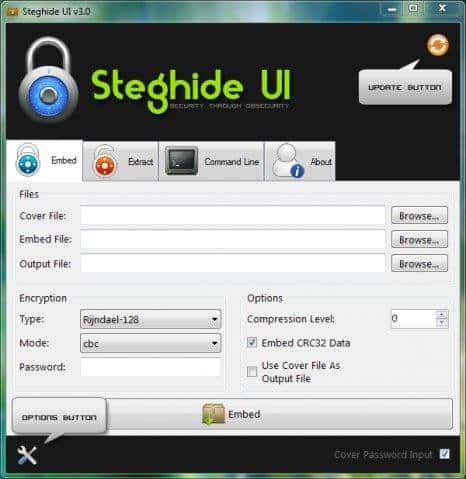
Sophisticated Concealment Mechanisms: Steghide’s prowess lies in its capacity to ingeniously embed confidential information within various digital carriers, ranging from images to audio files. Its algorithms utilize LSB (Least Significant Bit) embedding and other advanced techniques, ensuring the hidden data nestles undetected within the host file’s digital fabric.
Impenetrable Encryption: Beyond the art of concealment, Steghide fortifies its covert exchange with layers of encryption. Data is hidden and encrypted using powerful ciphers, rendering it impervious to unauthorized access.
Command-line Dexterity: Steghide’s command-line interface adds a touch of sophistication to its usage. This interface allows for fine-tuned control over the embedding process, catering to the discerning needs of tech-savvy users and enthusiasts.
Cross-platform Compatibility: Versatility is another feather in Steghide’s cap. Its availability on multiple platforms, including Linux, Windows, and macOS, ensures that its utility transcends operating system boundaries.
The Nexus of Privacy and Creativity: Beyond its technical excellence, Steghide strikes a balance between privacy and creativity. Its concealed payloads and hidden messages transform digital files into covert art pieces, elevating secret communication to an artful form.
Challenges of Detection: As with any formidable tool, Steghide challenges steganalysis. Its subtle embedding techniques and encryption make unraveling its concealed contents require meticulous effort.
In the tapestry of steganography tools, Steghide stands as a masterpiece, weaving the threads of concealment, encryption, and finesse into a seamless fabric of covert communication. As the digital age propels us toward a landscape of hidden messages and encrypted conversations, Steghide emerges as an indispensable companion for those navigating the intricate realms of secrecy.
In the realm of steganography tools, Steghide shines as a powerful contender, offering a unique blend of capabilities that come with its own set of advantages and limitations. Let’s explore the pros and cons of this enigmatic tool:
Pros:-
Robust Concealment: Steghide excels in concealing sensitive information within digital carriers. Its sophisticated algorithms ensure that the embedded data remains hidden from casual observers.
Encryption Enhancements: Going beyond mere concealment, Steghide fortifies hidden data with encryption, adding an extra layer of security to protect sensitive information from unauthorized access.
Cross-Platform Compatibility: Steghide’s availability across various operating systems makes it an accessible choice for users across different platforms, enhancing its versatility and reach.
Command-Line Precision: The command-line interface provides granular control over the embedding process, allowing users to tailor concealment and encryption according to their specific requirements.
Artistic Camouflage: Steghide’s ability to transform ordinary files into covert information carriers adds a creative dimension to secret communication, merging innovation with privacy.
Cons:-
Technical Proficiency: Steghide’s command-line interface might prove challenging for less tech-savvy users, potentially limiting its adoption among a wider audience.
Potential Detection: While Steghide’s concealment mechanisms are robust, the ongoing evolution of steganalysis techniques poses the risk of hidden data being detected by advanced algorithms.
Single Carrier Type: Steghide primarily focuses on images and audio files as carriers. This limitation might hinder users who require more diverse carrier formats for their hidden data.
Complexity: While its command-line nature offers control, it can also introduce complexity for users who prefer graphical user interfaces or simpler tools.
Potential Misuse: As with any powerful tool, Steghide could be misused for malicious purposes, underscoring the ethical implications associated with its usage.
In the intricate dance between secrecy and innovation, Steghide emerges as a leading player, wielding the art of concealment and encryption with finesse. Its strengths lie in its technical prowess and security enhancements, yet it’s essential to tread carefully, mindful of its complexities and the evolving landscape of detection techniques.
2. OpenStego
In the intricate realm of steganography tools, a gem of innovation shines brightly: OpenStego. With a tapestry of features and functionalities, OpenStego claims its rightful place as a paragon of concealed communication, setting a benchmark for excellence in digital secrecy.
Elegance in Concealment: OpenStego embodies elegance, seamlessly integrating confidential data within various digital carriers. Through its adept utilization of LSB (Least Significant Bit) and other advanced embedding techniques, OpenStego ensures that the concealed information remains imperceptible to the naked eye.
Versatile Carrier Formats: Distinguishing itself from the crowd, OpenStego’s prowess extends across multiple carrier formats, from images to audio and beyond. This versatility enhances its applicability, accommodating diverse user needs and preferences.
Embedding Algorithms: OpenStego employs a spectrum of embedding algorithms, each tailored to specific use cases. This nuanced approach empowers users to fine-tune their concealment methods, amplifying the tool’s utility and impact.
Ease of Use: Beyond its technical finesse, OpenStego embraces accessibility. With its user-friendly interface, users are invited to navigate the complexities of concealed communication without stumbling upon the hurdles of complexity.
Advanced Security: OpenStego’s commitment to safeguarding data transcends mere concealment. Integrating encryption mechanisms ensures that the concealed information remains impervious to unauthorized access.
The Road Ahead: As the digital communication landscape evolves, OpenStego keeps pace. Its commitment to continuous development promises users a tool that remains relevant in the ever-shifting world of cybersecurity and secrecy.
In the grand tapestry of steganography tools, OpenStego unfurls as a masterpiece, weaving together innovation, security, and user-friendliness. Its power to transform digital carriers into covert communication conduits is a testament to human ingenuity and the art of concealed exchange.
As the journey of secret communication continues, OpenStego stands as a guiding light, illuminating the path toward seamless and secure information exchange.
Pros:-
Diverse Carrier Formats: OpenStego’s ability to embed information across various carrier formats, including images and audio files, grants users versatility in concealed communication methods.
Advanced Embedding Techniques: OpenStego leverages sophisticated techniques, like LSB embedding, to ensure seamless and undetectable data concealment within digital carriers.
User-Friendly Interface: The tool’s intuitive interface makes it accessible to a broader audience, enabling tech-savvy users and beginners to engage in concealed communication without a steep learning curve.
Tailored Embedding Algorithms: OpenStego’s array of embedding algorithms accommodates various use cases, allowing users to optimize concealment methods for their specific needs.
Encryption Integration: OpenStego’s integration of encryption fortifies concealed data, ensuring an additional layer of security to safeguard sensitive information.
Cons:-
Limited Carrier Formats: While OpenStego covers multiple carrier formats, its range may not extend to all digital file types, potentially limiting its application for users requiring unconventional formats.
Detection Risks: As with all steganography tools, the potential for detection by advanced steganalysis techniques remains a concern, demanding vigilance in concealing data effectively.
Operating System Compatibility: OpenStego’s compatibility across different operating systems might be limited, affecting its accessibility for users with diverse system preferences.
Dependencies and Performance: Depending on the system and configuration, OpenStego’s performance could be affected by dependencies, potentially impacting its efficiency.
Ethical Considerations: The power to conceal and transmit data covertly raises ethical concerns surrounding potential misuse for malicious purposes, underscoring the need for responsible usage.
In the grand tapestry of digital secrecy, OpenStego’s woven threads of versatility, security, and user-friendliness offer an enticing path for concealed communication.
However, it’s crucial to balance its advantages with potential limitations, ensuring that users approach its usage with a mindful understanding of its capabilities and constraints. As the journey of covert communication continues, OpenStego stands as a formidable ally, poised to empower users in their quest for secure information exchange.
How To Hide Important Data in a Photograph with OpenStego
Step 1:- Visit https://www.openstego.com/ and click on Download and install it.
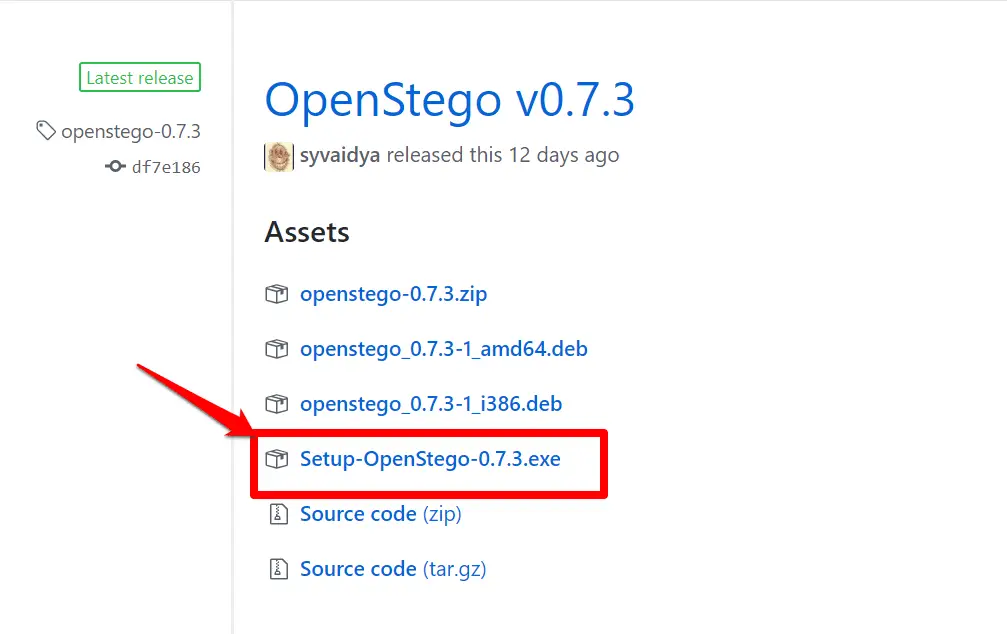
Step 2:- Create the message you want to hide. To avoid raising suspicion with an oversized file, it’s best to create it in Notepad and save it as plain text. Click the ellipses (…) next to Message File 1 and find your saved text file. Click the ellipses button next to Cover File.2
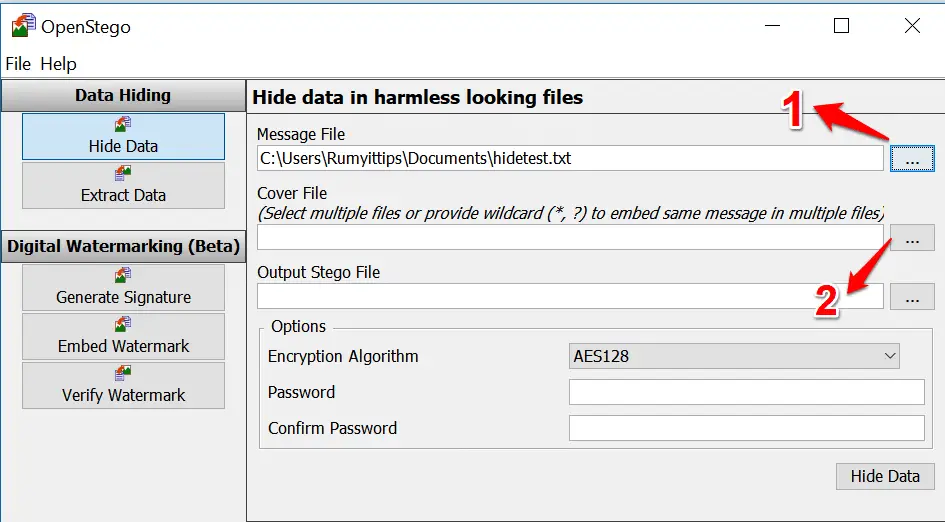
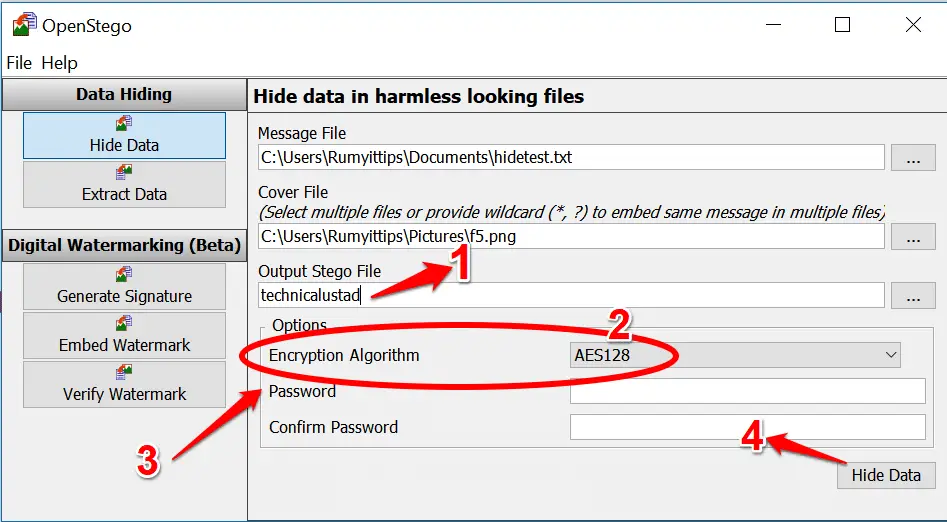
Step 3:- Select the image(s) you want to hide the message and enter a name for your new Stego file. 1 You have the option to choose an Encryption Algorithm.
2 Enter a password and confirm it, 3 then click Hide Data 4 and OpenStego will go to work creating a copy of your image with the text hidden inside.
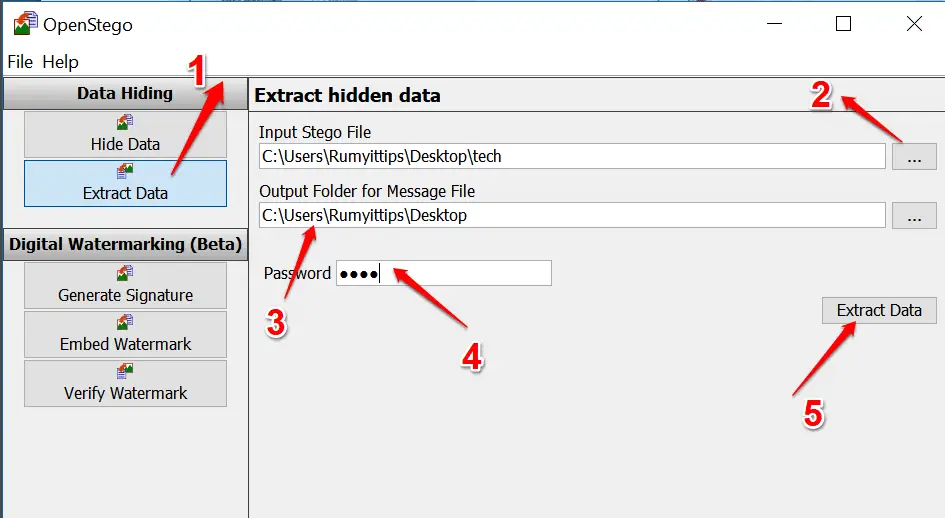
Step 4:- To recover the hidden text in your image (or in another image from somewhere else), click the Extract Data button on the left. 1 Tap the ellipses next to Input Stego File 2 and
select the secret file.
Specify the folder you want to save the message to 3 and enter the password to unlock it, 4 if one was set. Click Extract Data.
3. Invisible Secrets
In the realm where digital footprints and hidden exchanges intertwine, a tool emerges as a sentinel of concealed communication: Invisible Secrets. This cryptographic marvel casts an intricate web of security, offering a multifaceted approach to safeguarding sensitive information.
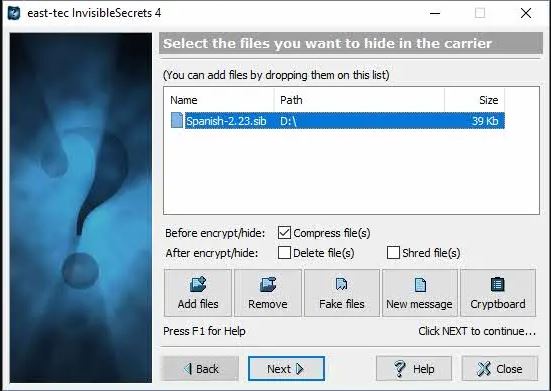
A Multiverse of Encryption: At the heart of Invisible Secrets lies a symphony of encryption techniques, transforming data into enigmatic code that defies prying eyes. From traditional ciphers to cutting-edge algorithms, the tool empowers users to craft an impregnable fortress around their secrets.
Concealment Beyond Perception: The essence of Invisible Secrets lies in its aptitude to embed encrypted data within seemingly innocuous digital carriers. Be it images, audio, or text, this tool renders the hidden information imperceptible to the ordinary observer, heralding a new era of covert communication.
Steganography’s Touch: Beyond Encryption, Invisible Secrets dons the cloak of steganography. By ingeniously camouflaging encrypted data within existing files, it evokes an artful dance of concealment and revelation, akin to a hidden treasure map in plain sight.
Advanced Authentication: This tool’s elegance extends to its authentication mechanisms. From passwords to hardware keys, Invisible Secrets provides layers of defense, ensuring that only authorized individuals can unlock the vault of concealed data.
The Nexus of Security and Innovation: As the digital landscape transforms, Invisible Secrets is a testament to the delicate balance between security and innovation. It melds the art of cryptography and steganography, weaving them into a seamless tapestry of concealed communication.
Whether safeguarding personal files, confidential documents, or private messages, Invisible Secrets beckons as a guardian of secrecy. As digital voyagers navigate the sea of information, this tool emerges as a guiding star, illuminating the path toward secure and covert exchanges. Embark on your journey into Invisible Secrets, where security is an enigma waiting to be unraveled.
Invisible Secrets emerges as a dual-edged sword, wielding benefits and challenges in the labyrinthine realm of data security and concealed communication. Let’s embark on an exploration of the pros and cons of this intriguing tool:
Pros:-
Multi-layered Encryption: Invisible Secrets shines in its ability to employ a diverse array of encryption techniques, constructing an impregnable fortress around sensitive data and ensuring only authorized eyes can decipher its contents.
Seamless Concealment: The tool’s prowess in embedding encrypted data within everyday digital carriers, such as images and text, makes it an adept ally for covert communication, evading detection by casual observers.
Artful Steganography: Invisible Secrets brings an artistic flair to security with its steganographic capabilities, expertly blending encrypted messages within existing files, elevating the concept of hidden communication to an art form.
Authentication Fortification: The tool’s multifaceted authentication mechanisms, encompassing passwords and hardware keys, add layers of security, ensuring that only those with the requisite authorization can access concealed data.
User-Friendly Interface: Despite its advanced capabilities, Invisible Secrets maintains a user-friendly interface, making it accessible to a spectrum of users, from the tech-savvy to the less experienced.
Cons:-
Learning Curve: The tool’s rich feature set might present a learning curve for those new to data encryption and steganography, potentially requiring time to harness its capabilities fully.
Risk of Misuse: As with any powerful tool, Invisible Secrets carries the risk of misuse for nefarious purposes, underscoring the ethical considerations surrounding its use.
Potential Detection: While the tool excels at concealing data, the evolving landscape of detection techniques poses the challenge of potential exposure by advanced steganalysis methods.
Compatibility Issues: Depending on system configurations and updates, Invisible Secrets might face compatibility issues, potentially affecting its seamless functionality.
Complexity vs. Simplicity: While the tool’s user-friendly design is commendable, its multifaceted features might inadvertently introduce complexity for users seeking simpler encryption solutions.
In the intricate mosaic of data security, Invisible Secrets emerges as both a sentinel and a riddle. It offers a potent blend of encryption, steganography, and authentication, standing as a shield against prying eyes.
Yet, its capabilities come hand in hand with challenges, urging users to tread the path of concealed communication with a mindful balance of exploration and caution. As the digital frontier evolves, Invisible Secrets remains a compass, guiding users through the complex terrain of secure data exchange.
4. SilentEye
In the realm where secrecy and digital innovation converge, SilentEye emerges as an undisputed champion among the best tools for steganography. With its digital brush strokes of concealment and encryption, it crafts a canvas of covert communication that defies detection and elevates the art of hidden exchange.
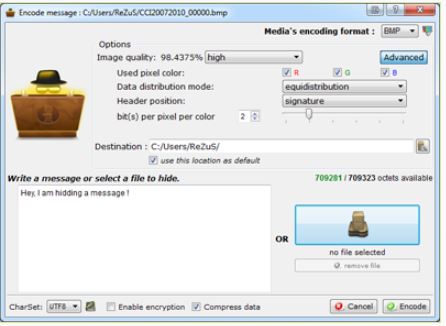
Stealthy Concealment Expertise: At the core of SilentEye lies an arsenal of sophisticated techniques that cloak sensitive information within the fabric of digital carriers. It orchestrates a seamless blend of data and host files through a symphony of algorithms, such as LSB and F5, rendering the concealed message a cipher of near-invisibility.
Multifaceted Carrier Formats: Distinguishing itself from the crowd, SilentEye weaves its magic across diverse carrier formats, from images to audio files. This versatility broadens its scope, accommodating various needs and preferences for concealed communication.
Interactive Interface Dynamics: Anchored in an interactive user interface, SilentEye welcomes novices and tech-savvy users to a realm of hidden wonders. Its intuitive design unearths the complexities of steganography, providing a user-friendly gateway to the realm of covert exchange.
Layered Encryption Guardianship: Beyond concealment, SilentEye elevates its protective layers with encryption mechanisms, fortifying concealed data against unauthorized access. This symmetrical marriage of steganography and cryptography engenders a vault of invincibility.
The Road Ahead: In a digital epoch perpetually awash with information, SilentEye evolves in stride. Its commitment to development assures users a tool that remains relevant, adapting to the shifting sands of technology and encryption.
As SilentEye reigns as the apex among the best tools for steganography, it invites users to partake in the enigmatic dance of concealed communication. In a world where information is both a shield and a weapon, this tool unfurls as a masterpiece, woven with threads of innovation, secrecy, and ingenuity.
5. SSuite Picsel Security
In the dynamic landscape of digital concealment, SSuite Picsel Security stands tall as an exceptional steganography tool for Windows users. Nestled within the domain of secure data transmission, this tool harnesses the power of obscurity to craft a symphony of covert communication.
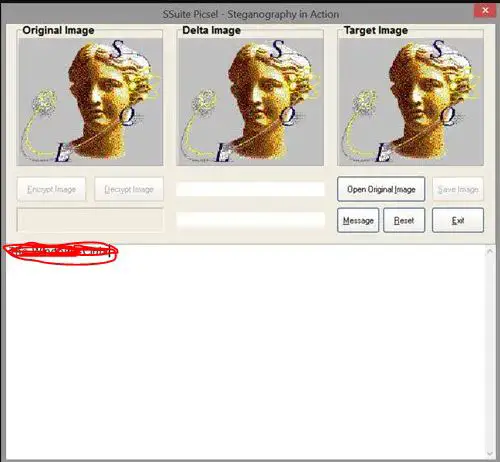
A Window into Concealed Communication: SSuite Picsel Security extends an innovative embrace to Windows users, ushering them into hidden exchanges. Its canvas is the digital image upon which it paints the strokes of concealed data, adeptly camouflaged within the host file’s very pixels.
Windows-Tailored Ingenuity: Designed with Windows users in mind, SSuite Picsel Security resonates with the operating system’s nuances, ensuring a seamless experience for those navigating the steganographic path. Its compatibility aligns with the familiar Windows environment, creating a comfortable space for concealed communication.
Subtle Techniques, Potent Impact: At the heart of SSuite Picsel Security lies a repertoire of steganographic techniques, such as LSB and JPEG compression. These techniques delicately weave encrypted messages within images, rendering the concealed data virtually undetectable.
Data Safeguarding Beyond Perception: Beyond its concealment prowess, SSuite Picsel Security enriches its tapestry with encryption layers, adding a shield of security to the hidden data. This dual-layer defense fortifies the hidden exchange against unauthorized access.
The Odyssey Ahead: In an era where information is both a treasure and a liability, SSuite Picsel Security evolves, poised to cater to Windows users’ changing needs. Its commitment to continuous development promises a tool that remains relevant in the evolving digital privacy landscape.
As SSuite Picsel Security emerges as the guardian of hidden communication for Windows users, it invites them to embark on a journey of concealed expression. This tool unfurls as a masterpiece of innovation and security, crafted to empower users with the art of steganography.
6. DeepSound
In the ethereal realm of covert communication, DeepSound emerges as a virtuoso, playing a mesmerizing melody of hidden exchange. With its harmonious blend of innovation and security, this tool transcends boundaries, redefining the art of steganography.
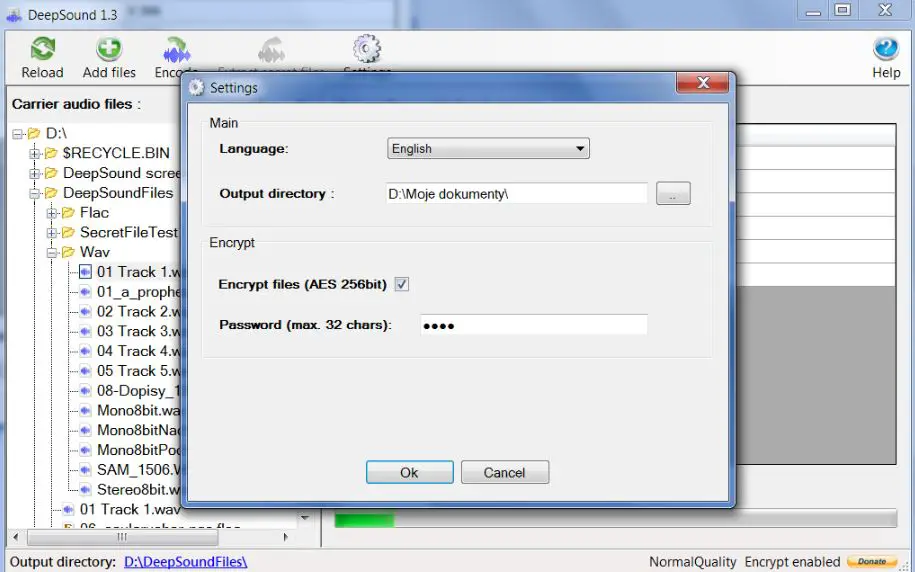
A Hidden Sonata: Nestled within the digital soundscape, DeepSound orchestrates a masterpiece of concealed communication. As a canvas, it employs audio files, elegantly embedding encrypted messages within the very cadence of sound waves.
Unveiling Sonic Concealment: At the core of DeepSound lies an ensemble of advanced techniques, such as echo hiding and phase coding, crafting a seamless interplay between hidden messages and audio carriers. This synergy between data and sound remains imperceptible to the untrained ear.
Sublime Encryption Fusion: Beyond the symphony of concealment, DeepSound enhances its composition with encryption layers. This symmetrical union fortifies the hidden data, creating a sanctuary against prying ears.
Whispers of Authentication: The tool’s harmonics extend to its authentication mechanisms, resonating with layers of security such as passwords and key files. These whispers of authentication grant access only to those with the requisite keys.
The Overture Ahead: In the digital crescendo of communication, DeepSound evolves. Its commitment to innovation ensures a tool that adapts to the evolving orchestration of technology, promising users an enduring companion in steganography.
As DeepSound serenades the world of covert communication, it beckons users to immerse themselves in its harmonious intricacies. With every concealed note, it paints a portrait of secure data exchange.
7. SteganPEG
In the realm of digital security and covert communication, SteganPEG (Download Here) emerges as a beacon of ingenuity, offering a canvas where secrets are artfully concealed within images. With a symphony of features, this tool harmoniously blends encryption and steganography to redefine the art of hidden exchange.
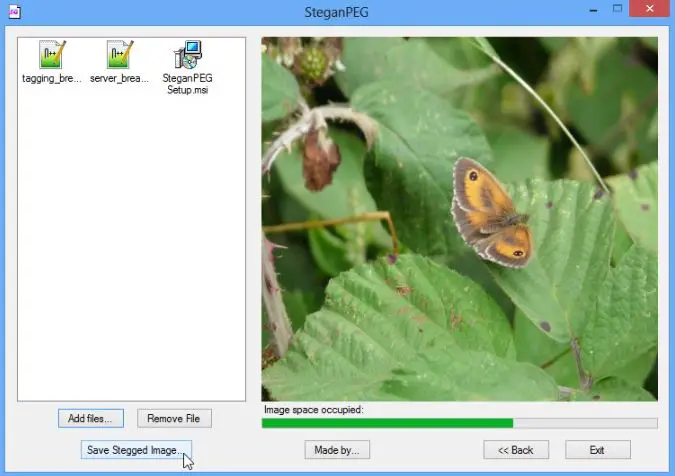
Hidden Strokes of Ingenuity: Anchored within the digital pixels of images, SteganPEG transcends the ordinary, ingeniously embedding encrypted messages within the visual tapestry. Each pixel becomes a note in a silent symphony of concealed communication.
Pixels as Palettes: At its core, SteganPEG harnesses the potential of least significant bit (LSB) steganography, using the subtle alterations of image pixels to encode encrypted data. This dance of pixels and information remains invisible to the naked eye.
A Fusion of Security: Beyond its concealment capabilities, SteganPEG fuses the art of steganography with robust encryption layers, safeguarding concealed data against unauthorized access. This dual-layered defense fortifies hidden communication.
Interface Intuition: The tool’s intuitive interface caters to both novices and tech-savvy users, unraveling the complexities of steganography without overwhelming users with technical jargon.
The Path Forward: In a digital landscape where information is both vulnerable and coveted, SteganPEG evolves in step. Its commitment to development ensures a relevant tool amidst the ever-evolving digital privacy landscape.
As SteganPEG emerges as a digital sanctuary for concealed communication, it beckons users to explore the art of hidden exchange. Within each image lies a symphony of secrets, a testament to the tool’s fusion of encryption and steganography. For those eager to immerse themselves in this enigmatic realm, SteganPEG offers its canvas of concealment.
8. QuickStego
In the world of digital enigma, where secrets and data intertwine, QuickStego emerges as a sentinel of concealed communication. As a free steganography tool for Windows, it encapsulates the essence of innovation, safeguarding hidden messages within the very fabric of digital files.
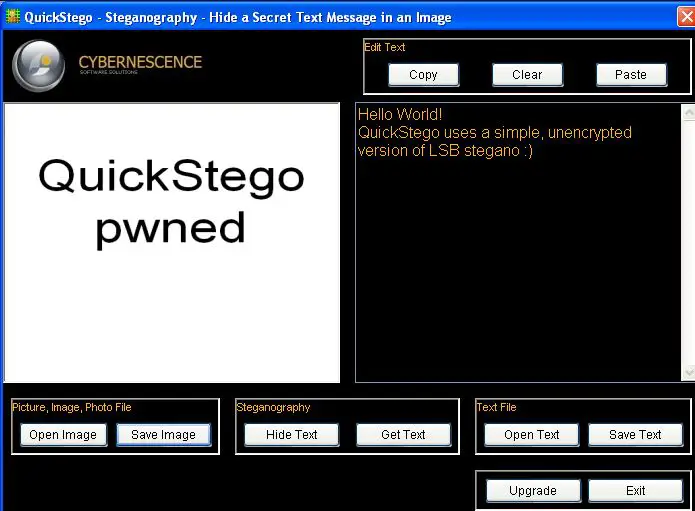
A Windows-Wrapped Gem: Tailored for Windows users, QuickStego is a testament to the tool’s harmonious compatibility with the Windows operating system. Its familiarity with the Windows environment creates a user-friendly haven for hidden communication.
Concealment: An Art Form: QuickStego transcends ordinary encryption. It crafts a symphony of concealment by embedding encrypted messages within various digital carriers, such as images or text files. The concealed messages become an integral part of their very file.
Visual Imperceptibility: At its core, QuickStego defies visual detection. By harnessing advanced steganographic techniques, it subtly modifies bits and pixels within the host file, rendering the hidden data virtually invisible to the naked eye.
Unveiling Creativity: The tool’s potential extends beyond data security. It transforms digital files into vessels of concealed artistry, where encrypted messages coexist harmoniously with visible content, creating a new dimension of creative expression.
Future-Ready: In the ever-evolving digital landscape, QuickStego adapts and thrives. Its commitment to evolution ensures a tool that remains on the forefront of steganography’s advancements, promising Windows users a steadfast ally in hidden exchanges.
QuickStego stands as a testament to the fusion of innovation and security. For Windows users seeking to explore the nuances of concealed communication, this tool offers a gateway to the enigmatic world of steganography.
9. Xiao Steganography
This amazing and free software on our list can help you hide secret files behind images and other media. The best part about this tool is that it is easy to handle and use. All you need to do is to open the software and load the image of a file to the interface.
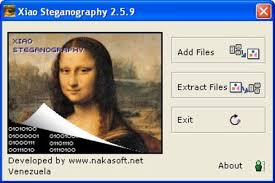
After that, you must add the file you are willing to hide. Apart from this, this application also supports encryption. You can easily select any algorithm like DES, triple DES, RC2, RC4, hashing SHA, and others.
It is important to have the same tool to read the hidden message. This tool will also help decode the hidden file and let you read the message. You need to determine that you cannot extract the message with the help of any other software.
The software is considered best for all those willing to get a simple and effective stenography tool. Apart from this, this software is also easy to use and free to download.
Download Here10. Image Steganography
It is also amazing free stenographer software that can help hide the information in image files. You can easily hide the message or the file behind any other file.
All you need to do is to select the source file and then select the file or message that you want to hide. You need to select the output image location. After selecting all the media stuff and the hidden message, click the start button to encode the file.
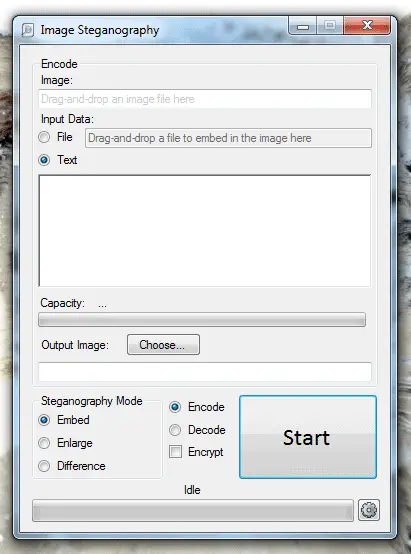
The encoded image will be having a secret image inside. The secret message can either be in the form of text or an image. The receiver needs to have the same stenography application to decode the message. If the receiver does not have the same applications, the message will not be decoded.
Pros:-
- You can easily hide the message behind the files
- Simple and easy-to-use interface
- Free to use former
Cons:-
- If you are not having the same software, then the message will not be decoded
11. Crypture
Crypture is an amazing cryptography tool, and with the help of this tool, you can easily perform stenography and hide sensitive data behind the image files.
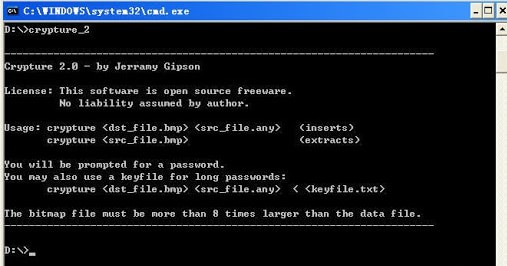
To use this tool, you need to complete one requirement. The BMP file must be 8 times larger than the file you are willing to hide. If you are willing to hide a small amount of data, you can easily use this tool.
The best part about this tool is that it is only 6 KB in size. So you do not need to perform any installation or complex downloading process to get this app working on your device.
Pros:-
- You can easily hide sensitive data behind
- Simple platform
- Best for a small amount of data
- Easy to install
- Sometimes no installation is required
Cons:-
- Only good for a small amount of data
- Command-line knowledge is very important
12. SteganographX Plus 2.0
It is an amazing Image Steganography Download tool that helps you hide your secret message behind the BMP image. If you are having any confidential data then you can easily hide it by using this tool.
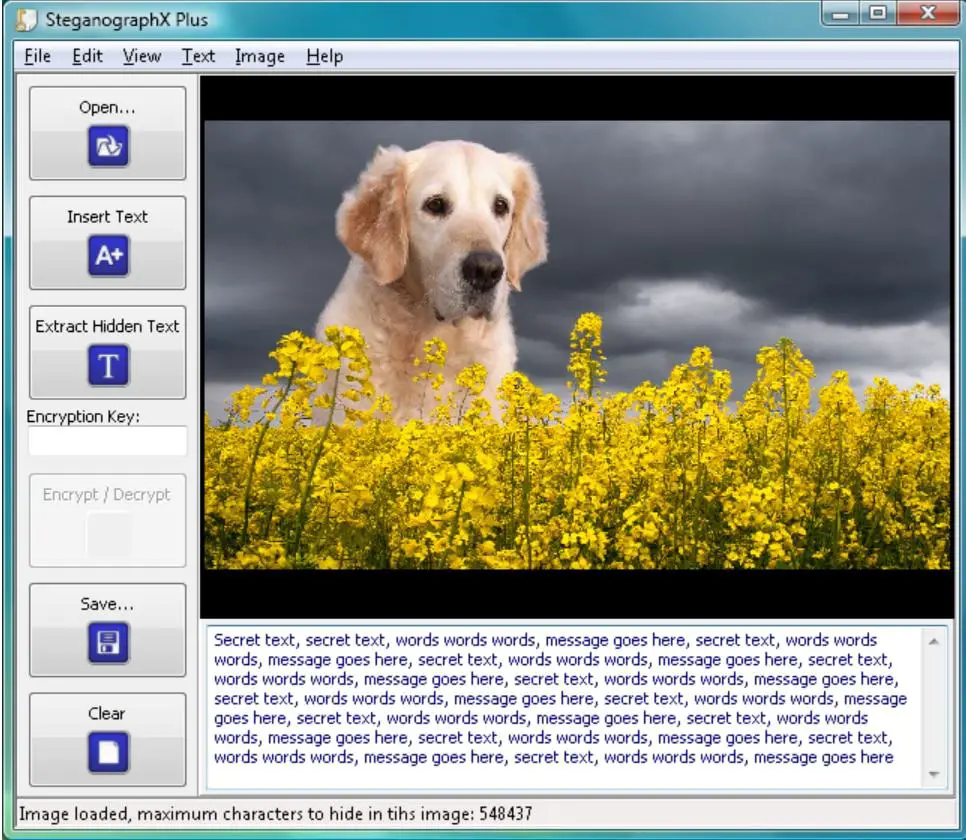
The size of this tool is 496 KB, and you do not need to perform a complex installation process to get it. Apart from this, this application’s user interface is so easy and simple.
You can easily use it and hide your confidential data behind the BMP images. Along with hiding sensitive data, you can also be called sensitive messages with the help of this same tool.
Pros:-
- Do not need any installation process
- Confidential data can easily get hidden
Cons:-
- Sometimes becomes complex for you
13. rSteg
This is also an amazing option on our list for all those looking for the best Steganography Tools. This tool is Java-based, and with the help of this you can easily hide text to data inside an image.
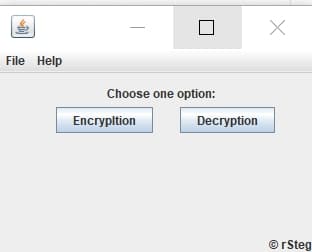
In this tool, there are two different tabs given. One tab is used to encrypt the data; with another tab, you can easily decrypt the data. All you need to do is select the image file and enter the pin.
After that you need to enter the text that you are willing to hide in the image. With the help of this tool, the target image will easily be generated along with the hidden message inside the file. To read the text again, you need to use the same tool. To read the message, you need to use that decrypt option.
Pros:-
- You can easily hide any data or text inside the image
- Simple to use and perform the encryption task
Cons:-
- It is Java-based so sometimes a little bit of technical knowledge required
14. Our Secret
If you have some sensitive information and are willing to hide it behind an image or audio tool, then you can easily use this application. The interface of this stenographer tool is divided into two parts.
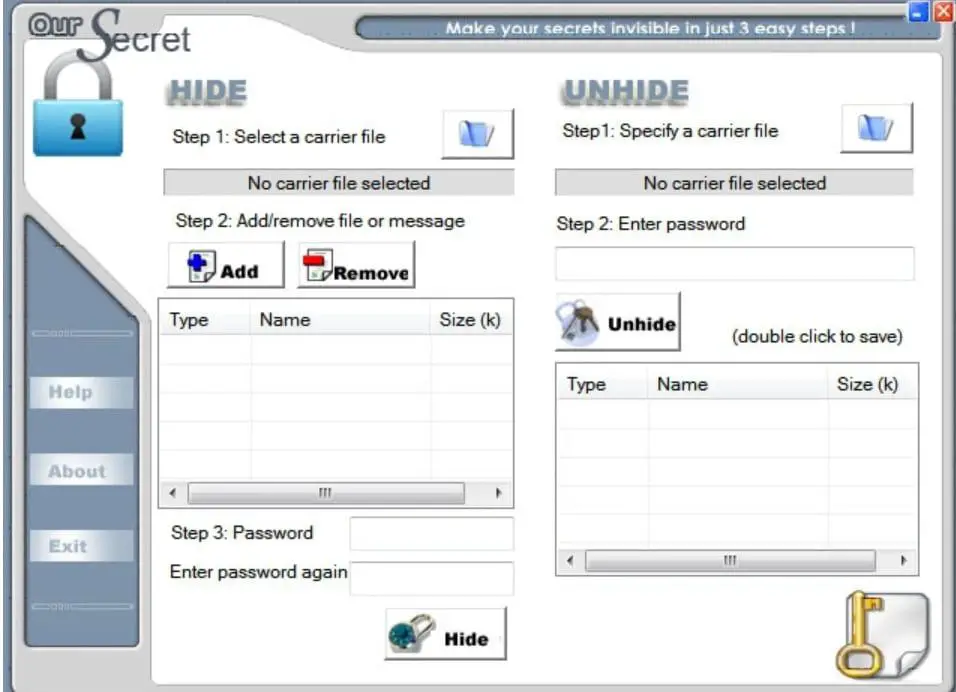
The first part easily hides the data in a file, and in another part, you can easily unhide the data from the file. First, you must select the carrier file where you are willing to hide the data. You need to select the data that you are willing to hide. After selecting both files, you must enter the password to encrypt the message.
Finally, select the hidden tab to hide the data point. You need to use the same tool again to unhide the information or data from the file. This tool is also available free of cost; through this, you can easily send your secret message to anyone.
Pros:-
- Easy to use and perform the hiding task
- More secure as compared to others
Cons:-
- If you forgot the password, you cannot decode the data.
15. Hide’N’Send
This amazing tool lets you hide your important data and send it without any complexities. You can easily hide any file behind the JPG image file. The best part about this is that it supports both encryption and hashing.
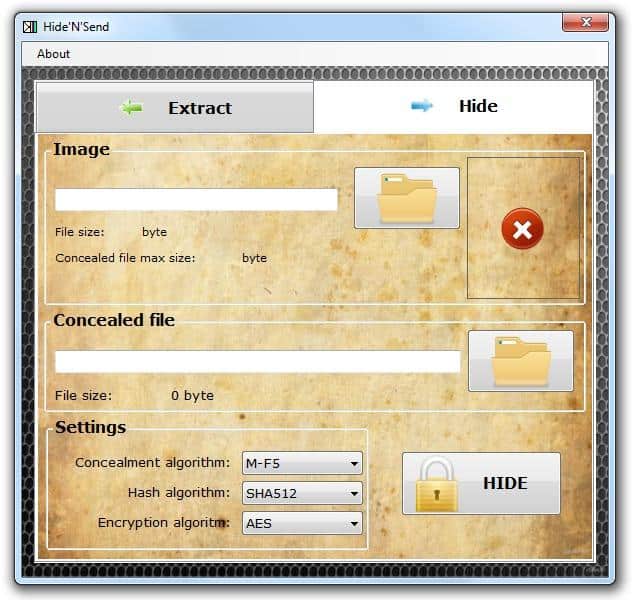
You can easily hide the details by encrypting and adding an extra security layer. The best part about this tool is that it has a simple interface and two tabs.
With the help of one tab, you can easily hide the data with the help of another tab; you can extract the data. Apart from this, you can easily choose any option accordingly.
To run that will, it is important for you to select the file you are willing to hide and the image file behind which you are willing to hide the hidden message. To extract the message from the hidden image, use the same tool repeatedly.
Pros:-
- Amazing and easy interface
- All types of files can be secured
- Simplified process of encoding and decoding the message
Cons:-
- Without the same to you, files will not be extracted.
16. ImageHide
It is an application that helps you hide your important messages and images behind ordinary images. With the help of this, you can easily share important and confidential messages with your friends, and you will not have to face any privacy problems.
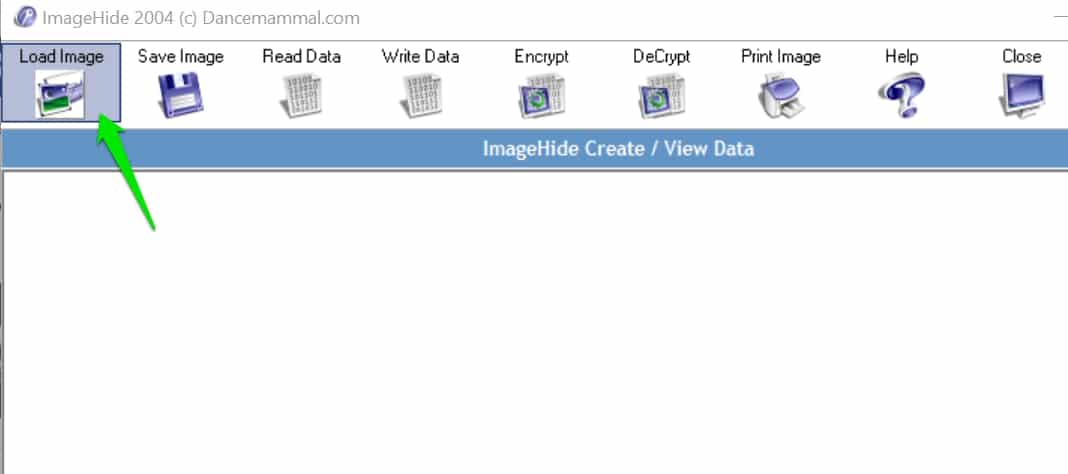
This is amazing portable software. Additionally, you do not need to install it on your device. You can easily place that will on the external device and plugin to the computer and run it.
Pros:-
- You can easily hide your important message
- It is portable software, so you do not need to install it
Cons:-
- You face difficulty if you lost the external device
17. GifShuffle ( Linux Steganography Tool)
If you are also willing to get an amazing tool that can easily help you conceal the messages in images by shuffling in the colormap, then you can go for this one.
It is an amazing tool that works with all the gifts images, including transparency and animation. Apart from this, it also provides compression and encryption settings for the concerned messages.
To hide any message, you can use this tool. Apart from this, you can use this tool without hassle if you are willing to decode any messages.
Pros:-
- Simple and easy to handle
- The transparency factor is there
Cons:-
- Sometimes become complex
How To Install “gifshuffle” Package on Ubuntu
18. S-Tools
It is also an amazing stenographer tool that helps hide the file in different formats. All you need to do is open the images and add the secret message. The best part about this is that you can easily hide multiple files in one picture.
Apart from this, you can also compressor data without having any hassle. This is one of the best encryption tools available to help you hide a secret message behind any image. You will see no difference in the original images even after adding the hidden message.

Pros:-
- An amazing tool with a great interface
- Files can be recorded in different formats
- Easily hide multiple files in one picture
Cons:-
- No such disadvantage is available
How To Choose the Right Steganography Tool
In the intricate dance of digital privacy, choosing the right steganography tool is akin to selecting a key that unlocks hidden doors of communication. With an array of options available, each boasting unique features and capabilities, the journey to finding the perfect tool can be exciting and daunting.
In this guide, we’ll unravel the key considerations that pave the path to selecting the right steganography tool tailored to your needs.
Understanding Your Objectives: Before delving into the sea of options, defining your objectives is crucial. Are you a professional seeking to secure sensitive business information or an individual safeguarding personal files? Clarifying your goals provides a compass that guides your search.
Concealment Techniques: Different steganography tools employ varying concealment techniques. Some may utilize LSB (Least Significant Bit) embedding, while others might delve into more advanced methods such as phase coding or echo hiding. Understanding these techniques empowers you to gauge the tool’s proficiency in concealing data within digital carriers.
Diverse Carrier Formats: Consider the range of carrier formats that the tool supports. Whether images, audio files, or text documents, ensure that the chosen tool accommodates the type of digital file you intend to use as a carrier for your concealed information.
Integration of Encryption: An essential aspect of secure steganography is the integration of encryption. Seek a tool that conceals data and fortifies it with encryption layers. This dual-layered approach ensures that even if the concealed information is discovered, it remains indecipherable without the proper decryption key.
User-Friendly Interface: Steganography involves intricate techniques, but a user-friendly interface is paramount. Look for a tool that strikes a balance between technical complexity and accessibility. An intuitive interface caters to beginners and experienced users, enabling seamless navigation.
Platform Compatibility: Consider the operating system on which you intend to use the steganography tool. Whether Windows, macOS, or Linux, ensure the tool is compatible with your preferred platform. Compatibility guarantees a smooth experience and efficient functionality.
Exploration of Advanced Features: Beyond the basics, delve into the tool’s additional features. Does it offer mechanisms for user authentication, watermarking, or integration with other security tools? These advanced features can significantly enhance the functionality and security of the chosen tool.
Reviews and Reputation: Research the reputation of the steganography tool. User reviews and testimonials provide invaluable insights into the real-world experiences of individuals using the tool. Learning from others’ experiences can aid in making an informed decision.
Support and Updates: A responsive support system and regular updates indicate a tool’s commitment to user satisfaction and continuous improvement. Seek a tool offering robust support channels and regular updates to keep up with evolving security standards.
In conclusion, choosing the right steganography tool is a meticulous process that requires balancing technical considerations and alignment with your specific needs.
By understanding your objectives, exploring concealment techniques, assessing carrier formats, and considering the integration of encryption, you pave the way toward selecting a tool that is a guardian of your concealed communication.
Remember, the right steganography tool is not merely a tool; it’s an ally in your journey toward securing sensitive information and mastering the art of hidden exchange.
Tips and Best Practices For Using Steganography Tools
In the ever-expanding realm of digital communication, using steganography tools has emerged as a captivating art, offering the power to convey information in an invisible cloak.
This journey into the world of concealed messages demands more than technical prowess—it requires an understanding of best practices that safeguard security, enhance concealment, and ensure ethical utilization.
Whether you’re a novice venturing into covert communication or a seasoned practitioner seeking to refine your skills, these comprehensive tips and best practices will guide you toward effectively mastering the subtleties of using steganography tools.
1. Understand the Essence: A Firm Foundation The inception of your steganographic journey necessitates grasping the fundamental principles. Comprehend the core concept: embedding secret information within seemingly innocuous carriers, such as images, audio, or text files.
2. Choose Wisely: The Right Tool for the Task Diverse steganography tools grace the digital landscape, each offering a unique tapestry of features. Selecting the right tool is paramount. Evaluate factors like supported carrier formats, encryption integration, and user-friendliness before choosing.
3. Safeguard with Encryption: A Dual Defense While steganography conceals, encryption fortifies. Opt for steganography tools that seamlessly integrate encryption layers into concealed data. This two-tier defense ensures that deciphering the concealed message remains an insurmountable challenge even if the concealed message is discovered.
4. Plan Your Message: Precision in Concealment Before embarking on the journey of embedding, carefully plan your concealed message. Keep it concise and focused, ensuring its alignment with the context of the carrier.
5. Carrier Selection: The Canvas Matters Choose carrier files judiciously. Opt for high-quality images or audio files with intricate patterns. An intricate carrier provides a richer tapestry for concealed data to merge with.
6. Format Consideration: Embrace Diversity Different carrier formats possess distinctive attributes. Dive into the nuances of each format, understanding how your steganography tool interacts with them. The format should align seamlessly with your intended use.
7. Validate Visibility: Concealment without Detection Before unveiling your concealed masterpiece, validate its visibility. Use appropriate tools to check if the embedded data remains invisible to the human eye.
8. Equilibrium between Concealment and Detection: A Delicate Balance Efficient steganography demands equilibrium. While concealing information is vital, striking a balance between successful concealment and the potential for detection by steganalysis techniques is equally crucial.
9. Document Your Odyssey: A Trail of Wisdom Maintain a record of your steganography endeavors. Document the tools used, carrier files employed, and encryption keys applied. This documentation serves as a roadmap for replication and troubleshooting.
10. Authentication Empowerment: Guarding the Concealed Vault If the steganography tool provides authentication mechanisms, embrace them. Implement password protection or digital signatures to bolster the security of your concealed communication.
11. Ethical Pathways: Responsibility and Legality Navigate steganography ethically and responsibly. Be aware of legal implications and respect data protection laws. Concealing certain types of information may lead to unintended consequences.
12. Stay Current: The Dance of Evolution In the dynamic realm of technology, steganography and steganalysis techniques evolve. Stay updated on the latest developments to ensure your concealed communication remains effective.
13. Education is Power: The Pursuit of Mastery Elevate your understanding by exploring the depths of steganography. Dive into literature, attend seminars, and engage in online forums. Knowledge amplifies expertise.
14. Secure Sharing: Channels of Confidentiality When sharing concealed data, choose secure communication channels. Opt for encrypted email services or secure messaging platforms to maintain the confidentiality of your exchanges.
15. The Art of Experimentation: The Creative Edge Steganography is an art as much as a science. Experiment with carrier formats, concealment techniques, and steganography tools to cultivate mastery.
These tips and best practices illuminate your path in the labyrinthine corridors of steganography. Embarking on concealed communication is a journey that combines technical adeptness with ethical considerations.
By adhering to these guidelines, you embark on a quest that unlocks hidden dimensions, preserving the sanctity of secrets while respecting the principles of digital ethics. Embrace the power of using steganography tools as an avenue to weave intrigue, enhance security, and navigate the intricate maze of modern communication.
Future of Steganography
In the ever-evolving landscape of digital security and communication, the concept of the Future of Steganography emerges as an enigma wrapped in innovation.
As technology advances and the need for secure information exchange intensifies, steganography is poised to undergo a transformative journey, reshaping how we perceive data concealment and communication.
Advancements in Concealment Techniques: The future of steganography promises a symphony of advanced concealment techniques that blur the lines between hidden and visible data. Techniques like frequency domain steganography, adaptive modulation, and hybrid approaches are poised to enhance the subtlety of concealed messages, rendering them even more impervious to detection.
Integration with AI and Machine Learning: The convergence of steganography with artificial intelligence and machine learning offers a tantalizing glimpse into the future. AI-driven algorithms could refine concealment methodologies, optimizing data embedding patterns for optimal security while ensuring minimal perceptibility.
Enhanced Carrier Diversity: The future holds an array of diverse carrier formats, extending beyond traditional images and audio files. Concealed data could find refuge within 3D models, video streams, and virtual reality environments, diversifying the canvas of hidden communication.
Quantum Steganography: With the advent of quantum computing, a new era of steganography emerges. Quantum steganography leverages the principles of quantum entanglement to create secure channels for information exchange, promising unparalleled levels of security and indistinguishability.
Blockchain Integration: The blockchain revolution could intertwine with steganography, creating an immutable ledger for concealed messages. Blockchain’s decentralized and tamper-resistant nature could enhance the authenticity and integrity of hidden exchanges.
Threats and Countermeasures: As steganography evolves, so do the detection methods. The future holds a cat-and-mouse game between steganography practitioners and steganalysis experts, with innovations in both domains shaping the security landscape.
Ethical and Legal Considerations: The future of steganography demands a balance between innovation and responsibility. Ethical considerations will be pivotal in navigating the delicate path between secure communication and potential misuse.
Data Privacy and Personalization: Steganography’s future could extend beyond concealed messages to data privacy and personalization. Hidden metadata within media files might enable tailored user experiences while safeguarding personal information.
Global Implications: The future of steganography holds global implications, influencing cybersecurity strategies, law enforcement methodologies, and intelligence practices. As concealed communication gains sophistication, its role in digital espionage and counterterrorism efforts may evolve.
Usability and Accessibility: The future will likely witness advancements in user-friendly steganography tools, empowering individuals from various backgrounds to engage in secure communication without technical complexity.
In conclusion, the Future of Steganography unfurls as an intricate tapestry of innovation, security, and ethical considerations. As technology surges forward, steganography evolves beyond mere concealment to a realm of adaptive techniques, artificial intelligence integration, and novel carrier formats.
The enigmatic horizon promises unparalleled security, challenging adversaries, and a reimagined landscape of hidden communication. As the future unfolds, steganography will continue to be a cornerstone of digital privacy and secure information exchange, leaving a trail of intrigue and transformation in its wake.
Conclusion
The demand for innovative and resilient methods to safeguard information continues to grow in the ever-changing digital security landscape. Through this comprehensive exploration of the Best Steganography Tools, we’ve delved into an advanced and discreet way to protect your most valuable digital assets.
The problem of data vulnerability is real and ever-present. However, the tools highlighted in this guide offer encryption and an intelligent way to conceal information, making it a formidable line of defense against unauthorized access.
Choosing the right steganography tool depends on your unique needs, whether personal or professional. Considering the features, compatibility, ease of use, and other factors detailed in this guide, you can find the solution that best fits your requirements.
In an age where privacy can often feel like a luxury, these steganography tools empower you to take control of your digital destiny. Don’t let the fear of exposure hold you back. Embrace the art of hidden communication, invest in the best steganography tools, and experience a newfound sense of security and peace of mind.
Feel free to revisit this guide whenever you need a reference or share it with others who might benefit from this invaluable insight. Remember, the power to protect lies in your hands in the world of information.


