
























Everyone has dreams, goals, and experiences they want to achieve in their lifetime.
A bucket list is a perfect tool to keep track of these aspirations, yet organizing and managing these lists can be challenging. Without a suitable method to curate, update, and visualize your progress, your bucket list might become a forgotten document tucked away in some corner.
The frustration builds when you can’t remember where you kept your list or when you lose track of your progress. It’s even more aggravating when you miss out on fulfilling an opportunity because you forgot it was on your list.
In this fast-paced world, wouldn’t it be more convenient to have your dreams and plans at your fingertips? Enter Bucket List Apps. These innovative solutions ensure that your life goals never go unattended.
From your wildest travel dreams to learning new skills or even just trying out a new restaurant, bucket list apps help you keep track of and fulfill your personal goals.
They bring organization, reminders, and progress tracking to your bucket list, ensuring your dreams are always within reach. Plus, they make sharing and discussing your goals with friends or family a breeze.
This article will review the top bucket list apps to help you realize your dreams.
Benefits of Using Bucket List Apps✌️
Bucket list apps have revolutionized how we approach our life goals and experiences. These innovative tools offer many advantages that can enhance our personal growth, motivation, and sense of achievement.
Let’s explore the benefits of using bucket list apps and how they can enrich our lives.
1. Organization and Goal Tracking:- It provides a structured platform to list and track your aspirations. You can organize your goals, set deadlines, and monitor progress with intuitive interfaces and customizable features. Whether traveling to exotic destinations, learning new skills, or conquering personal challenges, these apps ensure you stay on track and accountable.
2. Inspiration and Discovery:- One of the greatest benefits of bucket list apps is the opportunity to discover new experiences and ideas. They offer curated lists, recommendations, and suggestions tailored to your interests. By exploring categories such as adventure, culture, or self-improvement, you can broaden your horizons and find inspiration for your bucket list.
3. Social Integration and Collaboration:- Many apps foster a sense of community by allowing you to connect with like-minded individuals. You can share your goals, achievements, and experiences, inspiring others and receiving support in return. Collaborative features enable you to plan and embark on adventures together, creating memories and forging friendships.
4. Motivation and Achievement:- It serve as powerful motivator, spurring you to take action and accomplish your goals. They provide visual progress indicators, reminders, and rewards that fuel your determination. Celebrating milestones and checking off completed tasks instills a sense of fulfillment and propels you toward future endeavors.
In conclusion, These apps offer a range of benefits that streamline goal setting, foster inspiration, and cultivate a sense of community.
Utilizing these innovative tools allows you to embark on self-discovery, personal growth, and unforgettable experiences.
Start using a bucket list app today and unlock a world of possibilities.
Criteria For Evaluating Bucket List Apps🔭
When choosing a bucket list app, it’s essential to consider certain criteria for evaluating it to ensure you select the perfect tool to enhance your goal-setting and adventure-planning experience.
By considering these factors, you can make an informed decision and maximize the benefits of your chosen app.
1. User Interface and Ease of Use:- The user interface is crucial to your overall app experience. Look for an intuitive and visually appealing app for easy navigation and seamless interaction. A user-friendly design ensures you can efficiently manage your goals and explore new experiences without unnecessary complexity.
2. Features and Functionalities:- Different apps offer various features to support your bucket list journey. Consider the functionalities that align with your specific needs.
Look for features such as goal categorization, deadline setting, progress tracking, reminders, and social sharing capabilities. A comprehensive range of features empowers you to tailor your bucket list app experience to your preferences.
3. Social Integration and Community Engagement:-
Connecting and engaging with other users can significantly enhance your motivation and inspiration. Seek an app that provides social integration, allowing you to share your goals, achievements, and experiences with a supportive community. Look for features like commenting, liking, and following others to foster a sense of camaraderie and collaboration.
4. Availability across Different Platforms:- Accessibility is key when choosing a bucket list app. Ensure the app is available on various platforms, including mobile devices, web browsers, and smartwatches. This versatility allows you to access and update your bucket list anytime, anywhere, keeping you connected to your goals on the go.
By evaluating bucket list apps based on these essential criteria, you can find an app that aligns with your needs and preferences, helping you stay organized, motivated, and connected throughout your exciting journey of accomplishing your goals.
Best Bucket List Apps To Get Inspired and Organized
1. Bucket Listly
Embark on a transformative journey of discovery and adventure with Bucket Listly, the quintessential bucket list app that transcends the ordinary and propels you towards extraordinary experiences. With its innovative features and user-centric design, Bucket Listly redefines how you curate and pursue your dreams.
Bucket Listly distinguishes itself as an unrivaled platform for those who crave unforgettable escapades and seek to leave no stone unturned in their quest for self-fulfillment.
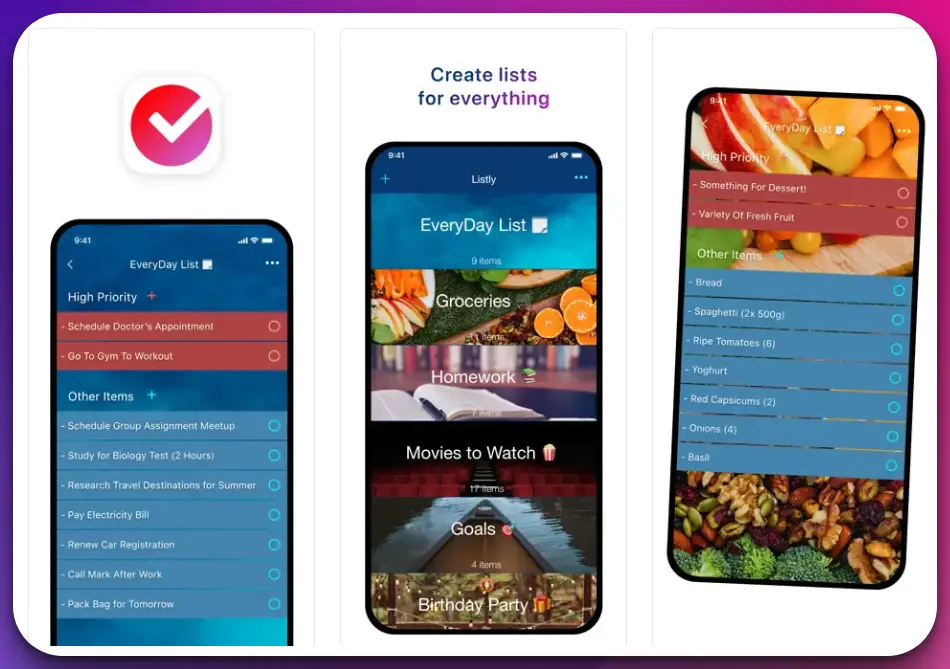
Seamlessly blending functionality and aesthetics, this app offers an immersive and intuitive experience that captivates and inspires. The app’s remarkable versatility lets you easily create and manage your bucket list.
From adrenaline-pumping activities to soul-stirring destinations, Bucket Listly empowers you to customize your list according to your unique aspirations and preferences. Embrace the freedom to dream big and manifest those dreams into reality.
What sets Bucket Listly apart is its vibrant community-driven ecosystem. Connect with fellow adventurers, share your experiences, and gain insights from the collective wisdom of a diverse community.
Discover hidden treasures, receive recommendations, and be motivated by the triumphs of others as you embark on your transformative journey. With seamless integration across platforms, Bucket Listly ensures that your dreams are always at your fingertips.
Whether exploring remote corners of the globe or immersing yourself in local culture, the app provides a seamless interface to document your progress, celebrate achievements, and capture cherished memories.
In conclusion, Bucket Listly emerges as the epitome of a bucket list app, offering a captivating blend of innovation, community, and personalization. It empowers you to transcend boundaries, explore new horizons, and live fully. Embrace the remarkable possibilities of Bucket Listly and embark on a remarkable journey of self-discovery and adventure today.
Download The App From Apple App Store
2. Wanderlog
Prepare to embark on a remarkable journey of exploration and wanderlust with Wanderlog, an exceptional addition to bucket list apps. With its impressive features and intuitive design, Wanderlog stands out as a dynamic and comprehensive platform for avid adventurers and dream chasers.
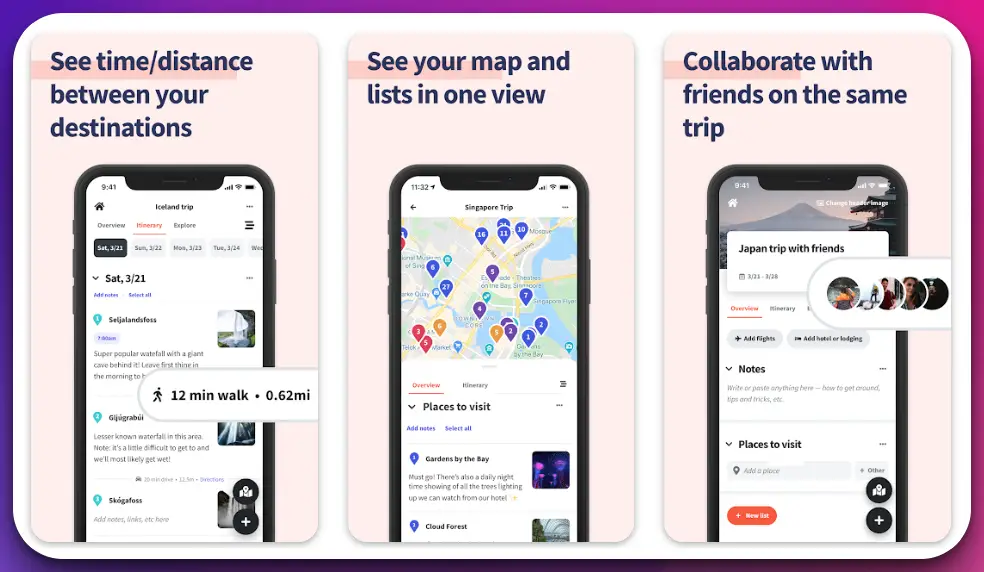
Wanderlog transcends the conventional notion of a bucket list app, offering a sophisticated and customizable experience tailored to your aspirations and travel goals.
With its extensive database of destinations, you can effortlessly curate a collection of must-visit places, whether it’s conquering towering peaks or savoring exotic cuisines.
The app’s seamless integration with mapping services lets you plan your journeys meticulously, marking each destination on an interactive map. You can easily track your progress, add detailed notes, and collaborate with fellow travelers to create an ever-evolving repository of remarkable experiences.
Wanderlog’s rich array of features extends beyond mere list-making. It is a virtual travel companion offering itinerary planning tools, real-time weather updates, and local recommendations that transform your travels into unforgettable adventures. Stay organized, stay inspired, and immerse yourself in the magic of exploration.
Moreover, Wanderlog fosters a sense of community and connection among travel enthusiasts. Share your itineraries, seek advice from experienced globetrotters, and discover off-the-beaten-path gems through a thriving network of fellow adventurers.
With Wanderlog, your bucket list becomes a collective journey that transcends borders and creates lifelong memories.
In conclusion, Wanderlog emerges as an exemplary bucket list app, seamlessly blending functionality, customization, and community engagement. It empowers you to curate your dreams, plan your escapades, and connect with a vibrant travel community. Embrace the possibilities of Wanderlog and embark on a transformative voyage of discovery and fulfillment.
Download The App From Google Play Store
Download The App From Apple App Store
3. Tripbucket
Prepare to embark on an extraordinary journey of discovery and wanderlust with Tripbucket, an exceptional addition to bucket list apps. With its innovative features and user-centric design, Tripbucket stands out as a dynamic and comprehensive platform for avid adventurers and dream chasers.
Tripbucket transcends the traditional concept of a bucket list app, offering a sophisticated and personalized experience tailored to your unique travel aspirations and goals.
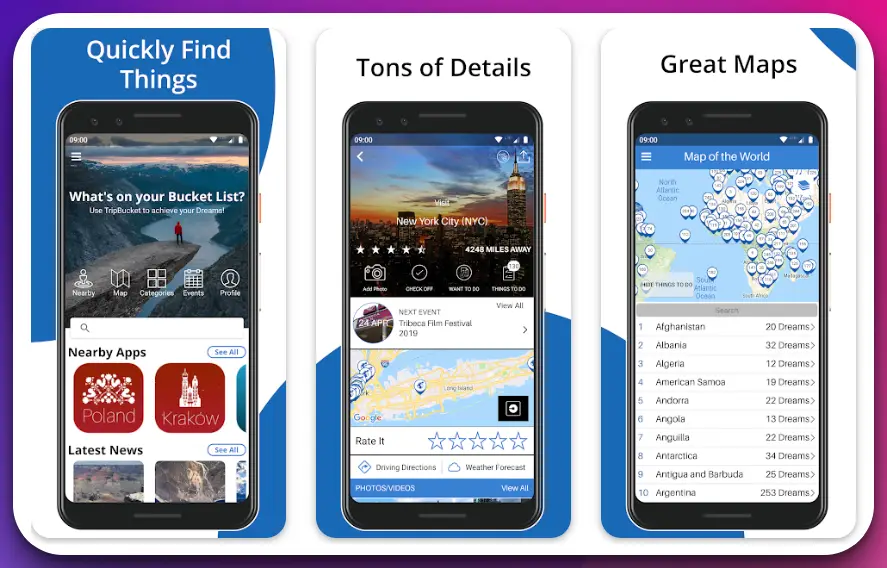
With its vast database of destinations, you can effortlessly curate a must-visit place collection, whether exploring ancient ruins or indulging in culinary delights.
The app’s intuitive interface allows you to seamlessly organize your travel goals and track your progress as you check off each accomplished milestone. With Tripbucket’s smart algorithms, you receive personalized recommendations and suggested itineraries, ensuring that no extraordinary experience goes unnoticed.
What sets Tripbucket apart is its commitment to fostering a sense of community and collaboration among travelers. Connect with like-minded explorers, share your adventures, and gain inspiration from the collective wisdom of a diverse community.
Discover hidden gems, insider tips, and firsthand accounts that enrich your travel experiences. Moreover, Tripbucket empowers you to transform your aspirations into reality through its integrated travel planning tools.
Seamlessly create and customize itineraries, book accommodations, and access vital information such as local transportation options, safety guidelines, and cultural insights.
In conclusion, Tripbucket emerges as an exemplary bucket list app, seamlessly combining functionality, personalization, and community engagement. It empowers you to curate your dreams, plan your adventures, and connect with a vibrant travel community. Embrace the possibilities of Tripbucket and embark on a transformative voyage of discovery and fulfillment.
Download The App From Google Play Store
Download The App From Apple App Store
4. Buckist by Iced Tea Labs
Prepare to embark on a transformative journey of exploration and self-discovery with Buckist by Iced Tea Labs, an extraordinary addition to bucket list apps.
With its innovative features and user-centric design, Buckist is a testament to Iced Tea Labs’ commitment to creating exceptional digital experiences.
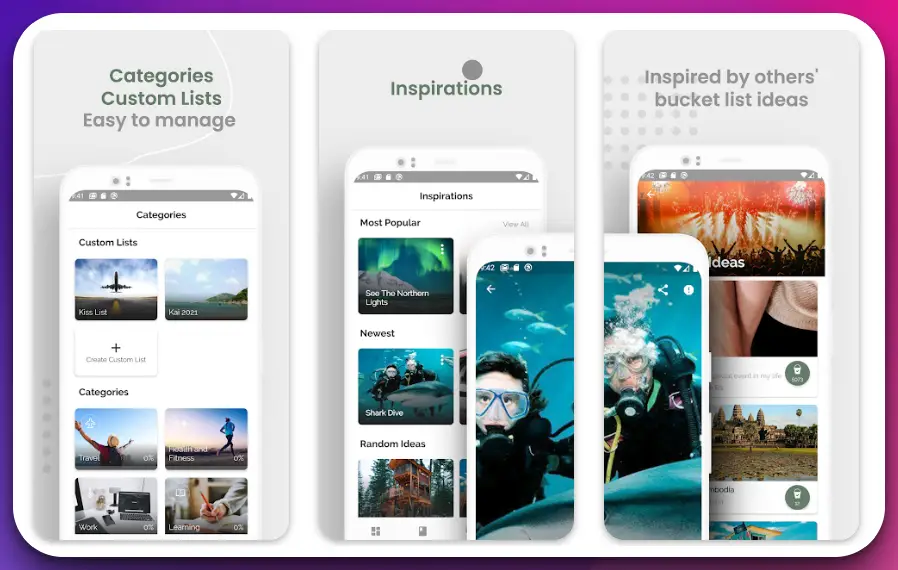
Buckist transcends the ordinary, offering a seamless and immersive interface that empowers you to curate remarkable experiences and elevate your bucket list to new heights.
From adrenaline-fueled adventures to serene nature retreats, Buckist provides a platform to manifest your dreams and embrace the extraordinary. The app’s intuitive design and robust functionalities make it effortless to organize and track your bucket list.
With Buckist’s intelligent goal-setting features and progress-tracking tools, you can visualize your journey, celebrate milestones, and stay motivated.
Its commitment to fostering community and inspiration sets Buckist by Iced Tea Labs apart. Engage with a vibrant network of fellow dreamers, share your experiences, and gain valuable insights from the community’s collective wisdom.
Discover hidden gems, receive recommendations, and be inspired to expand the horizons of your aspirations. Moreover, Buckist by Iced Tea Labs incorporates cutting-edge technology to enhance user experience. With seamless cross-platform integration and synchronization, your bucket list is always at your fingertips, no matter where you go.
In conclusion, Buckist by Iced Tea Labs emerges as a pinnacle of excellence among bucket list apps. It combines functionality, community, and technological innovation to empower you to curate and pursue your dreams with passion and purpose.
Embrace the possibilities of Buckist by Iced Tea Labs and embark on a transformative journey of self-discovery and fulfillment.
Download The App From Google Play Store
Download The App From Apple App Store
5. iBucket: Revolutionizing the Bucket List Experience
Step into a world of limitless possibilities and extraordinary adventures with iBucket, a groundbreaking innovation that redefines the concept of bucket list apps.
Designed to inspire and empower, iBucket offers a seamless and immersive platform to curate, track, and conquer your wildest dreams.
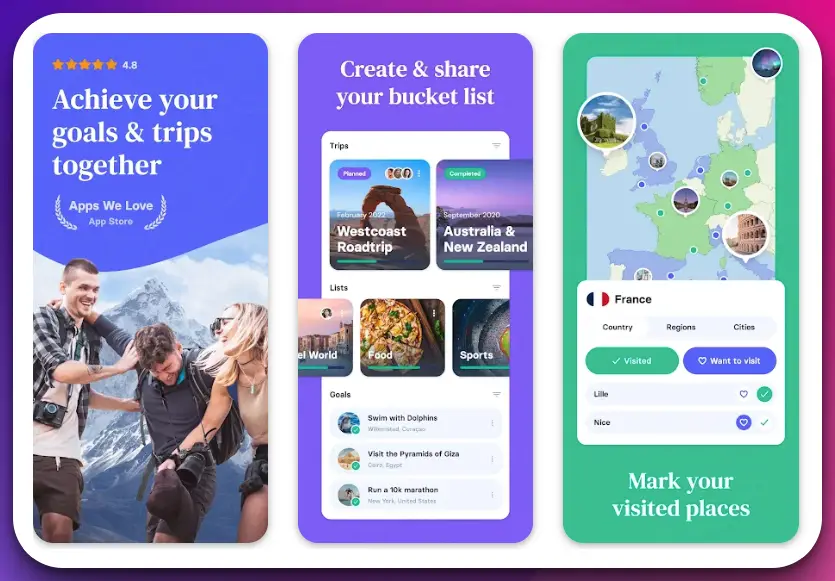
With its cutting-edge features and user-centric design, iBucket transforms how you approach your bucket list. This visionary app combines functionality, aesthetics, and personalization to create a truly immersive and engaging experience.
With iBucket, you can curate a bespoke collection of aspirations and goals, whether exploring hidden gems, embarking on thrilling experiences, or engaging in meaningful cultural encounters. The app’s intuitive interface makes it effortless to organize and prioritize your list, ensuring a purposeful and fulfilling journey.
iBucket leverages advanced algorithms and intelligent recommendations to provide tailored suggestions and ideas. Discover new destinations, add them to your list, and unleash your wanderlust like never before.
Moreover, iBucket goes beyond the conventional realm of bucket list apps by fostering a vibrant and supportive community. Connect with fellow dream chasers, share experiences, and find inspiration from the triumphs of others.
The app’s interactive features allow for seamless collaboration and engagement, creating a sense of camaraderie that amplifies the joy of achieving your goals.
In conclusion, iBucket stands at the forefront of bucket list apps, revolutionizing how we dream, plan, and achieve. Seamlessly blending functionality, personalization, and community, iBucket empowers individuals to embrace their aspirations, conquer new horizons, and create a life filled with unforgettable moments.
Embrace the power of iBucket and unlock the extraordinary in your life.
Download The App From Google Play Store
Download The App From Apple App Store
6. Tasks: To-do list with sync, reminders & calendar
Tasks is a free, simple to-do list, reminder app, and task list with a calendar designed to organize your busy life easily. The app makes everything easy and simple regardless of your profession, a sitting office job, or something that needs frequent traveling.
Getting started with the app is free, easy, and simple. Adding new tasks, preparing the bucket lists, and following them becomes surprisingly easy with the app, especially if you use the “shortcut” feature.
“Tasks” is one of the simplest bucket list apps that beautifully emphasizes ease of use and simplicity yet ensures maximum productivity.
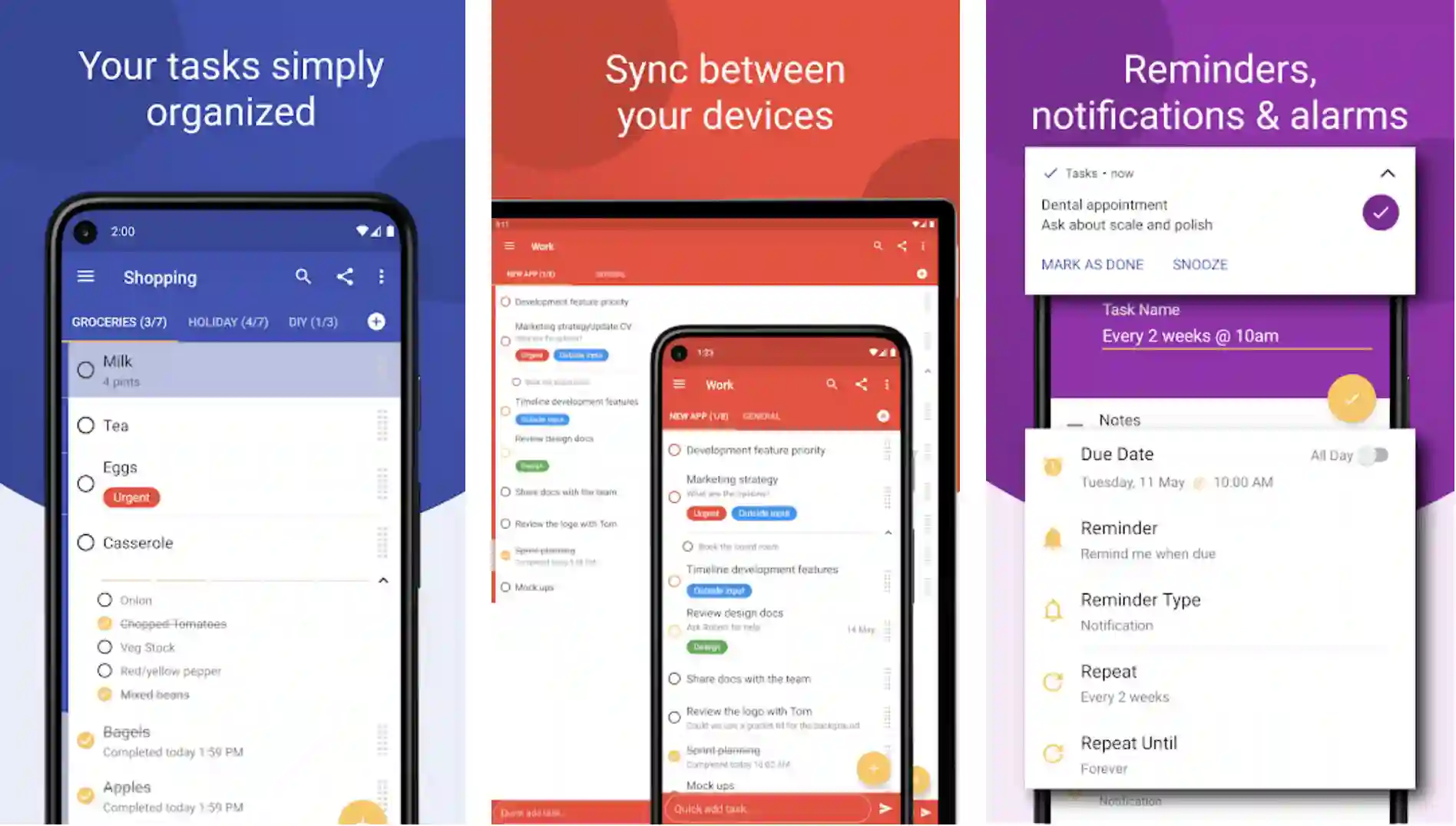
Whether you want to prepare a “to-do list”, or you want to make a list of your dream travel destinations, or you want to prepare a grocery list, the app is designed for everything.
Using the app, you can prepare powerful to-do lists to achieve your short-term and long-term goals, color code them according to your preferences, and interestingly manage them like you haven’t done before!
Intuitive gestures like dropping, dragging, swiping, deleting, and re-prioritizing make this app useful for those who are always on the move to achieve something big.
The reminder feature of the app makes things even easier for the users. You don’t even have to open the app if you opt for this feature.
With actionable notifications, all you have to do is to mark the tasks as “done” or snooze them for the future.
Features:-
- One of the simplest yet highly productive to-do list apps
- Getting started and using the app is as easier as it gets
- Allows you to send your feedback anytime and help the developers improve the app the way you want
- Very simple yet effective gestures
- It makes sharing tasks and syncing with other devices very easy and simple
Device – Android
Ratings:- Google Play Store – 4.7 / 5 | 10,00,000+ Downloads
Download the App from Google Play Store
7. Microsoft To-Do: List, Task & Reminder
Increase your productivity, achieve bigger life goals, make a to-do list like never before, create customizable reminders, and share your progress!
Microsoft To-Do is one of the best task management apps to help you organize and manage your short-term and long-term goals. You can use this simple yet highly effective application to prepare task lists, grocery lists, event or travel planning, record collections, and more!
Microsoft To-Do makes all these things easier and more fun, and that, too, right from your palms! Accomplish what’s important and meaningful in your daily life and your long-term, future goals with the app’s very motivating “My Day” and “Suggestions” features.
Intelligent suggestions help you to achieve your targets with an improved probability of success. When you try to switch from one task to another, it’s important to focus on the most important ones, and Microsoft To-Do does the same for you, but in a lot simpler, more effective, and more productive way.
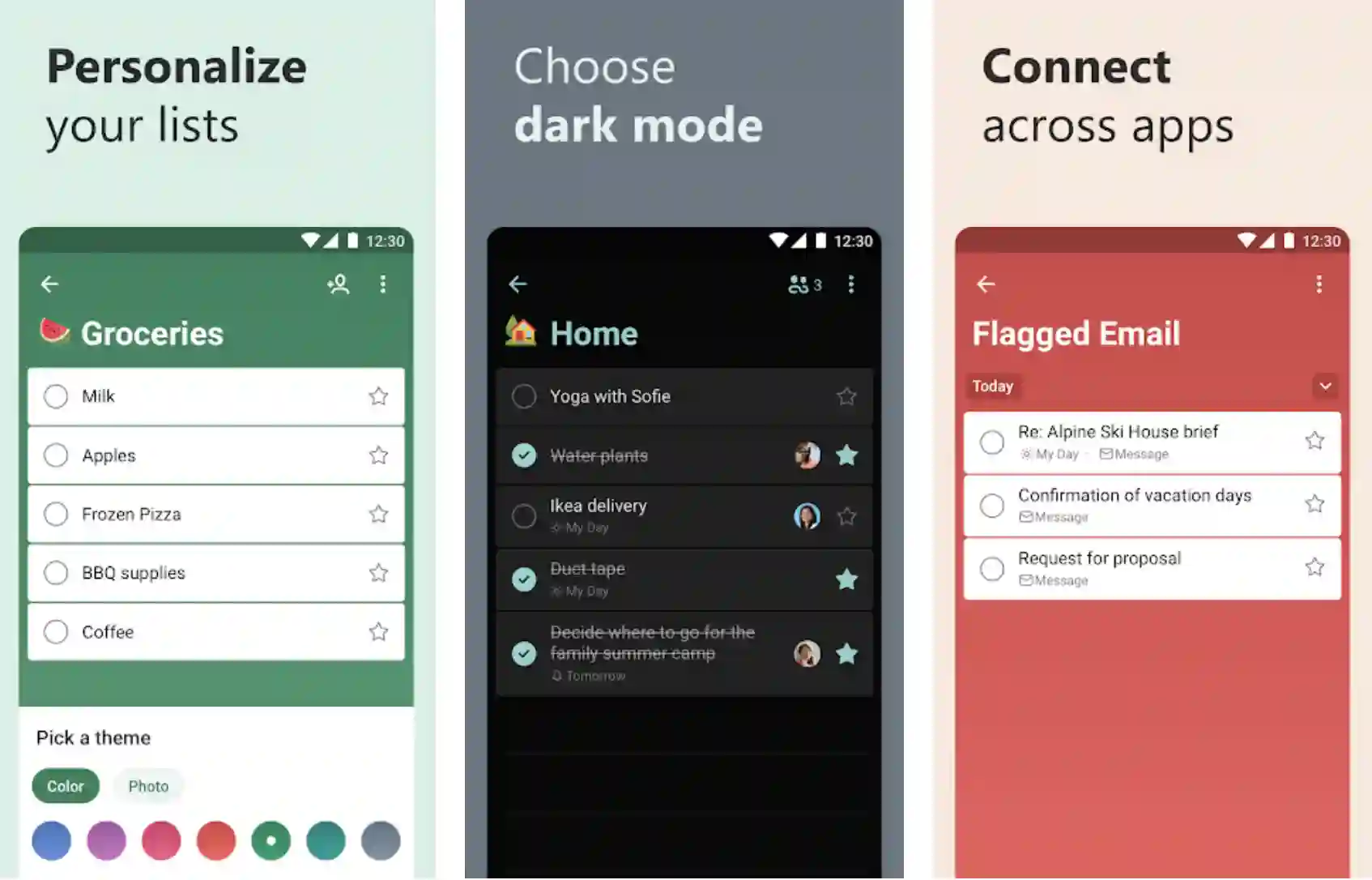
You can easily capture and retrieve all your tasks and lists across different devices and multiple accounts. Microsoft To-Do is a quick, modern, easy-to-use app that makes your lists attractive and unique, with multiple customizable features like colorful themes, emojis, dark mode, etc.
Plus, you can use the app to share your lists to stay connected and collaborate with your family, friends, and colleagues.
Features:-
- A daily planner with personalized suggested tasks
- Task manager for adding reminders, managing tasks, editing, and deleting the tasks done with To-Do Widget
- To-Do lists for various purposes include shopping lists, bill planners, task management, reminders, and many other things.
Device – Android and iOS
Ratings:- Google Play Store – 4.6 / 5 | 10,000,000+ Downloads and 4.7/5 iOS rating.
Download the App from Google Play Store
Download the App from Apple App Store
8. Simple Bucket List
One of the simplest yet very productive apps to list what needs to be done and when! If you want to keep things very simple and sophisticated or don’t like adding fancy titles and descriptions, here is an app to achieve your goals!
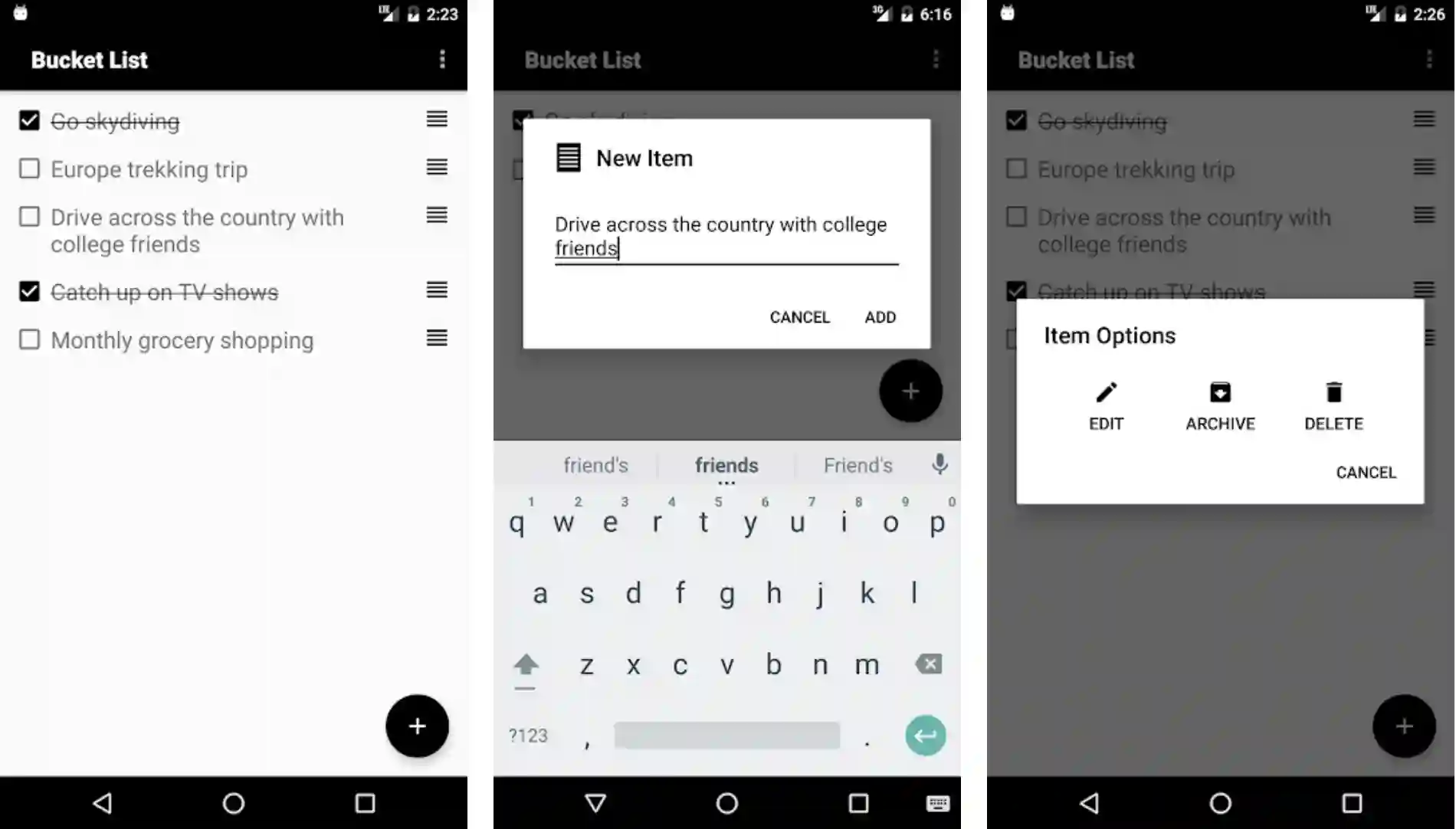
All you have to do is to write your goals down, name them specifically, and check them when done, archive them if they aren’t very important, or delete them – that’s all! That’s how simple it is to use this app!
You can also use this app as a digital to-do list for places you want to go or destinations you have already visited. The app also allows you to recognize all the items easily in the list by dragging them. There is no something extraordinary app.
It’s a dedicated, simple, and useful to-do list app and does perfectly what it is designed for.
Features:-
- Make a simple list of your goals, and keep track of them
- Very simple, clean, yet very powerful user interface
- Quick viewing through the tiny app widget
- Easy to edit, archive, record, and delete the items
- Automatic restore and backup via Google Services
Device – Android
Ratings:- Google Play Store – 4.6 / 5 | 50,000+ Downloads
Download the App from Google Play Store
9. Any. Do:- To-Do List, Planner, Calendar & Reminders
As many as 30 million, yes, 30 million people use a “To-Do List” to perfectly organize their lives and improve their overall productivity! And it’s time for you to get the best out of your routine with one of the world’s most popular app. The app is perfect for a planner, reminder, task list, and calendar!

You can easily sync the app between all your devices to manage your bucket lists in one place. Whether you want to manage them on the web, your desktop, mobile, or tablet, you need only one app for all of them!
The app manages everything so perfectly and beautifully that you won’t miss a task or forget anything! You can also share your schedule and to-do lists with your coworkers if you are working together on the same project, or tell your family members, when you are busy, and when you can talk to them!
Get customized, innovative, and inspiring reminders for a scheduled time, get them at a fixed location, or set recurring reminders for very important tasks. The app is a single solution for improving work productivity, planning holidays, sending emails, or texting your pretty wife!
The ultimate solution for your tendency to forget important things!
Features:-
- Simple, easy-to-follow, powerful user interface with some extraordinary features
- All-in-one bucket list app for getting things done easily and on time
- A sophisticated and powerful task list management
- Daily planner & Life Organizer
- Share your schedule and to-do list with the people who care for you
Devices – Android and IOS
Ratings:- Google Play Store – 4.5 / 5 | Ratings on Apple Store – 4.6 / 5
Price:- Free, In-app Purchases, Yearly Subscription @ $59.99 on Apple Store
Download the App from Google Play Store
Download the App from Apple App Store
10. iWish – Life Goals, Wishlist, Bucket List
iWish is one of the most powerful and beautiful apps to achieve your life goals with a lot of fun easily! There are more than 1200 amazing and interesting ideas to discover!
Dream of the life you want to enjoy in the future, imagine how you can make it possible, and start believing in yourself to succeed!
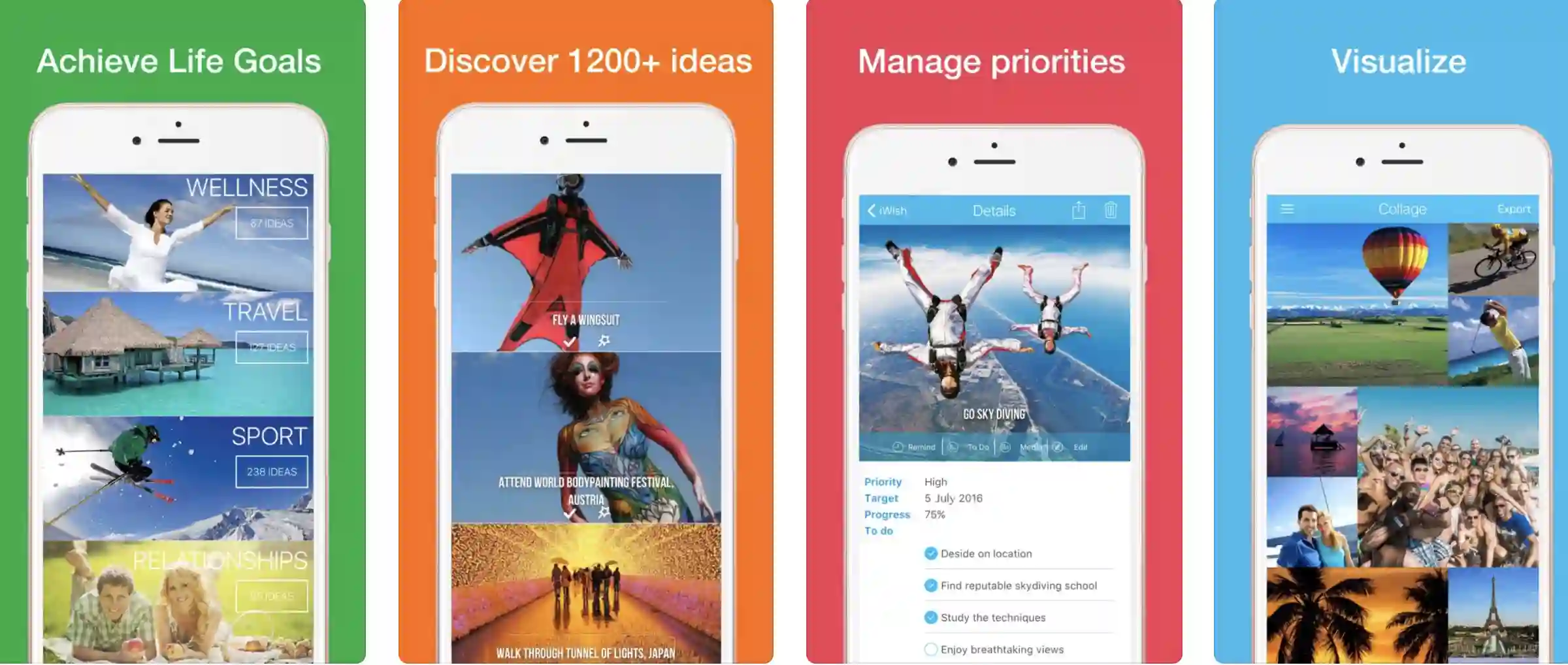
The iWish app is used and loved by thousands of people worldwide! Supported by those who want to be limitless and achieve something big in life!
The app is plain fun, inspiring, and motivating! It simply helps you to dream big and learn how to achieve it! With iWish, you get some useful and interesting tools to set your goals correctly and fulfill the biggest of your dreams!
The app has some extraordinary features including wellness activities for your all-important health and relationship goals with your loved ones.
Some of the most beautiful travel destinations to explore, adventures and sports activities you can do, career goals with financial milestones, helpful advice, personal development, and a lot more!
Features:-
- Identify your biggest life goals and perfectly track your achievements
- It helps you to plan, dream, and visualize your beautiful future
- Inspirational messages and morning motivations to keep you upbeat
- A powerful combination of short-term motivation and long-term visualization
- Share your dreams and achievements with the people that matter a lot in your life
Devices – IOS Devices, Including iPhone and iPad
Ratings:- Apple Store – 4.4 / 5
Download the App from Apple App Store
11. Travel Mapper: Travel Tracker, Map Where I’ve Been
A frequent traveler? Globetrotter? Someone who is always on the move? From pinning the travel destinations you have already visited, the cities and destinations you want to visit, and exploring different places, the app works like a complete guide for travelers.
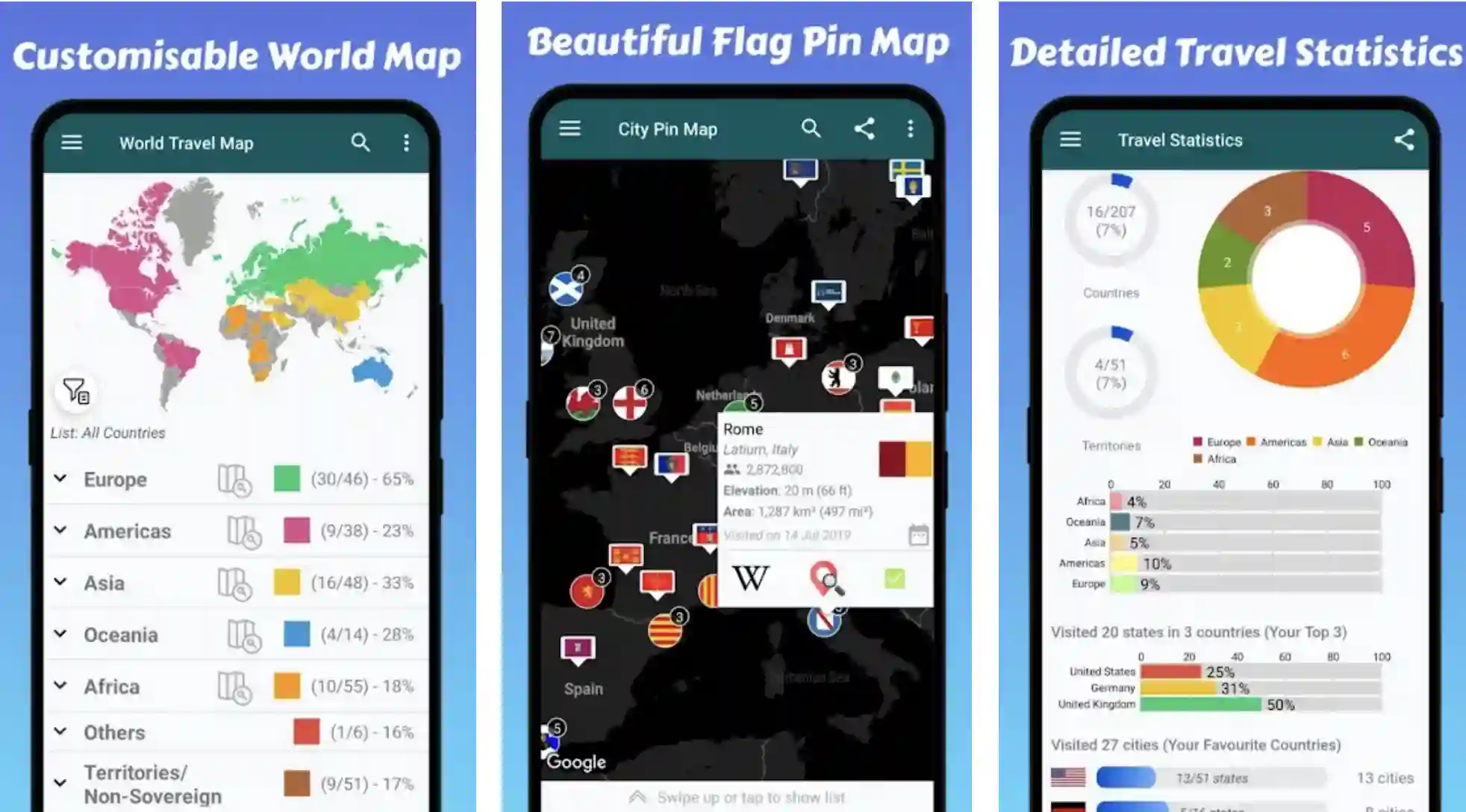
The app allows you to create your own unique, customized map to keep a record of your memories with the help of its “travel map tracker” feature. Leave your mark on the world map in the app, transform your imaginations into realities, and create a beautiful bucket list of your dream destinations.
Travel Mapper is an excellent, free travel tracker and travel planner app for nomads and globetrotters. All you have to do is to start using this app as an essential travel partner, and that too, without exceeding your luggage!
For every destination marked on the pin map, the app smartly automatically tags the places you have already visited. It beautifully marks off all the travel scratch maps for you in one go!
What more? If you want to share your journey with your friends and family, you can prepare a personal travel log of all the destinations visited and places yet to be discovered.
Features:-
- Mark the countries and destinations you have traveled to and the areas yet to discover
- A beautiful and very unique travel map with multiple flags for references
- Easy to discover the world’s best destinations and places of interest
- Detailed and informative statistics of all the travel destinations
- It helps you to check the visa requirements of different countries.
- All in all, a complete travel guide is right in your pocket!
Device – Android
Ratings:- Google Play Store – 4.2 / 5 | 10,000+ Downloads
Download the App from Google Play Store
12. Habit List: To-do, Streak & Goal Tracker
Build a better version of yourself by creating good habits and breaking the bad ones with the help of one of the most exciting apps.
The Habit List gives you everything you need to achieve your life goals. The app is especially known for its simple, beautiful, intuitive, and productive user interface. It keeps you on the move, motivates you, and makes you go that extra hard yard!
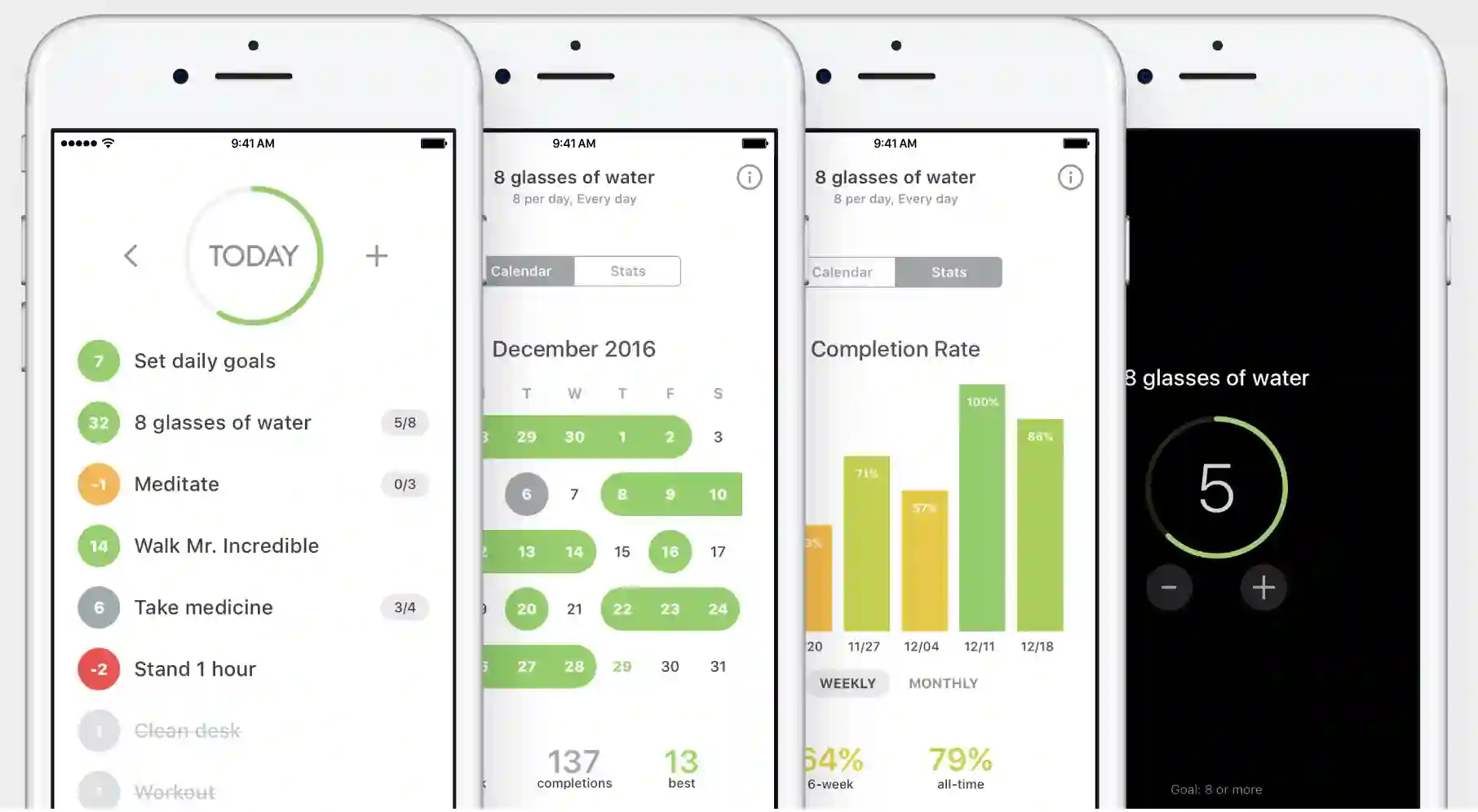
Get motivated with unbreakable streaks – Continuing the streaks is one of the most powerful ways to motivate yourself and improve daily. See your progress daily, and try to break the previous best slowly but steadily.
The app gives you Red Badges when you show even a bit of complacency or you end the streak. What does it mean? It simply means it’s the time to regain yourself, restart more effectively and positively, and push yourself even harder!
Focus on what needs to be done! Wading through all your habits is not the best thing for you; hence, the app smartly highlights the things that are yet to be done on a particular day. And the beautiful, distraction-free look of the Habit List keeps you focused and motivated all the time.
Reminders and achievement badges are also there to keep you on the move! Habits become powerful when they are automatic. But, when you try to build good habits and eliminate the bad ones, reminders and badges can be decisive.
The app badges help you to know what tasks are still yet to be completed in the day. You can also adjust the reminders according to the preferences and importance of the tasks.
Features of Habit List:-
- Stay motivated and on track with reminders and achievement badges
- Flexible, customizable scheduling
- Tracks your progress quite effectively
- It helps you to focus on every little thing. As little but important as drinking a glass of water!
- Some extraordinary features at no cost!
Devices – IOS Devices, Including iPhone and iPad
Ratings:- Apple Store – 4.2 / 5
Download the App from Apple App Store
13. Lifetime Goals
The Lifetime Goals app helps you to get started easily and purposefully to ensure you achieve your goals in the right way and at the right time. One of the most interesting apps has various preset categories, and you can customize the bucket list according to your goals and targets.
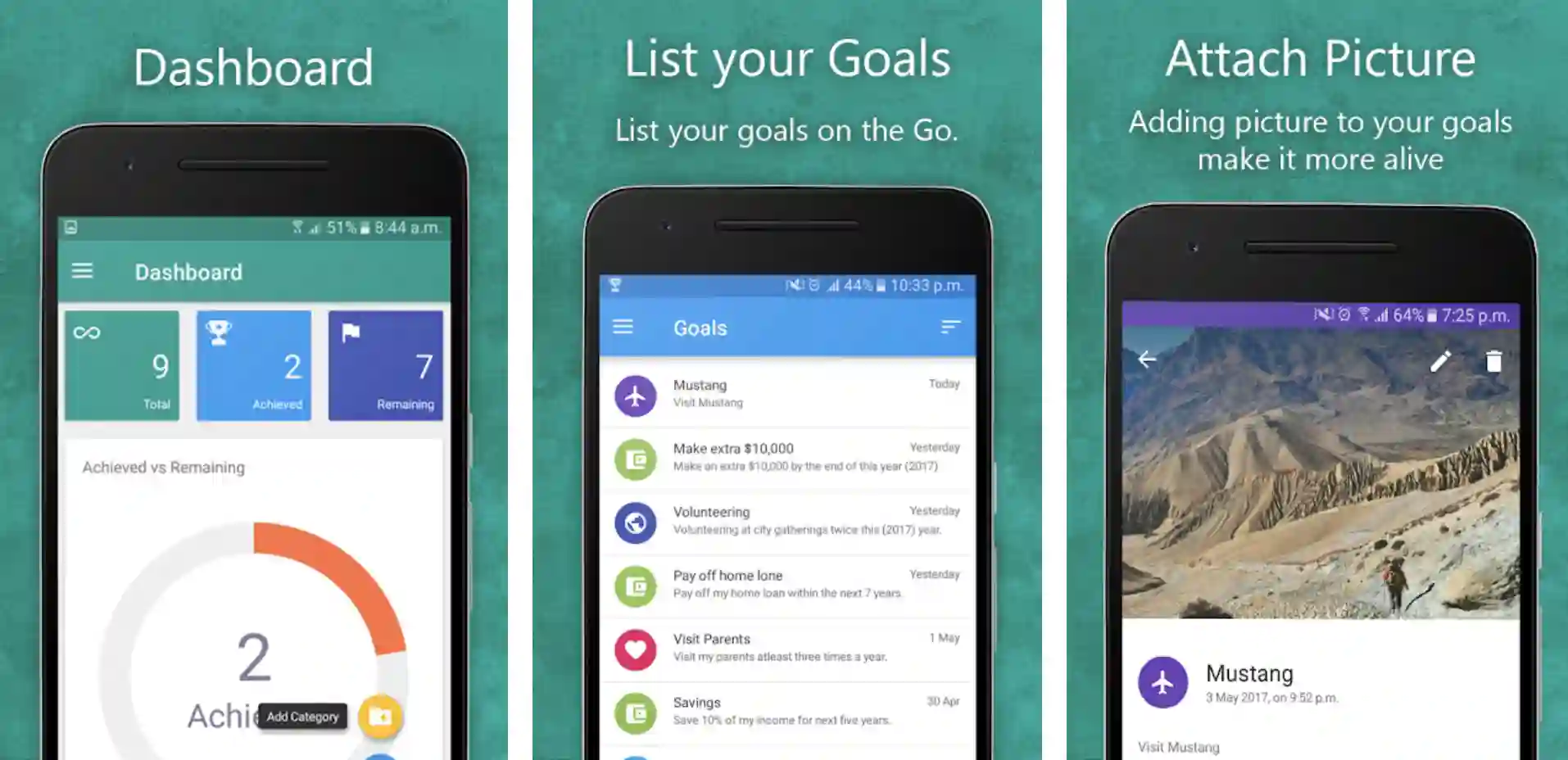
There are seven preset categories: career, health, personal, relationship, contribution, travel, and financial. Most of these categories are going to cover your life goals. If not, you can add and select an extra category based on your target.
With Lifetime Goals App, you can add detailed and specific descriptions for your goals. Mapping out a plan is easy, making the bulleted lists is simple and fun, and tracking your progress to success is always a satisfaction. Isn’t it?
A service feature in the app allows you to document everything about your goals and list them for convenience. And once you have achieved your goals on the bucket list, you can drag them into the “Achievements” section to inspire yourself in the future.
Just to show yourself that you have done it! And that can inspire itself, and accomplishing bigger and more important targets becomes much easier.
Features:-
- Listing your goals is full of fun and a lot easier than you would think
- A wide range of categories with an option of adding a new one
- Customizable reminders to keep you upbeat about your life goals
- Do not disturb mode for a more focused, undisturbed approach
- Tracking your achievements gives a sense of satisfaction and motivates you for the future.
Device – Android
Ratings:- Google Play Store – 4.0 / 5 | 50,000+ Downloads
Download the App from Google Play Store
Tips For Getting the Most Out of Bucket List Apps
Bucket list apps are powerful tools that can help you transform your dreams and aspirations into tangible experiences.
To maximize the benefits of these apps, consider the following tips for getting the most out of bucket list apps:-
1. Set Specific and Measurable Goals:- When using a bucket list app, be clear about your goals. Set specific and measurable goals that allow you to track your progress and stay motivated. Instead of vague aspirations, define actionable objectives that you can work towards.
2. Explore New and Diverse Experiences:- Bucket list apps offer a world of possibilities at your fingertips. Don’t limit yourself to familiar goals; embrace the opportunity to discover new and diverse experiences. Step out of your comfort zone and add activities that challenge and inspire you.
3. Engage with the Community:- Many bucket list apps provide a platform for users to connect and engage with one another.
Take advantage of this feature by joining communities, participating in discussions, and seeking inspiration from fellow adventurers. Share your experiences and support others in their journeys.
4. Use Reminders and Deadlines:- Stay on track by utilizing your bucket list app’s reminder and deadline features.
Set reminders for upcoming goals or milestones, and establish deadlines to hold yourself accountable. These prompts will help you stay focused and maintain momentum toward achieving your goals.
5. Celebrate Milestones and Achievements:- Acknowledge and celebrate your accomplishments. When you reach a milestone or complete a goal, take a moment to reflect on your achievement.
Share your success with others, reward yourself, and embrace the sense of fulfillment that comes with each milestone. Following these tips, you can optimize your experience with bucket list apps and turn them into valuable tools for personal growth, inspiration, and adventure.
Embrace the possibilities, challenge yourself, and maximize every opportunity to create a remarkable bucket list journey.
📗FAQ’s
Are there any bucket list apps?
Multiple applications include Tasks, Microsoft To-Do, Simple Bucket List, and Any. Do etc., to prepare all types of bucket lists and achieve your short-term and long-term goals.
How can I keep track of my bucket list?
Consistency is the most important part of tracking your bucket list. It is a waste of time if you are not dedicated and constant enough with your short-term and long-term goals. And it doesn’t matter how you can manage and track your bucket lists.
Various applications like Buckist, iWish, Microsoft To-Do, Lifetime Goals, etc., help you manage, change, and track your bucket list without much problem.
Yes, applications like Microsoft To-Do, Any. Do, iWish, Lifetime Goals, and OurCroceries allows users to share and sync customizable lists between multiple devices.
You can edit these lists based on your preferences and share them with your family and friends.
You can easily share your bucket lists by asking your family members or friends to use the same application you use to create them.
Posting on social media, emailing, or sharing with other social media applications are some of the best ways to share your bucket lists.
How do I make a digital bucket list?
Brainstorming is the first and most important part of deciding what you want and why you want to create a bucket list.
Get inspired by people who have already done better in that field, connect your dreams and imagination, and visualize what certain things can change in your life.
Plan smartly, make it digital through some of the most reliable apps, and share them with the people you trust the most.
What is the soon app?
Soon is a decent and reliable application that offers a smart way to help you keep track of all the important things you want to remember. In addition, you can create lists for movies, TV Series, Podcasts, Music, Books, and more.
The app is designed to help you remember, experience, and discover amazing things.
What is Woovly app?
Woovly is an exciting social discovery platform developed to help people create and achieve different bucket lists with fun.
The app claims on the Google Play Store that it is a leading platform for people interested in watching online videos and shopping directly from them. However, many people also questioned its legitimacy and reliability on the Google Play Store.
Is Woovly fake?
There isn’t much proof to say that Woovly is a trusted platform. Many users complained about multiple instances of fraud on the Google Play Store and the consumer court portal.
Google Keep is one of the best ways to share lists between iPhone and Android, especially by adding multiple collaborators across different platforms.
You can also use Microsoft To Do to share your lists between iPhone and Android and vice versa.
You can use the Google calendar app for everything, including creating, editing, managing, customizing, and sharing reminders across different platforms, including iPhone and Android.
Is there anything better than Todoist?
Trello is one of the best and most effective alternatives to Todoist and enables you to manage, share, and collaborate and automate tedious professional tasks with your team.
bucket list apps for couples
Some apps help couples plan and organize their bucket list.
Here are some options:-
1. The “Couple Bucket List” app lets couples create and track their items. It has suggested categories like travel, adventure, and romance and lets you add custom categories too. Couples can share progress on social media.
2. The “Been” app helps couples track visited and desired destinations. It displays a map of travel history and a list of upcoming spots. You can add notes and photos for each destination.
3. “The Adventure Challenge” app offers couples a range of adventure ideas. Challenges can be simple tasks like cooking or thrilling activities like bungee jumping. They’re presented as a mystery to add excitement.
4. “Wanderlust” app is for travel-loving couples. You can search for destinations by interests and budget. The app has a feature for creating shared itineraries to plan trips together.
5. “Everest” app assists couples in achieving long-term goals. You can create a list of goals and track progress over time. It includes motivational features like reminders and a progress tracker to help you stay on track.
How do I make a digital bucket list?
Making a digital bucket list is easy and convenient. Here are the steps:
Choose a platform:- Select where you want to create your digital bucket list. Note-taking, task management, dedicated bucket list apps, or a simple text document.
Brainstorm:- Begin by generating ideas for things you want to experience or accomplish. Consider long-term goals, destinations to visit, skills to learn, books to read, and more.
Organize:- Categorize your ideas into themes or areas of interest, such as travel, personal development, adventure, or career.
Include specifics:- Add details to each item on your list, such as the name of a place to visit, a target date, or the steps required to achieve a particular goal.
Prioritize:– Focus first on the goals that are most important to you.
Review and update:- Regularly review your list to track progress and make changes when necessary.
What is the app for giving away free stuff?
Free stuff giveaway apps are available for those who want to declutter or help others in need.
Here are some popular options:
Freecycle – A non-profit community lets users give and get items for free locally. Post what you no longer need, and search for things you want.
Craigslist – A website where you can sell, trade, and give items away for free. Navigate to the “Free” section for local posts.
OfferUp – A mobile marketplace where you can buy, sell, and give away items. Access the “Free” section to list your items.
Letgo – A mobile app for local buying, selling, and giving. Find the “Free” section to share your items.
Facebook Marketplace – Facebook’s free service connects buyers and sellers locally. Post your items for free under the “Free Stuff” section.
Are there apps for just making friends?
Apps designed to make new friends are available. Some popular options include:
Bumble BFF – Bumble is a dating app with a Bumble BFF feature. Users can find friends in their area by creating a profile, swiping potential matches, and starting conversations.
Friender – This friendship app matches users with people sharing similar interests and hobbies. Users can create a profile, browse potential matches, and send messages to connect.
Meetup – This app connects people with similar interests and hobbies. Users can join groups related to their interests, attend events, and meet new people.
Patook – This spiritual friend-making app matches users based on shared interests and values. Users can build a profile by answering questions and swiping through potential matches.
Nextdoor – This social networking app connects users with neighbors, groups, and events in their local area.
Conclusion
In conclusion, bucket list apps bridge your dreams and their achievement. They are your goal managers, ensuring no aspiration slips through the cracks.
By offering an organized, accessible, and interactive platform, they transform the experience of creating and fulfilling a bucket list from a mundane task to an exciting journey.
Remember, the purpose of a bucket list is to enrich your life and not just to tick off boxes. Each goal should be significant and contribute to your growth, enjoyment, or fulfillment.
The bucket list apps discussed in this article are effective tools, making your dream-chasing endeavors seamless and enjoyable.
So, don’t let your dreams and plans be lost in the whirl of life; instead, let these bucket list apps help guide your journey toward accomplishing your life goals.
Happy planning, and here’s to making your dreams come true!


