
























Imagine being at a social gathering, a professional meeting, or even just a casual outing and finding yourself unable to communicate effectively with someone deaf or hard of hearing.
The language barrier seems insurmountable, leaving both parties feeling isolated and frustrated. Alternatively, maybe you or a loved one are starting to experience hearing loss, and you are keen to learn a new way to communicate.
For many, these situations are all too real, and traditional sign language classes might often be too expensive, time-consuming, or simply inaccessible. This language barrier limits your interactions and your understanding of a rich and diverse community.
The inability to communicate in sign language can lead to missed opportunities, from forming meaningful relationships to broadening your cultural horizons or expressing your thoughts and needs effectively.
But don’t worry; technology has an answer to this problem. With the rise of “Apps for Learning Sign Language”, mastering this mode of communication is now as simple as unlocking your smartphone.
These apps, designed with user-friendly interfaces and interactive lessons, make learning sign language a breeze.
Whether you’re a beginner or looking to improve your skills, this article will guide you through the best apps for learning sign language, helping you bridge the communication gap one sign at a time.
The Importance of Learning Sign Language
The significance of learning sign language cannot be overstated in a world that thrives on effective communication.
Sign language serves as a bridge, connecting individuals who are deaf or hard of hearing with the rest of society. By acquiring this unique form of nonverbal expression, one gains the power to break down barriers and foster inclusivity.
Sign language is a visual-gestural system that relies on handshapes, movements, and facial expressions to convey meaning. Learning sign language not only empowers individuals to communicate directly with the deaf community but also enables them to appreciate the rich diversity of human expression.
 Moreover, it is a gateway to a vibrant culture and a means of developing a deeper understanding of the challenges those with hearing impairments face.
The benefits of learning sign language extend far beyond improved communication. It enhances cognitive skills, promotes early language development in children, and cultivates empathy and inclusivity in individuals of all ages.
By acquiring sign language skills, one becomes an advocate for accessibility, challenging societal norms, and promoting a more inclusive environment.
In professional settings, fluency in sign language can open doors to numerous career opportunities. Industries such as education, healthcare, interpretation, and customer service actively seek individuals proficient in sign language to cater to the needs of diverse populations.
In essence, learning sign language is not just about mastering a set of gestures; it is about embracing culture, breaking down barriers, and fostering inclusivity.
By investing in acquiring this remarkable language, we take a significant step towards creating a more accessible and inclusive society for all.
Factors To Consider in Choosing a Sign Language Learning App
In the digital age, sign language learning apps have emerged as valuable tools for individuals seeking to acquire sign language skills conveniently.
However, not all apps are created equal, and selecting the right one can greatly impact the learning experience. Several factors should be considered when choosing a sign language learning app to ensure an effective and engaging learning journey.
Firstly, content quality plays a pivotal role in the learning process. Look for apps that offer comprehensive and well-structured lessons covering a wide range of sign language topics, from basic vocabulary to complex grammatical structures. The presence of visual aids such as videos and diagrams enhances comprehension and retention.
Secondly, interactive features are essential for an engaging learning experience. Look for apps that provide interactive exercises and quizzes, allowing learners to practice their skills in a fun and interactive manner. Feedback mechanisms are also crucial; they help identify improvement areas and guide progress.
Thirdly, flexibility and accessibility are important considerations. Ensure the app is compatible with different devices and operating systems, enabling you to learn anytime, anywhere. Moreover, apps that offer offline functionality are advantageous for individuals with limited internet access.
Another factor to consider is community support. Choose an app that fosters community, allowing learners to connect with fellow sign language enthusiasts, share experiences, and seek assistance from native or experienced signers.
Lastly, the cost is a significant aspect to evaluate. While many apps offer free features, consider investing in a premium version with additional resources, personalized learning paths, and advanced features.
By carefully considering these factors, you can select a sign language learning app that caters to your needs, accelerates your learning progress, and empowers you to communicate effectively with the vibrant deaf community.
Best Apps For Learning Sign Language With Ease
1. Lingvano – Best Overall ASL App
When learning sign language effectively and conveniently, Lingvano stands out as one of the top choices for Android and iPhone users. This remarkable app combines innovative features, comprehensive content, and a user-friendly interface to create an immersive learning experience.
With Lingvano, users can embark on their sign language journey with confidence. The app offers many lessons covering various aspects of sign language, including vocabulary, grammar, and expressions.
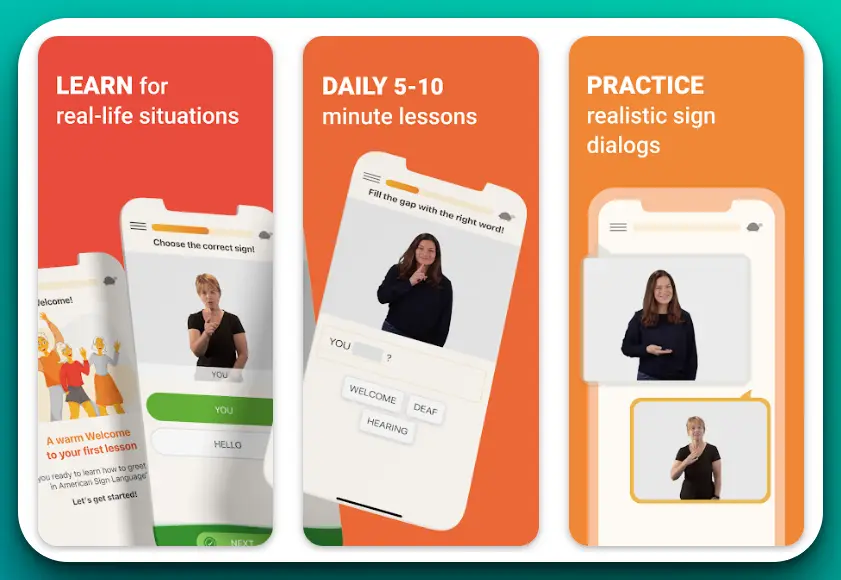
The lessons are thoughtfully designed, progressing from beginner to advanced levels, ensuring a gradual and comprehensive learning process.
One of the standout features of Lingvano is its interactive and engaging approach. The app utilizes videos of native signers, allowing learners to observe and imitate authentic sign language usage. The clear and precise demonstrations enhance comprehension and facilitate accurate mimicry of signs.
To reinforce learning, Lingvano incorporates interactive quizzes and exercises. These activities allow learners to practice their skills and assess their progress. The app also offers real-time feedback, ensuring learners receive immediate guidance and correction, fostering continuous improvement.
In addition to its educational content, Lingvano fosters a supportive community environment. Users can connect with fellow learners, participate in discussions, and share their experiences. This sense of community motivates learners and allows for exchanging knowledge and support.
Another noteworthy aspect of Lingvano is its cross-platform availability. Whether you are an Android or iPhone user, you can access the app from the Google Play Store or the Apple App Store. This flexibility ensures that sign language learning is accessible to many users.
In conclusion, if you are looking for the best sign language learning app for Android and iPhone, Lingvano emerges as a standout choice. Its comprehensive content, interactive features, and supportive community provide an immersive and effective learning experience.
Embrace Lingvano to unlock the beauty and power of sign language and embark on a journey of communication and inclusivity.
Pros:-
Comprehensive Content: Lingvano offers a wide range of lessons covering various aspects of sign language, ensuring a comprehensive learning experience.
Interactive Approach: The app incorporates videos of native signers, interactive exercises, and quizzes to engage learners actively and enhance their understanding and retention of sign language.
Real-Time Feedback: Lingvano provides real-time feedback, allowing learners to receive immediate guidance and correction and improve their signing skills effectively.
Community Support: The app fosters a supportive community environment where learners can connect with fellow sign language enthusiasts, share experiences, and seek assistance, creating a sense of belonging and motivation.
Cross-Platform Availability: Lingvano is available on Android and iPhone platforms, ensuring accessibility to many users.
Cons:-
Limited Free Features: While Lingvano offers free access to some features, certain advanced resources and personalized learning paths may require a premium subscription, which might be a drawback for users seeking a free learning experience.
Platform Dependency: The app’s availability is limited to Android and iPhone devices, which means users with other operating systems might be unable to access Lingvano.
Potential Technical Issues: Like any app, Lingvano may encounter occasional technical glitches or bugs that could impact the user experience. However, regular updates and bug fixes can mitigate these issues.
Language Limitations: Lingvano primarily focuses on American Sign Language (ASL) and may not cover other sign languages in different countries or regions. This limitation might be a drawback for users seeking to learn specific regional sign languages.
Despite these cons, Lingvano remains an excellent choice for individuals learning sign language conveniently and effectively.
The app’s comprehensive content, interactive features, and supportive community make it a valuable tool for beginners and advanced learners, fostering inclusivity and communication within the deaf community.
Price:-
- Basic is Free
- ASL Premium yearly$119.99
- ASL Premium monthly$17.99
- ASL Premium monthly$17.99
- ASL Premium quarterly$47.99
- ASL Premium quarterly$47.99
- ASL Premium yearly$119.99
- Lingvano BSL Premium yearly$129.99
- Lingvano BSL Premium monthly$19.99
- Lingvano BSL Premium monthly$19.99
- Lingvano BSL Premium quarterly$49.99
Download The App From Google Play Store
Download The App From Apple App Store
2. ASL American Sign Language
When learning sign language on your iPhone, ASL American Sign Language is the go-to app for individuals seeking a comprehensive and immersive learning experience.
Designed specifically for iPhone users, this app combines user-friendly features, high-quality content, and interactive tools to make learning American Sign Language (ASL) a breeze.
One of the key strengths of ASL American Sign Language is its extensive ASL video library. The app provides many videos featuring native signers demonstrating various signs, phrases, and expressions.
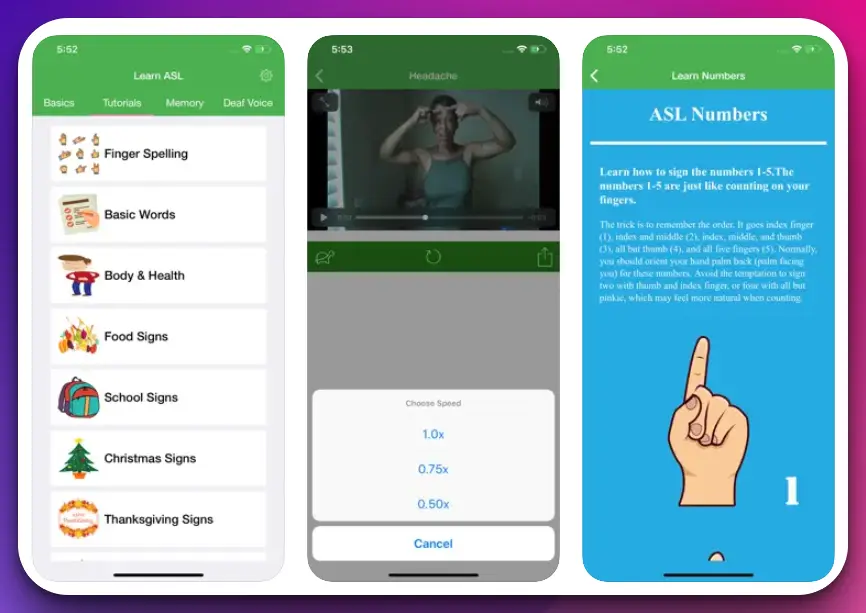
These videos are invaluable resources for learners as they allow for accurate visual modeling of ASL, enhancing comprehension and promoting accurate signing.
Another standout feature of ASL American Sign Language is its interactive exercises. The app offers a variety of interactive activities and quizzes that enable users to practice their signing skills and reinforce their understanding of ASL. The interactive nature of these exercises keeps learners engaged and actively involved in the learning process.
Furthermore, ASL American Sign Language offers progress-tracking capabilities. Users can monitor their learning progress, track their achievements, and identify areas that require further practice. This feature provides motivation and a sense of accomplishment as learners can see their improvement over time.
The app also provides community support through its integrated platform, where learners can connect with a community of fellow ASL enthusiasts.
This allows for discussion, sharing of experiences, and the opportunity to seek guidance from more advanced signers. The sense of community fosters a supportive learning environment that encourages growth and provides additional resources for learners.
One aspect that sets ASL American Sign Language apart is its user-friendly interface. The app has a sleek and intuitive layout, making navigation seamless and effortless. Users can easily access different app sections, search for specific signs, and customize their learning experience.
In conclusion, if you’re an iPhone user looking for the best sign language learning app, ASL American Sign Language is a top-notch choice. The app offers an immersive and effective learning journey with its extensive ASL video library, interactive exercises, progress tracking, community support, and user-friendly interface.
Embrace ASL American Sign Language and unlock the beauty and power of ASL, enabling you to communicate and connect with the vibrant deaf community like never before.
Pros:-
Extensive ASL Video Library: The app offers a vast collection of videos featuring native signers, providing learners with accurate visual modeling of ASL signs, phrases, and expressions.
Interactive Exercises: ASL American Sign Language incorporates interactive exercises and quizzes, allowing users to actively practice their signing skills and reinforce their understanding of ASL.
Progress Tracking: Users can track their learning progress, monitor their achievements, and identify areas for improvement, providing motivation and a sense of accomplishment.
Community Support: The app provides a platform for learners to connect with a community of fellow ASL enthusiasts, facilitating discussion, sharing experiences, and seeking guidance from more advanced signers.
User-Friendly Interface: ASL American Sign Language features a sleek and intuitive interface, ensuring easy navigation, quick access to different sections, and the ability to customize the learning experience.
Cons:-
Platform Dependency: The app is available exclusively for iPhone users, limiting accessibility for individuals who use other mobile operating systems.
ASL Focus: ASL American Sign Language primarily focuses on teaching American Sign Language (ASL). If users are interested in learning other sign languages, they may need to seek alternative resources.
Limited Free Content: While the app offers free access to some features, the full range of content and advanced features may require a paid subscription or in-app purchases.
Limited Offline Functionality: ASL American Sign Language may require an internet connection for full functionality, which could be a drawback for users in areas with limited or no internet access.
Lack of Personalized Learning Paths: The app may not offer highly personalized learning paths tailored to individual learning styles and preferences.
Despite these potential drawbacks, ASL American Sign Language remains a top choice for iPhone users interested in learning ASL.
Its extensive video library, interactive exercises, progress tracking, community support, and user-friendly interface make it a valuable tool for embarking on a journey of ASL fluency and communication with the deaf community.
Price:-
- Basic is Free
- Asl Pro Updated$2.99
- ASL Pro$1.99
Download The App From Google Play Store
Download The App From Apple App Store
3. ASL Bloom – Best for Beginners
When learning sign language on your Android or iPhone device, ASL Bloom emerges as a top-tier app that offers an immersive and effective learning experience. This exceptional app is designed for Android and iPhone users, making it a versatile choice for individuals seeking to learn American Sign Language (ASL).
One of the key strengths of ASL Bloom lies in its rich and comprehensive content. The app provides a vast library of ASL lessons covering various topics such as vocabulary, grammar, and conversational phrases.
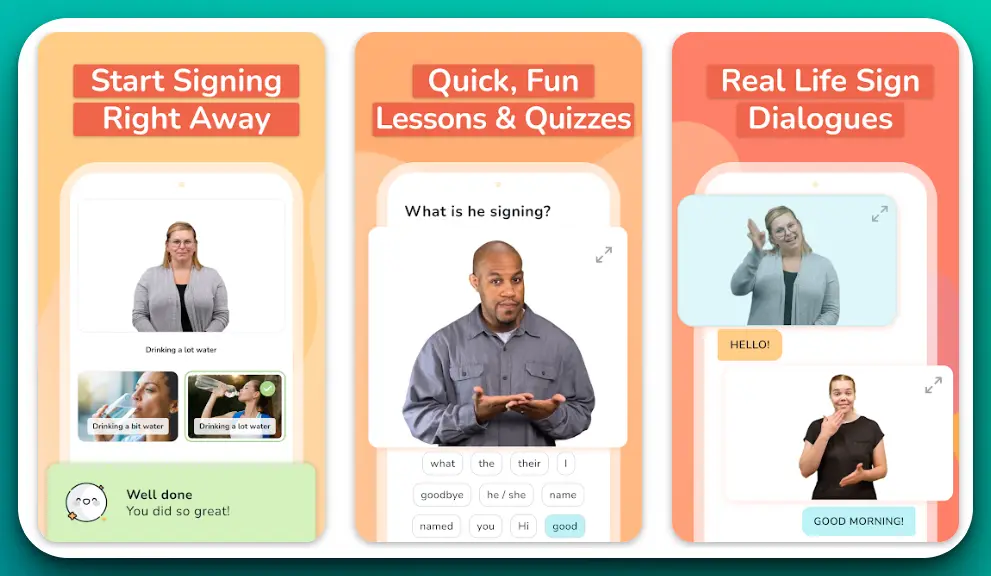
The lessons are thoughtfully organized, progressing from basic to advanced levels, allowing learners to develop their signing skills systematically.
ASL Bloom incorporates innovative video-based learning. The app offers high-quality videos featuring native signers, allowing learners to observe and learn proper signing techniques, facial expressions, and body language. This visual approach enhances comprehension and promotes accurate sign production.
Another notable feature of ASL Bloom is its interactive nature. The app includes engaging interactive exercises and quizzes that enable users to practice their signing skills in a fun and interactive manner. The exercises provide valuable opportunities for learners to apply what they have learned and reinforce their understanding of ASL.
ASL Bloom also offers progress-tracking features, allowing users to monitor their learning journey and track their achievements. This feature provides motivation and a sense of accomplishment as learners can see their progress over time, boosting their confidence and encouraging continuous learning.
Additionally, ASL Bloom fosters a sense of community through its social platform, where users can connect with other ASL learners, share experiences, and seek support. This community aspect creates a supportive learning environment and promotes collaboration and interaction among learners.
ASL Bloom’s availability on Android and iPhone devices ensures accessibility to a wide range of users, regardless of their mobile operating system preference.
In conclusion, ASL Bloom is a standout choice if you are looking for the best sign language learning app for Android and iPhone. The app offers an immersive and effective platform for mastering ASL with its comprehensive content, video-based learning, interactive exercises, progress tracking, and community support.
Embrace ASL Bloom and embark on a remarkable journey of sign language fluency and communication with the vibrant deaf community.
Pros:-
Comprehensive Content: ASL Bloom offers a vast library of ASL lessons covering various topics, ensuring a comprehensive learning experience for users.
Video-Based Learning: The app incorporates high-quality videos featuring native signers, allowing learners to observe and learn proper signing techniques, facial expressions, and body language.
Interactive Exercises: ASL Bloom provides interactive exercises and quizzes that engage users and allow them to practice their signing skills in an interactive and fun manner.
Progress Tracking: The app offers features, enable users to monitor their learning journey, track their achievements, and stay motivated.
Community Support: ASL Bloom fosters community through its social platform, allowing users to connect with fellow learners, share experiences, and seek support.
Availability on Multiple Platforms: The app is available for Android and iPhone users, ensuring accessibility and convenience for many learners.
Cons:-
Language Limitations: ASL Bloom primarily focuses on teaching American Sign Language (ASL) and may not cover other sign languages used in different countries or regions.
Limited Offline Functionality: The app may require an internet connection for full functionality, which could be a limitation for users in areas with limited or no internet access.
Paid Features: While the app offers free access to some features, access to advanced content and additional resources may require a paid subscription or in-app purchases.
Personalized Learning Paths: ASL Bloom may not offer highly personalized learning paths tailored to individual learning styles and preferences.
Technical Issues: ASL Bloom may encounter occasional technical glitches or bugs that could impact the user experience like any app. However, regular updates and bug fixes can mitigate these issues.
Despite these potential drawbacks, ASL Bloom remains a top choice for individuals seeking to learn sign language on their Android or iPhone devices.
Its comprehensive content, video-based learning, interactive exercises, progress tracking, and community support make it a valuable tool for acquiring ASL skills and fostering communication with the deaf community.
Price:-
- Basic is Free
- Learn ASL – 3 Months PlanUSD 47.99
- Learn ASL – 1 Year PlanUSD 98.99
- Quarterly premium (30% off)USD 33.49
- Yearly premium (30% off)USD 68.99
- Quarterly premium (20% off)USD 37.99
- Yearly premium (50% off)USD 48.99
- Yearly premium (20% off)USD 78.99
- Quarterly premium (50% off)USD 23.99
- Monthly premium (20% off)USD 14.99
- Learn ASL – 3 Months PlanUSD 47.99
4. Sign Language ASL Pocket Sign
If you’re looking for an indispensable tool to learn sign language, Sign Language ASL Pocket Sign is the ultimate app that deserves your attention.
Available on both Google Play Store and the Apple App Store, this remarkable application is designed to be your pocket-sized companion for mastering American Sign Language (ASL).
One of the standout features of Sign Language ASL Pocket Sign is its comprehensive ASL dictionary. The app offers an extensive collection of signs, covering a wide range of vocabulary, phrases, and expressions.
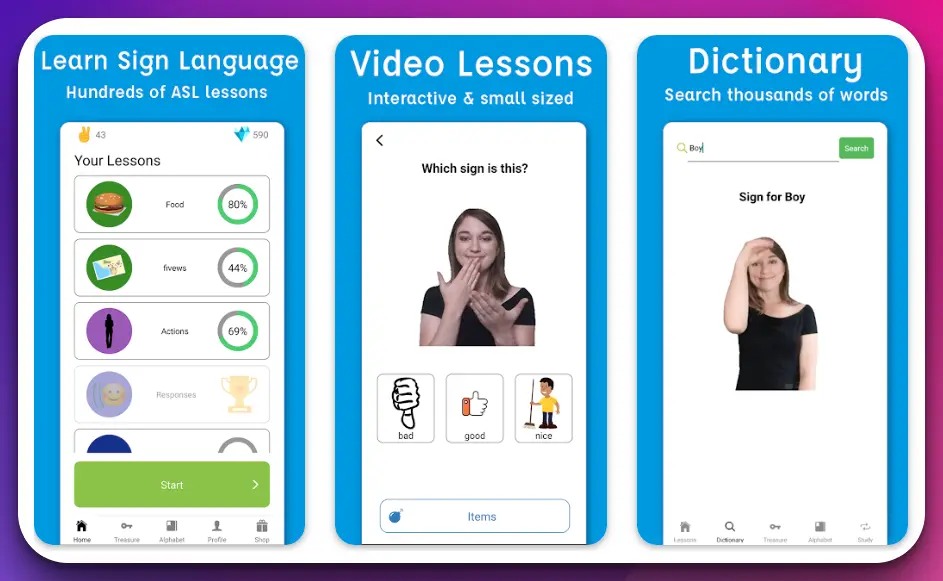
With just a few taps, you can access clear video demonstrations and step-by-step instructions for each sign, ensuring accurate and effective learning.
To enhance your learning experience, Sign Language ASL Pocket Sign provides various interactive features. The app offers interactive quizzes and games that allow you to practice your signing skills playfully and engagingly. These activities reinforce your understanding and improve your fluency in ASL.
Another remarkable aspect of Sign Language ASL Pocket Sign is its convenience and portability. With this app, you can access ASL resources anytime and anywhere. Whether at home, on the go, or in a social setting, you can rely on this pocket-sized companion to support your learning journey.
The user-friendly interface of Sign Language ASL Pocket Sign makes navigation a breeze. You can easily search for specific signs, bookmark your favorites, and customize your learning experience according to your preferences. The intuitive design ensures a seamless and enjoyable user experience.
While the app offers a free version with essential features, upgrading to the premium version unlocks additional benefits. The premium version provides access to advanced lessons, expanded vocabulary, and personalized learning paths tailored to your progress and goals.
In conclusion, Sign Language ASL Pocket Sign is the go-to app for anyone aspiring to learn sign language. Its comprehensive ASL dictionary, interactive features, convenience, and user-friendly interface serve as your essential companion on your journey toward ASL fluency.
Download Sign Language ASL Pocket Sign today and immerse yourself in the rich world of sign language.
Pros:-
Comprehensive ASL Dictionary: The app offers an extensive collection of signs, covering a wide range of vocabulary, phrases, and expressions, providing learners with a comprehensive resource for ASL.
Clear Video Demonstrations: Each sign is accompanied by clear video demonstrations and step-by-step instructions, ensuring accurate and effective learning.
Interactive Quizzes and Games: The app provides interactive quizzes and games that engage users and allow them to practice their signing skills playfully and engagingly, enhancing learning and retention.
Convenience and Portability: Sign Language ASL Pocket Sign is designed to be a pocket-sized companion, providing instant access to ASL resources anytime and anywhere, allowing for convenient and flexible learning.
User-Friendly Interface: The app features a user-friendly interface that facilitates easy navigation, search functionality, bookmarking of favorite signs, and customization of the learning experience.
Cons:-
Limited Free Version: While the app offers a free version with essential features, accessing advanced lessons, expanded vocabulary, and personalized learning paths may require upgrading to the premium version, which might be a drawback for users seeking a fully free learning experience.
Language Limitations: Sign Language ASL Pocket Sign primarily focuses on teaching American Sign Language (ASL) and may not cover other sign languages used in different countries or regions.
Platform Dependency: The app’s availability is limited to Android and iPhone devices, which means users with other mobile operating systems may be unable to access Sign Language ASL Pocket Sign.
Offline Functionality: The availability of offline functionality may vary, and some features of the app may require an internet connection, which could be a limitation for users in areas with limited or no internet access.
Despite these potential drawbacks, Sign Language ASL Pocket Sign remains an excellent choice for individuals seeking a portable and comprehensive tool to learn ASL.
Its comprehensive dictionary, clear video demonstrations, interactive features, convenience, and user-friendly interface make it a valuable resource for learning and mastering sign language.
Price:-
- Basic is Free
- Unlimited ASL Lessons (Month)$5.99
- Unlimited ASL Lessons (Yearly)$59.99
Download The App From Google Play Store
Download The App From Apple App Store
5. Hand Talk Translator
Hand Talk Translator is an exceptional app that revolutionizes communication by breaking down language barriers for individuals who are deaf or hard of hearing.
This remarkable application, available on both Google Play Store and the Apple App Store, harnesses the power of technology to facilitate seamless communication through sign language translation.
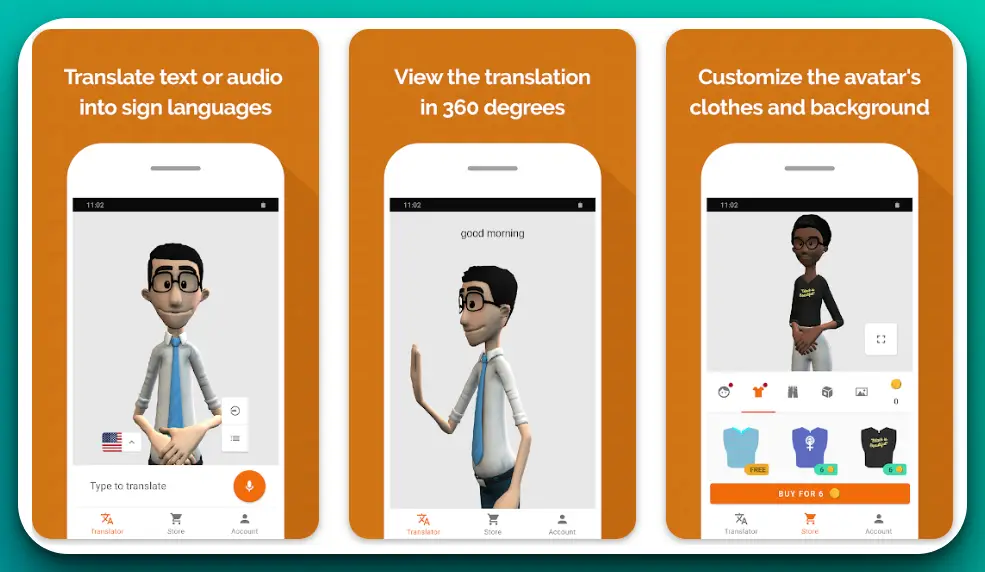
At the heart of Hand Talk Translator lies its groundbreaking translation technology. The app utilizes artificial intelligence and machine learning algorithms to instantly translate spoken or written words into sign language. This innovative approach allows for effective communication between hearing individuals and those who use sign language as their primary means of communication.
The app’s user-friendly interface ensures a seamless experience for users. Users can input text or use voice recognition to generate accurate sign language translations with just a few taps. The app’s intuitive design and simple navigation make it accessible to all skill levels.
Hand Talk Translator’s extensive sign language library is a testament to its commitment to inclusivity. The app provides a vast collection of signs covering various topics and vocabulary. Users can access clear video demonstrations of signs to communicate effectively in various contexts.
One of the standout features of Hand Talk Translator is its offline functionality. Users can download language packs and use the app without an internet connection, making it a valuable tool for communication in remote or low-connectivity areas.
Moreover, Hand Talk Translator fosters community by providing a social platform where users can connect, share experiences, and support one another. This community aspect creates an inclusive environment and promotes exchanging knowledge and resources.
In conclusion, Hand Talk Translator is a groundbreaking app that harnesses the power of technology to bridge communication gaps between hearing individuals and those who use sign language.
With its innovative translation technology, extensive sign language library, user-friendly interface, offline functionality, and community support, Hand Talk Translator is a powerful tool that empowers individuals and fosters inclusivity.
Download Hand Talk Translator and embark on a journey of communication without boundaries.
Pros:-
Translation Technology: Hand Talk Translator utilizes artificial intelligence and machine learning algorithms to instantly translate spoken or written words into sign language. This facilitates effective communication between hearing individuals and signs language users.
User-Friendly Interface: The app features a user-friendly interface that allows users to input text or use voice recognition to generate accurate sign language translations. The intuitive design and simple navigation enhance the user experience.
Extensive Sign Language Library: Hand Talk Translator provides a vast collection of signs, covering a wide range of topics and vocabulary. Users can access clear video demonstrations of signs, enabling effective communication in various contexts.
Offline Functionality: The app offers offline functionality, allowing users to download language packs and use the app without an internet connection. This feature is particularly valuable in remote or low-connectivity areas.
Community Support: Hand Talk Translator provides a social platform where users can connect, share experiences, and support one another. This sense of community fosters inclusivity and promotes exchanging knowledge and resources.
Cons:-
Language Limitations: The app primarily focuses on translating spoken or written words into sign language and may have limitations in covering all regional sign languages or specific sign language dialects.
Accuracy of Translations: While Hand Talk Translator employs advanced translation technology, the accuracy of translations may vary based on factors such as context and complexity of the input. Users should exercise caution and ensure proper understanding during communication.
Availability on Specific Platforms: Hand Talk Translator is available on both Google Play Store and the Apple App Store, but users with devices on other operating systems may not be able to access the app.
Limited Features: Hand Talk Translator’s primary focus is on sign language translation, and it may have limited additional features compared to comprehensive language learning apps.
Despite these potential drawbacks, Hand Talk Translator remains an innovative and valuable app for breaking down communication barriers between hearing individuals and sign language users.
Its translation technology, user-friendly interface, extensive sign language library, offline functionality, and community support make it a powerful tool for fostering inclusive communication.
Price:-
- Basic is Free
- Remover Propaganda$9.99
- 10 HTCoins$2.99
- 30 HTCoins$7.99
- 50 HTCoins$12.99
- 200 HTCoins$39.99
- 100 HTCoins$24.99
Download The App From Google Play Store
Download The App From Apple App Store
6. JW Library Sign Language – Best App to Learn ASL for Free
Regarding sign language learning apps for Android and iPhone, JW Library Sign Language stands out as a top-tier choice. This remarkable app, available on both the Google Play Store and the Apple App Store, offers a comprehensive and immersive learning experience for individuals interested in learning sign language.
One of the key strengths of JW Library Sign Language is its extensive library of sign language videos. The app provides a vast collection of high-quality videos that cover a wide range of sign language topics.
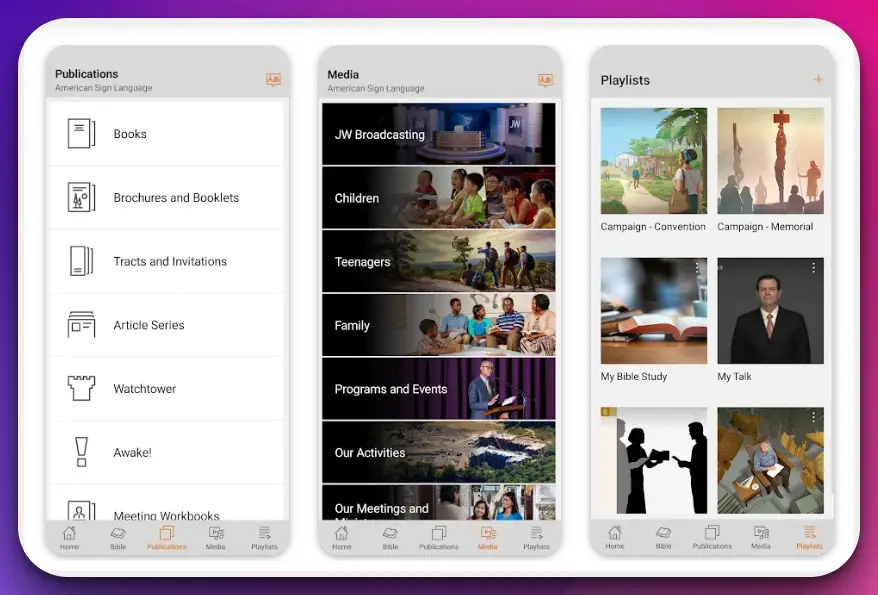
From basic vocabulary to complex expressions, users can access clear and accurate demonstrations of signs, ensuring an effective learning process.
The app also offers interactive features that enhance the learning experience. Users can engage with interactive exercises, quizzes, and games that allow them to practice their signing skills in a fun and interactive manner. These interactive features promote active learning and help reinforce comprehension and retention.
With JW Library Sign Language, users have access to various educational resources. The app provides detailed explanations of sign language grammar, sentence structures, and cultural nuances, offering a deeper understanding of sign language as a vibrant communication system.
Moreover, JW Library Sign Language caters to the needs of different users by offering customization options. Users can personalize their learning paths, set goals, and track progress. The app allows individualized learning experiences that adapt to users’ skill levels and preferences.
JW Library Sign Language’s availability on Android and iPhone platforms ensures accessibility for many users. Individuals can benefit from this comprehensive sign language learning app regardless of their device.
In conclusion, JW Library Sign Language is the ideal sign language learning app for Android and iPhone users. With its extensive library of sign language videos, interactive features, educational resources, customization options, and cross-platform availability, the app provides a comprehensive and immersive learning experience.
Pros:-
Extensive Library of Sign Language Videos: JW Library Sign Language offers a vast collection of high-quality videos covering various topics, providing users with accurate and clear demonstrations of signs.
Interactive Features: The app incorporates interactive exercises, quizzes, and games that engage users and promote active learning, allowing for practice and reinforcement of signing skills.
Educational Resources: JW Library Sign Language provides detailed explanations of sign language grammar, sentence structures, and cultural nuances, offering a deeper understanding of sign language as a communication system.
Customization Options: Users can personalize their learning paths, set goals, and track their progress, allowing individualized learning experiences that adapt to their skill levels and preferences.
Cross-Platform Availability: JW Library Sign Language is available on Android and iPhone platforms, ensuring accessibility for a wide range of users regardless of their device preference.
Cons:-
Language Limitations: The app primarily focuses on teaching sign language within a specific context and may not cover other sign languages used in different countries or regions.
Platform Dependency: JW Library Sign Language is only available on Android and iPhone devices, which means users with other operating systems may be unable to access the app.
Limited Features: The app’s primary focus is on sign language learning, and it may have limited additional features compared to comprehensive language learning apps.
Availability of Resources: Sign language videos and educational resources may vary based on region or language options.
Despite these potential drawbacks, JW Library Sign Language remains a valuable sign language learning app for Android and iPhone users.
Its extensive library of sign language videos, interactive features, educational resources, customization options, and cross-platform availability make it a powerful tool for individuals seeking to learn and communicate effectively through sign language.
Price:-
- Free
Download JW Library Sign Language and embark on a journey of sign language fluency and effective communication.
Download The App From Google Play Store
Download The App From Apple App Store
Other Resources for Learning Sign Language
When it comes to how to learn sign language, there are numerous resources available that can complement your journey and enhance your skills.
In addition to dedicated sign language learning apps, here are some other valuable resources that can aid in your quest to become proficient in sign language.
1. Online Courses and Websites
Explore online platforms that offer comprehensive sign language courses and resources. Websites such as ASL University and Lifeprint provide free lessons, videos, and interactive exercises, catering to beginners and advanced learners.
These online courses often cover various sign language systems, including American Sign Language (ASL) and British Sign Language (BSL), offering a comprehensive learning experience.
2. Local Community Centers and Schools
Check out community centers, colleges, and schools in your area that offer sign language classes. These institutions often provide structured courses taught by experienced sign language instructors who can guide you through learning. Joining a local class provides you with hands-on practice and offers opportunities to connect with fellow learners and members of the deaf community.
3. Deaf Community Events and Workshops
Immerse yourself in the deaf community by attending events and workshops. Look for local deaf community centers, cultural festivals, or sign language gatherings where you can interact with native signers and engage in real-life conversations.
Participating in these events not only improves your signing skills but also deepens your understanding of deaf culture and fosters meaningful connections.
4. Sign Language Books and Publications
Traditional printed resources such as sign language books, dictionaries, and workbooks can be valuable references in your sign language learning journey. Look for comprehensive ASL dictionaries explaining signs, meanings, and usage. Books focusing on sign language grammar, linguistics, and cultural aspects can further enrich your knowledge.
5. Online Signing Communities and Forums
Join online signing communities and forums where sign language learners and native signers come together to share experiences, ask questions, and practice their skills.
Websites like SignLanguageForum.com and Reddit’s r/ASL subreddit offer platforms for discussions, video exchanges, and feedback. Engaging in these communities can provide a supportive and interactive learning environment.
6. Sign Language Interpreters and Mentors
Consider seeking guidance from professional sign language interpreters or mentors. These individuals have expertise in sign language and can provide personalized feedback, guidance, and additional resources tailored to your learning needs. They can help fine-tune your signing skills, provide cultural insights, and answer specific questions you may have along the way.
7. Mobile Applications and Learning Platforms
In addition to dedicated sign language learning apps, other mobile applications and learning platforms offer sign language courses and resources.
Platforms like Udemy and Coursera feature sign language courses taught by certified instructors, providing structured learning experiences with video lessons, quizzes, and assignments.
In conclusion, while sign language learning apps are valuable tools, numerous other resources are available to support your journey to becoming proficient in sign language.
Online courses, local community centers, deaf community events, sign language books, online signing communities, sign language interpreters, and mobile applications are just a few examples of the diverse resources available.
Embrace these resources, immerse yourself in sign language, and embark on a fulfilling journey of effective communication and connection with the deaf community.
Does Duolingo Have ASL?
In language learning, Does Duolingo have ASL? is a question often among enthusiasts. Duolingo, a renowned platform, has been instrumental in breaking down linguistic barriers for millions. However, the situation becomes a tad more complex regarding American Sign Language (ASL).
Unlike spoken languages, ASL is visual, demanding a different pedagogical approach. Therefore, the question, Does Duolingo have ASL? is not merely about availability but also the efficacy of teaching a visual language through an app primarily designed for auditory and textual learning.
As of now, Duolingo does not offer ASL. This absence, however, should not be construed as a lack of interest or respect for ASL. Instead, it underscores the unique challenges associated with teaching sign languages digitally.
The question is, Does Duolingo have ASL? Thus, opening up a broader discussion about the future of language learning apps and their ability to adapt to the diverse needs of global learners.
In conclusion, while the answer to Does Duolingo have ASL? is currently a ‘no’, the future may hold different prospects. As technology evolves, so does the potential for more inclusive and comprehensive language-learning platforms.
📗FAQ’s
What is the best program to learn sign language?
Several excellent programs, such as ASL University, SignSchool, and Rocket Sign Language, are available for learning sign languages. Each program offers comprehensive lessons, video demonstrations, and interactive exercises to support your learning journey.
Is there a Duolingo for ASL?
Duolingo does not offer a specific American Sign Language (ASL) course. However, other dedicated apps and online platforms like SignSchool and ASL Meredith provide structured ASL courses.
What is the best free app to learn sign language?
One highly recommended free app for learning sign language is SignSchool, which offers comprehensive lessons, interactive activities, and video tutorials for beginners and advanced learners.
How do I teach myself sign language?
Teaching yourself sign language can be done through resources such as online tutorials, videos, textbooks, and apps. Start with basic vocabulary, practice regularly, and engage with the deaf community or sign language learners for immersive practice.
How long does it take to become fluent in ASL?
The time it takes to become fluent in ASL can vary depending on several factors, including your dedication, practice consistency, exposure to the language, and immersion in the deaf community. Becoming fluent in any language, including ASL, typically takes years of consistent study and practice.
Does Harvard accept ASL as a language?
Yes, Harvard University recognizes American Sign Language (ASL) as a language and offers ASL courses as part of its curriculum.
Is there a free ASL app?
Yes, free ASL apps are available, such as ASL Coach, ASL Pocket Sign, and ASL Kids. These apps provide basic sign language lessons and vocabulary.
Do colleges recognize ASL as a language?
Many colleges and universities recognize ASL as a distinct and valid language, offering ASL courses and even degree programs in ASL or Deaf Studies.
What is the easiest sign language to learn?
American Sign Language (ASL) is often considered the easiest sign language to learn for English speakers due to its accessibility, resources, and wide usage within the United States.
Should I learn ASL or BSL?
ASL (American Sign Language) is predominantly used in the United States and parts of Canada, while BSL (British Sign Language) is used in the United Kingdom. Choose the sign language that aligns with your geographic location and personal interests.
What is the difference between ASL and BSL?
ASL (American Sign Language) and BSL (British Sign Language) are distinct sign languages with grammar, vocabulary, and cultural influences.
While both use manual signs, the syntax and signs differ significantly. ASL is closer in structure to French Sign Language (LSF), while BSL has its roots in the deaf community in the United Kingdom.
What’s the most common sign language?
The most widely used sign language is American Sign Language (ASL), used by a significant portion of the deaf and hard-of-hearing community in the United States and parts of Canada.
How to memorize sign language?
Memorizing sign language involves consistent practice and repetition. Break down the signs into smaller components, practice them regularly, and incorporate them into everyday conversations. Flashcards, mnemonic techniques, and interactive apps can also aid in memorization.
In sign language, How do you say “I love you”?
In American Sign Language (ASL), the “I love you” sign is made by extending the thumb, index finger, and pinky finger while the middle and ring fingers are folded down towards the palm. This sign represents the letters “I,” “L,” and “Y.”
What is the hardest part of ASL?
Many learners find that mastering facial expressions, non-manual markers, and understanding the nuances of ASL grammar can be challenging. Additionally, building receptive skills and adjusting to the spatial nature of sign language can take time and practice.
What is so hard about learning ASL?
Learning ASL can present challenges due to its visual-spatial nature, grammatical differences from spoken languages, and the need to develop new cognitive and motor skills for expressing thoughts and ideas through manual signs.
What is the hardest part about learning ASL?
One of the most challenging aspects of learning ASL is developing fluency in understanding and producing signs in real-time conversations. This requires practice, exposure to various signing styles, and building a broad vocabulary.
What is the best age to teach ASL?
ASL can be taught to individuals of all ages. However, early exposure to sign language during childhood, particularly during critical language acquisition, can significantly benefit language development and communication skills.
How many words must you know to be fluent in ASL?
Fluency in ASL is not solely dependent on the number of words known. It encompasses a comprehensive understanding of grammar, syntax, cultural nuances, and the ability to engage in meaningful conversations. A broad vocabulary is undoubtedly beneficial, but fluency involves more than word count.
Should I learn the ASL alphabet first?
Learning the ASL alphabet (manual alphabet or finger-spelling) is often recommended as a starting point for beginners. It helps familiarize learners with hand shapes, introduces the concept of fingerspelling, and aids in building vocabulary.
Is it true that ASL is the 3rd most used language in the US?
Yes, it is widely acknowledged that American Sign Language (ASL) is the third most used language in the United States, following English and Spanish. ASL is the primary means of communication for a substantial portion of the deaf and hard-of-hearing community.
Does Harvard accept C’s?
Harvard University has stringent academic standards, and while a grade of C may fulfill the minimum passing requirement for some courses, it is generally advisable to strive for higher grades to maintain a competitive academic profile.
Which Ivy League schools offer ASL programs?
Several Ivy League schools, such as Harvard, Yale, and Columbia University, offer American Sign Language (ASL) programs or courses. These institutions recognize the value of ASL as a language and offer opportunities for students to study and engage with it.
Is it worth it to learn ASL?
Learning American Sign Language (ASL) is highly beneficial, regardless of whether you are deaf or hearing. It promotes communication and inclusivity, enhances cultural understanding, and opens doors to various professions, such as interpreting, teaching, and working in the deaf community.
Is it possible to learn ASL online?
It is possible to learn ASL online through dedicated sign language learning platforms, video tutorials, interactive courses, and virtual communities. Online resources offer flexibility, convenience, and accessibility for individuals interested in learning ASL remotely.
How much is the ASL app?
The cost of ASL apps can vary depending on the features, content, and level of instruction they provide. Some ASL apps offer free versions with limited features, while others may require a one-time purchase or a subscription model for full access to all lessons and resources.
Are you bilingual if you speak ASL?
Yes, individuals fluent in American Sign Language (ASL) and a spoken language, such as English, are considered bilingual. Bilingualism refers to the ability to communicate effectively in two different languages.
Does ASL count as bilingual?
Yes, American Sign Language (ASL) is recognized as a separate language with grammatical structure and vocabulary. Therefore, individuals fluent in ASL and other spoken languages are considered bilingual.
How many states recognize ASL as a language?
Over 45 states in the United States have officially recognized American Sign Language (ASL) as a legitimate language. These recognitions vary regarding legal status, official policies, and support for ASL in education and public services.
Should I learn sign language if I’m not Deaf?
Absolutely! Learning sign language, such as American Sign Language (ASL), is valuable for anyone interested in effective communication, fostering inclusivity, and engaging with the deaf community. It promotes cultural understanding and breaks down communication barriers.
Is ASL harder than spoken language?
ASL and spoken languages have distinct characteristics and structures, making it difficult to compare their difficulty levels directly. While ASL does not rely on auditory skills, it requires visual-spatial awareness, facial expressions, and body movements.
The complexity of learning any language depends on individual learning styles and prior language learning experiences.
How do you say “mom” in sign language?
To sign “mom” in American Sign Language (ASL), you place an open flat hand against your chin and then bring it forward towards your face in a tapping motion. This sign represents the affectionate term for “mom” or “mother.”
Can ASL signers understand BSL?
While American Sign Language (ASL) and British Sign Language (BSL) have different vocabularies, grammar, and cultural influences, some similarities may allow ASL signers to understand basic concepts in BSL and vice versa. However, they are distinct languages with their unique features.
Can someone who uses BSL understand ASL?
While American Sign Language (ASL) and British Sign Language (BSL) share some similarities, they are separate languages with distinct grammatical structures and vocabulary.
Someone who uses BSL may recognize a few signs in ASL, but understanding full conversations may be challenging without prior exposure or study of ASL.
Can you be fluent in BSL?
Yes, becoming fluent in British Sign Language (BSL) is possible through dedicated study, immersion, and practice. Like any language, achieving fluency in BSL requires consistent effort, exposure to the language, and engagement with the deaf community.
Do all deaf people use BSL?
Not all deaf people use British Sign Language (BSL). Deaf individuals worldwide may use different sign languages based on their geographic location, cultural background, and educational experiences. BSL is predominantly used in the United Kingdom, but other sign languages exist in different countries.
How long does it take to learn BSL?
The time it takes to learn British Sign Language (BSL) can vary depending on prior language learning experience, dedication, and practice. It typically takes several years of consistent study and immersion to achieve a high level of proficiency.
Do people use ASL or BSL more?
ASL (American Sign Language) is used more widely than BSL (British Sign Language) due to its usage in the United States and parts of Canada. ASL has a larger user base and more learning resources than BSL.
What is the most common ASL word order?
The most common word order in American Sign Language (ASL) is subject-verb-object (SVO), similar to English. However, ASL has a flexible syntax, allowing for variations in sentence structure based on context, emphasis, and the speaker’s preference.
What language do Deaf people think in?
Deaf individuals may think in various ways, including visual imagery, concepts, or signed or written language. The language in which a deaf person thinks can depend on their proficiency in sign language or their exposure to written language.
What country uses ASL the most?
American Sign Language (ASL) is primarily used in the United States and parts of Canada, where it is the predominant sign language. It is estimated that hundreds of thousands of individuals in the United States communicate using ASL.
What are the 5 rules of sign language?
The five rules of sign language include:
- Non-dominant hand as support
- The dominant hand is the active hand for producing signs
- Use of facial expressions and body movements for grammar and emphasis
- Signing in the appropriate signing space
- Maintaining eye contact while signing for effective communication.
What is sorry in sign language?
To sign “sorry” in American Sign Language (ASL), you make a fist with your dominant hand and move it circularly on your chest. This sign represents the concept of expressing regret or apologizing.
How do you say no in sign language?
In American Sign Language (ASL), the sign for “no” is made by extending the index finger and shaking it back and forth from side to side.
What does 🤟 mean in sign language?
The 🤟 hand gesture, often called the “I love you” sign, is a popular symbol in sign language. It represents the letters “I,” “L,” and “Y” when forming the sign for “I love you” in American Sign Language (ASL).
What is kiss in sign language?
To sign “kiss” in American Sign Language (ASL), you pucker your lips and bring them towards the cheek or the back of the hand. It mimics the action of blowing a kiss.
What does tapping your chest mean in sign language?
Tapping your chest in sign language can indicate first-person pronouns such as “I” or “me.” It is a way of referencing oneself in the conversation or context.
Conclusion
In our increasingly digital world, the gap between communication barriers and accessibility is closing more rapidly.
Thanks to innovative apps for learning sign language, a wealth of resources is available at your fingertips. These apps, each with unique strengths and user-friendly features, make the language learning journey not only accessible but also enjoyable.
Whether you’re learning sign language out of necessity, for professional reasons, or simply out of a desire to broaden your linguistic horizons, there’s an app tailored to your needs. Remember, the journey to fluency in any language takes time and practice, but you can start making strides with these tools.
With each sign you master, you’re not just learning a new word but unlocking a new way to connect with a vibrant and diverse community. You’re breaking down barriers, expanding your worldview, and becoming part of a global conversation.
So download an app, start learning, and open up a world of silent poetry right in the palm of your hand.
The power to communicate is one of our greatest gifts; let’s use technology to ensure it’s a gift everyone can share.


